Black Friday at Hostinger: 15% off yearly and longer plans with BFVPS15, until 6 Dec. See plans

Black Friday: 15% off hosting with BFVPS15

Open Source Alternatives
  • Alternatives
  • Categories
    Categories by size1,346 projects
    • Developer Tools688
    • AI & Machine Learning557
    • Business & Productivity334
    • Web Development222
    • Security & Monitoring205
    • Communication & Collaboration173
    • IT Management166
    • Design & Creative151
    • DevOps & CI/CD145
    • LLMOps & AI Tooling144
    Browse all 21 categoriesCloud & Hosting, Product & Project Management and 9 more
  • Blog
  • Advertise
SearchNotion, Slack, password manager.../
Submit
Open Source Alternatives
  • Alternatives
    • Developer Tools688
    • AI & Machine Learning557
    • Business & Productivity334
    • Web Development222
    • Security & Monitoring205
    • Communication & Collaboration173
    • Browse all 21 categories
  • Blog
  • Advertise
Submit your project

New open source projects by email

The projects we add and every new guide. Free, unsubscribe any time.

Open Source Alternatives LogoOpen Source Alternatives

Handpicked Open Source Alternatives to Paid Softwares

Add Open Source Alternatives as a preferred source on Google

Product

  • Categories
  • Tag
  • Advertise

Resources

  • Blog
  • Collection
  • Submit

Company

  • Privacy Policy
  • Terms of Service
  • Refund Policy
  • Sitemap

Alternatives

  • Claude Code
  • Jira
  • Notion
  • Slack
  • Linear
  • Wispr Flow
  • All alternatives
© 2026 Open Source Alternatives. All rights reserved.
Open SourceAlternatives
Home/Categories/Developer Tools/Hearth
icon of Hearth

Hearth

Open source alternative to Docker Desktop

  • 46 stars
  • MIT
  • Active this week
  • Last commit today

Last verified Nov 29, 2026

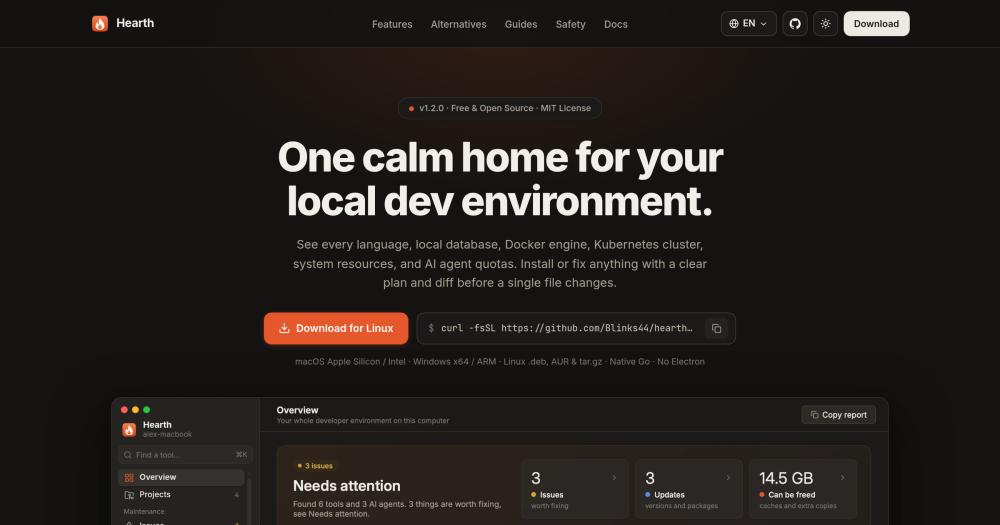
Manage Docker containers, Kubernetes clusters, local databases, and AI agent quotas in one native desktop app for macOS, Windows, and Linux.

Visit websiteGitHub46 stars
image of Hearth
TL;DR

Hearth is a free, open-source desktop app that puts your whole local development setup in one window. It replaces Docker Desktop and several other commercial tools with a single native app that uses about 70 megabytes of memory at idle. The MIT license means you can use it at no cost and change the code freely. Best for developers who run Docker, Kubernetes, and multiple AI coding agents on one machine.

Read the full breakdownHide the full breakdownWho it is for, how it works, trade-offs, the quick start and the FAQ
who it's for

Who Hearth is for#

Developers setting up a new laptop

Hearth guides you through installing Node.js, Python, Docker, Kubernetes, and AI coding agents in one ordered plan. It reads your project files to find what each repo needs, then installs only the right versions without changing global defaults.

Skip if:

You have your machine already set up and need just one-off installs. Hearth's value is managing conflicts and keeping your environment clean over time.

Developers running Docker and Kubernetes daily

Hearth shows all your running containers, Compose stacks, and Kubernetes pods in one place. You can start, stop, and restart services, stream logs, and manage volumes without opening a terminal.

Skip if:

You only need container management and prefer Docker Desktop's extension marketplace. Hearth focuses on combining tools, not extending them.

Developers managing several AI coding agents

Hearth tracks subscription quotas and rate limits across providers including Claude Code, Codex, Cursor, and GitHub Copilot. It also unifies the config files that connect your agents to local tools, so each agent sees the same setup.

Skip if:

You use only one AI coding agent and do not track quotas. Standard config files are enough for a single-agent workflow.

the problem

The problem it solves#

Running a local development environment means managing four or five separate apps. You need them for containers, Kubernetes, local databases, and AI agent costs. These tools often conflict. The system path (the list of folders where your terminal looks for programs) can point to the wrong version of Node.js or Python. That breaks your project without a clear error message.

The hardest part is diagnosing the problem. Each tool uses its own config file. Shell startup scripts edit each other's settings without warning. When something fails, it is not obvious which tool caused it.

how Hearth solves it

How it solves it#

Runtime conflict detection

Hearth scans your system path (the list of folders where your terminal finds programs) and shows any conflicts. If two versions of Node.js or Python are both on the path, Hearth shows the overlap. It walks you through fixing it without changing things you need. It also times your shell startup script to find what is slowing your terminal open.

Docker and Colima management

Manage containers, images, volumes, and Compose stacks from one window. On macOS, Hearth sets up and controls Colima (a free, open-source container engine) for you. On Linux, it connects to the native Docker Engine directly.

Kubernetes management

Browse pods (groups of containers), deployments, services, and config maps across your Kubernetes clusters. Create local clusters with kind (a lightweight tool that runs Kubernetes inside Docker). Stream logs from live pods, forward ports, and check crash reasons. No separate visual Kubernetes app needed.

AI agent quota tracking

Hearth tracks subscription rate limits across providers including Claude Code, Codex, Cursor, and GitHub Copilot. You see burn pace, reset times, and low-quota notifications. It also unifies the config files that connect your agents to local tools. Each agent then sees the same setup, and you can spot conflicts in one place.

Safe plan and diff before every change

Nothing changes silently. Every fix Hearth proposes shows an ordered list of steps, the exact command it will run, and a preview of any config file changes. If a step fails, Hearth rolls back cleanly without touching what already succeeded.

strengths · trade-offs

Strengths and trade-offs#

Strengths

  • Free and MIT licensedHearth is free for everyone, including businesses. The MIT license means you can change the code and use it in your own projects with no restrictions. Docker Desktop charges organizations above a certain team size; Hearth does not charge anyone.
  • Very low memory useHearth uses around 70 megabytes of memory at idle. Docker Desktop and its supporting tools can use 1.5 to 2.5 gigabytes across multiple windows. If you run Docker and Kubernetes on a laptop, the difference matters.
  • No account, no telemetry, no cloudHearth runs entirely on your own machine. There is no account to create, no data sent anywhere, and no telemetry. Config values and secrets are hidden in any cached data or exports.
  • One app for the whole local development setupOne install covers container management, a Kubernetes viewer, local database controls, system monitoring, and AI agent quota tracking. You do not need separate apps for each of these jobs.

Trade-offs

  • -Very new projectHearth launched in November 2026 and has fewer than 100 GitHub stars at the time of writing. The core features work, but some workflows may have rough edges. Issue reports and feature requests are welcome on GitHub.
  • -macOS Homebrew is the simplest install pathWindows and Linux users need to download an installer from the GitHub Releases page. The macOS version installs in one command via Homebrew. On macOS, Hearth is not yet notarized with a paid Apple developer certificate, so a security prompt appears on first launch. The Homebrew install handles this automatically.
  • -Local development dashboard only, not a SQL clientHearth shows connection status and start/stop controls for local databases. It does not include a query editor for running SQL (Structured Query Language, the standard way to read and write database records). For detailed database work you still need a tool like TablePlus or DBeaver.
versus alternatives

Hearth vs alternatives#

Hearth vs Docker Desktop

Docker Desktop is a paid commercial app for macOS and Windows. Organizations above a certain team size pay a monthly subscription per developer. It is a full container management tool with a built-in Kubernetes cluster, a graphical interface, and an extensions marketplace.

Hearth is free and MIT licensed. It has no subscription and no business tiers. Where Docker Desktop focuses on containers, Hearth covers your whole local development setup. That includes Kubernetes, local databases, system monitoring, AI agent quotas, and runtime management.

For raw container work, Docker Desktop has more features and a larger extension marketplace. If Docker containers are all you need to manage, Docker Desktop may fit better.

Hearth uses about 70 megabytes of memory at idle. Docker Desktop and its supporting services can use 1.5 to 2.5 gigabytes. On a laptop with limited memory, the difference is noticeable.

On macOS, Docker Desktop runs containers inside a hidden virtual machine. Hearth supports Colima (a free container engine for macOS) as an alternative. With Colima, you control the memory and processor resources it uses directly.

Hearth does not have an extensions marketplace. If you rely on Docker Desktop plugins, Hearth does not replace that part.

Linux developers who run Docker Engine directly can use Hearth as a dashboard without any virtual machine overhead at all.

install · quick start

Quick start#

bash
Install Hearth on macOS with Homebrew:
```bash
brew install --cask blinks44/tap/hearth
```
tech stack · detected from GitHub

What it's built on#

Languages
GoTypeScript
Frameworks
React
Infrastructure
DockerKubernetes
frequently asked

FAQ#

Is Hearth free for businesses?

Yes. Hearth is MIT licensed and free for everyone, including businesses of any size. There are no paid tiers or subscription plans.

Does Hearth work on Windows and Linux?

Yes. Hearth has installers for Windows and Linux. On Windows, download the setup file from the GitHub Releases page. On Linux, install the .deb package or extract the tar.gz archive. The macOS Homebrew install is the smoothest path.

Does Hearth replace Docker itself?

No. Hearth is a control panel, not a container engine. Docker or Colima (a free container engine for macOS) must already be installed, or Hearth can set them up for you. Hearth adds the visual dashboard on top.

Can AI coding tools like Claude Code connect to Hearth?

Yes. Hearth includes a built-in Model Context Protocol (MCP) server, a standard that lets AI coding tools read your machine's state. You connect it from the AI section inside Hearth. The agent can then see your installed tools, running containers, and system state. It cannot make changes without your approval in Hearth.

Does Hearth send any data to the internet?

No. Hearth runs entirely on your own machine. There is no account, no telemetry, and no cloud sync. Config values and secrets are hidden before anything is cached or exported. The only network request Hearth makes is to check for app updates.

also worth a look

Similar open-source tools#

Container

Alternative toDocker Desktop

Linux containers as lightweight VMs, native to Apple silicon

  • 52,100 GitHub stars
  • Apache-2.0Licence Apache-2.0

Minikube

Alternative toDocker Desktop

Run a local Kubernetes cluster on macOS, Linux, or Windows

  • 32,276 GitHub stars
  • Apache-2.0Licence Apache-2.0

Nuphos

Featured

Alternative toConductor

Agent workspace for teams running Claude Code or Codex

  • 821 GitHub stars
  • Apache-2.0Licence Apache-2.0

Aeon

Alternative toDevin

Autonomous AI agent on GitHub Actions, self-healing, 93 skills

  • 800 GitHub stars
  • MITLicence MIT

Dbos Transact Java

Alternative toTemporal Cloud

Postgres-native durable workflows for Java, no orchestrator required.

  • 250 GitHub stars
  • MITLicence MIT

SkillEvaluator

InAI & Machine Learning

Validation, deduplication, and live sandbox eval for AI agent skills.

  • 4,616 GitHub stars
  • Apache-2.0Licence Apache-2.0
by category

Open source tools in these categories#

689

Developer Tools

REA (Reverse Engineer Anything), Skills for Real Engineers, superpowers
146

DevOps & CI/CD

Nvm, Uptime Kuma, Netdata
558

AI & Machine Learning

freeCodeCamp, REA (Reverse Engineer Anything), OpenClaw

Sponsors

SnitchFeed

Live monitoring on LinkedIn, X, Reddit & more. Agentic social listening for startups.

Marketing & Growth

Windshift

Alternative toJira

Self-hosted work management for teams leaving Jira

  • 481 GitHub stars
  • AGPL-3.0Licence AGPL-3.0

Nuphos

Alternative toConductor

Agent workspace for teams running Claude Code or Codex

  • 821 GitHub stars
  • Apache-2.0Licence Apache-2.0
  • #AI Agents
Advertise your product

New open source projects by email

The projects we add and every new guide. Free, unsubscribe any time.

Find open source alternatives to paid software

/
  • Claude Code to OpenCode
  • Jira to Windshift
  • Notion to AppFlowy
  • Slack to Mattermost
  • Linear to GitLab
  • Wispr Flow to Handy
  • Microsoft To Do to Super Productivity
  • Arc to Zen Browser
  • CapCut to Concat
  • Grok Bot to Rakazo
  • Superhuman to Inbox Zero
  • Discord to Stoat
  • Airtable to AITable
  • Datadog to SigNoz
  • Muse to OpenClaw
  • Railway to Coolify
  • GitHub Copilot to Cline
  • Confluence to Wiki.js
  • Microsoft Teams to Rocket.Chat
  • 1Password to KeePassXC
  • Zapier to n8n
  • Pinecone to Qdrant
  • Contentful to Strapi
  • Firebase to Supabase