

Who humla is for#
Freelancers handling sensitive client conversations
Your audio stays on your Mac and no bot appears in the call, so clients are never aware a third-party service is involved. Combine local Whisper and Ollama for a workflow where nothing leaves your device, then use summary presets to send a client recap in under a minute.
Skip if:
Skip if you need mobile recording on iOS or Android, or if your clients use video platforms that block Mac system audio capture through the Screen Recording permission.
Developers querying meeting history from their IDE
The built-in MCP server connects Humla to Claude Code or Codex. Ask what your team agreed with a client in a past meeting and get a cited answer, with a chip that jumps to the source note, without leaving your editor. Enable it in Settings and paste one config line.
Skip if:
Skip if you do not use Claude Code, Codex, or another MCP-compatible AI tool in your development workflow.
Small teams replacing cloud-based transcription services
Personal use is free with no account. Team sync adds collaborative workspaces at $5/user/month, or free if you run PocketBase yourself. The core transcription and summaries still run on each user's device or through their own API keys, so the sync server never sees your audio.
Skip if:
Skip if your team needs a mobile app, Slack or CRM integrations, or a product with a longer track record. Humla was created in April 2026 and has 33 open issues as of mid-2026.
Multi-language teams with non-English meetings
Humla supports around 100 languages via Whisper with auto-detection, plus a dedicated Norwegian NB Whisper Large model. Per-language engine overrides mean each language routes to a different transcription service automatically, so a bilingual team can set Norwegian to a local model and English to Deepgram without touching any settings per meeting.
Skip if:
Skip if your primary language is not well-supported by Whisper models, or if you need a dedicated translation feature rather than transcription in the original language.
The problem it solves#
Most AI meeting tools require a bot to join your call, which the other side can see, and your audio travels to a third-party cloud on the way to your notes. For sensitive client conversations, legal calls, or internal strategy discussions, that is a real risk.
Beyond privacy, per-seat pricing compounds the pain: cloud-based transcription services charge $14 to $20 per user per month, and even tools that appear affordable gate key features like offline chat behind higher tiers. The workaround most people reach for is pasting a transcript into a chatbot after the meeting, but that moves your audio to yet another cloud with no memory of previous calls and no prompt tuning. You lose context, continuity, and gain one more step after every meeting.
How it solves it#
No-bot, two-stream audio recording
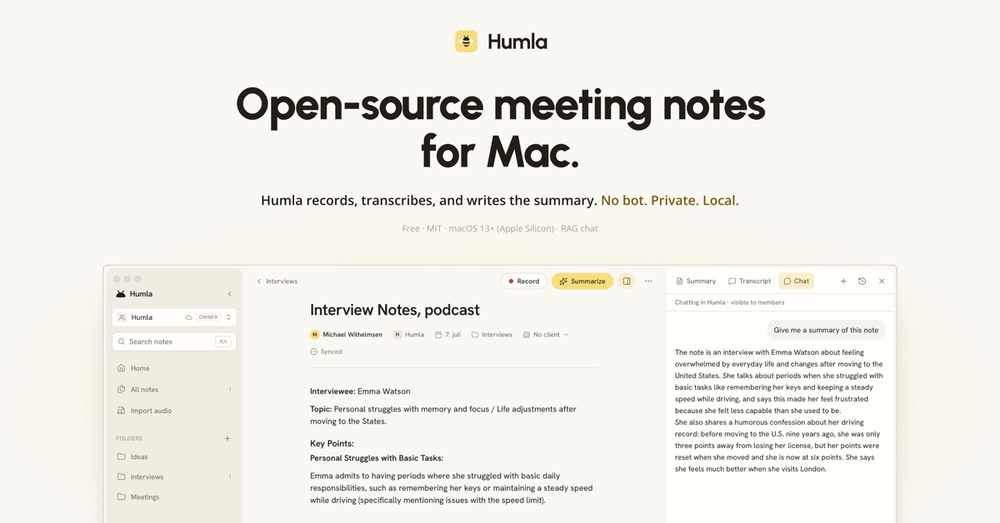
Humla captures your microphone and your system audio as two separate streams, so remote calls and in-person meetings both transcribe cleanly. Nothing joins the call: the other side sees no recorder. Zoom, Google Meet, Slack huddles, and any audio source on your Mac work without any integration or account setup.
On-device and bring-your-own-key transcription
Local Whisper runs entirely on Apple Silicon's GPU after a one-time model download, free with no API calls. For higher accuracy or speed, connect your own OpenAI key (whisper-1, gpt-4o-transcribe), Deepgram (Nova-3), or Groq (whisper-large-v3-turbo, roughly 10x cheaper than OpenAI's hosted Whisper). Set per-language engine overrides so each recording routes to the right engine automatically.
Offline speaker diarization
After recording stops, Humla runs speaker identification on your Mac with no audio upload. Two on-device engines are available: Community-1 auto-detects how many speakers are present; Sortformer handles rapid back-and-forth with a fixed four-speaker cap. Click any speaker label to rename it and the change applies across the full transcript instantly.
Summary presets with note fusion
Six presets cover common meeting types: Meeting, 1:1, Lecture, Interview, Brainstorm, and Voice memo. Summaries receive your typed notes and the transcript as separate labelled inputs, so the model knows what you wrote versus what was said. Switch presets and regenerate from the same transcript without re-running transcription. Runs via OpenAI or any local LLM via Ollama.
Chat with your meeting history
Every note has a Chat tab that answers questions using hybrid retrieval: full-text keyword search and semantic embedding search together. Ask about any past meeting and get cited answers with links to the source note. Works fully offline via Ollama or with your own OpenAI key. Scope per conversation: this note, a folder, or your entire history.
MCP server for AI coding tools
Humla ships a built-in Model Context Protocol server with six read-only tools: search_notes, get_note, get_transcript, list_notes, list_folders, and list_clients. Enable it in Settings and paste one config line into Claude Code or Codex to query your meeting notes from your IDE. Off by default, read-only always, and works whether or not the Humla app is open.
Strengths and trade-offs#
Strengths
- Fully private mode: nothing leaves your MacCombine Local Whisper for transcription, Community-1 for speaker ID, and Ollama for summaries and chat, and no audio or text ever travels off your device. This is a configuration no cloud-only competitor in the space can match by architecture: they are cloud products by default, with no on-device option.
- MIT licensed and fully auditableEvery line of code is public at github.com/michaelwilhelmsen/humla under the MIT license. You can audit the exact data paths before trusting the app with sensitive meetings, fork it, modify it, and use it commercially with no restrictions. The license is not a marketing claim: it is an OSI-approved SPDX MIT.
- Per-language transcription engine routingSet a different transcription engine for each language. Norwegian calls can route to the local NB Whisper Large model from Nasjonalbiblioteket; English calls to Deepgram Nova-3; everything else falls back to OpenAI. Humla detects language automatically and picks the right engine without manual switching.
- Team sync at $5/user/month or free if self-hostedHumla Cloud adds team workspaces and cross-device sync for $5/user/month with a 14-day free trial. For teams willing to run infrastructure, a self-hosted PocketBase server unlocks every team feature with no subscription gate: billing only activates when the server has a Stripe key set.
Trade-offs
- -macOS 13 and Apple Silicon onlyHumla runs only on Apple Silicon Macs running macOS 13 or later. There is no Windows, Linux, or Intel Mac version. The project was created in April 2026 and the roadmap is open: the GitHub repo suggests starring it and opening an issue to signal interest in other platforms.
- -Speaker diarization is unreliable above six voicesSpeaker labels are most accurate in meetings with up to about six participants. Large calls can mislabel who said what. You can rename or merge speakers by hand and re-run detection, but big group calls are not a strong use case for Humla's current speaker ID engines.
- -Self-hosting team sync requires backend workThe self-hosted sync path involves running PocketBase, optionally Caddy for TLS, S3-compatible storage for audio blobs, Litestream for SQLite replication, and a separate Hono service for workspace chat. It is not a single command. Humla Cloud exists specifically for teams who do not want to manage this.
humla vs alternatives#
Humla vs Granola
Granola is the paid product Humla most explicitly targets, reflected in the GitHub topics (granola-alternative) and README positioning. Both tools record Mac meetings without a visible bot and produce AI summaries, but they differ on architecture, openness, and pricing model.
| Feature | Humla | Granola |
|---|---|---|
| License | MIT, open source | Proprietary |
| Transcription | On-device Whisper or your own key | Cloud (not on-device) |
| Runs fully on device | Yes, with local LLM | No |
| Bring your own AI key | Yes | No |
| Open source and auditable | Yes | No |
| Chat with notes offline | Yes | Cloud only |
| App integrations (Slack, CRM) | None | Yes |
| Mobile app | No | Yes |
| Price (personal use) | Free | $5/user/month |
| Price (team sync) | $5/user/month | $5/user/month |
Humla is the stronger choice for anyone who needs audio to stay on their device. The fully local configuration (Whisper plus Community-1 plus Ollama) means no audio ever leaves your Mac, which matters for sensitive client work or regulated industries. The MIT license and public codebase mean you can audit the exact data path before trusting it with your meetings.
Granola is the better fit for teams who need mobile apps, Slack or CRM integrations, or a product with a longer track record. Granola has been on the market longer and has more ecosystem integrations. Humla was created in April 2026 and is an actively developed but young project.
Humla vs Other Paid AI Notetakers
Mumble AI, Wispr Flow Notetaker, and Talat are also in the paid AI meeting notes category. All are proprietary cloud services. Humla's differentiation against any cloud-only notetaker is consistent: local-first architecture by default, MIT license, no account required for personal use, and the ability to run entirely on-device with no per-seat subscription for individual workflows.
What it's built on#
- Languages
- C++RustSwiftTypeScript
- Frameworks
- React
FAQ#
Does a bot join the meeting when I use Humla?
No. Humla records through macOS itself using the Screen Recording permission to capture system audio. Nothing joins the call, and the other side sees no recorder. The recording is entirely local to your Mac.
Can I use Humla without an internet connection or any paid API key?
Yes. Download a local Whisper model in Settings (between 500 MB and 1.1 GB depending on model size), use Community-1 for speaker diarization, and point summaries at a local LLM via Ollama. In that setup, nothing leaves your Mac and there are no API costs beyond the initial model download.
Does Humla work on Windows or Linux?
Not yet. Humla requires macOS 13 or later on Apple Silicon. There is no Windows, Linux, or Intel Mac version at the time of writing. The GitHub repo (github.com/michaelwilhelmsen/humla) is where you can open an issue to request those platforms.
What does Humla Cloud do, and do I need it?
Humla Cloud syncs notes across your devices and adds shared team workspaces for $5/user/month. Transcription and summaries still run on your own providers or on-device: the sync server never sees your audio or API keys. It is optional: you can self-host a PocketBase server for free and get the same team features with no subscription.
Can I chat with my meeting notes without sending them to the cloud?
Yes. Point Humla's Chat feature at a local Ollama server and all retrieval and generation runs on your Mac. The search index is a local SQLite database. You only send data off-device if you configure OpenAI as the chat provider, in which case your note content goes to your own OpenAI account.
Similar open-source tools#

omi
Open AI memory assistant for meetings, screens, and wearables

Hyprnote
Local-first AI meeting notetaker with transcription

starnet
Local-first AI agent runtime with a visual pixel-art crew station
cli
Official Lark/Feishu CLI with 200+ commands and AI Agent Skills

FckSignups
Open-source tools that work instantly, no signup required

VoiceInk
Private voice dictation for Mac, no subscription required.