Open Source Alternatives
  • Alternatives
  • Categories
    Categories by size1,201 projects
    • Developer Tools620
    • AI & Machine Learning521
    • Business & Productivity293
    • Web Development215
    • Security & Monitoring180
    • Communication & Collaboration161
    • IT Management151
    • LLMOps & AI Tooling132
    • Cloud & Hosting129
    • Product & Project Management126
    Browse all 21 categoriesDesign & Creative, DevOps & CI/CD and 9 more
  • Blog
  • Advertise
SearchNotion, Slack, password manager.../
Submit
Open Source Alternatives
  • Alternatives
    • Developer Tools620
    • AI & Machine Learning521
    • Business & Productivity293
    • Web Development215
    • Security & Monitoring180
    • Communication & Collaboration161
    • Browse all 21 categories
  • Blog
  • Advertise
Submit your project

New open source projects by email

The projects we add and every new guide. Free, unsubscribe any time.

Open Source Alternatives LogoOpen Source Alternatives

Handpicked Open Source Alternatives to Paid Softwares

Add Open Source Alternatives as a preferred source on Google

Product

  • Categories
  • Tag
  • Advertise

Resources

  • Blog
  • Collection
  • Submit

Company

  • Privacy Policy
  • Terms of Service
  • Refund Policy
  • Sitemap

Alternatives

  • Claude Code
  • Jira
  • Notion
  • Slack
  • Linear
  • Wispr Flow
  • All alternatives
© 2026 Open Source Alternatives. All rights reserved.
Open SourceAlternatives
Home/Categories/Developer Tools/Kabuk
icon of Kabuk

Kabuk

Open source alternative to DisplayFusion and Actual Window Manager

  • 4 stars
  • Apache-2.0
  • Active this week
  • Last commit today

Last verified Nov 11, 2026

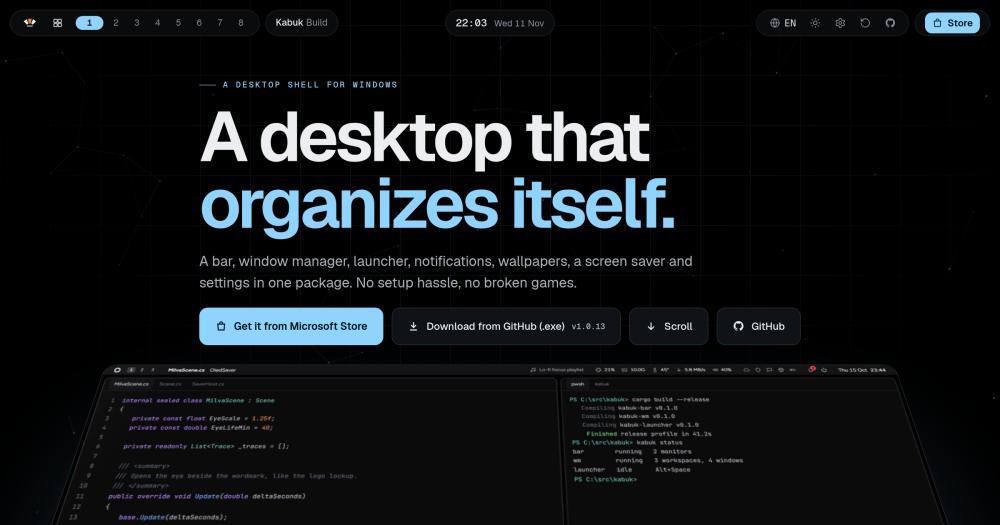
Run a Hyprland-style desktop shell on Windows 11 with tiling windows, a per-monitor bar, launcher, and OLED-safe wallpapers in one installer.

Visit websiteGitHub4 stars
image of Kabuk
TL;DR

Kabuk is a desktop shell for Windows 11, written in Rust, that provides tiling window management, per-monitor bars, a keyboard launcher, animated wallpapers, and a screen saver in one signed installer. It replaces the need for separate commercial tools like DisplayFusion for window management, delivering a Hyprland-style workflow at no cost. Apache 2.0 licensed and free, it installs to the user folder without administrator rights. Best for Windows users who want Linux-style keyboard-driven tiling without giving up games, Office, or other Windows-only software.

Read the full breakdownHide the full breakdownWho it is for, how it works, trade-offs, the quick start and the FAQ
who it's for

Who Kabuk is for#

Linux desktop users who need Windows for specific software

Users who have lived in Hyprland, i3, or sway and switched back to Windows for games, Office, or professional tools find Kabuk's keyboard-first tiling and bar familiar. Win+arrows to move focus, Win+1-9 for workspaces, Win+Enter for a drop-down terminal, and Win+R for the launcher cover most of the Hyprland muscle memory.

Skip if:

You are willing to run Linux as your primary system. Kabuk solves the need-Windows-but-want-Hyprland situation; if you have no Windows dependency, there is no reason to leave Linux.

OLED laptop owners on Windows 11

OLED panels are at risk from fixed bright elements, and the Windows taskbar is exactly that. Kabuk puts its own bar on every monitor that shifts slightly, dims when idle, and uses a palette calibrated for OLED. The gallery holds 42 designs (wallpapers and screen savers), all built to be predominantly dark.

Skip if:

You use an IPS or LCD panel. Burn-in prevention is a first-class feature of Kabuk's design; if it is not a concern for your display, the OLED features are still usable but the tradeoff they represent does not apply to you.

Developers who keyboard-drive their workflow

Kabuk's launcher (Win+R) covers apps, open windows, files, bookmarks, and inline math without reaching for a mouse. Dwindle tiling keeps the terminal and editor in a fixed layout as new windows open. The drop-down terminal (Win+Enter) is always one keypress from any workspace.

Skip if:

You prefer a traditional desktop with a taskbar and do not use keyboard shortcuts for window navigation. Kabuk hides the taskbar and puts its own bar in its place, rather than supplementing it.

Gamers who want window management between sessions

Kabuk detects full-screen programs and clears within under a second. The bar hides, tiling pauses, hooks turn off, and GPU priority drops. When the game closes, the layout returns exactly as it was. Kabuk loads no code into other processes and installs no global DLL hooks; the site describes it as anti-cheat friendly.

Skip if:

You play full-time with no other work on the same machine. Kabuk's value is managing many windows across a workday; on a dedicated gaming rig with no productivity use, a standard taskbar is simpler.

the problem

The problem it solves#

Setting up a tiling workflow on Windows 11 means assembling tools from multiple independent projects. You need a window manager, a custom taskbar replacement, a launcher, and an animated wallpaper engine, each with its own configuration format and update schedule. When Windows updates, any of these can break and leave the desktop in a half-working state.

OLED laptop owners have another concern. The standard Windows taskbar is a fixed-brightness bar occupying the same screen region every session, which raises burn-in risk over time. Gamers using third-party shell components discover that many tools inject code into other processes, which trips anti-cheat software and forces a choice between a usable desktop setup and playing online games.

how Kabuk solves it

How it solves it#

Per-Monitor Bar with Live System Stats

Each monitor gets its own bar showing workspaces, pinned and running apps (with right-click jump lists), system tray, clock, volume, media controls, and live readings for CPU, RAM, GPU temperature, and network speed. Any module can be turned off individually. The bar can be blurred, solid, or transparent.

Dwindle and Master-Stack Tiling

Windows tile automatically as they open using dwindle layout (each new window splits the remaining space). Switch to master-and-stack with Win+Y. Any workspace can be set to all-floating. Dialogs, splash screens, and windows that cannot be resized float automatically to avoid breaking the layout.

Keyboard Launcher

Win+R opens a launcher for apps, open windows, files, bookmarks, and an inline calculator. Win+Shift+A opens every installed app as a full-screen grid. Search uses fuzzy matching with language-aware character rules for Turkish and English.

OLED-Safe Animated Wallpapers

Animated wallpapers run on the GPU and are capped at 30 fps. They pause automatically when the desktop is covered by windows, during full-screen games, and while running on battery. The gallery holds 42 designs in total: 22 wallpapers (animated and static) and additional screen savers. Animated wallpapers use colors from the active look and update when you change accent or mode. Static wallpapers shift slowly to prevent pixel lock-in.

Game-Safe Architecture

Kabuk loads no code into other processes and installs no global DLL hooks. When a full-screen program covers a monitor, the bar disappears and tiling pauses. Keyboard and mouse hooks are disabled, GPU priority is lowered, and notifications queue silently until the game exits. The site describes Kabuk as anti-cheat friendly.

Crash Recovery via Watchdog

A separate watchdog process monitors Kabuk at all times. If the shell crashes or is killed in Task Manager, the watchdog restores every hidden window and the taskbar within two seconds and restarts Kabuk. If the bar stops responding for 15 seconds, the watchdog ends and restarts it. Ctrl+Alt+Shift+End is a hardcoded restore key that always works.

strengths · trade-offs

Strengths and trade-offs#

Strengths

  • No Code Injected Into Other ProcessesMost third-party Windows shells inject code into other processes to intercept window events. Kabuk runs all hooks inside its own process and uses Windows' documented event APIs. No code is loaded into other processes, and no global DLL hooks are installed. The site describes Kabuk as anti-cheat friendly.
  • One Installer, Six Features, No Config PileThe signed installer puts a complete desktop shell on Windows 11 in one pass: bar, tiling, launcher, wallpapers, screen saver, and settings. No separate setup for each component, no TOML files required to get started, though the full config file is available for power users who want it.
  • OLED Burn-In Prevention Built InThe bar shifts by a pixel or two on a slow cycle and dims when idle. Animated wallpapers are designed to be predominantly dark, pause while the desktop is covered, and are off by default on battery. Every look in every accent passes a 4.5:1 contrast check, so Kabuk never applies a shade it cannot read back.
  • State Saved Before Every ChangeEvery window Kabuk hides, every taskbar change, and every workspace assignment is written to a state file before the change is made. If Kabuk exits for any reason, the state file is what the watchdog uses to restore everything. The `kabuk` CLI's restore command does the same from any terminal without needing Kabuk to be running.

Trade-offs

  • -Windows 11 OnlyKabuk targets Windows 11 and does not support Windows 10 or earlier. The WebView2 dependency for the settings app ships with Windows 11, but the Win32 APIs it uses for the bar and tiling are Windows 11 specific. Users on Windows 10 have no supported path.
  • -Early-Stage Project with 4 GitHub StarsKabuk was created in October 2026 and has 4 GitHub stars and no forks. The README is written from a solo-maintainer perspective. There are no open issues and no community contributions yet. Users who need a large active community for support should look elsewhere.
  • -Microsoft Store Version Has Fewer CapabilitiesThe Store version cannot set system cursors, the screen saver, or Windows' accent colors because Store packages are not allowed to write those settings. Users who want all features should install from GitHub Releases.
versus alternatives

Kabuk vs alternatives#

Kabuk vs DisplayFusion

DisplayFusion (Binary Fortress Software) is a commercial multi-monitor management tool that covers window snap zones, custom per-monitor taskbars, and monitor profiles. Kabuk covers more of the desktop shell: tiling window management, a keyboard launcher, and GPU-rendered wallpapers, alongside the bar.

FeatureKabukDisplayFusion
LicenseApache 2.0 (free)Proprietary, paid license
Tiling layoutsDwindle, master-stack, floatingSnap zones
Per-monitor barYes, with system statsYes, with toolbars
LauncherYes (Win+R)No
Animated wallpapersYes, 22 GPU-renderedNo
Windows supportWindows 11 onlyWindows 10 and 11

Kabuk is the better choice for users who want keyboard-driven automatic tiling and a complete shell on Windows 11 at no cost. DisplayFusion is worth choosing when you need Windows 10 support, multi-monitor profiles with scripted window rules, or want to extend the standard taskbar rather than hide it and use Kabuk's own bar.

Kabuk vs Actual Window Manager

Actual Window Manager (Actual Tools) is a commercial utility that layers window rules, virtual desktops, and snap tiling onto the existing Windows shell. It supports Windows 11, Windows 10, and older versions.

Kabuk puts its own bar on every monitor, hides the taskbar, and leaves Explorer running underneath, rather than layering onto the standard shell. This provides a tighter keyboard workflow with a skinnable bar and launcher. Actual Window Manager lets you keep the standard taskbar and apply window rules on top. Users who prefer that approach, or who need Windows 10 or older, are better served by Actual Window Manager.

install · quick start

Quick start#

bash
Download the signed Windows installer from GitHub Releases: https://github.com/Milvasoft/kabuk/releases/latest
tech stack · detected from GitHub

What it's built on#

Languages
C#JavaScriptRust
frequently asked

FAQ#

Does installing Kabuk require administrator rights?

No. The installer runs without administrator rights and installs to %LOCALAPPDATA%\Programs\Kabuk. No system directories are written and no driver or service is installed. The Microsoft Store version does not require any additional permissions beyond a standard Store install.

What happens to my windows and taskbar if Kabuk crashes?

A watchdog process runs alongside Kabuk and monitors it. If Kabuk crashes or is killed in Task Manager, the watchdog restores every hidden window and the original taskbar within two seconds and then restarts Kabuk. If Kabuk stops responding for 15 seconds, the watchdog ends and restarts it. After three restarts within a minute, the watchdog stops restarting and notifies you. Ctrl+Alt+Shift+End from any state manually restores everything and exits Kabuk.

Does Kabuk work with games that use anti-cheat software?

Yes. Kabuk loads no code into other processes, runs its keyboard and mouse hooks entirely inside its own process, and uses Windows' documented APIs. The site describes it as anti-cheat friendly. When a game enters full-screen, Kabuk disengages: the bar hides, tiling pauses, and keyboard and mouse hooks turn off. The transition takes under one second.

Does Kabuk collect any usage data or require an account?

No. The README and PRIVACY.md both state that Kabuk collects nothing. There is no account, no telemetry, and no analytics. The only outbound connections are the update check (when you trigger it from Settings) and any AI connection you configure yourself using your own key.

What is the difference between the GitHub version and the Microsoft Store version?

The GitHub version (installed via kabuk-setup.exe) has full capabilities including setting system cursors, the screen saver, and Windows' accent colors. The Store version cannot write those settings because Store packages are restricted from doing so by the platform. Settings, tiling, bars, launcher, and wallpapers work identically in both. The Store version updates automatically; the GitHub version checks for updates from Settings › About.

also worth a look

Similar open-source tools#

CleanYourTV

Featured

Alternative toATV Launcher Pro

Debloat any Android or Google TV over Wi-Fi and get an Apple TV-style home.

  • 55,564 GitHub stars
  • MIT LicenseLicence MIT License

rakazo

Featured

Alternative toGrok Bot

AI teammates you own: your keys, your model, your machine.

  • 7,869 GitHub stars
  • Apache-2.0Licence Apache-2.0

Excelize

InDeveloper Tools

Pure Go library for Excel files with streaming and chart support.

  • 21,124 GitHub stars
  • BSD-3-ClauseLicence BSD-3-Clause

Gopeed

Alternative toInternet Download Manager

Download manager for HTTP, BitTorrent, and ed2k on every platform.

  • 27,552 GitHub stars
  • GPL-3.0Licence GPL-3.0

Camber

Alternative toArc

Open source Arc alternative with spaces, sidebar, and no account

  • 18 GitHub stars
  • GPL-3.0Licence GPL-3.0

Tidybatch

InDeveloper Tools

CLI bulk file renamer with dry-run preview and journaled undo

  • MITLicence MIT
by category

Open source tools in these categories#

620

Developer Tools

REA (Reverse Engineer Anything), Skills for Real Engineers, superpowers
293

Business & Productivity

OpenClaw, Excalidraw, RustDesk

Sponsors

Inbox Zero

Alternative toSuperhuman

AI email assistant that drafts replies and clears your inbox

  • 12,987 GitHub stars
  • AGPL-3.0Licence AGPL-3.0
  • #Email

rakazo

Alternative toGrok Bot

AI teammates you own: your keys, your model, your machine.

  • 7,869 GitHub stars
  • Apache-2.0Licence Apache-2.0
  • #AI Agents

SnitchFeed

Live monitoring on LinkedIn, X, Reddit & more. Agentic social listening for startups.

Marketing & Growth

Advertise your product

New open source projects by email

The projects we add and every new guide. Free, unsubscribe any time.

Find open source alternatives to paid software

/
  • Claude Code to OpenCode
  • Jira to Windshift
  • Notion to AppFlowy
  • Slack to Mattermost
  • Linear to GitLab
  • Wispr Flow to Handy
  • Arc to Zen Browser
  • CapCut to Concat
  • Grok Bot to rakazo
  • Superhuman to Inbox Zero
  • Airtable to AITable
  • Muse to OpenClaw
  • Railway to Coolify
  • GitHub Copilot to Cline
  • Datadog to Netdata
  • Confluence to Wiki.js
  • Microsoft Teams to Rocket.Chat
  • 1Password to KeePassXC
  • Firebase to Supabase
  • Pinecone to Qdrant
  • Zapier to n8n
  • Devin AI to OpenHands
  • Asana to Leantime
  • Contentful to Strapi
  • Claude Code to OpenCode
  • Jira to Windshift
  • Notion to AppFlowy
  • Slack to Mattermost
  • Linear to GitLab
  • Wispr Flow to Handy
  • Arc to Zen Browser
  • CapCut to Concat
  • Grok Bot to rakazo
  • Superhuman to Inbox Zero
  • Airtable to AITable
  • Muse to OpenClaw
  • Railway to Coolify
  • GitHub Copilot to Cline
  • Datadog to Netdata
  • Confluence to Wiki.js
  • Microsoft Teams to Rocket.Chat
  • 1Password to KeePassXC
  • Firebase to Supabase
  • Pinecone to Qdrant
  • Zapier to n8n
  • Devin AI to OpenHands
  • Asana to Leantime
  • Contentful to Strapi