Open Source Alternatives
  • Alternatives
  • Categories
    Categories by size1,150 projects
    • Developer Tools590
    • AI & Machine Learning503
    • Business & Productivity278
    • Web Development209
    • Security & Monitoring173
    • Communication & Collaboration154
    • IT Management146
    • LLMOps & AI Tooling129
    • Cloud & Hosting128
    • Product & Project Management123
    Browse all 21 categoriesDevOps & CI/CD, Data & Analytics and 9 more
  • Blog
  • Advertise
SearchNotion, Slack, password manager.../
Submit
Open Source Alternatives
  • Alternatives
    • Developer Tools590
    • AI & Machine Learning503
    • Business & Productivity278
    • Web Development209
    • Security & Monitoring173
    • Communication & Collaboration154
    • Browse all 21 categories
  • Blog
  • Advertise
Submit your project

New open source projects by email

The projects we add and every new guide. Free, unsubscribe any time.

Open Source Alternatives LogoOpen Source Alternatives

Handpicked Open Source Alternatives to Paid Softwares

Add Open Source Alternatives as a preferred source on Google

Product

  • Categories
  • Tag
  • Advertise

Resources

  • Blog
  • Collection
  • Submit

Company

  • Privacy Policy
  • Terms of Service
  • Refund Policy
  • Sitemap

Alternatives

  • Claude Code
  • Jira
  • Notion
  • Slack
  • Linear
  • Wispr Flow
  • All alternatives
© 2026 Open Source Alternatives. All rights reserved.
Open SourceAlternatives
Home/Categories/Developer Tools/Tidybatch
icon of Tidybatch

Tidybatch

  • 0 stars
  • MIT
  • Active this week
  • Last commit today

Last verified Nov 6, 2026

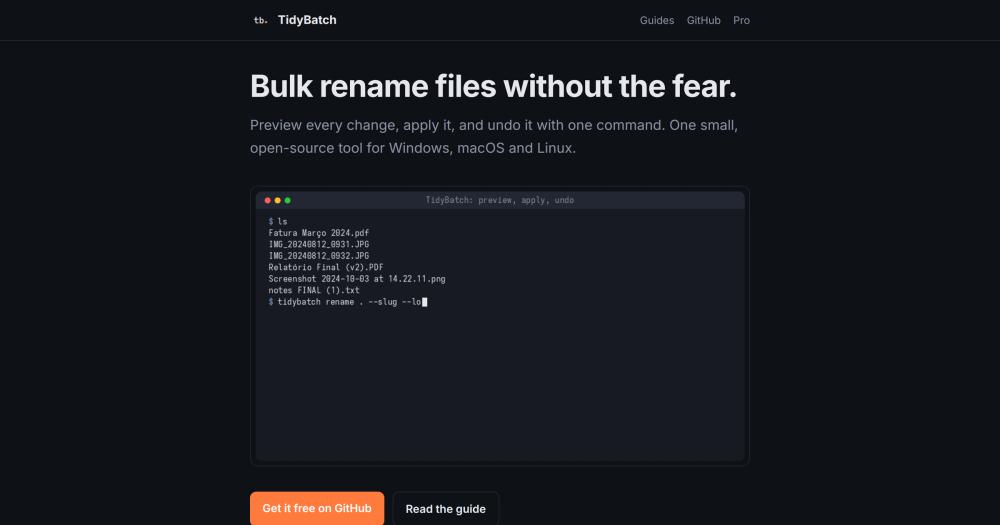
Run bulk file renames with dry-run preview, collision-proof apply, and one-command undo. Zero dependencies, MIT licensed.

Visit websiteGitHub0 stars
image of Tidybatch
TL;DR

Tidybatch is a command-line bulk file renamer for Windows, macOS, and Linux that prevents the silent file corruption at the core of naive bulk rename scripts. It uses a two-phase rename engine with journaled undo, so every applied run can be reversed with 'tidybatch undo'. MIT licensed with no external dependencies, it installs with 'pipx install tidybatch' on Python 3.9+. Best for developers and photographers who need to rename files in batches and want a preview before anything changes.

Read the full breakdownHide the full breakdownWho it is for, how it works, trade-offs, the quick start and the FAQ
who it's for

Who Tidybatch is for#

Developers organizing project file directories

TidyBatch handles automated file renaming in build pipelines, test fixtures, or export scripts where consistent naming conventions matter. The CLI interface fits into shell scripts and Makefiles, and the dry-run default makes it safe to call in a CI environment with '--apply' only after reviewing the plan.

Skip if:

Your rename logic requires reading file content, database records, or metadata beyond name, date, and EXIF. TidyBatch works from name, date, and EXIF only.

Photographers naming images by capture date

The '{taken}' template reads EXIF date-taken from JPEG, HEIC, TIFF, DNG, CR2, CR3, NEF, RW2, and RAF files without additional libraries. A single command with the '{taken:%Y-%m-%d_%H%M%S}{ext}' template processes an entire shoot and can be undone if the output is wrong.

Skip if:

You need to also organize images into folder hierarchies by date or deduplicate a camera roll. The free Core renames only; folder organization and deduplication require TidyBatch Pro, available as a one-time purchase.

Anyone cleaning up a Downloads or Desktop folder

The '--slug' and '--lower' options strip accents, spaces, and symbols from file names and lowercase everything in one pass. A dry-run first shows exactly what changes before '--apply' commits them. 'tidybatch undo ~/Downloads' puts everything back if the result is not what was intended.

Skip if:

You need to move files into category subfolders (Documents, Images, Videos) as part of the cleanup. The Core rename command does not create folders; that is a Pro feature.

the problem

The problem it solves#

Bulk renaming files seems simple until a name collision silently destroys a file. The standard approach on any OS is to loop through files and rename them one by one, but when renaming A to B and B to C in the same batch, the first move lands on a name that already exists and overwrites the file there. Shell scripts that renumber photo sequences this way drop frames without warning.

For photographers, the challenge is deeper. Organizing thousands of images by capture date requires reading EXIF metadata, which varies across JPEG, HEIC, and RAW formats and typically needs a library like Pillow or ExifTool installed separately. Most free CLI rename tools skip EXIF support entirely. Paid GUI tools handle it but are platform-specific and cost money even for occasional use.

how Tidybatch solves it

How it solves it#

Dry-run preview by default

Every rename command shows what would change before touching any file. Add '--apply' to execute. The preview lists every old and new name, flags collisions, and lets you verify the entire plan before committing to it.

Two-phase collision-proof rename engine

Files move first to temporary names, then to final names. A destination slot is only freed once the occupant is itself moving away, making chains like 1 to 2 to 3 safe. Name collisions within a batch get '_1', '_2' suffixes rather than silently overwriting. Case-insensitive collision checks catch 'Photo.JPG' vs 'photo.jpg' conflicts on Windows and macOS.

One-command journaled undo

Every applied run writes a journal to '.tidybatch/journal-*.json' in the target folder before moving any files. Running 'tidybatch undo <folder>' reads that journal and reverses every rename, including chains and swaps. If a run is interrupted by Ctrl+C or a power cut, TidyBatch automatically restores files from the partial journal.

EXIF date support for photos

The '{taken}' template field reads the date-taken timestamp from EXIF metadata in JPEG, HEIC, TIFF, DNG, CR2, CR3, NEF, RW2, and RAF files using Python's standard library only, with no Pillow or ExifTool required. Each CI run cross-checks the output against ExifTool on its own sample images. Files with no EXIF date fall back to the modification date.

Zero external dependencies

TidyBatch is a single Python file that imports only the standard library. No third-party packages need to be installed; running 'python3 tidybatch.py --help' works without 'pipx install'. The absence of dependencies means the source is short enough to read and audit before trusting it with important files.

Template and regex rename patterns

File names are built from templates with fields like '{n:03}' (zero-padded counter), '{date:%Y-%m-%d}' (modification date), '{taken:%Y-%m-%d_%H%M%S}' (EXIF date), '{stem}', and '{ext}'. Regex find-and-replace with capture groups handles patterns like renaming 'IMG_2024_0001.jpg' to '2024-photo-0001.jpg'. Sort order (by name, date, taken, or size) controls numbering.

strengths · trade-offs

Strengths and trade-offs#

Strengths

  • Collision safety that shell scripts lackTidyBatch's two-phase approach plans the full rename graph, ensures every destination is free before writing, and handles circular chains that would otherwise lose files. The test suite runs on Linux, macOS, and Windows on every push and feeds the EXIF parser 20,000 corrupted files to verify it never crashes or hangs.
  • Full undo after any applied runThe journal written before execution makes undo reliable even after a crash or interruption. Most bulk rename tools in this space offer no undo at all; files are gone once moved. TidyBatch's journal records the full rename map, so the undo command reconstructs the original state without relying on the filesystem's own history.
  • Cross-platform with one install pathThe same Python package runs on Windows, macOS, and Linux. 'pipx install tidybatch' or 'pip install tidybatch' is the full install. GUI rename tools in this category tend to be platform-specific. A-Better-Finder Rename runs on macOS only; Bulk Rename Utility runs on Windows only. TidyBatch handles all three from one codebase.
  • No library needed for EXIF photo datesReading EXIF date-taken from JPEG, HEIC, and RAW files without installing Pillow or ExifTool is a meaningful convenience. TidyBatch reads EXIF using Python's standard library only, verified on the CI against ExifTool's own sample image set across nine camera raw formats.

Trade-offs

  • -Command-line only, no graphical interfaceBoth the free Core and the paid Pro version are CLI tools. Users who prefer a drag-and-drop visual rename workflow will need a GUI alternative. The dry-run output is a text list of old and new names in the terminal.
  • -Python required on all platforms, no macOS appTidyBatch requires Python 3.9 or later on all three supported platforms. On macOS, both the free Core and the paid Pro versions run via 'python3 tidybatch.py' or the pipx package; there is no standalone macOS app. On Windows and Linux, TidyBatch Pro includes ready-to-run binaries that do not need Python. macOS users who need a no-Python path will need a different tool.
  • -EXIF XMP and IPTC dates not readThe '{taken}' template reads EXIF-embedded date fields only. Dates stored in XMP or IPTC sidecars fall back to the file's modification date. Files from some cameras or photo editors that write dates only to XMP may show incorrect capture times when sorted or renamed by date taken.
  • -Very early stage with no community adoption yetTidyBatch was created in late October 2026 and has no GitHub stars or forks at the time of writing. The core rename, collision, and EXIF logic are covered by a test suite that runs on every push, but the project has not yet seen broad real-world use. Those who prefer proven tools with an active community should factor this in.
versus alternatives

Tidybatch vs alternatives#

TidyBatch vs A-Better-Finder Rename

A-Better-Finder Rename is a paid macOS application for bulk file renaming with a graphical interface. Both tools support template-based naming and photo EXIF dates; the main differences are platform coverage, interface type, and undo capability.

FeatureTidyBatchA-Better-Finder Rename
LicenseMIT, freeProprietary, paid
PlatformsWindows, macOS, LinuxmacOS only
InterfaceCommand-lineGraphical
UndoJournaled undo for every runNone
EXIF photo datesYes, no extra librariesYes

TidyBatch is the better choice when you work across multiple operating systems, want to script renames, or need reliable undo after every batch. A-Better-Finder Rename suits users who prefer a point-and-click graphical interface on macOS and do not need cross-platform support.

TidyBatch vs Bulk Rename Utility

Bulk Rename Utility is a widely used Windows file renamer with an extensive GUI and many transformation presets. TidyBatch is cross-platform and CLI-first.

FeatureTidyBatchBulk Rename Utility
LicenseMIT, free for personal and commercial useFreeware for personal use; commercial license required
PlatformsWindows, macOS, LinuxWindows only
InterfaceCommand-lineGraphical
UndoJournaled undo for every runNo journaled undo
EXIF photo datesYes, no extra librariesYes

TidyBatch is the better fit when you need cross-platform support, scripted rename pipelines, or historical undo across multiple sessions. Bulk Rename Utility is worth using for Windows-only environments where you prefer a GUI with a wide set of transformation presets and are renaming for personal use.

install · quick start

Quick start#

bash
Install TidyBatch as a Python package using pipx (recommended), uv, or pip.

```bash
pipx install tidybatch
uv tool install tidybatch
pip install tidybatch
```
tech stack · detected from GitHub

What it's built on#

Languages
Python
frequently asked

FAQ#

Does TidyBatch overwrite files if two would end up with the same name?

No. TidyBatch detects collisions during the planning phase before any files move. Files that would clash get '_1', '_2' suffixes appended to make each name unique. The collision check is case-insensitive on Windows NTFS and macOS HFS+, so 'Photo.JPG' and 'photo.jpg' are treated as the same target.

Can I undo a TidyBatch rename after the fact?

Yes, if the rename was applied with TidyBatch. Every 'tidybatch rename ... --apply' run writes a journal file to '.tidybatch/' in the target folder before moving any files. Run 'tidybatch undo ' to reverse it. If TidyBatch was interrupted mid-run by Ctrl+C or a power cut, it automatically restores the partial run from the journal. Files renamed by other tools cannot be undone by TidyBatch.

Does TidyBatch read EXIF metadata from RAW camera files?

Yes. The '{taken}' template field reads EXIF date-taken from JPEG, HEIC, TIFF, DNG, CR2, CR3, NEF, RW2, and RAF files using Python's standard library. No Pillow, ExifTool, or other library needs to be installed. Files whose date is stored only in XMP or IPTC fall back to the modification date. The EXIF parser is cross-checked on every CI run against ExifTool's own sample images.

What is the difference between TidyBatch Core and TidyBatch Pro?

TidyBatch Core, free and MIT licensed, covers renaming (templates, regex, EXIF dates), dry-run preview, collision-proof apply, and undo. TidyBatch Pro is a one-time purchase that adds the 'organize' command (sort files into folders by type, date, extension, or EXIF date taken) and the 'dedupe' command (find exact duplicates by SHA-256 content hash, moved to a '_duplicates' folder without deletion). Pro also includes ready-to-run apps for Windows and Linux that do not require Python. macOS requires Python for both editions.

Does TidyBatch work without an internet connection?

Yes. TidyBatch is a local-first CLI tool with no network calls. It reads files from your disk, renames them, and writes the journal back to disk. No account, no telemetry, and no internet connection is needed for any operation.

also worth a look

Similar open-source tools#

CleanYourTV

Featured

Alternative toATV Launcher Pro

Debloat any Android or Google TV over Wi-Fi and get an Apple TV-style home.

  • 51,495 GitHub stars
  • MIT LicenseLicence MIT License

rakazo

Featured

Alternative toGrok Bot

AI teammates you own: your keys, your model, your machine.

  • 7,028 GitHub stars
  • Apache-2.0Licence Apache-2.0

PipeVoice

Alternative toWispr Flow

Push-to-talk voice typing for Windows, cloud or fully offline

  • 39 GitHub stars
  • MITLicence MIT

Superhound

Alternative toRaycast AI

Typo-tolerant Mac launcher with clipboard history, free, AGPL-3.0.

  • 3 GitHub stars
  • AGPL-3.0Licence AGPL-3.0

Gojo

Alternative toNotchNook

Notch workspace for Mac: windows, clipboard, dictation, and music.

  • 4 GitHub stars
  • GPL-3.0Licence GPL-3.0

BetterCmdTab

Alternative toWitch

Per-window Cmd+Tab switcher for macOS

  • 853 GitHub stars
  • GPL-3.0Licence GPL-3.0
by category

Open source tools in these categories#

590

Developer Tools

REA (Reverse Engineer Anything), Skills for Real Engineers, superpowers
278

Business & Productivity

OpenClaw, Excalidraw, RustDesk

Sponsors

Inbox Zero

Alternative toSuperhuman

AI email assistant that drafts replies and clears your inbox

  • 12,915 GitHub stars
  • AGPL-3.0Licence AGPL-3.0
  • #Email

rakazo

Alternative toGrok Bot

AI teammates you own: your keys, your model, your machine.

  • 7,028 GitHub stars
  • Apache-2.0Licence Apache-2.0
  • #AI Agents

SnitchFeed

Live monitoring on LinkedIn, X, Reddit & more. Agentic social listening for startups.

Marketing & Growth

Advertise your product

New open source projects by email

The projects we add and every new guide. Free, unsubscribe any time.

Find open source alternatives to paid software

/
  • Claude Code to OpenCode
  • Jira to Windshift
  • Notion to AppFlowy
  • Slack to Mattermost
  • Linear to GitLab
  • Wispr Flow to Handy
  • Arc to Zen Browser
  • CapCut to Concat
  • Grok Bot to rakazo
  • Superhuman to Inbox Zero
  • Airtable to AITable
  • Muse to OpenClaw
  • Railway to Coolify
  • GitHub Copilot to Cline
  • Datadog to Netdata
  • Confluence to Wiki.js
  • Microsoft Teams to Rocket.Chat
  • Firebase to Supabase
  • Pinecone to Qdrant
  • Zapier to n8n
  • 1Password to KeePassXC
  • Devin AI to OpenHands
  • Asana to Leantime
  • Contentful to Strapi
  • Claude Code to OpenCode
  • Jira to Windshift
  • Notion to AppFlowy
  • Slack to Mattermost
  • Linear to GitLab
  • Wispr Flow to Handy
  • Arc to Zen Browser
  • CapCut to Concat
  • Grok Bot to rakazo
  • Superhuman to Inbox Zero
  • Airtable to AITable
  • Muse to OpenClaw
  • Railway to Coolify
  • GitHub Copilot to Cline
  • Datadog to Netdata
  • Confluence to Wiki.js
  • Microsoft Teams to Rocket.Chat
  • Firebase to Supabase
  • Pinecone to Qdrant
  • Zapier to n8n
  • 1Password to KeePassXC
  • Devin AI to OpenHands
  • Asana to Leantime
  • Contentful to Strapi