Open Source Alternatives
  • Alternatives
  • Categories
    Categories by size1,078 projects
    • Developer Tools545
    • AI & Machine Learning470
    • Business & Productivity253
    • Web Development205
    • Security & Monitoring167
    • Communication & Collaboration146
    • IT Management143
    • Cloud & Hosting127
    • LLMOps & AI Tooling122
    • Data & Analytics116
    Browse all 21 categoriesDevOps & CI/CD, Product & Project Management and 9 more
  • Blog
  • Advertise
SearchNotion, Slack, password manager.../
Submit
Open Source Alternatives
  • Alternatives
    • Developer Tools545
    • AI & Machine Learning470
    • Business & Productivity253
    • Web Development205
    • Security & Monitoring167
    • Communication & Collaboration146
    • Browse all 21 categories
  • Blog
  • Advertise
Submit your project

New open source projects by email

The projects we add and every new guide. Free, unsubscribe any time.

Open Source Alternatives LogoOpen Source Alternatives

Handpicked Open Source Alternatives to Paid Softwares

Product

  • Categories
  • Tag
  • Advertise

Resources

  • Blog
  • Collection
  • Submit

Company

  • Privacy Policy
  • Terms of Service
  • Refund Policy
  • Sitemap

Alternatives

  • Claude Code
  • Jira
  • Notion
  • Slack
  • Linear
  • Wispr Flow
  • All alternatives
© 2026 Open Source Alternatives. All rights reserved.
Open SourceAlternatives
Home/Categories/Business & Productivity/Linkding
icon of Linkding

Linkding

Open source alternative to Raindrop.io, Pinboard, Readwise Reader and Instapaper

  • 11.4K stars
  • MIT
  • Active this month
  • Last commit 9 days ago

Last verified Nov 5, 2026

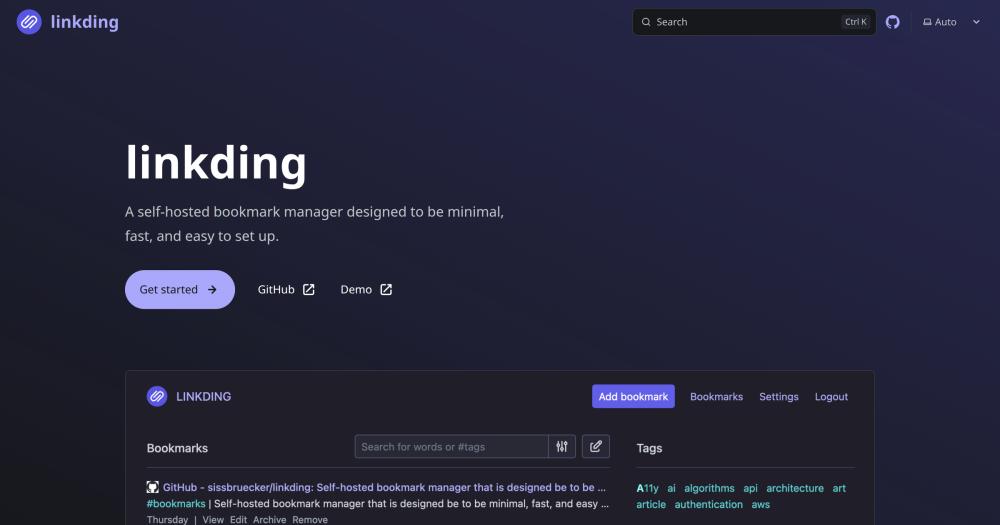
Manage self-hosted bookmarks with tag organization, automatic archiving, and browser extensions for Firefox and Chrome.

Visit websiteGitHub11.4K starsDeploy on Hostinger
Image for Linkding
TL;DR

Linkding is a self-hosted bookmark manager that replaces paid services like Raindrop.io and Instapaper. MIT licensed and deployable as a single Docker container with SQLite, it offers tag organization, automatic archiving, browser extensions for Firefox and Chrome, and multi-user support. Best for individuals and small teams who want their bookmarks on infrastructure they control rather than a commercial service.

Read the full breakdownHide the full breakdownWho it is for, how it works, trade-offs and the FAQ
who it's for

Who Linkding is for#

Privacy-conscious researchers building a personal knowledge base

Researchers who save dozens of links daily want to avoid giving a commercial service a record of everything they read. Linkding runs on a home server or VPS with no telemetry, and the automatic archiving feature protects against pages disappearing after they were saved.

Skip if:

If you need polished cross-device sync out of the box without any server management, a managed service like Raindrop.io is simpler to get started with.

Development teams managing internal reference links

Small engineering teams can share a Linkding instance with multi-user support, SSO via OIDC, and tag-based organization for internal links, documentation, and tool references. The REST API allows integration with existing internal tooling.

Skip if:

If your team needs advanced collaborative annotation, bi-directional linking to notes, or tight integration with a read-later workflow, tools like Readwise Reader offer those natively.

Developers building bookmark automation workflows

Linkding exposes a full REST API, so developers can write scripts to ingest bookmarks from RSS feeds, browser exports, or other sources. The API covers creating, tagging, searching, and deleting bookmarks without opening the web interface.

Skip if:

If you only need to save links manually from a browser, the REST API is unnecessary overhead. The browser extension alone covers the basic workflow.

the problem

The problem it solves#

Commercial bookmark managers put your reading list on their servers, at their prices, on their schedule. Services change subscription tiers, remove features, or shut down entirely, taking your saved links and reading history with them. Privacy-conscious users and teams handling sensitive research have no self-hosting path with the major players.

Managing bookmarks across a large collection also gets unwieldy without tags, search, and bulk operations. Browser-to-browser sync through a proprietary service means giving a third party a full record of everything you have ever found worth saving.

how Linkding solves it

How it solves it#

Tag-based organization with auto-fetched metadata

Linkding automatically retrieves titles, descriptions, favicon icons, and preview images when you save a bookmark. Tags let you organize the whole collection without folders, and the search index covers titles, descriptions, and tag names across all saved links.

Automatic website archiving

When you save a bookmark, Linkding can capture a local HTML snapshot of the page or submit it to the Internet Archive. Snapshots protect against link rot: if the original page disappears, your archived copy stays accessible from your Linkding instance.

Browser extensions for Firefox and Chrome

Official extensions for Firefox and Chrome let you add bookmarks and search your collection directly from the browser toolbar without opening the Linkding interface. A bookmarklet provides the same quick-add function on any other browser.

Multi-user support with sharing

Linkding supports multiple users on a single instance, with each user maintaining their own bookmark collection. Users can share individual bookmarks with other users on the instance or with guests who have no account.

REST API for scripts and integrations

Every Linkding action is available through a REST API, so you can build scripts that import bookmarks from external sources, export to other formats, or integrate with note-taking tools and automation workflows.

Single-container deployment with zero breaking changes

The entire stack runs as one Docker container backed by SQLite, with no separate database service required. The project maintains a zero breaking changes policy, so automated migrations handle every version update without manual intervention.

strengths · trade-offs

Strengths and trade-offs#

Strengths

  • MIT license with no restrictions on useLinkding is MIT licensed, meaning you can run it on your infrastructure, modify it, and use it commercially with no licensing fees or usage restrictions. Unlike proprietary bookmark services that gate features behind paid tiers, the full feature set is available on your own server from day one.
  • Minimal operational footprintOne Docker container, one SQLite file. There is no Postgres service, no Redis cache, and no external dependencies to provision. This keeps hosting costs low on any VPS or home server, and backup is as simple as copying the SQLite database file.
  • SSO support via OIDC and authentication proxiesLinkding supports Single Sign-On through OpenID Connect and authentication proxies, making it suitable for teams that want to integrate bookmark management into an existing identity provider without maintaining separate credentials per user.
  • Active development with 11,384 GitHub starsWith 11,384 stars and a most recent code push in October 2026, the project sees consistent maintenance. The zero breaking changes commitment means upgrades are low-risk, and the documented REST API makes it possible to extend the tool without forking the codebase.

Trade-offs

  • -No official mobile appLinkding does not ship an official iOS or Android application. The site is installable as a Progressive Web App, which provides a home-screen shortcut and basic offline support, but it is not a native mobile experience. Community-built third-party clients exist but are maintained outside the core project.
  • -SQLite limits high-concurrency multi-user deploymentsThe default database is SQLite, which suits personal use or small teams well, but can become a bottleneck on instances with many simultaneous users doing heavy writes. Large team deployments should evaluate whether the single-file database fits their concurrency needs.
  • -199 open issues at time of writingWith 199 open issues, there is an active backlog of reported bugs and feature requests. The project is maintained by a small core team, so issue resolution time varies. Users running Linkding in production should check the issue tracker for items affecting their specific configuration.
versus alternatives

Linkding vs alternatives#

Linkding vs Raindrop.io

Both Linkding and Raindrop.io organize bookmarks with tags and offer browser extensions, but they serve different operational models. Raindrop.io is a fully managed commercial platform with no self-hosting option; Linkding runs on your own server with no subscription required.

FeatureLinkdingRaindrop.io
HostingSelf-hostedManaged (no self-hosting)
LicenseMITProprietary
PricingFree (self-hosted)Free tier / paid Pro
Multi-userYesYes (team plans)
Browser extensionsFirefox, ChromeAll major browsers
ArchivingLocal HTML or Internet ArchiveBroken link detection (Pro)
REST APIYesYes

Linkding is the better choice when data ownership matters: your bookmarks stay on your server with no telemetry and no account beyond your own instance. The archiving feature captures full HTML snapshots locally, going further than Raindrop.io's broken-link detection.

Raindrop.io is worth considering when you want a polished cross-device experience with native mobile apps and no server to maintain. Its nested collection structure and UI refinement exceed what Linkding's PWA provides.

Linkding vs Instapaper

Instapaper is a read-later service focused on article text extraction and offline reading. Linkding covers read-later as one feature within a broader bookmark management workflow.

FeatureLinkdingInstapaper
HostingSelf-hostedManaged
LicenseMITProprietary
Article text extractionNoYes
ArchivingHTML snapshotsFull text extraction
Browser extensionYesYes
REST APIYesYes (limited)

Linkding stores the original page as an HTML snapshot but does not extract clean article text the way Instapaper does. If your primary use case is reading long-form articles in a distraction-free view, Instapaper's text renderer fits that workflow better. If you want full link management where read-later is one workflow among many, Linkding covers more ground.

Other Alternatives

Pinboard is a paid bookmarking service with a one-time fee and no self-hosting path. It offers minimal UI and reliable archiving, but is proprietary. Linkding replicates most of Pinboard's core workflows under MIT terms.

Readwise Reader focuses on reading queue management, article annotation, and highlights rather than broad link collection. If annotation and reading analytics are the primary goal, Readwise Reader serves that workflow better than Linkding.


tech stack · detected from GitHub

What it's built on#

Languages
JavaScriptPython
Frameworks
Django
Tooling
esbuild
frequently asked

FAQ#

How do I install Linkding on my own server?

Linkding is designed to run as a single Docker container with no external dependencies. The official installation guide at linkding.link/installation walks through the Docker setup, environment variable configuration, and creating the first admin user. Managed hosting options are also documented there if you prefer not to run the container yourself.

Can I import my bookmarks from other services like Raindrop.io or Instapaper?

Yes. Linkding supports import and export in the Netscape HTML format, which is the standard bookmark export format used by Raindrop.io, Instapaper, and most browsers. Export your collection from your current service in that format, then import the file through the Linkding settings panel.

Does Linkding support multiple users on one instance?

Yes. Linkding is built for multi-user deployments. Each user maintains their own private bookmark collection, and users can share individual bookmarks with other users on the instance or with unauthenticated guests. An admin panel covers user creation, account management, and raw data access.

Is there a mobile app for Linkding?

There is no official native iOS or Android app. Linkding is installable as a Progressive Web App from a mobile browser, which puts a shortcut on your home screen and provides basic offline access. Several community-built third-party clients also exist; the project's community page at linkding.link/community lists current options.

Does Linkding support single sign-on?

Yes. Linkding supports SSO through OpenID Connect and authentication proxies. This lets teams integrate Linkding into an existing identity provider rather than managing separate user credentials. Configuration details are available in the official installation documentation at linkding.link/installation.

also worth a look

Similar open-source tools#

Linkwarden

Alternative toRaindrop.io

Self-hosted bookmark manager with archiving and team collaboration

  • 20,312 GitHub stars
  • AGPL-3.0Licence AGPL-3.0

Arcmark

Alternative toAnybox

Native macOS bookmark manager with browser integration

  • 494 GitHub stars
  • MITLicence MIT

CleanYourTV

Featured

Alternative toATV Launcher Pro

Debloat any Android or Google TV over Wi-Fi and get an Apple TV-style home.

  • 51,495 GitHub stars
  • MIT LicenseLicence MIT License

OpenClaw

Featured

Alternative toMuse

Self-hosted AI assistant for WhatsApp, Telegram, and more

  • 393,917 GitHub stars
  • MITLicence MIT

Inbox Zero

Featured

Alternative toSuperhuman

AI email assistant that drafts replies and clears your inbox

  • 12,889 GitHub stars
  • AGPL-3.0Licence AGPL-3.0

rakazo

Featured

Alternative toGrok Bot

AI teammates you own: your keys, your model, your machine.

  • 6,568 GitHub stars
  • Apache-2.0Licence Apache-2.0
by category

Open source tools in these categories#

253

Business & Productivity

OpenClaw, Excalidraw, RustDesk
Hostinger

Self-host Linkding on a Hostinger VPS

Keep it running 24/7, even when your laptop is off. A Hostinger VPS gives it a server of its own.

  1. 01

    Choose a plan

    Starts from $6.49/mo

  2. 02

    Apply

    Extra 10% off yearly plans

  3. 03

    Install Linkding

    On a server that stays on

  4. 04

    Start building

    Focus on the app, not the server

Deploy on Hostinger

Sponsors

Inbox Zero

Alternative toSuperhuman

AI email assistant that drafts replies and clears your inbox

  • 12,889 GitHub stars
  • AGPL-3.0Licence AGPL-3.0
  • #Email

rakazo

Alternative toGrok Bot

AI teammates you own: your keys, your model, your machine.

  • 6,568 GitHub stars
  • Apache-2.0Licence Apache-2.0
  • #AI Agents

SnitchFeed

Live monitoring on LinkedIn, X, Reddit & more. Agentic social listening for startups.

Marketing & Growth

Advertise your product

New open source projects by email

The projects we add and every new guide. Free, unsubscribe any time.

Find open source alternatives to paid software

/
  • Claude Code to OpenCode
  • Jira to Windshift
  • Notion to AppFlowy
  • Slack to Mattermost
  • Linear to GitLab
  • Wispr Flow to Handy
  • Arc to Zen Browser
  • CapCut to Concat
  • Grok Bot to rakazo
  • Superhuman to Inbox Zero
  • Airtable to AITable
  • Muse to OpenClaw
  • Railway to Coolify
  • GitHub Copilot to Cline
  • Datadog to Netdata
  • Confluence to Wiki.js
  • Microsoft Teams to Rocket.Chat
  • Pinecone to Qdrant
  • Zapier to n8n
  • 1Password to KeePassXC
  • Devin AI to OpenHands
  • Firebase to Supabase
  • Contentful to Strapi
  • Adobe Premiere Pro to Shotcut
  • Claude Code to OpenCode
  • Jira to Windshift
  • Notion to AppFlowy
  • Slack to Mattermost
  • Linear to GitLab
  • Wispr Flow to Handy
  • Arc to Zen Browser
  • CapCut to Concat
  • Grok Bot to rakazo
  • Superhuman to Inbox Zero
  • Airtable to AITable
  • Muse to OpenClaw
  • Railway to Coolify
  • GitHub Copilot to Cline
  • Datadog to Netdata
  • Confluence to Wiki.js
  • Microsoft Teams to Rocket.Chat
  • Pinecone to Qdrant
  • Zapier to n8n
  • 1Password to KeePassXC
  • Devin AI to OpenHands
  • Firebase to Supabase
  • Contentful to Strapi
  • Adobe Premiere Pro to Shotcut