Open Source Alternatives
  • Alternatives
  • Categories
    Categories by size1,263 projects
    • Developer Tools650
    • AI & Machine Learning535
    • Business & Productivity305
    • Web Development217
    • Security & Monitoring196
    • Communication & Collaboration168
    • IT Management160
    • Design & Creative138
    • DevOps & CI/CD135
    • LLMOps & AI Tooling135
    Browse all 21 categoriesCloud & Hosting, Product & Project Management and 9 more
  • Blog
  • Advertise
SearchNotion, Slack, password manager.../
Submit
Open Source Alternatives
  • Alternatives
    • Developer Tools650
    • AI & Machine Learning535
    • Business & Productivity305
    • Web Development217
    • Security & Monitoring196
    • Communication & Collaboration168
    • Browse all 21 categories
  • Blog
  • Advertise
Submit your project

New open source projects by email

The projects we add and every new guide. Free, unsubscribe any time.

Open Source Alternatives LogoOpen Source Alternatives

Handpicked Open Source Alternatives to Paid Softwares

Add Open Source Alternatives as a preferred source on Google

Product

  • Categories
  • Tag
  • Advertise

Resources

  • Blog
  • Collection
  • Submit

Company

  • Privacy Policy
  • Terms of Service
  • Refund Policy
  • Sitemap

Alternatives

  • Claude Code
  • Jira
  • Notion
  • Slack
  • Linear
  • Wispr Flow
  • All alternatives
© 2026 Open Source Alternatives. All rights reserved.
Open SourceAlternatives
Home/Categories/Design & Creative/Phosphor Cam
icon of Phosphor Cam

Phosphor Cam

  • 137 stars
  • MIT
  • Active this week
  • Last commit 4 days ago

Last verified Nov 15, 2026

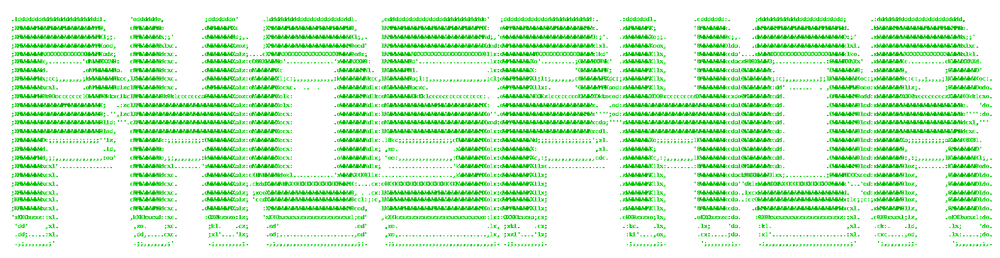
Convert your webcam feed or any photo into real-time ASCII art, dither, halftone, voxel, or lines effects using five render engines, entirely in-browser.

Visit websiteGitHub137 stars
image of Phosphor Cam
TL;DR

Phosphor Cam is a browser-based creative camera tool that converts a live webcam feed or uploaded photo into ASCII art, dithered bitmaps, halftone patterns, voxel blocks, or ribbon lines in real time. It runs entirely client-side on the Canvas 2D and MediaStream APIs, so no frame is ever uploaded to a server. MIT licensed, it is a free alternative to paid creative tools in this space, with a native Android app available from GitHub Releases and F-Droid. Best for digital artists, content creators, and developers who want high-resolution retro exports without a subscription.

Read the full breakdownHide the full breakdownWho it is for, how it works, trade-offs, the quick start and the FAQ
who it's for

Who Phosphor Cam is for#

Content creator making retro social media images

Use the ASCII or Dither engine on a webcam selfie, adjust character size and foreground color to fit the aesthetic, then export at 4x or 8x scale for a high-resolution image ready for posts or print. The seven post-processing effects add depth without leaving the browser.

Skip if:

You need to composite the effect over existing video footage or apply it to a batch of files.

Developer exploring canvas rendering

Tune each engine's parameters live (character size, contrast, color mode, 3D block mode, line direction) while watching the camera feed to understand how character-mapping, dithering, and halftone patterns respond to different settings. The live FPS and render-time display confirms the cost of each change in real time.

Skip if:

You need a full canvas rendering framework or a production-ready graphics library rather than a learning environment.

Photographer wanting artistic presets on still photos

Load any photo into Phosphor Studio from a file, drag and drop, or clipboard paste. Pick from ten presets across Retro CRT, Print and Dither, and Digital and 3D styles, then fine-tune with the full settings panel. Hold the Compare button to view the original alongside the effect before exporting as PNG, JPEG, or WEBP.

Skip if:

You need batch processing across a folder of photos.

Android user wanting an offline retro camera

Install from F-Droid or the GitHub Releases page (no Play Store account required). The app runs fully offline after install, with the same five render engines and all settings available. Signed APKs are published automatically on every release.

Skip if:

You are on iOS, which is not currently supported.

the problem

The problem it solves#

Adding real-time ASCII art or graphic effects to a live camera feed has historically meant using commercial video software, paying for subscription filter apps, or writing custom canvas code from scratch. Subscription creative tools charge monthly fees for effects pipelines that need significant setup just to preview a single render style, and mobile apps offer canned filters with no access to engine parameters or high-resolution export.

The harder gap is control: most browser-based ASCII tools are fixed-character, low-resolution novelties with no support for adjustable contrast, multiple render engines, or fine-grained export settings. Creators who want a specific aesthetic, particular character sets, fine-tuned brightness, or the ability to process still photos with the same pipeline end up writing their own tooling or paying for a professional motion graphics suite.

how Phosphor Cam solves it

How it solves it#

Five Interchangeable Render Engines

ASCII, Dither, Halftone, Voxel, and Lines engines are all available from one settings panel and switchable at runtime without restarting the camera. The ASCII engine maps characters to pixel luminance with 22 built-in sets from classic ramps to braille and runes. The Voxel engine adds an optional 3D block mode; the Lines engine renders each row or column as a continuous ribbon.

Color, Contrast, and Character Size Controls

Character size adjusts from 2 to 30 px across all five engines, controlling output density and coarseness. Color mode can be on or off; foreground and background accept any hex color, a color wheel, or one of six presets with a one-click swap. Contrast runs from 0.5x to 3.0x, brightness from -100 to +100, with an invert toggle available for all engines.

Phosphor Studio for Photo Editing

The /studio route applies the same five render engines to any uploaded photo, with undo/redo, zoom, pan, pinch, and hold-to-compare against the original. Load from a file, drag and drop, clipboard paste, or built-in samples. Ten presets span Retro CRT, Print and Dither, and Digital and 3D styles, and every adjustment including slider changes is undoable.

Seven Adjustable Post-Processing Effects

Glow, bloom, halation, chromatic aberration, vignette, scanlines, and grain effects each have individual on/off controls and intensity sliders. Effects apply to the live preview, saved images, and exported files, so the full look is preserved in every capture. Combined with color mode, contrast, and brightness, every element of the final aesthetic is configurable.

High-Resolution Capture and Video Recording

Capture scale runs from 1x to 20x (a memory warning appears above 12x), and output saves as PNG, JPEG, or WEBP. The ASCII engine supports copying text output directly to the clipboard. Video recording of the rendered camera feed is available, and Phosphor Studio can copy the rendered image to the clipboard for direct use in other apps.

Fully Client-Side, No Server Required

Every frame is processed locally by a Web Worker and drawn on the browser's Canvas 2D API. Nothing is uploaded. The app works in any secure context (HTTPS or localhost), runs as a PWA, and is available as an offline-capable native Android app via GitHub Releases and F-Droid, running entirely without internet access after installation.

strengths · trade-offs

Strengths and trade-offs#

Strengths

  • Privacy by designPhosphor Cam processes every camera frame and photo in the browser via a Web Worker. No frame, image, or personal data is transmitted to any server. Users who cannot use cloud-based creative tools due to privacy requirements or restricted network environments can run Phosphor Cam in any modern browser or install the Android APK for fully offline use.
  • MIT license, no subscription, free to self-hostThe MIT license permits use, modification, and commercial deployment without restriction. Self-hosting the web app requires only a Bun 1.4 build and a static file server, with no licensing fees or backend service to maintain. The hosted web version at phosphor.aroy.site is also free with no account required.
  • Worker-based rendering targeting 60 FPSThe Canvas rendering pipeline runs in a dedicated Web Worker, keeping the main UI thread responsive during active capture. A live FPS counter and render-time readout appear in the interface, so users can observe performance in real time and adjust character size or capture scale to maintain smooth output on their device.
  • Android app with offline supportA native Android build ships from the same codebase, is signed and published automatically on every release via GitHub Actions, and is available on F-Droid without a Play Store account. It runs fully offline after install, making it usable in fieldwork or low-connectivity situations.

Trade-offs

  • -Source build required for self-hostingThere is no Docker image or prebuilt server package. Self-hosting requires Bun 1.4, cloning the repository, running bun install and bun run build, and serving the output from a static file server or CDN. Users who want a managed deployment or one-command setup should use the hosted version at phosphor.aroy.site instead.
  • -No video file editing in Studio yetPhosphor Studio supports only photos. Applying the five render engines to an existing video file is noted in the README as planned for a later release, but is not currently available. Users who need this capability must record a live camera session and work frame-by-frame.
  • -High capture scales require more device memoryThe Configuration table in the README lists a memory warning above 12x capture scale. Very large exports on low-RAM devices or browsers with restricted memory budgets may fail or produce incomplete files. Setting capture scale to 8x or below avoids most memory constraints on typical hardware.
versus alternatives

Phosphor Cam vs alternatives#

Phosphor Cam vs Adobe After Effects

Adobe After Effects can produce ASCII art and retro rendering effects through third-party plugins or manually scripted expressions, but it is a subscription product that requires significant setup overhead. A plugin must be downloaded and configured, the effect applied to a composition, and rendering happens offline. There is no live camera preview at interactive frame rates without custom work.

Phosphor Cam runs in the browser with no subscription and shows a live camera feed at a target of 60 FPS. The tradeoff is scope: Phosphor Cam is a single-purpose creative camera tool with no timeline editor, no compositing layer, and no support for editing existing video files. After Effects suits teams building production video content; Phosphor Cam suits creators who want a live retro camera aesthetic with immediate results.

Phosphor Cam vs Paid Mobile Filter Apps

Several subscription camera apps include pixelated or ASCII-adjacent effects as part of a wider filter library. These apps optimize for quick presets and social sharing but expose limited controls: users choose from a fixed list of effects and cannot adjust character sets, render parameters, contrast curves, or export resolution.

Phosphor Cam's Android app is free, offline-first, and gives full access to all five render engines and their settings, including 22 character sets, capture scale up to 20x, PNG/JPEG/WEBP output, and all seven post-processing effects. For creators who want specific control over the final aesthetic rather than a quick filter, Phosphor Cam covers ground that paid filter apps do not.

install · quick start

Quick start#

bash
Download the signed Android APK from GitHub Releases or install through F-Droid: https://github.com/pshycodr/phosphor-cam/releases/latest
tech stack · detected from GitHub

What it's built on#

Languages
JavaScriptKotlinTypeScript
Frameworks
CapacitorReact
frequently asked

FAQ#

Does Phosphor Cam upload my camera feed or photos?

No. Every frame and photo is processed entirely in the browser using the Canvas 2D API and MediaStream API. Nothing is transmitted to a server. The app works in any secure context (HTTPS or localhost) and requires only camera permission from the browser.

What render engines does Phosphor Cam include?

Five engines are available: ASCII (characters mapped to pixel luminance, with 22 character sets), Dither (reduced-tone bitmap with a print-like texture), Halftone (image recreated as a grid of dots), Voxel (pixelated 3D block mode), and Lines (each row or column as a continuous ribbon). All five can be switched at runtime without restarting the camera.

How do I install Phosphor Cam on Android?

Download the signed APK from the GitHub Releases page at https://github.com/pshycodr/phosphor-cam/releases/latest, or install through F-Droid at https://f-droid.org/packages/site.aroy.phosphor/. No Play Store account is required. Signed APKs are published automatically on every release.

Can I self-host Phosphor Cam?

Yes. Phosphor Cam is a static web app with no server-side component. Self-hosting requires Bun 1.4 or later: clone the repository, run bun install and bun run build, then serve the built output directory from any static file server or CDN. The MIT license permits use and modification without restriction, including for internal commercial deployments.

Which browsers support Phosphor Cam?

Phosphor Cam requires getUserMedia, Canvas 2D API, and ES2020+ support. The README documents support for Chrome 90+, Firefox 88+, Safari 14+, and Edge 90+. A secure context (HTTPS or localhost) is required for camera access.

also worth a look

Similar open-source tools#

God's Eye View

Featured

Alternative toFFlightradar24

Real-time global intelligence on a 3D globe

  • 64,750 GitHub stars
  • CustomLicence MIT with third-party data restrictions

Synfig

Alternative toToon Boom Harmony

Vector-tweened 2D animation without frame-by-frame drawing.

  • 2,425 GitHub stars
  • GPL-3.0Licence GPL-3.0

Opentoonz

Alternative toToon Boom Harmony

2D animation software from Studio Ghibli's Toonz, free to use

  • 8,236 GitHub stars
  • BSD 3-ClauseLicence BSD 3-Clause

Openscreen

Alternative toScreen Studio

Free cross-platform screen recorder for polished product demos

  • 7,291 GitHub stars
  • MITLicence MIT

Oh My Ppt

Alternative toGamma

AI presentation builder, local-first, 90+ styles, PPTX export.

  • 2,527 GitHub stars
  • Apache-2.0Licence Apache-2.0

Azahar

Alternative toFolium

Free 3DS emulator for Windows, macOS, Linux, and Android.

  • 8,678 GitHub stars
  • GPL-3.0Licence GPL-3.0
by category

Open source tools in these categories#

139

Design & Creative

ComfyUI, Excalidraw, Godot Engine

Sponsors

Inbox Zero

Alternative toSuperhuman

AI email assistant that drafts replies and clears your inbox

  • 13,025 GitHub stars
  • AGPL-3.0Licence AGPL-3.0
  • #Email

rakazo

Alternative toGrok Bot

AI teammates you own: your keys, your model, your machine.

  • 8,291 GitHub stars
  • Apache-2.0Licence Apache-2.0
  • #AI Agents

SnitchFeed

Live monitoring on LinkedIn, X, Reddit & more. Agentic social listening for startups.

Marketing & Growth

Advertise your product

New open source projects by email

The projects we add and every new guide. Free, unsubscribe any time.

Find open source alternatives to paid software

/
  • Claude Code to OpenCode
  • Jira to Windshift
  • Notion to AppFlowy
  • Slack to Mattermost
  • Linear to GitLab
  • Wispr Flow to Handy
  • Arc to Zen Browser
  • CapCut to Concat
  • Grok Bot to rakazo
  • Superhuman to Inbox Zero
  • Discord to Stoat
  • Airtable to AITable
  • Datadog to SigNoz
  • Muse to OpenClaw
  • Railway to Coolify
  • GitHub Copilot to Cline
  • Confluence to Wiki.js
  • Microsoft Teams to Rocket.Chat
  • 1Password to KeePassXC
  • Firebase to Supabase
  • Pinecone to Qdrant
  • Zapier to n8n
  • Devin AI to OpenHands
  • Asana to Leantime
  • Claude Code to OpenCode
  • Jira to Windshift
  • Notion to AppFlowy
  • Slack to Mattermost
  • Linear to GitLab
  • Wispr Flow to Handy
  • Arc to Zen Browser
  • CapCut to Concat
  • Grok Bot to rakazo
  • Superhuman to Inbox Zero
  • Discord to Stoat
  • Airtable to AITable
  • Datadog to SigNoz
  • Muse to OpenClaw
  • Railway to Coolify
  • GitHub Copilot to Cline
  • Confluence to Wiki.js
  • Microsoft Teams to Rocket.Chat
  • 1Password to KeePassXC
  • Firebase to Supabase
  • Pinecone to Qdrant
  • Zapier to n8n
  • Devin AI to OpenHands
  • Asana to Leantime