Open Source Alternatives
  • Alternatives
  • Categories
    Categories by size1,150 projects
    • Developer Tools590
    • AI & Machine Learning503
    • Business & Productivity278
    • Web Development209
    • Security & Monitoring173
    • Communication & Collaboration154
    • IT Management146
    • LLMOps & AI Tooling129
    • Cloud & Hosting128
    • Product & Project Management123
    Browse all 21 categoriesDevOps & CI/CD, Data & Analytics and 9 more
  • Blog
  • Advertise
SearchNotion, Slack, password manager.../
Submit
Open Source Alternatives
  • Alternatives
    • Developer Tools590
    • AI & Machine Learning503
    • Business & Productivity278
    • Web Development209
    • Security & Monitoring173
    • Communication & Collaboration154
    • Browse all 21 categories
  • Blog
  • Advertise
Submit your project

New open source projects by email

The projects we add and every new guide. Free, unsubscribe any time.

Open Source Alternatives LogoOpen Source Alternatives

Handpicked Open Source Alternatives to Paid Softwares

Add Open Source Alternatives as a preferred source on Google

Product

  • Categories
  • Tag
  • Advertise

Resources

  • Blog
  • Collection
  • Submit

Company

  • Privacy Policy
  • Terms of Service
  • Refund Policy
  • Sitemap

Alternatives

  • Claude Code
  • Jira
  • Notion
  • Slack
  • Linear
  • Wispr Flow
  • All alternatives
© 2026 Open Source Alternatives. All rights reserved.
Open SourceAlternatives
Home/Categories/Developer Tools/Pyxel
icon of Pyxel

Pyxel

Open source alternative to PICO-8 and Picotron

  • 18.5K stars
  • MIT
  • Active this week
  • Last commit today

Last verified Nov 6, 2026

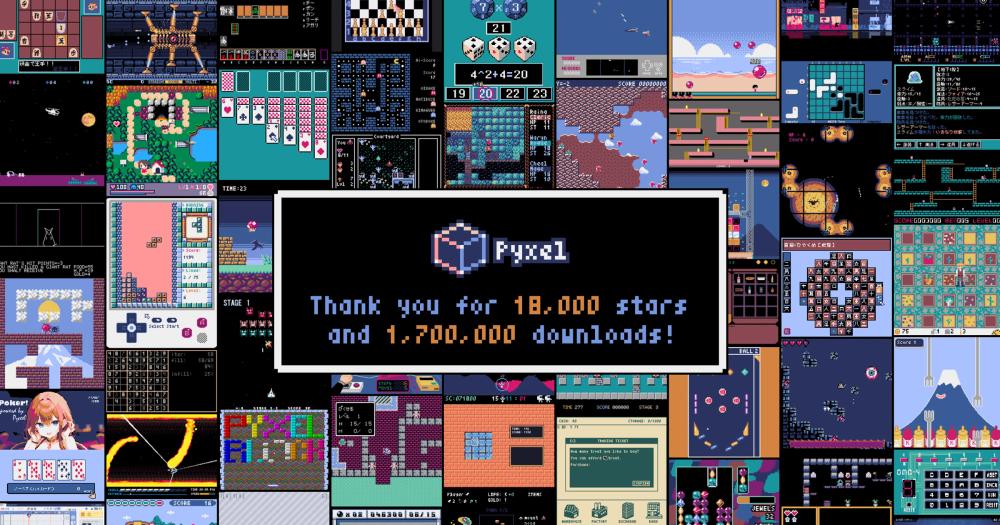
Build retro games in Python with a Rust-powered engine, built-in sprite and sound editors, and WebAssembly export for browser play.

Visit websiteGitHub18.5K stars
image of Pyxel
TL;DR

Pyxel is a retro game engine for Python with a Rust core, offering a free and open source path to PICO-8-style game creation. It includes built-in image, tilemap, sound, and music editors, and exports games to WebAssembly for play in any modern browser. MIT licensed with no restrictions on commercial or internal use. Best for Python developers learning game development, educators teaching programming through game projects, and game jam participants who want constrained pixel-art game creation without a licensing fee.

Read the full breakdownHide the full breakdownWho it is for, how it works, trade-offs and the FAQ
who it's for

Who Pyxel is for#

Python developers building their first game

Pyxel provides a minimal, documented API for drawing pixels, handling input, and playing sounds, all from Python. Developers who know Python basics can build a working game in an afternoon without touching a larger game engine. The constrained environment also prevents scope creep on a first project.

Skip if:

Skip if the target is a commercial product targeting modern platforms. Pyxel's retro constraints and Python-based game logic limit its fit for professional game development where performance and modern visual fidelity matter.

Educators teaching Python through game projects

Pyxel's constrained API reduces the number of concepts a student needs before seeing results on screen. A single import and a draw loop are enough for a first working example. The built-in editors mean students see the connection between assets and code without leaving the tool.

Skip if:

Skip if students have no prior programming exposure. Pyxel still requires writing Python code; it is not a visual programming environment suitable for complete beginners.

Game jam participants using Python

Pyxel's built-in sprite, tilemap, sound, and music editors mean a game jam participant can produce a complete game without assembling a separate asset pipeline. WebAssembly export means the entry is a single link, easy to submit and play without asking judges to install anything.

Skip if:

Skip if the jam requires a full browser game experience beyond the retro aesthetic, or if the submission format expects a downloadable native build that runs outside a browser.

Hobbyists wanting a free PICO-8 alternative

Pyxel replicates the fantasy console experience: a constrained environment, built-in editors, and a simple API, all for free under the MIT license. Developers who tried PICO-8 but balked at the licensing fee or wanted Python instead of Lua have a direct alternative in Pyxel.

Skip if:

Skip if the PICO-8 community's specific conventions, cart format, and game library are the draw. Pyxel has its own ecosystem and does not run PICO-8 cartridges.

the problem

The problem it solves#

Making retro-style games in a constrained, fantasy-console workflow typically requires buying into a proprietary tool. PICO-8 and Picotron are paid fantasy consoles that use Lua as their scripting language. Python developers who want this workflow have no first-class free option that bundles the game engine with built-in asset editors and a WebAssembly export path.

Fantasy consoles combine the game engine, sprite editor, sound editor, and distribution format into one product. Replicating that in Python from scratch means assembling separate tools for each step. For hobby projects, game jams, or educational settings, that overhead is a real barrier to getting started.

how Pyxel solves it

How it solves it#

Built-in image and tilemap editor

Pyxel includes a full image and tilemap editor in the package, accessible from the terminal. Draw sprites and tilemaps in the editor, save them as a Pyxel resource file, and load them directly in your game code. No external sprite tool is needed to produce a complete game.

Built-in sound and music editor

Pyxel includes a sound and music editor alongside the image tools, in the same terminal-accessible tool suite. Compose sound effects and background music tracks within the editor, then reference them by channel number in your Python game code. The whole asset workflow stays inside one tool.

WebAssembly export for browser play

Finished Pyxel games export to self-contained HTML files that run in any modern browser via WebAssembly. The bundle can be hosted on any static file server, requiring no server-side code and no proprietary runtime for the player. Sharing a game is a matter of posting a link.

Rust rendering core with OpenGL and WebGL

Pyxel's rendering layer is written in Rust and targets OpenGL for desktop and WebGL for browser export. Python handles game logic; Rust handles the rendering pipeline. This split keeps the Python interface approachable while the graphics layer stays fast across platforms.

strengths · trade-offs

Strengths and trade-offs#

Strengths

  • MIT license with no commercial restrictionsPyxel is MIT licensed. The license permits use, modification, distribution, and commercial deployment with no fee. The only requirement is preserving the copyright notice in distributed copies. Paid alternatives like PICO-8 and Picotron charge licensing fees before you can ship commercially.
  • Python-native workflowGame logic is written in standard Python using Pyxel's API for drawing and input. Developers who already know Python can start building retro games without learning a new scripting language. PICO-8 and Picotron require Lua, which adds a learning curve for the Python-native developer.
  • Active maintenance with minimal open issuesPyxel has 18,522 GitHub stars and its last commit was November 5, 2026. The project carries only 6 open issues, a low count for a tool at this activity level. Active maintenance matters for a game engine dependency: a stalled engine leaves projects stranded when language updates break compatibility.
  • Browser distribution via WebAssemblyPyxel games export to WebAssembly and run in any modern browser. Sharing a finished game is a matter of hosting an HTML file. The export requires no server-side code and no proprietary runtime on the player's machine, which makes distribution simpler than paid fantasy consoles that require their own runtimes.

Trade-offs

  • -Requires writing Python codePyxel provides no visual scripting, block coding, or GUI game builder. Every game is written in Python code. For beginners with no programming background, the learning curve is writing Python first and game development second. Tools designed for complete beginners with no coding experience are a better starting point.
  • -Designed for retro aesthetics, not modern gamesPyxel is designed for pixel-art retro game making. Its built-in tools, palette, and API prioritize the constrained 8-bit or 16-bit aesthetic. Developers wanting modern 2D sprite animation with high-resolution assets, real-time shader effects, or large asset pipelines will find Pyxel's intentional constraints a poor fit and need a game engine without the retro focus.
versus alternatives

Pyxel vs alternatives#

Pyxel vs PICO-8

Both tools target retro game making with built-in asset editors and a constrained aesthetic, but they differ on price, scripting language, and flexibility. PICO-8 is a proprietary tool with a licensing fee; Pyxel is MIT licensed and free.

FeaturePyxelPICO-8
LicenseMIT (free)Proprietary (paid)
Scripting languagePythonLua
Browser exportWebAssemblyHTML player
Self-hostingLocal install, no licenseLicensed binary
Built-in editorsImage, tilemap, sound, musicSprite, map, sfx, music, code

Pyxel is the better choice for Python developers who want the fantasy console workflow without a licensing cost. The MIT license also makes it safe for educational and commercial projects without negotiating licensing terms. PICO-8 is still the better fit for developers who specifically want Lua's syntax and want access to the PICO-8 community's existing game library and conventions built around its format.

Pyxel vs Picotron

Picotron is a next-generation fantasy workstation from the PICO-8 creators, running Lua apps as windowed processes beyond just games. Pyxel focuses specifically on retro game development with a Python API.

FeaturePyxelPicotron
LicenseMIT (free)Proprietary (paid)
Scripting languagePythonLua
Use case focusRetro gamesFantasy workstation (apps + games)
Browser exportWebAssemblyHTML export

Pyxel is the better fit for game development in Python at no cost. Picotron is worth considering for creators who want a broader fantasy workstation concept extending to general apps, tools, and utilities beyond the game-making focus, and who prefer Lua over Python.

tech stack · detected from GitHub

What it's built on#

Languages
JavaScriptPythonRust
Runtimes
WebAssembly
frequently asked

FAQ#

Is Pyxel free to use?

Yes. Pyxel is MIT licensed and free to install, use, and distribute with no cost. The MIT license permits commercial use with no fee; the only requirement is preserving the copyright notice in distributed copies. There is no paid tier, no cloud dependency, and no account required.

Can Pyxel games run in a browser?

Yes. Pyxel exports games to WebAssembly, which runs in any modern browser. The export produces a self-contained HTML file. Players open it in a browser with no install or plugin required. This makes sharing a game as simple as hosting a static file and posting a link.

How does Pyxel compare to PICO-8?

Both are retro game engines with built-in asset editors, but they differ in language and cost. PICO-8 uses Lua and requires a paid license. Pyxel uses Python, is MIT licensed, and is free for any use. PICO-8 has a large dedicated community and an established game library built around its conventions. Pyxel is the better fit for Python developers who want the fantasy console approach without the licensing cost or the Lua requirement.

Can I use Pyxel for a commercial game?

Yes. The MIT license places no restrictions on commercial use. You can build, sell, and distribute games made with Pyxel without paying a licensing fee. The only requirement is that the copyright notice be included in copies of the Pyxel library itself. Your game's assets and code are yours to license as you choose.

What Python experience do I need to use Pyxel?

Basic Python knowledge is enough to start: understanding of variables, loops, and functions covers the initial API. Pyxel's API is intentionally small, with simple functions for drawing, input, and sound. Beginners who know Python fundamentals can build a working game quickly. Advanced Python features are not required for most retro game projects.

also worth a look

Similar open-source tools#

DiscImageStudio

Alternative toLightScribe Toolbox

Burn visible images into standard CD, DVD, or Blu-ray discs.

  • 6,620 GitHub stars
  • GPL-3.0Licence GPL-3.0

Awwwards-mcp

Alternative toLazyweb

MCP server for Awwwards design inspiration, no API key required.

  • 424 GitHub stars
  • MITLicence MIT

Opensource UI

Alternative toTailwind UI

200+ copy-paste React and Next.js components, MIT licensed, no package

  • 818 GitHub stars
  • MITLicence MIT

Stayput

InBusiness & Productivity

136 file tools for images, PDFs and video, no uploads or accounts.

  • 1 GitHub stars
  • MITLicence MIT

Pixtamer

Alternative toSquash

Native Mac image optimiser, on-device, private, MIT-licensed

  • MITLicence MIT

Open3D

InDeveloper Tools

C++/Python library for point clouds, meshes, and 3D visualization.

  • 14,168 GitHub stars
  • MITLicence MIT
by category

Open source tools in these categories#

590

Developer Tools

REA (Reverse Engineer Anything), Skills for Real Engineers, superpowers
117

Design & Creative

ComfyUI, Excalidraw, Godot Engine

Sponsors

Inbox Zero

Alternative toSuperhuman

AI email assistant that drafts replies and clears your inbox

  • 12,915 GitHub stars
  • AGPL-3.0Licence AGPL-3.0
  • #Email

rakazo

Alternative toGrok Bot

AI teammates you own: your keys, your model, your machine.

  • 7,028 GitHub stars
  • Apache-2.0Licence Apache-2.0
  • #AI Agents

SnitchFeed

Live monitoring on LinkedIn, X, Reddit & more. Agentic social listening for startups.

Marketing & Growth

Advertise your product

New open source projects by email

The projects we add and every new guide. Free, unsubscribe any time.

Find open source alternatives to paid software

/
  • Claude Code to OpenCode
  • Jira to Windshift
  • Notion to AppFlowy
  • Slack to Mattermost
  • Linear to GitLab
  • Wispr Flow to Handy
  • Arc to Zen Browser
  • CapCut to Concat
  • Grok Bot to rakazo
  • Superhuman to Inbox Zero
  • Airtable to AITable
  • Muse to OpenClaw
  • Railway to Coolify
  • GitHub Copilot to Cline
  • Datadog to Netdata
  • Confluence to Wiki.js
  • Microsoft Teams to Rocket.Chat
  • Firebase to Supabase
  • Pinecone to Qdrant
  • Zapier to n8n
  • 1Password to KeePassXC
  • Devin AI to OpenHands
  • Asana to Leantime
  • Contentful to Strapi
  • Claude Code to OpenCode
  • Jira to Windshift
  • Notion to AppFlowy
  • Slack to Mattermost
  • Linear to GitLab
  • Wispr Flow to Handy
  • Arc to Zen Browser
  • CapCut to Concat
  • Grok Bot to rakazo
  • Superhuman to Inbox Zero
  • Airtable to AITable
  • Muse to OpenClaw
  • Railway to Coolify
  • GitHub Copilot to Cline
  • Datadog to Netdata
  • Confluence to Wiki.js
  • Microsoft Teams to Rocket.Chat
  • Firebase to Supabase
  • Pinecone to Qdrant
  • Zapier to n8n
  • 1Password to KeePassXC
  • Devin AI to OpenHands
  • Asana to Leantime
  • Contentful to Strapi