Open Source Alternatives
  • Alternatives
  • Categories
    Categories by size1,024 projects
    • Developer Tools525
    • AI & Machine Learning454
    • Business & Productivity235
    • Web Development203
    • Security & Monitoring152
    • Communication & Collaboration138
    • IT Management136
    • Cloud & Hosting120
    • LLMOps & AI Tooling118
    • Data & Analytics112
    Browse all 21 categoriesProduct & Project Management, Design & Creative and 9 more
  • Blog
  • Advertise
SearchNotion, Slack, password manager.../
Submit
Open Source Alternatives
  • Alternatives
    • Developer Tools525
    • AI & Machine Learning454
    • Business & Productivity235
    • Web Development203
    • Security & Monitoring152
    • Communication & Collaboration138
    • Browse all 21 categories
  • Blog
  • Advertise
Submit your project

New open source projects by email

The projects we add and every new guide. Free, unsubscribe any time.

Open Source Alternatives LogoOpen Source Alternatives

Handpicked Open Source Alternatives to Paid Softwares

Product

  • Categories
  • Tag
  • Advertise

Resources

  • Blog
  • Collection
  • Submit

Company

  • Privacy Policy
  • Terms of Service
  • Refund Policy
  • Sitemap

Alternatives

  • Claude Code
  • Jira
  • Notion
  • Slack
  • Linear
  • Wispr Flow
  • All alternatives
© 2026 Open Source Alternatives. All rights reserved.
Open SourceAlternatives
Home/Categories/Business & Productivity/Stayput
icon of Stayput

Stayput

  • 0 stars
  • MIT
  • Active this week
  • Last commit today

Last verified Nov 3, 2026

Convert, compress, and edit images, PDFs, video, and audio with 136 browser-based tools that never upload your files, require an account, or add watermarks.

Visit websiteGitHub0 stars
image of Stayput
TL;DR

Stayput is a collection of 136 file conversion and editing tools for images, PDFs, video, and audio that run entirely in your browser tab, with no server, no uploads, and no accounts. It replaces paid conversion platforms like SmallPDF and CloudConvert for users who need privacy or work with sensitive files, with no daily limits or watermarks. MIT licensed and self-hostable as a static Astro build, it works offline after the first visit.

Read the full breakdownHide the full breakdownWho it is for, how it works, trade-offs, the quick start and the FAQ
who it's for

Who Stayput is for#

Privacy-conscious individuals converting personal or sensitive files

People handling medical records, legal documents, tax forms, or personal photos who need file conversion without routing files through third-party servers. Stayput's no-upload architecture removes the data-handling risk without installing any software beyond visiting the site.

Skip if:

If you are converting large video files on a mobile device, the browser tab's memory ceiling may be a practical obstacle on phones with limited RAM.

Small teams self-hosting a file tool suite

Teams that want one internal tool for image compression, PDF signing, and video trimming without routing files through cloud services. The static Astro build deploys to any hosting infrastructure in three documented commands, with no server-side dependencies.

Skip if:

Teams that need collaboration features, shared cloud storage, or document workflow automation will need a different tool: Stayput has no backend and no persistent state.

Developers integrating file operations into LLM workflows

Engineers connecting file conversion to an LLM client via Model Context Protocol. The stayput-mcp server exposes Stayput's PDF and image tools as MCP tool calls with no network access and no uploads, configured with a single JSON block in the MCP client.

Skip if:

If you need to run file conversions in a server-side pipeline rather than in an MCP client workflow, a server-side library is more appropriate than a browser-based or local MCP tool.

the problem

The problem it solves#

Most browser-based file tools are cloud services. Drop a PDF into a merge tool and it travels to a third-party server; upload an iPhone photo to convert it and the image leaves your device. For legal documents, medical records, employee data, or personal photos, that is not a minor privacy concern. File conversion services typically state that they delete files after a set period, but the deletion claim is difficult to verify and the file has already crossed their infrastructure.

Paid platforms like SmallPDF and CloudConvert also impose usage limits: a file size cap, a daily conversion ceiling, or a watermark on the free tier that forces an upgrade. For anyone converting files regularly, the cost adds up and the data-handling risk remains.

how Stayput solves it

How it solves it#

136 browser-side tools across images, PDFs, video, and audio

The toolset covers image conversions (HEIC to JPG, compress, resize, background removal), PDF operations (merge, split, compress, sign, OCR, fill forms), video tools (trim, compress, convert format, blur faces), and audio tools (convert, trim, vocal remover, Whisper transcription). All 136 run as JavaScript and WebAssembly in the browser tab with no server processing.

Verifiable no-upload architecture

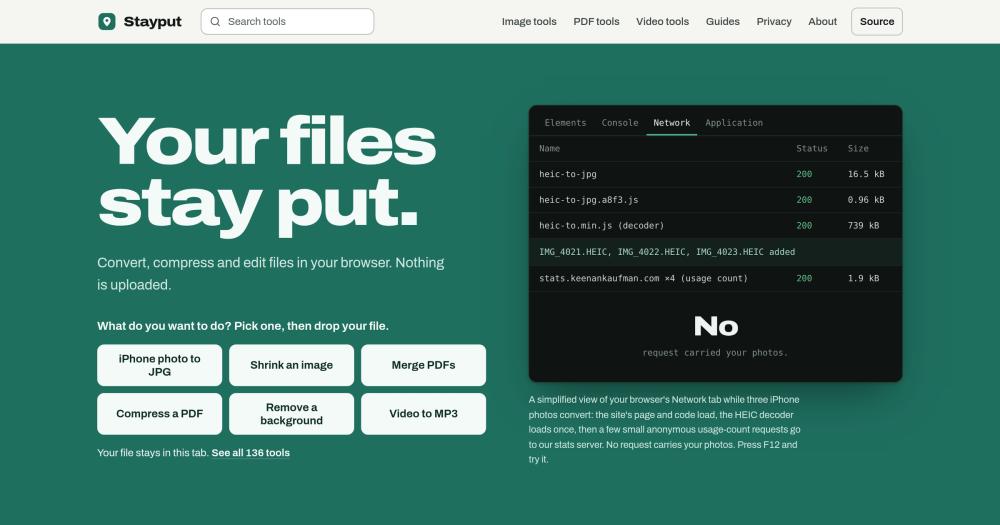
Every tool page counts the network requests made after a file is added and displays the list in the UI. Opening the browser's network tab shows no request carrying your file, because the site is static HTML and JavaScript with no backend. The same conversion works in airplane mode after one visit: load the tool, switch to airplane mode, and it keeps working.

Offline-capable after one visit

A service worker caches the site after the first visit, so most tools keep working with no network. Tools that use a downloaded AI model (background remover, vocal remover, audio transcription with Whisper) need one online run to download the model; subsequent uses are fully offline.

MCP server for LLM tool calls

Stayput ships as a local Model Context Protocol server (stayput-mcp) that exposes the same PDF and image tools as MCP tool calls for LLM clients. Configuration is one JSON block in an MCP client config file using `npx -y stayput-mcp`. No uploads, no network access.

Unrestricted access with no account or watermark

Every tool is free to use without creating an account. Output files carry no watermarks, and conversion is limited only by device memory rather than daily quotas or file-size tiers. A batch of 100 photos processes the same as a single file.

strengths · trade-offs

Strengths and trade-offs#

Strengths

  • No file data leaves the deviceThe site is static files; every conversion runs in the browser tab. There is no server that could receive files, so no data-handling policy, retention period, or breach risk applies. This is verifiable: open the browser's network tab, add a file, and no request carries it.
  • MIT license with self-hostingThe MIT license permits running a private instance for personal, team, or commercial use without restriction. Deployment is a static Astro build documented with three commands: `git clone`, `npm install`, `npm run build`. The compiled `dist/` directory deploys to any static host.
  • 136 tools in one place with no account switchingImage conversion, PDF editing, video compression, audio tools, OCR, QR code generation, background removal, and vocal remover are all available without switching between multiple online services or creating accounts on each.

Trade-offs

  • -Device memory is the processing ceilingServer-based tools offload heavy conversion to dedicated hardware; Stayput runs in the browser tab, so large video files or batch operations on a low-memory phone may run slowly or fail. The site documents this constraint explicitly: phones hold less memory than desktops.
  • -AI-model tools require one online run to download the modelTools that use a local AI model (background remover, vocal remover, noise reduction, Whisper transcription) download their model on the first run. Until the model is cached on the device, those specific tools require a network connection.
  • -New project with no production track record beyond the hosted siteStayput was created in September 2026 and had 0 GitHub stars at time of writing. The codebase is actively maintained (last push November 2026) and the hosted site is live, but there is no public community, no issue history, and no verified deployment record for self-hosted instances.
versus alternatives

Stayput vs alternatives#

Stayput vs SmallPDF

SmallPDF is one of the most widely used browser-based PDF tools, covering merge, split, compress, sign, and format conversions. Both tools serve the same PDF operations in a browser, but Stayput processes files locally while SmallPDF routes them through its cloud infrastructure.

FeatureStayputSmallPDF
LicenseMITProprietary
Self-hostingYesNo
File processingClient-side, no uploadCloud server
Free tier limitsNone2 tasks per hour
WatermarksNoneFree tier adds watermarks on some outputs
PricingFree$12/month Pro

For confidential documents, the upload difference is material. SmallPDF's data-retention policy applies when files cross its servers; Stayput runs the same merge, compress, sign, and OCR operations in your browser tab. SmallPDF's Pro plan adds team collaboration, cloud storage, and document workflow features, which Stayput does not offer. If those features matter, SmallPDF is worth the cost. For daily individual use or handling sensitive files, Stayput's no-limit, no-upload model is the stronger fit.

Stayput vs CloudConvert

CloudConvert is a paid file-conversion service and REST API supporting over 200 formats, primarily aimed at developers integrating conversion into applications. Stayput covers the same image, PDF, video, and audio conversions in the browser.

FeatureStayputCloudConvert
LicenseMITProprietary
Self-hostingYesNo
ProcessingClient-side browserCloud API
Free tierFully free, no limits25 conversion minutes per day
IntegrationMCP server (local)REST API (cloud)

CloudConvert's REST API is the better choice when you need to integrate conversion into a server-side application or automate bulk processing at scale from a backend service. Stayput's browser tools and local MCP server serve interactive and LLM-client workflows where files should stay on the device. For web-based use, Stayput handles the formats CloudConvert covers in the browser without per-conversion cost or data leaving the device.

install · quick start

Quick start#

bash
Deploy a self-hosted instance from the source repository.
```bash
git clone https://github.com/keenanlk/stayput
npm install
npm run build
node scripts/serve.mjs
```
tech stack · detected from GitHub

What it's built on#

Languages
JavaScriptTypeScript
Runtimes
WebAssembly
Tooling
esbuild
frequently asked

FAQ#

Does Stayput work offline?

Most tools work offline after one visit, which triggers a service worker that caches the site's files. Tools that use a downloaded AI model (background remover, vocal remover, Whisper transcription) need one online run to download the model; after that they work offline. You can confirm this yourself: load a tool, switch to airplane mode, and use it.

How can I verify that files are not uploaded?

Open your browser's developer tools (F12 or Cmd-Option-I on a Mac), go to the Network tab, open any tool, and add a file. You will see requests for the page's code and decoder files, plus small anonymous usage-count requests, but no request carrying your file. The tool page also lists its own requests after you add a file. Switching to airplane mode after loading the page confirms the conversion still works locally.

Can I self-host Stayput?

Yes. Stayput is a static Astro build with an MIT license. Clone the repository, run npm install and npm run build, and the compiled site is in the dist/ directory. Run node scripts/serve.mjs to serve it locally, or deploy the dist/ folder to any static hosting service. There is no server-side code or database to configure.

Is there a file size limit?

There is no server-imposed file size limit. The constraint is your device's available memory, since all processing happens in the browser tab. Desktop computers with several gigabytes of free memory handle large video files. Phones hold less memory and may run slowly or fail on very large files, which the site documents on its homepage.

Does Stayput track what files I convert?

No file names or contents are tracked. The site sends a small anonymous usage count (which tool was used and rough ranges such as file count and size, never your file or its name) to a stats server. The full list of requests the site makes is published at stayput.dev/privacy. Cookie-free, and no account means no user profile is built.

also worth a look

Similar open-source tools#

Flameshot

Alternative toSnagit

Open source screenshot tool with annotation and upload

  • 31,382 GitHub stars
  • GPL-3.0Licence GPL-3.0

ShareX

Alternative toSnagit

Screenshot and record with 80+ upload destinations on Windows

  • 40,569 GitHub stars
  • GPL-3.0Licence GPL-3.0

PDF4QT

Alternative toAdobe Acrobat

Open source PDF editor and viewer for Windows and Linux

  • 1,505 GitHub stars
  • MITLicence MIT

LiVES

Alternative toResolume

Live video editing and VJ performance tool for GNU/Linux

  • 102 GitHub stars
  • GPL-3.0Licence GPL-3.0

CleanYourTV

Featured

Alternative toATV Launcher Pro

Debloat any Android or Google TV over Wi-Fi and get an Apple TV-style home.

  • 48,047 GitHub stars
  • MIT LicenseLicence MIT License

rakazo

Featured

Alternative toGrok Bot

AI teammates you own: your keys, your model, your machine.

  • 6,568 GitHub stars
  • Apache-2.0Licence Apache-2.0
by category

Open source tools in these categories#

236

Business & Productivity

OpenClaw, Excalidraw, RustDesk
110

Design & Creative

ComfyUI, Excalidraw, Godot Engine
526

Developer Tools

REA (Reverse Engineer Anything), superpowers, Skills for Real Engineers

Sponsors

Inbox Zero

Alternative toSuperhuman

AI email assistant that drafts replies and clears your inbox

  • 12,889 GitHub stars
  • AGPL-3.0Licence AGPL-3.0
  • #Email

rakazo

Alternative toGrok Bot

AI teammates you own: your keys, your model, your machine.

  • 6,568 GitHub stars
  • Apache-2.0Licence Apache-2.0
  • #AI Agents

SnitchFeed

Live monitoring on LinkedIn, X, Reddit & more. Agentic social listening for startups.

Marketing & Growth

Advertise your product

New open source projects by email

The projects we add and every new guide. Free, unsubscribe any time.

Find open source alternatives to paid software

/
  • Claude Code to OpenCode
  • Jira to Windshift
  • Notion to AppFlowy
  • Slack to Mattermost
  • Linear to GitLab
  • Wispr Flow to Handy
  • Arc to Zen Browser
  • CapCut to Concat
  • Grok Bot to rakazo
  • Superhuman to Inbox Zero
  • Airtable to AITable
  • Muse to OpenClaw
  • Railway to Coolify
  • GitHub Copilot to Cline
  • Datadog to Netdata
  • Microsoft Teams to Rocket.Chat
  • Confluence to Docmost
  • Pinecone to Qdrant
  • Zapier to n8n
  • Devin AI to OpenHands
  • Firebase to Supabase
  • 1Password to KeePassXC
  • Contentful to Strapi
  • Adobe Premiere Pro to Shotcut
  • Claude Code to OpenCode
  • Jira to Windshift
  • Notion to AppFlowy
  • Slack to Mattermost
  • Linear to GitLab
  • Wispr Flow to Handy
  • Arc to Zen Browser
  • CapCut to Concat
  • Grok Bot to rakazo
  • Superhuman to Inbox Zero
  • Airtable to AITable
  • Muse to OpenClaw
  • Railway to Coolify
  • GitHub Copilot to Cline
  • Datadog to Netdata
  • Microsoft Teams to Rocket.Chat
  • Confluence to Docmost
  • Pinecone to Qdrant
  • Zapier to n8n
  • Devin AI to OpenHands
  • Firebase to Supabase
  • 1Password to KeePassXC
  • Contentful to Strapi
  • Adobe Premiere Pro to Shotcut