Open Source Alternatives
  • Alternatives
  • Categories
    Categories by size1,230 projects
    • Developer Tools633
    • AI & Machine Learning528
    • Business & Productivity296
    • Web Development217
    • Security & Monitoring190
    • Communication & Collaboration166
    • IT Management157
    • LLMOps & AI Tooling133
    • DevOps & CI/CD132
    • Cloud & Hosting131
    Browse all 21 categoriesDesign & Creative, Product & Project Management and 9 more
  • Blog
  • Advertise
SearchNotion, Slack, password manager.../
Submit
Open Source Alternatives
  • Alternatives
    • Developer Tools633
    • AI & Machine Learning528
    • Business & Productivity296
    • Web Development217
    • Security & Monitoring190
    • Communication & Collaboration166
    • Browse all 21 categories
  • Blog
  • Advertise
Submit your project

New open source projects by email

The projects we add and every new guide. Free, unsubscribe any time.

Open Source Alternatives LogoOpen Source Alternatives

Handpicked Open Source Alternatives to Paid Softwares

Add Open Source Alternatives as a preferred source on Google

Product

  • Categories
  • Tag
  • Advertise

Resources

  • Blog
  • Collection
  • Submit

Company

  • Privacy Policy
  • Terms of Service
  • Refund Policy
  • Sitemap

Alternatives

  • Claude Code
  • Jira
  • Notion
  • Slack
  • Linear
  • Wispr Flow
  • All alternatives
© 2026 Open Source Alternatives. All rights reserved.
Open SourceAlternatives
Home/Categories/Developer Tools/Qwen Code
icon of Qwen Code

Qwen Code

Open source alternative to GitHub Copilot and Claude Code

  • 29.8K stars
  • Apache-2.0
  • Active this week
  • Last commit today

Last verified Nov 13, 2026

Run an open-source AI coding agent in your terminal, editor, or desktop with multi-protocol model support and no vendor lock-in.

Visit websiteGitHub29.8K stars
image of Qwen Code
TL;DR

Qwen Code is an open-source AI coding agent that runs in the terminal, IDE, desktop app, and chat platforms, letting developers build features, debug code, and navigate repositories in plain language. It replaces paid tools like GitHub Copilot and Claude Code's managed tier with an Apache-2.0-licensed framework that works with any compatible model provider: OpenAI, Anthropic, Gemini, Qwen, or a local deployment via Ollama or vLLM. Best for developers who want agentic coding without single-provider dependency.

Read the full breakdownHide the full breakdownWho it is for, how it works, trade-offs, the quick start and the FAQ
who it's for

Who Qwen Code is for#

Backend engineers replacing a commercial AI coding assistant

Developers who want the agentic capabilities of an AI coding assistant without a subscription to a commercial service can run Qwen Code against any compatible API. The terminal interface fits existing workflows with no additional IDE plugin required.

Skip if:

If your team already has a GitHub Copilot Business or Enterprise plan and is satisfied with its IDE completions, Qwen Code adds setup overhead without a clear productivity gain for that specific workflow.

Teams with their own GPU or private model infrastructure

Organizations running Ollama, vLLM, or any OpenAI-compatible local server can point Qwen Code at that endpoint and keep code entirely on-premises. No data leaves the host, which satisfies air-gapped or compliance-driven environments.

Skip if:

If your model is a managed cloud API and you have no self-hosting interest, the multi-protocol flexibility provides no advantage over a single-provider tool.

DevOps engineers automating code review and PR workflows

Headless mode via `qwen -p "..."` runs in CI pipelines without user interaction. The agent can translate new strings, review diffs, raise PRs for a reviewer team, and loop on test failures, all triggered from a standard shell command.

Skip if:

If your CI environment restricts external network calls, the agent needs a local model endpoint configured; cloud model calls will not work in those setups.

Developers in regions where Western AI services are unavailable

Qwen Code's native integration with Qwen models, Alibaba ModelStudio, and domestic Chinese messaging platforms (DingTalk, WeChat, Feishu) makes it practical in contexts where other major AI coding tools are blocked or uneconomical.

Skip if:

If you are based in a region with straightforward access to all major AI providers and your team already uses a US-based IDE workflow, the domestic integrations are not relevant to your decision.

the problem

The problem it solves#

AI coding assistants have a lock-in problem. Commercial tools tie you to one model provider, one interface, and one billing relationship. Switching providers means reconfiguring every workflow and losing accumulated context. For teams running their own GPU infrastructure or already holding API contracts with particular model providers, this vendor dependency is an avoidable tax.

The second issue is surface coverage. Most AI coding tools work in one context: the IDE or the terminal. Developer workflows span both, plus CI/CD pipelines and team communication platforms. A tool that handles scripted batch jobs, interactive sessions, and chat-based triggers without a separate integration for each reduces friction that compounds over time.

how Qwen Code solves it

How it solves it#

Multi-protocol model support

Connects to any OpenAI-, Anthropic-, Gemini-, or Qwen-compatible API endpoint, plus local models running through Ollama or vLLM. You can switch providers at runtime without restarting: pick the model that fits the task, the budget, or the data-residency requirement.

Agentic task execution with SubAgents and Auto-Skills

Runs multi-step coding tasks autonomously: plans the work, edits files, runs commands, creates commits, and loops until the task is done or a checkpoint is reached. Auto-Skills loads relevant playbooks automatically; SubAgents delegate subtasks to parallel agent instances, each scoped to a workspace.

MCP integration for external data sources

Connects to external tools through the Model Context Protocol: Google Drive for design docs, Jira for tickets, Figma for specs, Slack for team context, or any custom developer tooling. Qwen Code reads from these sources at task time, not just at startup.

Daemon mode for shared agent sessions

Run `qwen serve` to start a long-lived service that multiple browser, editor, SDK, and automation clients can share. Active sessions persist across client reconnects, and multiple workspaces run concurrently. The default listens on loopback; `QWEN_SERVER_TOKEN` restricts access on shared hosts.

Chat platform integrations

Connects to Telegram, DingTalk, WeChat, and Feishu through `qwen channel start`. Runs coding tasks triggered from chat messages, files, or commands in those platforms. Useful for teams whose primary communication tool is not a Western collaboration app.

Headless and CI/CD scripting mode

Run `qwen -p "..."` non-interactively in shell scripts, CI pipelines, or batch jobs. Standard Unix pipes work: `tail -f app.log | qwen -p "Slack me if anomalies appear"`. The same agent session, tools, and model setup available interactively are available headlessly.

strengths · trade-offs

Strengths and trade-offs#

Strengths

  • Apache-2.0 license with no model vendor dependencyThe framework is Apache-2.0 licensed, which means you can run it commercially, fork it, and modify it without licensing fees. Because it supports any compatible model endpoint, your agents are not tied to a single provider's pricing or availability.
  • SWE-bench Verified scores of 76.4% to 77.8%Seven Qwen Code versions scored between 76.40% and 77.80% on SWE-bench Verified using Qwen 3.7 Max (500 tasks, three trials per version). That places it among the highest-performing publicly tested coding agents on a standard benchmark.
  • Multi-surface interfaces from one installOne install covers terminal, desktop app (macOS, Windows, Linux), web UI via `qwen serve`, VS Code, Zed, and JetBrains plugins, and chat integrations. Teams with varied workflows can choose the interface that fits each context without maintaining separate tools.
  • SDK support for TypeScript, Python, and JavaBuild custom integrations using the TypeScript, Python, or Java SDKs. The Python SDK's `query()` function streams results asynchronously, making it straightforward to wire Qwen Code into ETL pipelines, review automation, or test generation workflows.

Trade-offs

  • -1,748 open issues at time of reviewThe repository carried 1,748 open issues (pull requests excluded) as of 2026-11-13. For a project launched in June 2025, that volume indicates active iteration alongside a backlog of reported bugs and feature requests. Teams that need enterprise support SLAs should evaluate the issue tracker before committing.
  • -Model provider setup required on first runQwen Code prompts for a model provider on first launch. While the docs cover several options (Qwen subscription, QwenCloud, Alibaba ModelStudio, third-party providers, custom endpoints), teams without an existing API key or Qwen account need to provision one before the tool is useful. No offline fallback is documented for the core text completion path.
  • -Daemon default is unauthenticated on shared hostsBy default, the daemon runs on loopback without bearer authentication, so any process on the same host can reach the API, including code execution. On shared or multi-user servers, the server token variable and require-auth flag must be configured manually before exposing the daemon.
versus alternatives

Qwen Code vs alternatives#

Qwen Code vs GitHub Copilot

GitHub Copilot provides inline code completions and chat directly within the IDE. Qwen Code takes an agentic approach: it runs tasks end to end, edits files, executes commands, and operates from the terminal and multiple other surfaces, not just an editor plugin.

FeatureQwen CodeGitHub Copilot
LicenseApache-2.0Proprietary
Self-hostingYesNo
Primary interfaceTerminal, IDE, desktop, chat appsIDE
Agentic task executionYesNo (completions and chat)
MCP integrationsYesNo

Qwen Code is the better choice when you want an agent that takes multi-step action across your project rather than providing completion suggestions. GitHub Copilot is worth considering when your team lives entirely in the IDE and wants inline completions and code chat without terminal familiarity or model setup.

Qwen Code vs Claude Code

Claude Code is Anthropic's own agentic coding CLI with feature parity across most dimensions. The key difference is model support: Claude Code uses Anthropic models exclusively, while Qwen Code works with any OpenAI-, Anthropic-, Gemini-, or Qwen-compatible endpoint, including local deployments.

FeatureQwen CodeClaude Code
LicenseApache-2.0Proprietary
Model supportAny compatible APIAnthropic models only
Daemon modeYesNo
Chat integrationsTelegram, DingTalk, WeChat, FeishuNo
Agent ArenaYesNo
Open-source codebaseYesNo

Qwen Code is the better choice when you need to run against local or non-Anthropic models, want chat platform integrations for DingTalk or WeChat, or want to self-host the agent framework itself under a permissive license. Claude Code is worth considering when your team already uses Anthropic's Claude and wants the tightest integration with its model capabilities without additional setup.

install · quick start

Quick start#

bash
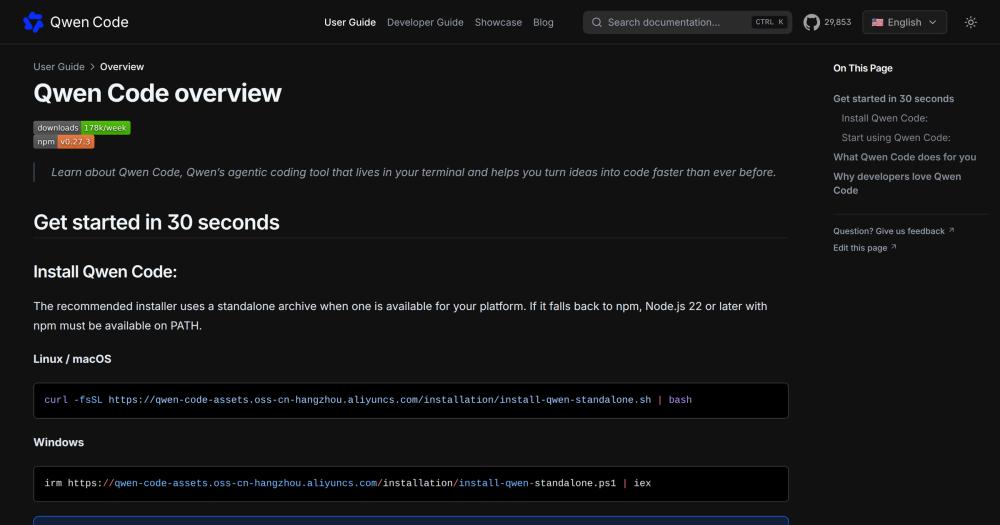
Install Qwen Code on Linux or macOS using the standalone installer or Homebrew.

```bash
# Standalone installer (Linux / macOS)
curl -fsSL https://qwen-code-assets.oss-cn-hangzhou.aliyuncs.com/installation/install-qwen-standalone.sh | bash

# Homebrew (macOS / Linux)
brew install qwen-code

# npm (Node.js 22+)
npm install -g @qwen-code/qwen-code@latest
```
tech stack · detected from GitHub

What it's built on#

Languages
CJavaJavaScriptRustTypeScript
Frameworks
Next.jsReact
Tooling
esbuild
frequently asked

FAQ#

Is Qwen Code free to use?

The software is Apache-2.0 licensed and free to run. Model costs depend on which provider you configure: a Qwen Plus or Pro subscription from chat.qwen.ai is one option; QwenCloud, Alibaba ModelStudio, and third-party providers like DeepSeek and OpenRouter each have their own pricing. Local model deployments via Ollama or vLLM run at infrastructure cost only, with no per-query fee.

How does Qwen Code compare to Claude Code?

Qwen Code was built to match Claude Code's feature set and adds multi-protocol model support, daemon mode, chat platform integrations, and an open-source license. Claude Code uses Anthropic models exclusively; Qwen Code works with any OpenAI-, Anthropic-, Gemini-, or Qwen-compatible endpoint. For teams already committed to the Anthropic ecosystem, Claude Code is the lower-friction choice. Qwen Code's advantage is flexibility: switch models at runtime, run locally, or use providers other than Anthropic.

Can I use Qwen Code with my existing OpenAI or Anthropic API key?

Yes. The first-run setup menu includes a Third-party Providers option with built-in connectors for DeepSeek, MiniMax, Z.AI, Kimi, and OpenRouter, each requiring only an API key. A Custom Provider option accepts any OpenAI-compatible endpoint URL, covering self-hosted models or proxies. For Anthropic specifically, configure your API key through the third-party provider path.

Does Qwen Code send my code to Qwen's servers?

Only if you use a cloud model provider (Qwen, QwenCloud, Alibaba ModelStudio, or a third-party API). If you configure a local model via Ollama or vLLM through the Custom Provider option, no code leaves your machine. The daemon's default loopback setup keeps agent sessions local unless you explicitly expose a port.

What is the Qwen Code VS Code extension?

Qwen Code ships a VS Code extension listed on the marketplace as Qwen Code Companion. It provides a sidebar panel for running the agent inside VS Code without a terminal. The extension was in beta as of the November 2026 README.

Looking for more

Other ways to replace GitHub Copilot and Claude Code#

OpenCode

#1 in the Claude Code guide

Broad provider and model choice in a terminal-first client, MIT-licensed with AGENTS.md instructions

225,912 GitHub stars

oh-my-pi

#2 in the Claude Code guide

Direct Claude configuration inheritance with Anthropic subscription support

38,563 GitHub stars

kilocode

#3 in the Claude Code guide

Documented Claude transcript import with IDE and CLI surfaces

27,942 GitHub stars

Goose

#4 in the Claude Code guide

ACP subscription bridge that reuses an existing Claude Code or ChatGPT subscription

56,437 GitHub stars
All 24 Claude Code alternatives10 open source Claude Code alternatives, ranked
by category

Open source tools in these categories#

633

Developer Tools

REA (Reverse Engineer Anything), Skills for Real Engineers, superpowers
528

AI & Machine Learning

freeCodeCamp, REA (Reverse Engineer Anything), OpenClaw

Sponsors

Inbox Zero

Alternative toSuperhuman

AI email assistant that drafts replies and clears your inbox

  • 12,987 GitHub stars
  • AGPL-3.0Licence AGPL-3.0
  • #Email

rakazo

Alternative toGrok Bot

AI teammates you own: your keys, your model, your machine.

  • 7,869 GitHub stars
  • Apache-2.0Licence Apache-2.0
  • #AI Agents

SnitchFeed

Live monitoring on LinkedIn, X, Reddit & more. Agentic social listening for startups.

Marketing & Growth

Advertise your product

New open source projects by email

The projects we add and every new guide. Free, unsubscribe any time.

Find open source alternatives to paid software

/
  • Claude Code to OpenCode
  • Jira to Windshift
  • Notion to AppFlowy
  • Slack to Mattermost
  • Linear to GitLab
  • Wispr Flow to Handy
  • Arc to Zen Browser
  • CapCut to Concat
  • Grok Bot to rakazo
  • Superhuman to Inbox Zero
  • Discord to Stoat
  • Airtable to AITable
  • Muse to OpenClaw
  • Railway to Coolify
  • GitHub Copilot to Cline
  • Datadog to Netdata
  • Confluence to Wiki.js
  • Microsoft Teams to Rocket.Chat
  • 1Password to KeePassXC
  • Firebase to Supabase
  • Pinecone to Qdrant
  • Zapier to n8n
  • Devin AI to OpenHands
  • Asana to Leantime
  • Claude Code to OpenCode
  • Jira to Windshift
  • Notion to AppFlowy
  • Slack to Mattermost
  • Linear to GitLab
  • Wispr Flow to Handy
  • Arc to Zen Browser
  • CapCut to Concat
  • Grok Bot to rakazo
  • Superhuman to Inbox Zero
  • Discord to Stoat
  • Airtable to AITable
  • Muse to OpenClaw
  • Railway to Coolify
  • GitHub Copilot to Cline
  • Datadog to Netdata
  • Confluence to Wiki.js
  • Microsoft Teams to Rocket.Chat
  • 1Password to KeePassXC
  • Firebase to Supabase
  • Pinecone to Qdrant
  • Zapier to n8n
  • Devin AI to OpenHands
  • Asana to Leantime