Open Source Alternatives
  • Alternatives
  • Categories
    Categories by size1,284 projects
    • Developer Tools660
    • AI & Machine Learning543
    • Business & Productivity308
    • Web Development219
    • Security & Monitoring198
    • Communication & Collaboration168
    • IT Management164
    • Design & Creative142
    • LLMOps & AI Tooling140
    • DevOps & CI/CD137
    Browse all 21 categoriesCloud & Hosting, Product & Project Management and 9 more
  • Blog
  • Advertise
SearchNotion, Slack, password manager.../
Submit
Open Source Alternatives
  • Alternatives
    • Developer Tools660
    • AI & Machine Learning543
    • Business & Productivity308
    • Web Development219
    • Security & Monitoring198
    • Communication & Collaboration168
    • Browse all 21 categories
  • Blog
  • Advertise
Submit your project

New open source projects by email

The projects we add and every new guide. Free, unsubscribe any time.

Open Source Alternatives LogoOpen Source Alternatives

Handpicked Open Source Alternatives to Paid Softwares

Add Open Source Alternatives as a preferred source on Google

Product

  • Categories
  • Tag
  • Advertise

Resources

  • Blog
  • Collection
  • Submit

Company

  • Privacy Policy
  • Terms of Service
  • Refund Policy
  • Sitemap

Alternatives

  • Claude Code
  • Jira
  • Notion
  • Slack
  • Linear
  • Wispr Flow
  • All alternatives
© 2026 Open Source Alternatives. All rights reserved.
Open SourceAlternatives
Home/Categories/Business & Productivity/SignuDoc
icon of SignuDoc

SignuDoc

Open source alternative to DocuSign, Adobe Acrobat Sign, Dropbox Sign, SignNow and BoldSign

  • 786 stars
  • MIT
  • Active this week
  • Last commit today

Last verified Nov 17, 2026

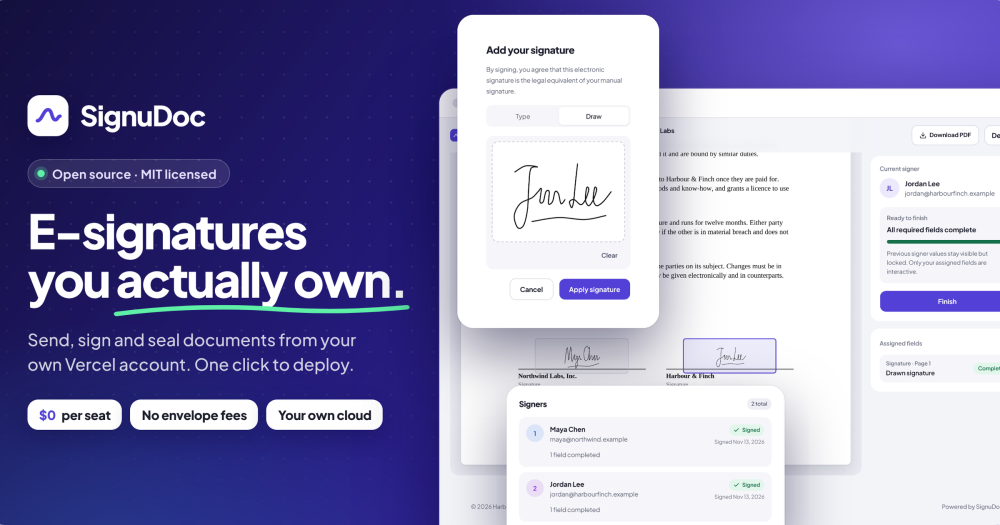
Host your own e-signature app with PAdES-sealed PDFs, a hash-chained audit trail, and no per-seat fees.

Visit websiteGitHub786 starsDeploy on Hostinger
image of SignuDoc
TL;DR

SignuDoc is an MIT-licensed e-signature app that lets you send, sign, and seal PDF documents from your own Vercel account. It replaces commercial e-signature services like DocuSign by putting signed PDFs, audit trails, and signer data into private cloud accounts you control, with no per-seat pricing. The primary deployment route is a Vercel Deploy button that sets up a Neon Postgres database, Resend email, and a private Vercel Blob store. Best for small to mid-sized teams sending everyday agreements who want ownership over their signing data and no seat-based billing.

Read the full breakdownHide the full breakdownWho it is for, how it works, trade-offs, the quick start and the FAQ
who it's for

Who SignuDoc is for#

Teams sending recurring NDAs and service contracts

Set up templates for the agreements you send every week, add signers by role, and distribute signing links by email. The dashboard tracks who has signed and who the envelope waits on, with automatic reminders at 1, 2, 3, or 7-day intervals. No per-seat fee and no envelope limit from SignuDoc itself.

Skip if:

Your team needs to trigger document sending from a CRM or other software, or needs signers to sign simultaneously rather than in a defined order.

Organizations with data sovereignty requirements

Every signed PDF and audit record stays in a Neon Postgres database and a Vercel Blob store in your own cloud accounts, in the region you choose. No third party hosts your agreements. The MIT license means you can inspect and modify the code.

Skip if:

You need certifications such as HIPAA compliance, 21 CFR Part 11 validation, or eIDAS qualified signatures without adding an external signing provider.

Developers setting up signing for their organization

The Vercel Deploy button requires no infrastructure expertise: it provisions a database, file storage, and email in one step. The source is on GitHub and MIT licensed, so you can fork and extend it. Environment variables are documented for self-hosting on any Node.js 24 server.

Skip if:

You need a signing API, webhooks, or embedded signing to integrate document workflows programmatically into your own application. SignuDoc currently has no API.

the problem

The problem it solves#

Commercial e-signature services charge per seat or per envelope. A team of any size pays for every user whether they send one document a month or many, and the cost scales with headcount rather than usage. Signed PDFs live in the vendor's cloud, under their retention policies and subject to changes in their terms of service. Plans that include an envelope allowance mean a team that sends more than expected faces overage charges or an upgrade.

For teams that want cost control and data ownership together, the options are limited. Dedicated on-premise signing software typically requires server administration, database maintenance, and ongoing infrastructure work that most teams do not have bandwidth for.

how SignuDoc solves it

How it solves it#

PDF upload with 8 field types for up to 10 signers

Upload any PDF and place signature, initials, date, text, number, checkbox, dropdown, and radio button fields in a drag-and-drop editor. Each field is tied to a specific signer and can be marked required or optional. Add up to 10 signers in a defined signing order, plus copy recipients who receive the finished document.

PAdES-sealed PDF and audit certificate

When all signers complete the document, SignuDoc builds a signed PDF and an audit certificate, seals both with a PAdES digital seal, and emails them to every signer and recipient. The PAdES seal lets any PDF reader check whether the file has been modified since signing. Names and text in Latin, Greek, Cyrillic, Chinese, Japanese, and Korean scripts are rendered correctly.

Hash-chained audit trail

Every step in the signing process is recorded in a hash-chained log: consent to electronic records, IP address, browser, timestamp, and how each signer was identified. Altering or deleting a row in the chain breaks the hash, making tampering detectable. Anyone who holds a copy of a signed document can drop it on the install's public Verify page to confirm it is the original; only the file's fingerprint is sent.

Reusable document templates

Save any envelope as a template with its document, fields, and signing order preserved. Templates use roles instead of names, so using one asks only who signs this time and opens a draft ready to send. This reduces setup time for documents you send every week, such as NDAs and offer letters.

Custom branding for every install

Configure the organization name, logo, and brand color: they appear on the signing pages, the site itself, and every email to signers. Serve SignuDoc at your own domain and link your own terms and privacy policy. Signers see your organization's identity throughout the signing experience.

Access code and email OTP verification

For documents where an email link is not enough, require each signer to enter an access code you provide, or have SignuDoc send a one-time code to their email when they open the signing link. The audit certificate records which verification method was used, the signer's IP address, and their browser.

strengths · trade-offs

Strengths and trade-offs#

Strengths

  • MIT-licensed, data in your own accountsSignuDoc is MIT licensed and open source: you can read the code, fork it, and run it without restriction. Every signed PDF lives in a private Vercel Blob store in your name, and the database is a Neon Postgres instance you control. You choose the region. No third party hosts your agreements.
  • No per-seat pricing, no envelope limitEvery user, regardless of how many documents they send, costs the same: nothing, on the self-hosted path. The project says the free plans from Vercel, Neon, and Resend carry about 250 documents a month for $0. Volume beyond that depends on your hosting plans, not on a per-user fee.
  • Signed documents verifiable by anyoneThe PAdES digital seal on every finished PDF can be checked by any PDF reader with no account required. The hash-chained audit trail and the public Verify page on the install let any recipient confirm a document is exactly what was produced, without sending the file to a third-party service: the Verify page checks only the document's fingerprint.
  • One-step deployment via Vercel Deploy buttonThe Deploy to Vercel button creates the Neon Postgres database, the Resend email connection, and the private Vercel Blob store automatically. You click the button, follow the account setup prompts, and the app is live. There are no servers to patch: each push to your repository deploys again.

Trade-offs

  • -PDF only, one document per envelopeSignuDoc accepts only PDF files and supports one document per signing envelope. Word documents, spreadsheets, or multi-document signing packages are not supported. If your workflow involves Word files or requires combining several documents into one envelope, you will need to convert to PDF or use a different tool.
  • -Sequential signing only, no parallel signingSigners always proceed in the order you define. There is no option for multiple signers to sign simultaneously. For agreements where the signing order does not matter and you want all parties to sign at once, this is a limitation compared to DocuSign, which supports parallel signing.
  • -No API or webhooks yetSignuDoc has no programmatic API or webhook support as of this writing. Documents can only be sent and managed through the web interface. If you need to trigger document sending from your application, receive signing-event callbacks, or embed signing in another product, the README notes API access is "not yet" available.
  • -Signing pages in English onlyThe signer-facing interface and emails are in English. For teams with signers who primarily work in other languages, this may be a friction point. DocuSign's signing pages support many more languages.
versus alternatives

SignuDoc vs alternatives#

SignuDoc vs DocuSign

Both tools cover the everyday e-signature loop: sequential signing, templates, deadlines, reminders, and PAdES-sealed output. The key difference is ownership and pricing model: SignuDoc runs in your Vercel account with no per-seat billing, while DocuSign is a managed service with per-seat pricing and envelope limits on its plans.

FeatureSignuDocDocuSign
LicenseMIT, open sourceProprietary
Data locationYour Vercel account and Neon databaseDocuSign's cloud
Per-seat feesNonePer user per month
Envelope limitNo limit of its ownLimited per user per year on paid plans
API accessNot yetAvailable on API plans
Single sign-onOpenID Connect, set up through environment variablesAvailable on higher plans
Signing languagesEnglish onlyMany languages

SignuDoc is the better fit for teams that want their documents in their own accounts and no seat-based billing. DocuSign is the better fit when you need ready-made integrations, bulk sending, a programmatic signing API, or signing at the same time rather than in order.

SignuDoc vs SignNow

SignNow is an affordable e-signature SaaS that also supports PAdES digital signatures, team workflows, and document templates. The key difference is the hosting model: SignNow is a managed service, while SignuDoc runs in accounts you control. If your team wants a managed service with no infrastructure overhead, SignNow is a reasonable choice. If data ownership and no per-seat billing matter more, SignuDoc fits better.

SignuDoc vs BoldSign

BoldSign is designed for developers who need to embed signing into a product: it offers an API, webhooks, and per-document pricing, as the catalogue describes it. SignuDoc currently has no API or webhooks, so it is not suitable for programmatic signing workflows or embedded signing in another application. BoldSign is the right choice for SaaS builders who need programmatic document workflows; SignuDoc is for organizations sending documents manually from their own dashboard.

install · quick start

Quick start#

bash
Deploy to your own Vercel account with the Deploy to Vercel button in the README, which also creates the Neon Postgres database, Resend email connection and private Blob store. To run it elsewhere you need Node.js 24 and Postgres (set DATABASE_URL, APP_URL, BETTER_AUTH_SECRET and RESEND_API_KEY first):

```bash
git clone https://github.com/NYLLON-SOFTWARE/SignuDoc.git
cd SignuDoc
npm install
npm run db:migrate
npm run build
npm run start
```
tech stack · detected from GitHub

What it's built on#

Languages
JavaScriptTypeScript
Frameworks
Next.jsReact
Databases
PostgreSQL
frequently asked

FAQ#

Is SignuDoc legally binding?

The documentation states that SignuDoc is not legal advice and is not certified for Advanced Electronic Signatures (AdES) or Qualified Electronic Signatures (QES) unless you add an external signing provider. It produces PAdES-sealed PDFs with a hash-chained audit trail and an audit certificate, which provide evidence that documents were signed and have not been altered. Whether a signed document meets legal requirements in your jurisdiction depends on local law. The README also notes it is not intended for documents that laws specifically exclude from electronic signing.

What do I need to deploy SignuDoc on Vercel?

The Deploy to Vercel button provisions everything automatically: it creates a Vercel project, connects a Neon Postgres database and a Resend email account, and sets up a private Vercel Blob store in one step. You need a Vercel account, and the deploy flow walks you through connecting or creating the Neon and Resend accounts. No manual configuration is required before clicking the button.

Can I use my own domain and branding with SignuDoc?

Yes. You can serve SignuDoc at your own domain and configure the organization name, logo, and brand color. Those appear on the site, the signing pages, and every email sent to signers. Signers see your organization's identity throughout the process, not SignuDoc's.

What happens if I exceed the free plan limits on Vercel, Neon, or Resend?

SignuDoc itself has no document or user limit. The project says the free plans from Vercel, Neon, and Resend carry about 250 documents a month for $0. Beyond that, you pay the hosting providers' standard rates for additional usage. You can also self-host SignuDoc on your own Node.js 24 server with a Postgres database to manage costs directly, using local disk storage for files.

Does SignuDoc support advanced or qualified electronic signatures?

Not by default. SignuDoc produces PAdES-sealed PDFs that any PDF reader can verify for tampering, and records a hash-chained audit trail. For Advanced Electronic Signatures (AdES) or Qualified Electronic Signatures (QES) under regulations such as eIDAS, you need to add an external signing provider such as eID Easy or a CSC remote signing service. The README notes that SignuDoc is not built for HIPAA documents or documents that laws exclude from electronic signing.

also worth a look

Similar open-source tools#

documenso

Alternative toDocuSign

Open source DocuSign alternative with enterprise e-signatures

  • 15,760 GitHub stars
  • AGPL-3.0Licence AGPL-3.0

LibreSign

Alternative toDocuSign

Open source e-signature platform for PDF signing and forms

  • 845 GitHub stars
  • AGPL-3.0Licence AGPL-3.0

DocuSeal

Alternative toDocuSign

Open source document signing and fillable PDF forms

  • 19,048 GitHub stars
  • AGPL-3.0Licence AGPL-3.0

CleanYourTV

Featured

Alternative toATV Launcher Pro

Debloat any Android or Google TV over Wi-Fi and get an Apple TV-style home.

  • 58,387 GitHub stars
  • MIT LicenseLicence MIT License

OpenClaw

Featured

Alternative toMuse

Self-hosted AI assistant for WhatsApp, Telegram, and more

  • 394,602 GitHub stars
  • MITLicence MIT

Inbox Zero

Featured

Alternative toSuperhuman

AI email assistant that drafts replies and clears your inbox

  • 13,025 GitHub stars
  • AGPL-3.0Licence AGPL-3.0
by category

Open source tools in these categories#

308

Business & Productivity

OpenClaw, Excalidraw, RustDesk
Hostinger

Self-host SignuDoc on a Hostinger VPS

Keep it running 24/7, even when your laptop is off. A Hostinger VPS gives it a server of its own.

  1. 01

    Choose a plan

    Starts from $6.49/mo

  2. 02

    Apply

    Extra 10% off yearly plans

  3. 03

    Install SignuDoc

    On a server that stays on

  4. 04

    Start building

    Focus on the app, not the server

Deploy on Hostinger

Sponsors

Inbox Zero

Alternative toSuperhuman

AI email assistant that drafts replies and clears your inbox

  • 13,025 GitHub stars
  • AGPL-3.0Licence AGPL-3.0
  • #Email

rakazo

Alternative toGrok Bot

AI teammates you own: your keys, your model, your machine.

  • 8,291 GitHub stars
  • Apache-2.0Licence Apache-2.0
  • #AI Agents

SnitchFeed

Live monitoring on LinkedIn, X, Reddit & more. Agentic social listening for startups.

Marketing & Growth

Advertise your product

New open source projects by email

The projects we add and every new guide. Free, unsubscribe any time.

Find open source alternatives to paid software

/
  • Claude Code to OpenCode
  • Jira to Windshift
  • Notion to AppFlowy
  • Slack to Mattermost
  • Linear to GitLab
  • Wispr Flow to Handy
  • Arc to Zen Browser
  • CapCut to Concat
  • Grok Bot to rakazo
  • Superhuman to Inbox Zero
  • Discord to Stoat
  • Airtable to AITable
  • Datadog to SigNoz
  • Muse to OpenClaw
  • Railway to Coolify
  • GitHub Copilot to Cline
  • Confluence to Wiki.js
  • Microsoft Teams to Rocket.Chat
  • 1Password to KeePassXC
  • Firebase to Supabase
  • Pinecone to Qdrant
  • Zapier to n8n
  • Devin AI to OpenHands
  • Asana to Leantime
  • Claude Code to OpenCode
  • Jira to Windshift
  • Notion to AppFlowy
  • Slack to Mattermost
  • Linear to GitLab
  • Wispr Flow to Handy
  • Arc to Zen Browser
  • CapCut to Concat
  • Grok Bot to rakazo
  • Superhuman to Inbox Zero
  • Discord to Stoat
  • Airtable to AITable
  • Datadog to SigNoz
  • Muse to OpenClaw
  • Railway to Coolify
  • GitHub Copilot to Cline
  • Confluence to Wiki.js
  • Microsoft Teams to Rocket.Chat
  • 1Password to KeePassXC
  • Firebase to Supabase
  • Pinecone to Qdrant
  • Zapier to n8n
  • Devin AI to OpenHands
  • Asana to Leantime