Open Source Alternatives
  • Alternatives
  • Categories
    Categories by size1,206 projects
    • Developer Tools622
    • AI & Machine Learning524
    • Business & Productivity294
    • Web Development216
    • Security & Monitoring183
    • Communication & Collaboration162
    • IT Management152
    • LLMOps & AI Tooling132
    • Cloud & Hosting130
    • Product & Project Management126
    Browse all 21 categoriesDesign & Creative, DevOps & CI/CD and 9 more
  • Blog
  • Advertise
SearchNotion, Slack, password manager.../
Submit
Open Source Alternatives
  • Alternatives
    • Developer Tools622
    • AI & Machine Learning524
    • Business & Productivity294
    • Web Development216
    • Security & Monitoring183
    • Communication & Collaboration162
    • Browse all 21 categories
  • Blog
  • Advertise
Submit your project

New open source projects by email

The projects we add and every new guide. Free, unsubscribe any time.

Open Source Alternatives LogoOpen Source Alternatives

Handpicked Open Source Alternatives to Paid Softwares

Add Open Source Alternatives as a preferred source on Google

Product

  • Categories
  • Tag
  • Advertise

Resources

  • Blog
  • Collection
  • Submit

Company

  • Privacy Policy
  • Terms of Service
  • Refund Policy
  • Sitemap

Alternatives

  • Claude Code
  • Jira
  • Notion
  • Slack
  • Linear
  • Wispr Flow
  • All alternatives
© 2026 Open Source Alternatives. All rights reserved.
Open SourceAlternatives
Home/Categories/Security & Monitoring/Sniffnet
icon of Sniffnet

Sniffnet

Open source alternative to GlassWire, CommView, Colasoft Capsa and macOS

  • 42.5K stars
  • Apache-2.0
  • Active this week
  • Last commit 2 days ago

Last verified Nov 12, 2026

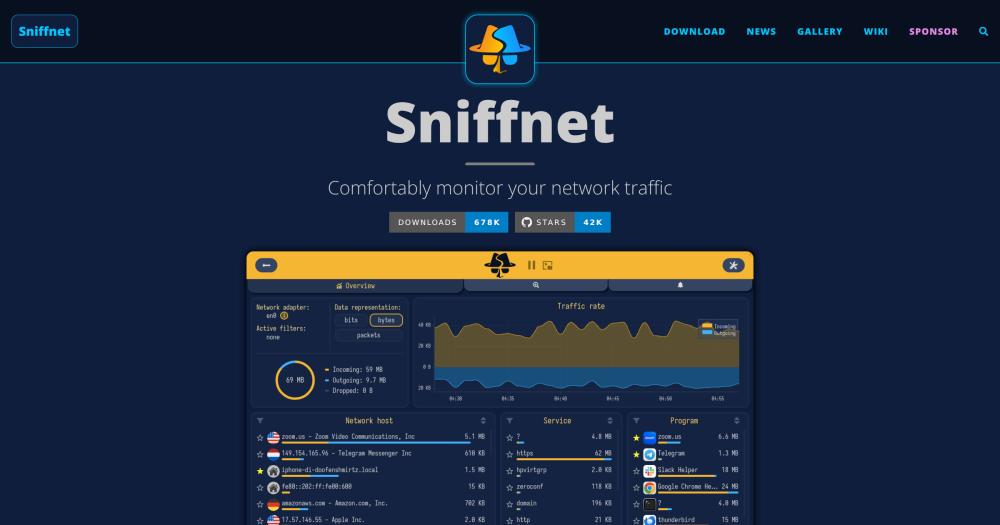
Monitor network traffic on Windows, macOS, and Linux with real-time charts, geolocation of remote hosts, and per-app bandwidth tracking.

Visit websiteGitHub42.5K stars
image of Sniffnet
TL;DR

Sniffnet is an Apache-2.0 licensed desktop application that monitors network traffic on Windows, macOS, and Linux, showing which programs are consuming bandwidth, the geographic location of remote hosts, and real-time traffic charts. It replaces paid tools like GlassWire and CommView for everyday network visibility use cases, without a subscription or account requirement. Sniffnet ships as signed native installers and stores no data outside your machine. Best for home users, developers, and IT administrators who need readable network monitoring without packet-analyzer complexity.

Read the full breakdownHide the full breakdownWho it is for, how it works, trade-offs, the quick start and the FAQ
who it's for

Who Sniffnet is for#

Home users tracking bandwidth and connection activity

Sniffnet shows which programs on your machine are using bandwidth and which remote IPs they are connecting to, with geographic labels that make the data readable without network expertise. You can run it in the background and check the thumbnail view when you notice a slowdown or unexpected data usage.

Skip if:

You need active traffic blocking or a built-in firewall. Sniffnet monitors and alerts but cannot stop a connection from within the app. Use it alongside your OS firewall, not instead of it.

Developers inspecting application network behavior

During development, you can use Sniffnet to verify which endpoints your application actually calls, check that it is not sending data to unexpected third-party services, and inspect the protocol distribution of its network activity. PCAP export lets you bring the capture into Wireshark for deeper analysis when needed.

Skip if:

You need sub-millisecond packet timing or full protocol dissection. Sniffnet gives you a readable overview; Wireshark or tcpdump are the right tools for detailed protocol-level debugging.

IT administrators monitoring small office or home networks

Sniffnet can run on each workstation to give per-machine visibility into outgoing connections, flagging connections to known-bad IPs via custom blacklists and alerting on bandwidth spikes. The 26-language support and non-technical interface reduce onboarding time for less technical staff.

Skip if:

You are managing more than a handful of machines. Sniffnet has no centralized monitoring console; each instance runs independently. For fleet-wide visibility, a centralized SIEM or network monitoring platform is a better fit.

the problem

The problem it solves#

Most network monitoring tools fall into one of two camps: packet analyzers designed for network engineers with deep protocol knowledge, or commercial tools that lock real-time visibility behind paid licenses. Packet analyzers capture everything but require expertise to extract meaning from raw frames. Commercial monitoring tools provide readable dashboards but are proprietary products aimed at professional or enterprise use cases.

The result is that home users, developers, and small-office IT staff have no straightforward way to answer basic questions: which program is consuming bandwidth right now, which remote IP address their machine connected to this morning, or whether a device on the network is behaving unexpectedly. These are legitimate questions for anyone running a home server or developer workstation, but the tools that answer them have traditionally assumed either professional training or a paid subscription.

how Sniffnet solves it

How it solves it#

Real-time traffic charts and statistics

Sniffnet displays live charts of incoming and outgoing traffic intensity, broken down by protocol and direction. The overview page shows cumulative bandwidth totals alongside the per-second rate, giving you an instant picture of network activity without navigating menus.

Per-application bandwidth tracking

The inspect page shows which programs on your machine are actively using the network, with per-connection detail for each. You can see the remote host, protocol, and data volume for every active connection tied to a specific application.

IP geolocation and ASN lookup

For every remote host your machine connects to, Sniffnet resolves the geographic location, domain name, and Autonomous System Number (ASN) using MaxMind's GeoLite2 database. This makes it straightforward to spot connections to unexpected countries or unfamiliar ASNs.

6,000+ protocol and service identification

Sniffnet recognizes over 6,000 upper-layer services, protocols, trojans, and worms from its traffic database. Connections are labelled by service name in the inspect view, so you can tell a DNS query from a BitTorrent handshake without reading raw port numbers.

PCAP import and export

Traffic captures can be exported as standard PCAP files and loaded back for review, or shared with tools like Wireshark for deeper analysis. Standard PCAP import is also supported, so existing captures from other tools can be browsed in Sniffnet's interface.

Custom notifications and IP blacklists

You can define notification rules that trigger alerts when specific network events occur, such as a connection matching a blocked IP range or a bandwidth threshold being exceeded. Custom IP blacklists highlight potentially dangerous connections in the interface.

strengths · trade-offs

Strengths and trade-offs#

Strengths

  • Runs on Windows, macOS, and LinuxGlassWire, one of the most direct paid alternatives in this category, focuses on the Windows platform. Sniffnet works identically on all three major desktop platforms from a single signed native installer, making it a cross-platform option that prioritizes readability over protocol depth.
  • No account, no cloud, no subscriptionAll traffic data stays on your machine. There is no account to create, no analytics to opt out of, and no subscription to maintain. The Apache-2.0 license means you can run Sniffnet on as many machines as you want at no cost.
  • Accessible to non-technical usersSniffnet is translated into 26 languages and explicitly designed so users without network engineering backgrounds can understand what they are looking at. Its graphical interface shows geographic maps, plain-language service names, and program-level attribution that make raw network data interpretable.
  • Signed native installers for every platformThe Windows MSI is code-signed through SignPath.io's free open source program. macOS ships as a DMG with both Intel and Apple Silicon builds. Linux users get DEB, RPM, or AppImage packages depending on their distribution. Sniffnet uses the iced GUI library written in Rust, with no browser dependency or Electron overhead.

Trade-offs

  • -No firewall or network blockingUnlike GlassWire, which includes a firewall integration to block individual apps from network access, Sniffnet is a monitor-only tool. It can alert you to suspicious connections but cannot block them from within the app. Users who need active traffic control must use a separate firewall.
  • -Requires platform dependenciesOn Linux, Sniffnet requires libpcap and may need additional system libraries depending on the distribution. On macOS, the app needs a network entitlement that triggers a system security prompt on first launch. The wiki documents the required dependencies, but users on unusual or older systems may need extra steps.
  • -Rendering issues on older hardwareThe default GPU renderer (wgpu via the iced framework) can produce visual glitches on old graphics hardware or systems with outdated drivers. The fallback is a CPU-only renderer set with the ICED_BACKEND=tiny-skia environment variable, which the README documents. This workaround is not obvious for non-technical users.
versus alternatives

Sniffnet vs alternatives#

Sniffnet vs GlassWire

GlassWire and Sniffnet both display real-time network traffic, per-application bandwidth usage, and geographic information about remote connections. The key difference is that GlassWire bundles a firewall component for active traffic control, while Sniffnet focuses on monitoring only.

FeatureSniffnetGlassWire
LicenseApache-2.0Proprietary
FirewallNoYes
CostFreePaid

Sniffnet is the better choice for users who want open source, no-cost network monitoring with broad protocol identification across 6,000+ services and standard PCAP export. The Apache-2.0 license allows unlimited installs without seat costs.

GlassWire is worth considering when you need an integrated firewall that can block individual applications from network access. Sniffnet has no blocking capability; GlassWire adds that layer alongside its monitoring features.

Sniffnet vs CommView

CommView targets LAN administrators and security professionals who need real-time packet capture alongside traffic statistics. Sniffnet addresses a broader audience with a graphical interface designed to be readable without network engineering expertise.

FeatureSniffnetCommView
LicenseApache-2.0Proprietary
CostFreePaid
Target userHome users, developersLAN admins, security professionals

Sniffnet is the right choice when cost and ease of use are priorities. CommView suits professional network diagnostic work where the depth of a dedicated packet analyzer is required. For everyday monitoring use cases, Sniffnet delivers the core visibility needs at no cost.


install · quick start

Quick start#

bash
Download the signed installer for Windows (.msi), macOS (.dmg), or Linux (.deb, .rpm, .AppImage) from GitHub Releases: https://github.com/GyulyVGC/sniffnet/releases/latest
tech stack · detected from GitHub

What it's built on#

Languages
PythonRust
frequently asked

FAQ#

Is Sniffnet free to use?

Yes. Sniffnet is free and open source, available under the Apache-2.0 license. The website also states it is dual-licensed with MIT. There is no paid tier, no subscription, and no account required. You can run it on as many machines as you want at no cost.

Does Sniffnet work on Linux?

Yes. Sniffnet provides DEB packages (amd64, arm64, i386, armhf), RPM packages (x86_64, aarch64), and AppImage files for Linux. The app requires libpcap and potentially other system libraries. The wiki's required dependencies page lists exactly what each distribution needs before the app will start.

Can Sniffnet block network connections?

No. Sniffnet is a monitoring-only tool. It can alert you when a connection matches a custom rule, highlight IPs on your blacklist, and show you exactly which program is responsible, but it cannot stop a connection. For active blocking, use your operating system's firewall alongside Sniffnet.

What is the difference between Sniffnet and Wireshark?

Wireshark is a full packet analyzer for network engineers. It captures every frame and allows protocol dissection at the byte level. Sniffnet is a monitoring app designed for readability, showing traffic in terms ordinary users can understand: geographic maps, program names, and service labels. Wireshark is the right choice when you need raw protocol data; Sniffnet is better when you want everyday network visibility without expertise.

Does Sniffnet send data to external servers?

No. All traffic data stays on your local machine. The app resolves IP geolocation and ASN data using a local database (MaxMind GeoLite2 bundled with the app) and does not require an internet connection to show geographic information. The website notes that security audits have been conducted on the application.

also worth a look

Similar open-source tools#

omarchy

Alternative tomacOS

DHH's opinionated Linux distribution for developer workstations

  • 46,765 GitHub stars
  • MITLicence MIT

Rustdesk Server

Alternative toTeamViewer

Self-hosted relay and rendezvous server for RustDesk remote desktop.

  • 10,720 GitHub stars
  • AGPL-3.0Licence AGPL-3.0

Stats

Alternative toiStat Menus

Free macOS menu bar system monitor, MIT-licensed.

  • 43,262 GitHub stars
  • MITLicence MIT

OpenNavo

Alternative toCork

Homebrew GUI for Mac with ClamAV scanning and system monitoring.

  • 93 GitHub stars
  • GPL-3.0Licence GPL-3.0

Pocket ID

Alternative toAuth0

Self-hosted OIDC provider with passkey-only authentication

  • 10,251 GitHub stars
  • BSD-2-ClauseLicence BSD-2-Clause

Termix

Alternative toTermius

Self-hosted, plugin-based server manager with SSH and remote desktop.

  • 15,932 GitHub stars
  • Apache-2.0Licence Apache-2.0
by category

Open source tools in these categories#

183

Security & Monitoring

REA (Reverse Engineer Anything), RustDesk, Sherlock
152

IT Management

RustDesk, Immich, Stirling PDF

Sponsors

Inbox Zero

Alternative toSuperhuman

AI email assistant that drafts replies and clears your inbox

  • 12,987 GitHub stars
  • AGPL-3.0Licence AGPL-3.0
  • #Email

rakazo

Alternative toGrok Bot

AI teammates you own: your keys, your model, your machine.

  • 7,869 GitHub stars
  • Apache-2.0Licence Apache-2.0
  • #AI Agents

SnitchFeed

Live monitoring on LinkedIn, X, Reddit & more. Agentic social listening for startups.

Marketing & Growth

Advertise your product

New open source projects by email

The projects we add and every new guide. Free, unsubscribe any time.

Find open source alternatives to paid software

/
  • Claude Code to OpenCode
  • Jira to Windshift
  • Notion to AppFlowy
  • Slack to Mattermost
  • Linear to GitLab
  • Wispr Flow to Handy
  • Arc to Zen Browser
  • CapCut to Concat
  • Grok Bot to rakazo
  • Superhuman to Inbox Zero
  • Airtable to AITable
  • Muse to OpenClaw
  • Railway to Coolify
  • GitHub Copilot to Cline
  • Datadog to Netdata
  • Confluence to Wiki.js
  • Microsoft Teams to Rocket.Chat
  • 1Password to KeePassXC
  • Firebase to Supabase
  • Pinecone to Qdrant
  • Zapier to n8n
  • Devin AI to OpenHands
  • Asana to Leantime
  • Contentful to Strapi
  • Claude Code to OpenCode
  • Jira to Windshift
  • Notion to AppFlowy
  • Slack to Mattermost
  • Linear to GitLab
  • Wispr Flow to Handy
  • Arc to Zen Browser
  • CapCut to Concat
  • Grok Bot to rakazo
  • Superhuman to Inbox Zero
  • Airtable to AITable
  • Muse to OpenClaw
  • Railway to Coolify
  • GitHub Copilot to Cline
  • Datadog to Netdata
  • Confluence to Wiki.js
  • Microsoft Teams to Rocket.Chat
  • 1Password to KeePassXC
  • Firebase to Supabase
  • Pinecone to Qdrant
  • Zapier to n8n
  • Devin AI to OpenHands
  • Asana to Leantime
  • Contentful to Strapi