Open Source Alternatives
  • Alternatives
  • Categories
    Categories by size1,102 projects
    • Developer Tools555
    • AI & Machine Learning470
    • Business & Productivity268
    • Web Development208
    • Security & Monitoring171
    • Communication & Collaboration153
    • IT Management145
    • Cloud & Hosting127
    • LLMOps & AI Tooling122
    • Data & Analytics118
    Browse all 21 categoriesProduct & Project Management, DevOps & CI/CD and 9 more
  • Blog
  • Advertise
SearchNotion, Slack, password manager.../
Submit
Open Source Alternatives
  • Alternatives
    • Developer Tools555
    • AI & Machine Learning470
    • Business & Productivity268
    • Web Development208
    • Security & Monitoring171
    • Communication & Collaboration153
    • Browse all 21 categories
  • Blog
  • Advertise
Submit your project

New open source projects by email

The projects we add and every new guide. Free, unsubscribe any time.

Open Source Alternatives LogoOpen Source Alternatives

Handpicked Open Source Alternatives to Paid Softwares

Product

  • Categories
  • Tag
  • Advertise

Resources

  • Blog
  • Collection
  • Submit

Company

  • Privacy Policy
  • Terms of Service
  • Refund Policy
  • Sitemap

Alternatives

  • Claude Code
  • Jira
  • Notion
  • Slack
  • Linear
  • Wispr Flow
  • All alternatives
© 2026 Open Source Alternatives. All rights reserved.
Open SourceAlternatives
Home/Categories/Developer Tools/OpenNavo
icon of OpenNavo

OpenNavo

Open source alternative to Cork and CleanMyMac

  • 89 stars
  • GPL-3.0
  • Active this week
  • Last commit today

Last verified Nov 5, 2026

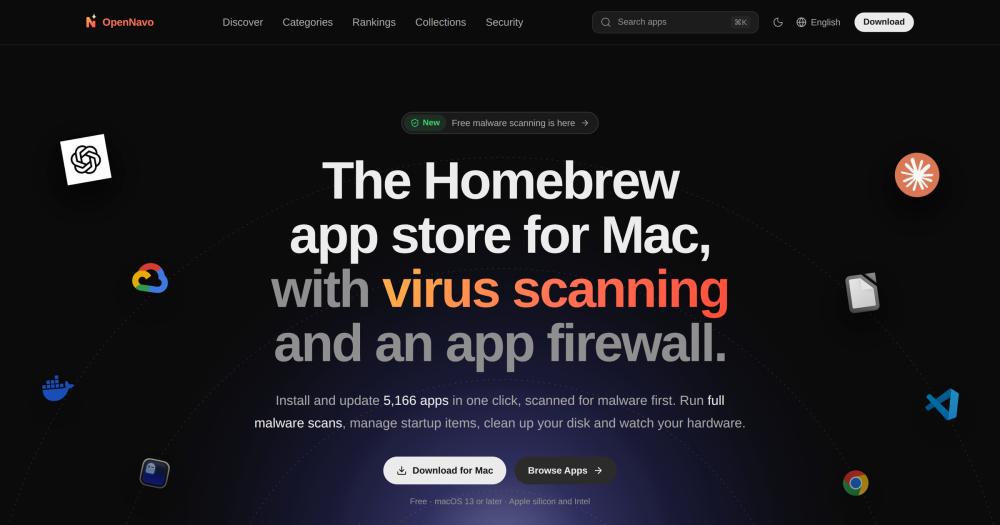
Manage and install over 5,000 Homebrew apps on Mac with a visual app store, pre-install malware scanning via ClamAV, and system monitoring.

Visit websiteGitHub89 stars
image of OpenNavo
TL;DR

OpenNavo is a free, GPL-3.0 Homebrew GUI for macOS that installs and updates over 5,000 casks in one click from a visual directory with screenshots and version histories. It replaces paid tools like Cork for Homebrew management and CleanMyMac for cleanup and monitoring, adding ClamAV malware scanning before every install, an uninstaller that finds and removes app leftovers, and a system monitor for CPU, memory, fans, and temperatures in the menu bar. Best for Mac users who rely on Homebrew but prefer not to use Terminal, and developers setting up new Macs with Brewfile export.

Read the full breakdownHide the full breakdownWho it is for, how it works, trade-offs, the quick start and the FAQ
who it's for

Who OpenNavo is for#

Mac users replacing Terminal-based Homebrew

Browse and install over 5,000 casks with screenshots, rankings, and release notes. Daily update checks handle Homebrew, App Store, and other update mechanisms in one place, so the morning routine is a click rather than a sequence of brew commands.

Skip if:

You are comfortable with brew in Terminal and already have an update workflow. OpenNavo adds the most value for users who have Homebrew installed but rarely open Terminal.

Developers setting up a new Mac

Add apps to a Brewfile list while browsing opennavo.com. On a new Mac, running brew bundle with the exported file installs every app in the list. Collections can also be exported directly as a Brewfile.

Skip if:

Your team already manages Mac provisioning with tools like Ansible or MDM. Brewfile export is most useful for personal or small-team setups.

Mac owners wanting cleanup without a subscription

The uninstaller finds the data, caches, preferences, and background items left by an app across all three install sources (Homebrew, App Store, and disk image installs). The cleanup scan sorts leftovers into risk tiers before anything is deleted, with files going to Trash by default.

Skip if:

You need commercial support or guaranteed safe deletion with rollback beyond Trash. CleanMyMac and similar tools have longer track records and customer support channels.

Security-aware users adding a first layer of malware detection

ClamAV scans run before every Homebrew install and on every file that lands in Downloads. Startup items are catalogued and new additions trigger an alert immediately. System check shows the status of SIP, Gatekeeper, FileVault, XProtect, and the firewall in one screen.

Skip if:

You need enterprise-grade endpoint security. ClamAV has limited coverage of Mac-specific malware compared to dedicated macOS security products. OpenNavo adds to macOS built-in protections but does not replace a dedicated endpoint security tool.

the problem

The problem it solves#

Homebrew is one of the most reliable ways to install software on a Mac, but its command-line interface puts a ceiling on who can use it. Remembering exact cask names, running brew outdated to find stale apps, and looking up changelogs separately are friction points that push many Mac users back to the App Store or scattered download pages. There is no built-in way to browse what is available, compare options, or know what changed in a new version.

For Mac users who also want to keep their system clean and secure, the problem multiplies. Dedicated cleanup tools like CleanMyMac run as proprietary software and require paid subscriptions, meaning you cannot inspect what they delete or how they determine what is safe to remove. Malware scanning on Mac is either limited to built-in XProtect or requires a separate paid product. Having separate paid tools for Homebrew management, malware scanning, cleanup, and system monitoring adds up quickly.

how OpenNavo solves it

How it solves it#

Homebrew App Directory

Over 5,000 Homebrew casks organized with descriptions, screenshots, installation counts, dependencies, and per-version release notes. Rankings follow real install data from the past 30 days. The web directory at opennavo.com lets you browse and copy brew commands without installing the app.

One-Click Install, Update, and Uninstall

The macOS app queues tasks with live Homebrew command output, so you see exactly what runs. Daily update checks cover Homebrew, the App Store, Sparkle, Electron, and GitHub releases. Apps can be pinned or skipped; running apps prompt before an update proceeds.

ClamAV Malware Scanning

Every download goes through ClamAV before it installs. New files in Downloads are scanned automatically. Scheduled quick scans cover the Desktop and startup items; full scans cover the whole Mac. Scans run locally and no files are uploaded to any server.

Startup Item and Signature Monitoring

Twenty categories of startup items are tracked, from background services and login items to browser extensions, each with its owning app and signature. New startup items trigger an alert. Signature checks catch apps whose developer certificate changed after install.

App Cleanup and Uninstaller

Uninstalls apps from Homebrew, the App Store, or disk images and finds associated data, caches, preferences, and background items before removing anything. A read-only scan categorizes leftovers into risk tiers; caches are deleted directly, while other files go to Trash so the action can be undone.

System Monitor with Menu Bar Integration

CPU, GPU, memory, disk, network, battery, temperatures, and fans are available as menu bar items, shown as text or small charts. SMART drive health, per-process resource usage, and fan speed control are included. Readings stay in memory and are never written to disk or uploaded.

strengths · trade-offs

Strengths and trade-offs#

Strengths

  • Free While Replacing Two Paid ToolsCork is a paid Homebrew GUI and CleanMyMac is a paid cleanup and monitoring suite. OpenNavo is free with no paid tier and published under GPL-3.0, so you can read the cleanup rules, the ClamAV integration, and the fan control code before trusting it on your Mac.
  • Covers Homebrew, Cleanup, and Security in One DownloadCork handles Homebrew management, CleanMyMac handles cleanup and monitoring, and a separate antivirus handles malware scanning. OpenNavo replaces all three in a single free app that installs in one download and needs no subscription.
  • Transparent and Reversible CleanupCleanup scans are read-only until you approve. Files go to Trash by default so they can be recovered. Protected items (keychains, VPNs, virtual machines, iCloud Drive, browser history, passwords) are never touched. Each path is rechecked right before removal.
  • No Account, No TelemetryNo sign-in is required. The app does not report which apps you have installed. Malware scans run on-device. The Brewfile list stays in your browser.

Trade-offs

  • -ClamAV Has Limited Mac Malware CoverageClamAV's coverage of Mac-specific malware is limited compared to dedicated macOS security products, as the project itself notes. OpenNavo adds signature checks, notarization checks, and startup item monitoring to compensate, but the combination does not replace a dedicated endpoint security tool.
  • -Early-Stage ProjectOpenNavo was created in October 2026 and has 89 GitHub stars. The user community and ecosystem of third-party guides are still developing, and the issue tracker has 8 open items as of the research date.
  • -Web Directory Requires a Complex Stack to Self-HostThe macOS app is a simple download, but self-hosting the web directory and backend sync server requires a Go backend, PostgreSQL, Redis, and a Nuxt 4 web app via Docker Compose. This is not a zero-effort setup and is not needed for typical desktop use.
versus alternatives

OpenNavo vs alternatives#

OpenNavo vs Cork

Cork is a paid Homebrew GUI for macOS. Both Cork and OpenNavo give Homebrew a visual interface for installing and updating casks without Terminal.

FeatureOpenNavoCork
LicenseGPL-3.0Proprietary
PriceFreePaid
Malware scanningClamAV, pre-installNone
System monitoringCPU, GPU, memory, fansNone
Mac cleanupYes, with leftovers detectionNone
App Store updatesYesNo

OpenNavo is the better choice when you want Homebrew management alongside malware scanning, cleanup, and system monitoring in one free tool. Cork may be a better fit if you want a narrower app focused purely on Homebrew management and do not need the security and monitoring features OpenNavo includes.

OpenNavo vs CleanMyMac

CleanMyMac is a subscription-based Mac optimization suite from MacPaw that covers cleanup, malware scanning, and system monitoring. The two tools overlap in cleanup and monitoring, but OpenNavo adds Homebrew management while CleanMyMac does not.

FeatureOpenNavoCleanMyMac
LicenseGPL-3.0Proprietary
PriceFreePaid subscription
Homebrew managementYes, full GUINo
Malware scanningClamAVProprietary engine
Mac cleanupYes, risk-tieredYes
System monitoringYes, with fan controlYes

OpenNavo is the better choice for Mac users who want cleanup, monitoring, and malware scanning at no cost and want to inspect the source code behind what runs on their system. CleanMyMac's proprietary malware engine has broader Mac-specific threat coverage and comes with MacPaw customer support, which matters for less technical users who want a supported product and do not want to manage an open source tool.

install · quick start

Quick start#

bash
Download the signed macOS app from GitHub Releases: https://github.com/opennavo/OpenNavo/releases/latest
tech stack · detected from GitHub

What it's built on#

Languages
GoJavaScriptObjective-CPythonRustTypeScript
Frameworks
NuxtVue
Cache
Redis
frequently asked

FAQ#

Is OpenNavo free?

Yes. OpenNavo is free to download and use with no paid tier or subscription. The source code is published under GPL-3.0 on GitHub.

Does OpenNavo replace Homebrew?

No. OpenNavo wraps Homebrew, so Homebrew must already be installed on your Mac. The app calls brew on your local Homebrew installation and does not ship its own version. The server never runs brew itself: installation and updates run on your Mac only.

How does the malware scanning work?

OpenNavo ships the open-source ClamAV engine with its virus database updated from ClamAV's official servers. Downloads are scanned after Homebrew finishes downloading and before the cask installs. New files in your Downloads folder are also scanned automatically. Scans run on your Mac and no files are uploaded. ClamAV's coverage of Mac-specific malware is limited, so OpenNavo also checks signatures, notarization, and startup items alongside ClamAV.

Does OpenNavo work on Apple silicon and Intel Macs?

Yes. OpenNavo requires macOS 13 or later and supports both Apple silicon and Intel Macs.

Can I export my app list for a new Mac setup?

Yes. You can add apps to a Brewfile list while browsing and export it in one click. On a new Mac, running brew bundle with the exported file installs every app in the list. Collections can also be exported directly as a Brewfile.

also worth a look

Similar open-source tools#

Tidymint

Alternative toCleanMyMac

Free Mac disk cleaner with cache cleaning, duplicates, and space map

  • 3 GitHub stars
  • MITLicence MIT

PureMac

Alternative toCleanMyMac

Free native Mac cleaner with app uninstall, cache scans, no telemetry.

  • 7,600 GitHub stars
  • MITLicence MIT

Mole

Alternative toCleanMyMac X

Free CLI and native app for Mac cleanup, uninstall, and disk analysis

  • 73,715 GitHub stars
  • GPL-3.0Licence GPL-3.0

Cleaner

Alternative toCleanMyMac

Mac disk cleaner that shows every item before it removes anything.

  • 4 GitHub stars
  • MITLicence MIT

Blitzclean

Alternative toCleanMyMac

macOS menu-bar monitor and storage cleaner for developers

  • 264 GitHub stars
  • MITLicence MIT

chippytea

Alternative toCleanMyMac

Free up Mac disk space with no account and no telemetry.

  • 235 GitHub stars
  • MITLicence MIT
by category

Open source tools in these categories#

555

Developer Tools

REA (Reverse Engineer Anything), Skills for Real Engineers, superpowers
171

Security & Monitoring

RustDesk, REA (Reverse Engineer Anything), Uptime Kuma
145

IT Management

Immich, RustDesk, Stirling PDF

Sponsors

Inbox Zero

Alternative toSuperhuman

AI email assistant that drafts replies and clears your inbox

  • 12,889 GitHub stars
  • AGPL-3.0Licence AGPL-3.0
  • #Email

rakazo

Alternative toGrok Bot

AI teammates you own: your keys, your model, your machine.

  • 7,028 GitHub stars
  • Apache-2.0Licence Apache-2.0
  • #AI Agents

SnitchFeed

Live monitoring on LinkedIn, X, Reddit & more. Agentic social listening for startups.

Marketing & Growth

Advertise your product

New open source projects by email

The projects we add and every new guide. Free, unsubscribe any time.

Find open source alternatives to paid software

/
  • Claude Code to OpenCode
  • Jira to Windshift
  • Notion to AppFlowy
  • Slack to Mattermost
  • Linear to GitLab
  • Wispr Flow to Handy
  • Arc to Zen Browser
  • CapCut to Concat
  • Grok Bot to rakazo
  • Superhuman to Inbox Zero
  • Airtable to AITable
  • Muse to OpenClaw
  • Railway to Coolify
  • GitHub Copilot to Cline
  • Datadog to Netdata
  • Confluence to Wiki.js
  • Microsoft Teams to Rocket.Chat
  • Firebase to Supabase
  • Pinecone to Qdrant
  • Zapier to n8n
  • 1Password to KeePassXC
  • Devin AI to OpenHands
  • Asana to Leantime
  • Contentful to Strapi
  • Claude Code to OpenCode
  • Jira to Windshift
  • Notion to AppFlowy
  • Slack to Mattermost
  • Linear to GitLab
  • Wispr Flow to Handy
  • Arc to Zen Browser
  • CapCut to Concat
  • Grok Bot to rakazo
  • Superhuman to Inbox Zero
  • Airtable to AITable
  • Muse to OpenClaw
  • Railway to Coolify
  • GitHub Copilot to Cline
  • Datadog to Netdata
  • Confluence to Wiki.js
  • Microsoft Teams to Rocket.Chat
  • Firebase to Supabase
  • Pinecone to Qdrant
  • Zapier to n8n
  • 1Password to KeePassXC
  • Devin AI to OpenHands
  • Asana to Leantime
  • Contentful to Strapi