Open Source Alternatives
  • Alternatives
  • Categories
    Categories by size1,108 projects
    • Developer Tools558
    • AI & Machine Learning472
    • Business & Productivity271
    • Web Development208
    • Security & Monitoring171
    • Communication & Collaboration153
    • IT Management145
    • Cloud & Hosting127
    • LLMOps & AI Tooling123
    • Data & Analytics118
    Browse all 21 categoriesProduct & Project Management, DevOps & CI/CD and 9 more
  • Blog
  • Advertise
SearchNotion, Slack, password manager.../
Submit
Open Source Alternatives
  • Alternatives
    • Developer Tools558
    • AI & Machine Learning472
    • Business & Productivity271
    • Web Development208
    • Security & Monitoring171
    • Communication & Collaboration153
    • Browse all 21 categories
  • Blog
  • Advertise
Submit your project

New open source projects by email

The projects we add and every new guide. Free, unsubscribe any time.

Open Source Alternatives LogoOpen Source Alternatives

Handpicked Open Source Alternatives to Paid Softwares

Product

  • Categories
  • Tag
  • Advertise

Resources

  • Blog
  • Collection
  • Submit

Company

  • Privacy Policy
  • Terms of Service
  • Refund Policy
  • Sitemap

Alternatives

  • Claude Code
  • Jira
  • Notion
  • Slack
  • Linear
  • Wispr Flow
  • All alternatives
© 2026 Open Source Alternatives. All rights reserved.
Open SourceAlternatives
Home/Categories/Business & Productivity/Superhound
icon of Superhound

Superhound

Open source alternative to Raycast AI, Alfred and LaunchBar

  • 3 stars
  • AGPL-3.0
  • Active this month
  • Last commit 10 days ago

Last verified Nov 5, 2026

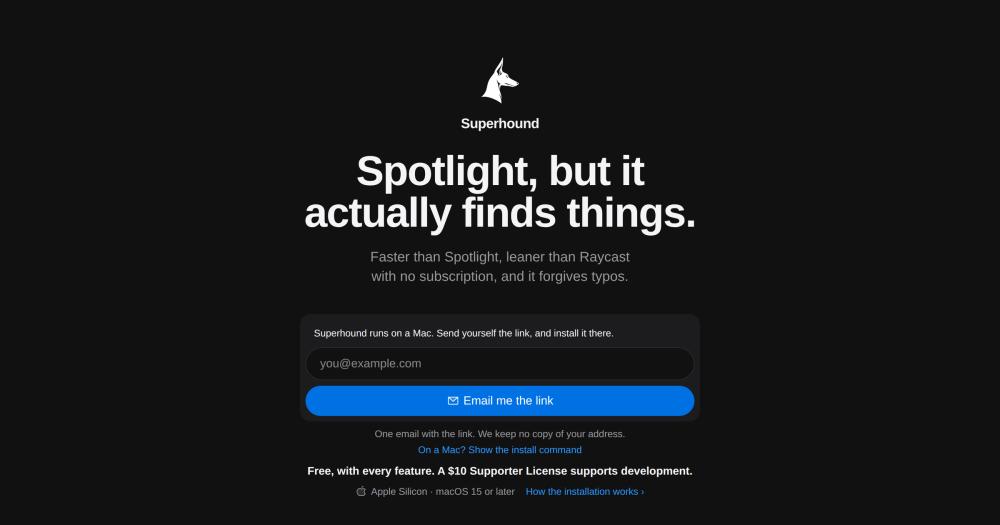
Search and launch apps and files on Mac with typo tolerance, clipboard history, and inline calculator. Free with every feature, AGPL-3.0, Apple Silicon only.

Visit websiteGitHub3 stars
image of Superhound
TL;DR

Superhound is a native macOS launcher written in Objective-C and C, replacing Spotlight with typo-tolerant app and file search, clipboard history, inline calculator, unit and colour conversion, emoji search, and system commands. It is a free, AGPL-3.0 open source alternative to paid launchers like Raycast AI and Alfred. At v0.6.1 with 3 stars on GitHub, it is an early-stage project suited for Mac users on Apple Silicon running macOS 15 or later who want a lightweight, offline-first launcher with no subscription and all data stored locally.

Read the full breakdownHide the full breakdownWho it is for, how it works, trade-offs, the quick start and the FAQ
who it's for

Who Superhound is for#

Mac developers avoiding Electron and subscription tools

Superhound replaces Raycast or Alfred for developers who want a lightweight launcher with no background network traffic and no subscription. The AGPL-3.0 source is auditable and the 0.7 MB footprint keeps the system clean.

Skip if:

You depend on Raycast extensions or Alfred workflows for daily work. Superhound has no extension system, so any workflow that requires one needs a different tool.

Privacy-conscious Mac users who want all data local

All search, clipboard, and usage data stays on the Mac. Superhound makes no network requests during normal use and reads only file names, never file contents. The install script verifies the SHA-256 checksum and code signature before installing.

Skip if:

You need an App Store installation or a managed device policy that requires notarized apps. Superhound installs via a Terminal script and is not notarized through Apple.

Users who frequently paste from clipboard history

Clipboard history is accessible with a single shortcut and stores the last 500 items with the source app and copy time visible. Normal searches of three or more characters also surface up to two matching clipboard entries inline.

Skip if:

Your password manager does not mark sensitive copies as private and you copy passwords frequently. Superhound skips copies that password managers flag as private, but verify your manager is compatible before relying on that behaviour.

the problem

The problem it solves#

Spotlight misses files when you mistype, has no clipboard history, and requires a separate app for quick math or unit conversion. Getting all those features means installing a commercial launcher. Raycast runs at 54 to 108 MB of RAM and downloaded 9 MB over the network during 13 idle minutes in a measurement published in the Superhound README. Alfred and LaunchBar are also paid commercial launchers in this space.

Mac users who want typo tolerance, clipboard history, and inline utilities without an Electron app, a subscription, or a tool that sends network traffic during idle time have few open source options. The standard choice is to install a commercial launcher and accept its footprint, or stay with Spotlight and work around its gaps.

how Superhound solves it

How it solves it#

Typo-tolerant app and file search

Ranks 100,000 names in about 10 ms, with results on screen about 23 ms after a key press. Mistyping an app name still surfaces the right result; the top result is ordered by what you open most. A search through 10,000 files takes 0.95 ms on an Apple M1.

Clipboard history with 500 entries

Keeps the last 500 pieces of text you copy, available with a single keyboard shortcut. Respects password manager private-copy flags and skips copies from Keychain Access and Passwords. Text never leaves your Mac; the history is stored locally in ~/Library/Application Support/Superhound/.

Inline calculator, units, and colour conversion

Type an expression like 48*12 or 5 km to mi and press Return to copy the answer. Colour codes convert between hex, rgb, and hsl. No separate app needed for quick math or unit checks during a file search session.

Zero network traffic in normal use

Superhound makes no network requests during searches, app launches, or clipboard pastes. It checks for updates once a day, with no license key or device ID in the request. The README measured zero bytes received in 13 idle minutes versus 9 MB for Raycast 1.104.32 on the same machine.

Native Objective-C and C, no Electron

0.7 MB download, 1.4 MB on disk, 39 to 57 MB of RAM when idle with 48,000 files indexed, and under 0.2% CPU when the panel is closed. No web views, no third-party dependencies, AppKit only. The search matcher is written in C and runs fully offline.

strengths · trade-offs

Strengths and trade-offs#

Strengths

  • AGPL-3.0 source, free with every featureEvery feature works with no time limit and no subscription. A Supporter License ($10 at launch, regular $15) for 3 Macs removes the in-panel reminder and supports development. Raycast AI features require a subscription tier; Alfred and LaunchBar are paid commercial launchers. Superhound is free with everything included.
  • All data stored locally on your MacThe file index, clipboard history, usage data, and license key are stored in ~/Library/Application Support/Superhound/. The app works offline, reads file names only (never contents), and has no account requirement. License activation sends your key and a one-way device ID to superhound.app once.
  • Minimal footprint versus paid alternatives0.7 MB download versus 112 MB for Raycast. 1.4 MB on disk versus 219 MB for Raycast. Under 0.2% CPU when idle. These numbers were measured on an Apple M1 on 2026-10-23 as stated in the README, against Raycast 1.104.32 with no extensions installed.

Trade-offs

  • -Apple Silicon and macOS 15 or later onlySuperhound does not run on Intel Macs or macOS 14 and earlier. Raycast 1 supports macOS 13 or later and Alfred supports older macOS versions. Users on Intel hardware or macOS 14 and earlier have no supported path to Superhound.
  • -Early-stage project: v0.6.1, 3 GitHub starsAt v0.6.1 with 3 GitHub stars, Superhound is a new project. The README describes it as 'an early version.' No plugin or extension system exists. Users who depend on Raycast extensions or Alfred workflows will find Superhound covers only the core launcher and built-in utilities.
  • -Not notarized through AppleSuperhound is signed with its own developer certificate but has not been notarized through Apple. macOS blocks apps downloaded via a browser for this reason; the installer script uses curl to bypass that check. Users on managed devices or in environments that require notarized apps may not be able to install it.
versus alternatives

Superhound vs alternatives#

Superhound vs Raycast AI

Both tools replace Spotlight for app launching and file search, but their scope differs sharply. Superhound covers launching, file search, clipboard history, and built-in utilities; Raycast adds an extension platform, AI chat, snippets, and window management.

FeatureSuperhoundRaycast
Download size0.7 MB112 MB
App on disk1.4 MB219 MB
RAM when idle39 to 57 MB54 to 108 MB
Network in 13 idle minutesNone9 MB received
LicenseAGPL-3.0Closed source
macOS requirement15 or later13 or later
ExtensionsNoneOpen extension platform

Data from the Superhound README, measured on an Apple M1 on 2026-10-23 against Raycast 1.104.32 with no extensions.

Superhound is the better fit when you want a small, offline-first launcher with no subscription, no extension system, and no idle network traffic. Raycast is the better fit when you need its extension ecosystem, AI chat, or window management, or when you are on macOS 13 or 14.

Superhound vs Alfred

Alfred is a paid macOS launcher. Superhound includes clipboard history and built-in utilities without any payment and under an AGPL-3.0 open source license. Alfred supports older macOS versions and Intel Macs; Superhound requires Apple Silicon and macOS 15 or later.

Superhound is the better fit for Apple Silicon Mac users who want clipboard history and quick utilities for free under an open source license. Alfred is the better fit when you need compatibility with Intel Macs or older macOS versions.

Superhound vs LaunchBar

LaunchBar is a paid macOS launcher with support for older macOS versions and a broad action set. Superhound covers a narrower set of actions and is free with an AGPL-3.0 open source license.

Superhound is the better fit for Apple Silicon users who want a free, open source launcher. LaunchBar is the better fit when you need its broader action library or compatibility with hardware and macOS versions Superhound does not support.

install · quick start

Quick start#

bash
Install on a Mac with Apple Silicon and macOS 15 or later using the maker's install script.
```bash
curl -fsSL https://superhound.app/install | sh
```
tech stack · detected from GitHub

What it's built on#

Languages
CObjective-CPython
frequently asked

FAQ#

Does Superhound work on Intel Macs?

No. Superhound requires Apple Silicon (M1 or later) and macOS 15 or later. Intel Macs and earlier macOS versions are not supported.

Is Superhound really free?

Yes. Every feature works with no time limit. The free version shows a reminder every tenth launch. A Supporter License ($10 at launch, regular $15) for 3 Macs removes the reminder and supports development. There is no subscription.

Does Superhound send data off my Mac?

Not during normal use. Superhound makes no network requests when you search, open apps, or paste from clipboard history. It checks for updates once a day with no license key or device ID in that request. License activation sends your key and a one-way device ID to superhound.app once.

How does Superhound compare to Raycast?

Raycast includes extensions, AI chat, snippets, and window management. Superhound covers app launching, file search, clipboard history, and built-in utilities. Superhound downloads at 0.7 MB versus Raycast's 112 MB and produced zero network traffic in 13 idle minutes versus 9 MB for Raycast. Raycast supports macOS 13 or later; Superhound requires Apple Silicon and macOS 15 or later.

Can I replace Spotlight on Command+Space with Superhound?

Yes. Enable 'Use Command+Space in place of Spotlight' in Settings. Superhound turns off Spotlight's shortcut and takes Command+Space. Turn the switch off, or run Uninstall Superhound from the menu bar, to restore Spotlight's shortcut.

also worth a look

Similar open-source tools#

tinycast

Alternative toRaycast AI

One hotkey, everything you reach for all day.

  • 9,123 GitHub stars
  • AGPL-3.0Licence AGPL-3.0

Maccy

Alternative toPaste

Keyboard-driven clipboard history for macOS, MIT licensed and free

  • 22,184 GitHub stars
  • MITLicence MIT

openhuman

Alternative toMuse

Personal AI agent with local memory and 100+ integrations

  • 42,548 GitHub stars
  • GPL-3.0Licence GPL-3.0

CleanYourTV

Featured

Alternative toATV Launcher Pro

Debloat any Android or Google TV over Wi-Fi and get an Apple TV-style home.

  • 51,495 GitHub stars
  • MIT LicenseLicence MIT License

rakazo

Featured

Alternative toGrok Bot

AI teammates you own: your keys, your model, your machine.

  • 7,028 GitHub stars
  • Apache-2.0Licence Apache-2.0

Gojo

Alternative toNotchNook

Notch workspace for Mac: windows, clipboard, dictation, and music.

  • 4 GitHub stars
  • GPL-3.0Licence GPL-3.0
by category

Open source tools in these categories#

271

Business & Productivity

OpenClaw, Excalidraw, RustDesk
558

Developer Tools

REA (Reverse Engineer Anything), Skills for Real Engineers, superpowers

Sponsors

Inbox Zero

Alternative toSuperhuman

AI email assistant that drafts replies and clears your inbox

  • 12,889 GitHub stars
  • AGPL-3.0Licence AGPL-3.0
  • #Email

rakazo

Alternative toGrok Bot

AI teammates you own: your keys, your model, your machine.

  • 7,028 GitHub stars
  • Apache-2.0Licence Apache-2.0
  • #AI Agents

SnitchFeed

Live monitoring on LinkedIn, X, Reddit & more. Agentic social listening for startups.

Marketing & Growth

Advertise your product

New open source projects by email

The projects we add and every new guide. Free, unsubscribe any time.

Find open source alternatives to paid software

/
  • Claude Code to OpenCode
  • Jira to Windshift
  • Notion to AppFlowy
  • Slack to Mattermost
  • Linear to GitLab
  • Wispr Flow to Handy
  • Arc to Zen Browser
  • CapCut to Concat
  • Grok Bot to rakazo
  • Superhuman to Inbox Zero
  • Airtable to AITable
  • Muse to OpenClaw
  • Railway to Coolify
  • GitHub Copilot to Cline
  • Datadog to Netdata
  • Confluence to Wiki.js
  • Microsoft Teams to Rocket.Chat
  • Firebase to Supabase
  • Pinecone to Qdrant
  • Zapier to n8n
  • 1Password to KeePassXC
  • Devin AI to OpenHands
  • Asana to Leantime
  • Contentful to Strapi
  • Claude Code to OpenCode
  • Jira to Windshift
  • Notion to AppFlowy
  • Slack to Mattermost
  • Linear to GitLab
  • Wispr Flow to Handy
  • Arc to Zen Browser
  • CapCut to Concat
  • Grok Bot to rakazo
  • Superhuman to Inbox Zero
  • Airtable to AITable
  • Muse to OpenClaw
  • Railway to Coolify
  • GitHub Copilot to Cline
  • Datadog to Netdata
  • Confluence to Wiki.js
  • Microsoft Teams to Rocket.Chat
  • Firebase to Supabase
  • Pinecone to Qdrant
  • Zapier to n8n
  • 1Password to KeePassXC
  • Devin AI to OpenHands
  • Asana to Leantime
  • Contentful to Strapi