Open Source Alternatives
  • Alternatives
  • Categories
    Categories by size1,105 projects
    • Developer Tools557
    • AI & Machine Learning471
    • Business & Productivity269
    • Web Development208
    • Security & Monitoring171
    • Communication & Collaboration153
    • IT Management145
    • Cloud & Hosting127
    • LLMOps & AI Tooling123
    • Data & Analytics118
    Browse all 21 categoriesProduct & Project Management, DevOps & CI/CD and 9 more
  • Blog
  • Advertise
SearchNotion, Slack, password manager.../
Submit
Open Source Alternatives
  • Alternatives
    • Developer Tools557
    • AI & Machine Learning471
    • Business & Productivity269
    • Web Development208
    • Security & Monitoring171
    • Communication & Collaboration153
    • Browse all 21 categories
  • Blog
  • Advertise
Submit your project

New open source projects by email

The projects we add and every new guide. Free, unsubscribe any time.

Open Source Alternatives LogoOpen Source Alternatives

Handpicked Open Source Alternatives to Paid Softwares

Product

  • Categories
  • Tag
  • Advertise

Resources

  • Blog
  • Collection
  • Submit

Company

  • Privacy Policy
  • Terms of Service
  • Refund Policy
  • Sitemap

Alternatives

  • Claude Code
  • Jira
  • Notion
  • Slack
  • Linear
  • Wispr Flow
  • All alternatives
© 2026 Open Source Alternatives. All rights reserved.
Open SourceAlternatives
Home/Categories/Business & Productivity/Gojo
icon of Gojo

Gojo

Open source alternative to NotchNest

  • 4 stars
  • GPL-3.0
  • Active this week
  • Last commit today

Last verified Nov 5, 2026

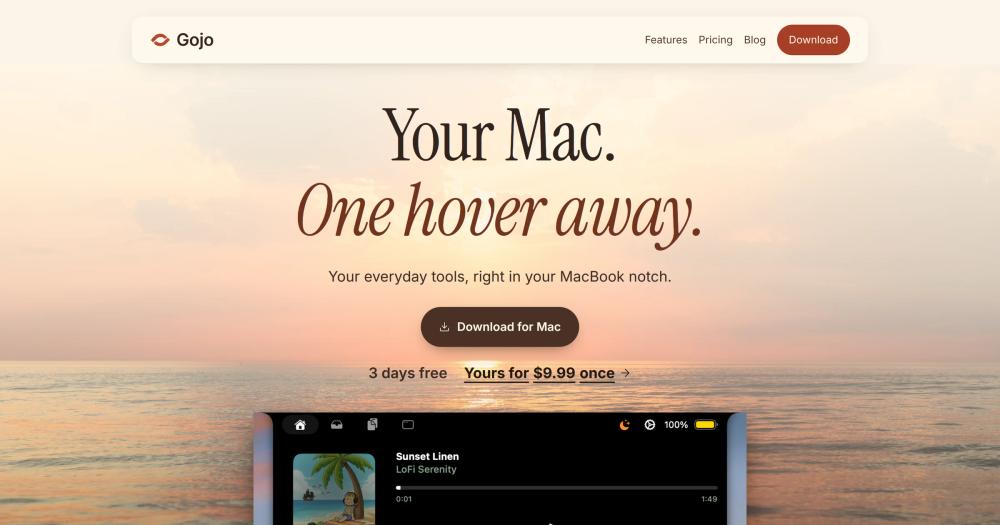
Transform your MacBook notch into a tab-driven workspace for window management, clipboard history, local dictation, and music controls.

Visit websiteGitHub4 stars
image of Gojo
TL;DR

Gojo is a GPL-3.0 licensed macOS utility that turns the MacBook notch into a hover-activated tab panel for window management, clipboard history, local dictation, music controls, and a drag-and-drop file shelf. It is a paid app ($9.99 lifetime for one Mac, $2.99 per month on subscription) with the source code publicly available on GitHub and a 3-day free trial that requires no account or payment card. The signed binary targets macOS 14 or later and Apple Silicon Macs. Best for MacBook users who want to replace paid notch utilities like NotchNest with an open source, on-device option that keeps voice and clipboard data local.

Read the full breakdownHide the full breakdownWho it is for, how it works, trade-offs, the quick start and the FAQ
who it's for

Who Gojo is for#

MacBook users replacing multiple menu bar utilities

Gojo consolidates a window manager, clipboard manager, local dictation app, and display warmth control into one app accessed from the notch. For users running Rectangle, a clipboard manager, and a Whisper front-end simultaneously, it reduces menu bar icon count and the number of permission surfaces to manage.

Skip if:

You need a clipboard manager that syncs across multiple Macs or to iOS. Gojo's clipboard history is local to the running Mac only.

Writers and developers who dictate offline

Local dictation with multiple model choices (Bark, Parakeet, Whisper) lets you pick the accuracy-versus-speed tradeoff. Parakeet Unified handles punctuation and capitalization automatically. Vocabulary import supports code symbols and jargon up to 250 entries, importable from JSON, CSV, or plain text.

Skip if:

You dictate primarily in a non-English language. Whisper Large v3 supports multilingual detection, but Bark and Parakeet models are English-focused.

Privacy-conscious Mac users

The default dictation path uses on-device models with no cloud dependency after setup. Clipboard history does not sync off-device. The XPC architecture and permission handling are readable in the GPL-3.0 source on GitHub.

Skip if:

You are comfortable with Apple's built-in dictation and your current clipboard manager. If those cover your needs, Gojo's privacy properties may not add further value.

Developers evaluating notch utility codebases

GPL-3.0 source lets you read the full Swift implementation: the notch window, XPC helper, Sparkle update integration, and dictation path. The build toolchain, signing requirements, and release process are documented in RELEASING.md and the README.

Skip if:

You need a Homebrew-installable, cask-distributable app. Gojo ships via its own signed installer and cannot be built by other team IDs without modifications.

the problem

The problem it solves#

The MacBook notch is dead space. Apple uses it for the camera and status icons, but the wide flanking area around the notch sits idle across the entire screen top. MacBook users who want fast access to window snapping, clipboard history, and voice dictation end up running separate apps: a window manager such as Rectangle, a clipboard manager, and a Whisper-based dictation front-end. Each adds its own menu bar icon, keyboard shortcut to remember, and permission dialog to approve.

The result is menu bar clutter and a context-switching tax. Reaching a clipboard entry means opening a floating panel, clicking the entry, and dismissing it. Snapping a window requires a keyboard shortcut you may not remember across all six positions. Local dictation on macOS has historically lived in a terminal app or a separate tray process. The notch, sitting at the top center of every MacBook screen, could be the natural home for all of these.

how Gojo solves it

How it solves it#

Tab-driven notch panel

The notch expands on hover into a tab-driven HUD. Each tab (Windows, Clipboard, Files, Music, Dictation, Displays, Calendar, Battery, Camera) surfaces only what you need. Tabs you do not enable stay hidden. The panel closes when you move the cursor away; no persistent floating window stays on screen.

Window snapping with live monitor preview

A strip of running apps shows real app icons and a live preview of the monitor layout. Six snap actions are available per window: left half, right half, top half, bottom half, fill, and zoom. Click any app chip to raise its window; each chip shows the keyboard shortcut for that snap direction.

Local dictation with on-device speech models

Supports Underdog Bark 3.0, Parakeet Unified, Parakeet v3, Whisper Small, and Whisper Large v3. Models run on Apple silicon after a one-time download (Bark is about 202 MB; Parakeet Unified Clean is about 447 MB). Hold Control+Option to start, release to insert. An optional OpenRouter path sends audio to a cloud provider, but only when you configure and enable it.

Clipboard history with private-entry skipping

Recent clipboard items are browsable from the notch. Supports search, pinning, and paste-back into the focused app. Automatically skips entries marked private by supported password managers. Other copied text, including unmarked secrets, can enter history.

Drag-and-drop file shelf

Drop files from anywhere into the notch and pick them up later in another app. No Finder tab or desktop stash needed for temporary file staging between two apps. Files are held until you retrieve them.

Music and display controls

The music tab follows whatever is playing: Apple Music, Spotify, or browser audio. Scrub the track, switch songs, and see album art in the notch. The display tab provides f.lux-style color temperature control with schedule-based transitions and location-aware sunset detection, all without opening System Settings.

strengths · trade-offs

Strengths and trade-offs#

Strengths

  • GPL-3.0 source published on GitHubThe full Swift codebase is public under GPL-3.0. You can inspect what the app does with Accessibility, microphone, and clipboard data before installing. The two-process XPC architecture (Gojo.app and GojoXPCHelper.xpc) is documented in the README, and the signing and notarization setup is in RELEASING.md.
  • On-device dictation, no API key requiredLocal speech models run on Apple silicon after a one-time download. Voice never leaves the Mac for the default dictation path. The app does not download models automatically; you choose and install each one explicitly in Settings. Vocabulary import supports code symbols and jargon up to 250 entries.
  • XPC isolation for the Accessibility grantThe Accessibility authorization is held by a separate bundled XPC service (GojoXPCHelper), not the main app process. The UI does not run with elevated permissions. This reduces the trust surface for the main app and makes the permission boundary auditable from the GPL-3.0 source.
  • Signed, notarized installer with auto-updateOfficial releases are signed with a Developer ID certificate and notarized by Apple. macOS Gatekeeper opens the app normally. Auto-updates arrive through Sparkle with an EdDSA-signed appcast, so you do not need to re-download manually.

Trade-offs

  • -Paid app; source build requires team certificateGojo is not free to keep after the 3-day trial. A lifetime license is $9.99 for one Mac or $19.99 for three. The source is GPL-3.0 and public, but building a usable signed binary requires an Apple developer certificate for the project's signing team (ID L6U44C67P5). Unsigned builds fail the XPC helper's caller requirement and cannot use the window manager or dictation.
  • -Apple Silicon focus; Intel support unverifiedThe README states that the current signed release targets Apple Silicon Macs. Intel support is not verified for the published binary. Users on Intel MacBook Pros should test the 3-day trial before purchasing.
  • -Early-stage project: 4 stars at 5 months oldThe repo was created in June 2026 and has 4 GitHub stars with zero open issues as of November 2026. Active development is ongoing (last push November 2026), but there is no large community yet and limited third-party documentation or community troubleshooting resources.
  • -macOS 14+ and MacBook notch requiredGojo requires macOS 14 Sonoma or later and is designed around the MacBook hardware notch. iMac, Mac mini, and Mac Pro users do not have a notch for the hover interaction. External display mirroring is available but requires configuration in Settings.
versus alternatives

Gojo vs alternatives#

Gojo vs NotchNest

Gojo and NotchNest both expand the MacBook notch into a utility panel. The comparison centers on source availability, pricing model, and feature depth.

FeatureGojoNotchNest
Source licenseGPL-3.0, public on GitHubProprietary
Pricing model$9.99 lifetime or $2.99/month per MacPaid commercial

Gojo bundles on-device dictation using local speech models (Bark 3.0, Parakeet, and Whisper variants) that run on Apple silicon after a one-time download. Voice never leaves the Mac by default. The GPL-3.0 source lets you read the full Swift codebase for the notch window, Accessibility XPC helper, and clipboard integration before installing.

NotchNest is a more established commercial notch utility. For users who prefer a longer-track-record paid product and are not concerned with source auditability or on-device dictation, NotchNest is worth evaluating. Other tools in the notch utility space, such as NotchNook, also offer hover-activated notch panels; Gojo's GPL-3.0 codebase and built-in local speech recognition set it apart from most of them.

Gojo is the better choice for MacBook users who want on-device dictation, an auditable open source codebase, and a one-time lifetime purchase. NotchNest or similar commercial utilities fit better when a mature product with a dedicated development team matters more than open source availability.

install · quick start

Quick start#

bash
Download the signed macOS installer from GitHub Releases: https://github.com/rohoswagger/gojo/releases/latest
tech stack · detected from GitHub

What it's built on#

Languages
JavaScriptPythonSwiftTypeScript
Frameworks
Next.jsReact
frequently asked

FAQ#

Is Gojo free to use?

No. Gojo includes a 3-day free trial that requires no account or payment card. After the trial, a license is required: $9.99 lifetime for one Mac, $19.99 lifetime for up to three Macs, or a monthly subscription starting at $2.99 per Mac. The source code is GPL-3.0 and public on GitHub, but building a usable signed binary requires an Apple developer certificate for the project's signing team.

Does Gojo's dictation send my voice to the cloud?

By default, no. Local models (Bark, Parakeet, Whisper variants) run on the Mac after a one-time download, and voice stays on-device. An optional OpenRouter path in Settings sends audio to a cloud provider, but you must enable it and supply your own API key. The app does not activate cloud transcription automatically.

What macOS version and hardware does Gojo require?

Gojo requires macOS 14 Sonoma or later. The current signed release targets Apple Silicon Macs; Intel support is not verified for the published build. Gojo is designed around the MacBook hardware notch, so it works best on MacBook Pro or MacBook Air models that have one.

Can I build Gojo from the source code?

You can compile the source, but a usable build requires a developer certificate for Gojo's signing team (ID L6U44C67P5). Without it, the XPC helper rejects the connection and the window manager will not function. Unsigned builds pass compilation but fail at runtime for all features that require the helper. The build command is 'make run' after cloning the repository.

Does Gojo work on external monitors?

Settings lets you configure which display Gojo uses and whether to mirror the notch panel across all displays. The app is designed for the MacBook notch; iMac, Mac mini, and Mac Pro users do not have a hardware notch for the hover interaction.

also worth a look

Similar open-source tools#

CleanYourTV

Featured

Alternative toATV Launcher Pro

Debloat any Android or Google TV over Wi-Fi and get an Apple TV-style home.

  • 51,495 GitHub stars
  • MIT LicenseLicence MIT License

rakazo

Featured

Alternative toGrok Bot

AI teammates you own: your keys, your model, your machine.

  • 7,028 GitHub stars
  • Apache-2.0Licence Apache-2.0

BetterCmdTab

Alternative toWitch

Per-window Cmd+Tab switcher for macOS

  • 853 GitHub stars
  • GPL-3.0Licence GPL-3.0

NTFSTool

Alternative toParagon NTFS for Mac

NTFS read/write on macOS via Apple FSKit, no kernel extension needed.

  • 4,193 GitHub stars
  • MITLicence MIT

Lowcoder

Alternative toRetool

Low-code app builder with 120+ components, self-hostable

  • 1,627 GitHub stars
  • AGPL-3.0Licence AGPL-3.0

SilverBullet

Alternative toObsidian

Programmable markdown wiki with Lua scripting and live queries

  • 6,457 GitHub stars
  • MITLicence MIT
by category

Open source tools in these categories#

270

Business & Productivity

OpenClaw, Excalidraw, RustDesk
557

Developer Tools

REA (Reverse Engineer Anything), Skills for Real Engineers, superpowers

Sponsors

Inbox Zero

Alternative toSuperhuman

AI email assistant that drafts replies and clears your inbox

  • 12,889 GitHub stars
  • AGPL-3.0Licence AGPL-3.0
  • #Email

rakazo

Alternative toGrok Bot

AI teammates you own: your keys, your model, your machine.

  • 7,028 GitHub stars
  • Apache-2.0Licence Apache-2.0
  • #AI Agents

SnitchFeed

Live monitoring on LinkedIn, X, Reddit & more. Agentic social listening for startups.

Marketing & Growth

Advertise your product

New open source projects by email

The projects we add and every new guide. Free, unsubscribe any time.

Find open source alternatives to paid software

/
  • Claude Code to OpenCode
  • Jira to Windshift
  • Notion to AppFlowy
  • Slack to Mattermost
  • Linear to GitLab
  • Wispr Flow to Handy
  • Arc to Zen Browser
  • CapCut to Concat
  • Grok Bot to rakazo
  • Superhuman to Inbox Zero
  • Airtable to AITable
  • Muse to OpenClaw
  • Railway to Coolify
  • GitHub Copilot to Cline
  • Datadog to Netdata
  • Confluence to Wiki.js
  • Microsoft Teams to Rocket.Chat
  • Firebase to Supabase
  • Pinecone to Qdrant
  • Zapier to n8n
  • 1Password to KeePassXC
  • Devin AI to OpenHands
  • Asana to Leantime
  • Contentful to Strapi
  • Claude Code to OpenCode
  • Jira to Windshift
  • Notion to AppFlowy
  • Slack to Mattermost
  • Linear to GitLab
  • Wispr Flow to Handy
  • Arc to Zen Browser
  • CapCut to Concat
  • Grok Bot to rakazo
  • Superhuman to Inbox Zero
  • Airtable to AITable
  • Muse to OpenClaw
  • Railway to Coolify
  • GitHub Copilot to Cline
  • Datadog to Netdata
  • Confluence to Wiki.js
  • Microsoft Teams to Rocket.Chat
  • Firebase to Supabase
  • Pinecone to Qdrant
  • Zapier to n8n
  • 1Password to KeePassXC
  • Devin AI to OpenHands
  • Asana to Leantime
  • Contentful to Strapi