Open Source Alternatives
  • Alternatives
  • Categories
    Categories by size1,230 projects
    • Developer Tools633
    • AI & Machine Learning528
    • Business & Productivity296
    • Web Development217
    • Security & Monitoring190
    • Communication & Collaboration166
    • IT Management157
    • LLMOps & AI Tooling133
    • DevOps & CI/CD132
    • Cloud & Hosting131
    Browse all 21 categoriesDesign & Creative, Product & Project Management and 9 more
  • Blog
  • Advertise
SearchNotion, Slack, password manager.../
Submit
Open Source Alternatives
  • Alternatives
    • Developer Tools633
    • AI & Machine Learning528
    • Business & Productivity296
    • Web Development217
    • Security & Monitoring190
    • Communication & Collaboration166
    • Browse all 21 categories
  • Blog
  • Advertise
Submit your project

New open source projects by email

The projects we add and every new guide. Free, unsubscribe any time.

Open Source Alternatives LogoOpen Source Alternatives

Handpicked Open Source Alternatives to Paid Softwares

Add Open Source Alternatives as a preferred source on Google

Product

  • Categories
  • Tag
  • Advertise

Resources

  • Blog
  • Collection
  • Submit

Company

  • Privacy Policy
  • Terms of Service
  • Refund Policy
  • Sitemap

Alternatives

  • Claude Code
  • Jira
  • Notion
  • Slack
  • Linear
  • Wispr Flow
  • All alternatives
© 2026 Open Source Alternatives. All rights reserved.
Open SourceAlternatives
Home/Categories/IT Management/Techo5
icon of Techo5

Techo5

Open source alternative to Amazon Alexa+

  • 636 stars
  • MIT
  • Active this week
  • Last commit today

Last verified Nov 13, 2026

Run Alpine Linux and Home Assistant on Echo Show and Echo Dot hardware, replacing Fire OS and Alexa with a local, privacy-first voice satellite.

Visit websiteGitHub636 starsDeploy on Hostinger
image of Techo5
TL;DR

Techo5 is open firmware for Amazon Echo Show and Echo Dot devices that replaces Fire OS and Alexa with Alpine Linux and a local Home Assistant voice satellite. Voice requests never leave the device; everything runs on-device with wake word detection, a touch screen UI, and SSH access. It is MIT licensed and best for Home Assistant users who want to repurpose existing Echo hardware for a fully private smart home setup.

Read the full breakdownHide the full breakdownWho it is for, how it works, trade-offs, the quick start and the FAQ
who it's for

Who Techo5 is for#

Home Assistant users with Echo Show or Echo Dot hardware

TECHO5 turns the Echo Show's touch screen into a fully integrated Home Assistant control panel, with alarms, to-do lists, entity tiles, weather, and media. Voice commands go directly to Home Assistant Assist, with no cloud relay. The hardware cost has already been paid.

Skip if:

If your Echo is newer than 2021, no public unlock exists and TECHO5 cannot be installed. Also skip if your household relies on Alexa Skills, Amazon Music, or any Amazon cloud feature, all of which are unavailable after flashing.

Privacy-first smart home builders avoiding cloud assistants

Every voice request is processed locally by microwakeword and Home Assistant. No audio leaves the device for detection or transcription unless you configure an external speech-to-text service. The firmware records nothing to Amazon.

Skip if:

If you need a commercially supported voice assistant with guaranteed uptime and feature parity to Alexa or Google Assistant, a commercial subscription service is a more reliable choice. TECHO5 requires Home Assistant and comfort with flashing hardware.

Multi-room audio users running Snapcast

TECHO5 turns each Echo into a synchronized Snapcast client, joining it to the same audio stream as other Snapcast speakers in the house. The Echo's speaker hardware becomes a network audio endpoint without any Amazon Music subscription.

Skip if:

If you do not run a Snapcast server, this feature is not relevant to your setup.

iPhone and Mac users adding Echo hardware to AirPlay 2 groups

With AirPlay switched on, the Echo Show or Echo Dot joins an AirPlay 2 group alongside Apple HomePod or other AirPlay 2 speakers. The iPhone's volume slider controls the device's volume directly, and the Echo can be a speaker in a whole-house AirPlay 2 setup.

Skip if:

If you use Android or Windows as your primary audio source and do not have an Apple device, AirPlay 2 is not applicable.

the problem

The problem it solves#

Amazon Echo Show and Echo Dot devices have good microphones, usable screens, and decent speakers. But every voice request flows through Amazon's servers, the wake word activates Amazon's software, and the data-sharing agreement comes with the device. When Amazon layers Alexa+ as a subscription tier and gates features behind it, the value proposition of that hardware shifts without the owner's consent.

Repurposing the hardware for a local smart home setup has historically required either accepting Amazon's terms or scrapping the device. The devices run a locked-down fork of Android (Fire OS), and the bootloader is not intended to be opened. Without a firmware replacement, there is no path to running a local voice assistant on this hardware.

how Techo5 solves it

How it solves it#

Alpine Linux base, no Fire OS or Alexa

TECHO5 flashes a minimal Alpine Linux image onto the Echo Show or Echo Dot hardware, removing Fire OS, the Alexa agent, and the Amazon cloud dependency entirely. The resulting system boots in seconds, leaves more RAM available for the daemon and the UI, and gives SSH access to the running device.

On-device wake word and Home Assistant integration

The Go daemon uses microwakeword to detect a wake word entirely on the device's own microphones, then sends the transcribed request to Home Assistant via its native API. No audio leaves the device until the wake word triggers, and even then it goes to your local Home Assistant instance, not to Amazon.

Touch screen UI with weather, alarms, and media

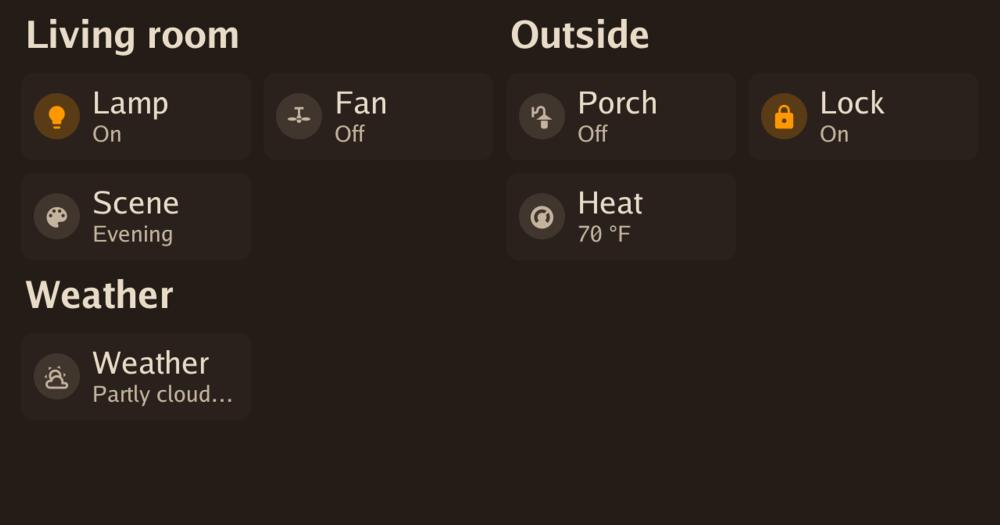
The daemon draws clock, weather with animated rain and sunrise effects, alarms, to-do lists from Home Assistant, music playback with Now Playing, and tile dashboards for controlling home entities. Text size is adjustable from 70% to 125%, and brightness goes as low as 5%.

A/B over-the-air updates and SSH access

Updates write to the inactive A/B partition; the device boots from it on success, leaving the previous working image available if anything goes wrong. SSH is available throughout for diagnostics and manual configuration.

AirPlay 2 and Snapcast client support

With AirPlay switched on, an iPhone or Mac can stream audio to the device or include it in an AirPlay 2 group. The device can also join a Snapcast setup as a synchronized client, playing in step with other Snapcast speakers in the house.

Runs on Echo Show 5, Show 8, Echo Spot, and Echo Dot

TECHO5 supports six Echo models in daily use, including both generations of the Echo Show 5 and Show 8. The Echo Show 8 2nd gen runs a 64-bit mainline Linux kernel; the Show 5 and older models share the same daemon binary. TECHO5 Panel extends support to Android tablets and the Meta Portal via an app.

strengths · trade-offs

Strengths and trade-offs#

Strengths

  • MIT license with no cloud dependency or account requiredThe firmware is MIT licensed and routes no data to Amazon or any third party unless you configure it to. Voice processing happens on the device or on your local Home Assistant instance. There is no Amazon account required after flashing; the device no longer contacts Amazon's servers.
  • On-device wake word detection via microwakewordThe microwakeword engine runs the wake word entirely on the device's own processor, with no audio streaming to an external server for detection. Wake word scores are visible in the setup page so you can tune the threshold for your room. Custom wake words can be trained offline using the companion wakesmith tool.
  • Active development across multiple Echo modelsThe project had 636 stars and 110 forks as of November 2026, with updates shipping frequently through the fall. Releases add features such as call-by-wake-word, external microphone processing, Snapcast support, and additional screen language support. The project is used daily across six Echo hardware variants.
  • Full Linux environment with SSH on the deviceTECHO5 gives full SSH access to a standard Alpine Linux environment running on the Echo hardware. This means you can install additional packages, inspect logs, modify the daemon configuration, and troubleshoot hardware directly, something the locked Fire OS never permitted.

Trade-offs

  • -Requires an irreversible bootloader exploit to installInstalling TECHO5 requires running a bootloader exploit (amonet) to unlock the Echo hardware. This step is irreversible: once unlocked, the device cannot return to its original locked state from Amazon's perspective. The process requires physical access and comfort with hardware flashing procedures.
  • -No support for Echo hardware made after 2021No Echo device manufactured after 2021 has a known public unlock, so TECHO5 only runs on older hardware. The Echo Show 5 (1st and 2nd gen, 2019 and 2021) and Echo Show 8 (1st and 2nd gen, 2019 and 2021) are supported; newer Echo devices with updated bootloaders are not.
  • -Amazon Alexa features are unavailable after flashingTECHO5 replaces Alexa entirely. Amazon shopping, Alexa Skills, Amazon Music, Drop In to other Alexa devices in the household, and any feature tied to Amazon's cloud are gone after installation. Voice control works through Home Assistant only; capabilities depend on what Home Assistant and its integrations support.
versus alternatives

Techo5 vs alternatives#

TECHO5 vs Amazon Alexa+

Amazon Alexa+ is the subscription tier of Amazon's voice platform, adding generative AI and context-aware responses to Alexa, all processed in Amazon's cloud. TECHO5 replaces Alexa and Fire OS entirely with Alpine Linux and a Home Assistant daemon on the same Echo hardware, targeting local control and data ownership.

FeatureTECHO5Amazon Alexa+
LicenseMITProprietary subscription
Voice processingOn-device + local Home AssistantAmazon cloud
Self-hostingYes, runs on the deviceNo
Internet requiredNo (for voice commands)Yes
Subscription feeNoneYes (Alexa+ is paid)
AirPlay 2YesNo
Custom wake wordsYes (via wakesmith)Limited presets

TECHO5 is the better choice for Home Assistant users who want voice control without routing audio through Amazon's servers, for those repurposing older Echo hardware without an ongoing subscription, and for households where data leaves the home only by deliberate choice. Every voice request is processed locally and nothing reaches Amazon after installation.

Amazon Alexa+ is the better fit when you rely on Alexa Skills, Amazon Music, shopping features tied to your Amazon account, or Drop In calling with other Alexa devices. It also offers generative AI responses that go beyond a default Home Assistant Assist setup. If your Echo was made after 2021, Alexa+ is your only option because no public bootloader unlock exists for newer hardware.

install · quick start

Quick start#

bash
Download the TECHO5 firmware image for your Echo Show or Echo Dot model from GitHub Releases: https://github.com/HuskerMinion/techo5/releases/latest
tech stack · detected from GitHub

What it's built on#

Languages
CGoPython
frequently asked

FAQ#

Does installing TECHO5 brick the Echo device or void its warranty?

Installing TECHO5 uses a bootloader exploit to unlock the device, which is an irreversible step. The device will no longer run Fire OS or Amazon's software. It does not physically brick the hardware, and A/B OTA updates mean a failed software update does not leave the device unbootable. The warranty with Amazon is voided. If you need to retain Amazon support or the original Alexa experience, do not proceed.

Which Echo Show and Echo Dot models does TECHO5 support?

TECHO5 supports Echo Show 5 (1st and 2nd gen, 2019 and 2021), Echo Show 8 (1st and 2nd gen, 2019 and 2021), Echo Spot 1st gen, Echo Dot 2nd and 3rd gen, and the Echo 2nd gen. No Echo made after 2021 has a public unlock. Android tablets and the Meta Portal are supported via the TECHO5 Panel app. The Skylight Calendar 15 is supported as an experimental port.

Does TECHO5 require Home Assistant to function?

Yes. TECHO5 connects to your local Home Assistant instance for voice commands, alarms, to-do lists, entity control, and media. Without a running Home Assistant instance on your local network, most of the device's features will not work. Home Assistant is free and self-hosted.

Can I use a custom wake word instead of a preset one?

Yes. The companion wakesmith tool trains a custom wake word on your own computer using synthetic speech and real recordings taken from the device. The setup page can record takes of a wake word directly on the device's microphones. Wake word sensitivity is tunable from the setup page, and wake word scores are shown live so you can calibrate for your room.

Does TECHO5 support AirPlay 2 or Snapcast for multi-room audio?

Both are supported. AirPlay 2 lets an iPhone or Mac stream audio to the device or include it in an AirPlay 2 group, with volume control from the Apple device. Snapcast client support lets TECHO5 join a Snapcast server as a synchronized speaker alongside other Snapcast clients in the house. Both features are opt-in and configured from the setup page.

also worth a look

Similar open-source tools#

Rustdesk Server

Alternative toTeamViewer

Self-hosted relay and rendezvous server for RustDesk remote desktop.

  • 10,736 GitHub stars
  • AGPL-3.0Licence AGPL-3.0

OpenInvento

Alternative toSortly

Self-hosted inventory manager with QR scanning and shared inventories.

  • 61 GitHub stars
  • CustomLicence PolyForm Shield 1.0.0

Snipe It

Alternative toAsset Panda

Self-hosted IT asset management for hardware, licenses, consumables.

  • 15,167 GitHub stars
  • AGPL-3.0Licence AGPL-3.0

Mole

Alternative toCleanMyMac X

Free CLI and native app for Mac cleanup, uninstall, and disk analysis

  • 74,762 GitHub stars
  • GPL-3.0Licence GPL-3.0

Vorssaint Utils

Alternative toiStat Menus

One menu bar icon replacing a dozen paid macOS apps

  • 33,946 GitHub stars
  • GPL-3.0Licence GPL-3.0

OpenBot

Alternative toGrok Bot

AI coworkers you can trust with real work

  • 11,400 GitHub stars
  • MITLicence MIT
by category

Open source tools in these categories#

157

IT Management

RustDesk, Immich, Stirling PDF
296

Business & Productivity

OpenClaw, Excalidraw, RustDesk
Hostinger

Self-host Techo5 on a Hostinger VPS

Keep it running 24/7, even when your laptop is off. A Hostinger VPS gives it a server of its own.

  1. 01

    Choose a plan

    Starts from $6.49/mo

  2. 02

    Apply

    Extra 10% off yearly plans

  3. 03

    Install Techo5

    On a server that stays on

  4. 04

    Start building

    Focus on the app, not the server

Deploy on Hostinger

Sponsors

Inbox Zero

Alternative toSuperhuman

AI email assistant that drafts replies and clears your inbox

  • 12,987 GitHub stars
  • AGPL-3.0Licence AGPL-3.0
  • #Email

rakazo

Alternative toGrok Bot

AI teammates you own: your keys, your model, your machine.

  • 7,869 GitHub stars
  • Apache-2.0Licence Apache-2.0
  • #AI Agents

SnitchFeed

Live monitoring on LinkedIn, X, Reddit & more. Agentic social listening for startups.

Marketing & Growth

Advertise your product

New open source projects by email

The projects we add and every new guide. Free, unsubscribe any time.

Find open source alternatives to paid software

/
  • Claude Code to OpenCode
  • Jira to Windshift
  • Notion to AppFlowy
  • Slack to Mattermost
  • Linear to GitLab
  • Wispr Flow to Handy
  • Arc to Zen Browser
  • CapCut to Concat
  • Grok Bot to rakazo
  • Superhuman to Inbox Zero
  • Discord to Stoat
  • Airtable to AITable
  • Muse to OpenClaw
  • Railway to Coolify
  • GitHub Copilot to Cline
  • Datadog to Netdata
  • Confluence to Wiki.js
  • Microsoft Teams to Rocket.Chat
  • 1Password to KeePassXC
  • Firebase to Supabase
  • Pinecone to Qdrant
  • Zapier to n8n
  • Devin AI to OpenHands
  • Asana to Leantime
  • Claude Code to OpenCode
  • Jira to Windshift
  • Notion to AppFlowy
  • Slack to Mattermost
  • Linear to GitLab
  • Wispr Flow to Handy
  • Arc to Zen Browser
  • CapCut to Concat
  • Grok Bot to rakazo
  • Superhuman to Inbox Zero
  • Discord to Stoat
  • Airtable to AITable
  • Muse to OpenClaw
  • Railway to Coolify
  • GitHub Copilot to Cline
  • Datadog to Netdata
  • Confluence to Wiki.js
  • Microsoft Teams to Rocket.Chat
  • 1Password to KeePassXC
  • Firebase to Supabase
  • Pinecone to Qdrant
  • Zapier to n8n
  • Devin AI to OpenHands
  • Asana to Leantime