Open Source Alternatives
  • Alternatives
  • Categories
    Categories by size1,139 projects
    • Developer Tools583
    • AI & Machine Learning498
    • Business & Productivity275
    • Web Development209
    • Security & Monitoring173
    • Communication & Collaboration154
    • IT Management146
    • Cloud & Hosting128
    • LLMOps & AI Tooling128
    • Product & Project Management122
    Browse all 21 categoriesDevOps & CI/CD, Data & Analytics and 9 more
  • Blog
  • Advertise
SearchNotion, Slack, password manager.../
Submit
Open Source Alternatives
  • Alternatives
    • Developer Tools583
    • AI & Machine Learning498
    • Business & Productivity275
    • Web Development209
    • Security & Monitoring173
    • Communication & Collaboration154
    • Browse all 21 categories
  • Blog
  • Advertise
Submit your project

New open source projects by email

The projects we add and every new guide. Free, unsubscribe any time.

Open Source Alternatives LogoOpen Source Alternatives

Handpicked Open Source Alternatives to Paid Softwares

Product

  • Categories
  • Tag
  • Advertise

Resources

  • Blog
  • Collection
  • Submit

Company

  • Privacy Policy
  • Terms of Service
  • Refund Policy
  • Sitemap

Alternatives

  • Claude Code
  • Jira
  • Notion
  • Slack
  • Linear
  • Wispr Flow
  • All alternatives
© 2026 Open Source Alternatives. All rights reserved.
Open SourceAlternatives
Home/Categories/AI & Machine Learning/Agent Teams AI
icon of Agent Teams Ai

Agent Teams AI

Open source alternative to Conductor

  • 2.4K stars
  • AGPL-3.0
  • Active this week
  • Last commit today

Last verified Nov 5, 2026

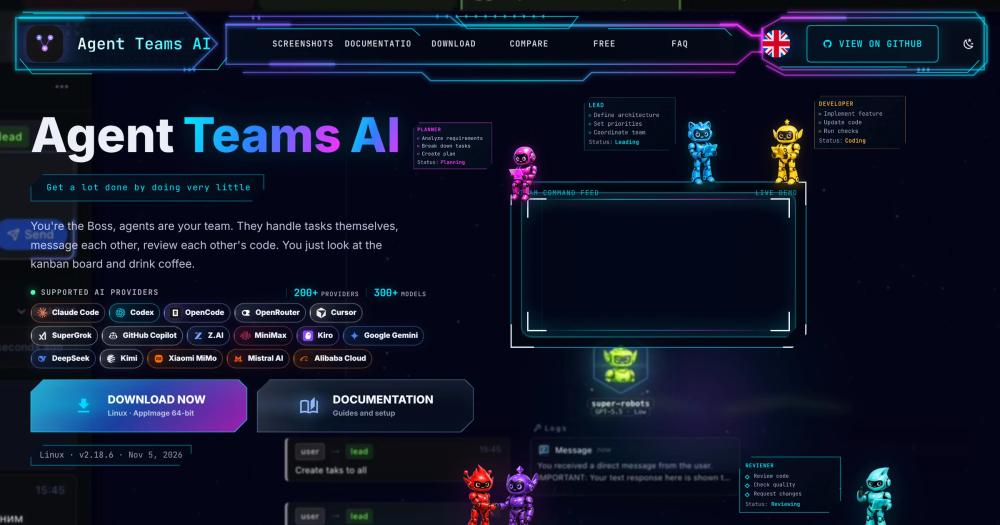
Orchestrate autonomous AI agent teams with a Kanban board, built-in code review, and 300+ models from 200+ providers, free on macOS, Windows, and Linux.

Visit websiteGitHub2.4K stars
image of Agent Teams Ai
TL;DR

Agent Teams AI is a free, AGPL-3.0 desktop app for macOS, Windows, and Linux that orchestrates multiple AI agents as a team across a Kanban board. It replaces commercial agent orchestration platforms, giving developers visual oversight of autonomous agents that plan, build, and review each other's work. Each agent has a role and runtime (Claude Code, Codex, OpenCode, Cursor, or any of 300+ supported models), and a free model is included for no-auth use from the first launch. Best for developers who run parallel coding workstreams and want task ownership, code review, and progress visibility without a cloud subscription.

Read the full breakdownHide the full breakdownWho it is for, how it works, trade-offs, the quick start and the FAQ
who it's for

Who Agent Teams AI is for#

Developers running parallel AI coding workstreams

Agent Teams AI is built for developers who want multiple AI agents handling separate features or bug fixes simultaneously. The Kanban board shows task ownership and status across all agents, the Changes viewer handles code review, and cross-agent messaging handles handoffs without manual coordination.

Skip if:

If you only run one AI agent at a time and do not need task tracking or review workflows, the app adds overhead that a plain terminal session does not.

Teams evaluating multi-agent orchestration without a paid subscription

The included free model and no-signup flow let you evaluate multi-agent orchestration with no cost commitment. Connect a paid provider only when you have confirmed the workflow fits your project.

Skip if:

If you need a managed, cloud-hosted orchestration service with SLAs and enterprise support, Agent Teams AI is self-managed with community support only.

Developers who already have Claude Code, Codex, or OpenCode installed

Agent Teams AI auto-detects installed Claude Code, Codex, and OpenCode runtimes and assigns them to agent roles. Teams mixing providers in a single project get a unified task view across all agents without extra configuration.

Skip if:

If you use only one provider and have no need for the Kanban board or inter-agent communication, the CLI tool for that provider is a simpler option.

the problem

The problem it solves#

Running multiple AI coding agents in parallel means opening separate terminal windows, manually tracking which agent is working on what, and manually reviewing every diff. There is no shared task state across agents, no handoff protocol, and no way to see at a glance whether agents are blocked, reviewing, or done.

The usual workaround is to run one agent at a time, give it a large prompt, and check the output. This keeps things simple but forfeits the speed of parallel work. The other path is to wire up a custom orchestration script, which adds infrastructure complexity and still leaves you with no visual dashboard. Neither path gives you the agent-to-agent communication and built-in review workflow that mirrors how a human engineering team actually operates.

how Agent Teams AI solves it

How it solves it#

Kanban board with autonomous task management

Agents pick up tasks, update statuses, and move cards across a 5-column board with review states. You can drag and drop for manual reordering, but the board updates itself as agents complete and hand off work. Each card links to its task detail, execution logs, and diff.

Built-in Changes viewer for code review

The Changes viewer shows file and hunk-level diffs for every task. You can accept or reject individual hunks, edit in place, undo a decision, or leave feedback directly on the diff. The layout mirrors Cursor's review workflow, scoped to each agent's task output.

Multi-provider support across 300+ models

Teams can mix Claude Code, Codex, OpenCode, Cursor, SuperGrok, GitHub Copilot, Z.AI, MiniMax, Kiro, and other providers in a single team. A free model with no auth is included, so you can run your first team without an API key or account.

Token analytics and budget alerts

Token and estimated-cost usage is tracked across teams, agents, tasks, projects, models, runtimes, sessions, and runs. Monthly budgets can be set with alerts at 80% and 100% usage. For supported scheduled runs, an optional hard cap is available.

Cross-team communication and nested organizations

Agents send direct messages and task comments within and across teams. Teams can be grouped into departments or squads in a nested organization view, with a live map showing team status, task progress, dependencies, and cross-team communication.

Solo Mode for single-agent workflows

Solo Mode runs a single agent that creates its own tasks and shows live progress. It uses fewer tokens than a full team and can be expanded to a multi-agent team at any point without reconfiguring the project.

strengths · trade-offs

Strengths and trade-offs#

Strengths

  • Free with a no-auth model includedAgent Teams AI has no paid tier. A free model with no authentication is bundled so you can run your first agent team immediately with no signup, API key, or credit card. Paid provider connections are optional and controlled by the provider you choose.
  • Unified workspace for tasks, code review, terminal, and messagingThe Kanban board, task detail pages, agent message feeds, execution logs, Changes viewer, and an integrated visual terminal are all in one Electron app. You do not need separate browser tabs, terminal windows, or external dashboard tools to follow what your agents are doing.
  • AGPL-3.0: unrestricted for internal and commercial useAGPL-3.0 permits running Agent Teams AI for internal and commercial team use without restriction. The copyleft clause applies only if you distribute a modified version as a managed service: then you must publish your source changes.
  • Auto-detects installed runtimes, no manual wiringThe app detects Claude Code, Codex, and OpenCode runtimes installed on your machine. You can connect Cursor, SuperGrok, GitHub Copilot, Z.AI, MiniMax, and Kiro from the UI. No environment file setup or configuration script is required to start.

Trade-offs

  • -AGPL-3.0 restricts managed-service redistributionIf you plan to run a modified version of Agent Teams AI as a hosted service for others, AGPL-3.0 requires you to publish the source changes. Teams running it internally have no such restriction, but businesses building a competing hosted product need to review the license terms before proceeding.
  • -26 open issues; active development may bring surface-level churnThe repo had 26 open issues when this entry was written. As a project launched in February 2026 with 2406 stars, it is under active development. Some features documented on the product site may be in flux, and stability should be evaluated against the latest release.
  • -Desktop app only; no headless or server deploymentAgent Teams AI runs as an Electron desktop app, not a server or container. If you need to run agent teams on a remote machine, in CI, or as a background service, there is no documented path for headless deployment. All orchestration requires the desktop app to be open.
versus alternatives

Agent Teams AI vs alternatives#

Agent Teams AI vs Conductor

Agent Teams AI and Conductor both address the same category: running structured AI agent teams with task tracking, roles, and review workflows. The key difference is that Conductor is a paid commercial platform while Agent Teams AI is a free, open source desktop app licensed under AGPL-3.0.

Conductor reaches its end of life on 2026-11-20.

FeatureAgent Teams AIConductor
LicenseAGPL-3.0, freeProprietary, paid
DeploymentDesktop app (macOS, Windows, Linux)Managed cloud
Kanban board5-column board with review statesAvailable
Code reviewBuilt-in Changes viewer (file/hunk accept, reject, edit)Available
Provider support300+ models, 200+ providers; free model includedProprietary provider set
Self-hostingRuns on your machine, no server requiredCloud only

For teams that were using Conductor to run structured AI agent workflows, Agent Teams AI covers the same core loop: assign roles, run agents in parallel, track progress on a Kanban board, and inspect diffs in the built-in Changes viewer. The free model with no auth lets you start without connecting any provider. All features are available without a subscription, and the app runs entirely on your machine.

install · quick start

Quick start#

bash
Download the installer for your platform (macOS, Windows, or Linux) from GitHub Releases: https://github.com/777genius/agent-teams-ai/releases/latest
tech stack · detected from GitHub

What it's built on#

Languages
JavaScriptTypeScript
Frameworks
ElectronNuxtReactVue
frequently asked

FAQ#

Is Agent Teams AI really free?

Yes. Agent Teams AI has no paid tier. A free model with no auth is included for immediate use. When you connect a paid provider such as Claude Code or OpenCode, you use that provider's existing subscription or API key; Agent Teams AI itself charges nothing. All features, including the Kanban board, Changes viewer, and organizations, are available on the free download.

What platforms does Agent Teams AI support?

Agent Teams AI runs on macOS (Apple Silicon and Intel), Windows (64-bit), and Linux. Linux packages include an AppImage, .deb, .rpm, and .pacman installer. All platforms are supported on the same release cadence. Download the installer for your platform from GitHub Releases.

Which AI providers and models does Agent Teams AI support?

Agent Teams AI auto-detects Claude Code, Codex, and OpenCode runtimes on your machine. From the UI you can connect Cursor, SuperGrok, GitHub Copilot, Z.AI, MiniMax, Kiro, and others. The app supports 300+ models from 200+ providers. A free model with no authentication is included for first use.

What does the AGPL-3.0 license mean for teams using Agent Teams AI?

AGPL-3.0 allows you to run Agent Teams AI for internal and commercial team use without restriction. The copyleft clause applies only if you distribute a modified version as a network service: then you must publish the modified source. For teams running it on their own machines to orchestrate their own work, there is no restriction.

Can I use Agent Teams AI without installing Claude Code or Codex?

Yes. A free model with no auth is bundled, so you can run your first team immediately with no account or API key. Claude Code, Codex, and OpenCode are auto-detected if installed, but they are not required. Paid provider connections are optional and controlled by the provider you choose.

Looking for more

Other ways to replace Conductor#

paperclip

Featuredfor Conductor

Self-hosted AI agent management with org charts and budgets

111,113 GitHub starsVisit

Orca

#1 in the Conductor guide

Drop-in Conductor replacement with 27 or more agents on macOS, Windows, and Linux under MIT

115,397 GitHub stars

T3 Code

#2 in the Conductor guide

MIT-licensed control plane for 6 or more agents with mobile and web clients and a large community

46,806 GitHub stars

Paseo

#3 in the Conductor guide

Daemon-based architecture for agents running on a VM or Docker host with full mobile parity

23,074 GitHub stars
All 51 Conductor alternatives12 open source Conductor alternatives, ranked
by category

Open source tools in these categories#

498

AI & Machine Learning

freeCodeCamp, REA (Reverse Engineer Anything), OpenClaw
583

Developer Tools

REA (Reverse Engineer Anything), Skills for Real Engineers, superpowers
122

Product & Project Management

agency-agents, freeCodeCamp, Gstack

Sponsors

Inbox Zero

Alternative toSuperhuman

AI email assistant that drafts replies and clears your inbox

  • 12,915 GitHub stars
  • AGPL-3.0Licence AGPL-3.0
  • #Email

rakazo

Alternative toGrok Bot

AI teammates you own: your keys, your model, your machine.

  • 7,028 GitHub stars
  • Apache-2.0Licence Apache-2.0
  • #AI Agents

SnitchFeed

Live monitoring on LinkedIn, X, Reddit & more. Agentic social listening for startups.

Marketing & Growth

Advertise your product

New open source projects by email

The projects we add and every new guide. Free, unsubscribe any time.

Find open source alternatives to paid software

/
  • Claude Code to OpenCode
  • Jira to Windshift
  • Notion to AppFlowy
  • Slack to Mattermost
  • Linear to GitLab
  • Wispr Flow to Handy
  • Arc to Zen Browser
  • CapCut to Concat
  • Grok Bot to rakazo
  • Superhuman to Inbox Zero
  • Airtable to AITable
  • Muse to OpenClaw
  • Railway to Coolify
  • GitHub Copilot to Cline
  • Datadog to Netdata
  • Confluence to Wiki.js
  • Microsoft Teams to Rocket.Chat
  • Firebase to Supabase
  • Pinecone to Qdrant
  • Zapier to n8n
  • 1Password to KeePassXC
  • Devin AI to OpenHands
  • Asana to Leantime
  • Contentful to Strapi
  • Claude Code to OpenCode
  • Jira to Windshift
  • Notion to AppFlowy
  • Slack to Mattermost
  • Linear to GitLab
  • Wispr Flow to Handy
  • Arc to Zen Browser
  • CapCut to Concat
  • Grok Bot to rakazo
  • Superhuman to Inbox Zero
  • Airtable to AITable
  • Muse to OpenClaw
  • Railway to Coolify
  • GitHub Copilot to Cline
  • Datadog to Netdata
  • Confluence to Wiki.js
  • Microsoft Teams to Rocket.Chat
  • Firebase to Supabase
  • Pinecone to Qdrant
  • Zapier to n8n
  • 1Password to KeePassXC
  • Devin AI to OpenHands
  • Asana to Leantime
  • Contentful to Strapi