

Open-source alternatives guide
Conductor Is Joining Meta: 12 Open Source Alternatives
By SurajReviewed Verified
Conductor is joining Meta. No new sign-ups have been accepted since November 4, 2026, and Conductor Cloud shuts down on November 20 with data deletion beginning that day. The local Conductor app will continue to work through early 2027, then winds down too.
The best open source alternative to Conductor is Orca because it runs the same Git worktree model, supports 27 or more coding agents on macOS, Windows, and Linux, and is MIT and self-run, so there is no service that can shut down on you. I compared 12 open source options. If you are on macOS and want the nearest drop-in, Orca is the first place to look. On Windows or Linux, Orca still works, but Pane reads your existing conductor.json scripts.
TL;DR
- Orca: the nearest drop-in for macOS developers leaving Conductor, with the same worktree model, 27 or more agents, and an MIT licence.
- Pane: reads your existing conductor.json setup scripts and runs any CLI agent in isolated worktrees on Windows or Linux.
- Paseo: runs its daemon on a VM or Docker host so agents keep working when your laptop is off, accessible from any device including mobile.
Overview
What Conductor is and what it costs
Conductor is a macOS desktop app for running multiple coding agents in parallel. Each task gets its own Git worktree with its own files, branch, commands, chats, and review flow, so agents work without stepping on each other's work. The 4 supported agents are Claude Code, Codex, Cursor, and OpenCode. Claude Code, Codex, and OpenCode come bundled. Cursor sessions run through the Cursor API and require a separate key.
The app is free. Conductor does not bill or resell model usage. Each agent's usage goes to the provider account or API key you already have. On Team plans, Multiplayer lets you share a workspace link with teammates, see who is active, and prompt agents together in real time.
Conductor Cloud gave hosted workspaces on its Pro, Teams, and Enterprise plans. Each Cloud sandbox ran on a Vercel sandbox with 8 vCPUs, 16 GB of RAM, and 32 GB of ephemeral NVMe storage, and Cloud workspaces worked with GitHub repositories only. For local workspaces, messages go directly to the model provider and session data stays on your Mac. Agents run with the same permissions as your user account, without sandboxing.
Conductor launched in July 2025. Conductor is available for macOS only.
Pain points
Why people leave Conductor
The practical reasons teams compare Conductor with open-source alternatives before they migrate.
Conductor is joining Meta, and the timeline is tighter than it looks at first read.
No new sign-ups are accepted as of November 4, 2026, and new users cannot download the app. On November 13, Conductor Cloud workspaces go read-only: you can still read old chats and export data, but you cannot send new messages. Active subscribers will get a refund. On November 20, Cloud shuts down and data deletion begins. The local Conductor app continues to receive new models and critical bug fixes until early 2027, then it too winds down. All user data will be deleted when the app shuts down. The team has promised something new for early next year.
The dates matter most if you have agents running in Cloud workspaces today. November 13 is when you lose the ability to send new messages. November 20 is when Cloud data deletion begins, so transfer or export before then. If you are relying on Cloud for work in progress, the window to act is before November 13.
With an open source licence, the copy you already have keeps the licence terms it came with. Updates still depend on who maintains the project, so check that before you switch. That is a real reason to look at the 12 options below, beyond the immediate pressure of the shutdown dates.
Conductor is not available for Windows or Linux yet, so on those platforms it was never an option. Orca, Pane, Emdash, T3 Code, and Paseo all run there, and what follows is your first comparison of tools in this space.
At a glance
Quick comparison
| Name | License | Best For |
|---|---|---|
| Orca | MIT | Drop-in Conductor replacement with 27 or more agents on macOS, Windows, and Linux under MIT |
| T3 Code | MIT | MIT-licensed control plane for 6 or more agents with mobile and web clients and a large community |
| Paseo | Apache-2.0 | Daemon-based architecture for agents running on a VM or Docker host with full mobile parity |
| Paradev | MIT | macOS parallel-agent desktop app with SOC 2 Type II certification and optional paid remote access |
| Orchestrator | Apache-2.0 | Parallel workers in their own worktrees with a PR and CI review loop, 35 or more agents, macOS, Windows, and Linux, Apache-2.0 |
| Emdash | Apache-2.0 | Scheduled recurring agent runs with Linear, Jira, and Asana issue-pull on macOS, Windows, and Linux |
| Maestro | AGPL-3.0 | Keyboard-first cross-platform worktree orchestrator with Auto Run batch jobs, CLI, and SSH remote hosts, AGPL-3.0 |
| bb | MIT | Agentic IDE where every thread runs on its own worktree branch, macOS Apple Silicon first, MIT, one agent can spawn another |
| Xum | AGPL-3.0 | Provider-agnostic parallel workspaces with integrated code review, local or over SSH, AGPL-3.0, from Coder |
| Nimbalyst | MIT | Visual WYSIWYG workspace with rendered diff review, task tracking, and an iOS companion app |
| Jean | Apache-2.0 | Headless Linux server keeps agents running after the laptop closes, with an RTK plugin Jean says cuts tool-output tokens by 60 to 90 percent |
| Pane | AGPL-3.0 with attribution requirement | Terminal-first agent manager for Windows, macOS, and Linux with conductor.json migration support and no paid tier |
Platforms
macOS only
Orca, Pane, Emdash, T3 Code, Nimbalyst, Orchestrator.inc, Maestro: macOS/Windows/Linux. Paseo: same+mobile. Xum: macOS+Linux. Jean: macOS tested, Linux community tested, Windows not fully tested, headless Linux server. bb: macOS (Linux+Windows alpha). Paradev: macOS
Licence
Check Conductor's terms
MIT: Orca, Paradev, T3 Code, Nimbalyst, bb. Apache-2.0: Paseo, Emdash, Jean, Orchestrator.inc. AGPL-3.0: Pane, Maestro, Xum
Git worktree isolation
Yes, 1 worktree per workspace
Yes across all 12, though Emdash and T3 Code let you work without a separate worktree, so check the default before you start.
Supported agent count
4: Claude Code, Codex, Cursor (via API), OpenCode
Orca: 27+. Emdash: 35. Orchestrator.inc: 35+. Paseo: 30+. T3 Code: 6+. Pane, Paradev: any CLI agent. Jean: 8+. bb: 8. Maestro: 7 (3 in beta). Nimbalyst: Claude Code, Codex (OpenCode and Copilot alpha). Xum: own loop, multi-model.
Off-laptop execution
Conductor Cloud (shutting down November 20, 2026)
Jean headless: self-hosted Linux. Paseo daemon: VM or Docker. Orchestrator.inc Cloud: paid from $20, keeps workers running with laptop closed. Maestro, Xum: SSH to remote hosts. Paradev Pro: $20/month. Pane Remote Pane: self-hosted, free. Orca, Emdash: SSH remote.
Service status
Cloud shuts down November 20, 2026. Local winds down early 2027
All 12 are open source. Some also offer hosted parts, such as Paradev cloud workspaces and Orchestrator.inc Cloud, so check which hosted parts of your chosen tool you would depend on.
Editorial ranking
12 Best Open Source Conductor Alternatives (Ranked)

Rank 1
Orca
Best for Drop-in Conductor replacement with 27 or more agents on macOS, Windows, and Linux under MIT
- 115.4K stars
- MIT
- Active this week
- Last commit today
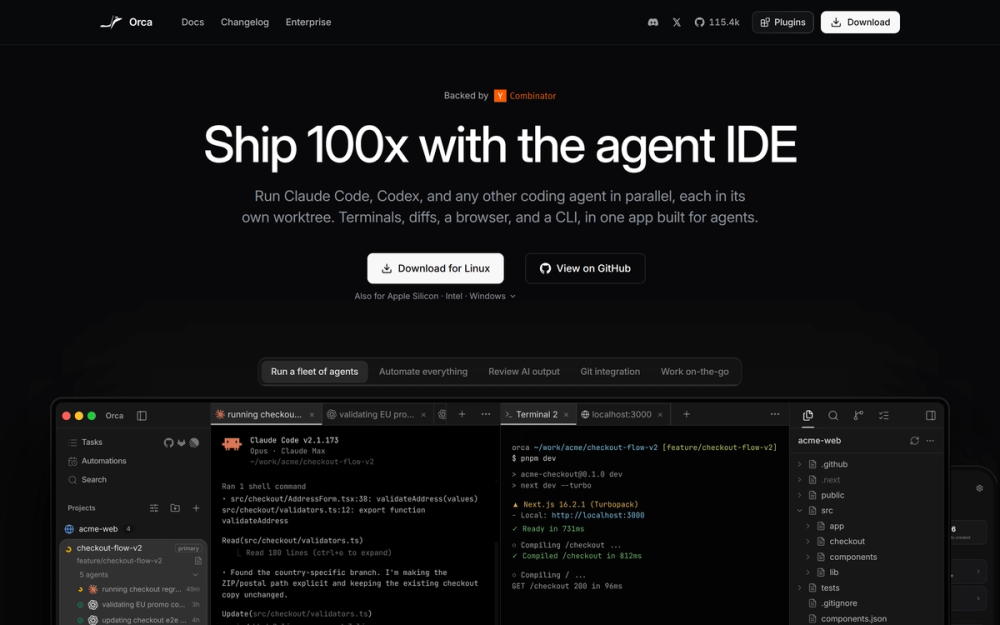
Orca is built around worktree isolation: every task runs in its own isolated Git worktree, so parallel agents never touch the same files on disk. It runs 27 or more coding agents, ships new features daily, and covers macOS, Windows, and Linux, the 3 platforms where Conductor covered only 1.
Read moreShow lessKey Features · Pros · Cons · License & Hosting · Best For
Key Features
- Every task runs in its own isolated Git worktree, and each worktree is a real Git worktree usable with standard git commands such as
git status,git rebase, andgit cherry-pick - 27 or more coding agents supported, against the 4 that Conductor ran
- Embedded Chromium browser per worktree with Design Mode, which lets you click any UI element to send its HTML, CSS, and a cropped screenshot into an agent's prompt
- Native GitHub and Linear integration for browsing PRs, issues, and project boards in-app and opening a worktree from any task
- SSH remote execution with auto-reconnect, port forwarding, and passphrase caching, so agents can run on a remote machine
- Orchestration that lets agents manage and coordinate workspaces for larger tasks, plus an Orca CLI so agents can drive the environment via commands like
orca worktree create - MCP, hooks, and skills support, with WebGL terminal rendering, infinite splits, and scrollback restored on restart
Pros
- MIT licence permits commercial use, modification, distribution, and private use with no AGPL compliance overhead
- Cross-platform on macOS, Windows, and Linux, where Conductor was macOS-only
- Mobile companion app for iOS and Android shows live agent status and keeps terminal work moving when you are away from your desk
- Ships new features daily from a team backed by Y Combinator
Cons
- Orca is a YC-backed project. If the acquisition risk that ended Conductor concerns you, that is worth weighing, though Orca is MIT and self-run, so there is no service that can shut down on you.
License & Hosting
- License: MIT, copyright Lovecast Inc. 2026, permitting commercial use, modification, distribution, and private use
- Where it runs: local-first on macOS, Windows, and Linux, with optional SSH connection to a remote machine for running agents there
- Setup: download the desktop app from onorca.dev, bring your own agent subscriptions and API keys
- Costs: provider API key or agent subscription for each agent you run, Orca itself is free
Best For
I'd start with Orca when you want the most direct drop-in for Conductor: same worktree model, same parallel-agent pattern, broader OS and agent support, and no licence friction.

Rank 2
T3 Code
Best for MIT-licensed control plane for 6 or more agents with mobile and web clients and a large community
- 46.8K stars
- MIT
- Active this week
- Last commit today
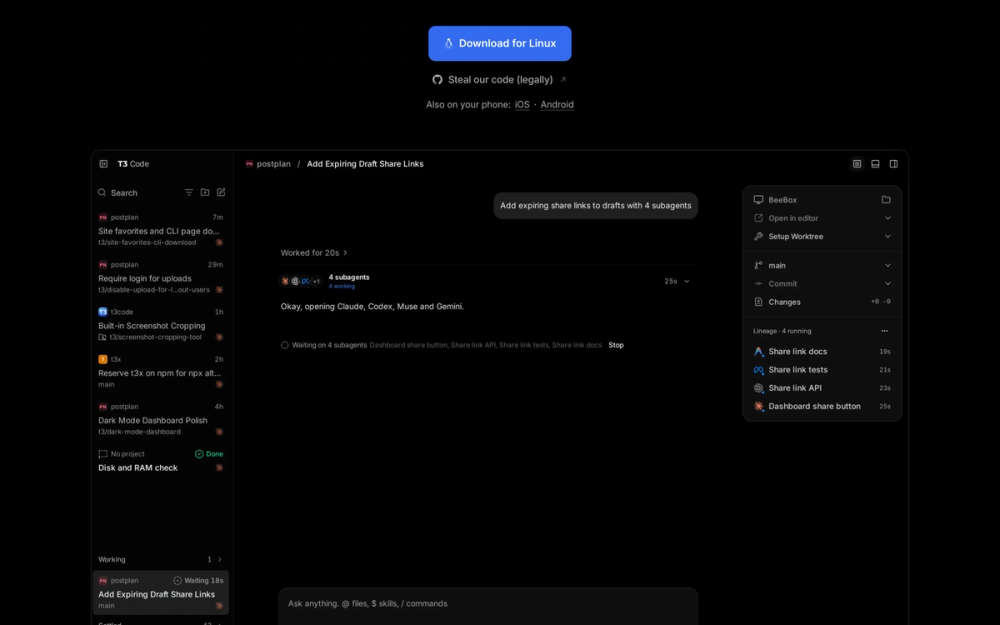
T3 Code is an open-source control plane from T3 Tools Inc. that orchestrates Claude Code, Codex, Antigravity, OpenCode, Cursor, Grok, and fx from one surface without reselling tokens. The install is a curl script on macOS and Linux, a PowerShell script on Windows, or npx t3@latest to try it once before committing.
Read moreShow lessKey Features · Pros · Cons · License & Hosting · Best For
Key Features
- Fan the same prompt to several models at once, each running in its own thread and worktree, so competing attempts finish in parallel
- Side chats let you ask a question about a thread without touching it, keeping the thread working while you ask
- One button commits, pushes, and opens a pull request on GitHub with a generated title, body, and changelog
- iOS and Android apps, a web app, and an Electron desktop app all control agents running on your machine
- A subagents view follows work delegated to subagents in one place
- Inline diff review, draft PRs, stacked PRs, and amended PRs before you push
Pros
- Actively maintained by T3 Tools Inc.
- MIT licence: free for personal and commercial use, modification, and distribution
- Cross-platform via curl, PowerShell, or npx, so you can try it before committing to an install
- T3 Code does not resell tokens: plug in the credentials you already have and it orchestrates them
- Supports switching models mid-thread, with more agent integrations shipping weekly
Cons
- 6 or more supported agents (Claude Code, Codex, Antigravity, OpenCode, Cursor, Grok, and fx), fewer than the 27 or more in Orca or the 35 in Emdash
License & Hosting
- License: MIT (copyright T3 Tools Inc., 2026), permitting commercial use, modification, distribution, and private use
- Where it runs: local-first on macOS, Linux, and Windows, with mobile and web clients that control the local agent daemon
- Setup:
curl -fsSL https://t3.codes/install.sh | shon macOS and Linux, PowerShell script on Windows, ornpx t3@latestto try it once without installing - Costs: provider API key or subscription for each agent. T3 Code is free
Best For
T3 Code is the community's pick, and by T3 Tools' own account, Conductor was among the tools that inspired it. T3 Code fits a developer who wants a large community, a simple cross-platform install, and a control surface that works over their existing agent subscriptions. If you need a longer agent list or want scheduling, Orca or Emdash are the stronger picks.

Rank 3
Paseo
Best for Daemon-based architecture for agents running on a VM or Docker host with full mobile parity
- 23.1K stars
- Apache-2.0
- Active this week
- Last commit today
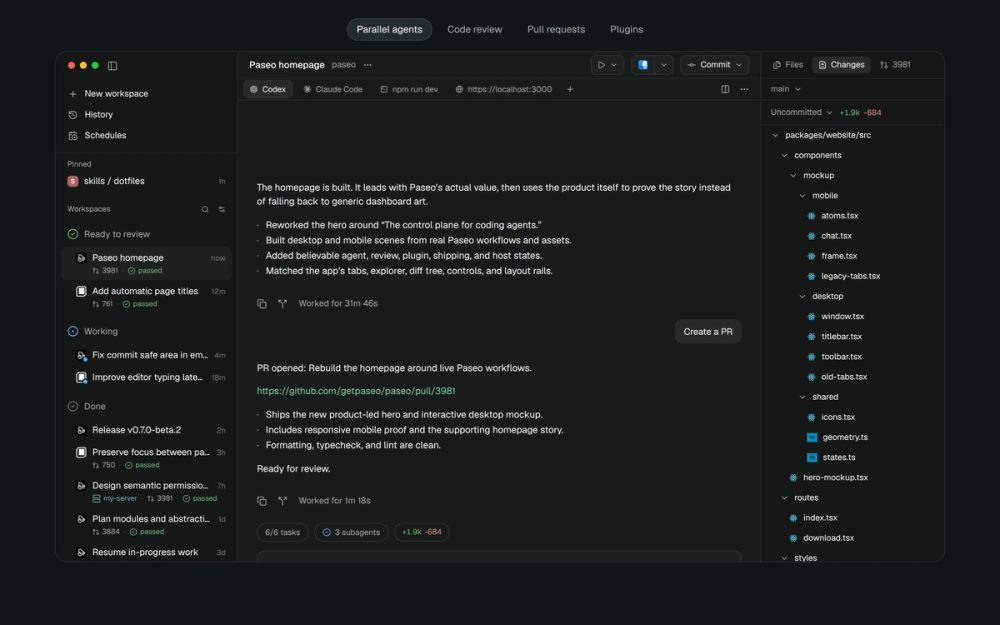
Paseo connects every client to a single daemon over a websocket, so desktop, mobile, web, and CLI all reach the same agents whether the daemon runs on your laptop, a VM, or a Docker container. It supports 30 or more agents through its in-app catalog, runs on macOS, Linux, Windows, iOS, and Android, and is maintained by a single person with no investors behind it.
Read moreShow lessKey Features · Pros · Cons · License & Hosting · Best For
Key Features
- Daemon architecture: desktop, web, mobile, and CLI clients all connect over a websocket to the same running daemon, which you can run on a laptop, a VM, or a Docker host
- 400 or more community plugins built on the same plugin API agents use, covering workspace panels, sidebar items, composer attachments, themes, and more across desktop, browser, iOS, and Android
- Native iOS and Android apps with full feature parity with the desktop app, not a companion viewer
- Schedules and heartbeats for running agents on a cron, plus a CLI that can run agents, list them, send follow-up messages, and connect to remote daemons
- Each worktree gets its own dev server URL, so 2 agents running dev servers in parallel get separate local addresses instead of port collisions
- Local speech-to-text and text-to-speech voice control, no telemetry, tracking, or forced login
- Pull requests handled in-app for GitHub, GitLab, Gitea, Forgejo, and Codeberg, where Conductor Cloud supported GitHub only
Pros
- Apache-2.0 licence is permissive and includes an express patent grant, with no commercial-use restrictions
- Multi-device access through an opt-in relay that is end-to-end encrypted and requires no account
- TypeScript SDK for automating Paseo, plus agent orchestration where agents create worktrees and launch other agents across providers
Cons
- One person maintains this, so the pace of fixes and features depends on a single maintainer, though the community plugin ecosystem adds surface area
- If you want a document-first workspace with WYSIWYG Mermaid and Excalidraw editing alongside code, Nimbalyst covers that job
License & Hosting
- License: Apache-2.0, copyright Mohamed Boudra, permitting commercial use, modification, distribution, and patent use
- Where it runs: local-first on macOS, Linux, Windows, iOS, and Android, with daemon connectable to a VM or Docker host
- Setup: download from paseo.sh/download, the daemon starts automatically when the app opens, then connect any client
- Costs: provider API key or subscription for each agent you run, Paseo itself is free
Best For
Paseo is the pick when mobile access with full feature parity matters, or when you want agents running on a VM or Docker host that you connect to from wherever you are. If you want a larger community and a team that says it ships new features daily, start with Orca.

Rank 4
Paradev
Best for macOS parallel-agent desktop app with SOC 2 Type II certification and optional paid remote access
- 15.9K stars
- MIT
- Active this week
- Last commit today
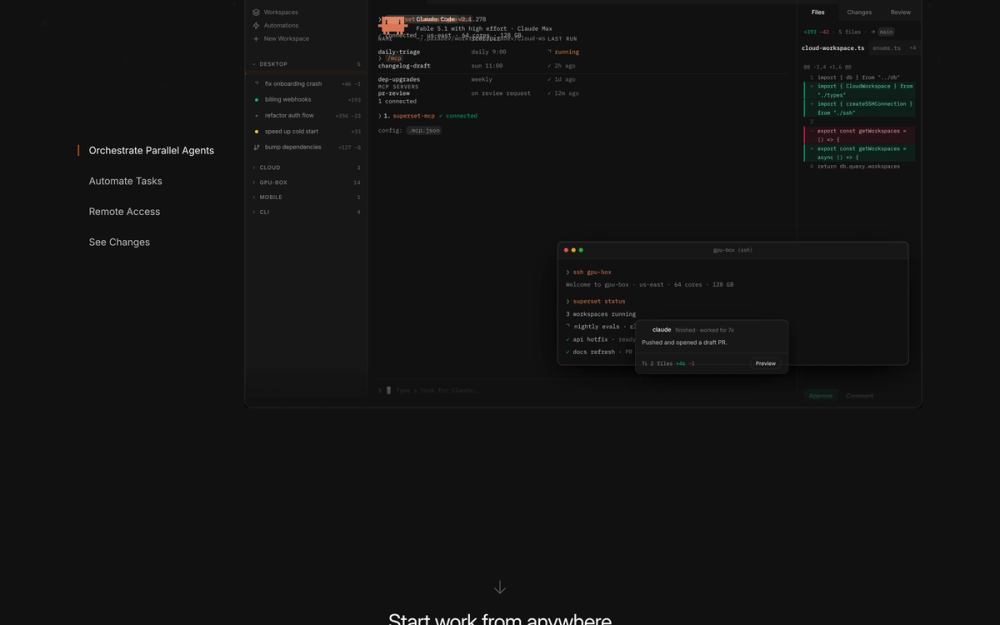
Paradev, formerly Superset, is an open-source desktop workspace for running CLI coding agents in parallel, each in its own Git worktree and branch, on macOS (Apple Silicon and Intel). It states SOC 2 Type II certification from an independent audit. Nimbalyst also states SOC-2 Type 2 certification, so check each tool's security page if that matters to your team.
Read moreShow lessKey Features · Pros · Cons · License & Hosting · Best For
Key Features
- Each task gets its own Git worktree and branch, so Claude Code, Codex, OpenCode, Cursor Agent, Copilot CLI, Gemini CLI, Amp, and any other CLI agent can work on several tasks at once without overwriting each other's files
- Changes pane for reviewing, committing, pushing, and opening pull requests, plus a pull request pane with checks, review threads, and merge
- Scheduled automations and event-triggered automations (issue triage, changelog drafts, dependency bumps) that run without prompting and open PRs for review
- iPhone and iPad app for answering agents and reviewing diffs remotely (requires Pro)
- CLI, TypeScript SDK, and MCP server so agents and scripts can create workspaces and launch agents programmatically
- Remote access: add any machine as a host, workspaces keep running when your laptop sleeps
- In-app browser with Design Mode and port management
Pros
- SOC 2 Type II certification with an independent audit, relevant for teams with enterprise security requirements
- MIT licence on the desktop app, same as Orca, permitting commercial use and modification
- Repos, worktrees, terminal output, and agent sessions stay on your machine, with cloud sync covering only account and organization metadata
Cons
- Linux support is experimental (AppImage only), not production-ready for Linux-first teams
- Scheduled automations, remote access, and the iPhone app require Pro at $20 per user per month
License & Hosting
- License: MIT, permitting commercial use, modification, distribution, and private use
- Where it runs: local-first on macOS, with optional remote machine hosting via Pro, Linux AppImage is experimental
- Setup: download from paradev.com, Git must be installed, Pro plan required for remote access and mobile
- Costs: provider API key or subscription for each agent, the desktop app is free, Pro is $20 per user per month, Team is $60, Ultra is $200
Best For
I'd pick Paradev for macOS developers who want remote access and mobile on Pro at $20 per user per month, or cloud workspaces on Team at $60. Skip it on Linux until the AppImage stabilises and use Orca or Pane there.

Rank 5
Orchestrator
Best for Parallel workers in their own worktrees with a PR and CI review loop, 35 or more agents, macOS, Windows, and Linux, Apache-2.0
- 14.1K stars
- Apache-2.0
- Active this week
- Last commit today
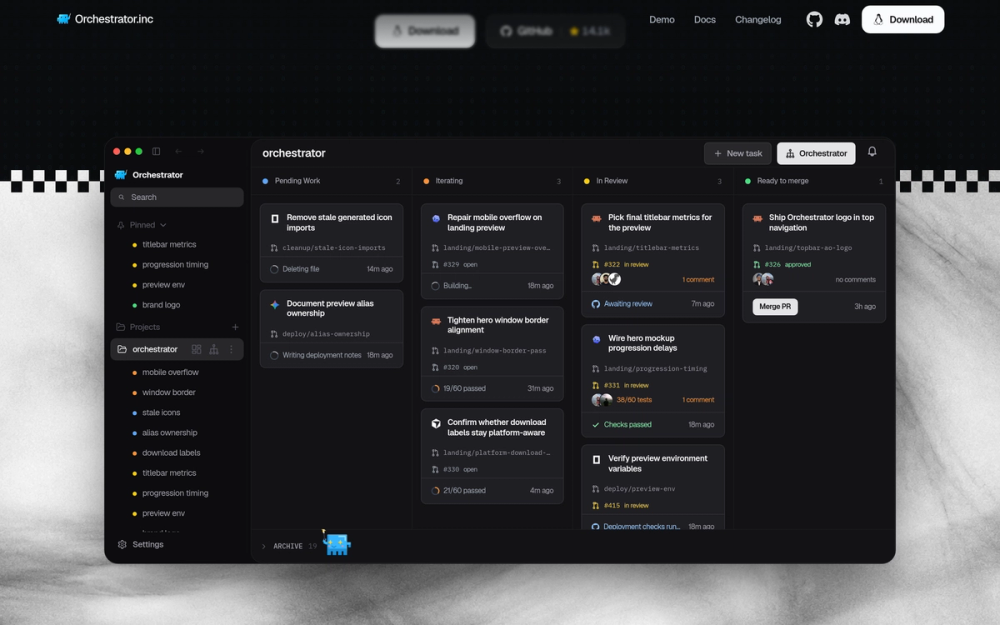
Orchestrator.inc is a local desktop workspace where a main agent plans the work, starts a worker for each piece in its own Git worktree, and comes back only when something needs you. Sessions sort themselves into lanes by the agent, its PR, CI, and reviews, so whatever needs attention is on top. Failed checks, review comments, and merge conflicts go back to the worker that owns the branch until the PR is approved, and a reviewer agent can read every PR before you do.
Read moreShow lessKey Features · Pros · Cons · License & Hosting · Best For
Key Features
- Main agent plans and delegates; each worker runs in its own Git worktree with its own branch
- Sessions sorted into lanes by agent, PR, CI, and review state so the most urgent item surfaces first
- Failed CI checks, review comments, and merge conflicts return automatically to the worker that owns the branch
- Pick the agent and model per task; work in structured chat or the agent's own terminal UI; each worker gets a browser to preview and test the app
- 35 or more coding agents supported, including Claude Code and Codex
- Desktop builds for macOS (Apple Silicon and Intel), Windows, and Linux (AppImage, deb, rpm)
- iPhone and Android apps paired by QR code for alerts, replies, and PR review on the go
Pros
- Apache-2.0 licence: commercial use, modification, and distribution permitted
- Local use is free and open source with no account needed; you bring your own API keys with no proxying
- The PR and CI feedback loop is built into the session lane model: workers handle CI failures on their own until a PR is approved, so you spend less time triaging build failures
- Mobile companion keeps you connected to agent runs and PR review without opening the laptop
Cons
- Collects limited usage and reliability telemetry including your GitHub username; you can turn this off in Settings
- Cloud workers that keep running after the laptop closes require a paid plan: Starter is $20/month, Pro is $40/month
License & Hosting
- License: Apache-2.0, permitting commercial use, modification, distribution, and private use
- Where it runs: local-first on macOS, Windows, and Linux, with optional paid Cloud workers that run in hosted workspaces
- Setup: download the desktop app from orchestrator.inc; the app runs the daemon, no CLI required
- Costs: local use is free; Cloud workers start at $20/month (Starter) or $40/month (Pro)
Best For
I'd use Orchestrator.inc when the work-review-approve cycle is the bottleneck: the worktree-per-task model is shared by most tools on this list, but the built-in PR lane, CI feedback loop, and reviewer agent give the clearest view of which tasks need attention and why. The telemetry is worth noting before you start; turn it off in Settings if that matters. If you do not need the PR and CI feedback loop, Orca is the more direct pick.

Rank 6
Emdash
Best for Scheduled recurring agent runs with Linear, Jira, and Asana issue-pull on macOS, Windows, and Linux
- 6.2K stars
- Apache-2.0
- Active this week
- Last commit 3 days ago
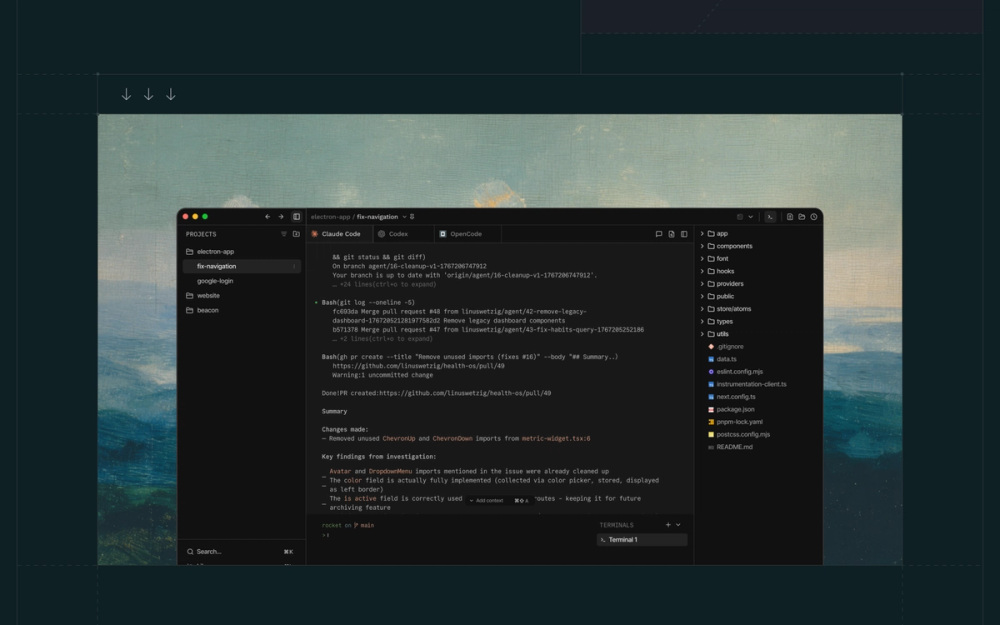
Emdash from General Action, Inc. runs 35 coding agent CLIs in parallel, each in its own Git worktree, and adds scheduled recurring agent runs and direct issue-pull from Linear, Jira, GitHub, Notion, and Asana. It is a free, open-source tool from a Y Combinator W26 company and runs on macOS, Windows, and Linux.
Read moreShow lessKey Features · Pros · Cons · License & Hosting · Best For
Key Features
- Detects and supports 35 coding agent CLIs from whatever you have installed, each running in its own Git worktree on a separate branch
- Scheduling for recurring agent runs: automate bug sweeps, release prep, reviews, and checks on a timed basis
- Pull issues from Linear, Jira, GitHub, Notion, Asana, and more and pass them directly to agents with full context attached
- SSH connection to remote dev servers, cloud VMs, or GPU boxes, with agents running remotely with full worktree isolation
- Built-in file editor for browsing, editing, searching, and recovering files directly inside the task workspace
- Library for saving reusable prompts, installing skills, and syncing MCP servers to supported agents
- In-app review flow: inspect changes, commit, push, open pull requests, and monitor CI without switching tools
Pros
- Apache-2.0 licence includes an express patent grant, same as Paseo, with no commercial-use restrictions
- Each task creates a Git worktree on its own branch by default, with an option to work directly on the checked-out branch instead
- 35 supported agent CLIs, one of the longest named lists in this roster
Cons
- Emdash is a 2026 YC-backed project with a smaller community than Orca or T3 Code
- For phone monitoring of running agents, Paseo or Paradev are the stronger picks
License & Hosting
- License: Apache-2.0, copyright General Action, Inc. 2026, permitting commercial use, modification, distribution, and patent use
- Where it runs: macOS, Windows, and Linux, with optional SSH connection to a remote machine
- Setup: download the desktop app from emdash.com, bring your own agent subscriptions and API keys
- Costs: provider API key or subscription for each agent CLI you use, Emdash is free
Best For
Scheduled recurring agent runs are the reason to pick Emdash for teams that also need Linear, Jira, or Asana tasks, or for Windows developers who want Apache-2.0 licensing and project-tracker integration in one app. If mobile monitoring matters, start with Paseo or Paradev instead.

Rank 7
Maestro
Best for Keyboard-first cross-platform worktree orchestrator with Auto Run batch jobs, CLI, and SSH remote hosts, AGPL-3.0
- 3.5K stars
- AGPL-3.0
- Active this week
- Last commit today
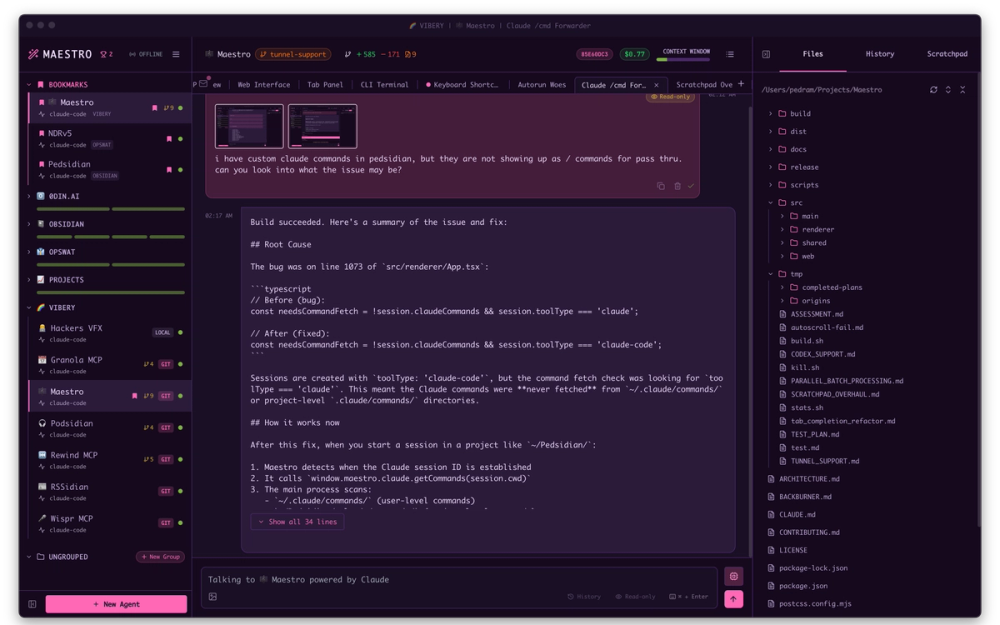
Maestro is a cross-platform desktop app for keyboard-first developers who want to orchestrate a fleet of coding agents across isolated worktree branches at once. Auto Run batch-processes markdown checklists or a free-text goal through agents in separate sessions, and playbooks make those runs repeatable. That is the distinguishing workflow: not just parallel sessions, but a file-system task runner that ties agent runs to a spec and re-runs it on demand.
Read moreShow lessKey Features · Pros · Cons · License & Hosting · Best For
Key Features
- Worktree sub-agents run agents in parallel on isolated branches, each in its own directory, with one-click PR creation
- Auto Run: batch-process a markdown checklist or free-text goal through agents, one task per session, with playbooks for repeat workflows
- Full CLI (maestro-cli) for headless operation, including running playbooks from cron jobs and CI/CD pipelines
- Orchestrate agents on remote hosts over SSH, so agents keep running on a machine that stays online
- Built-in web server with QR code access and optional Cloudflare tunnel for phone control from anywhere
- Pass-through to your AI provider: Claude Code, Codex, and OpenCode configurations, MCP tools, and permissions work as configured
- Automatically discovers and imports existing sessions from supported providers, including conversations from before Maestro was installed
- Real-time token usage and cost tracking per session and globally
Pros
- Cross-platform on macOS, Windows, and Linux, with keyboard shortcuts documented for each OS
- Auto Run turns a markdown checklist into a repeatable batch job without writing any glue code
- The headless CLI integrates with cron and CI/CD, so you can kick off agent runs from your build pipeline
Cons
- AGPL-3.0 licence requires publishing source code for modifications you distribute or run as a network service; check with your legal team before modifying and shipping
- 7 supported agents today, 3 of them in beta (Claude Code, Codex, OpenCode, and Factory Droid are fully supported; Copilot-CLI, Qwen3 Coder, and Oh My Pi are in beta)
License & Hosting
- License: AGPL-3.0, permitting use and modification, but requiring source disclosure for distributed or service-hosted modifications
- Where it runs: local-first on macOS, Windows, and Linux, with optional SSH connection to a remote host
- Setup: download the desktop app from the Maestro releases page; bring your own agent credentials
- Costs: provider API key or subscription for each agent you use; Maestro itself is free
Best For
I'd pick Maestro when you want repeatable batch workflows or need to run agents from a cron job or CI pipeline without a separate orchestration layer. The Auto Run task runner and headless CLI are the distinctive feature set here. If you need more than 7 agents or want a permissive licence, start with Orca (MIT) or Orchestrator.inc (Apache-2.0).

Rank 8
bb
Best for Agentic IDE where every thread runs on its own worktree branch, macOS Apple Silicon first, MIT, one agent can spawn another
- 4.9K stars
- MIT
- Active this week
- Last commit today
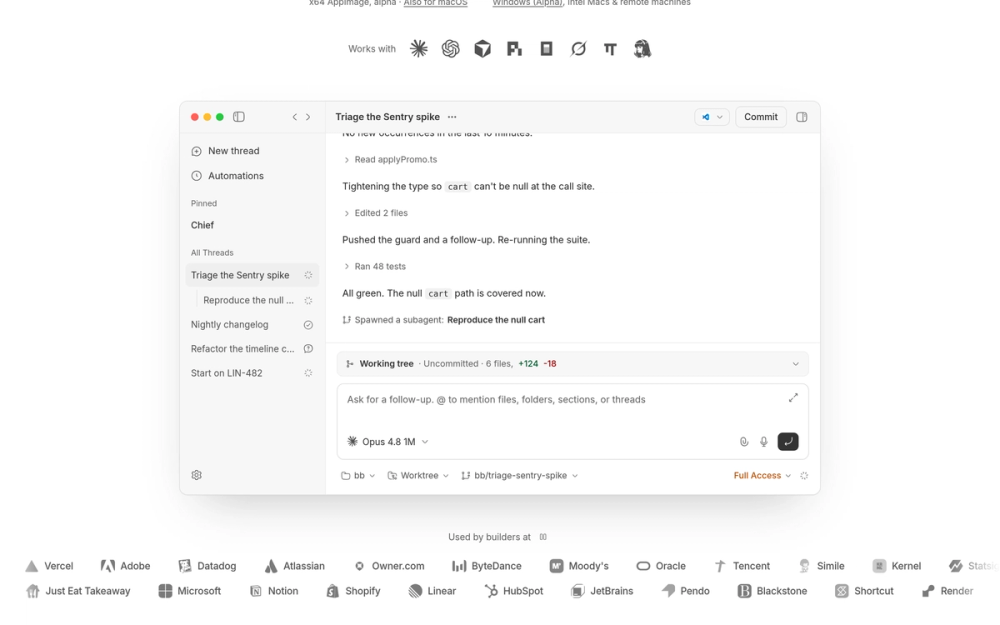
bb is an agentic IDE where work runs in threads you can follow live, steer at any point, or hand off to another agent, each in its own worktree branch. Claude Code, Codex, Cursor, Pi, OpenCode, Grok, omp, and Hermes all run in bb, and one agent can spawn and manage another, each in its own thread. The desktop app targets macOS Apple Silicon; Linux x64 and Windows x64 are alpha.
Read moreShow lessKey Features · Pros · Cons · License & Hosting · Best For
Key Features
- 8 agents in one IDE: Claude Code, Codex, Cursor, Pi, OpenCode, Grok, omp, and Hermes
- Every thread runs on its own worktree branch, with a working tree view of uncommitted changes
- One agent can spawn and manage another, each in its own thread, so a triage agent can hand sub-tasks to specialists
- Each agent uses your existing provider subscription, billed by the provider directly
- CLI open to any program: shell scripts, cron jobs, or bots can spawn a bb thread
- GitHub integration, agent memory, scheduled jobs, and remote access are all plugins, so you add only what you need
- Run anywhere with npx bb-app@latest, served at localhost:38886, without installing the desktop app
Pros
- MIT licence end to end: use, modify, and distribute freely with no AGPL compliance overhead
- Runs anywhere with npx; useful for quick experiments without committing to a full install
- Pluggable architecture: add GitHub integration or remote access only when you need them
Cons
- Desktop app is Apple Silicon first; Linux and Windows builds are alpha, so expect rough edges on those platforms
- In active development: core architecture is stable, but workflows and surfaces are still evolving
- Sends anonymous usage telemetry in production runs; opt out with BB_TELEMETRY=false
License & Hosting
- License: MIT, permitting commercial use, modification, distribution, and private use
- Where it runs: local-first on macOS (Apple Silicon); Linux x64 and Windows x64 builds are alpha; runs anywhere via npx
- Setup: download the desktop app for macOS Apple Silicon, or run npx bb-app@latest; uses the provider CLI you already have authenticated
- Costs: provider API key or subscription for each agent you use; bb is free
Best For
I'd use bb when you want an agentic IDE where agents can spawn sub-agents in separate threads, and you want a pluggable base you can extend yourself. The npx fallback also makes it easy to try without committing to a full install. If you need stable Linux or Windows support today, start with Orca or Emdash while bb's alpha builds mature.

Rank 9
Xum
Best for Provider-agnostic parallel workspaces with integrated code review, local or over SSH, AGPL-3.0, from Coder
- 2.1K stars
- AGPL-3.0
- Active this week
- Last commit today
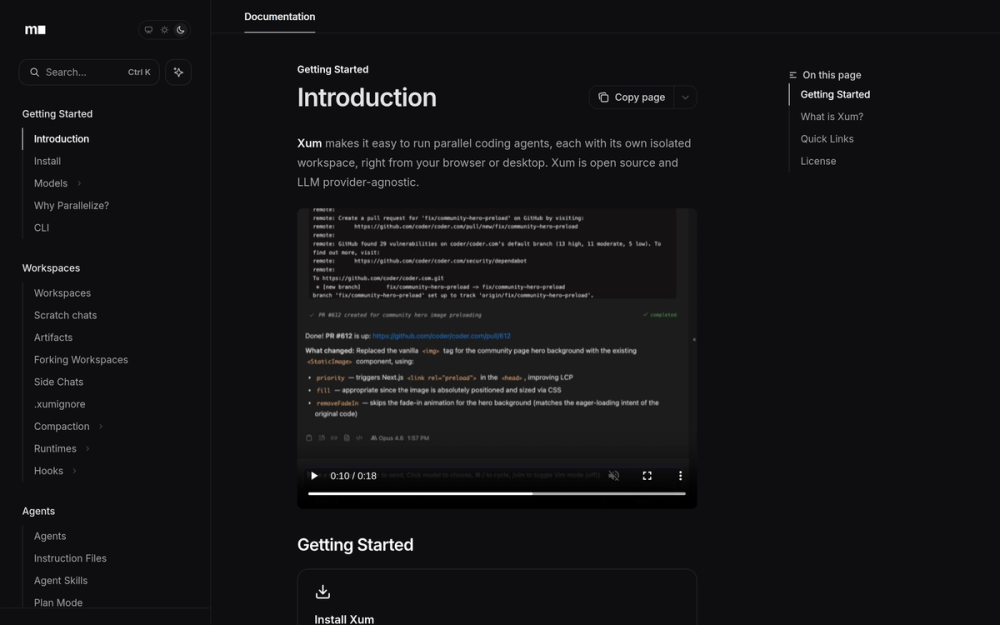
Xum is a desktop app from Coder for isolated, parallel agentic development. Each workspace can run locally in a git worktree on your machine or on a server over SSH. Xum runs its own agent loop whose core UX is inspired by Claude Code, with Plan/Exec mode among familiar features; it does not drive the Claude Code or Codex CLIs, which means you get provider flexibility but give up the CLI's own tool access and configurations.
Read moreShow lessKey Features · Pros · Cons · License & Hosting · Best For
Key Features
- Isolated workspaces in local project directories, git worktrees, or on a remote server over SSH
- Custom agent loop with Plan/Exec mode; supports Ollama for local LLMs and OpenRouter for other models
- Integrated code review with a sidebar for agent status and a git divergence view for changes and conflicts
- Cost and token tracking so you can see what each parallel run is spending
- VS Code extension for jumping into Xum workspaces directly from the editor
- Server mode with a responsive UI for mobile users
- LLM provider-agnostic; usable from the browser or desktop
Pros
- SSH remote execution lets agents keep running on a machine that stays online, without a paid cloud plan
- Multi-model and provider-agnostic: bring your own Ollama setup or an OpenRouter key with no model lock-in
Cons
- AGPL-3.0 licence requires source disclosure for modifications you distribute or run as a network service
- Runs its own agent loop rather than driving Claude Code or Codex; check that the capabilities you rely on in those CLIs are available in Xum before switching
- Pre-built binaries are available for macOS and Linux
License & Hosting
- License: AGPL-3.0, copyright Coder Technologies, permitting use and modification with source disclosure for distributed or service-hosted modifications
- Where it runs: local-first on macOS and Linux, or on a remote server over SSH
- Setup: download pre-built binaries from the GitHub releases page for macOS and Linux
- Costs: LLM provider API key or Ollama setup; Xum itself is free
Best For
I'd pick Xum when you want provider-agnostic parallel workspaces that you can point at a remote server over SSH, and you are comfortable running a custom agent loop rather than delegating to Claude Code or Codex directly. If you need Windows support or want to drive the established CLI agents with their full tool configurations, Orca or Orchestrator.inc are the stronger picks.

Rank 10
Nimbalyst
Best for Visual WYSIWYG workspace with rendered diff review, task tracking, and an iOS companion app
- 2K stars
- MIT
- Active this week
- Last commit 1 day ago
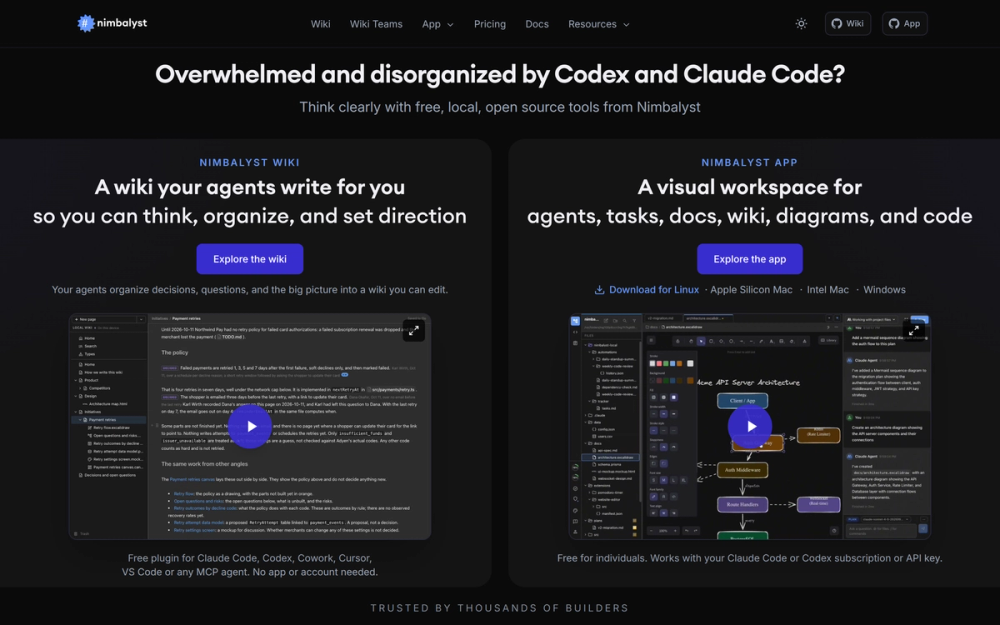
Nimbalyst is an open-source visual workspace that runs Claude Code and Codex in parallel, with OpenCode and Copilot in alpha, each in its own Git worktree, on Linux, macOS, and Windows. What sets it apart from most of this list is the editing model: you and the agent edit the same files in WYSIWYG editors, and the diff review shows proposed changes in the rendered document rather than raw code.
Read moreShow lessKey Features · Pros · Cons · License & Hosting · Best For
Key Features
- WYSIWYG editors for markdown, mockups, Mermaid, Excalidraw, CSV, data models, and code in Monaco, where both you and the agent edit the same files
- Red/green diff review: step through the agent's proposed edits in the rendered document and accept or reject each one
- Parallel agent sessions in isolated Git worktrees, with a code editor, terminal, AI git management, commits, and worktrees
- Task tracking built in: plans, bugs, features, and todos in trackers that agents read and update alongside you
- iOS companion app for seeing which agents need you, replying by text or voice, swiping through diffs, queuing the next task, and getting a push notification when an agent is waiting
- MCP server support, extensions, and an extension system to build your own visual workspace
Pros
- MIT licence, permitting commercial use, modification, distribution, and private use
- Plain files on disk: everything in git, no proprietary store to migrate out of
- Wiki plugin works in Claude Code, Codex CLI, Cowork, Cursor, VS Code, and any MCP agent with no app or account needed
- Individual app is free and works with an existing Claude Code or Codex subscription or API key
Cons
- Supports Claude Code and Codex (OpenCode and Copilot in alpha), not the broader list of Orca or Emdash
License & Hosting
- License: MIT, permitting commercial use, modification, distribution, and private use
- Where it runs: local-first on Linux, macOS, and Windows; Wiki plugin runs inside other tools without the app
- Setup: download from nimbalyst.com; app is free for individuals and works with an existing Claude Code or Codex subscription or API key
- Costs: provider subscription or API key for each agent. Individual app is free
Best For
Document-first developers who want a rendered diff review in the actual document are the right fit for Nimbalyst, especially those who use Mermaid and Excalidraw alongside code. If you need more than those agent integrations, Paseo or Orca cover those.

Rank 11
Jean
Best for Headless Linux server keeps agents running after the laptop closes, with an RTK plugin Jean says cuts tool-output tokens by 60 to 90 percent
- 1.4K stars
- Apache-2.0
- Active this week
- Last commit today
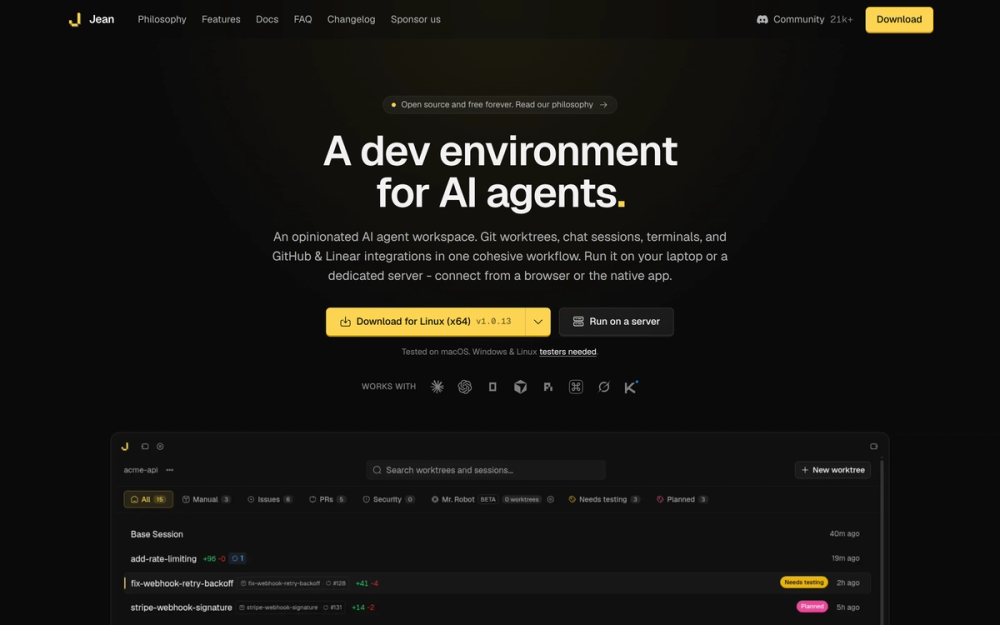
Jean is an open-source AI agent workspace that runs coding agents in isolated git worktrees on a laptop or a dedicated server. The headless jean-server binary runs on Linux amd64 and arm64 and keeps agents working after the laptop closes, with the full UI reachable from any browser through an embedded HTTP and WebSocket server. That is the clearest reason to pick it over the macOS desktop tools in this list.
Read moreShow lessKey Features · Pros · Cons · License & Hosting · Best For
Jean supports 8 or more AI backends, including Claude, Codex, OpenCode, Cursor, Pi, Command Code, Grok, and Kimi Code. It uses your own CLI installations and subscriptions, with no vendor lock-in.
Key Features
- Headless
jean-serverfor Linux amd64 and arm64 (Ubuntu 22.04+ or Debian 12+ recommended) keeps agents running after the laptop is closed, full UI accessible from any browser - Jean says its RTK plugin cuts tool-output tokens by 60 to 90 percent
- 8 or more AI backends supported, including Claude, Codex, OpenCode, Cursor, Pi, Command Code, Grok, and Kimi Code
- Magic git commands for committing, reviewing, opening pull requests, and fixing conflicts
- GitHub and Linear integrations in a single workflow, with Linear issues loadable into any session
- Automated merging with AI fixing conflicts when merging PRs or worktrees
- Mr. Robot (beta) sweeps GitHub issues and drafts plans
Pros
- Apache 2.0 licence includes an express patent grant, permitting commercial use, modification, distribution, and patent use with no share-alike restriction
- No vendor lock-in: Jean uses your own CLI installations and subscriptions, and everything runs on machines you control
- Web access serves the full UI over HTTP and WebSocket with token authentication, so any browser including a phone connects to a running session
Cons
- Jean is tested on macOS, and Windows and Linux desktop testers are still needed, so it is not an established desktop choice on those platforms yet
- Mr. Robot issue sweeping is in beta, not a finished feature
- Smaller community than most tools in this list
License & Hosting
- License: Apache-2.0, permitting commercial use, modification, distribution, and patent use
- Where it runs: desktop app tested on macOS; headless
jean-serverfor Linux amd64 and arm64; web UI accessible from any browser - Setup: download from jean.build for the desktop app; for headless, download the
jean-serverbinary for Linux and configure web access - Costs: provider API key or subscription for each agent; Jean is free
Best For
On a Linux server that stays on after the laptop closes, Jean is the pick if you need agents working overnight or want the RTK token plugin, which Jean says cuts tool-output tokens by 60 to 90 percent. Skip Jean as a Windows or Linux desktop tool until the macOS-only testing disclaimer is resolved, and start with Pane or Emdash on those platforms instead.

Rank 12
Pane
Best for Terminal-first agent manager for Windows, macOS, and Linux with conductor.json migration support and no paid tier
- 602 stars
- AGPL-3.0 with attribution requirement
- Active this week
- Last commit today
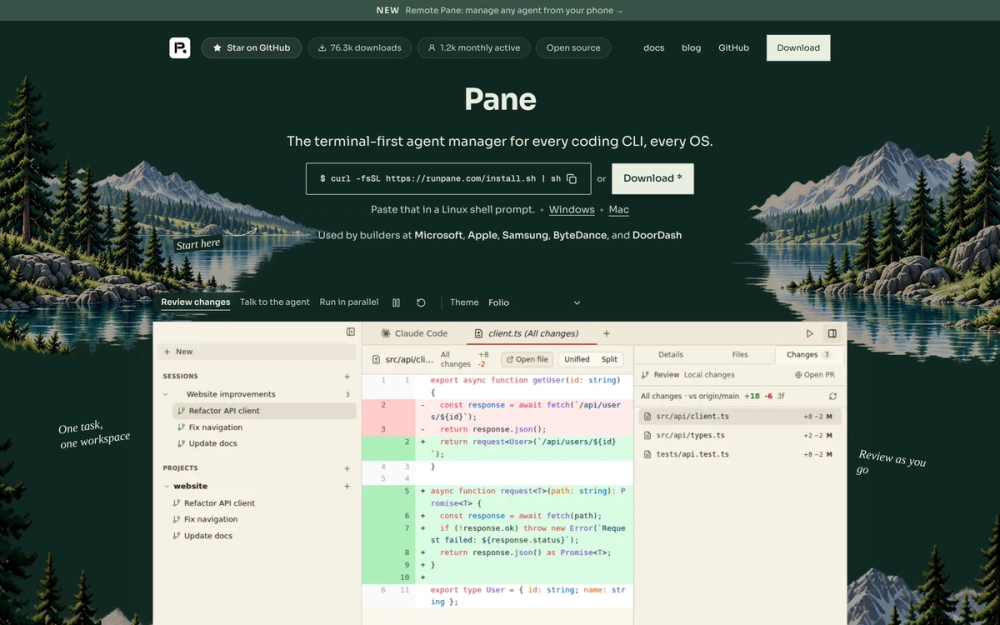
Pane, built by Greenfield (formerly Dcouple), runs any CLI agent on Windows x64 and ARM64, macOS (Apple Silicon and Intel), and Linux x64 and ARM64, including repos inside WSL, with each task in its own isolated Git worktree. There is no paid tier, and Remote Pane, the self-hosted option for running worktrees and agents on another machine, is included at no extra cost.
Read moreShow lessKey Features · Pros · Cons · License & Hosting · Best For
Key Features
- Creates and cleans up Git worktrees automatically when a pane is created or deleted
- Each pane gets its own block of 10 ports via
$PANE_PORT, so parallel dev servers never collide - MCP server registered with Claude Code, Codex, and Cursor on launch, including inside WSL, so agents can start and check on other agents
- Sessions: chats with Claude Code, Codex, or Cursor that split up work, start panes, watch them, collect reports, and track PRs
- Remote Pane keeps the desktop UI local while worktrees, terminals, and agents run on a VM, WSL box, or another machine, self-hosted on your own hardware
.envand gitignored files copy into every new worktree automatically- Supports
conductor.jsonsetup scripts alongsidepane.json
Pros
- Runs on Windows, macOS, and Linux, where Conductor was macOS-only
- Built-in Git: diff, commit, push, pull, rebase, squash, and merge, all from the keyboard
- Free with no paid tier
Cons
- AGPL-3.0 is free to use, modify, and distribute. Check its terms before shipping or hosting a modified version commercially
License & Hosting
- License: AGPL-3.0 with attribution requirement (copyright Dcouple Inc., 2025), free to use, modify, and distribute
- Where it runs: local-first on Windows, macOS, and Linux, including WSL; Remote Pane for self-hosted remote execution on machines you own
- Setup: download the desktop app; bring at least one supported agent CLI installed and signed in
- Costs: provider API key or subscription for each agent. Pane is free with no paid tier
Best For
Pane fits Linux and Windows developers who want a terminal-first tool and need the conductor.json compatibility as a migration aid. The AGPL-3.0 licence is worth reading before you ship or host a modified version commercially. If mobile access matters, Orca or Paseo cover that job.
Decision framework
How to choose
Use this section to narrow the Conductor replacement by team size, hosting model, license, and migration difficulty.
3 questions cut the list down quickly.
The first is OS. If you work on Windows or Linux, Conductor was never an option, so the whole list applies. Orca, Pane, Emdash, T3 Code, Paseo, Orchestrator.inc, and Maestro all run on Windows and Linux. Paradev's Linux support is experimental. For macOS, any tool on the list works.
The second is whether agents need to keep running when your laptop is off. Conductor Cloud did that job, and it is going away. Orchestrator.inc's paid Cloud (from $20/month) runs workers in hosted workspaces so tasks keep going after the lid closes. Maestro and Xum can orchestrate agents on remote hosts over SSH. Jean runs a headless server on Linux that keeps agents running after you close the lid. Paseo's daemon works on a VM or Docker host, so you can connect from your phone or another machine. Paradev Pro adds remote access for $20 per user per month, but you still add and keep online a machine of your own. Its cloud workspaces start on the Team plan at $60.
The third is licence. Pane, Maestro, and Xum are AGPL-3.0: for personal use this costs you nothing, but check with your legal team before shipping or hosting modified versions commercially. Orca, Paradev, T3 Code, Nimbalyst, and bb are MIT. Paseo, Emdash, Jean, and Orchestrator.inc are Apache-2.0.
For most macOS developers, I'd start with Orca. The worktree model is the same as Conductor, it supports 27 or more agents where Conductor ran 4, and it is MIT and self-run, so there is no service that can shut down on you.
If you are on Windows or Linux, the same answer holds: start with Orca. Pick Pane there if you want to keep your conductor.json setup scripts, and check that they still run. Pane's AGPL-3.0 licence rules it out for some commercial products, in which case Emdash is the Apache-2.0 alternative with scheduling and project-tracker integration.
If you want agents running when your laptop is off and are comfortable managing a server, Jean's headless option is the most direct path. Paseo's daemon is the stronger pick if you also want mobile access with full feature parity on iOS and Android.
Complete directory list
All alternatives to Conductor


paperclip
FeaturedAlternative to Grok Bot
Self-hosted AI agent management with org charts and budgets
- 111,113 GitHub stars
- Licence MIT
- #AI Agents

Alternative to Conductor
Deploy intelligent AI agents with ease.
- 80,856 GitHub stars
- Licence MIT
- #AI Agents

Alternative toConductor
Assign GitHub issues to AI coding agents. They run on your machine.
- 54,890 GitHub stars
- Licence Multica-1.0

Alternative toConductor
Agent runtime that keeps terminals alive across machines
- 47,968 GitHub stars
- Licence Apache-2.0

Alternative toConductor
Control your coding agents from one interface
- 46,806 GitHub stars
- Licence MIT

Alternative toConductor
Open source AI coding orchestrator for Claude, Codex, Grok, Gemini.
- 24,474 GitHub stars
- Licence MIT

Alternative toConductor
Run any coding agent in parallel, across desktop, mobile, and CLI
- 23,074 GitHub stars
- Licence Apache-2.0
- #AI Agents

Alternative toConductor
Open-source macOS workspace for parallel CLI coding agents
- 15,923 GitHub stars
- Licence MIT

Alternative toConductor
Run a parallel coding agent fleet from one desktop workspace.
- 14,118 GitHub stars
- Licence Apache-2.0
- #AI Agents

Alternative to Cursor
Free AI coding agent with five tools across desktop, CLI, and cloud
- 13,934 GitHub stars
- Licence Apache-2.0

Alternative toConductor
Git worktree management for parallel AI agents
- 10,328 GitHub stars
- Licence MIT OR Apache-2.0
- #CLI

Alternative toConductor
Local-first AI agent desktop app for Claude Code, Codex, and Pi.
- 9,029 GitHub stars
- Licence Apache-2.0
- #AI Agents

Alternative toConductor
Terminal manager for multiple AI coding agents in isolated workspaces
- 8,732 GitHub stars
- Licence AGPL-3.0
Migration
Migration notes for leaving Conductor
Do 2 things before November 20.
First, right-click any Conductor Cloud workspace and choose Transfer to local. That pulls the workspace and its chat history into the local app before Cloud shuts down. After November 13, Cloud workspaces go read-only and you can no longer send new messages, so do this before that date if you have active Cloud work.
Second, go to Settings, then Account, then Export data. November 20 is when Cloud shuts down and deletion begins. Do not let that step slip.
Your local worktrees land at ~/conductor/workspaces/repo-name/workspace-name by default. These are real Git worktrees. The branches are yours and you can open them in any Git client or editor without the Conductor app.
What each alternative takes from you:
- Pane reads setup, run, and archive scripts from conductor.json alongside its own pane.json format. If you wrote setup scripts for Conductor, check that they still run in Pane.
- Every alternative on this list lets you bring the agent subscriptions and API keys you already have. Check that your agent is on the tool's supported list before you switch. Orca, Paseo, Emdash, Paradev, T3 Code, Pane, Jean, bb, and Orchestrator.inc list Cursor.
- Conductor Cloud's hosted sandboxes have no free equivalent below. Jean's headless Linux server, Paseo's daemon on a VM or Docker host, Pane's Remote Pane, and SSH to a remote machine in Orca, Emdash, Maestro, and Xum are the closest self-hosted replacements, but each needs a machine you run yourself. Orchestrator.inc's paid Cloud is the closest hosted equivalent to Conductor Cloud.
A staged move is safer than a full cut-over. Transfer your Cloud workspaces and export your data before November 13. Then run your chosen replacement alongside Conductor's local app, which continues to receive critical bug fixes through early 2027, until you are confident in the new workflow. Moving one project at a time makes any problems easier to trace than switching everything at once.
FAQ
Conductor alternatives FAQ
When does Conductor stop working?
No new sign-ups are accepted as of November 4, 2026. Conductor Cloud workspaces go read-only on November 13 and shut down on November 20, with data deletion beginning that day. The local Conductor app continues to receive new models and critical bug fixes until early 2027, then winds down. All user data will be deleted when the app shuts down in early 2027.
Will Conductor Pro subscribers get a refund?
Yes. Active subscribers will get a refund. Check the Conductor announcement for timing. Free users cannot upgrade to Pro at this point, but they can continue using their existing free account. The local app remains free for existing users and continues to receive new models and critical bug fixes until early 2027. No new sign-ups or downloads are accepted as of November 4, 2026.
How do I export my Conductor data before the November 20 deadline?
2 steps. To move a Cloud workspace and its chat history to your Mac, right-click the workspace and choose Transfer to local. To download all your data, go to Settings, then Account, then Export data. Do both before November 20, when Cloud shuts down and data deletion begins. After November 13, Cloud workspaces go read-only and you can no longer send new messages.
Is there an open source Conductor alternative for Windows or Linux?
Yes. Orca (MIT), Pane (AGPL-3.0), Emdash (Apache-2.0), T3 Code (MIT), Paseo (Apache-2.0), Orchestrator.inc (Apache-2.0), Maestro (AGPL-3.0), and Nimbalyst (MIT) all run on Windows and Linux. Orca and T3 Code are MIT-licensed with no additional commercial-use conditions. Pane and Maestro are AGPL-3.0, which is free for personal use. Paradev runs on macOS with experimental Linux support. Each tool lets you bring the agent subscriptions and API keys you already use.
What is the best open source Conductor alternative?
I'd start with Orca. It uses the same worktree model as Conductor, supports 27 or more agents, runs on macOS, Windows, and Linux, and it is MIT and self-run, so there is no service that can shut down on you. If you need agents running when your laptop is off, Paseo's daemon handles that; Orchestrator.inc's paid Cloud also keeps workers going after the lid closes. Orca holds on Windows and Linux too. For a terminal-first tool that reads conductor.json scripts, pick Pane.
Do these alternatives work with my existing Claude Code or Codex subscription?
Yes. Conductor itself operated the same way: free to use, with model usage billed through the provider account or API key you already have. All 12 alternatives on this list let you bring your own subscriptions and API keys. Claude Code and Codex are listed by each of them. OpenCode is alpha in Nimbalyst, so check it before you switch. Paradev and T3 Code state explicitly that they do not proxy or resell model calls.
By category


