

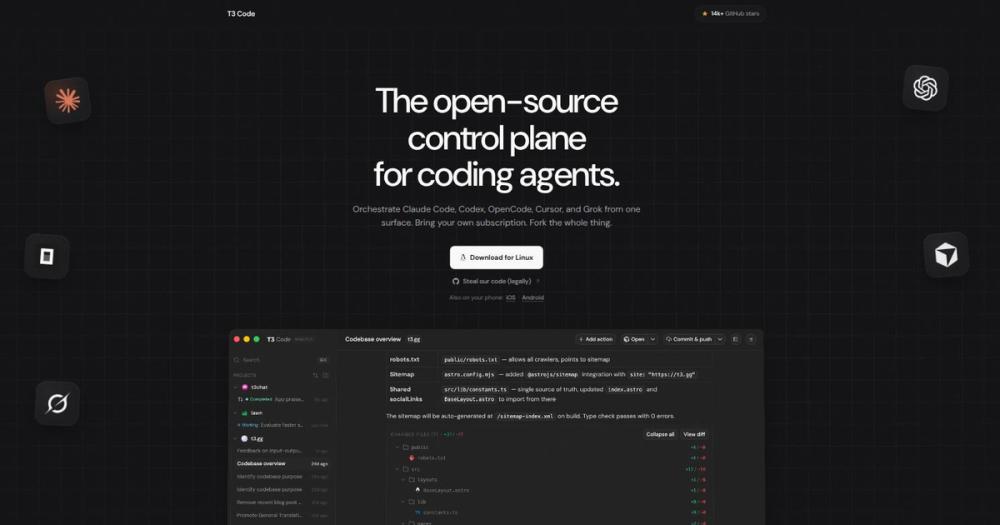
Who t3code is for#
Developers running agent sessions away from their desk
T3 Code gives you a native iOS or Android app that connects to the agent server on your machine. Start a session before you leave, monitor progress from your phone, and review the output when you return.
Skip if:
You only work at a single fixed workstation and never need to monitor or interact with a running session from a different device.
Developers running multiple agent threads in parallel
Each agent thread gets its own branch in T3 Code. You can run a Codex session and a Claude Code session in parallel from the same interface, review both outputs, and ship whichever produces better results first.
Skip if:
Your workflow is a single sequential session. If you run one agent at a time and finish before starting the next, T3 Code adds interface overhead with limited benefit.
Teams who want one-button GitHub PR creation
The one-button PR flow auto-generates the title, body, and changelog from the agent thread, then opens the pull request on GitHub. This works with your existing GitHub credentials; no extra tokens or setup beyond what the README documents.
Skip if:
Your team has its own PR automation or your workflow requires manual review of the git diff before committing. T3 Code's one-button path assumes the diff is ready to push.
Developers who want to fork and customize the control plane
The MIT license and public GitHub repo mean you can fork T3 Code, swap in a different UI, add an agent the team has not officially supported yet, or self-host a modified version for your team. The codebase is mostly TypeScript.
Skip if:
You need enterprise support, a hosted managed service, or a stable API surface. The project is early and the team is not accepting large contributions yet.
The problem it solves#
AI coding agents are powerful but terminal-bound. When you start a Claude Code or Codex session on your laptop, you are locked to that machine for the duration. There is no mobile app to check on a running session, no way to hand off a thread to a second machine, and no native flow to turn a finished session into a pull request without writing git commands yourself.
Managing multiple agent threads at once compounds the problem. You end up with separate terminal windows for different sessions, no unified view of what each agent is working on, and a manual merge step at the end of every thread. Teams that want to run agents in parallel face friction that grows with each session they add.
How it solves it#
Multi-agent control from one surface
Connects to Claude Code, OpenAI Codex, Cursor, Grok Build, OpenCode, and Google Antigravity from a single interface. If the agent is installed and authenticated on your machine, T3 Code can start and manage sessions for it. Switch models mid-thread without reopening a terminal.
Mobile, web, and desktop access
A native iOS app, an Android app, a web interface, and an Electron desktop app all connect to the T3 Code server running on your machine. Start a session from the desktop, check its progress from your phone, and review the output from a browser on another machine.
One-button GitHub PR creation
When an agent thread is ready to ship, a single button commits the changes, pushes to a branch, and opens a pull request on GitHub with an auto-generated title, body, and changelog. The flow supports draft PRs, stacked PRs, and amend PRs. No terminal commands required after the agent finishes.
Bring your own agent subscription
T3 Code does not resell tokens or add quota caps. Plug in your existing Claude Code, Codex, Cursor, or other subscriptions using the credentials you already have. T3 Code orchestrates the agents; your plan and usage limits stay unchanged.
MIT licensed and fully forkable
T3 Code is MIT licensed with over 22,000 GitHub stars. The full codebase is on GitHub under pingdotgg/t3code. Fork it, modify the UI, wire in additional agents, and ship your own build. The MIT license permits redistribution and commercial use.
Strengths and trade-offs#
Strengths
- Works with six agents, not just oneClaude Code, Codex, Cursor, Grok Build, OpenCode, and Google Antigravity are all supported in one interface. This matters when different projects use different agents, or when you want to run multiple models in parallel on the same task without switching terminal windows.
- Remote access from any deviceT3 Code's server runs on your machine; the iOS, Android, and web clients connect to it remotely. You can start an agent session from your desktop, step away, and monitor progress from your phone. Both iOS and Android apps are documented in the README alongside the desktop and web clients.
- MIT license with no token markupT3 Code does not profit from your agent usage. You pay Anthropic, OpenAI, or your other provider directly at the rates you agreed to. The MIT license also means you can fork the product if the team's direction diverges from what you need.
Trade-offs
- -Early stage: 1,834 open issues as of September 2026The project was created in February 2026 and the README warns explicitly: "We are very very early in this project. Expect bugs." The GitHub repo has 1,834 open issues against 22,000+ stars. The team is mostly not accepting contributions yet; only small fixes may be considered, not large features.
- -Requires pre-installed and authenticated agentsT3 Code has no AI coding capability of its own. You must install and authenticate at least one supported agent before T3 Code can do anything. For developers who do not already pay for Claude Code, Codex, or another supported agent, this adds a prerequisite step before setup.
- -Electron desktop app and a Node.js 22.16+ serverThe desktop client is Electron-based, and the npx path needs Node.js 22.16+, 23.11+, or 24.10+ on the machine that runs the server. If you want a lightweight native client or you are pinned to an older Node release, T3 Code will not fit without extra setup.
t3code vs alternatives#
T3 Code vs Claude Code
Claude Code is Anthropic's proprietary command-line tool for AI-assisted coding. T3 Code is an MIT-licensed open-source control plane that sits around Claude Code rather than replacing it. Understanding which role each plays is the central question for developers considering T3 Code.
| T3 Code | Claude Code | |
|---|---|---|
| License | MIT | Proprietary (Anthropic) |
| Role | Agent control plane | The coding agent itself |
| Clients | iOS, Android, web, Electron desktop | Terminal CLI |
| Agents it drives | Claude Code, Codex, Cursor, Grok Build, OpenCode, Antigravity | Claude models |
| AI coding capability | None of its own; delegates to the agents | Does the coding work |
| Cost | Free (MIT) | Your own Claude Code subscription or API access |
Claude Code is what actually writes code. It reads files, runs commands, and edits your codebase based on your instructions. T3 Code cannot do any of that on its own: it needs Claude Code (or another supported agent) installed and authenticated on your machine before it works.
What T3 Code adds is a control surface for those sessions. You can start a Claude Code session from your phone, check its progress from a browser tab on another machine, and when the session is ready, send the output to GitHub as a pull request without touching a terminal.
When Claude Code without T3 Code is enough
If you work at one machine, you are comfortable in a terminal, and you do not need multi-agent sessions or a one-button PR flow, Claude Code alone is the simpler path. T3 Code adds a server process and an app layer that are unnecessary for straightforward single-machine terminal use.
When T3 Code pays off
T3 Code is worth adding when you want remote access to running agent sessions from a phone or second machine, when you are running multiple agents in parallel on different branches, or when you want the one-button commit-push-PR workflow without writing git commands.
Quick start#
Install T3 Code via npx to run the server immediately, or use a desktop package manager for a persistent install.

```bash
npx t3@latest
brew install --cask t3-code
winget install T3Tools.T3Code
```What it's built on#
- Languages
- TypeScript
FAQ#
Does T3 Code replace Claude Code?
No. T3 Code is a control plane that sits around Claude Code and other agents, not a replacement for them. Claude Code still does the actual coding work. T3 Code gives you a mobile app, web app, and desktop client to start and manage those Claude Code sessions from anywhere, plus a one-button PR flow when a session is done. The two tools work together.
What coding agents does T3 Code support?
As of the repository's last update, T3 Code supports Claude Code, OpenAI Codex, Cursor, Grok Build, OpenCode, and Google Antigravity. Each agent must be installed and authenticated on your machine before T3 Code can connect to it. The README notes that more agents are being added regularly.
Is T3 Code free to use?
Yes. T3 Code is MIT licensed and free to run on your own machine. You pay nothing to T3 Code itself. What you do pay for are the underlying agent subscriptions you bring to it: Claude Code, Codex, or whichever agents you use. T3 Code does not resell tokens or add fees on top of those subscriptions.
How do I install T3 Code?
The quickest path is npx t3@latest, which starts the server without a permanent install (requires Node.js 22.16+, 23.11+, or 24.10+). For a persistent desktop app, macOS users can run brew install --cask t3-code and Windows users can run winget install T3Tools.T3Code. You need at least one supported agent installed and authenticated before starting.
How stable is T3 Code right now?
The README warns explicitly that the project is very early and to expect bugs. It was created in February 2026 and has over 1,800 open issues. The team is not accepting most contributions yet. If you need a production-stable control plane, check back later; if you are comfortable with early-access software and can live with rough edges, it is actively maintained and has a strong following.
Similar open-source tools#

orbi
self-hosted, open-source (AGPL-3.0) AI coding agent

Pi
The minimal, self-extensible coding agent for the terminal

Jean
A dev environment for running AI agents in isolated git worktrees

fx
Native Zig CLI coding agent, 7.8 MiB, any AI model.

codex
OpenAI's terminal coding agent, Apache-2.0 licensed

kilocode
Open source AI coding agent. 500+ models at zero markup.