Open Source Alternatives
  • Alternatives
  • Categories
    Categories by size1,150 projects
    • Developer Tools590
    • AI & Machine Learning503
    • Business & Productivity278
    • Web Development209
    • Security & Monitoring173
    • Communication & Collaboration154
    • IT Management146
    • LLMOps & AI Tooling129
    • Cloud & Hosting128
    • Product & Project Management123
    Browse all 21 categoriesDevOps & CI/CD, Data & Analytics and 9 more
  • Blog
  • Advertise
SearchNotion, Slack, password manager.../
Submit
Open Source Alternatives
  • Alternatives
    • Developer Tools590
    • AI & Machine Learning503
    • Business & Productivity278
    • Web Development209
    • Security & Monitoring173
    • Communication & Collaboration154
    • Browse all 21 categories
  • Blog
  • Advertise
Submit your project

New open source projects by email

The projects we add and every new guide. Free, unsubscribe any time.

Open Source Alternatives LogoOpen Source Alternatives

Handpicked Open Source Alternatives to Paid Softwares

Add Open Source Alternatives as a preferred source on Google

Product

  • Categories
  • Tag
  • Advertise

Resources

  • Blog
  • Collection
  • Submit

Company

  • Privacy Policy
  • Terms of Service
  • Refund Policy
  • Sitemap

Alternatives

  • Claude Code
  • Jira
  • Notion
  • Slack
  • Linear
  • Wispr Flow
  • All alternatives
© 2026 Open Source Alternatives. All rights reserved.
Open SourceAlternatives
Home/Categories/Design & Creative/ApolloShell
icon of ApolloShell

ApolloShell

  • 127 stars
  • AGPL-3.0
  • Active this week
  • Last commit 1 day ago

Last verified Nov 6, 2026

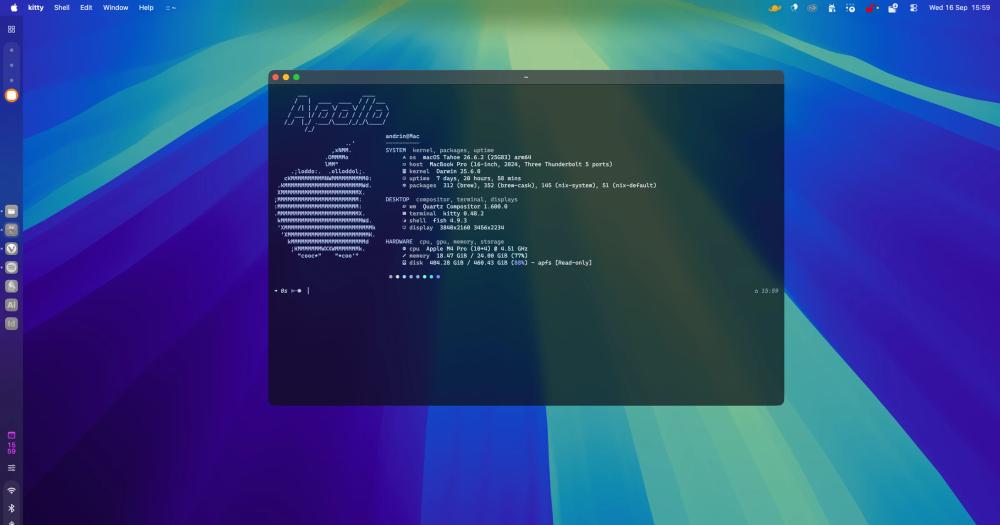
Run a customized macOS desktop shell with sidebar, launcher, dashboard and control centre, all themed with a single CSS file.

Visit websiteGitHub127 stars
image of ApolloShell
TL;DR

ApolloShell is a native Swift desktop shell for macOS 26 Tahoe that adds a sidebar with its own dock, a widget dashboard, an app launcher (⌥Space), and a control centre to your Mac. Licensed AGPL-3.0, it replaces the piecemeal approach of using paid tools like Raycast for launching and separate apps for dashboard widgets, dock management, and system controls. Best for Mac users on Tahoe who want a customizable, persistent desktop without subscriptions.

Read the full breakdownHide the full breakdownWho it is for, how it works, trade-offs, the quick start and the FAQ
who it's for

Who ApolloShell is for#

Mac users switching from a Linux desktop environment

Users coming from tiling window managers or desktop shells on Linux (Hyprland, Waybar, the Caelestia shell ApolloShell was inspired by) find this the closest macOS equivalent: a persistent sidebar with a dock, widget pages, and CSS theming from a single file. It brings a dotfiles-style workflow to the Mac.

Skip if:

You are on macOS Sequoia or earlier; ApolloShell requires macOS 26 Tahoe. Also skip if you need a fully notarised, App Store-available app with no first-launch security prompts.

Developers who want persistent access to tools and stats

The ⌥Space launcher keeps frequently used apps at the top of results, and the control centre handles common toggles (Wi-Fi, dark mode, keep-awake) in one panel. The dashboard puts calendar events and system stats one shortcut (⌃⌥D) away without covering what you are working on.

Skip if:

A launcher like Raycast already covers your app-switching needs and you have no use for a persistent sidebar or dashboard; ApolloShell adds more UI surface than you need for the launcher-only case.

macOS power users who want a customized desktop appearance

ApolloShell's CSS theming lets you change the entire shell's colour palette, fonts, and corner radii by editing a single file; the tokens and their effect are documented in docs/THEMES.md in the repository. Three bundled themes (Afterglow, Marble, Tide) provide starting points.

Skip if:

Your customization goals are limited to changing the macOS accent colour or Dock position; System Settings already covers those without installing a full shell.

the problem

The problem it solves#

Mac power users who want a customizable desktop face a fragmented set of tools: one paid app for launching, another for dashboard widgets, macOS's own Dock offering little flexibility. Each tool comes with its own subscription, permission requests, and settings interface. Getting a persistent sidebar with a custom dock, quick-access widgets, and a unified control centre on macOS has meant paying for multiple separate commercial apps or doing without.

The underlying constraint is that macOS ships the Dock, Spotlight, and Notification Centre as locked system components. You can hide the Dock or pin apps to it, but you cannot move it to a sidebar panel, embed it next to clock and calendar widgets, or theme the whole desktop with a single CSS file. Users coming from Linux desktop environments know what that level of control feels like; on macOS, nothing built-in comes close.

how ApolloShell solves it

How it solves it#

Sidebar with configurable blocks

The left-edge sidebar holds Spaces navigation, a clock, status icons, power controls, and a full-featured dock for pinned and running apps. Right-click menus, drag and drop, and notification badges work as they do in Apple's own Dock. Blocks can be added, removed, and reordered from Nexus, ApolloShell's settings app, or you can start from a preset layout.

Dashboard with widget pages

A panel from the top edge holds pages of widgets you place and resize: weather from Open-Meteo or MET Norway, calendar events, system resource gauges, now-playing controls, and a timer. Each page is a grid; widgets resize independently. Open it with ⌃⌥D or click the top edge.

App launcher

Press ⌥Space to open a quick-launch bar. Apps you use most often appear first; type to narrow results, press Return to open. The trigger shortcut and sort behaviour can be changed in Nexus → Keyboard Shortcuts.

Control centre panel

A compact panel in the bottom-right corner (⌃⌥U) for quick-action toggles: keep-awake mode, sound controls, Wi-Fi, dark mode, Night Shift, a colour picker, and your own custom buttons. It stays out of the way until called and dismisses automatically.

CSS theming with live reload

A theme is a single CSS file in ~/Library/Application Support/ApolloShell/themes with --apollo-* tokens for colours, gradients, fonts, corner radii, and sidebar width. Saving the file applies it immediately with no restart needed. Three bundled themes (Afterglow, Marble, Tide) ship with the app.

Auto-updating without user action

The .dmg build checks for updates once a day and installs the new version the next time the app quits; Nexus offers a Restart now button when an update is waiting. The Homebrew install runs brew upgrade apolloshell in the background and signals Nexus when done. Both behaviours can be turned off in Nexus → About.

strengths · trade-offs

Strengths and trade-offs#

Strengths

  • Native Swift with no browser-engine overheadWritten in Swift 6.2 with AppKit and SwiftUI, ApolloShell carries no Electron or embedded browser overhead. It starts fast, uses the system's native rendering, and handles Dock menus, drag and drop, and system keyboard shortcuts the way a Mac app is expected to.
  • No accounts, no telemetry, no subscriptionApolloShell requires no sign-in and collects no analytics. The only network traffic is weather data, sent to the provider you pick (Open-Meteo, MET Norway, or wttr.in). Crash reports are opt-in: the app shows you the report before asking whether to send it.
  • CSS theming at the whole-shell levelMost macOS customization apps provide appearance options through a GUI preference screen with a fixed set of choices. ApolloShell gives you a CSS file with documented --apollo-* tokens for colours, fonts, corner radii, gradients, and sidebar width, applied live on save.
  • Self-contained install with auto-updatesThe .dmg build updates itself silently using Sparkle. The Homebrew tap keeps the app under package management. Neither path requires a developer account, Xcode, or build tools; the source build also works with just the macOS Command Line Tools.

Trade-offs

  • -Relies on private macOS APIsApolloShell uses undocumented macOS interfaces for Spaces, fullscreen detection, Night Shift, dark mode, window lists, and now-playing information (SkyLight, CoreBrightness, HIServices, MediaRemote). The README warns that a macOS update can break parts of the app without notice. Features that depend on a missing API are disabled at launch rather than crashing, but breakage after a system update is a known risk.
  • -Requires macOS 26 Tahoe or laterThe minimum supported OS is macOS 26 Tahoe. Users on macOS Sequoia or earlier cannot run ApolloShell; the app targets APIs that only exist in Tahoe.
  • -Early release, not notarised, no App Store pathThe README describes this as an early release. The app is not notarised (notarisation requires a paid Apple developer account), so macOS blocks the first launch and you must approve it in System Settings or run an xattr command. It cannot appear in the Mac App Store because of its use of private APIs.
  • -Keep-awake feature requires a one-time sudo writeThe keep awake with lid closed feature writes a sudoers rule to /etc/sudoers.d/apolloshell that permits two specific pmset commands. This is a one-time setup that can be removed in Nexus, but it does require admin access on first use.
versus alternatives

ApolloShell vs alternatives#

ApolloShell vs Raycast

ApolloShell and Raycast both provide a quick-launch shortcut on macOS, but they serve different visions of what the desktop should do. Raycast is a focused launcher and command palette with a large extension marketplace and paid Pro features (AI integrations, custom themes, cloud sync). ApolloShell is a full desktop shell: launcher plus a persistent sidebar, a custom dock, a dashboard of widgets, and a control centre, all themed with CSS.

FeatureApolloShellRaycast
LicenseAGPL-3.0Proprietary
PriceFreeFree tier / paid Pro tier
App launcherYes (⌥Space)Yes
Persistent sidebarYesNo
Custom dockYesNo
Widget dashboardYesNo
CSS themingYes (whole shell)No
Extension marketplaceNoYes
AI integrationsNoYes (Pro tier)

ApolloShell is the better choice when you want a persistent desktop environment: a sidebar you see at all times, your own dock layout, widget pages for weather and calendar, and a control centre panel, all styled from one CSS file. The launcher is one piece of a larger shell, not the main event.

Raycast is the better choice when your primary goal is a fast, extensible command palette. Its extension ecosystem covers web search, clipboard history, window management, and hundreds of integrations with popular tools. Raycast Pro's AI features and cloud sync have no equivalent in ApolloShell. For users who need a launcher that does many things, Raycast's extension depth is what ApolloShell does not offer.

ApolloShell vs Alfred

Alfred is a long-standing paid launcher for macOS; most advanced features require the Powerpack license. Like Raycast, it focuses on the launch and workflow-automation use case rather than a full desktop shell. ApolloShell's launcher covers the core find-and-open-an-app case, but Alfred's Powerpack adds clipboard history, file search with actions, custom workflows, and third-party integrations that ApolloShell does not attempt to provide.

Pick ApolloShell when you want the full shell experience alongside a launcher. Pick Alfred when powerful keyboard-driven workflows are the priority and you have no need for a persistent sidebar or dashboard.

install · quick start

Quick start#

bash
Install via the Homebrew tap on macOS 26 Tahoe or later.
```bash
brew trust --tap Silvertree2010/apolloshell
brew tap Silvertree2010/apolloshell
brew install apolloshell
```

Or download the `.dmg` from GitHub Releases: https://github.com/Silvertree2010/ApolloShell/releases/latest
tech stack · detected from GitHub

What it's built on#

Languages
Objective-CSwift
frequently asked

FAQ#

Does ApolloShell replace the macOS Dock?

Not by default. ApolloShell adds its own dock inside the sidebar, and Nexus → General can hide Apple's Dock while ApolloShell runs. The system Dock reappears whenever ApolloShell quits. You can run both simultaneously or use ApolloShell's dock exclusively.

Is ApolloShell safe to install without Apple notarisation?

The app is not notarised because notarisation requires a paid Apple developer account. macOS blocks the first launch; approve it in System Settings → Privacy & Security by clicking Open Anyway, or run xattr -dr com.apple.quarantine /Applications/ApolloShell.app in Terminal. The source code is public and licensed AGPL-3.0, so you can inspect what you are running. This is a common situation for small open source Mac projects.

Will a macOS update break ApolloShell?

It may. ApolloShell uses undocumented macOS interfaces for Spaces, fullscreen detection, Night Shift, now-playing, and window lists. The README warns that a macOS update can break parts of the app. When an API is missing at launch, ApolloShell disables that feature rather than crashing, but occasional breakage after a system update is a known risk of building on private interfaces.

Can I build ApolloShell from source?

Yes. The build requires only the macOS Command Line Tools; Xcode is not needed. Clone the repository, run scripts/setup-signing.sh once to configure code signing, then run ./build.sh. Full build and testing instructions are in CONTRIBUTING.md in the repository.

Is ApolloShell licensed for commercial use?

AGPL-3.0 covers both personal and commercial use at a desk: you can run it in a work environment with no licensing fees and modify the source code freely. The AGPL restriction applies when you distribute modified copies or run a modified version as a network service others access; in those cases you must release your source changes under AGPL-3.0. For typical desktop use, there are no restrictions.

also worth a look

Similar open-source tools#

ScreenToGif

Alternative toSnagit

Screen, webcam, and sketchboard recorder with frame-level GIF editor

  • 27,887 GitHub stars
  • MS-PLLicence MS-PL

Stayput

InBusiness & Productivity

136 file tools for images, PDFs and video, no uploads or accounts.

  • 1 GitHub stars
  • MITLicence MIT

Lap

Alternative toMylio Photos

Local-first photo manager with on-device AI and face clustering

  • 4,220 GitHub stars
  • GPL-3.0Licence GPL-3.0

Reactive Resume

Alternative toResume.io

Resume builder with 18 templates, ATS checker, and job tracker.

  • 45,285 GitHub stars
  • MITLicence MIT

Screenshots

Alternative toCleanShot X

macOS screenshot and recorder, no cloud, no account, MIT licensed

  • 5 GitHub stars
  • MITLicence MIT

presenton

Alternative toGamma

Self-hosted AI slide generator with BYOK support and PPTX export.

  • 11,717 GitHub stars
  • Apache-2.0Licence Apache-2.0
by category

Open source tools in these categories#

117

Design & Creative

ComfyUI, Excalidraw, Godot Engine
278

Business & Productivity

OpenClaw, Excalidraw, RustDesk

Sponsors

Inbox Zero

Alternative toSuperhuman

AI email assistant that drafts replies and clears your inbox

  • 12,915 GitHub stars
  • AGPL-3.0Licence AGPL-3.0
  • #Email

rakazo

Alternative toGrok Bot

AI teammates you own: your keys, your model, your machine.

  • 7,028 GitHub stars
  • Apache-2.0Licence Apache-2.0
  • #AI Agents

SnitchFeed

Live monitoring on LinkedIn, X, Reddit & more. Agentic social listening for startups.

Marketing & Growth

Advertise your product

New open source projects by email

The projects we add and every new guide. Free, unsubscribe any time.

Find open source alternatives to paid software

/
  • Claude Code to OpenCode
  • Jira to Windshift
  • Notion to AppFlowy
  • Slack to Mattermost
  • Linear to GitLab
  • Wispr Flow to Handy
  • Arc to Zen Browser
  • CapCut to Concat
  • Grok Bot to rakazo
  • Superhuman to Inbox Zero
  • Airtable to AITable
  • Muse to OpenClaw
  • Railway to Coolify
  • GitHub Copilot to Cline
  • Datadog to Netdata
  • Confluence to Wiki.js
  • Microsoft Teams to Rocket.Chat
  • Firebase to Supabase
  • Pinecone to Qdrant
  • Zapier to n8n
  • 1Password to KeePassXC
  • Devin AI to OpenHands
  • Asana to Leantime
  • Contentful to Strapi
  • Claude Code to OpenCode
  • Jira to Windshift
  • Notion to AppFlowy
  • Slack to Mattermost
  • Linear to GitLab
  • Wispr Flow to Handy
  • Arc to Zen Browser
  • CapCut to Concat
  • Grok Bot to rakazo
  • Superhuman to Inbox Zero
  • Airtable to AITable
  • Muse to OpenClaw
  • Railway to Coolify
  • GitHub Copilot to Cline
  • Datadog to Netdata
  • Confluence to Wiki.js
  • Microsoft Teams to Rocket.Chat
  • Firebase to Supabase
  • Pinecone to Qdrant
  • Zapier to n8n
  • 1Password to KeePassXC
  • Devin AI to OpenHands
  • Asana to Leantime
  • Contentful to Strapi