Open Source Alternatives
  • Alternatives
  • Categories
    Categories by size1,030 projects
    • Developer Tools527
    • AI & Machine Learning455
    • Business & Productivity237
    • Web Development203
    • Security & Monitoring153
    • Communication & Collaboration138
    • IT Management137
    • Cloud & Hosting122
    • LLMOps & AI Tooling119
    • Data & Analytics112
    Browse all 21 categoriesDesign & Creative, Product & Project Management and 9 more
  • Blog
  • Advertise
SearchNotion, Slack, password manager.../
Submit
Open Source Alternatives
  • Alternatives
    • Developer Tools527
    • AI & Machine Learning455
    • Business & Productivity237
    • Web Development203
    • Security & Monitoring153
    • Communication & Collaboration138
    • Browse all 21 categories
  • Blog
  • Advertise
Submit your project

New open source projects by email

The projects we add and every new guide. Free, unsubscribe any time.

Open Source Alternatives LogoOpen Source Alternatives

Handpicked Open Source Alternatives to Paid Softwares

Product

  • Categories
  • Tag
  • Advertise

Resources

  • Blog
  • Collection
  • Submit

Company

  • Privacy Policy
  • Terms of Service
  • Refund Policy
  • Sitemap

Alternatives

  • Claude Code
  • Jira
  • Notion
  • Slack
  • Linear
  • Wispr Flow
  • All alternatives
© 2026 Open Source Alternatives. All rights reserved.
Open SourceAlternatives
Home/Categories/Design & Creative/ScreenToGif
icon of ScreenToGif

ScreenToGif

Open source alternative to Snagit, Zight and Honeycam

  • 27.9K stars
  • MS-PL
  • Active this month
  • Last commit 20 days ago

Last verified Nov 4, 2026

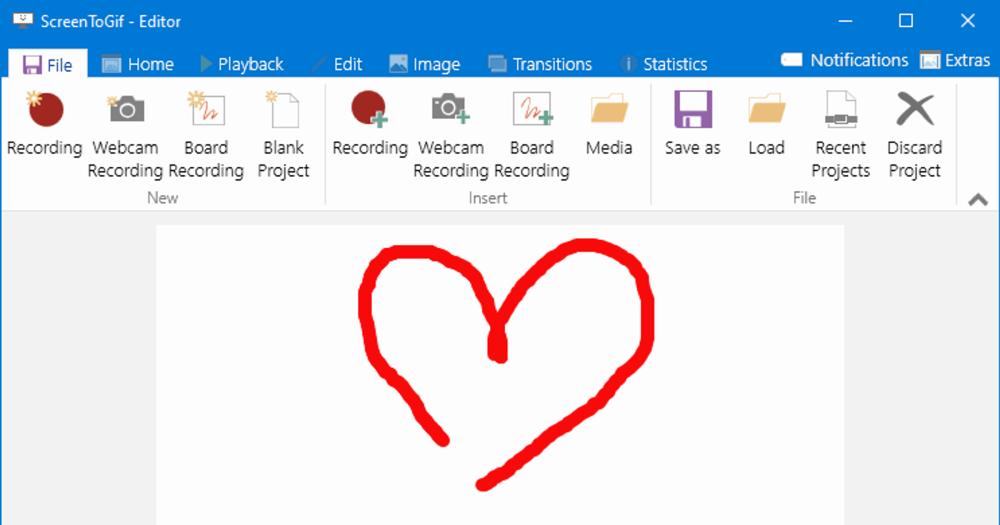
Create GIFs, APNG animations, and video clips from Windows screen recordings, webcam feeds, or sketchboard drawings with a built-in frame editor.

Visit websiteGitHub27.9K stars
image of ScreenToGif
TL;DR

ScreenToGif is a free Windows desktop tool for recording screen areas, webcam feeds, and sketchboard drawings, then editing captured frames before exporting as GIF, APNG, video, PSD, or PNG. It replaces paid tools like Snagit and Zight for teams that only need the core recording-and-GIF workflow on Windows. The MS-PL license allows personal and commercial use at no cost. Best for developers, technical writers, and designers who create documentation animations or bug-report clips.

Read the full breakdownHide the full breakdownWho it is for, how it works, trade-offs, the quick start and the FAQ
who it's for

Who ScreenToGif is for#

Developers writing bug reports with GIFs

Record the specific UI interaction that triggers a bug, trim the before-and-after frames in the editor, and export a tight GIF that drops directly into a GitHub issue or Jira ticket. The frame editor makes it fast to remove idle cursor time.

Skip if:

Skip ScreenToGif if the bug involves audio or if the team primarily works on macOS or Linux, where ScreenToGif has no support.

Technical writers documenting software

Record step-by-step workflows with the keystroke overlay enabled so keyboard shortcuts appear on screen. Export as GIF for static documentation pages or as video for embedded help center articles. The built-in editor handles trimming and annotation without a separate video editor.

Skip if:

Skip ScreenToGif if documentation requires narrated video with voiceover, or if the team needs cloud-based sharing and viewer analytics built into the recorder.

Developers sharing feature progress in pull requests

Record a short screen clip of a new feature or UI change, trim it to the relevant frames, and export as a GIF or video for a pull request description or team chat. No subscription or cloud account needed.

Skip if:

Skip ScreenToGif if the update requires audio commentary or if recipients need a hosted playback link rather than a file attachment.

the problem

The problem it solves#

Creating screen recordings and GIF animations on Windows means choosing between basic free tools with no editing capabilities and paid applications that charge subscription fees for a full feature set.

The specific friction comes from frame editing. Once a recording captures several seconds of dead-time before the action starts, or a cursor-hover pause in the middle, fixing it in a video editor adds a separate import-and-trim step that slows down what should be a simple workflow. Teams writing bug reports, building onboarding tutorials, or documenting UI changes need to trim frames, adjust playback speed, and add text callouts without opening a separate video editor or paying for a screencasting subscription.

how ScreenToGif solves it

How it solves it#

Three recording modes

Captures from a selected screen region, a connected webcam, or the built-in sketchboard for hand-drawn animations. Each mode opens in a separate recorder window, letting you choose the right input source for the content you are creating.

Frame-by-frame editor

Every recorded frame is accessible in the editor's timeline. Delete frames that show dead-time, adjust per-frame delay to control playback speed, apply visual effects, add text captions, and insert keystroke overlays before committing to any output format.

Multiple export formats

Exports to GIF, APNG, video, PSD with one frame per layer, and PNG image sequences. Each format has dedicated encoder settings in the export panel, so the same recording can produce a compressed GIF for a README and a higher-fidelity video for documentation.

Keystroke display overlay

Renders a keystroke indicator on screen during recording that shows which keys were pressed in real time. Useful for tutorial recordings where keyboard shortcuts are part of the workflow being documented.

Built-in sketchboard recorder

Records hand-drawn animations from a built-in drawing canvas, letting you create animated sketches or annotate over a blank surface without a connected webcam or screen content. Output is treated the same as any other recording and can be edited in the frame editor.

strengths · trade-offs

Strengths and trade-offs#

Strengths

  • Free with no subscription or accountMS-PL licensed and free to download and use with no account registration, subscription fee, or usage limit. The same applies to commercial use: a team documenting internal software has no licensing obligation beyond the MS-PL terms.
  • Actively maintained since 2016The repository has been in continuous development since 2016 and received its last commit in October 2026. With 27,887 GitHub stars and 2,382 forks, the project has a strong contributor community and a steady release cadence.
  • Local-first with no cloud dependencyAll recordings and edited files stay on the local machine. There is no account requirement, no upload step, and no cloud storage integration to configure. Files go where you put them, in the format you choose.

Trade-offs

  • -Windows onlyBuilt on WPF and the .NET stack, ScreenToGif runs only on Windows. macOS and Linux are not supported. Teams with members on mixed operating systems will need a separate recording tool for non-Windows machines.
  • -Requires .NET 9 Desktop Runtime.NET 9 Desktop Runtime must be installed separately on machines that do not already have it. This adds one step to the install process on fresh Windows machines and may require IT-managed deployment in enterprise environments.
  • -328 open GitHub issuesThe repository carries 328 open issues. Active single-maintainer projects at this scale often accumulate issues faster than they can be resolved; some edge cases or format-specific bugs may remain unaddressed for extended periods.
versus alternatives

ScreenToGif vs alternatives#

ScreenToGif vs Snagit

Both tools handle screen region recording and GIF export on Windows. Snagit is a proprietary commercial tool from TechSmith with annotation features, cloud asset storage, and a paid license. ScreenToGif is an MS-PL-licensed open source tool focused on the frame-level editing workflow with no cloud dependency.

FeatureScreenToGifSnagit
LicenseMS-PL (open source)Proprietary
CostFreePaid
Frame editorYesYes
Cloud storageNoYes
PlatformWindows onlyWindows and macOS

ScreenToGif is the better choice when you need a free, offline tool for GIF and clip creation without a license fee or cloud account. Snagit is worth considering when you need macOS support, TechSmith's annotation library, or built-in cloud sharing for team workflows.

ScreenToGif vs Zight

Zight (formerly CloudApp) is a cloud-first proprietary screen recording service designed around instant link sharing and team collaboration. ScreenToGif has no cloud component; recordings stay on the local machine.

FeatureScreenToGifZight
LicenseMS-PL (open source)Proprietary
CostFreeFree tier / paid plans
Frame editorYesLimited
Cloud sharingNoYes (core feature)

ScreenToGif fits workflows where recordings stay local and go into issue trackers or docs as file attachments. Zight fits teams built around cloud-hosted playback links with viewer analytics.

ScreenToGif vs Honeycam

Honeycam is a paid GIF recorder for Windows. ScreenToGif covers the same GIF recording workflow at no cost and adds APNG, video, PSD, and PNG export alongside GIF. Users who only need simple looping GIFs and find the frame editor's depth unnecessary may prefer Honeycam's focused interface; for everyone else, the breadth of export formats and zero cost make ScreenToGif the more practical pick.

install · quick start

Quick start#

bash
Download the Windows installer from GitHub Releases: https://github.com/NickeManarin/ScreenToGif/releases/latest
tech stack · detected from GitHub

What it's built on#

Languages
C#
frequently asked

FAQ#

Is ScreenToGif free to use commercially?

Yes. ScreenToGif is licensed under the MS-PL (Microsoft Public License), which permits personal and commercial use at no cost. You can use it to create documentation for a commercial product, distribute the recordings, or use it internally at a company without any licensing fee.

Does ScreenToGif work on macOS or Linux?

No. ScreenToGif is built on WPF (Windows Presentation Foundation) and runs only on Windows. macOS and Linux are not supported. If your team includes non-Windows users, you will need a separate tool for those platforms.

What .NET version does ScreenToGif require?

.NET 9 Desktop Runtime or above is required. If it is not already installed on your machine, download it from Microsoft's .NET download page. The ScreenToGif installer or the Microsoft Store version will indicate if the runtime is missing.

What export formats does ScreenToGif support?

ScreenToGif exports to GIF, APNG (animated PNG), video, PSD with one layer per frame, and PNG image sequences. Each format has dedicated encoder settings accessible from the editor's export panel.

How do I install ScreenToGif?

Download the Windows installer from GitHub Releases at https://github.com/NickeManarin/ScreenToGif/releases/latest, install via Chocolatey with 'choco install screentogif', or install from the Microsoft Store. All three paths require .NET 9 Desktop Runtime.

also worth a look

Similar open-source tools#

Screenshots

Alternative toCleanShot X

macOS screenshot and recorder, no cloud, no account, MIT licensed

  • 5 GitHub stars
  • MITLicence MIT

Flameshot

Alternative toSnagit

Open source screenshot tool with annotation and upload

  • 31,382 GitHub stars
  • GPL-3.0Licence GPL-3.0

Capso

Alternative toCleanShot X

Free open-source screenshot and recorder for macOS

  • 1,474 GitHub stars
  • Apache-2.0Licence Apache-2.0

ShareX

Alternative toSnagit

Screenshot and record with 80+ upload destinations on Windows

  • 40,569 GitHub stars
  • GPL-3.0Licence GPL-3.0

Kap

Alternative toCleanShot X

Open source screen recorder for macOS with web tech

  • 19,405 GitHub stars
  • MITLicence MIT

Stayput

InBusiness & Productivity

136 file tools for images, PDFs and video, no uploads or accounts.

  • MITLicence MIT
by category

Open source tools in these categories#

111

Design & Creative

ComfyUI, Excalidraw, Godot Engine
237

Business & Productivity

OpenClaw, Excalidraw, RustDesk

Sponsors

Inbox Zero

Alternative toSuperhuman

AI email assistant that drafts replies and clears your inbox

  • 12,889 GitHub stars
  • AGPL-3.0Licence AGPL-3.0
  • #Email

rakazo

Alternative toGrok Bot

AI teammates you own: your keys, your model, your machine.

  • 6,568 GitHub stars
  • Apache-2.0Licence Apache-2.0
  • #AI Agents

SnitchFeed

Live monitoring on LinkedIn, X, Reddit & more. Agentic social listening for startups.

Marketing & Growth

Advertise your product

New open source projects by email

The projects we add and every new guide. Free, unsubscribe any time.

Find open source alternatives to paid software

/
  • Claude Code to OpenCode
  • Jira to Windshift
  • Notion to AppFlowy
  • Slack to Mattermost
  • Linear to GitLab
  • Wispr Flow to Handy
  • Arc to Zen Browser
  • CapCut to Concat
  • Grok Bot to rakazo
  • Superhuman to Inbox Zero
  • Airtable to AITable
  • Muse to OpenClaw
  • Railway to Coolify
  • GitHub Copilot to Cline
  • Datadog to Netdata
  • Microsoft Teams to Rocket.Chat
  • Confluence to Docmost
  • Pinecone to Qdrant
  • Zapier to n8n
  • Devin AI to OpenHands
  • Firebase to Supabase
  • 1Password to KeePassXC
  • Contentful to Strapi
  • Adobe Premiere Pro to Shotcut
  • Claude Code to OpenCode
  • Jira to Windshift
  • Notion to AppFlowy
  • Slack to Mattermost
  • Linear to GitLab
  • Wispr Flow to Handy
  • Arc to Zen Browser
  • CapCut to Concat
  • Grok Bot to rakazo
  • Superhuman to Inbox Zero
  • Airtable to AITable
  • Muse to OpenClaw
  • Railway to Coolify
  • GitHub Copilot to Cline
  • Datadog to Netdata
  • Microsoft Teams to Rocket.Chat
  • Confluence to Docmost
  • Pinecone to Qdrant
  • Zapier to n8n
  • Devin AI to OpenHands
  • Firebase to Supabase
  • 1Password to KeePassXC
  • Contentful to Strapi
  • Adobe Premiere Pro to Shotcut