Open Source Alternatives
  • Alternatives
  • Categories
    Categories by size1,302 projects
    • Developer Tools673
    • AI & Machine Learning549
    • Business & Productivity311
    • Web Development219
    • Security & Monitoring198
    • Communication & Collaboration168
    • IT Management165
    • Design & Creative145
    • LLMOps & AI Tooling142
    • DevOps & CI/CD141
    Browse all 21 categoriesCloud & Hosting, Product & Project Management and 9 more
  • Blog
  • Advertise
SearchNotion, Slack, password manager.../
Submit
Open Source Alternatives
  • Alternatives
    • Developer Tools673
    • AI & Machine Learning549
    • Business & Productivity311
    • Web Development219
    • Security & Monitoring198
    • Communication & Collaboration168
    • Browse all 21 categories
  • Blog
  • Advertise
Submit your project

New open source projects by email

The projects we add and every new guide. Free, unsubscribe any time.

Open Source Alternatives LogoOpen Source Alternatives

Handpicked Open Source Alternatives to Paid Softwares

Add Open Source Alternatives as a preferred source on Google

Product

  • Categories
  • Tag
  • Advertise

Resources

  • Blog
  • Collection
  • Submit

Company

  • Privacy Policy
  • Terms of Service
  • Refund Policy
  • Sitemap

Alternatives

  • Claude Code
  • Jira
  • Notion
  • Slack
  • Linear
  • Wispr Flow
  • All alternatives
© 2026 Open Source Alternatives. All rights reserved.
Open SourceAlternatives
Home/Categories/DevOps & CI/CD/Arcane
icon of Arcane

Arcane

Open source alternative to Portainer Business

  • 9.3K stars
  • BSD-3-Clause
  • Active this week
  • Last commit today

Last verified Nov 18, 2026

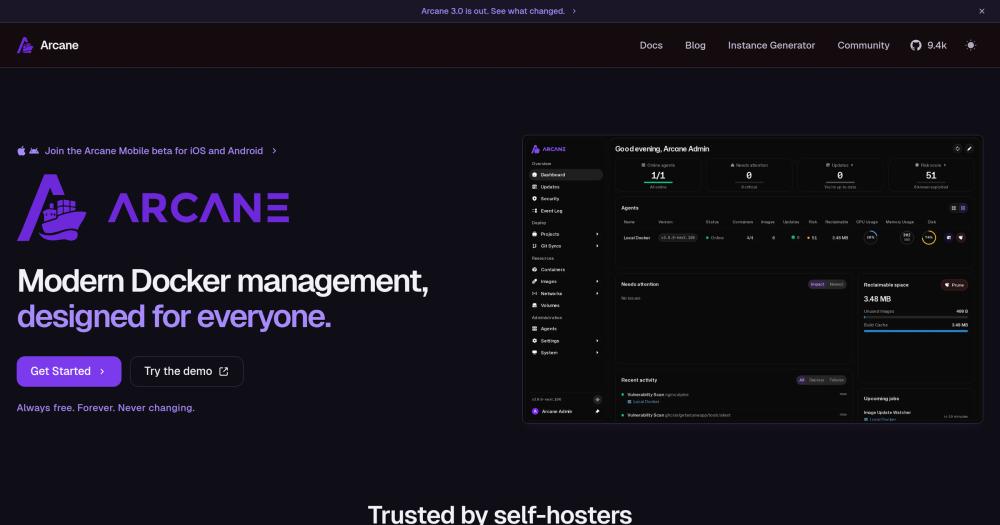
Manage Docker containers, images, volumes, networks, Compose stacks, and remote hosts from a self-hosted web UI.

Visit websiteGitHub9.3K starsDeploy on Hostinger
image of Arcane
TL;DR

Arcane is an open source Docker management UI that covers containers, images, volumes, networks, Compose stacks, and remote hosts from a single web interface. It replaces Portainer Business for self-hosters who want multi-host Docker management without a commercial license, adding built-in update checking and Git-backed Compose stack management. BSD-3-Clause licensed, it runs as a self-hosted Docker container with a lightweight agent for each additional remote host. Best for homelab operators and DevOps engineers managing several Docker servers who want REST API access for CI/CD without enterprise pricing.

Read the full breakdownHide the full breakdownWho it is for, how it works, trade-offs and the FAQ
who it's for

Who Arcane is for#

Homelab operators running multiple Docker servers

If you manage containers across a primary server and one or more remote hosts, Arcane's agent model gives you a single dashboard for the whole fleet. The Compose editor and auto-update checking reduce manual SSH work enough that several r/selfhosted users describe replacing Portainer, Dockge, Watchtower, and Diun with Arcane alone.

Skip if:

If you run a single Docker host with only a few containers, the overhead of Arcane may exceed what you need. A minimal Portainer CE install or a Compose file managed from the terminal may be sufficient.

DevOps engineers building homelab CI/CD pipelines

Arcane exposes a REST API that integrates with self-hosted Git platforms like Gitea. You can configure a webhook that hits the Arcane API after a push, pulling the new image and restarting the stack automatically. This covers the basic deploy-on-push workflow without a full CI system.

Skip if:

If your CI/CD pipeline already manages deployments via SSH, Ansible, or a managed CD system, adding Arcane's API may duplicate rather than simplify your tooling.

Self-hosters migrating away from Portainer

Users who have outgrown Portainer CE or find Portainer Business pricing unwarranted for their workload report Arcane covers the same Docker and Compose features with a faster, cleaner UI and no licensing pressure. The migration path is straightforward: Compose stacks stay in place and Arcane reads them from the same directories.

Skip if:

If your team depends on Portainer Business role-based access control or Kubernetes management, Arcane does not yet replicate those features.

the problem

The problem it solves#

Managing Docker across multiple servers without a UI means context-switching between SSH sessions, running docker ps on each host, and manually tracking which containers need updates. Compose stacks spread across directories become hard to audit when they grow, and catching image updates requires either a dedicated polling tool or disciplined manual checking.

The difficulty increases when a second or third server enters the picture. There is no single view of what is running where, and update rollouts, secret rotation, and network inspection each require separate shell access per host. For self-hosters or small DevOps teams running more than a handful of stacks, this overhead is constant and grows with each added service.

how Arcane solves it

How it solves it#

Container, Image, Volume, and Network Management

Start, stop, restart, inspect, and remove containers from the web UI without touching a terminal. The dashboard covers images, volumes, and networks in the same interface, so you can prune unused assets, check network bindings, and inspect container logs without switching tools.

Compose Project Support with Git Integration

Manage Docker Compose stacks directly from the UI, including editing compose files. Stacks can be linked to a Git repository so changes made via SSH or a code editor are picked up automatically in Arcane, keeping the UI and the filesystem in sync without an extra import step.

Remote Host Management via Lightweight Agents

Install a small agent on any remote server to bring it under Arcane's dashboard. Users running homelabs across TrueNAS boxes, VPS instances, and local servers report the agent setup as straightforward, with secrets manageable per node or shared across the fleet.

Built-in Container Update Checking

Arcane checks for new image versions on a cron schedule with dependency ordering, so it does not restart a container before its database or reverse proxy is ready. This handles the same job as a separate Watchtower instance within the existing management interface.

REST API for CI/CD Integration

Arcane exposes a REST API that lets you trigger deployments from external CI/CD systems. Users have reported using it with Gitea to build homelab pipelines: a push to the repository triggers an Arcane API call that pulls the updated image and restarts the stack.

strengths · trade-offs

Strengths and trade-offs#

Strengths

  • Fully free under BSD-3-Clause with no paid tierEvery feature is available without a license purchase. Portainer Business gates multi-host management, role-based access, and other capabilities behind a paid plan; Arcane provides multi-host Docker management, agent-based remote access, and all Compose tooling free and open source under BSD-3-Clause.
  • Active development with fast bug turnaroundThe repository records daily commit activity. Community members on r/selfhosted note that the developer addresses bug reports within a week and ships feature requests regularly, which is atypical for a tool less than two years old with over 9,000 GitHub stars.
  • Lower resource footprint than PortainerMultiple users who migrated from Portainer describe Arcane as noticeably lighter. Community members report faster page loads and quicker container operations, which matters on low-spec homelab hardware like a repurposed mini PC or a small VPS.
  • Git-backed Compose editing with SSH compatibilityCompose files edited manually over SSH update automatically in Arcane's view, since Arcane reads directly from the filesystem path. Pairing that with Git repository integration gives a workflow where SSH editing, code review, and UI management stay in sync without import or export steps.

Trade-offs

  • -v3 is the development branch; 2.x is the last stable releaseThe main branch is the v3 version, which the README describes as still in progress. The last stable 2.x release is on a separate branch. Teams wanting a mature, battle-tested release should check whether v3 is marked stable before deploying it to a critical environment.
  • -No Kubernetes supportArcane manages Docker and Compose workloads only. Teams running Kubernetes clusters alongside Docker hosts will need a separate UI for the Kubernetes layer. Portainer Business covers both; Arcane does not.
  • -Mobile app is in public betaiOS and Android apps are available but remain in a public beta. The browser-based interface works on mobile, but the native apps may have rough edges. For operators who rely on a polished mobile experience for on-the-go container management, the beta status is worth noting.
versus alternatives

Arcane vs alternatives#

Arcane vs Portainer Business

Arcane and Portainer Business both provide a web UI for Docker management with multi-host support and Compose project handling. The core difference is licensing: Arcane is BSD-3-Clause and free; Portainer Business is a commercial product with a per-node licensing fee.

FeatureArcanePortainer Business
LicenseBSD-3-ClauseProprietary
Self-hostingYesYes
Multi-host managementYes, via agentsYes
Compose projectsYes, with Git integrationYes
Container auto-updatesYes, with dependency checksNot built-in
Kubernetes supportNoYes
REST APIYesYes
PricingFreePaid per node

Arcane is the better choice for self-hosters and small teams running Docker and Compose workloads who want multi-host management without a licensing cost. Users who have migrated from Portainer to Arcane consistently report a faster, lighter experience with no functional gaps for Docker-only environments. The Git integration for Compose stacks and the REST API for CI/CD pipelines are available in Arcane at no cost, features that Portainer Business gates behind its paid tier.

Portainer Business is worth considering when your environment includes Kubernetes clusters alongside Docker hosts, when your organization requires role-based access control with audit logging, or when you need an enterprise support contract. For those scenarios, Portainer Business covers more ground. For pure Docker and Compose workloads on a budget, it offers no meaningful advantage over Arcane.


tech stack · detected from GitHub

What it's built on#

Languages
GoTypeScript
Frameworks
Svelte
Infrastructure
Docker
frequently asked

FAQ#

Is Arcane free to use?

Yes. Arcane is BSD-3-Clause licensed and free to self-host with no paid tier. Every feature, including multi-host agent management and Compose support, is available without a license fee. Hosting it requires running the Docker container on your own infrastructure.

How does Arcane compare to Portainer?

Arcane covers the same Docker and Compose management features as Portainer CE and much of what Portainer Business charges for, with no licensing cost. Community users who have switched describe Arcane's UI as faster and lighter. The main gap is Kubernetes: Portainer Business supports Kubernetes clusters; Arcane does not. For pure Docker and Compose workloads, Arcane is a credible drop-in.

What is an Arcane agent and when do I need one?

An agent is a small process you install on a remote server. It connects back to your main Arcane instance and lets you manage that server's Docker containers from the same dashboard. You need an agent for each host beyond the one Arcane itself runs on. Users report the agent install as quick and the connection as stable across TrueNAS, VPS, and bare-metal setups.

Can Arcane replace Watchtower for automatic container updates?

Yes, for most homelab use cases. Arcane has a built-in update checker that runs on a cron schedule and applies updates with dependency ordering, handling the same job as Watchtower. Users who have switched from a Portainer plus Watchtower setup to Arcane alone report the built-in update path covers their workflow. If you rely on Watchtower-specific label-based configuration, verify Arcane's update settings match your requirements before removing Watchtower.

also worth a look

Similar open-source tools#

Homeio

Alternative toUnraid

Browser desktop for your self-hosted home server

  • 109 GitHub stars
  • AGPL-3.0Licence AGPL-3.0

meshery

Alternative toPortainer Business

Manage your Kubernetes and cloud native infrastructure

  • 12,226 GitHub stars
  • Apache-2.0Licence Apache-2.0

1Panel

Alternative tocPanel & WHM

One-click Docker and SSL from a web-based Linux server panel

  • 37,459 GitHub stars
  • GPL-3.0Licence GPL-3.0

Aws Emulator

Alternative toLocalStack Enterprise

Local AWS API emulator for offline development and CI/CD

  • 9,146 GitHub stars
  • CC0-1.0Licence CC0-1.0

K9s

Alternative toLens

Keyboard-driven Kubernetes monitor with real-time pod and log views.

  • 34,988 GitHub stars
  • Apache-2.0Licence Apache-2.0

Aspire

InDeveloper Tools

Code-first distributed app orchestration with built-in observability.

  • 6,434 GitHub stars
  • MITLicence MIT
by category

Open source tools in these categories#

141

DevOps & CI/CD

Nvm, Uptime Kuma, Netdata
673

Developer Tools

REA (Reverse Engineer Anything), Skills for Real Engineers, superpowers
135

Cloud & Hosting

dify, RuView, OmniRoute
Hostinger

Self-host Arcane on a Hostinger VPS

Keep it running 24/7, even when your laptop is off. A Hostinger VPS gives it a server of its own.

  1. 01

    Choose a plan

    Starts from $6.49/mo

  2. 02

    Apply

    Extra 10% off yearly plans

  3. 03

    Install Arcane

    On a server that stays on

  4. 04

    Start building

    Focus on the app, not the server

Deploy on Hostinger

Sponsors

Inbox Zero

Alternative toSuperhuman

AI email assistant that drafts replies and clears your inbox

  • 13,058 GitHub stars
  • AGPL-3.0Licence AGPL-3.0
  • #Email

rakazo

Alternative toGrok Bot

AI teammates you own: your keys, your model, your machine.

  • 8,913 GitHub stars
  • Apache-2.0Licence Apache-2.0
  • #AI Agents

SnitchFeed

Live monitoring on LinkedIn, X, Reddit & more. Agentic social listening for startups.

Marketing & Growth

Advertise your product

New open source projects by email

The projects we add and every new guide. Free, unsubscribe any time.

Find open source alternatives to paid software

/
  • Claude Code to OpenCode
  • Jira to Windshift
  • Notion to AppFlowy
  • Slack to Mattermost
  • Linear to GitLab
  • Wispr Flow to Handy
  • Arc to Zen Browser
  • CapCut to Concat
  • Grok Bot to rakazo
  • Superhuman to Inbox Zero
  • Discord to Stoat
  • Airtable to AITable
  • Datadog to SigNoz
  • Muse to OpenClaw
  • Railway to Coolify
  • GitHub Copilot to Cline
  • Confluence to Wiki.js
  • Microsoft Teams to Rocket.Chat
  • 1Password to KeePassXC
  • Firebase to Supabase
  • Pinecone to Qdrant
  • Zapier to n8n
  • Devin AI to OpenHands
  • Asana to Leantime
  • Claude Code to OpenCode
  • Jira to Windshift
  • Notion to AppFlowy
  • Slack to Mattermost
  • Linear to GitLab
  • Wispr Flow to Handy
  • Arc to Zen Browser
  • CapCut to Concat
  • Grok Bot to rakazo
  • Superhuman to Inbox Zero
  • Discord to Stoat
  • Airtable to AITable
  • Datadog to SigNoz
  • Muse to OpenClaw
  • Railway to Coolify
  • GitHub Copilot to Cline
  • Confluence to Wiki.js
  • Microsoft Teams to Rocket.Chat
  • 1Password to KeePassXC
  • Firebase to Supabase
  • Pinecone to Qdrant
  • Zapier to n8n
  • Devin AI to OpenHands
  • Asana to Leantime