Open Source Alternatives
  • Alternatives
  • Categories
    Categories by size1,302 projects
    • Developer Tools673
    • AI & Machine Learning549
    • Business & Productivity311
    • Web Development219
    • Security & Monitoring198
    • Communication & Collaboration168
    • IT Management165
    • Design & Creative145
    • LLMOps & AI Tooling142
    • DevOps & CI/CD141
    Browse all 21 categoriesCloud & Hosting, Product & Project Management and 9 more
  • Blog
  • Advertise
SearchNotion, Slack, password manager.../
Submit
Open Source Alternatives
  • Alternatives
    • Developer Tools673
    • AI & Machine Learning549
    • Business & Productivity311
    • Web Development219
    • Security & Monitoring198
    • Communication & Collaboration168
    • Browse all 21 categories
  • Blog
  • Advertise
Submit your project

New open source projects by email

The projects we add and every new guide. Free, unsubscribe any time.

Open Source Alternatives LogoOpen Source Alternatives

Handpicked Open Source Alternatives to Paid Softwares

Add Open Source Alternatives as a preferred source on Google

Product

  • Categories
  • Tag
  • Advertise

Resources

  • Blog
  • Collection
  • Submit

Company

  • Privacy Policy
  • Terms of Service
  • Refund Policy
  • Sitemap

Alternatives

  • Claude Code
  • Jira
  • Notion
  • Slack
  • Linear
  • Wispr Flow
  • All alternatives
© 2026 Open Source Alternatives. All rights reserved.
Open SourceAlternatives
Home/Categories/Business & Productivity/Artisan
icon of Artisan

Artisan

Open source alternative to Cropster

  • 1.2K stars
  • AGPL-3.0
  • Active this week
  • Last commit today

Last verified Nov 18, 2026

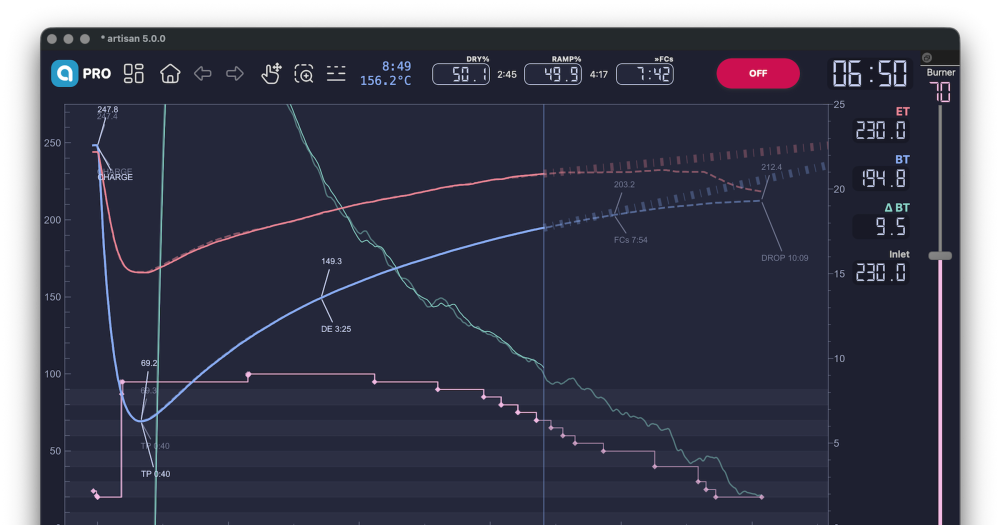
Monitor and control coffee roast profiles using thermocouple loggers and PID controllers on macOS, Windows, Linux, and Raspberry Pi.

Visit websiteGitHub1.2K starsDeploy on Hostinger
Image for Artisan
TL;DR

Artisan is an open source desktop application for coffee roasters that records, analyzes, and controls roast profiles using thermocouple data loggers and PID controllers. It replaces the roast profiling module of paid services like Cropster, running entirely offline on your own machine at no cost. Licensed under AGPL-3.0 and free for commercial use, it ships signed installers for macOS, Windows, Linux, and Raspberry Pi. Best fit for independent roasteries, roasting consultants, and home enthusiasts who want repeatable profiles without a subscription.

Read the full breakdownHide the full breakdownWho it is for, how it works, trade-offs, the quick start and the FAQ
who it's for

Who Artisan is for#

Independent specialty roasters building repeatable profiles

Artisan records every roast as a temperature curve and stores the full session log locally. On the next roast, the previous curve loads as a reference overlay so the operator can match the profile by adjusting heat and airflow in real time.

Skip if:

Skip if your operation also needs green coffee inventory, production planning, or cloud-based team collaboration. Artisan handles the roast itself; the business management layer is separate.

Roasters with existing PID controllers and thermocouple loggers

Artisan connects to Modbus devices, PID controllers, MQTT brokers, and Phidget modules without custom wiring, using its built-in device profiles. If your roastery already owns compatible hardware, Artisan is a zero-cost software upgrade to that investment.

Skip if:

Skip if your hardware is not among the supported brands and protocols. While the list covers 40+ machine manufacturers, niche or custom setups may require manual configuration or may not connect at all.

Home roasting enthusiasts and roasting consultants

The donation-supported model means home roasters and independent consultants can use Artisan with no recurring cost. The cross-platform installer covers macOS, Windows, Linux, and Raspberry Pi, so it works on any available machine.

Skip if:

Skip if you need a hosted multi-user environment. Artisan is a single-machine desktop tool with no built-in account system or multi-user sync.

the problem

The problem it solves#

Repeating a successful roast requires capturing the full temperature curve: bean temperature, environmental temperature, rate of rise, and the exact timing of charge and drop. Without dedicated software connected to a thermocouple logger or PID controller, roasters rely on handwritten notes and memory, making batch consistency difficult to maintain.

Commercial tools that solve this problem, like Cropster, require monthly subscription fees and cloud connectivity to store roast data on their servers. For independent roasters and small operations, the subscription cost per seat adds up, and sending production data to a third-party server raises both cost and data ownership concerns. Existing physical hardware goes underused when the only profiling software option is a managed cloud product.

how Artisan solves it

How it solves it#

Real-time temperature curve plotting

Reads live sensor data from thermocouples and displays the roast curve as it develops, tracking bean temperature, environmental temperature, and rate of rise simultaneously. The chart updates in real time and marks key events like charge, first crack, and drop.

PID controller and hardware automation

Connects to PID controllers, Modbus devices, and MQTT brokers to automate burner settings, drum speed, and airflow based on the roast curve. Version 5.0.0 adds synchronized autoCHARGE and autoDROP support across compatible machine models.

Support for 40+ roasting machine brands

Built-in device profiles cover machines from Probat, Aillio, Loring, Giesen, ROEST, Hottop, Kaleido, IMF, and many more. Each profile maps the machine's sensors and control channels directly, with no custom wiring required for supported models.

Cropster profile import and overlay comparison

Imports roast profiles from Cropster via drag-and-drop, as well as CSVs from IKAWA, ROEST machines, Stronghold, and Aillio RoastWorld. Any imported profile loads as a reference overlay so the operator can compare a previous batch with the current roast in real time.

Energy and CO2 tracking per batch

Calculates fuel consumption and CO2 output per roast batch from sensor data and reports it per session. Added in v2.4.6, this gives roasteries an audit trail for sustainability reporting without separate instrumentation.

strengths · trade-offs

Strengths and trade-offs#

Strengths

  • Free for commercial use, including production roasteriesThe README explicitly states the software is 'absolutely free to use, also in commercial settings.' AGPL-3.0 permits internal commercial use, so a production roastery can run Artisan on its production floor at no licensing cost.
  • Runs fully offline with no cloud dependencyAll roast data is stored locally on the roaster's machine. No internet connection is required for logging, profiling, or hardware control. This matters in production environments where connectivity is unreliable or where sending production data to a third-party server is a concern.
  • Broad hardware compatibility via open protocolsArtisan communicates with thermocouple loggers, PID controllers, Modbus devices, MQTT brokers, Phidget modules, and Yoctopuce sensors. This covers a wide range of hardware a roastery may already own, with no proprietary interface adapter required.
  • Active development with frequent releasesThe project has been under continuous development since 2015, with major releases in 2024, 2025, and 2026. Version 5.0.0 shipped November 5, 2026, and the last repository push was November 17, 2026, indicating active maintenance and community contribution.

Trade-offs

  • -No business management layerArtisan handles roast profiling and hardware control, not coffee inventory, green buying, ordering, or team collaboration. Roasteries that need production planning and business analytics alongside their profiling software will need a separate tool for those functions.
  • -AGPL-3.0 restricts hosting as a managed serviceAGPL-3.0 permits running Artisan internally in a commercial setting, but anyone who modifies the software and deploys it as a network-accessible service must release their modifications under the same license. Reselling a hosted version without complying with this requirement is not permitted.
  • -31 open issues as of November 2026The GitHub tracker showed 31 open issues as of November 2026, covering a mix of hardware compatibility requests and configuration edge cases. For most users on supported machines this is not a concern, but niche setups may require workarounds or forum support.
versus alternatives

Artisan vs alternatives#

Artisan vs Cropster

Artisan and Cropster both serve specialty coffee roasters, but they address different parts of the operation. Artisan is a free, offline desktop application focused on the roast: temperature logging, hardware control, and profile replay. Cropster is a cloud-connected commercial platform that adds green coffee inventory, production scheduling, and team collaboration on top of its roasting interface.

FeatureArtisanCropster
LicenseAGPL-3.0Proprietary
PricingFreeSubscription
Cloud requiredNoYes
Roast profilingYesYes
PID and Modbus controlYesLimited
Cropster profile importYes (drag-and-drop)Native
Green coffee inventoryNoYes
Production planningNoYes
Multi-user collaborationNoYes
PlatformsmacOS, Windows, Linux, Raspberry PiWeb / cloud

Artisan is the right choice for roasters who want offline profile recording and hardware control at no recurring cost. It covers the core profiling workflow completely, and its support for over 40 machine brands means most roasteries can connect existing hardware without additional cost.

Cropster is the better fit for roasteries that need green coffee tracking, production scheduling, and team collaboration integrated with their profiling data. If your operation depends on those business management features, Artisan does not replace them. For those roasters, Artisan can serve as a free local backup or a secondary system for hardware control, while Cropster manages the broader business workflow.

install · quick start

Quick start#

bash
Download the installer for macOS, Windows, Linux, or Raspberry Pi from GitHub Releases: https://github.com/artisan-roaster-scope/artisan/releases/latest
tech stack · detected from GitHub

What it's built on#

Languages
Python
Messaging
MQTTWebSocket
frequently asked

FAQ#

Is Artisan free to use commercially?

Yes. The README explicitly states the software is 'absolutely free to use, also in commercial settings.' AGPL-3.0 permits internal commercial use, including running it in a production roastery. The restriction applies only to redistributing a modified version as a hosted service to external customers.

What hardware does Artisan support?

Artisan supports thermocouple data loggers, Modbus devices, MQTT brokers, Phidget modules, Yoctopuce sensors, and built-in device profiles for over 40 roasting machine brands including Probat, Aillio, Loring, Giesen, Hottop, Kaleido, ROEST, and IMF. Full brand and device lists are at docs.artisan.tools.

Can I import roast profiles from Cropster into Artisan?

Yes. As of v3.4.0, Artisan supports importing Cropster profiles through drag-and-drop. It also imports CSVs from IKAWA, ROEST, RoastLog, Stronghold, and Aillio RoastWorld, making it straightforward to bring existing profile libraries into Artisan.

What operating systems does Artisan run on?

Artisan provides signed installers for macOS, Windows, and Linux. A Raspberry Pi build is also available, which allows mounting a low-cost computer directly on the roaster as a dedicated control station.

Does Artisan require an internet connection during roasting?

No. Artisan runs entirely offline. All roast data is stored locally on the machine, and hardware control does not require any cloud connectivity. An internet connection is only needed for downloading updates or accessing the optional artisan platform web services.

also worth a look

Similar open-source tools#

Teable

Alternative toAirtable

Spreadsheet-simple database and AI app builder on PostgreSQL

  • 21,997 GitHub stars
  • CustomLicence AGPL-3.0 with brand protection terms

Grist

Alternative toAirtable

Relational spreadsheet with Python formulas, self-hosted on SQLite.

  • 12,104 GitHub stars
  • Apache-2.0Licence Apache-2.0

Metabase

Alternative toTableau

Self-hosted BI with dashboards, SQL editor, and AI-native analytics.

  • 50,345 GitHub stars

Freehire

Alternative toSimplify.jobs

Open source job search with 3.3M+ postings direct from company boards.

  • 3,534 GitHub stars
  • MITLicence MIT

MiroFish

InAI & Machine Learning

Multi-agent simulation engine that predicts real-world outcomes

  • 85,831 GitHub stars
  • AGPL-3.0Licence AGPL-3.0

FckSignups

InCustomer Support

Open-source tools that work instantly, no signup required

  • 4,588 GitHub stars
  • GPL-3.0Licence GPL-3.0
by category

Open source tools in these categories#

311

Business & Productivity

OpenClaw, Excalidraw, RustDesk
124

Data & Analytics

Firecrawl, ragflow, Worldmonitor
Hostinger

Self-host Artisan on a Hostinger VPS

Keep it running 24/7, even when your laptop is off. A Hostinger VPS gives it a server of its own.

  1. 01

    Choose a plan

    Starts from $6.49/mo

  2. 02

    Apply

    Extra 10% off yearly plans

  3. 03

    Install Artisan

    On a server that stays on

  4. 04

    Start building

    Focus on the app, not the server

Deploy on Hostinger

Sponsors

Inbox Zero

Alternative toSuperhuman

AI email assistant that drafts replies and clears your inbox

  • 13,058 GitHub stars
  • AGPL-3.0Licence AGPL-3.0
  • #Email

rakazo

Alternative toGrok Bot

AI teammates you own: your keys, your model, your machine.

  • 8,913 GitHub stars
  • Apache-2.0Licence Apache-2.0
  • #AI Agents

SnitchFeed

Live monitoring on LinkedIn, X, Reddit & more. Agentic social listening for startups.

Marketing & Growth

Advertise your product

New open source projects by email

The projects we add and every new guide. Free, unsubscribe any time.

Find open source alternatives to paid software

/
  • Claude Code to OpenCode
  • Jira to Windshift
  • Notion to AppFlowy
  • Slack to Mattermost
  • Linear to GitLab
  • Wispr Flow to Handy
  • Arc to Zen Browser
  • CapCut to Concat
  • Grok Bot to rakazo
  • Superhuman to Inbox Zero
  • Discord to Stoat
  • Airtable to AITable
  • Datadog to SigNoz
  • Muse to OpenClaw
  • Railway to Coolify
  • GitHub Copilot to Cline
  • Confluence to Wiki.js
  • Microsoft Teams to Rocket.Chat
  • 1Password to KeePassXC
  • Firebase to Supabase
  • Pinecone to Qdrant
  • Zapier to n8n
  • Devin AI to OpenHands
  • Asana to Leantime
  • Claude Code to OpenCode
  • Jira to Windshift
  • Notion to AppFlowy
  • Slack to Mattermost
  • Linear to GitLab
  • Wispr Flow to Handy
  • Arc to Zen Browser
  • CapCut to Concat
  • Grok Bot to rakazo
  • Superhuman to Inbox Zero
  • Discord to Stoat
  • Airtable to AITable
  • Datadog to SigNoz
  • Muse to OpenClaw
  • Railway to Coolify
  • GitHub Copilot to Cline
  • Confluence to Wiki.js
  • Microsoft Teams to Rocket.Chat
  • 1Password to KeePassXC
  • Firebase to Supabase
  • Pinecone to Qdrant
  • Zapier to n8n
  • Devin AI to OpenHands
  • Asana to Leantime