Open Source Alternatives
  • Alternatives
  • Categories
    Categories by size1,108 projects
    • Developer Tools558
    • AI & Machine Learning472
    • Business & Productivity271
    • Web Development208
    • Security & Monitoring171
    • Communication & Collaboration153
    • IT Management145
    • Cloud & Hosting127
    • LLMOps & AI Tooling123
    • Data & Analytics118
    Browse all 21 categoriesProduct & Project Management, DevOps & CI/CD and 9 more
  • Blog
  • Advertise
SearchNotion, Slack, password manager.../
Submit
Open Source Alternatives
  • Alternatives
    • Developer Tools558
    • AI & Machine Learning472
    • Business & Productivity271
    • Web Development208
    • Security & Monitoring171
    • Communication & Collaboration153
    • Browse all 21 categories
  • Blog
  • Advertise
Submit your project

New open source projects by email

The projects we add and every new guide. Free, unsubscribe any time.

Open Source Alternatives LogoOpen Source Alternatives

Handpicked Open Source Alternatives to Paid Softwares

Product

  • Categories
  • Tag
  • Advertise

Resources

  • Blog
  • Collection
  • Submit

Company

  • Privacy Policy
  • Terms of Service
  • Refund Policy
  • Sitemap

Alternatives

  • Claude Code
  • Jira
  • Notion
  • Slack
  • Linear
  • Wispr Flow
  • All alternatives
© 2026 Open Source Alternatives. All rights reserved.
Open SourceAlternatives
Home/Categories/Developer Tools/BetterCmdTab
icon of BetterCmdTab

BetterCmdTab

Open source alternative to Witch, Command-Tab Plus, Contexts and TabTab

  • 853 stars
  • GPL-3.0
  • Active this week
  • Last commit 1 day ago

Last verified Nov 5, 2026

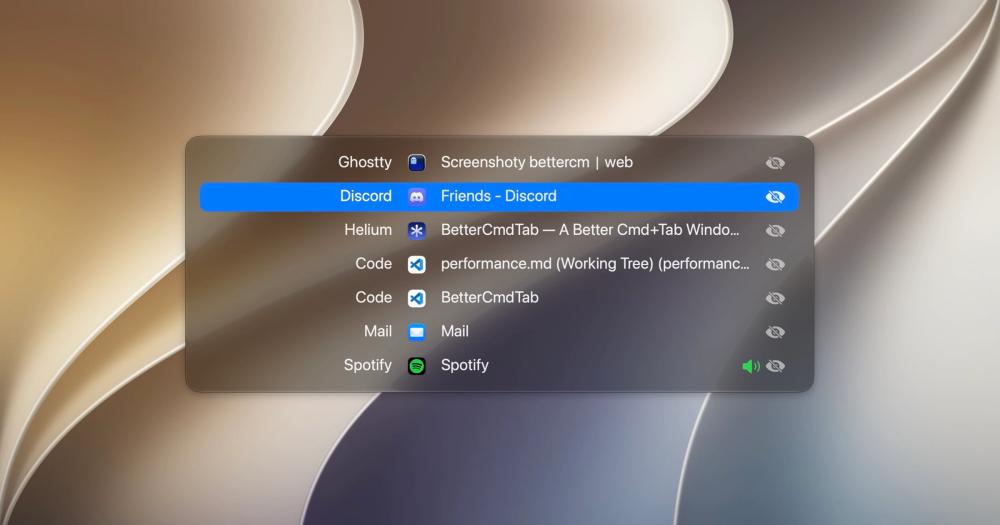
Manage every open window on macOS with a Cmd+Tab replacement offering live previews, fuzzy search, browser tab drill-in, and tiling. Free and GPL-3.0.

Visit websiteGitHub853 stars
image of BetterCmdTab
TL;DR

BetterCmdTab is a free, GPL-3.0 window switcher for macOS that replaces the built-in Cmd+Tab with a per-window view covering every open window, including minimized ones and windows on other Spaces. It replaces paid macOS window switchers like Witch and Contexts, with no Pro tier and no paywall on features such as live previews, browser tab drill-in, window tiling, and per-app hotkeys. Best for macOS developers and power users who work across many open windows and want a no-cost, telemetry-free replacement for the native app switcher.

Read the full breakdownHide the full breakdownWho it is for, how it works, trade-offs, the quick start and the FAQ
who it's for

Who BetterCmdTab is for#

Developers working across multiple terminal or editor windows

BetterCmdTab lists every terminal session, every editor project window, and every browser window as a separate entry. Fuzzy search and per-app hotkeys let developers jump to a specific window by name rather than cycling through all apps.

Skip if:

You work in a single terminal and editor at a time; the native Cmd+Tab may be sufficient for that workflow.

Researchers and writers with many open browser windows

Browser tab drill-in lets researchers jump to a specific Chrome or Safari tab from the switcher without visiting the browser and scrolling through tabs. The main window list can display each browser tab as its own row for even finer navigation.

Skip if:

You keep all sources in one browser window with tabs; the standard tab bar is enough for tab navigation in that case.

macOS users managing system configuration via dotfiles

BetterCmdTab's live JSON config at ~/.config/bettercmdtab/config.json works directly with dotfile setups. Edit the file to change settings and they apply immediately; a generated schema.json gives editors autocomplete for every available key.

Skip if:

You do not use dotfiles or prefer GUI-only configuration; the in-app settings panel covers every option without touching the JSON file.

Users migrating from a paid macOS window switcher

BetterCmdTab covers per-window switching, search, layouts, browser tab drill-in, and tiling, matching the core features of paid tools like Witch and Contexts, without a purchase. The Homebrew cask makes migration as simple as one command.

Skip if:

You rely on a feature exclusive to your current paid tool, such as a specific integration or support channel that BetterCmdTab does not yet offer.

the problem

The problem it solves#

The macOS built-in Cmd+Tab switches between apps, not individual windows. If you have three Chrome windows open, pressing Cmd+Tab shows one Chrome entry, and you get whichever window Chrome last focused. Minimized windows disappear from the switcher entirely; they can only be reached by holding Cmd+Tab, pressing Option, and clicking with the mouse.

For anyone who works across multiple browser windows, multiple code editors, or multiple documents in the same app, the native switcher is a constant source of friction. The only way around it has been a paid macOS window switcher, most of which carry a one-time purchase fee or split features across free and Pro tiers.

how BetterCmdTab solves it

How it solves it#

Per-window switching

Every open window gets its own row in the switcher, including minimized windows and windows on other Spaces. Two Chrome windows or three terminal sessions each appear as separate entries, so you can reach any window directly without cycling through all windows of the same app with Cmd+`.

Three layout modes

Switch between a window title list, an app icon grid, and live previews of every open window. Live previews show actual window contents in real time and require Screen Recording permission. Without that permission, the previews layout falls back to app icons instead of window captures.

Fuzzy search and app launch

Press / in the switcher to open a fuzzy search that matches both open windows and every installed app. Launch any installed app from the search results, even if it is not currently running. Type any letter without pressing / to jump directly to the first matching window by name.

Browser tab drill-in

Press the backslash key in the switcher to pick one specific tab inside Safari, Chrome, Arc, Brave, Edge, Vivaldi, Opera, Dia, Finder, or Terminal without leaving the switcher. Tabs can also appear as individual rows in the main window list. Each browser requires separate Automation access.

Window tiling and display management

Tile any selected window to left half, right half, two-thirds, one-third, maximized, or centered using Ctrl+Cmd+arrow keys; pressing again cycles through the half, two-thirds, and one-third presets. Send a window to the next display without dragging. Close, minimize, zoom, hide, quit, and force-quit (Cmd+Opt+Q) are also available from within the switcher.

strengths · trade-offs

Strengths and trade-offs#

Strengths

  • Fully free, no Pro tier or paywallEvery feature in BetterCmdTab is free, with no Pro tier, trial, license key, or account required. The product site lists 31 features, all unlocked in the free download. Paid macOS window switchers in the same category, including Witch and Contexts, charge for comparable functionality.
  • Zero telemetry and no outgoing dataBetterCmdTab collects no analytics, crash data, or usage information. Its only network requests go to GitHub to check for updates, as documented in the README. No account is created and no data leaves the device, which matters for a tool that holds Accessibility permission.
  • Live JSON config for dotfiles versioningEvery setting syncs with ~/.config/bettercmdtab/config.json in real time. Edit the file and the switcher reflects the change immediately without a restart; change a setting in the app and the file updates to match. A generated schema.json enables editor autocomplete for the config keys.
  • Signed, notarized, and open sourceThe app is signed and notarized so Gatekeeper opens it without a security warning. Every line of code is public on GitHub under GPL-3.0, so the binary can be compared against the published source. For a tool that requires Accessibility permission, public source code is a material trust signal.

Trade-offs

  • -macOS 13+ only, no Windows or Linux supportBetterCmdTab runs on macOS 13 Ventura and later, on Apple Silicon and Intel. No Windows or Linux version exists. Users on macOS 12 Monterey and below cannot install it.
  • -Live previews require Screen Recording permissionThe live window preview layout needs Screen Recording access. Without it, the preview layout shows app icons rather than window content, reducing its usefulness compared to the list or grid layouts. Users who prefer not to grant Screen Recording access get a less informative preview mode.
  • -New project launched May 2026BetterCmdTab launched in May 2026 and has 853 GitHub stars and 9 open issues as of November 2026. It lacks the multi-year compatibility track record of paid alternatives like Witch or Contexts. Users who depend on a window switcher for critical workflows may prefer a more established tool while BetterCmdTab matures.
versus alternatives

BetterCmdTab vs alternatives#

BetterCmdTab vs Witch

Witch is a paid macOS window switcher by Many Tricks; the BetterCmdTab README credits it as one of the tools that inspired the project. Both replace the native Cmd+Tab with a per-window switcher, but they differ on cost, licensing, and source availability.

BetterCmdTabWitch
LicenseGPL-3.0Proprietary
PriceFreePaid
Source codePublic on GitHubClosed

BetterCmdTab covers per-window switching, search, live previews, browser tab drill-in, and tiling at no cost. Witch is the stronger fit for users who want a long-established macOS utility from a commercial Mac software company, with years of compatibility updates and a formal support channel.

BetterCmdTab vs Command-Tab Plus

Command-Tab Plus is a paid macOS Cmd+Tab replacement. BetterCmdTab provides per-window switching with three layout modes, fuzzy search, browser tab drill-in, and window tiling, all under GPL-3.0 at no cost. Command-Tab Plus fits users who prefer a purchased macOS app with a commercial support model and a track record predating the open source alternatives in this category.

BetterCmdTab vs Contexts

Contexts is a paid macOS window switcher that the BetterCmdTab README also names as an inspiration. Both focus on per-window, keyboard-first window navigation.

BetterCmdTabContexts
LicenseGPL-3.0Proprietary
PriceFreePaid
Source codePublic on GitHubClosed

BetterCmdTab adds browser tab drill-in, window tiling, per-app hotkeys, and a live JSON config file at no charge. Contexts is the stronger fit for users who want a mature commercial product with an established user base and professional support.

BetterCmdTab vs TabTab

TabTab is a paid macOS window-switching app. BetterCmdTab covers the same per-window switching category at no cost under GPL-3.0. TabTab suits users who prefer commercially supported macOS software with a purchase-backed development model.

install · quick start

Quick start#

bash
Install via Homebrew or download the signed .dmg from GitHub Releases.

```bash
brew install --cask bettercmdtab
```
tech stack · detected from GitHub

What it's built on#

Languages
SwiftTypeScript
Frameworks
React
frequently asked

FAQ#

Is BetterCmdTab really free, with no paid tier or future upgrade path?

Yes. Every feature is free with no Pro tier, trial, license key, or account. The source code is GPL-3.0 on GitHub. The app has no telemetry, analytics, or crash reporting, and its only network requests go to GitHub to check for updates.

What macOS permissions does BetterCmdTab need, and why?

Accessibility is required: without it, the app cannot intercept Cmd+Tab or read the list of open windows. Screen Recording is optional and needed only for live window previews; without it, the preview layout shows app icons instead of window content. Each browser you want tab drill-in for requires separate Automation access.

How is BetterCmdTab different from AltTab?

Both are open-source macOS window switchers. AltTab covers per-window switching with live window thumbnails. BetterCmdTab ships the same core switching plus app launching, browser tab drill-in, window tiling, per-app hotkeys, and force-quit from the switcher, all without any paid tier. If AltTab covers your window-switching needs, there is no reason to switch; BetterCmdTab fits users who want those extras without installing a second tool.

How do I restore the native macOS Cmd+Tab after installing BetterCmdTab?

Choose Quit BetterCmdTab from its menu-bar icon and the native Cmd+Tab resumes immediately. To uninstall, quit first, then move the app to Trash or run brew uninstall --cask bettercmdtab. If the app is force-killed rather than quit, Cmd+Tab stops working until BetterCmdTab is relaunched.

Which macOS versions and Mac models does BetterCmdTab support?

macOS 13 Ventura and later, on both Apple Silicon and Intel Macs. On macOS 26 the panel uses Liquid Glass; on macOS 13 to 15 it falls back to the standard blurred material. Screen-sharing hide requires macOS 14.6 or later. A few features that need newer system APIs are noted in the app.

also worth a look

Similar open-source tools#

Switch

Alternative toWitch

macOS window picker with type-to-filter, thumbnails, and cross-Space

  • 616 GitHub stars
  • FSL-1.1-MITLicence FSL-1.1-MIT

CleanYourTV

Featured

Alternative toATV Launcher Pro

Debloat any Android or Google TV over Wi-Fi and get an Apple TV-style home.

  • 51,495 GitHub stars
  • MIT LicenseLicence MIT License

rakazo

Featured

Alternative toGrok Bot

AI teammates you own: your keys, your model, your machine.

  • 7,028 GitHub stars
  • Apache-2.0Licence Apache-2.0

Superhound

Alternative toRaycast AI

Typo-tolerant Mac launcher with clipboard history, free, AGPL-3.0.

  • 3 GitHub stars
  • AGPL-3.0Licence AGPL-3.0

Gojo

Alternative toNotchNook

Notch workspace for Mac: windows, clipboard, dictation, and music.

  • 4 GitHub stars
  • GPL-3.0Licence GPL-3.0

NTFSTool

Alternative toParagon NTFS for Mac

NTFS read/write on macOS via Apple FSKit, no kernel extension needed.

  • 4,193 GitHub stars
  • MITLicence MIT
by category

Open source tools in these categories#

558

Developer Tools

REA (Reverse Engineer Anything), Skills for Real Engineers, superpowers
271

Business & Productivity

OpenClaw, Excalidraw, RustDesk

Sponsors

Inbox Zero

Alternative toSuperhuman

AI email assistant that drafts replies and clears your inbox

  • 12,889 GitHub stars
  • AGPL-3.0Licence AGPL-3.0
  • #Email

rakazo

Alternative toGrok Bot

AI teammates you own: your keys, your model, your machine.

  • 7,028 GitHub stars
  • Apache-2.0Licence Apache-2.0
  • #AI Agents

SnitchFeed

Live monitoring on LinkedIn, X, Reddit & more. Agentic social listening for startups.

Marketing & Growth

Advertise your product

New open source projects by email

The projects we add and every new guide. Free, unsubscribe any time.

Find open source alternatives to paid software

/
  • Claude Code to OpenCode
  • Jira to Windshift
  • Notion to AppFlowy
  • Slack to Mattermost
  • Linear to GitLab
  • Wispr Flow to Handy
  • Arc to Zen Browser
  • CapCut to Concat
  • Grok Bot to rakazo
  • Superhuman to Inbox Zero
  • Airtable to AITable
  • Muse to OpenClaw
  • Railway to Coolify
  • GitHub Copilot to Cline
  • Datadog to Netdata
  • Confluence to Wiki.js
  • Microsoft Teams to Rocket.Chat
  • Firebase to Supabase
  • Pinecone to Qdrant
  • Zapier to n8n
  • 1Password to KeePassXC
  • Devin AI to OpenHands
  • Asana to Leantime
  • Contentful to Strapi
  • Claude Code to OpenCode
  • Jira to Windshift
  • Notion to AppFlowy
  • Slack to Mattermost
  • Linear to GitLab
  • Wispr Flow to Handy
  • Arc to Zen Browser
  • CapCut to Concat
  • Grok Bot to rakazo
  • Superhuman to Inbox Zero
  • Airtable to AITable
  • Muse to OpenClaw
  • Railway to Coolify
  • GitHub Copilot to Cline
  • Datadog to Netdata
  • Confluence to Wiki.js
  • Microsoft Teams to Rocket.Chat
  • Firebase to Supabase
  • Pinecone to Qdrant
  • Zapier to n8n
  • 1Password to KeePassXC
  • Devin AI to OpenHands
  • Asana to Leantime
  • Contentful to Strapi