Open Source Alternatives
  • Alternatives
  • Categories
    Categories by size1,108 projects
    • Developer Tools558
    • AI & Machine Learning472
    • Business & Productivity271
    • Web Development208
    • Security & Monitoring171
    • Communication & Collaboration153
    • IT Management145
    • Cloud & Hosting127
    • LLMOps & AI Tooling123
    • Data & Analytics118
    Browse all 21 categoriesProduct & Project Management, DevOps & CI/CD and 9 more
  • Blog
  • Advertise
SearchNotion, Slack, password manager.../
Submit
Open Source Alternatives
  • Alternatives
    • Developer Tools558
    • AI & Machine Learning472
    • Business & Productivity271
    • Web Development208
    • Security & Monitoring171
    • Communication & Collaboration153
    • Browse all 21 categories
  • Blog
  • Advertise
Submit your project

New open source projects by email

The projects we add and every new guide. Free, unsubscribe any time.

Open Source Alternatives LogoOpen Source Alternatives

Handpicked Open Source Alternatives to Paid Softwares

Product

  • Categories
  • Tag
  • Advertise

Resources

  • Blog
  • Collection
  • Submit

Company

  • Privacy Policy
  • Terms of Service
  • Refund Policy
  • Sitemap

Alternatives

  • Claude Code
  • Jira
  • Notion
  • Slack
  • Linear
  • Wispr Flow
  • All alternatives
© 2026 Open Source Alternatives. All rights reserved.
Open SourceAlternatives
Home/Categories/Developer Tools/NTFSTool
icon of NTFSTool

NTFSTool

Open source alternative to Paragon NTFS for Mac, Tuxera NTFS for Mac, iBoysoft NTFS for Mac, EaseUS NTFS for Mac and BuhoNTFS

  • 4.2K stars
  • MIT
  • Active this week
  • Last commit 3 days ago

Last verified Nov 5, 2026

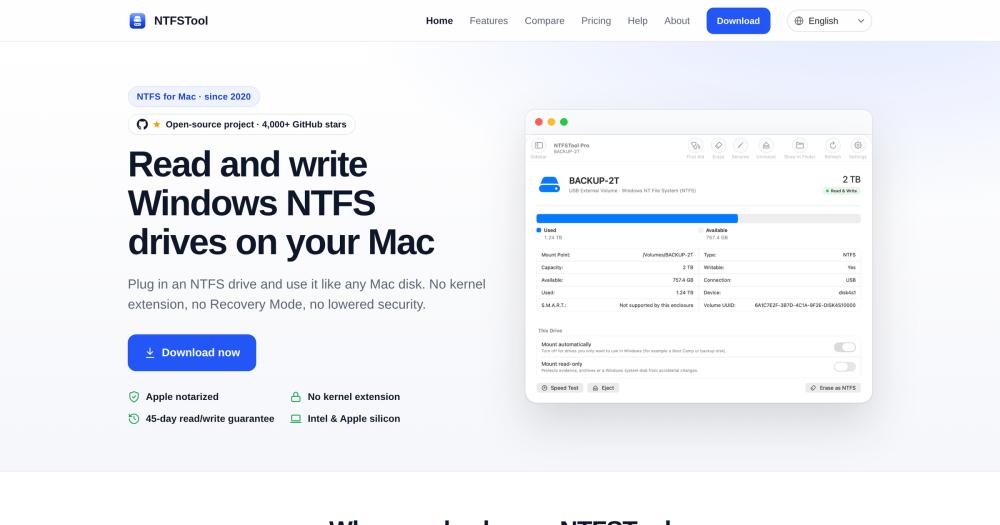
Manage NTFS drives on macOS with full read and write access, using Apple FSKit; no kernel extension required.

Visit websiteGitHub4.2K stars
image of NTFSTool
TL;DR

NTFSTool is a free, MIT-licensed Mac app that gives NTFS drives full read and write access on macOS using Apple's FSKit framework, with no kernel extension, no macFUSE, and no security setting changes required. It replaces paid NTFS drivers like Paragon NTFS for Mac and Tuxera NTFS for Mac, which require Reduced Security mode on Apple silicon. The GitHub repository is an open-source learning build; the official free Mac App Store edition and NTFSTool Pro ($24.99 one-time, adds disk repair and S.M.A.R.T. health tools) are the production builds. Best for Mac users who connect Windows drives regularly and want a no-setup driver that keeps their Mac's security intact.

Read the full breakdownHide the full breakdownWho it is for, how it works, trade-offs, the quick start and the FAQ
who it's for

Who NTFSTool is for#

Mac users who transfer files with Windows PCs or drives

NTFSTool gives you a writable NTFS mount point with no Terminal commands and no security trade-offs. Copy, edit, and delete files on a Windows-formatted external drive exactly as you would any Mac volume, with automatic mounting on plug-in and a plain-language warning if the drive is in a dirty state.

Skip if:

If you only copy files from NTFS drives to your Mac and never write back, macOS's built-in read support handles this without additional software.

Developers learning how FSKit file system modules work

The open-source edition is MIT licensed, commented in English throughout, and explicitly designed as a reference for building an FSKit file system module. The repo includes architecture docs, a demo mode (runs the UI without a physical disk), and the full write path from Finder to the NTFS layer.

Skip if:

If you need a production NTFS driver for everyday use and are on macOS 12 or later, the official NTFSTool Pro or free App Store edition has features (dual drivers, disk repair) the reference build lacks.

IT and power users assessing NTFS drivers for a Mac fleet

NTFSTool Pro's one-time per-Mac pricing ($24.99, macOS 12+) compares directly against Paragon NTFS ($29.95/Mac) and Tuxera NTFS ($28.95/person). Its security profile is unique in the category: no kernel extension, no Reduced Security mode on Apple silicon, with a 45-day read/write guarantee to reduce deployment risk.

Skip if:

If your organization already holds Paragon NTFS volume licenses or requires centralized MDM deployment support, evaluate Paragon's enterprise offering before switching.

the problem

The problem it solves#

macOS has never supported writing to Windows NTFS drives without additional software. Plugging in an external drive formatted by Windows gives read access only: you can copy files off it, but you cannot edit, rename, or delete anything on it.

The traditional fix has been a kernel extension (kext) driver that loads privileged code into macOS to intercept disk I/O. On Apple silicon Macs, this requires dropping to Reduced Security mode, which disables certain security features including Apple Pay. The installation also requires restarting the machine and approving the kernel extension through System Settings. For many Mac users, that is a larger security trade-off than the access problem they are trying to fix.

how NTFSTool solves it

How it solves it#

FSKit driver, no kernel extension

NTFSTool registers as an Apple FSKit file system module, so macOS loads it as a sandboxed, user-space extension with no kernel code. This means no Reduced Security mode, no Recovery Mode, and no admin password prompt at any point. On Apple silicon Macs, Apple Pay stays enabled and the Mac's security profile is never changed.

Automatic read-write mounting on plug-in

Plug in an NTFS drive and macOS mounts it writable without any action from you. NTFSTool handles the mount automatically, showing the drive as read-write if the state is clean, or read-only with a plain-language explanation if Windows was hibernated or Fast Startup is on.

Hibernation and dirty-drive detection

If Windows was hibernated or Fast Startup was on when the drive was last used, writing could corrupt data. NTFSTool detects this and mounts the drive read-only, then explains exactly how to clear the state before you proceed. No data is at risk from silent corruption.

One-command Homebrew install

An official Homebrew cask (`brew install --cask ntfstool`) installs the same signed, Apple-notarized build available at ntfstool.com and the Mac App Store. The same signed build on all three channels means no version divergence or unofficial distribution risk.

20-language interface

The app ships in 20 languages: English, Simplified and Traditional Chinese, Japanese, Korean, German, French, Spanish, Italian, Portuguese, Russian, Arabic, Persian, Turkish, Hindi, Bengali, Indonesian, Swahili, Thai, and Vietnamese, with correct right-to-left layouts for Arabic and Persian.

strengths · trade-offs

Strengths and trade-offs#

Strengths

  • No kernel extension keeps Apple silicon at full securityParagon NTFS for Mac and Tuxera NTFS for Mac both use kernel extensions that require Reduced Security mode on Apple silicon, which can affect Apple Pay. NTFSTool uses Apple FSKit in user space and never requires a security downgrade, making it the only mainstream NTFS driver for Mac that keeps the system at full security.
  • MIT-licensed codebase, 4,193 GitHub starsThe open-source reference edition is MIT licensed, with every source file commented in English. The repo explicitly documents the FSKit architecture and the full write path from Finder to disk. With 4,193 stars and active maintenance (last push November 2026), the codebase is a well-regarded reference in the Mac developer community.
  • Free tier on the Mac App StoreA free edition on the Mac App Store covers read and write for users on macOS 15.6 or later, with no payment, subscription, or time limit. Users who need disk repair, S.M.A.R.T. health, or speed testing can upgrade to NTFSTool Pro ($24.99 one-time, macOS 12+) without losing data or settings.
  • One-time purchase with lifetime updatesNTFSTool Pro costs $24.99 once with no subscription and no paid major upgrades. Owners of older 4.x licenses get the Pro upgrade for free. A 45-day read/write guarantee refunds the purchase in full if the driver cannot read and write your specific drive after support assistance.

Trade-offs

  • -Open-source edition write support requires macOS 26The GitHub reference edition runs on macOS 15.6 or later, but its FSKit write driver only activates on macOS 26 or later. On macOS 15.x, Apple's own read-only NTFS driver takes over for physical disks, so the reference build provides no write access on those systems. The official free App Store build and NTFSTool Pro handle write from macOS 12 onward via a second driver.
  • -Pro features are closed-sourceNTFSTool Pro, with its second driver for older macOS, disk First Aid, S.M.A.R.T. health, speed testing, menu bar control, and per-drive settings, is closed-source. The open-source GitHub edition is a learning and reference build, not the production app. Users who want the full feature set must use the official builds from ntfstool.com or the Mac App Store.
  • -macOS onlyNTFSTool is a macOS app with no Windows, Linux, or cross-platform version. It addresses the NTFS gap specifically on macOS; for NTFS write support on Linux, ntfs-3g covers that use case. For cross-platform NAS or server setups, NTFSTool and NTFSTool Pro do not apply.
versus alternatives

NTFSTool vs alternatives#

NTFSTool vs Paragon NTFS for Mac

Both mount NTFS drives on macOS, but the technical approach differs. Paragon NTFS uses a kernel extension, which on Apple silicon requires Reduced Security mode and can affect Apple Pay. NTFSTool's open-source edition (MIT, free) uses Apple's FSKit framework as a user-space module, so the Mac's security profile stays unchanged. The tradeoff: the open-source edition writes only on macOS 26 or later, while Paragon writes from macOS 12 onward.

FeatureNTFSTool (open source)Paragon NTFS for Mac
LicenseMIT (free)Proprietary
PriceFree$29.95 per Mac, home use
Kernel extensionNo (FSKit module)Yes
Reduced Security requiredNoYes (Apple silicon)
Write supportmacOS 26 or latermacOS 12 or later
macOS to runmacOS 15.6 or latermacOS 10.15 or later

Prices from vendor pages read 2026-11-05: Paragon at shop.paragon-software.com.

NTFSTool Pro ($24.99 once, macOS 12+) is the closed-source upgrade that extends write support to macOS 12 and adds First Aid, S.M.A.R.T. health, and speed testing.

NTFSTool vs Tuxera NTFS for Mac

Tuxera NTFS also uses a kernel extension that requires Reduced Security mode on Apple silicon. Tuxera's personal license ($28.95 per person) covers one person on up to 5 home Macs. The open-source NTFSTool edition (MIT, free) requires no Reduced Security and costs nothing, but its FSKit write driver needs macOS 26 or later; Tuxera writes from macOS 12.

FeatureNTFSTool (open source)Tuxera NTFS for Mac
LicenseMIT (free)Proprietary
PriceFree$28.95 per person (up to 5 Macs, personal use)
Kernel extensionNo (FSKit module)Yes
Reduced Security requiredNoYes (Apple silicon)
Write supportmacOS 26 or latermacOS 12 or later
macOS to runmacOS 15.6 or latermacOS 10.4 or later

Prices from vendor pages read 2026-11-05: Tuxera at ntfsformac.tuxera.com.

NTFSTool Pro ($24.99 once, macOS 12+) is the closed-source upgrade that extends write support to macOS 12 and adds First Aid, S.M.A.R.T. health, and speed testing.
install · quick start

Quick start#

bash
Install NTFSTool with Homebrew's official cask.
```bash
brew install --cask ntfstool
```
tech stack · detected from GitHub

What it's built on#

Languages
CSwift
frequently asked

FAQ#

Does NTFSTool require a kernel extension or disabling System Integrity Protection?

No. NTFSTool uses Apple's FSKit framework to run as a sandboxed user-space file system module. There is no kernel extension, no System Integrity Protection change, and no Reduced Security mode required, even on Apple silicon Macs. Apple Pay stays enabled throughout.

What is the difference between the open-source GitHub edition and NTFSTool Pro?

The GitHub repository is an open-source learning and reference build derived from the free App Store edition. It has the FSKit driver and the basic UI. NTFSTool Pro (closed-source, $24.99 one-time) adds a second driver for older macOS, First Aid for dirty or hibernated drives, S.M.A.R.T. health status, a built-in speed test, menu bar access, and per-drive settings. The open-source edition's write driver also requires macOS 26 or later; Pro's first driver works from macOS 12.

Which macOS versions does NTFSTool support?

NTFSTool Pro and the free App Store edition run on macOS 12 or later (Intel and Apple silicon); the free App Store edition requires macOS 15.6 or later specifically. The open-source reference edition requires macOS 15.6 or later to run, and write support in that build requires macOS 26 or later: on macOS 15.x, Apple's own read-only NTFS driver takes over for physical disks. Macs on macOS 10.15 to 11 can use the classic version from ntfstool.com.

How do I install NTFSTool?

Three install paths are available: the Mac App Store (free edition, macOS 15.6 or later), ntfstool.com (NTFSTool Pro, macOS 12 or later), and Homebrew via brew install --cask ntfstool (installs the same signed, notarized build as the site). After install, the app guides you through enabling the file system extension once in System Settings.

Can I build the open-source edition from source?

Yes. Clone the repo and run make to build the app. Full write support in the reference build requires macOS 26 or later, and running the driver (not just the UI) requires an Apple Developer account to provision the FSKit entitlement, which Apple restricts to registered developers. The repo includes a demo mode (make demo) that runs the full UI with in-memory demo disks without a physical drive or Apple Developer account.

also worth a look

Similar open-source tools#

CleanYourTV

Featured

Alternative toATV Launcher Pro

Debloat any Android or Google TV over Wi-Fi and get an Apple TV-style home.

  • 51,495 GitHub stars
  • MIT LicenseLicence MIT License

rakazo

Featured

Alternative toGrok Bot

AI teammates you own: your keys, your model, your machine.

  • 7,028 GitHub stars
  • Apache-2.0Licence Apache-2.0

Superhound

Alternative toRaycast AI

Typo-tolerant Mac launcher with clipboard history, free, AGPL-3.0.

  • 3 GitHub stars
  • AGPL-3.0Licence AGPL-3.0

Gojo

Alternative toNotchNook

Notch workspace for Mac: windows, clipboard, dictation, and music.

  • 4 GitHub stars
  • GPL-3.0Licence GPL-3.0

BetterCmdTab

Alternative toWitch

Per-window Cmd+Tab switcher for macOS

  • 853 GitHub stars
  • GPL-3.0Licence GPL-3.0

Lowcoder

Alternative toRetool

Low-code app builder with 120+ components, self-hostable

  • 1,627 GitHub stars
  • AGPL-3.0Licence AGPL-3.0
by category

Open source tools in these categories#

558

Developer Tools

REA (Reverse Engineer Anything), Skills for Real Engineers, superpowers
271

Business & Productivity

OpenClaw, Excalidraw, RustDesk

Sponsors

Inbox Zero

Alternative toSuperhuman

AI email assistant that drafts replies and clears your inbox

  • 12,889 GitHub stars
  • AGPL-3.0Licence AGPL-3.0
  • #Email

rakazo

Alternative toGrok Bot

AI teammates you own: your keys, your model, your machine.

  • 7,028 GitHub stars
  • Apache-2.0Licence Apache-2.0
  • #AI Agents

SnitchFeed

Live monitoring on LinkedIn, X, Reddit & more. Agentic social listening for startups.

Marketing & Growth

Advertise your product

New open source projects by email

The projects we add and every new guide. Free, unsubscribe any time.

Find open source alternatives to paid software

/
  • Claude Code to OpenCode
  • Jira to Windshift
  • Notion to AppFlowy
  • Slack to Mattermost
  • Linear to GitLab
  • Wispr Flow to Handy
  • Arc to Zen Browser
  • CapCut to Concat
  • Grok Bot to rakazo
  • Superhuman to Inbox Zero
  • Airtable to AITable
  • Muse to OpenClaw
  • Railway to Coolify
  • GitHub Copilot to Cline
  • Datadog to Netdata
  • Confluence to Wiki.js
  • Microsoft Teams to Rocket.Chat
  • Firebase to Supabase
  • Pinecone to Qdrant
  • Zapier to n8n
  • 1Password to KeePassXC
  • Devin AI to OpenHands
  • Asana to Leantime
  • Contentful to Strapi
  • Claude Code to OpenCode
  • Jira to Windshift
  • Notion to AppFlowy
  • Slack to Mattermost
  • Linear to GitLab
  • Wispr Flow to Handy
  • Arc to Zen Browser
  • CapCut to Concat
  • Grok Bot to rakazo
  • Superhuman to Inbox Zero
  • Airtable to AITable
  • Muse to OpenClaw
  • Railway to Coolify
  • GitHub Copilot to Cline
  • Datadog to Netdata
  • Confluence to Wiki.js
  • Microsoft Teams to Rocket.Chat
  • Firebase to Supabase
  • Pinecone to Qdrant
  • Zapier to n8n
  • 1Password to KeePassXC
  • Devin AI to OpenHands
  • Asana to Leantime
  • Contentful to Strapi