Open Source Alternatives
  • Alternatives
  • Categories
    Categories by size1,303 projects
    • Developer Tools673
    • AI & Machine Learning550
    • Business & Productivity312
    • Web Development219
    • Security & Monitoring198
    • Communication & Collaboration169
    • IT Management165
    • Design & Creative145
    • LLMOps & AI Tooling142
    • DevOps & CI/CD141
    Browse all 21 categoriesCloud & Hosting, Product & Project Management and 9 more
  • Blog
  • Advertise
SearchNotion, Slack, password manager.../
Submit
Open Source Alternatives
  • Alternatives
    • Developer Tools673
    • AI & Machine Learning550
    • Business & Productivity312
    • Web Development219
    • Security & Monitoring198
    • Communication & Collaboration169
    • Browse all 21 categories
  • Blog
  • Advertise
Submit your project

New open source projects by email

The projects we add and every new guide. Free, unsubscribe any time.

Open Source Alternatives LogoOpen Source Alternatives

Handpicked Open Source Alternatives to Paid Softwares

Add Open Source Alternatives as a preferred source on Google

Product

  • Categories
  • Tag
  • Advertise

Resources

  • Blog
  • Collection
  • Submit

Company

  • Privacy Policy
  • Terms of Service
  • Refund Policy
  • Sitemap

Alternatives

  • Claude Code
  • Jira
  • Notion
  • Slack
  • Linear
  • Wispr Flow
  • All alternatives
© 2026 Open Source Alternatives. All rights reserved.
Open SourceAlternatives
Home/Categories/AI & Machine Learning/Casama
icon of Casama

Casama

Open source alternative to Manus, OpenAI Operator and Perplexity Personal Computer

  • 0 stars
  • Apache-2.0
  • Active this week
  • Last commit today

Last verified Nov 18, 2026

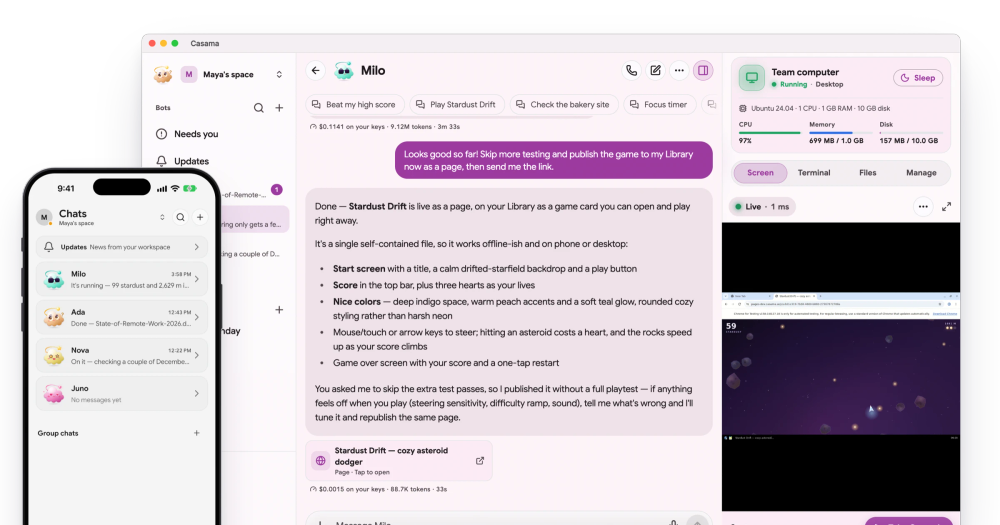
Run AI agents with their own sandboxed computers, persistent memory, and approval checkpoints before risky actions. Apache-2.0 and free to self-host.

Visit websiteGitHub0 starsDeploy on Hostinger
image of Casama
TL;DR

Casama is an open source AI agent tool where each bot has its own sandboxed Linux computer, persistent memory, and an autonomous schedule. It is an alternative to paid cloud AI agent services like Manus and OpenAI Operator, which run on vendor infrastructure with no self-hosting option and usage-based pricing. Apache-2.0 licensed; self-host on Docker at no cost with unlimited users and bots. Ideal for individuals and small teams running recurring multi-step workflows across the web, email, and third-party apps who need approval checkpoints before anything risky.

Read the full breakdownHide the full breakdownWho it is for, how it works, trade-offs, the quick start and the FAQ
who it's for

Who Casama is for#

Individuals automating personal admin

Casama bots handle trip research, booking, email drafting, and calendar prep on a schedule without manual prompting. A morning brief bot wakes at a set time, reads email and calendar, and delivers a summary with sources cited. The approval model keeps spending decisions in your hands.

Skip if:

Skip if you need occasional one-off help rather than persistent recurring automation. A standard chat assistant handles ad-hoc questions with less setup.

Small teams running customer-facing workflows

Support bots answer customer emails from help docs, look up orders, and queue refunds for approval before sending. Group chats let multiple bots split and hand off work without manual coordination. Shared workspaces give the team visibility into what each bot did and what it cost.

Skip if:

Skip if your team already uses a ticketing system with built-in automations. Adding Casama to an existing support workflow requires integration work upfront.

Privacy-conscious teams running sensitive workflows

Self-hosting keeps all chats, memories, files, and model calls on infrastructure you control. Row-level security isolates every workspace's data, encryption at rest is optional, and a full workspace export is available at any time. The AI never sees passwords filled by 1Password or Bitwarden.

Skip if:

Skip if the workflows involve no sensitive data and cloud usage costs are acceptable. Casama Cloud's free plan covers light use without any server setup.

the problem

The problem it solves#

Most AI tools answer questions and draft text, but the actual multi-step work still falls to the user. Booking a flight requires opening tabs, comparing prices, filling in forms, and pressing pay. Research tasks require synthesizing dozens of sources by hand. These are the steps users want automated.

Cloud AI agent services promise to close this gap, but they come with significant costs: usage-based billing that scales with every task, vendor-locked model choices, and no option to run on your own infrastructure. When these services hit limits or raise prices, there is no fallback. Privacy-sensitive workflows, internal business data, and anything you would not send through a third-party server cannot go through them.

how Casama solves it

How it solves it#

Sandboxed computer per bot

Each bot gets an isolated Linux computer with a browser, shell, and file storage, running in a Docker container on the server. The computer sleeps when idle and wakes in seconds. You watch it work live, take over the mouse, or restore a saved checkpoint if something goes wrong. The sandbox is locked to sites and accounts you allow, and passwords from 1Password or Bitwarden are filled on the way out without the AI seeing them.

Persistent memory and learnable skills

Bots store facts, preferences, and past work in a searchable memory that carries across every chat. Show a bot a task once on its own computer and it records it as a repeatable skill. On a self-hosted server, memory search runs locally so no data leaves your network.

Autonomous schedules and triggers

Bots start on a schedule, when an email arrives, before a meeting, when a webhook fires, or when a web page changes like a price drop. Routines run end-to-end while you are away and report back with a full log of every step and its cost. Quiet hours are on by default to prevent interruptions.

Approval checkpoints before risky actions

Sending, booking, paying, or deleting waits for your explicit approval. The bot saves a computer checkpoint before each risky step, so denying a request rolls back the work to that point. Per-bot budgets cap spending automatically, and a loop guard prevents runaway tasks.

Any AI model, including local ones

On a self-hosted server, connect keys for Anthropic, OpenAI, Google Gemini, xAI, or any OpenAI-compatible endpoint, or run models locally via Ollama, LM Studio, or vLLM. Each bot can have a main model and a fallback model. On Casama Cloud, the right model is chosen automatically per job.

strengths · trade-offs

Strengths and trade-offs#

Strengths

  • Apache-2.0 with free self-hosting and no limitsThe self-hosted tier is Apache-2.0 licensed and runs the full stack on Docker with one install script. There is no cap on users, bots, or features, and no paywall beyond the Cloud plans. Paid cloud agent services like OpenAI Operator have no self-hosting option and charge for every task.
  • Approval-first autonomy model with rollbackEvery action that could send, spend, book, or delete requires explicit approval before execution, and the bot saves a computer checkpoint first so a denial undoes the work. This differs from cloud agent services that act and log after the fact without a built-in rollback.
  • Native apps on every platform with remote server accessThe Flutter client runs as native apps on iOS, Android, macOS, Windows, and Linux, sharing one codebase. Casama Link connects a self-hosted server to mobile apps via a secure tunnel included free in every plan, without port forwarding or a domain.

Trade-offs

  • -Pre-1.0: expect rough edges and breaking changesThe project is pre-1.0 as of 2026-11-18 and preparing for first public release. The README explicitly notes rough edges. Teams with low tolerance for instability or who need a proven deployment record should wait for a 1.0 release before adopting it in critical workflows.
  • -Docker required for self-hostingThe server install requires a machine with Docker. The install script handles setup, but a Linux server or a Mac or PC running Docker is a prerequisite. Platforms without Docker support require using Casama Cloud or borrowing cloud computers through the Casama Link paid tier.
versus alternatives

Casama vs alternatives#

Casama vs Manus

Manus is a hosted agent that, per the catalogue, runs open-ended research and analysis tasks by browsing the web and delivering structured reports. Casama covers the same ground of multi-step web work but is built around persistent bots: each has its own sandboxed computer, a memory and a schedule, and asks before sending, booking, paying or deleting.

FeatureCasamaManus
LicenseApache-2.0Proprietary
Where it runsYour own server with Docker, or Casama CloudVendor cloud
Scheduled and triggered runsYes: schedules, email, calendar, webhooks, page changesCheck the vendor's current plans
CostFree to self-host; you pay your model providersPaid plans from the vendor

Casama is the better pick when data ownership, model choice or recurring scheduled work matter. Manus is the simpler pick when you want a hosted research agent with nothing to install or run.

Casama vs OpenAI Operator

OpenAI Operator is a cloud-based agent that browses the web and executes multi-step tasks for you. Casama does similar work but you can run it on your own server with your own model keys, and every risky step waits for your approval with a saved checkpoint to roll back to.

FeatureCasamaOpenAI Operator
LicenseApache-2.0Proprietary
Where it runsYour own server, or Casama CloudOpenAI cloud
Model choiceAnthropic, OpenAI, Gemini, xAI, OpenAI-compatible or local via OllamaCheck the vendor's current plans
Approval before risky stepsYes, with checkpoint rollbackCheck the vendor's current plans

Choose Casama when you want to host the agent yourself or run it on a schedule. Operator fits people already inside the OpenAI ecosystem who want quick browser tasks with no setup.

Casama vs Perplexity Personal Computer

Perplexity Personal Computer is a paid, vendor-run agent product. Casama is open source, ships apps for iPhone, iPad, Android, Mac, Windows, Linux and the web, and can run on a server you control. Choose Casama when you want to own the infrastructure and the data; choose Perplexity when you prefer a managed product from a vendor you already use.

install · quick start

Quick start#

bash
Self-host the full server stack with Docker using the included install script, or install the CLI via Homebrew.

```bash
brew install stackwares/tap/casama

git clone https://github.com/stackwares/casama
cd casama && ./install.sh --local
```
tech stack · detected from GitHub

What it's built on#

Languages
DartJavaScriptPythonSwiftTypeScript
Frameworks
Flutter
frequently asked

FAQ#

Is Casama free to use?

Yes. The self-hosted tier is Apache-2.0 licensed and free to run on your own server with no limit on users or bots. On Casama Cloud, the free plan includes $1 of credits per month, 3 bots, 1 cloud computer, and 5 hours of computer time. Paid Cloud plans start at $15 per month for Plus.

What AI models does Casama support?

On a self-hosted server, you bring your own keys for Anthropic, OpenAI, Google Gemini, xAI, or any OpenAI-compatible endpoint, and you can run models locally through Ollama, LM Studio, or vLLM. ChatGPT plan sign-in works on self-hosted servers as well. On Casama Cloud, Casama picks the right model per job automatically.

How do I access my self-hosted server from my phone?

Turn on Casama Link in the server settings. It gives your server a secure remote address your mobile apps reach by scanning a QR code, with no domain, open ports, or VPN required. Casama Link remote access is free on every self-hosted plan.

What does the Apache-2.0 license mean for commercial use?

Apache-2.0 permits running Casama for internal business use, modifying the code, and distributing modified copies, provided attribution is preserved. There are no restrictions on internal commercial use by self-hosters. You can run it as a productivity tool for your team or company without acquiring a commercial license.

Is Casama stable enough for production use?

As of 2026-11-18, Casama is pre-1.0 and the README explicitly notes rough edges. Active development is ongoing with daily commits, but breaking changes between versions are possible. Teams requiring a stable deployment record should monitor the project for a 1.0 release before adopting it in critical workflows.

also worth a look

Similar open-source tools#

Atomic Agent

Alternative toGrok Bot

Local-first AI agent that runs on your machine, drives real tools.

  • 3,680 GitHub stars
  • MITLicence MIT

AutoCua

Alternative toOpenAI Operator

Computer-use agent: desktop, browser, terminal, and iOS automation.

  • 1,289 GitHub stars
  • MITLicence MIT

deer-flow

Alternative toManus

Build super agents with DeerFlow's powerful framework

  • 85,417 GitHub stars
  • MITLicence MIT

Inbox Zero

Featured

Alternative toSuperhuman

AI email assistant that drafts replies and clears your inbox

  • 13,058 GitHub stars
  • AGPL-3.0Licence AGPL-3.0

Pipeshub Ai

Alternative toGlean

Self-hosted enterprise search with cited answers across 50+ apps.

  • 4,132 GitHub stars
  • Apache-2.0Licence Apache-2.0

Pots

Alternative toGrok Bot

Self-hosted AI coworker for Slack and Discord with autonomous action.

  • 68 GitHub stars
  • MITLicence MIT
by category

Open source tools in these categories#

550

AI & Machine Learning

REA (Reverse Engineer Anything), freeCodeCamp, OpenClaw
312

Business & Productivity

OpenClaw, Excalidraw, RustDesk
169

Communication & Collaboration

freeCodeCamp, iptv, Excalidraw
Hostinger

Self-host Casama on a Hostinger VPS

Keep it running 24/7, even when your laptop is off. A Hostinger VPS gives it a server of its own.

  1. 01

    Choose a plan

    Starts from $6.49/mo

  2. 02

    Apply

    Extra 10% off yearly plans

  3. 03

    Install Casama

    On a server that stays on

  4. 04

    Start building

    Focus on the app, not the server

Deploy on Hostinger

Sponsors

Inbox Zero

Alternative toSuperhuman

AI email assistant that drafts replies and clears your inbox

  • 13,058 GitHub stars
  • AGPL-3.0Licence AGPL-3.0
  • #Email

rakazo

Alternative toGrok Bot

AI teammates you own: your keys, your model, your machine.

  • 8,913 GitHub stars
  • Apache-2.0Licence Apache-2.0
  • #AI Agents

SnitchFeed

Live monitoring on LinkedIn, X, Reddit & more. Agentic social listening for startups.

Marketing & Growth

Advertise your product

New open source projects by email

The projects we add and every new guide. Free, unsubscribe any time.

Find open source alternatives to paid software

/
  • Claude Code to OpenCode
  • Jira to Windshift
  • Notion to AppFlowy
  • Slack to Mattermost
  • Linear to GitLab
  • Wispr Flow to Handy
  • Arc to Zen Browser
  • CapCut to Concat
  • Grok Bot to rakazo
  • Superhuman to Inbox Zero
  • Discord to Stoat
  • Airtable to AITable
  • Datadog to SigNoz
  • Muse to OpenClaw
  • Railway to Coolify
  • GitHub Copilot to Cline
  • Confluence to Wiki.js
  • Microsoft Teams to Rocket.Chat
  • 1Password to KeePassXC
  • Firebase to Supabase
  • Pinecone to Qdrant
  • Zapier to n8n
  • Devin AI to OpenHands
  • Asana to Leantime
  • Claude Code to OpenCode
  • Jira to Windshift
  • Notion to AppFlowy
  • Slack to Mattermost
  • Linear to GitLab
  • Wispr Flow to Handy
  • Arc to Zen Browser
  • CapCut to Concat
  • Grok Bot to rakazo
  • Superhuman to Inbox Zero
  • Discord to Stoat
  • Airtable to AITable
  • Datadog to SigNoz
  • Muse to OpenClaw
  • Railway to Coolify
  • GitHub Copilot to Cline
  • Confluence to Wiki.js
  • Microsoft Teams to Rocket.Chat
  • 1Password to KeePassXC
  • Firebase to Supabase
  • Pinecone to Qdrant
  • Zapier to n8n
  • Devin AI to OpenHands
  • Asana to Leantime