
Open Source Alternatives
  • Alternatives
  • Categories
    Categories by size1,163 projects
    • Developer Tools598
    • AI & Machine Learning504
    • Business & Productivity281
    • Web Development211
    • Security & Monitoring174
    • Communication & Collaboration155
    • IT Management147
    • LLMOps & AI Tooling129
    • Cloud & Hosting128
    • Product & Project Management124
    Browse all 21 categoriesDesign & Creative, DevOps & CI/CD and 9 more
  • Blog
  • Advertise
SearchNotion, Slack, password manager.../
Submit
Open Source Alternatives
  • Alternatives
    • Developer Tools598
    • AI & Machine Learning504
    • Business & Productivity281
    • Web Development211
    • Security & Monitoring174
    • Communication & Collaboration155
    • Browse all 21 categories
  • Blog
  • Advertise
Submit your project

New open source projects by email

The projects we add and every new guide. Free, unsubscribe any time.

Open Source Alternatives LogoOpen Source Alternatives

Handpicked Open Source Alternatives to Paid Softwares

Add Open Source Alternatives as a preferred source on Google

Product

  • Categories
  • Tag
  • Advertise

Resources

  • Blog
  • Collection
  • Submit

Company

  • Privacy Policy
  • Terms of Service
  • Refund Policy
  • Sitemap

Alternatives

  • Claude Code
  • Jira
  • Notion
  • Slack
  • Linear
  • Wispr Flow
  • All alternatives
© 2026 Open Source Alternatives. All rights reserved.
Open SourceAlternatives
Home/Categories/Developer Tools/CrewCode
icon of Crewcode

CrewCode

Open source alternative to Conductor

  • 19 stars
  • Apache-2.0
  • Active this week
  • Last commit today

Last verified Nov 7, 2026

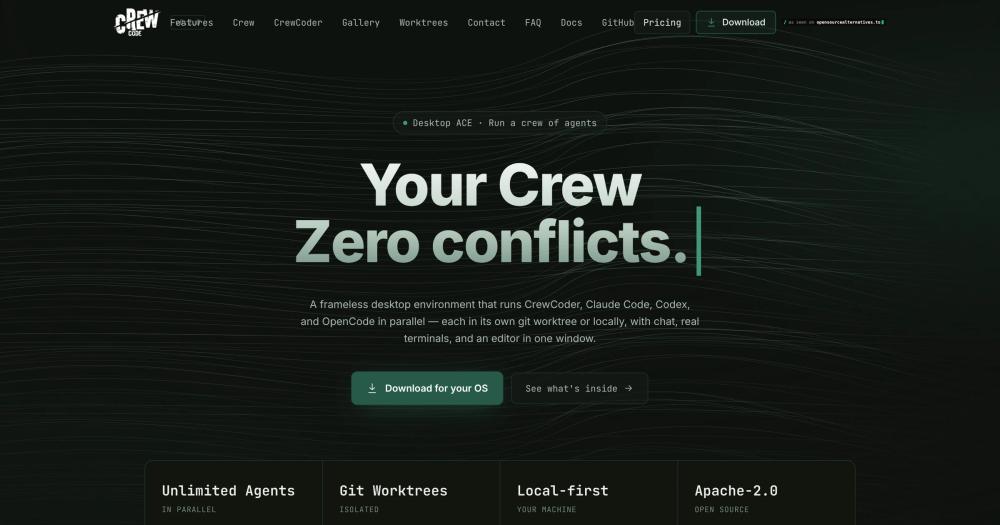
Orchestrate multiple AI coding agents in parallel across isolated git worktrees. Apache-2.0 licensed desktop app for Linux, macOS and Windows.

Visit websiteGitHub19 stars
Image for CrewCode
TL;DR

CrewCode is an open source desktop environment for running multiple AI coding agents in parallel, each in its own isolated git worktree. It replaces Conductor, the leading proprietary orchestrator in this category, which is shutting down on 2026-11-20. Apache-2.0 licensed and local-first, CrewCode runs Claude Code, Codex, OpenCode, Ollama, and other providers in supervised parallel workflows. Best for solo developers and small teams who want multi-agent coding without a subscription.

Read the full breakdownHide the full breakdownWho it is for, how it works, trade-offs, the quick start and the FAQ
who it's for

Who CrewCode is for#

Solo developers running parallel agent workflows

Create separate worktrees for independent tasks, assign an agent to each, and supervise all sessions from Mission Control without opening multiple terminal windows. The integrated git diff and PR workflow lets you land finished branches without switching tools.

Skip if:

If you run only one agent at a time and rarely juggle branches, the standard Claude Code or Codex CLI is simpler and has lower overhead than a desktop orchestrator.

Technical founders using agents as parallel collaborators

Assign lanes to different scopes (front end, back end, tests), mix providers to match task complexity, and review output in one place. Delegated Threads lets an agent spin up real, archivable chat sessions for subtasks, so the work trail is inspectable after the session ends.

Skip if:

Teams with established CI/CD pipelines and human code review may find CrewCode's in-app review workflow redundant if agents commit directly to feature branches already under review.

Developers needing remote or headless agent access

Run CrewCode on a VPS or always-on home server and continue sessions from a browser or phone. The Background Brain keeps worktrees and sessions alive after closing the Electron window; the Hub dashboard lists online machines and recent threads.

Skip if:

If all development happens on a single local machine with no remote continuity needs, the Hub and Background Brain add setup complexity you will not use.

the problem

The problem it solves#

Running more than one AI coding agent quickly becomes unmanageable. Each agent needs its own terminal, its own worktree, its own context window, and its own set of open files. Without tooling to hold those together, developers end up juggling multiple terminal windows across multiple branches with no central view of what each agent is doing or where it has gone wrong.

The harder challenge is coordination. When one agent finishes a task on a feature branch, reviewing its diff, handing work to another agent, handling merge conflicts, and deciding whether to discard or land the branch all require context-switching back to individual sessions. Developers lose track of which branches are live, which agents are blocked, and which diffs are worth reviewing, and that overhead often cancels out the speed gains that parallel agents were supposed to deliver.

how CrewCode solves it

How it solves it#

Multi-agent crew orchestration

Launch named lanes with different agents, models, roles, and effort levels running in parallel on the same project. Each lane gets its own worktree, so agents never conflict over the working tree. Save and reuse crew templates for common task patterns.

Worktree-native isolation with conflict preview

Every agent session runs in an isolated git worktree, keeping parallel work on separate branches without stashing or juggling. Before merging, CrewCode surfaces exact file overlap and likely cross-file contract collisions. Worktree and merge-audit state recovers automatically after a restart.

Provider mixing and mid-session handoff

Run Claude Code, Codex, OpenCode, Ollama, Hermes, OpenRouter, and Grok Build in the same workspace and switch providers mid-session. When you switch, CrewCode generates a handoff summary so the new agent picks up without losing context.

Integrated git and GitHub PR workflow

Stage, diff, commit, pull, push, and sync inside the app. Review AI-generated diffs, resolve merge conflicts, and delegate conflict resolution back to an agent. Create, approve, and merge pull requests through GitHub CLI integration without leaving the app.

Local plugin platform with sandboxed extensions

Install plugins from `~/.crewcode/plugins/` to add custom panels, sidebar items, MCP server declarations, and agent providers. Plugin UIs run in sandboxed `crewcode-plugin://` iframes and communicate through a typed API, so plugin code never gets direct Electron or Node access.

Self-hosted Hub for remote and mobile access

Run CrewCode headlessly on a VPS or home server and reach dev sessions from any browser or phone. The Hub uses a passkey-secured dashboard over an end-to-end-encrypted relay; dev machine files, code, and prompts never reach the Hub. No inbound ports required.

strengths · trade-offs

Strengths and trade-offs#

Strengths

  • Apache-2.0 with no paid tier or cloud dependencyCrewCode is fully Apache-2.0 licensed: use it, modify it, and deploy it commercially with no fee. There is no cloud tier, no subscription, and no data leaving your machine by default. Unlike proprietary orchestrators, the tool's continued availability doesn't depend on a company's commercial decisions.
  • Provider-agnostic: not locked to one AI vendorCrewCode runs Claude Code, Codex, OpenCode, Ollama, Hermes, OpenRouter, and Grok Build from one workspace. Mix local and hosted providers in the same project and switch models without starting a new session, keeping API costs and vendor risk in your own hands.
  • Worktree-first conflict prevention before mergeParallel agent sessions run in isolated git worktrees by design. Before any crew merge, CrewCode surfaces exact file overlap and likely cross-file contract collisions, reducing the chance that two agents overwrite each other's work silently.

Trade-offs

  • -Very early-stage project with a small communityCrewCode was created in August 2026 and has 19 GitHub stars at the time of this writing. The project is active (last pushed 2026-11-07), but the community is small and third-party documentation is limited. Users encountering bugs or missing features will largely rely on GitHub Issues and the README.
  • -Local voice requires Python 3.11 and native dependenciesRealtime voice is off by default. Hosted providers (GPT Realtime, xAI Voice) need separate API keys and billing. Local voice (Parakeet TDT 0.6B v2 for transcription, Kokoro-82M for speech) requires Python 3.11 and native dependencies, adding setup overhead many users will skip.
  • -macOS installer not yet formally documentedThe README notes that the author would appreciate help testing on macOS. The documented installer covers Linux (Arch, Debian, and AppImage for other x86_64 distributions). macOS and Windows are listed as targets but lack a first-party signed installer in the documented install path.
versus alternatives

CrewCode vs alternatives#

CrewCode vs Conductor

Both tools run multiple AI coding agents in parallel across local git worktrees in a desktop application. Conductor was the primary commercial platform in this category; CrewCode is the open source alternative.

FeatureCrewCodeConductor
LicenseApache-2.0Proprietary
PriceFreeFree app; Cloud tier paid (Pro, Teams, Enterprise)
Self-hostingLocal app; optional self-hosted HubLocal app only
Supported agentsClaude Code, Codex, OpenCode, Ollama, Hermes, OpenRouter, Grok BuildClaude Code, Codex, Cursor, OpenCode
Plugin platformYes (local plugins, MCP servers)No
Realtime voiceYes (hosted and local)No
Embedded browserYesNo
Primary platformLinux (documented); macOS and Windows listedmacOS

Conductor is shutting down on 2026-11-20 as the company joins Meta.

CrewCode is the stronger open source choice for teams who need a vendor-agnostic, extensible orchestrator they can inspect and modify. Its plugin platform, provider mixing (including local models via Ollama), embedded browser, voice layer, and document workflow cover capabilities that Conductor never offered.

Teams currently on Conductor who need to continue multi-agent workflows after the shutdown will find CrewCode covers the same core use case with an Apache-2.0 license and no dependency on a company's continued operation.

install · quick start

Quick start#

bash
Install CrewCode on Linux with the verified SHA-256 installer script.
```bash
curl --proto '=https' --tlsv1.2 -fsSL https://crewcode.logixhub.icu/install | sh
```
tech stack · detected from GitHub

What it's built on#

Languages
JavaScriptTypeScript
Frameworks
ElectronReact
Tooling
esbuild
frequently asked

FAQ#

Is CrewCode free and open source?

Yes. CrewCode is licensed under Apache-2.0 and free to use, modify, and distribute commercially. There is no paid tier, no subscription, and no hosted service required for core use. The optional self-hosted Hub is also free; you deploy it on your own infrastructure.

Which AI coding agents does CrewCode support?

CrewCode supports Claude Code, Codex, OpenCode, Pi, Ollama, Hermes, OpenRouter, and Grok Build. Providers can be mixed within the same project. When you switch providers mid-session, CrewCode generates a handoff summary so the new agent picks up without losing context.

How does CrewCode prevent parallel agents from conflicting?

Each agent session runs in its own git worktree, keeping parallel work on separate branches without stashing or conflicts. Before merging a crew's output, CrewCode surfaces exact file overlap and cross-file contract collisions. Worktree and merge-audit state recovers automatically after a restart.

Does CrewCode run on macOS and Windows?

CrewCode targets macOS, Linux, and Windows. The documented installer covers Linux (Arch, Debian, and AppImage for other x86_64 distributions). The README notes that macOS testing help would be appreciated, so the macOS path may be less polished than Linux at this stage.

What is the difference between Crew Lanes and Delegated Threads?

Crew lanes are parallel, ephemeral agent sessions that live for the duration of a crew run. Delegated Threads are persistent chat sessions with transcripts and archiving that an agent creates inside a turn and that you can open, read, and continue yourself afterward. Lanes are for concurrent work during a run; Delegated Threads outlive the run that made them.

Looking for more

Other ways to replace Conductor#

Orca

#1 in the Conductor guide

Drop-in Conductor replacement with 27 or more agents on macOS, Windows, and Linux under MIT

115,397 GitHub stars

T3 Code

#2 in the Conductor guide

MIT-licensed control plane for 6 or more agents with mobile and web clients and a large community

46,806 GitHub stars

Paseo

#3 in the Conductor guide

Daemon-based architecture for agents running on a VM or Docker host with full mobile parity

23,074 GitHub stars

Paradev

#4 in the Conductor guide

macOS parallel-agent desktop app with SOC 2 Type II certification and optional paid remote access

15,923 GitHub stars
All 53 Conductor alternatives12 open source Conductor alternatives, ranked
by category

Open source tools in these categories#

598

Developer Tools

REA (Reverse Engineer Anything), Skills for Real Engineers, superpowers
504

AI & Machine Learning

freeCodeCamp, REA (Reverse Engineer Anything), OpenClaw

Sponsors

Inbox Zero

Alternative toSuperhuman

AI email assistant that drafts replies and clears your inbox

  • 12,915 GitHub stars
  • AGPL-3.0Licence AGPL-3.0
  • #Email

rakazo

Alternative toGrok Bot

AI teammates you own: your keys, your model, your machine.

  • 7,028 GitHub stars
  • Apache-2.0Licence Apache-2.0
  • #AI Agents

SnitchFeed

Live monitoring on LinkedIn, X, Reddit & more. Agentic social listening for startups.

Marketing & Growth

Advertise your product

New open source projects by email

The projects we add and every new guide. Free, unsubscribe any time.

Find open source alternatives to paid software

/
  • Claude Code to OpenCode
  • Jira to Windshift
  • Notion to AppFlowy
  • Slack to Mattermost
  • Linear to GitLab
  • Wispr Flow to Handy
  • Arc to Zen Browser
  • CapCut to Concat
  • Grok Bot to rakazo
  • Superhuman to Inbox Zero
  • Airtable to AITable
  • Muse to OpenClaw
  • Railway to Coolify
  • GitHub Copilot to Cline
  • Datadog to Netdata
  • Confluence to Wiki.js
  • Microsoft Teams to Rocket.Chat
  • Firebase to Supabase
  • Pinecone to Qdrant
  • Zapier to n8n
  • 1Password to KeePassXC
  • Devin AI to OpenHands
  • Asana to Leantime
  • Contentful to Strapi
  • Claude Code to OpenCode
  • Jira to Windshift
  • Notion to AppFlowy
  • Slack to Mattermost
  • Linear to GitLab
  • Wispr Flow to Handy
  • Arc to Zen Browser
  • CapCut to Concat
  • Grok Bot to rakazo
  • Superhuman to Inbox Zero
  • Airtable to AITable
  • Muse to OpenClaw
  • Railway to Coolify
  • GitHub Copilot to Cline
  • Datadog to Netdata
  • Confluence to Wiki.js
  • Microsoft Teams to Rocket.Chat
  • Firebase to Supabase
  • Pinecone to Qdrant
  • Zapier to n8n
  • 1Password to KeePassXC
  • Devin AI to OpenHands
  • Asana to Leantime
  • Contentful to Strapi