Open Source Alternatives
  • Alternatives
  • Categories
    Categories by size1,321 projects
    • Developer Tools680
    • AI & Machine Learning552
    • Business & Productivity321
    • Web Development219
    • Security & Monitoring200
    • Communication & Collaboration171
    • IT Management166
    • Design & Creative148
    • DevOps & CI/CD143
    • LLMOps & AI Tooling142
    Browse all 21 categoriesCloud & Hosting, Product & Project Management and 9 more
  • Blog
  • Advertise
SearchNotion, Slack, password manager.../
Submit
Open Source Alternatives
  • Alternatives
    • Developer Tools680
    • AI & Machine Learning552
    • Business & Productivity321
    • Web Development219
    • Security & Monitoring200
    • Communication & Collaboration171
    • Browse all 21 categories
  • Blog
  • Advertise
Submit your project

New open source projects by email

The projects we add and every new guide. Free, unsubscribe any time.

Open Source Alternatives LogoOpen Source Alternatives

Handpicked Open Source Alternatives to Paid Softwares

Add Open Source Alternatives as a preferred source on Google

Product

  • Categories
  • Tag
  • Advertise

Resources

  • Blog
  • Collection
  • Submit

Company

  • Privacy Policy
  • Terms of Service
  • Refund Policy
  • Sitemap

Alternatives

  • Claude Code
  • Jira
  • Notion
  • Slack
  • Linear
  • Wispr Flow
  • All alternatives
© 2026 Open Source Alternatives. All rights reserved.
Open SourceAlternatives
Home/Categories/Business & Productivity/Donetick
icon of Donetick

Donetick

Open source alternative to Microsoft To-Do, Tody, Sweepy and OurHome

  • 2.8K stars
  • AGPL-3.0
  • Active this week
  • Last commit today

Last verified Nov 21, 2026

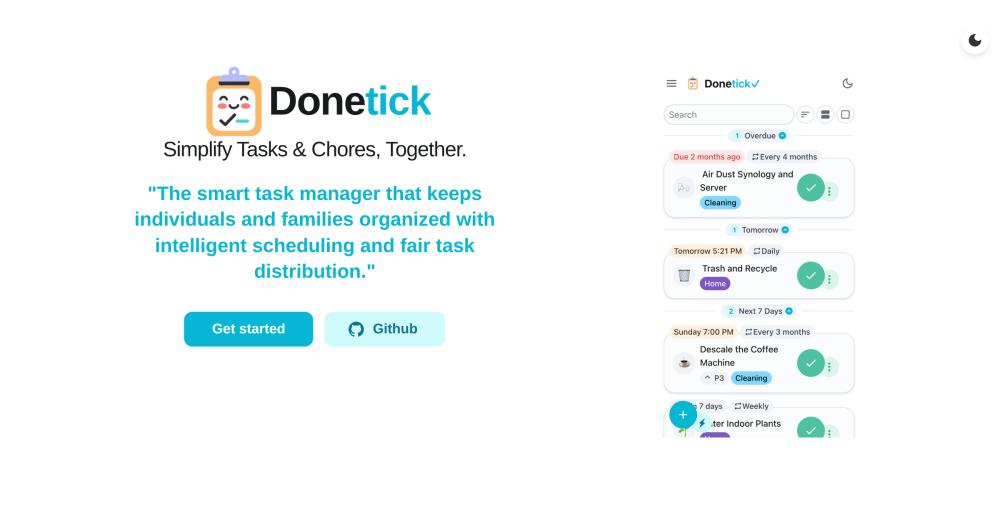
Manage household tasks and chores in shared groups with assignee rotation, natural language recurrence scheduling, and Home Assistant integration.

Visit websiteGitHub2.8K starsDeploy on Hostinger
Image for Donetick
TL;DR

Donetick is a self-hosted, AGPL-3.0 task and chore manager built for households and small groups. It replaces paid apps like OurHome and Sweepy with configurable recurrence, assignee rotation, and native Home Assistant integration, all stored on your own server. Deploy with Docker; SQLite runs by default and no external database is required. Best for households, homelab setups, and small teams who want full data ownership and chore automation without a subscription.

Read the full breakdownHide the full breakdownWho it is for, how it works, trade-offs, the quick start and the FAQ
who it's for

Who Donetick is for#

Households Managing Shared Chores

Households with multiple people sharing cleaning, maintenance, and recurring tasks can use Donetick groups to distribute assignments, track who last completed a chore, and enforce fair rotation. The dashboard view works on a wall-mounted tablet showing the current task list to everyone.

Skip if:

If chore management does not involve multiple people or rotation, a simpler personal task app with reminders is less infrastructure to maintain.

Home Assistant Homelab Users

Users already running Home Assistant can connect Donetick via the official integration to surface household tasks inside their HA dashboard. Tasks and chore schedules appear alongside automations, scenes, and device states without maintaining a separate interface.

Skip if:

If you do not run Home Assistant and do not need API access or webhook automation, a simpler consumer app avoids the server setup overhead.

Households Migrating from Microsoft To-Do

Users who relied on Microsoft To-Do for household task lists and shared reminders will need to migrate before the June 30, 2027 retirement date. Donetick covers shared lists, reminders, and recurring tasks while adding assignee rotation and self-hosting.

Skip if:

If Microsoft 365 ecosystem integration, such as Teams tasks, Outlook integration, or Planner sync, is a hard requirement, Donetick does not replicate those integrations.

Teams Wanting Data Ownership

Households and small teams that do not want their task history, group membership, or completion records stored on a vendor's servers can self-host Donetick. All data stays on the household's own server, backed up by whatever strategy the team already uses.

Skip if:

If managing a home server or VPS is not feasible, Donetick requires a persistent host. Users without infrastructure should choose a managed consumer app instead.

the problem

The problem it solves#

Shared household chores and recurring personal tasks are deceptively hard to manage across a group. Generic task apps handle individual productivity but lack the household-specific features that matter: rotation across who does what, recurrence tied to completion rather than calendar dates, and a view that works on a wall-mounted tablet.

Consumer apps like OurHome and Sweepy fill some of those gaps, but they store your household data on their servers and charge subscription fees. There is no self-hosting path, no Home Assistant integration, and no REST API for custom automations. Households that run Home Assistant or maintain homelab infrastructure are left choosing between a generic task app with no rotation logic and a consumer service with no data ownership.

how Donetick solves it

How it solves it#

Natural Language Task Creation

Describe recurring tasks in plain English and Donetick extracts the schedule automatically. Phrases like "change water filter every 6 months" or "take trash out every Monday at 6:15 pm" become structured recurring tasks without form filling. Dates, times, and recurrence patterns are parsed from the input.

Flexible Recurrence and Assignee Rotation

Schedule tasks on daily, weekly, monthly, yearly, or adaptive cadences. Adaptive scheduling learns from historical completion patterns to suggest due dates. Assignee rotation distributes tasks by fewest completions, randomly, or in round-robin order, so the same person is not always doing the same chore.

Things: Non-Task Data Tracking

"Things" let you track values that are not tasks, such as a number, boolean, or plain text, and optionally trigger a task to complete automatically when a Thing reaches a set value. Useful for tracking sensor readings, inventory levels, or any state change that should mark a chore as done.

Home Assistant Integration

An official Home Assistant integration creates per-user to-do lists inside HA from Donetick tasks. Users managing a smart home can view and complete household tasks directly within their HA dashboard without switching apps.

MCP Server for AI Assistants

A built-in Model Context Protocol server exposes task management to any MCP-compatible AI assistant. Enable it with DT_MCP_ENABLED=true and point your AI client at the /mcp endpoint with an API token. Tools cover task listing, creation, completion, labels, projects, filters, and Things.

strengths · trade-offs

Strengths and trade-offs#

Strengths

  • AGPL-3.0 with No SubscriptionThe AGPL-3.0 license means you can run Donetick on your own server for personal, household, or team use at no cost. Unlike OurHome or Sweepy, there is no subscription fee, no per-user pricing, and no dependency on a vendor's continued operation.
  • Home Assistant Official IntegrationThe official Home Assistant integration creates separate to-do lists for each Donetick user inside HA. For smart-home households, this removes the need to maintain a separate app: tasks appear alongside automations, scenes, and device states in the same dashboard.
  • Adaptive Scheduling from Historical DataDonetick learns from historical task completions to suggest due dates automatically. For chores where the actual completion date drifts from the schedule, adaptive scheduling adjusts future suggestions based on real usage patterns rather than fixed calendar math.
  • Low-Friction Self-HostingA single Docker command and a data volume mount is all that is needed to run Donetick. SQLite is the default database; no external Postgres or MySQL setup is required. The first run auto-generates a config file with a random JWT secret, reducing initial configuration.

Trade-offs

  • -Mobile Apps Still in Early DevelopmentThe iOS app is in TestFlight alpha and the Android app is distributed as an APK through GitHub Releases, not through the App Store or Google Play. Users who prefer installing through official stores will need to wait for stable mobile releases.
  • -Limited Offline ModeOffline support exists but is described as very limited in the README: some navigation works without a connection, but core functionality requires the server to be reachable. This matters for mobile users who want offline task management.
  • -188 Open IssuesThe issue tracker holds 188 open issues. The project was created in June 2024 and is still maturing; users should review open issues relevant to their use case before deploying in production.
versus alternatives

Donetick vs alternatives#

Donetick vs Microsoft To-Do

Both tools handle personal task lists and due date reminders, but they differ in deployment model and household features. Microsoft To-Do is a cloud-only commercial service tightly integrated with Microsoft 365; Donetick is self-hosted and built for household groups with rotation and recurrence as core features.

FeatureDonetickMicrosoft To-Do
LicenseAGPL-3.0Proprietary
Self-hostingYesNo
Assignee rotationYesNo
Household-specific recurrenceYesNo
Home Assistant integrationYesNo

Microsoft To-Do retires on June 30, 2027. Households currently using it for shared chore lists or personal task reminders will need to find a replacement before that date.

Donetick vs OurHome

Both tools target household task management with shared groups, chore assignment, and a points-based progress system. OurHome is a proprietary mobile app with no self-hosting path; Donetick is AGPL-3.0 and runs on your own server.

FeatureDonetickOurHome
LicenseAGPL-3.0Proprietary
Self-hostingYesNo
Points and rewardsYesYes
Assignee rotationAutomatic (rotation rules)Manual assignment
Home Assistant integrationYesNo
NFC task triggersYesNo
REST APIYesNo

Donetick is the better choice when data ownership matters, when Home Assistant integration is a priority, or when the household wants a REST API for custom automations. OurHome offers a more polished consumer mobile experience and may suit households that prefer a managed app without server maintenance.

Donetick vs Tody and Sweepy

Tody and Sweepy focus narrowly on cleaning schedules and are both proprietary mobile apps with no self-hosting path. Donetick covers the same recurring chore scheduling while adding general-purpose task management, group support, NFC triggers, Home Assistant integration, and a REST API. For a household that only needs a cleaning schedule tracker, Tody or Sweepy are simpler options with no server to maintain. For a household that also wants project tracking, home automation integration, or API-based automations, Donetick is the more complete choice.

install · quick start

Quick start#

bash
Deploy Donetick using Docker with a persistent data volume and a self-hosted config.
```bash
docker run -v /path/to/host/data:/donetick-data -v /path/to/host/config:/config -p 2021:2021 -e DT_ENV=selfhosted -e DT_SQLITE_PATH=/donetick-data/donetick.db donetick/donetick
```
tech stack · detected from GitHub

What it's built on#

Languages
Go
Frameworks
React
Infrastructure
Docker
frequently asked

FAQ#

Is Donetick free to use?

Yes. The self-hosted version is AGPL-3.0 licensed and free to run on your own server or home machine. There is no subscription, no per-user fee, and no cloud service required. All you need is a container host and a persistent volume for data.

Does Donetick have a mobile app?

An iOS app is in TestFlight alpha and an Android APK is available in the GitHub Releases. Neither is yet distributed through the App Store or Google Play. Mobile push notifications are supported through the alpha app, as well as via Telegram, Discord, and Pushover for users who prefer those channels over a mobile app.

What database does Donetick use?

SQLite is the default and requires no additional setup. The DT_DATABASE_TYPE environment variable and the config file allow switching to another database type if needed. For most household deployments, SQLite is sufficient and reduces infrastructure complexity.

Can I sign in with an existing identity provider?

Yes. Donetick supports any OAuth2 provider that implements OIDC, including Keycloak, Authentik, and Authelia. TOTP-based multi-factor authentication is also supported for local accounts. For single-household deployments, the DT_SINGLE_CIRCLE_INSTANCE mode hides circle management and auto-adds OIDC users to a shared household circle.

How does the Home Assistant integration work?

An official integration connects Donetick to Home Assistant and creates separate to-do lists for each Donetick user inside HA, making household tasks visible and completable from the HA dashboard. The Donetick README links to the official HA integration under the Home Assistant Integration section.

also worth a look

Similar open-source tools#

Tasks.org

Alternative toMicrosoft To-Do

GPL-licensed Android to-do app with CalDAV and self-hosted sync

  • 5,784 GitHub stars
  • GPL-3.0Licence GPL-3.0

Super Productivity

Alternative toMicrosoft To-Do

Offline-first task manager with time tracking and dev integrations

  • 23,913 GitHub stars
  • MITLicence MIT

Vikunja

Alternative toMicrosoft To-Do

Self-hosted task manager with list, Kanban, Gantt, and table views

  • 6,120 GitHub stars
  • AGPL-3.0Licence AGPL-3.0

OpenTodo

Alternative toMicrosoft To-Do

Self-hosted to-do app with offline sync, shared lists, and optional AI

  • 577 GitHub stars
  • AGPL-3.0Licence AGPL-3.0

rakazo

Featured

Alternative toGrok Bot

AI teammates you own: your keys, your model, your machine.

  • 9,277 GitHub stars
  • Apache-2.0Licence Apache-2.0

paperclip

Featured

Alternative toGrok Bot

Self-hosted AI agent management with org charts and budgets

  • 115,278 GitHub stars
  • MITLicence MIT
by category

Open source tools in these categories#

321

Business & Productivity

OpenClaw, Excalidraw, RustDesk
130

Product & Project Management

freeCodeCamp, agency-agents, Gstack
Hostinger

Self-host Donetick on a Hostinger VPS

Keep it running 24/7, even when your laptop is off. A Hostinger VPS gives it a server of its own.

  1. 01

    Choose a plan

    Starts from $6.49/mo

  2. 02

    Apply

    Extra 10% off yearly plans

  3. 03

    Install Donetick

    On a server that stays on

  4. 04

    Start building

    Focus on the app, not the server

Deploy on Hostinger

Sponsors

SnitchFeed

Live monitoring on LinkedIn, X, Reddit & more. Agentic social listening for startups.

Marketing & Growth

Windshift

Alternative toJira

Self-hosted work management for teams leaving Jira

  • 460 GitHub stars
  • AGPL-3.0Licence AGPL-3.0

Nuphos

Alternative toConductor

Agent workspace for teams running Claude Code or Codex

  • 707 GitHub stars
  • Apache-2.0Licence Apache-2.0
  • #AI Agents
Advertise your product

New open source projects by email

The projects we add and every new guide. Free, unsubscribe any time.

Find open source alternatives to paid software

/
  • Claude Code to OpenCode
  • Jira to Windshift
  • Notion to AppFlowy
  • Slack to Mattermost
  • Linear to GitLab
  • Wispr Flow to Handy
  • Arc to Zen Browser
  • CapCut to Concat
  • Grok Bot to rakazo
  • Superhuman to Inbox Zero
  • Discord to Stoat
  • Airtable to AITable
  • Datadog to SigNoz
  • Muse to OpenClaw
  • Railway to Coolify
  • GitHub Copilot to Cline
  • Confluence to Wiki.js
  • Microsoft Teams to Rocket.Chat
  • 1Password to KeePassXC
  • Firebase to Supabase
  • Pinecone to Qdrant
  • Zapier to n8n
  • Devin AI to OpenHands
  • Adobe Premiere Pro to Shotcut
  • Claude Code to OpenCode
  • Jira to Windshift
  • Notion to AppFlowy
  • Slack to Mattermost
  • Linear to GitLab
  • Wispr Flow to Handy
  • Arc to Zen Browser
  • CapCut to Concat
  • Grok Bot to rakazo
  • Superhuman to Inbox Zero
  • Discord to Stoat
  • Airtable to AITable
  • Datadog to SigNoz
  • Muse to OpenClaw
  • Railway to Coolify
  • GitHub Copilot to Cline
  • Confluence to Wiki.js
  • Microsoft Teams to Rocket.Chat
  • 1Password to KeePassXC
  • Firebase to Supabase
  • Pinecone to Qdrant
  • Zapier to n8n
  • Devin AI to OpenHands
  • Adobe Premiere Pro to Shotcut