Open Source Alternatives
  • Alternatives
  • Categories
    Categories by size1,319 projects
    • Developer Tools680
    • AI & Machine Learning552
    • Business & Productivity319
    • Web Development219
    • Security & Monitoring200
    • Communication & Collaboration171
    • IT Management166
    • Design & Creative148
    • DevOps & CI/CD143
    • LLMOps & AI Tooling142
    Browse all 21 categoriesCloud & Hosting, Product & Project Management and 9 more
  • Blog
  • Advertise
SearchNotion, Slack, password manager.../
Submit
Open Source Alternatives
  • Alternatives
    • Developer Tools680
    • AI & Machine Learning552
    • Business & Productivity319
    • Web Development219
    • Security & Monitoring200
    • Communication & Collaboration171
    • Browse all 21 categories
  • Blog
  • Advertise
Submit your project

New open source projects by email

The projects we add and every new guide. Free, unsubscribe any time.

Open Source Alternatives LogoOpen Source Alternatives

Handpicked Open Source Alternatives to Paid Softwares

Add Open Source Alternatives as a preferred source on Google

Product

  • Categories
  • Tag
  • Advertise

Resources

  • Blog
  • Collection
  • Submit

Company

  • Privacy Policy
  • Terms of Service
  • Refund Policy
  • Sitemap

Alternatives

  • Claude Code
  • Jira
  • Notion
  • Slack
  • Linear
  • Wispr Flow
  • All alternatives
© 2026 Open Source Alternatives. All rights reserved.
Open SourceAlternatives
Home/Categories/Business & Productivity/Super Productivity
icon of Super Productivity

Super Productivity

Open source alternative to Microsoft To-Do, TickTick and Sunsama

  • 23.9K stars
  • MIT
  • Active this week
  • Last commit today

Last verified Nov 21, 2026

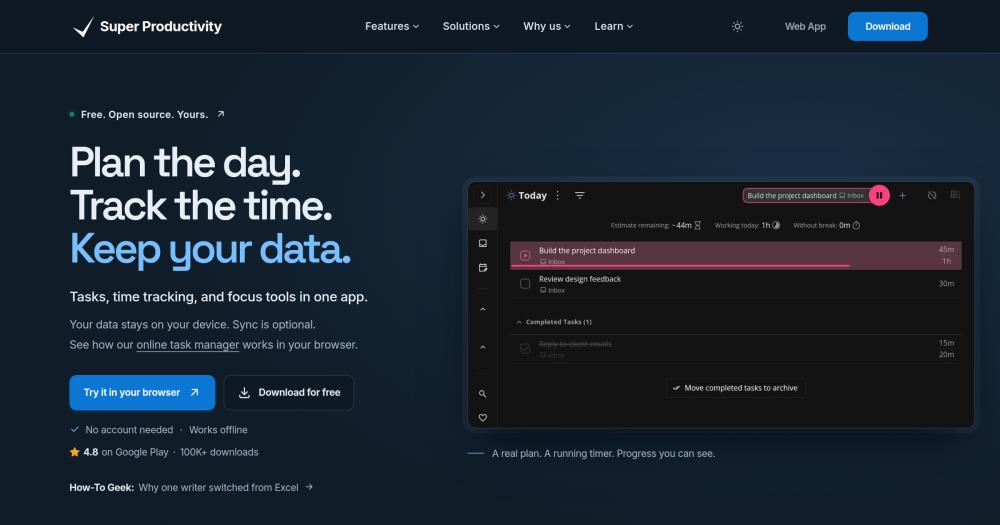
Manage tasks, track time, and plan your day with an offline-first app that integrates with Jira, GitHub, and GitLab.

Visit websiteGitHub23.9K starsDeploy on Hostinger
image of Super Productivity
TL;DR

Super Productivity is an MIT-licensed, offline-first task manager that combines to-do lists, time tracking, and daily planning in one application, with no account required and no data leaving your device by default. It replaces paid tools like TickTick and Sunsama by offering every feature free, including Pomodoro and Flowtime focus sessions, timesheet export, and integrations with Jira, GitHub, GitLab, Linear, and ClickUp. Available for Windows, macOS, Linux, Android, iOS, and web, with optional sync via SuperSync, WebDAV, or Dropbox. Best suited for developers who track time against issues, freelancers billing by the hour, and privacy-conscious workers who want their task data to stay local.

Read the full breakdownHide the full breakdownWho it is for, how it works, trade-offs, the quick start and the FAQ
who it's for

Who Super Productivity is for#

Developers pulling tasks from Jira or GitHub

Super Productivity imports issues assigned to you from Jira, GitHub, GitLab, and nine other issue trackers. You schedule and time-track those issues in the planner, then send completed time logs back as worklogs. This replaces the tab-switching cycle between your issue tracker and a separate to-do app.

Skip if:

Your team needs task tracking to be visible to everyone on a shared board. Super Productivity has no shared workspace, so you would need a parallel tool for team-visible task tracking.

Freelancers billing by the hour

Time is tracked per task automatically when a focus session runs. The timesheet export covers what you worked on, how long you spent, and when. At the end of a client engagement, you export the log rather than reconstructing hours from memory or a separate spreadsheet.

Skip if:

You need invoicing, client management, or project budgets in the same tool. Super Productivity only tracks time; billing and invoicing require a separate app.

Privacy-conscious professionals

No account is required and no data leaves your device without explicit opt-in. The app works fully offline. Sync is optional and can be routed through your own WebDAV server or self-hosted SuperSync instance so no task data touches a third-party server.

Skip if:

You need your tasks accessible from a browser on any machine without prior sync setup. Cloud-first apps like TickTick offer instant access from any browser; Super Productivity's local-first model requires sync to be configured first.

ADHD and focus-driven workers

The app ships Pomodoro, Flowtime, and countdown timers with break reminders and an anti-procrastination feature. Focus mode presents one task at a time to reduce distraction. The website names ADHD users as a primary audience, noting that structured time-boxing helps maintain attention across a busy workday.

Skip if:

Your primary challenge is long-term project planning across a team. Super Productivity handles daily execution well; strategic roadmapping or sprint planning belongs in a dedicated project management tool.

the problem

The problem it solves#

Task management tools that also offer time tracking and developer integrations typically charge a subscription for the full feature set. TickTick locks its Pomodoro timer, timeline view, and habit trackers behind a Premium plan. Sunsama charges around $20 per month for calendar-based daily planning with Jira and GitHub pulls. When you stop paying, your data stays on their servers and your workflow depends on their pricing decisions.

For developers who work from an issue tracker, the challenge compounds: your tasks live in GitHub or Jira, your personal planner is a separate app, and you export and reconcile time manually at the end of the week. Building a client timesheet from two data sources is friction every billable-hour worker recognizes.

how Super Productivity solves it

How it solves it#

Time tracking with timesheet export

Start a timer when you begin a task and log the time automatically. At the end of a session, export a timesheet to CSV or send worklogs directly back to Jira, GitLab, OpenProject, or Redmine. The time log persists in History so you can review what you worked on each day without maintaining a separate spreadsheet.

Pomodoro, Flowtime, and countdown focus sessions

Three focus modes are built in. Pomodoro runs fixed intervals with break prompts. Flowtime tracks continuous work time and suggests a proportional break based on how long you focused. Countdown runs a timer of whatever length you set before starting. All three log time against the active task automatically and trigger a break reminder when the session ends.

Issue tracker integrations

Pull issues assigned to you from Jira, GitHub, GitLab, Gitea, OpenProject, Linear, ClickUp, Redmine, Nextcloud Deck, Azure DevOps, and Trello. Imported issues carry their context into your planner so you can schedule and time-track them locally. Completed time logs can be sent back to Jira, GitLab, OpenProject, and Redmine as worklogs.

Schedule view with calendar integration

Lay out your day on a timeline next to your calendar events. CalDAV integration brings your calendar into the planner view. Timeboxing lets you assign time slots to tasks and see a realistic view of what can fit in a working day before you commit to it.

Kanban and Eisenhower Matrix boards

Organize tasks visually on built-in boards. The Kanban board lets you move tasks between columns by status. The Eisenhower Matrix groups tasks by urgency and importance, following the do/decide/delegate/delete quadrant system. Custom board layouts are also supported, letting you arrange columns and labels to fit your personal system.

Plugins, themes, and local REST API

Extend the app with community-built plugins and custom themes without modifying the core application. A local REST API lets external tools read and write tasks programmatically. The app also supports a Super Productivity MCP server for connecting a local AI assistant to your task list, documented on the project's blog.

strengths · trade-offs

Strengths and trade-offs#

Strengths

  • Every feature free under the MIT licenseSuper Productivity ships every feature at no cost with no freemium tier and no premium plan. Time tracking, focus sessions, Jira integration, and sync all work from day one. The MIT license permits personal, commercial, and team use without restriction, and you can fork and modify the app freely.
  • Data stored on your device by defaultYour task list and time logs are stored in a local file on your device. No account is required to use any feature. Sync to other devices is opt-in and can be routed through your own WebDAV server or self-hosted SuperSync instance, so no task data touches a third-party server unless you choose it.
  • Built-in developer workflow across 11 integrationsThe app pulls issues from Jira, GitHub, GitLab, Gitea, OpenProject, Linear, ClickUp, Redmine, Nextcloud Deck, Azure DevOps, and Trello, and can send completed time logs back as worklogs. This closes the loop between issue tracking and personal planning without requiring a separate integration layer.
  • Active project maintained since 2017The repository was created in January 2017 and had a commit pushed on November 21, 2026. With 23,913 GitHub stars and 2,407 forks, the project has an active contributor community. The README states 'Free and open source since 2017' as a standing commitment.

Trade-offs

  • -High open issue countThe repository carries 998 open issues. For a personal productivity tool, a backlog of this size suggests some bugs and feature requests remain unresolved for extended periods. Users who rely on specific integrations may find edge cases that need workarounds or community patches before they are addressed upstream.
  • -Designed for solo work, not team collaborationSuper Productivity is designed for one person's focused work, not team project management, as stated in the README. There are no shared boards, no task assignment to other users, and no collaborative comment threads. Teams needing a shared workspace should look at tools like Plane or Vikunja instead.
versus alternatives

Super Productivity vs alternatives#

Super Productivity vs Microsoft To-Do

Both handle personal task lists, but they differ on data ownership and feature depth. Microsoft To-Do requires a Microsoft account and stores data on Microsoft's servers; Super Productivity stores data locally with no account required.

FeatureSuper ProductivityMicrosoft To-Do
LicenseMIT (open source)Proprietary
Account requiredNoYes (Microsoft account)
Time trackingYesNo
Offline-firstYesLimited
Developer integrationsJira, GitHub, GitLab+None

Microsoft To-Do is being retired on June 30, 2027. Users migrating from Microsoft To-Do will find Super Productivity covers the core task list and reminder use case with the addition of time tracking, Pomodoro focus sessions, and developer integrations, all without requiring an account.

Super Productivity vs TickTick

TickTick and Super Productivity share a Pomodoro timer and calendar view, but TickTick locks several of these features behind a paid Premium subscription while Super Productivity ships every feature free.

FeatureSuper ProductivityTickTick
LicenseMIT (open source)Proprietary
Pomodoro/focus timerFreePremium only
Time tracking with exportYesPartial (Premium)
Issue tracker integrationsJira, GitHub, GitLabNone
Self-hosting (sync server)OptionalNo
Price for full featuresFree~$27.99/year

Super Productivity is the stronger choice when you need time tracking, timesheet export, or issue tracker integrations alongside a task list. TickTick is worth considering when you want a polished mobile-first experience with a large library of preset habit trackers and a hosted service that requires no sync setup.

Super Productivity vs Sunsama

Sunsama specializes in calendar-based daily planning for professionals: it pulls tasks from multiple sources into a time-boxed daily schedule. Super Productivity covers the same daily planning loop free.

FeatureSuper ProductivitySunsama
LicenseMIT (open source)Proprietary
Daily schedule viewYesYes
Calendar integrationCalDAVGoogle Calendar, Outlook
Jira/GitHub integrationYesPartial
Time trackingYesPartial
PriceFree (optional paid sync)~$20/month

Sunsama is worth considering when you need a guided daily review ritual with deep integration to Notion, Asana, and Trello, and you prefer a fully managed service with a polished onboarding flow. Super Productivity fits when you want the same daily planning capability free, with stronger time tracking and timesheet export for freelancers who bill by the hour.

install · quick start

Quick start#

bash
Download Super Productivity for Windows, macOS, Linux, Android, and iOS from GitHub Releases: https://github.com/super-productivity/super-productivity/releases/latest
tech stack · detected from GitHub

What it's built on#

Languages
JavaScriptKotlinTypeScript
Frameworks
AngularCapacitorElectron
frequently asked

FAQ#

Does Super Productivity have a mobile app?

Yes. Super Productivity is available for Android on Google Play, F-Droid, and Obtainium, and for iOS on the App Store. The mobile apps support the core task management features. For sync between desktop and mobile, you need to configure WebDAV, Dropbox, or the SuperSync server; there is no automatic cloud sync out of the box.

How does sync work between devices in Super Productivity?

Three sync options are built in: SuperSync (the project's own end-to-end encrypted sync service, which you can also self-host), Dropbox, and WebDAV. SuperSync is end-to-end encrypted with a password only you hold. The self-hosted SuperSync server lives in the repository under packages/super-sync-server and runs with Docker. If you do not set up sync, your data stays in a local file on the device you use.

Can Super Productivity integrate with Jira?

Yes. The Jira integration auto-imports issues assigned to you, lets you plan and time-track them locally, and sends completed time logs back to Jira as worklogs. Additional integrations are available for GitHub, GitLab, Gitea, OpenProject, Linear, ClickUp, Redmine, Nextcloud Deck, Azure DevOps, and Trello. CalDAV integration is also included for calendar events.

Is Super Productivity free for commercial use?

Yes. The MIT license permits personal, commercial, and team use without restriction. You can fork it, modify it, and use it in a business context without paying a fee or seeking permission. The only restriction MIT imposes is preserving the license notice in any distribution. There is no premium tier and no features gated behind payment.

What focus timer modes does Super Productivity support?

Three modes are built in. Pomodoro runs fixed 25-minute work intervals followed by a break prompt. Flowtime tracks continuous work time and calculates a proportional break based on how long you focused, designed for deeper uninterrupted work sessions. Countdown runs a custom-length timer you define before starting. All three track time against the active task and trigger a break reminder automatically.

also worth a look

Similar open-source tools#

Vikunja

Alternative toTodoist

Self-hosted task manager with list, Kanban, Gantt, and table views

  • 6,120 GitHub stars
  • AGPL-3.0Licence AGPL-3.0

OpenTodo

Alternative toTodoist

Self-hosted to-do app with offline sync, shared lists, and optional AI

  • 577 GitHub stars
  • AGPL-3.0Licence AGPL-3.0

rakazo

Featured

Alternative toGrok Bot

AI teammates you own: your keys, your model, your machine.

  • 9,277 GitHub stars
  • Apache-2.0Licence Apache-2.0

paperclip

Featured

Alternative toGrok Bot

Self-hosted AI agent management with org charts and budgets

  • 115,278 GitHub stars
  • MITLicence MIT

Flowplan

Alternative toNotion

Docs, databases, whiteboards; self-hosted in one container, AGPL-3.0.

  • 140 GitHub stars
  • AGPL-3.0Licence AGPL-3.0

Fider

Alternative toCanny

Self-hosted feature voting board for product teams.

  • 4,631 GitHub stars
  • AGPL-3.0Licence AGPL-3.0
by category

Open source tools in these categories#

319

Business & Productivity

OpenClaw, Excalidraw, RustDesk
128

Product & Project Management

freeCodeCamp, agency-agents, Gstack
Hostinger

Self-host Super Productivity on a Hostinger VPS

Keep it running 24/7, even when your laptop is off. A Hostinger VPS gives it a server of its own.

  1. 01

    Choose a plan

    Starts from $6.49/mo

  2. 02

    Apply

    Extra 10% off yearly plans

  3. 03

    Install Super Productivity

    On a server that stays on

  4. 04

    Start building

    Focus on the app, not the server

Deploy on Hostinger

Sponsors

SnitchFeed

Live monitoring on LinkedIn, X, Reddit & more. Agentic social listening for startups.

Marketing & Growth

Windshift

Alternative toJira

Self-hosted work management for teams leaving Jira

  • 460 GitHub stars
  • AGPL-3.0Licence AGPL-3.0

Nuphos

Alternative toConductor

Agent workspace for teams running Claude Code or Codex

  • 707 GitHub stars
  • Apache-2.0Licence Apache-2.0
  • #AI Agents
Advertise your product

New open source projects by email

The projects we add and every new guide. Free, unsubscribe any time.

Find open source alternatives to paid software

/
  • Claude Code to OpenCode
  • Jira to Windshift
  • Notion to AppFlowy
  • Slack to Mattermost
  • Linear to GitLab
  • Wispr Flow to Handy
  • Arc to Zen Browser
  • CapCut to Concat
  • Grok Bot to rakazo
  • Superhuman to Inbox Zero
  • Discord to Stoat
  • Airtable to AITable
  • Datadog to SigNoz
  • Muse to OpenClaw
  • Railway to Coolify
  • GitHub Copilot to Cline
  • Confluence to Wiki.js
  • Microsoft Teams to Rocket.Chat
  • 1Password to KeePassXC
  • Firebase to Supabase
  • Pinecone to Qdrant
  • Zapier to n8n
  • Devin AI to OpenHands
  • Adobe Premiere Pro to Shotcut
  • Claude Code to OpenCode
  • Jira to Windshift
  • Notion to AppFlowy
  • Slack to Mattermost
  • Linear to GitLab
  • Wispr Flow to Handy
  • Arc to Zen Browser
  • CapCut to Concat
  • Grok Bot to rakazo
  • Superhuman to Inbox Zero
  • Discord to Stoat
  • Airtable to AITable
  • Datadog to SigNoz
  • Muse to OpenClaw
  • Railway to Coolify
  • GitHub Copilot to Cline
  • Confluence to Wiki.js
  • Microsoft Teams to Rocket.Chat
  • 1Password to KeePassXC
  • Firebase to Supabase
  • Pinecone to Qdrant
  • Zapier to n8n
  • Devin AI to OpenHands
  • Adobe Premiere Pro to Shotcut