Open Source Alternatives
  • Alternatives
  • Categories
    Categories by size1,133 projects
    • Developer Tools577
    • AI & Machine Learning493
    • Business & Productivity275
    • Web Development209
    • Security & Monitoring173
    • Communication & Collaboration154
    • IT Management146
    • Cloud & Hosting128
    • LLMOps & AI Tooling127
    • Product & Project Management120
    Browse all 21 categoriesDevOps & CI/CD, Data & Analytics and 9 more
  • Blog
  • Advertise
SearchNotion, Slack, password manager.../
Submit
Open Source Alternatives
  • Alternatives
    • Developer Tools577
    • AI & Machine Learning493
    • Business & Productivity275
    • Web Development209
    • Security & Monitoring173
    • Communication & Collaboration154
    • Browse all 21 categories
  • Blog
  • Advertise
Submit your project

New open source projects by email

The projects we add and every new guide. Free, unsubscribe any time.

Open Source Alternatives LogoOpen Source Alternatives

Handpicked Open Source Alternatives to Paid Softwares

Product

  • Categories
  • Tag
  • Advertise

Resources

  • Blog
  • Collection
  • Submit

Company

  • Privacy Policy
  • Terms of Service
  • Refund Policy
  • Sitemap

Alternatives

  • Claude Code
  • Jira
  • Notion
  • Slack
  • Linear
  • Wispr Flow
  • All alternatives
© 2026 Open Source Alternatives. All rights reserved.
Open SourceAlternatives
Home/Categories/Developer Tools/Ghostex
icon of Ghostex

Ghostex

Open source alternative to Conductor and Amp Code

  • 1.6K stars
  • MIT
  • Active this week
  • Last commit today

Last verified Nov 5, 2026

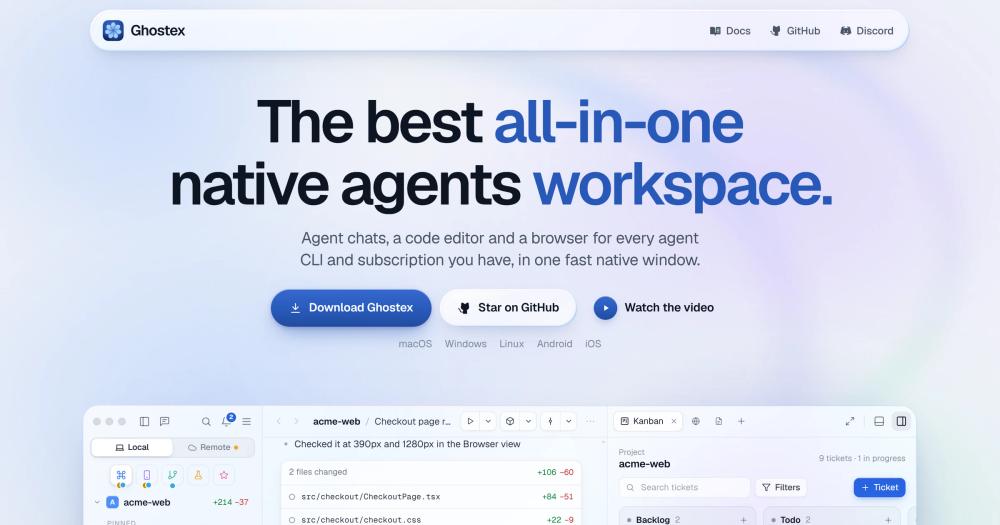
Run Claude Code, Codex, and 20+ other AI coding agents in parallel from one native desktop app on macOS, Windows, Linux, iOS, and Android.

Visit websiteGitHub1.6K stars
image of Ghostex
TL;DR

Ghostex is a native desktop workspace that runs Claude Code, Codex, OpenCode, and 20+ other CLI coding agents in parallel from a single window on macOS, Windows, Linux, iOS, and Android. It is MIT-licensed and free to run, making it the open source alternative to paid multi-agent workspace tools like Conductor and Amp Code. Built on Rust and GPUI rather than Electron, it stays CPU-light even with multiple active agent sessions. Best for developers who already use one or more CLI coding agents and want readable chat views, session history, mobile follow-up, and agent-to-agent orchestration in one place.

Read the full breakdownHide the full breakdownWho it is for, how it works, trade-offs, the quick start and the FAQ
who it's for

Who Ghostex is for#

Developers running more than one CLI coding agent

Use Ghostex when you already use Claude Code, Codex, or another CLI coding agent and want to run more than one in parallel, review their output in a readable chat view, and switch agents without opening multiple terminals.

Skip if:

You use a single agent in a standard terminal and do not need session history, mobile access, or multi-agent orchestration. A terminal emulator is simpler and has no overhead.

Teams coordinating parallel agents on the same project

Ghostex's coordinator type manages a project by spinning up agent threads, assigning tasks, and collecting results. Use it when your workflow involves one orchestrating agent directing several worker agents on parallel subtasks in the same codebase.

Skip if:

Your codebase fits in one agent's context window and a single sequential session handles the work. Coordination adds overhead that is unnecessary for single-agent tasks.

Developers who follow up on mobile or from remote machines

Easy Connect pairs your phone with any machine running Ghostex, letting you read transcripts, send follow-ups, and get push notifications when an agent finishes. Remote machine connections via SSH let you run agents on a build server and monitor them from anywhere.

Skip if:

You work at a fixed desk and do not need to follow up with agents from a phone or a different machine.

Plugin-driven workflows across Linear, Jira, Sentry, and similar services

Ghostex includes optional plugins for Linear, Jira, GitHub, PostHog, Sentry, Figma, Vercel, and Supabase that load only when you use them. Use it when you want your coding agent and your project management or observability tools in the same window.

Skip if:

You use none of these services, or you are comfortable with your existing multi-window workflow and do not need agent sessions co-located with issue trackers or dashboards.

the problem

The problem it solves#

Running multiple AI coding agents is friction-heavy. Claude Code, Codex, OpenCode, and others each run in their own terminal with separate session logs, no shared context, and no straightforward way to hand work from one agent to another without copy-pasting output across windows.

The harder problem is session continuity and visibility. Close a terminal and the thread is gone; start a new session and the agent has no memory of the prior one. Teams running parallel agents on the same codebase end up with no unified view of what each agent is doing or what it last changed, and following up with an agent from a phone or another machine means opening a separate app with no connection to the desktop sessions.

how Ghostex solves it

How it solves it#

Multi-agent sessions in parallel

Run Claude Code, Codex, OpenCode, Gemini CLI, Grok, Cursor, and 20+ other CLI agents simultaneously from one window, each with its own chat view, terminal, and session history. Switch agents mid-task or hand a session from one to another. Each Ghostex session is a real CLI instance of the agent that you can resume in the native app at any time.

Native Rust performance, no Electron overhead

Built on Rust and GPUI, the same framework underlying the Zed editor, rather than Electron or Tauri. Multiple parallel agent sessions run with low CPU overhead and light memory use. The app behaves as a native application on macOS, Windows, and Linux because it is one.

Agent-to-agent orchestration

Agents can open sessions, send prompts, and read replies from other agents through the `ghostex` command. Claude Code can spin up Codex sub-agents and steer them, or a coordinator session manages a full project by opening threads, assigning tasks, and collecting results. The `/ghostex-visuals` skill pairs with coordinators to publish charts, tables, and stat tiles directly in chat.

iOS and Android mobile companion

Pair your phone with the desktop app using an Easy Connect QR scan, or join through your Tailscale tailnet. Read transcripts, send follow-ups, preview localhost pages running on your computer, and receive push notifications when an agent finishes. No extra account or server is required beyond what you already use.

Annotation and in-line feedback

Open a Markdown plan, HTML prototype, or Excalidraw diagram next to your agent and leave typed notes or mark sections as 'Looks good', 'Clarify', or 'Needs tests'. One click sends every annotation to the agent's prompt as numbered feedback with line references, so the agent knows exactly what to change.

Optional plugin ecosystem

Browser (embedded Chromium), Kanban board, VS Code IDE, Docs, Linear, Jira, GitHub, PostHog, Sentry, Figma, Vercel, and Supabase plugins load only when you open them and sleep when you do not. Each plugin is optional; install only what your workflow needs, or write your own against the plugin API.

strengths · trade-offs

Strengths and trade-offs#

Strengths

  • MIT license, no workspace subscription requiredGhostex is MIT-licensed and free to run, modify, and redistribute. It does not sell access to a workspace layer: you bring your existing agent subscriptions and Ghostex connects them. The source is on GitHub and contributions are welcome across platform ports, agent integrations, and plugins.
  • Sessions are real CLI instancesEvery chat session in Ghostex is a real instance of the agent's own CLI, not a reimplemented wrapper. Switch from the chat view to the raw terminal with one hotkey. Any session can be resumed in the official agent app or CLI at any time, so you are never locked into Ghostex's interface.
  • Cross-platform including mobileNative packages cover macOS (Apple Silicon and x64, via Homebrew or direct download), Windows (x64 and ARM64), Linux (.deb, .rpm, AppImage, AUR, and tarball), Android (APK), and iOS (TestFlight). The same active sessions are accessible from desk or phone.
  • Prompt queue and full-history session searchPress Tab to queue the next prompt while the agent is still working, then drag to reorder or play a message immediately. Fuzzy search finds any prompt you have ever sent across all agents and sessions; press Enter to resume the conversation. Both are also available from the `gx` CLI.

Trade-offs

  • -iOS access is TestFlight onlyThe iOS app is not on the App Store. Access is through the Discord community (discord.gg/df7b3G92CS): post in the iOS channel to get a TestFlight invite. This adds friction for teams where iOS access matters, and TestFlight builds expire, requiring periodic re-installation.
  • -Browser and IDE views require a Chromium downloadGhostex offers to install Chromium the first time you open the browser or VS Code editor views. On a metered connection or in environments where automated downloads are restricted, this is a one-time setup step you need to handle before those views are usable.
  • -Young project under active developmentGhostex was created in April 2026 and is under active, fast-moving development. As of November 2026 it has 19 open GitHub issues. Developers who rely on specific agent integrations or platform behaviors should check the issue tracker before committing to it for production workflows.
versus alternatives

Ghostex vs alternatives#

Ghostex vs Conductor

Conductor is a paid workspace for Claude Code that stops working on November 20, 2026. Ghostex is the MIT-licensed alternative covering the same workspace role, supporting Claude Code, Codex, OpenCode, Gemini CLI, Grok, Cursor, and 20+ other agents.

FeatureGhostexConductor
LicenseMITProprietary
End of lifeNoneNovember 20, 2026

For developers currently using Conductor, migration to Ghostex requires only switching the workspace layer. Each Ghostex session runs as a real CLI instance of the underlying agent, so your existing agent sessions and history remain intact.

Ghostex vs Amp Code

Amp Code is a paid, proprietary coding agent. The core distinction from Ghostex is licensing and agent scope: Ghostex is MIT-licensed and runs any CLI agent you bring, while Amp Code is a commercial product.

FeatureGhostexAmp Code
LicenseMITProprietary
CostFree to runPaid

Ghostex suits developers who use multiple coding agents, want MIT-licensed software without a workspace subscription, or need agent-to-agent orchestration and mobile access. Amp Code may fit teams that prefer a single managed commercial product without the configuration overhead of an open source workspace.

install · quick start

Quick start#

bash
Install on macOS via Homebrew; Windows, Linux, iOS, and Android installers are at https://github.com/maddada/Ghostex/releases/latest

```bash
brew install ghostex
```
tech stack · detected from GitHub

What it's built on#

Languages
CC++JavaScriptRustSwiftTypeScriptZig
Frameworks
React
Tooling
esbuild
frequently asked

FAQ#

Does Ghostex work with any AI coding agent, or only Claude Code?

Ghostex supports any CLI-based coding agent. The README documents Claude Code, Codex, OpenCode, Pi, oh-my-pi, Gemini CLI, Grok, and Cursor, and the agent list is open: any agent that runs as a CLI process can be added. Each agent runs as a real CLI session, so you can also resume any session in the agent's own native app at any time.

What does the coordinator mode do?

A coordinator is a session type that manages a project by spawning worker agent threads, assigning them tasks, and monitoring their output via the ghostex command. It opens sessions, sends prompts, and reads replies from other agents. The /ghostex-visuals skill pairs with coordinators to publish charts, tables, and stat tiles in the chat view rather than raw text output.

Is there an iOS app, and how do I get access?

Yes. The iOS app runs through TestFlight rather than the App Store. Join the Discord at discord.gg/df7b3G92CS and post in the iOS channel to receive a TestFlight invite. The Android APK is available directly from GitHub Releases at https://github.com/maddada/Ghostex/releases/latest

What license is Ghostex under, and can I use it commercially?

Ghostex is MIT-licensed. You can run it on personal and commercial projects, modify the source, and redistribute it without restriction. The license governs the workspace tool itself; your use of the agents it connects to (Claude Code, Codex, etc.) is governed by each agent provider's own terms.

How do I connect Ghostex to a remote machine?

Remote machine connections use Easy Connect (a QR code or connection code displayed in Ghostex settings on the remote machine) or SSH. Once connected, the remote machine appears in the Ghostex sidebar and its agent sessions are accessible the same way as local ones. Easy Connect requires no extra accounts; Tailscale uses your existing tailnet.

Looking for more

Other ways to replace Conductor and Amp Code#

paperclip

Featuredfor Conductor

Self-hosted AI agent management with org charts and budgets

111,113 GitHub starsVisit

Orca

#1 in the Conductor guide

Drop-in Conductor replacement with 27 or more agents on macOS, Windows, and Linux under MIT

115,397 GitHub stars

T3 Code

#2 in the Conductor guide

MIT-licensed control plane for 6 or more agents with mobile and web clients and a large community

46,806 GitHub stars

Paseo

#3 in the Conductor guide

Daemon-based architecture for agents running on a VM or Docker host with full mobile parity

23,074 GitHub stars
All 47 Conductor alternatives12 open source Conductor alternatives, ranked
by category

Open source tools in these categories#

579

Developer Tools

REA (Reverse Engineer Anything), Skills for Real Engineers, superpowers
494

AI & Machine Learning

freeCodeCamp, REA (Reverse Engineer Anything), OpenClaw

Sponsors

Inbox Zero

Alternative toSuperhuman

AI email assistant that drafts replies and clears your inbox

  • 12,915 GitHub stars
  • AGPL-3.0Licence AGPL-3.0
  • #Email

rakazo

Alternative toGrok Bot

AI teammates you own: your keys, your model, your machine.

  • 7,028 GitHub stars
  • Apache-2.0Licence Apache-2.0
  • #AI Agents

SnitchFeed

Live monitoring on LinkedIn, X, Reddit & more. Agentic social listening for startups.

Marketing & Growth

Advertise your product

New open source projects by email

The projects we add and every new guide. Free, unsubscribe any time.

Find open source alternatives to paid software

/
  • Claude Code to OpenCode
  • Jira to Windshift
  • Notion to AppFlowy
  • Slack to Mattermost
  • Linear to GitLab
  • Wispr Flow to Handy
  • Arc to Zen Browser
  • CapCut to Concat
  • Grok Bot to rakazo
  • Superhuman to Inbox Zero
  • Airtable to AITable
  • Muse to OpenClaw
  • Railway to Coolify
  • GitHub Copilot to Cline
  • Datadog to Netdata
  • Confluence to Wiki.js
  • Microsoft Teams to Rocket.Chat
  • Firebase to Supabase
  • Pinecone to Qdrant
  • Zapier to n8n
  • 1Password to KeePassXC
  • Devin AI to OpenHands
  • Asana to Leantime
  • Contentful to Strapi
  • Claude Code to OpenCode
  • Jira to Windshift
  • Notion to AppFlowy
  • Slack to Mattermost
  • Linear to GitLab
  • Wispr Flow to Handy
  • Arc to Zen Browser
  • CapCut to Concat
  • Grok Bot to rakazo
  • Superhuman to Inbox Zero
  • Airtable to AITable
  • Muse to OpenClaw
  • Railway to Coolify
  • GitHub Copilot to Cline
  • Datadog to Netdata
  • Confluence to Wiki.js
  • Microsoft Teams to Rocket.Chat
  • Firebase to Supabase
  • Pinecone to Qdrant
  • Zapier to n8n
  • 1Password to KeePassXC
  • Devin AI to OpenHands
  • Asana to Leantime
  • Contentful to Strapi