Open Source Alternatives
  • Alternatives
  • Categories
    Categories by size1,235 projects
    • Developer Tools635
    • AI & Machine Learning530
    • Business & Productivity298
    • Web Development217
    • Security & Monitoring191
    • Communication & Collaboration167
    • IT Management158
    • LLMOps & AI Tooling135
    • DevOps & CI/CD132
    • Cloud & Hosting131
    Browse all 21 categoriesDesign & Creative, Product & Project Management and 9 more
  • Blog
  • Advertise
SearchNotion, Slack, password manager.../
Submit
Open Source Alternatives
  • Alternatives
    • Developer Tools635
    • AI & Machine Learning530
    • Business & Productivity298
    • Web Development217
    • Security & Monitoring191
    • Communication & Collaboration167
    • Browse all 21 categories
  • Blog
  • Advertise
Submit your project

New open source projects by email

The projects we add and every new guide. Free, unsubscribe any time.

Open Source Alternatives LogoOpen Source Alternatives

Handpicked Open Source Alternatives to Paid Softwares

Add Open Source Alternatives as a preferred source on Google

Product

  • Categories
  • Tag
  • Advertise

Resources

  • Blog
  • Collection
  • Submit

Company

  • Privacy Policy
  • Terms of Service
  • Refund Policy
  • Sitemap

Alternatives

  • Claude Code
  • Jira
  • Notion
  • Slack
  • Linear
  • Wispr Flow
  • All alternatives
© 2026 Open Source Alternatives. All rights reserved.
Open SourceAlternatives
Home/Categories/IT Management/mRemoteNG
icon of mRemoteNG

mRemoteNG

Open source alternative to Devolutions Remote Desktop Manager, Royal TS and MobaXterm

  • 11.2K stars
  • GPL-2.0
  • Active this week
  • Last commit today

Last verified Nov 13, 2026

Manage remote connections across RDP, VNC, SSH, Telnet and more from a tabbed Windows interface, with no subscription or cloud data storage.

Visit websiteGitHub11.2K starsDeploy on Hostinger
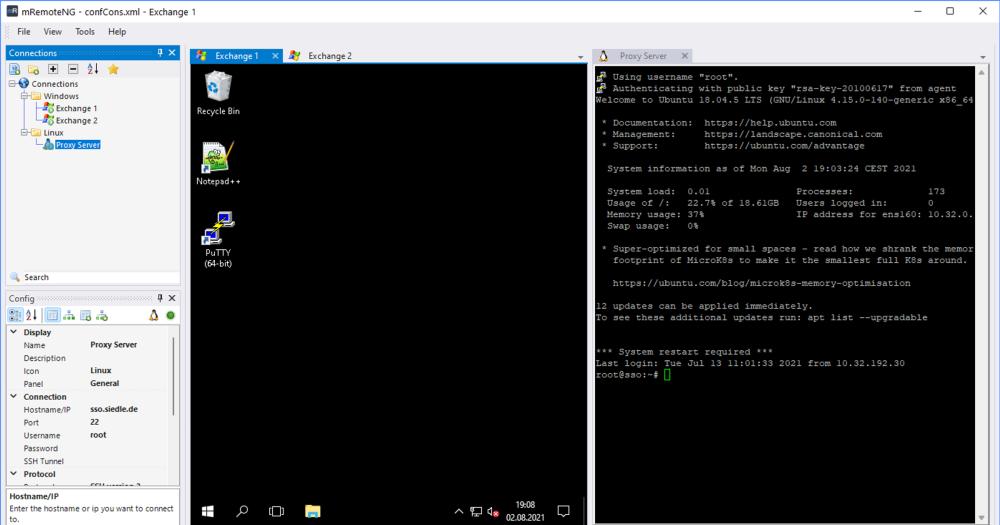
mRemoteNG with RDP and SSH sessions open in tabs
TL;DR

mRemoteNG is an open source, tabbed remote connections manager for Windows that supports RDP, VNC, SSH, Telnet, HTTP/S, PowerShell remoting, and AnyDesk from a single interface. It replaces paid tools like Devolutions Remote Desktop Manager and Royal TS for Windows-focused teams who need multi-protocol access without a recurring license fee. GPL-2.0 licensed, with no cloud component; connection data stays on your local machine. Best for IT administrators and sysadmins managing mixed Windows and Linux server fleets from a single Windows workstation.

Read the full breakdownHide the full breakdownWho it is for, how it works, trade-offs, the quick start and the FAQ
who it's for

Who mRemoteNG is for#

Windows sysadmins managing mixed server fleets

Sysadmins who maintain a mix of Windows Servers (RDP), Linux hosts (SSH), and network devices (Telnet) can organize all connections in one folder tree and switch between sessions with a single click. The portable ZIP means they can carry the same connection inventory to any Windows workstation.

Skip if:

You primarily work from macOS or Linux, or your team needs a shared credential vault where multiple users can access the same connection list from different machines simultaneously.

IT technicians doing on-site and remote support

Technicians can run the portable version from a USB drive on client machines with no install. Having all RDP, VNC, and HTTP management sessions accessible from one tool reduces the overhead of maintaining separate remote access utilities for each session type.

Skip if:

Your organization requires audit logging of all remote access sessions through a central server. mRemoteNG logs connections locally only; centralized session recording requires additional infrastructure.

Small teams standardizing on a free connection manager

Teams looking to replace paid per-seat connection managers can export the connection XML file and share it among team members, giving everyone the same server list at no cost. This covers the basic shared-access case without a central server or subscription.

Skip if:

Your team needs live credential synchronization, role-based access control per connection, or a session gateway for auditing. Those require Devolutions Remote Desktop Manager, Royal TS, or a comparable paid team tool.

the problem

The problem it solves#

Managing a mix of servers and network devices means juggling multiple tools: Remote Desktop for Windows servers, PuTTY or another SSH client for Linux, a VNC viewer for headless desktops, and a browser for HTTP-based admin panels. Each tool maintains its own connection list, its own credential store, and its own window. Teams with more than a handful of servers end up tab-switching constantly, maintaining duplicate bookmarks, and re-entering credentials across separate applications.

The deeper problem is consistency. When connection settings live in five separate tools, there is no single place to verify who has access to what, update a changed IP, or confirm that a server's credentials are current. For regulated environments where access logs matter, scattered tooling makes documentation harder than it needs to be.

how mRemoteNG solves it

How it solves it#

Multi-Protocol Support in One Interface

Connects to servers and devices via RDP, VNC, SSH, Telnet, HTTP/HTTPS, rlogin, Raw Socket, PowerShell remoting, and AnyDesk from a single window. Each protocol maps to its native handler so you get full protocol fidelity without leaving the application.

Tabbed Connection Management

Each active session opens as a tab within mRemoteNG, so switching between a Windows Server RDP session and a Linux SSH session takes a single click rather than alt-tabbing between separate windows.

Connection Folder Organization

The connection panel groups servers into folders you define: by environment, by region, or by team. Filtering by name narrows the list immediately when you have hundreds of connections. Folders can be nested for hierarchical organization of large inventories.

Portable and Installer Deployment Options

Distributed as either an MSI installer or a portable ZIP, so it can run from a USB drive with no installation and no administrator rights for the portable version. Useful for technicians who work across multiple Windows machines.

Plugin Architecture

Plugins extend the base application. The included plugin set covers port scanning, SSH file transfer, AWS connections, and multi-address support. Community-built tools include an OpenVPN integration script and PSmRemoteNG, a PowerShell module for scripting connection file generation.

strengths · trade-offs

Strengths and trade-offs#

Strengths

  • Free with No Per-Seat LicensingGPL-2.0 licensed with no commercial license required for business use. Teams of any size can run it without per-seat fees or enterprise tier upsells. Unlike Devolutions Remote Desktop Manager, which charges per user, or MobaXterm's Professional edition, mRemoteNG has no cost for the core software.
  • All Connection Data Stays LocalThere is no cloud sync, no account requirement, and no vendor server in the data path. Connection files, including saved credentials, are stored on disk under your control. This matters for organizations with strict data residency requirements or air-gapped network environments.
  • Broad Protocol Coverage Without Third-Party ToolsSupporting nine protocols natively means you can retire PuTTY, a standalone VNC viewer, and browser-based admin panels in favor of one consistent interface. The protocol list covers the typical Windows enterprise toolkit: RDP, SSH, VNC, Telnet, HTTP/S, and PowerShell remoting.
  • Portable Version for Multi-Machine UseThe portable ZIP needs no installation and leaves no registry entries behind. Technicians can carry mRemoteNG on a USB drive and use it on any Windows machine they work on, keeping their connection inventory consistent across workstations.

Trade-offs

  • -Windows-OnlymRemoteNG runs only on Windows. IT teams that work from macOS or Linux workstations cannot use it directly. Cross-platform alternatives like Royal TS (which has macOS and iOS versions) or Devolutions Remote Desktop Manager may be a better fit for mixed-OS admin teams.
  • -High Open Issue CountThe repository has 805 open issues. The project is maintained by a small team, and response times on specific edge-case bugs or feature requests can be slow. Checking the issue tracker before committing is worthwhile if you depend on a specific protocol edge case.
  • -Credentials Stored in a Local FileSaved credentials are stored in a connection file on the local disk, accessible to the Windows user running the application. In environments with shared workstations or where centralized credential vaulting is required, a dedicated secrets manager or the team features in a paid tool is a better fit.
  • -Source Build Requires Visual Studio on WindowsBuilding from source requires Visual Studio 2026 and the .NET 11 SDK on Windows. There is no cross-compile path. For contributors or organizations that need custom builds for security compliance, this limits who can produce a build to those with the full Visual Studio toolchain.
versus alternatives

mRemoteNG vs alternatives#

mRemoteNG vs Devolutions Remote Desktop Manager

Both tools manage multi-protocol remote connections, but they serve different budget profiles. mRemoteNG is GPL-2.0 licensed and free for any team size; Devolutions Remote Desktop Manager is a proprietary commercial product with per-user licensing.

FeaturemRemoteNGDevolutions Remote Desktop Manager
LicenseGPL-2.0 (free)Proprietary (per-user, paid)
Protocols9 (RDP, VNC, SSH, Telnet, HTTP/S, rlogin, Raw, PS remoting, AnyDesk)50+
Team credential vaultShared XML file (manual)Built-in team vault
PlatformsWindows onlyWindows, web, mobile
PriceFreePer-seat subscription

mRemoteNG is the better choice for Windows-only teams that need multi-protocol access without recurring costs. Devolutions Remote Desktop Manager is worth the subscription when you need centralized team credential vaults, enterprise directory integration, privileged access management, or protocol support beyond mRemoteNG's nine.

mRemoteNG vs Royal TS

Royal TS is a commercial connection manager that supports macOS, iOS, and Windows alongside team licensing. mRemoteNG covers only Windows but has no licensing cost.

FeaturemRemoteNGRoyal TS
LicenseGPL-2.0 (free)Proprietary (team licensing)
PlatformsWindows onlyWindows, macOS, iOS
Team vaultsShared XML fileBuilt-in team vaults
PriceFreePaid team plans

mRemoteNG is the right choice when the team works exclusively on Windows and cost is a constraint. Royal TS is the better fit for mixed-OS admin teams or when polished cross-platform support and centralized team access are required.

mRemoteNG vs MobaXterm

MobaXterm is a Windows terminal and remote access tool where the Home edition is free and the Professional edition is paid. Both run on Windows only. MobaXterm's strength is its built-in X11 server and Linux-like terminal experience; mRemoteNG's strength is breadth of tabbed connection management across nine protocols.

FeaturemRemoteNGMobaXterm
LicenseGPL-2.0 (free)Home edition free; Professional paid
Protocols9 (RDP, VNC, SSH, Telnet, HTTP/S, rlogin, Raw, PS remoting, AnyDesk)SSH, X11, RDP, VNC
X11 serverNoYes
Plugin systemYesYes (Professional)

mRemoteNG is the better fit when RDP management across a large mixed-protocol connection inventory is the priority. MobaXterm is the stronger choice when you need X11 forwarding, a full Linux-like terminal environment on Windows, or the tunnel and gateway features in its Professional edition.

install · quick start

Quick start#

bash
Download the MSI installer or portable ZIP from GitHub Releases: https://github.com/mRemoteNG/mRemoteNG/releases/latest
tech stack · detected from GitHub

What it's built on#

Languages
C#
frequently asked

FAQ#

Is mRemoteNG free for commercial use?

Yes. mRemoteNG is GPL-2.0 licensed, which permits commercial and business use at no cost. Any organization can run it without a license fee. The GPL-2.0 does require that if you distribute a modified version of mRemoteNG, you release that modification under the same GPL-2.0 license.

Does mRemoteNG work on macOS or Linux?

No. mRemoteNG is a Windows-only application built on .NET targeting Windows 10, Windows 11, and Windows Server versions from 2012 R2 through 2022. Users on macOS or Linux need a different tool; Royal TS has a macOS client and Devolutions Remote Desktop Manager supports cross-platform access.

How does mRemoteNG store connection credentials?

Credentials are saved in a connection file stored on the local disk, by default under the Windows user's AppData folder (%APPDATA%\mRemoteNG). The file is accessible to the Windows user running the application. For environments requiring centralized credential vaulting, a dedicated secrets manager or a paid team tool is a better fit.

What protocols does mRemoteNG support?

mRemoteNG supports RDP (Remote Desktop Protocol), VNC (Virtual Network Computing), SSH (Secure Shell), Telnet, HTTP/HTTPS, rlogin, Raw Socket Connections, PowerShell remoting, and AnyDesk. This covers the core toolkit for managing mixed Windows and Linux server environments.

How do I install mRemoteNG?

On Windows 11, run winget install -e --id mRemoteNG.mRemoteNG from the command line. On Windows 10 or Server editions, download the MSI installer or portable ZIP from GitHub Releases (https://github.com/mRemoteNG/mRemoteNG/releases) or from mremoteng.org/download. The portable ZIP runs without installation and without administrator rights.

also worth a look

Similar open-source tools#

Termix

Alternative toTermius

Self-hosted, plugin-based server manager with SSH and remote desktop.

  • 15,932 GitHub stars
  • Apache-2.0Licence Apache-2.0

OpenNavo

Alternative toCork

Homebrew GUI for Mac with ClamAV scanning and system monitoring.

  • 93 GitHub stars
  • GPL-3.0Licence GPL-3.0

Pulse

InSecurity & Monitoring

Read-only Windows diagnostics with a local AI assistant.

  • 857 GitHub stars
  • MITLicence MIT

Xray-core

Alternative toAstrill VPN

Open source proxy core with XTLS, VLESS, and REALITY protocols

  • 42,871 GitHub stars
  • MPL-2.0Licence MPL-2.0

Obtainium

InIT Management

Android app updates direct from GitHub and F-Droid

  • 21,504 GitHub stars
  • GPL-3.0Licence GPL-3.0

mvt

Alternative toiVerify

Mobile forensics toolkit for detecting spyware on Android and iOS

  • 15,962 GitHub stars
  • CustomLicence MVT License 1.1
by category

Open source tools in these categories#

158

IT Management

RustDesk, Immich, Stirling PDF
635

Developer Tools

REA (Reverse Engineer Anything), Skills for Real Engineers, superpowers
191

Security & Monitoring

Sherlock, REA (Reverse Engineer Anything), RustDesk
Hostinger

Self-host mRemoteNG on a Hostinger VPS

Keep it running 24/7, even when your laptop is off. A Hostinger VPS gives it a server of its own.

  1. 01

    Choose a plan

    Starts from $6.49/mo

  2. 02

    Apply

    Extra 10% off yearly plans

  3. 03

    Install mRemoteNG

    On a server that stays on

  4. 04

    Start building

    Focus on the app, not the server

Deploy on Hostinger

Sponsors

Inbox Zero

Alternative toSuperhuman

AI email assistant that drafts replies and clears your inbox

  • 12,987 GitHub stars
  • AGPL-3.0Licence AGPL-3.0
  • #Email

rakazo

Alternative toGrok Bot

AI teammates you own: your keys, your model, your machine.

  • 7,869 GitHub stars
  • Apache-2.0Licence Apache-2.0
  • #AI Agents

SnitchFeed

Live monitoring on LinkedIn, X, Reddit & more. Agentic social listening for startups.

Marketing & Growth

Advertise your product

New open source projects by email

The projects we add and every new guide. Free, unsubscribe any time.

Find open source alternatives to paid software

/
  • Claude Code to OpenCode
  • Jira to Windshift
  • Notion to AppFlowy
  • Slack to Mattermost
  • Linear to GitLab
  • Wispr Flow to Handy
  • Arc to Zen Browser
  • CapCut to Concat
  • Grok Bot to rakazo
  • Superhuman to Inbox Zero
  • Discord to Stoat
  • Airtable to AITable
  • Datadog to SigNoz
  • Muse to OpenClaw
  • Railway to Coolify
  • GitHub Copilot to Cline
  • Confluence to Wiki.js
  • Microsoft Teams to Rocket.Chat
  • 1Password to KeePassXC
  • Firebase to Supabase
  • Pinecone to Qdrant
  • Zapier to n8n
  • Devin AI to OpenHands
  • Asana to Leantime
  • Claude Code to OpenCode
  • Jira to Windshift
  • Notion to AppFlowy
  • Slack to Mattermost
  • Linear to GitLab
  • Wispr Flow to Handy
  • Arc to Zen Browser
  • CapCut to Concat
  • Grok Bot to rakazo
  • Superhuman to Inbox Zero
  • Discord to Stoat
  • Airtable to AITable
  • Datadog to SigNoz
  • Muse to OpenClaw
  • Railway to Coolify
  • GitHub Copilot to Cline
  • Confluence to Wiki.js
  • Microsoft Teams to Rocket.Chat
  • 1Password to KeePassXC
  • Firebase to Supabase
  • Pinecone to Qdrant
  • Zapier to n8n
  • Devin AI to OpenHands
  • Asana to Leantime