Black Friday at Hostinger: 15% off yearly and longer plans with BFVPS15, until 6 Dec. See plans

Black Friday: 15% off hosting with BFVPS15

Open Source Alternatives
  • Alternatives
  • Categories
    Categories by size1,348 projects
    • Developer Tools690
    • AI & Machine Learning558
    • Business & Productivity334
    • Web Development222
    • Security & Monitoring206
    • Communication & Collaboration173
    • IT Management167
    • Design & Creative151
    • DevOps & CI/CD146
    • LLMOps & AI Tooling144
    Browse all 21 categoriesCloud & Hosting, Product & Project Management and 9 more
  • Blog
  • Advertise
SearchNotion, Slack, password manager.../
Submit
Open Source Alternatives
  • Alternatives
    • Developer Tools690
    • AI & Machine Learning558
    • Business & Productivity334
    • Web Development222
    • Security & Monitoring206
    • Communication & Collaboration173
    • Browse all 21 categories
  • Blog
  • Advertise
Submit your project

New open source projects by email

The projects we add and every new guide. Free, unsubscribe any time.

Open Source Alternatives LogoOpen Source Alternatives

Handpicked Open Source Alternatives to Paid Softwares

Add Open Source Alternatives as a preferred source on Google

Product

  • Categories
  • Tag
  • Advertise

Resources

  • Blog
  • Collection
  • Submit

Company

  • Privacy Policy
  • Terms of Service
  • Refund Policy
  • Sitemap

Alternatives

  • Claude Code
  • Jira
  • Notion
  • Slack
  • Linear
  • Wispr Flow
  • All alternatives
© 2026 Open Source Alternatives. All rights reserved.
Open SourceAlternatives
Home/Categories/Developer Tools/MyXterm
icon of MyXterm

MyXterm

Open source alternative to MobaXterm, Termius, SecureCRT and Royal TSX

  • 0 stars
  • Apache-2.0
  • Active this week
  • Last commit today

Last verified Nov 29, 2026

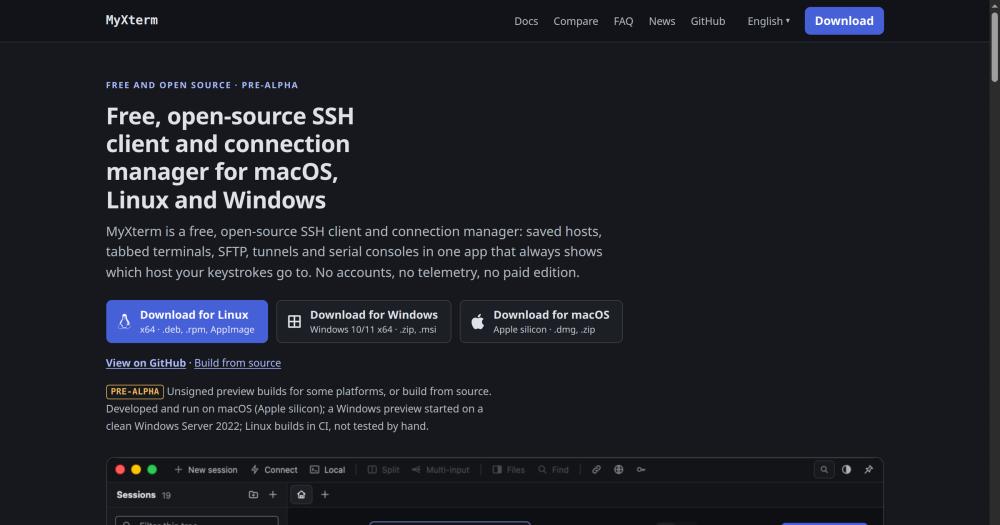
Connect to servers over Secure Shell (SSH) and manage files, tunnels and serial consoles from one desktop app. Free, Apache-2.0, no account required.

Visit websiteGitHub0 stars
image of MyXterm
TL;DR

MyXterm is a free, open-source desktop app for connecting to remote servers over Secure Shell (SSH, a protocol that encrypts the connection) and managing files, tunnels, serial consoles and more. It replaces paid tools like MobaXterm, Termius and SecureCRT for people who want no subscription fees and no cloud credential sync. Licensed under Apache-2.0, it has no paid edition and stores everything locally. It is best for network engineers, security analysts and sysadmins who manage many hosts every day.

Read the full breakdownHide the full breakdownWho it is for, how it works, trade-offs, the quick start and the FAQ
who it's for

Who MyXterm is for#

Network engineers managing many servers

MyXterm's session store is built for 10,000 or more hosts. Its command palette jumps to any host by name. Environment labels (production, staging, lab) show in words on every host card, so you always know where you are.

Skip if:

You need a fully mature, signed product today. MyXterm is pre-alpha, and some features are still partial or not yet tested on Windows and Linux.

Security engineers in environments with strict rules

Credentials stay in the operating system keychain and never go to a cloud server. There is no telemetry and no account required. It works fully offline.

Skip if:

Your team needs a tool with a proven security audit history. MyXterm is too new for that level of assurance.

Teams switching away from MobaXterm on Windows

MyXterm imports sessions and folders from MobaXterm directly. It runs on macOS and Linux too, so the whole team can use the same tool. Its Apache-2.0 license means no per-seat cost when the team grows.

Skip if:

You need RDP or VNC sessions shown inside the app window. MyXterm opens those in the system app instead.

the problem

The problem it solves#

SSH tools for professionals are either Windows-only or expensive. MobaXterm is the most feature-complete option for Windows but does not run on Mac or Linux. Termius runs on every platform but charges a monthly fee and syncs your server credentials to its cloud. SecureCRT is priced per seat. Royal TSX is a macOS-only paid app.

Engineers on Mac or Linux end up paying for a subscription or using several apps that do not share session data. Many fall back on a plain terminal with no session management. When you manage hundreds of hosts, losing track of which window connects to which production server causes real problems.

how MyXterm solves it

How it solves it#

Session store for thousands of hosts

Saves host details in folders by environment, with favourites and recently used hosts. From anywhere in the app, a command palette jumps to any host by name. Session storage has been built and tested for 10,000 sessions in the sidebar index.

Safety labels on every terminal pane

Every open terminal shows a strip with the host name and environment label in words, not just colour. Labels show production, staging or lab so you always know which server you are on. Selecting a production host shows a plain-text confirmation before it opens the connection.

File transfer with verified moves

File transfer over SSH (SFTP) opens in a two-panel view, one side for your computer and one for the remote server. Each transfer writes to a temporary file first, then renames it only after checking the file fingerprint. This prevents partial or corrupted files from landing on the server.

Tunnels, serial consoles, Telnet and more

Supports SSH tunnels (local, remote and SOCKS proxy, a type of network relay), serial consoles, Telnet connections (marked unencrypted in the app) and mosh. RDP (Remote Desktop Protocol, a Windows screen-sharing system) and VNC (Virtual Network Computing, another screen-sharing system) sessions both open in the system app. No password goes on the command line.

Credentials in the operating system keychain

Passwords and keys go in the macOS Keychain, Windows Credential Manager or Secret Service on Linux. Nothing is sent to a cloud server. You can also plug in 1Password, Bitwarden or KeePassXC as an external provider. One change to a named credential updates every session that uses it.

Network tools built in

Ping, traceroute, DNS (domain name lookups), port checks and Wake-on-LAN (a way to power on a nearby computer from the network) are in the app alongside your sessions. No separate terminal window needed for quick network checks.

strengths · trade-offs

Strengths and trade-offs#

Strengths

  • Free forever with no paid editionMyXterm is Apache-2.0 licensed with no paid tier, no license key and no subscription. MobaXterm, Termius and SecureCRT all charge money for professional use. MyXterm gives every feature to everyone at no cost.
  • Local-first with no cloud syncYour session data and credentials never leave your computer. Termius syncs credentials to its own cloud by default, which breaks rules in environments where credentials cannot go outside the building. MyXterm uses only the operating system keychain.
  • Runs on macOS, Windows and LinuxMobaXterm runs only on Windows. Termius and Royal TSX charge fees for multi-platform use. MyXterm is free on all three platforms. It is developed on macOS Apple silicon first, with Windows and Linux builds in the continuous integration pipeline.
  • Import from your existing toolSession import works from MobaXterm, PuTTY, SecureCRT and the standard OpenSSH config file. Folders and structure are preserved. Saved passwords are not read during import, keeping your credentials in your control.

Trade-offs

  • -Pre-alpha: most features are partialOf 200 tracked features, the maker counts none as fully completed. It works on macOS day to day. Windows and Linux builds pass the automated tests but have not been tested by hand. No signed releases are available yet, only unsigned preview builds.
  • -Very new project with no track recordIts first commit landed in late November 2026. There is no community history, no long-term track record and no issue reports to draw on. Teams that need a stable, proven tool today should wait for a signed release.
versus alternatives

MyXterm vs alternatives#

MyXterm vs MobaXterm

MobaXterm is the most popular Windows toolbox for network and systems work. It bundles SSH, file transfer, tunnels, serial consoles and an X11 (Linux graphics relay) server. Its Professional edition (paid) removes session and macro limits.

FeatureMyXtermMobaXterm
LicenseApache-2.0, freeFreeware + paid Professional
PlatformsmacOS, Windows, LinuxWindows only
Credential storageOperating system keychainLocal file
Session importYes (from MobaXterm)n/a
StatusPre-alphaMature

Pick MyXterm if you work on Mac or Linux, or if you want a fully open-source tool with no license restrictions. MobaXterm is the better choice if you work only on Windows and need a mature, fully tested tool today.

MyXterm vs Termius

Termius is a cross-platform SSH client with encrypted credential sync and team sharing for a monthly fee.

FeatureMyXtermTermius
LicenseApache-2.0, freeProprietary, subscription
Credential storageOperating system keychain onlyCloud sync
PlatformsmacOS, Windows, LinuxmacOS, Windows, Linux, iOS, Android
StatusPre-alphaMature

Pick MyXterm if you cannot send credentials to a third-party cloud, or if the subscription cost is a problem. Termius is the better choice if you need mobile access or a mature sync experience today.

MyXterm vs SecureCRT

SecureCRT is a professional SSH, Telnet and serial terminal client used in enterprise and network engineering. It is sold as a per-seat commercial license.

FeatureMyXtermSecureCRT
LicenseApache-2.0, freePer-seat commercial
PlatformsmacOS, Windows, LinuxmacOS, Windows, Linux
Session importYes (from SecureCRT)n/a
StatusPre-alphaMature

Pick MyXterm if you want to avoid per-seat licensing costs. SecureCRT is the better fit for enterprise teams that need a fully mature, vendor-supported product with a long track record.

MyXterm vs Royal TSX

Royal TSX is a macOS remote connection manager that organizes RDP, SSH, VNC, SFTP and web sessions in one app. It is commercial software. Its free tier limits the number of connections.

FeatureMyXtermRoyal TSX
LicenseApache-2.0, freeCommercial (paid for full use)
PlatformsmacOS, Windows, LinuxmacOS only
Connection typesSSH, SFTP, Telnet, serial, RDP/VNCRDP, SSH, VNC, SFTP, web
StatusPre-alphaMature

Pick MyXterm if you work on Windows or Linux as well as macOS, or if you want a fully free tool with no connection limits. Royal TSX is the better choice if you need a mature macOS app with built-in RDP sessions today.

install · quick start

Quick start#

bash
Download the latest MyXterm release for your operating system: https://github.com/adramelech/MyXterm/releases/latest
tech stack · detected from GitHub

What it's built on#

Languages
PythonRust
frequently asked

FAQ#

Is MyXterm free to use?

Yes. MyXterm is Apache-2.0 licensed and free for everyone. There is no paid edition, no license key and no subscription. Companies can use every feature at no cost.

Can I use MyXterm today?

You can download an unsigned preview build from GitHub Releases. MyXterm is pre-alpha. Some features are partial, and no signed release is available yet. It runs every day on macOS Apple silicon. Windows and Linux builds pass the automated tests but have not been tested by hand.

Where are my passwords stored?

In the operating system keychain: macOS Keychain, Windows Credential Manager, or Secret Service on Linux. Nothing is sent to a server. You can also use 1Password, Bitwarden or KeePassXC as an external provider.

Can I import sessions from MobaXterm, PuTTY or SecureCRT?

Yes. MyXterm imports SSH sessions and folders from MobaXterm, PuTTY and SecureCRT. It also reads the standard OpenSSH config file. Saved passwords are not read during import. Import from Royal TSX is planned but not yet available.

What connection types does MyXterm support?

SSH, SFTP, Telnet, serial consoles, mosh, SSH tunnels (local, remote and SOCKS proxy), RDP and VNC. RDP and VNC open in the system app. A network toolbox with ping, traceroute, DNS lookup, port check and Wake-on-LAN is also built in.

also worth a look

Similar open-source tools#

Termix

Alternative toTermius

Self-hosted, plugin-based server manager with SSH and remote desktop.

  • 16,125 GitHub stars
  • Apache-2.0Licence Apache-2.0

mRemoteNG

Alternative toDevolutions Remote Desktop Manager

Tabbed multi-protocol remote connections manager for Windows

  • 11,246 GitHub stars
  • GPL-2.0Licence GPL-2.0

Muxin

Alternative toRoyal TSX

One app for all your machines, AI agent sessions, desktops, and MCP.

  • 475 GitHub stars
  • Apache-2.0Licence Apache-2.0

Termux App

Alternative toTermius

Linux terminal and package manager for Android devices.

  • 65,921 GitHub stars
  • GPL-3.0-onlyLicence GPL-3.0-only

Nexion

Alternative toTermius

Web3 SSH manager that replaces passwords with crypto keys

  • 18 GitHub stars
  • Apache-2.0Licence Apache-2.0

OpenNavo

Alternative toCork

Homebrew GUI for Mac with ClamAV scanning and system monitoring.

  • 95 GitHub stars
  • GPL-3.0Licence GPL-3.0
by category

Open source tools in these categories#

690

Developer Tools

REA (Reverse Engineer Anything), Skills for Real Engineers, superpowers
167

IT Management

RustDesk, Immich, Stirling PDF
206

Security & Monitoring

Sherlock, REA (Reverse Engineer Anything), RustDesk

Sponsors

SnitchFeed

Live monitoring on LinkedIn, X, Reddit & more. Agentic social listening for startups.

Marketing & Growth

Windshift

Alternative toJira

Self-hosted work management for teams leaving Jira

  • 481 GitHub stars
  • AGPL-3.0Licence AGPL-3.0

Nuphos

Alternative toConductor

Agent workspace for teams running Claude Code or Codex

  • 821 GitHub stars
  • Apache-2.0Licence Apache-2.0
  • #AI Agents
Advertise your product

New open source projects by email

The projects we add and every new guide. Free, unsubscribe any time.

Find open source alternatives to paid software

/
  • Claude Code to OpenCode
  • Jira to Windshift
  • Notion to AppFlowy
  • Slack to Mattermost
  • Linear to GitLab
  • Wispr Flow to Handy
  • Microsoft To Do to Super Productivity
  • Arc to Zen Browser
  • CapCut to Concat
  • Grok Bot to Rakazo
  • Superhuman to Inbox Zero
  • Discord to Stoat
  • Airtable to AITable
  • Datadog to SigNoz
  • Muse to OpenClaw
  • Railway to Coolify
  • GitHub Copilot to Cline
  • Confluence to Wiki.js
  • Microsoft Teams to Rocket.Chat
  • 1Password to KeePassXC
  • Zapier to n8n
  • Pinecone to Qdrant
  • Contentful to Strapi
  • Firebase to Supabase