
Open Source Alternatives
  • Alternatives
  • Categories
    Categories by size1,311 projects
    • Developer Tools676
    • AI & Machine Learning550
    • Business & Productivity314
    • Web Development219
    • Security & Monitoring199
    • Communication & Collaboration169
    • IT Management165
    • Design & Creative148
    • DevOps & CI/CD142
    • LLMOps & AI Tooling142
    Browse all 21 categoriesCloud & Hosting, Product & Project Management and 9 more
  • Blog
  • Advertise
SearchNotion, Slack, password manager.../
Submit
Open Source Alternatives
  • Alternatives
    • Developer Tools676
    • AI & Machine Learning550
    • Business & Productivity314
    • Web Development219
    • Security & Monitoring199
    • Communication & Collaboration169
    • Browse all 21 categories
  • Blog
  • Advertise
Submit your project

New open source projects by email

The projects we add and every new guide. Free, unsubscribe any time.

Open Source Alternatives LogoOpen Source Alternatives

Handpicked Open Source Alternatives to Paid Softwares

Add Open Source Alternatives as a preferred source on Google

Product

  • Categories
  • Tag
  • Advertise

Resources

  • Blog
  • Collection
  • Submit

Company

  • Privacy Policy
  • Terms of Service
  • Refund Policy
  • Sitemap

Alternatives

  • Claude Code
  • Jira
  • Notion
  • Slack
  • Linear
  • Wispr Flow
  • All alternatives
© 2026 Open Source Alternatives. All rights reserved.
Open SourceAlternatives
Home/Categories/Business & Productivity/Nyxiontech PDF Tools
icon of Nyxiontech PDF Tools

Nyxiontech PDF Tools

Open source alternative to Smallpdf, iLovePDF and Sejda

  • 0 stars
  • AGPL-3.0
  • Active this week
  • Last commit 3 days ago

Last verified Nov 19, 2026

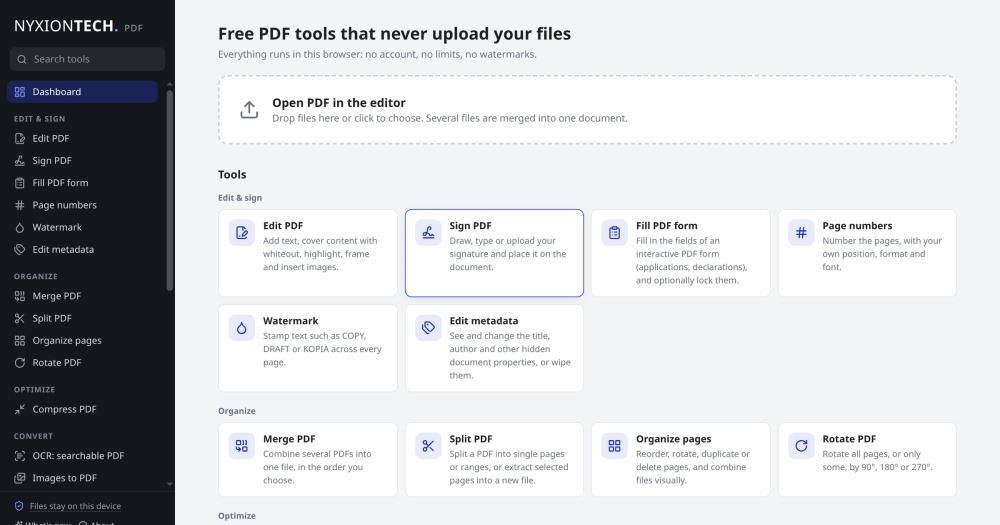
Convert, merge, sign, and redact PDFs entirely in your browser, with no file uploads, no account, and no daily limits.

Visit websiteGitHub0 stars
image of Nyxiontech PDF Tools
TL;DR

Nyxiontech PDF Tools is a browser-based PDF and image toolkit that covers editing, signing, merging, OCR, redaction, and format conversion without uploading a single file. It replaces paid services like Smallpdf and iLovePDF for teams where file privacy is a requirement: every operation runs in the browser via WebAssembly, enforced by a Content-Security-Policy that blocks outbound connections. Licensed AGPL-3.0 and free to self-host via Docker or as a Windows desktop app. Best for individuals and teams who process sensitive documents and cannot accept third-party server uploads.

Read the full breakdownHide the full breakdownWho it is for, how it works, trade-offs, the quick start and the FAQ
who it's for

Who Nyxiontech PDF Tools is for#

Legal and medical professionals handling confidential documents

Lawyers, doctors, and HR staff who must not upload client or patient documents to third-party servers can use the full PDF toolkit without network exposure. The redaction tool is designed for real data removal, not visual overlay.

Skip if:

Skip if your compliance policy requires a certified document management system with audit trails: Nyxiontech PDF Tools has no authentication, no audit log, and no document storage.

IT teams deploying a shared internal PDF tool

Self-hosting takes a single Docker command and runs on any server with no database or secrets to manage. The Docker image is published for linux/amd64 and linux/arm64. A team can restrict access to an internal network and get the full 25-tool suite.

Skip if:

Skip if your team needs server-side processing, batch job queues, or API access: the tool processes files in the user's browser and has no backend API.

Individuals replacing a Smallpdf or iLovePDF subscription

Users who pay monthly for a PDF tool subscription to avoid daily free-tier limits get the same range of 25 tools, unlimited, with no account required.

Skip if:

Skip if you rely on features specific to the paid tier of those services, such as iLovePDF's AI-assisted redaction or Smallpdf's cloud storage for processed files.

the problem

The problem it solves#

Most online PDF tools process files on their servers. Free tiers impose daily limits on tasks like merging or compressing, and paid plans unlock more usage while files still travel across the network and stay on vendor servers for up to two hours. For professionals handling legal, medical, or financial documents, that server upload is the central problem. Browser extensions and desktop PDF editors exist, but cross-platform browser tools that process files locally and cover the full range from OCR to redaction are rare. Teams handling sensitive documents typically pay for a subscription to a service like Smallpdf or iLovePDF, accepting the server-upload trade-off as unavoidable.

how Nyxiontech PDF Tools solves it

How it solves it#

Client-side processing via WebAssembly

Every PDF operation runs in the browser using WebAssembly. A strict Content-Security-Policy limits the page to its own origin, so no code path can transmit files to an external server. The Windows app works fully offline and uses the same processing pipeline.

Redaction with leak prevention

The redaction tool re-renders redacted pages as images with the blackout boxes burned into the pixels, and strips matching text from PDF comments and form-field values. End-to-end tests check the output file for text leaks after every build, so a code change that breaks this guarantee fails CI before it ships.

Windows desktop app with offline support

A Windows installer (.exe for per-user install, .msi for IT rollout via Intune or Group Policy) builds from the same codebase using Tauri 2. The app works fully offline and updates itself through a signed update channel.

32 how-to guides in English and Polish

The site ships 32 guides covering what happens inside PDF files, where common advice goes wrong, and which tool finishes the job. The Polish guide set is written for Polish legal and administrative context, not translated from English.

Accessibility verified in every CI run

Every CI build runs axe-core over the dashboard, a tool page, the Polish dashboard, and the guides index. Any WCAG 2.1 A or AA violation fails the build. The test suite also directly asserts contrast ratios for muted text that sits close to the 4.5:1 boundary, so a small color change that breaks contrast fails CI before it ships.

strengths · trade-offs

Strengths and trade-offs#

Strengths

  • No upload, enforced by the browser security policyThe Content-Security-Policy restricts the page to its own origin. Even if a future code change accidentally tried to send data elsewhere, the browser would block it. The Windows app works fully offline. This is not a privacy promise in a terms-of-service document: it is enforced by the browser and operating system.
  • Unlimited free use with no accountThere is no free tier with daily limits, no watermark added to processed files, and no sign-up required. iLovePDF's free plan limits document processing; Smallpdf's free tier has usage limits and watermarks on some tools. Nyxiontech PDF Tools imposes no such constraints.
  • AGPL-3.0 source code, self-hostable in one Docker commandThe full TypeScript source is public. Self-hosting takes one Docker command; the pre-built image is on the GitHub Container Registry for linux/amd64 and linux/arm64. You can audit the code, verify the privacy claims, or fork it for your own deployment.
  • EU-based project with Polish-language toolingBuilt and maintained by Nyxiontech in Poland. The Polish-language guide set is written for Polish legal and administrative context, not translated. The project is listed on EU Software Alternatives.

Trade-offs

  • -Very new project with no community historyCreated in November 2026, the repository has 0 stars and 1 fork. While the project ships tests, accessibility checks, and signed releases, the community and issue-tracking history are thin. Users who need a large contributor base or a long production history to trust a tool should wait for the project to mature.
  • -Desktop app is Windows-onlyThe desktop app ships Windows installers (.exe and .msi). macOS and Linux users access the full toolkit through the web app only. The web app installs as a PWA on Chrome and Edge, but there is no native package for macOS or Linux.
  • -Windows installers are not yet code-signedThe application to SignPath Foundation for free code signing is pending. Until signing is in place, Windows SmartScreen shows a publisher-unknown warning on first run. The download is verified by SHA-256 hashes on the GitHub Releases page, and the release workflow is public and auditable.
versus alternatives

Nyxiontech PDF Tools vs alternatives#

Nyxiontech PDF Tools vs Smallpdf

Smallpdf processes files on its servers (deleted after one hour per its FAQ). The free tier limits daily usage and adds watermarks to some tools; Pro unlocks unlimited access. Nyxiontech PDF Tools runs entirely in the browser with no server contact and no account required.

FeatureNyxiontech PDF ToolsSmallpdf
File processingBrowser (WebAssembly)Smallpdf's servers
Free useUnlimited, no accountDaily limits; some tools watermarked
LicenseAGPL-3.0Proprietary
Desktop appWindows, fully offlineWindows and macOS
Self-hostingYes, via DockerNo
RedactionYes, text removedYes, within free limits

Nyxiontech PDF Tools is the stronger choice when file privacy matters or when you need unlimited free use. Smallpdf is worth considering for its macOS desktop app, cloud storage for processed files, or Pro features beyond core PDF operations.

Nyxiontech PDF Tools vs iLovePDF

iLovePDF offers 25+ PDF tools. The free plan limits document processing; Premium unlocks more. Files are kept on iLovePDF's servers for up to two hours per its FAQ.

FeatureNyxiontech PDF ToolsiLovePDF
File processingBrowser (WebAssembly)iLovePDF's servers
Free useUnlimited, no accountLimited on free plan
LicenseAGPL-3.0Proprietary
Desktop appWindows, fully offlineWindows and macOS (Premium)
RedactionYes, freeAI-assisted on Premium

Nyxiontech PDF Tools is the stronger choice for no-upload requirements and unlimited free use. iLovePDF is worth considering for its AI-assisted redaction (a Premium feature) and for users who prefer a managed service with no server to maintain.

Nyxiontech PDF Tools vs Sejda

Sejda offers browser and desktop PDF editing with OCR and form tools. Its free plan has daily task limits; paid plans remove them. Files are processed on Sejda's servers.

Nyxiontech PDF Tools is the stronger choice for unlimited free use and local file processing. Sejda is worth considering for users who already pay for Sejda Pro and rely on its form editing tools.

install · quick start

Quick start#

bash
Self-host the static toolkit using the Docker image from the GitHub Container Registry.

```bash
docker run --rm -p 8080:80 ghcr.io/jurecki007/nyxiontech-tools:edge
```
tech stack · detected from GitHub

What it's built on#

Languages
JavaScriptTypeScript
Frameworks
React
Runtimes
WebAssembly
frequently asked

FAQ#

Does Nyxiontech PDF Tools really never upload my files?

Yes. All processing runs in the browser using WebAssembly, and the site's Content-Security-Policy restricts connections to its own origin. The Windows app works offline, with the only optional network contact being the auto-update version check, which can be disabled in settings. The privacy policy documents this in full.

Can I self-host it on my own server?

Yes. Run docker compose up -d from the repository root to start the toolkit on port 8080. The Docker image is also published on the GitHub Container Registry, so you can skip the build step: docker run --rm -p 8080:80 ghcr.io/jurecki007/nyxiontech-tools:edge. No database or backend configuration is required.

Is it free for commercial or team use?

Yes, under AGPL-3.0. You can use and self-host the tool for any purpose, including internal commercial team use. The AGPL condition is triggered only if you modify the source code and distribute a hosted version to others: in that case, you must make your modifications available under the same license.

What tools are included?

The toolkit includes 25 tools: Edit PDF, Sign PDF, Fill PDF form, Add page numbers, Watermark PDF, Edit PDF metadata, Merge PDF, Split PDF, Organize PDF pages, Rotate PDF, Compress PDF, OCR PDF, Image to PDF, PDF to JPG, PDF to text, PDF to Word, Word to PDF, Protect PDF, Unlock PDF, Redact PDF, Compare PDF, Image converter, Remove background, HEIC to JPG, and QR code generator. The site also ships 32 how-to guides in English and Polish.

How does the Windows app differ from the web version?

The Windows app is built on Tauri 2 and uses the system WebView2 engine. It works fully offline, integrates with Windows file associations so you can open PDFs directly from Explorer, and auto-updates when new versions are released. Per-user and MSI installers are available. The installers are not yet code-signed: Windows SmartScreen shows a warning on first download, which you can bypass by clicking More info then Run anyway.

also worth a look

Similar open-source tools#

BentoPDF

Alternative toSmallpdf

Browser-based PDF toolkit with 100+ tools, zero uploads, no signup.

  • 16,383 GitHub stars
  • AGPL-3.0Licence AGPL-3.0

PDFsam Basic

Alternative toAdobe Acrobat

Split, merge, rotate, and extract PDF pages for free

  • 4,677 GitHub stars
  • AGPL-3.0Licence AGPL-3.0

Fortify

Alternative toAppCrypt

Per-app Touch ID or PIN lock for macOS, local-first and open source

  • 4 GitHub stars
  • MITLicence MIT

Rustdesk Server

Alternative toTeamViewer

Self-hosted relay and rendezvous server for RustDesk remote desktop.

  • 10,773 GitHub stars
  • AGPL-3.0Licence AGPL-3.0

Blanc

Alternative toArc

Floating Island browser, built-in ad blocking, free on all desktops

  • 169 GitHub stars
  • MITLicence MIT

Comp AI

Alternative toVanta

Open source compliance automation for SOC 2, ISO 27001, and HIPAA.

  • 2,094 GitHub stars
  • AGPL-3.0Licence AGPL-3.0
by category

Open source tools in these categories#

314

Business & Productivity

OpenClaw, Excalidraw, RustDesk
199

Security & Monitoring

REA (Reverse Engineer Anything), RustDesk, Sherlock

Sponsors

Inbox Zero

Alternative toSuperhuman

AI email assistant that drafts replies and clears your inbox

  • 13,058 GitHub stars
  • AGPL-3.0Licence AGPL-3.0
  • #Email

rakazo

Alternative toGrok Bot

AI teammates you own: your keys, your model, your machine.

  • 8,913 GitHub stars
  • Apache-2.0Licence Apache-2.0
  • #AI Agents

SnitchFeed

Live monitoring on LinkedIn, X, Reddit & more. Agentic social listening for startups.

Marketing & Growth

Advertise your product

New open source projects by email

The projects we add and every new guide. Free, unsubscribe any time.

Find open source alternatives to paid software

/
  • Claude Code to OpenCode
  • Jira to Windshift
  • Notion to AppFlowy
  • Slack to Mattermost
  • Linear to GitLab
  • Wispr Flow to Handy
  • Arc to Zen Browser
  • CapCut to Concat
  • Grok Bot to rakazo
  • Superhuman to Inbox Zero
  • Discord to Stoat
  • Airtable to AITable
  • Datadog to SigNoz
  • Muse to OpenClaw
  • Railway to Coolify
  • GitHub Copilot to Cline
  • Confluence to Wiki.js
  • Microsoft Teams to Rocket.Chat
  • 1Password to KeePassXC
  • Firebase to Supabase
  • Pinecone to Qdrant
  • Zapier to n8n
  • Devin AI to OpenHands
  • Adobe Premiere Pro to Shotcut
  • Claude Code to OpenCode
  • Jira to Windshift
  • Notion to AppFlowy
  • Slack to Mattermost
  • Linear to GitLab
  • Wispr Flow to Handy
  • Arc to Zen Browser
  • CapCut to Concat
  • Grok Bot to rakazo
  • Superhuman to Inbox Zero
  • Discord to Stoat
  • Airtable to AITable
  • Datadog to SigNoz
  • Muse to OpenClaw
  • Railway to Coolify
  • GitHub Copilot to Cline
  • Confluence to Wiki.js
  • Microsoft Teams to Rocket.Chat
  • 1Password to KeePassXC
  • Firebase to Supabase
  • Pinecone to Qdrant
  • Zapier to n8n
  • Devin AI to OpenHands
  • Adobe Premiere Pro to Shotcut