Open Source Alternatives
  • Alternatives
  • Categories
    Categories by size1,114 projects
    • Developer Tools562
    • AI & Machine Learning478
    • Business & Productivity274
    • Web Development208
    • Security & Monitoring171
    • Communication & Collaboration153
    • IT Management145
    • Cloud & Hosting127
    • LLMOps & AI Tooling124
    • Data & Analytics118
    Browse all 21 categoriesProduct & Project Management, Design & Creative and 9 more
  • Blog
  • Advertise
SearchNotion, Slack, password manager.../
Submit
Open Source Alternatives
  • Alternatives
    • Developer Tools562
    • AI & Machine Learning478
    • Business & Productivity274
    • Web Development208
    • Security & Monitoring171
    • Communication & Collaboration153
    • Browse all 21 categories
  • Blog
  • Advertise
Submit your project

New open source projects by email

The projects we add and every new guide. Free, unsubscribe any time.

Open Source Alternatives LogoOpen Source Alternatives

Handpicked Open Source Alternatives to Paid Softwares

Product

  • Categories
  • Tag
  • Advertise

Resources

  • Blog
  • Collection
  • Submit

Company

  • Privacy Policy
  • Terms of Service
  • Refund Policy
  • Sitemap

Alternatives

  • Claude Code
  • Jira
  • Notion
  • Slack
  • Linear
  • Wispr Flow
  • All alternatives
© 2026 Open Source Alternatives. All rights reserved.
Open SourceAlternatives
Home/Categories/IT Management/Spug
icon of Spug

Spug

Open source alternative to Red Hat Ansible Automation Platform, PagerDuty Runbook Automation, PagerDuty Process Automation and Teleport

  • 11.1K stars
  • AGPL-3.0
  • Active this week
  • Last commit today

Last verified Nov 5, 2026

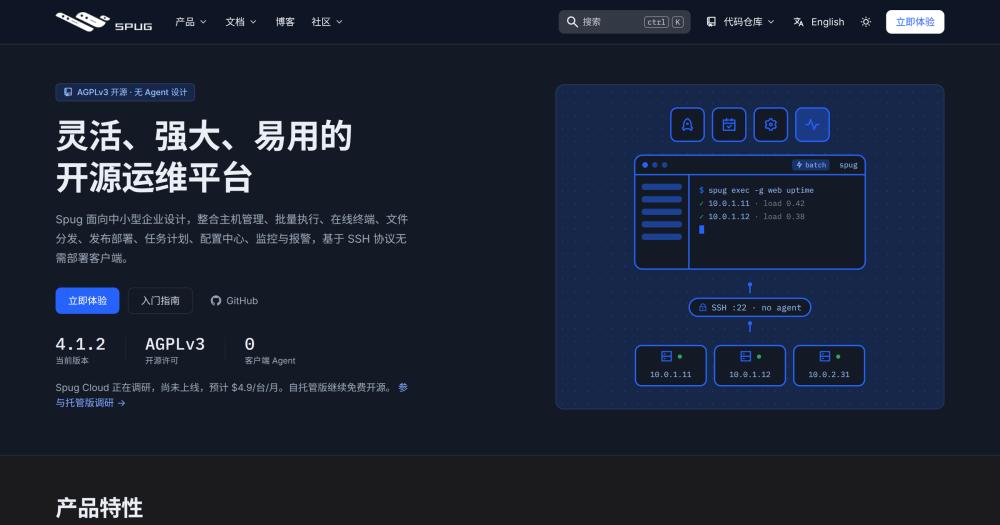
Manage hosts, deployments, monitoring, and alarms from a single self-hosted platform over SSH, without installing agents on target servers.

Visit websiteGitHub11.1K starsDeploy on Hostinger
Image for Spug
TL;DR

Spug is an agent-free IT operations platform for small and medium-sized teams. It manages hosts over SSH, runs batch commands, deploys applications through a pipeline builder with canary releases and rollbacks, and monitors site, port, and process health with alarms across email, DingTalk, WeChat, and Feishu. Spug replaces paid automation platforms like Red Hat Ansible Automation Platform by handling the full ops lifecycle without per-seat licensing or agents on target servers. AGPL-3.0 licensed and self-hosted via a single Docker Compose stack.

Read the full breakdownHide the full breakdownWho it is for, how it works, trade-offs, the quick start and the FAQ
who it's for

Who Spug is for#

Small DevOps teams managing 10 to 200 servers

Teams that outgrew SSH one-by-one and need centralized batch execution, deployment pipelines, and monitoring without a dedicated platform engineer. Spug's Docker install means one person can have the control panel running the same afternoon, with no agents to provision on existing servers.

Skip if:

Teams already invested in Ansible or Kubernetes with Helm deployments will find Spug's deployment model less flexible than their existing pipeline tooling.

Backend teams deploying applications to self-hosted Linux hosts

Spug's deploy configuration handles build steps, pushes to multiple targets, enforces a review gate, and supports canary releases and rollback. Teams deploying Python, Node.js, or Java applications to bare Linux hosts can replace ad-hoc deployment scripts with a reproducible, logged pipeline.

Skip if:

Teams already using a CI/CD platform like GitHub Actions, GitLab CI, or Jenkins for builds and deployments will likely keep the CI/CD system and would only pick up Spug for host management and monitoring.

Teams using Chinese collaboration tools for incident alerts

Spug's native alarm integrations for DingTalk, Feishu, WeChat, and WeChat Work send monitoring alerts and pipeline notifications directly to the channels these teams already use, with no third-party bridge or webhook setup required.

Skip if:

Teams not using any of these platforms and already routing alerts through PagerDuty or Opsgenie will not benefit from the notification integrations.

Teams needing browser-based SSH access with an audit trail

Spug's online terminal opens an interactive shell to any registered host from the browser, with no SSH client required on the operator's machine. All terminal sessions and batch command runs are logged with timestamps and output, covering basic audit requirements.

Skip if:

Teams with strict compliance requirements around privileged access management may need a dedicated tool like Teleport that offers certificate-based authentication and tamper-proof session recording.

the problem

The problem it solves#

Managing server infrastructure at small-to-medium scale typically falls into one of two traps. The first is managing hosts ad-hoc with direct SSH sessions and shell scripts, leaving no audit trail, no visibility into what ran where, and no repeatable deployment process. The second is deploying an enterprise automation platform sized for thousands of nodes, which brings license costs, complex agent deployments, and months of setup.

Neither fits a team running 20 to 200 servers that needs reliable deployments, scheduled cron tasks, file distribution, and health monitoring without hiring a dedicated platform engineer. The gap is especially sharp in deployment pipelines: pushing a build to multiple hosts, requiring a review gate, and rolling back cleanly if something fails means either paying for a CI/CD platform plus a runbook tool, or stitching together several open source pieces that do not share a common interface.

how Spug solves it

How it solves it#

Agent-free SSH host management

Spug connects to every target host over SSH using stored credentials or private keys. No agent needs to be installed on the managed machines. Hosts can be imported in bulk from cloud providers or an Excel file, grouped by environment or team, and checked for connectivity in batch. The browser-based terminal lets operators open an interactive shell to any registered host directly from the web UI.

Pipeline builder with conditional branches and live console

The pipeline editor assembles parameterized build steps, remote command nodes, file transfer nodes, upload nodes, and notification nodes (DingTalk, Feishu, WeChat Work, Push Assistant) into a single workflow. Pipelines support conditional branches so a stage can skip or diverge based on the output of an earlier step. A live console streams output in real time as the pipeline runs.

Application deployment with canary release and rollback

Deploy configurations define how each application is built and pushed to target hosts. Release requests go through a configurable review gate before deployment runs. Canary releases let teams push to a subset of hosts first. One-click rollback returns to the previous artifact without rerunning the build.

Monitoring center with multi-channel alarms

Built-in monitoring covers site availability, port status, process health, ping reachability, and custom scripts. Alarm rules trigger notifications over email, WeChat, DingTalk, WeChat Work, or Feishu when a check fails. The monitoring dashboard shows current status and history without requiring a separate APM tool.

Credential management and fine-grained RBAC

Spug stores SSH passwords and private keys in a central credential store and shares them across host definitions, so teams do not scatter credentials across config files. Role-based access control limits which users can run commands, trigger deployments, or view logs, with LDAP login and MFA available for team environments.

Task scheduling and configuration center

The task scheduler supports crontab and interval-based job definitions with execution history viewable in the UI. The configuration center stores environment-specific KV pairs, text blobs, and JSON configs that applications can pull at runtime, replacing scattered environment files distributed across hosts.

strengths · trade-offs

Strengths and trade-offs#

Strengths

  • No agents required, full SSH coverageBecause Spug controls hosts over SSH with no server-side software to install or update, adding a new host is as simple as entering its address and credentials. There is no version-skew problem between a control plane and distributed agents, and teams do not need root access to provision software on managed machines.
  • Full ops scope at zero license costSpug covers host management, deployments, pipelines, scheduling, config, monitoring, and alarms in one AGPL-3.0 tool. Comparable scope across paid tools (a runbook platform, a CI/CD service, an alerting service) would typically cost hundreds of dollars per month per team.
  • Single Docker Compose install with no cloud dependencyThe entire stack runs from a single docker-compose.yml that the README provides. The image bundles the backend and web UI together and ships pre-built for amd64 and arm64. No data leaves the team's infrastructure; the tool is fully air-gappable.
  • Native integrations for DingTalk, Feishu, and WeChat WorkSpug ships native alarm and notification integrations for DingTalk, Feishu, WeChat, and WeChat Work. The bilingual English and Simplified Chinese interface covers mixed international teams without additional configuration.

Trade-offs

  • -AGPL-3.0 restricts managed-service resaleSpug is AGPL-3.0 licensed, which allows internal team use, including commercial deployments on private infrastructure, with no fee or registration. The restriction is on distributing a modified version as a managed service: a company reselling hosted Spug to customers must release its modifications under the same license. Teams running it for their own operations are unaffected.
  • -Documentation primarily in Simplified ChineseThe documentation site and change log are primarily written in Simplified Chinese, with partial English translation. The README and quick-start guide are fully bilingual, but users troubleshooting edge cases or reading the change log may need a translation tool for sections not yet translated.
  • -Older frontend and backend framework versionsSpug's frontend runs on React 16.13 and the backend on Django 4.2 with Python 3.8+. These are older releases of their respective frameworks; teams evaluating Spug for security-sensitive environments should check whether the dependency versions meet their internal policy before deploying.
versus alternatives

Spug vs alternatives#

Spug vs Red Hat Ansible Automation Platform

Both tools automate operations across a fleet of Linux servers, but they target different scales and budgets. Ansible Automation Platform is built for enterprise organizations with node-based subscription pricing and commercial support contracts. Spug is built for small and medium teams that need similar day-to-day capabilities at zero license cost.

FeatureSpugAnsible Automation Platform
LicenseAGPL-3.0Proprietary (Red Hat subscription)
Self-hostingYesYes
Agent requiredNo (SSH only)No (SSH / WinRM)
Deployment pipelinesYes, with review gateVia AAP workflows
Built-in monitoringYesNo (needs external integration)
Web terminalYesNo
Declarative config managementNoYes (Ansible playbooks)
PricingFree self-hostedNode-based subscription

Spug is the better fit when a team needs deployments, host monitoring, file distribution, and an ops dashboard without paying for an enterprise subscription and without learning Ansible's declarative YAML model. Ansible Automation Platform is the better fit when teams rely on a large Ansible playbook library, need certified integrations with enterprise vendors, or require commercial support SLAs.

Spug vs Teleport

Teleport focuses on secure infrastructure access: identity-aware SSH, Kubernetes access, database access, and compliance-grade session recording. Spug is an ops platform that uses SSH as its transport layer but adds deployment pipelines, monitoring, scheduling, and alarms on top.

FeatureSpugTeleport
LicenseAGPL-3.0Proprietary (Enterprise) / AGPL-3.0 (community)
Browser-based SSHYesYes
Identity-aware accessRBAC + LDAPIdentity provider integration, certificate-based auth
Deployment pipelinesYesNo
Monitoring and alarmsYesNo
Kubernetes accessNoYes

Spug is the better choice when a team primarily needs an ops dashboard covering deployments, batch execution, and monitoring with SSH access included. Teleport is the better choice when privileged access management, compliance-grade session recording, or Kubernetes and database access control are the primary requirements.

Spug vs PagerDuty Runbook and Process Automation

PagerDuty Runbook Automation and Process Automation are incident-response tools: they run automated runbooks when alerts fire and integrate with PagerDuty's on-call workflows to reduce mean time to recovery. Spug does not have incident management, escalation policies, or on-call scheduling.

Spug is a better fit when a team wants to automate routine operational tasks (deployments, batch commands, file distribution) in a self-hosted platform. PagerDuty's automation products are the better fit when the primary need is automated incident response tied to an alerting and on-call system, particularly in organizations already using PagerDuty for incident management.

install · quick start

Quick start#

bash
Self-hosting uses Docker Compose with a Postgres database for production, or a single container for a quick start.

```bash
curl -fsSLO https://raw.githubusercontent.com/openspug/spug/4.0/docker-compose.yml
docker compose up -d
docker compose logs spug | grep password
```
tech stack · detected from GitHub

What it's built on#

Languages
JavaScriptPython
Frameworks
DjangoReact
Cache
Redis
frequently asked

FAQ#

Does Spug require installing any software on managed servers?

No. Spug connects to hosts over SSH using stored credentials or private keys, so nothing is installed on target machines. The control plane runs entirely on the server where you deploy Spug itself, and managed hosts only need SSH access enabled.

What is the quickest way to get Spug running?

A single Docker command starts the full stack on SQLite: docker run -d --name spug -p 8080:80 openspug/spug:4.1. The admin password is printed to the container logs on first start (docker logs spug | grep password). The README's Docker Compose path adds a Postgres container for production use. Both images run on amd64 and arm64.

What does the AGPL-3.0 license allow for commercial use?

Spug is AGPL-3.0 licensed. Teams can run it on their own infrastructure for internal use, including commercial and team environments, with no fee or registration. The restriction applies to reselling a modified version of Spug as a hosted or managed service to other customers; running it for your own operations is unrestricted.

How does Spug's monitoring compare to dedicated APM tools?

Spug's monitoring covers site availability, port status, process health, ping, and custom scripts, sending alerts over email, WeChat, DingTalk, Feishu, and WeChat Work. It is not a full APM tool: it has no metrics collection, distributed tracing, or log aggregation. Teams that need detailed application performance data should pair Spug with a dedicated observability stack; Spug handles infrastructure-level health checks.

Can Spug replace Ansible for configuration management?

Spug handles ad-hoc command execution, file distribution, and application deployments, covering much of Ansible's day-to-day ops use. It does not have Ansible's declarative configuration management, idempotent playbooks, or the breadth of Ansible Galaxy modules. Teams that run Ansible playbooks for infrastructure provisioning will find Spug a complement for deployments and monitoring, not a full replacement for configuration management.

also worth a look

Similar open-source tools#

Pangolin

Alternative toCloudflare Zero Trust

Zero-trust network access, reverse proxy, and AI gateway, self-hosted.

  • 23,314 GitHub stars

kudu

Alternative toHashiCorp Terraform Cloud

Terminal UI for QEMU/KVM VMs on Linux, no libvirt required

  • 205 GitHub stars
  • GPL-3.0Licence GPL-3.0

Termix

Alternative toTermius

Self-hosted, plugin-based server manager with SSH and remote desktop.

  • 15,837 GitHub stars
  • Apache-2.0Licence Apache-2.0

Portainer

Alternative toSUSE Rancher Prime

One self-hosted console for Docker, Kubernetes, Swarm, and Podman.

  • 38,785 GitHub stars
  • ZlibLicence Zlib

Beszel

Alternative toDatadog

Self-hosted server monitoring with Docker stats and disk health.

  • 26,836 GitHub stars
  • MITLicence MIT

NetBird

Alternative toTailscale

WireGuard overlay network with Zero Trust, SSO, and self-hosting

  • 30,622 GitHub stars
by category

Open source tools in these categories#

146

IT Management

RustDesk, Immich, Stirling PDF
116

DevOps & CI/CD

Nvm, Uptime Kuma, Netdata
Hostinger

Self-host Spug on a Hostinger VPS

Keep it running 24/7, even when your laptop is off. A Hostinger VPS gives it a server of its own.

  1. 01

    Choose a plan

    Starts from $6.49/mo

  2. 02

    Apply

    Extra 10% off yearly plans

  3. 03

    Install Spug

    On a server that stays on

  4. 04

    Start building

    Focus on the app, not the server

Deploy on Hostinger

Sponsors

Inbox Zero

Alternative toSuperhuman

AI email assistant that drafts replies and clears your inbox

  • 12,889 GitHub stars
  • AGPL-3.0Licence AGPL-3.0
  • #Email

rakazo

Alternative toGrok Bot

AI teammates you own: your keys, your model, your machine.

  • 7,028 GitHub stars
  • Apache-2.0Licence Apache-2.0
  • #AI Agents

SnitchFeed

Live monitoring on LinkedIn, X, Reddit & more. Agentic social listening for startups.

Marketing & Growth

Advertise your product

New open source projects by email

The projects we add and every new guide. Free, unsubscribe any time.

Find open source alternatives to paid software

/
  • Claude Code to OpenCode
  • Jira to Windshift
  • Notion to AppFlowy
  • Slack to Mattermost
  • Linear to GitLab
  • Wispr Flow to Handy
  • Arc to Zen Browser
  • CapCut to Concat
  • Grok Bot to rakazo
  • Superhuman to Inbox Zero
  • Airtable to AITable
  • Muse to OpenClaw
  • Railway to Coolify
  • GitHub Copilot to Cline
  • Datadog to Netdata
  • Confluence to Wiki.js
  • Microsoft Teams to Rocket.Chat
  • Firebase to Supabase
  • Pinecone to Qdrant
  • Zapier to n8n
  • 1Password to KeePassXC
  • Devin AI to OpenHands
  • Asana to Leantime
  • Contentful to Strapi
  • Claude Code to OpenCode
  • Jira to Windshift
  • Notion to AppFlowy
  • Slack to Mattermost
  • Linear to GitLab
  • Wispr Flow to Handy
  • Arc to Zen Browser
  • CapCut to Concat
  • Grok Bot to rakazo
  • Superhuman to Inbox Zero
  • Airtable to AITable
  • Muse to OpenClaw
  • Railway to Coolify
  • GitHub Copilot to Cline
  • Datadog to Netdata
  • Confluence to Wiki.js
  • Microsoft Teams to Rocket.Chat
  • Firebase to Supabase
  • Pinecone to Qdrant
  • Zapier to n8n
  • 1Password to KeePassXC
  • Devin AI to OpenHands
  • Asana to Leantime
  • Contentful to Strapi