
Open Source Alternatives
  • Alternatives
  • Categories
    Categories by size1,127 projects
    • Developer Tools571
    • AI & Machine Learning487
    • Business & Productivity275
    • Web Development209
    • Security & Monitoring173
    • Communication & Collaboration154
    • IT Management146
    • Cloud & Hosting128
    • LLMOps & AI Tooling126
    • DevOps & CI/CD119
    Browse all 21 categoriesProduct & Project Management, Data & Analytics and 9 more
  • Blog
  • Advertise
SearchNotion, Slack, password manager.../
Submit
Open Source Alternatives
  • Alternatives
    • Developer Tools571
    • AI & Machine Learning487
    • Business & Productivity275
    • Web Development209
    • Security & Monitoring173
    • Communication & Collaboration154
    • Browse all 21 categories
  • Blog
  • Advertise
Submit your project

New open source projects by email

The projects we add and every new guide. Free, unsubscribe any time.

Open Source Alternatives LogoOpen Source Alternatives

Handpicked Open Source Alternatives to Paid Softwares

Product

  • Categories
  • Tag
  • Advertise

Resources

  • Blog
  • Collection
  • Submit

Company

  • Privacy Policy
  • Terms of Service
  • Refund Policy
  • Sitemap

Alternatives

  • Claude Code
  • Jira
  • Notion
  • Slack
  • Linear
  • Wispr Flow
  • All alternatives
© 2026 Open Source Alternatives. All rights reserved.
Open SourceAlternatives
Home/Categories/Developer Tools/Synara
icon of Synara

Synara

Open source alternative to Conductor

  • 2.2K stars
  • MIT
  • Active this week
  • Last commit today

Last verified Nov 5, 2026

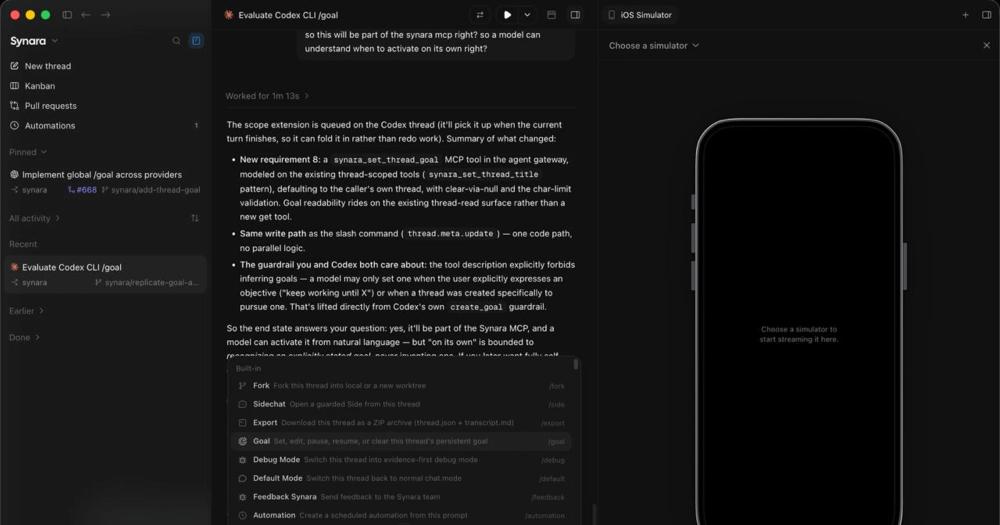
Run multiple coding agents in parallel from a local-first desktop workspace with isolated Git worktrees, terminals, and built-in PR delivery.

Visit websiteGitHub2.2K stars
image of Synara
TL;DR

Synara is a free, open source desktop workspace that lets you run Claude Code, Codex, Cursor, and eight other coding agents in parallel, each in its own Git worktree and terminal. It replaces paid agent-coordination tools, and fills the gap left by Conductor, which ends service on 2026-11-20. MIT licensed, local-first, no server required. Best for developers doing parallel feature work who want agent isolation without a cloud subscription.

Read the full breakdownHide the full breakdownWho it is for, how it works, trade-offs, the quick start and the FAQ
who it's for

Who Synara is for#

Developers running parallel feature branches

Run separate Claude Code and Codex sessions on different branches at the same time. Each session gets its own worktree and terminal, so work on branch A does not interfere with branch B. When both are done, review each diff separately before merging.

Skip if:

You are working on a single task at a time and do not need parallel isolation. For single-session workflows, using an agent tool directly is simpler than managing a workspace.

Developers coordinating multiple AI agents in parallel

When you run several coding agents on separate tasks, each session in Synara gets its own worktree, terminal, and task surface. No context bleed, no branch collisions, and a single diff view to review changes before they merge.

Skip if:

You run only one AI coding agent at a time. The parallel isolation features are not needed for single-session workflows, and the overhead of managing tasks in a workspace adds friction to simpler setups.

Engineers using multiple agent runtimes

If your workflow uses Claude Code for planning, Codex for execution, and Cursor for inline edits, Synara lets you run all three from one task surface. The handoff feature passes context between them without manual re-briefing.

Skip if:

You use only one agent runtime and have no interest in switching between providers. The multi-agent coordination features do not add value in a single-provider setup.

Frontend developers who want browser-verified changes

The built-in browser pane lets you view the running app next to the diff before you commit. Useful for frontend work where visual verification matters before a change ships to a pull request.

Skip if:

Your work is backend-only or non-visual. For server-side changes, the diff view alone is usually sufficient, and the browser pane adds nothing.

the problem

The problem it solves#

Managing multiple AI coding agents without a dedicated tool is friction-heavy. Each agent runs in its own terminal or app, with its own context, branch, and working directory. Without isolation, two agents editing the same files create merge conflicts that neither can resolve. Without a unified view, you lose track of which agent is working on what. Switching from one agent to another means manually passing context: copying notes, pasting summaries, re-explaining the task from scratch.

The underlying pain is coordination overhead. As AI coding agents get better, the bottleneck shifts from the agent's capability to the developer's ability to run, monitor, and direct multiple sessions at once. Most agent tools assume a single session at a time, leaving the multi-agent workflow to manual terminal management and context-passing.

how Synara solves it

How it solves it#

Parallel agent sessions with Git worktrees

Ten or more agents can build and test at once, each in its own managed worktree and branch. File changes stay isolated until you review and merge them, so no two agents overwrite the same working directory.

Task-scoped terminal and browser

Every task keeps its own terminal and built-in browser session. You can run commands in the project environment and check the running app in the same surface without switching windows.

Provider handoffs

Switch a task from Claude Code to Codex, Cursor, Grok, or another agent mid-task. Synara passes the project context forward so the next provider starts where the last one stopped, without you re-explaining the work.

Diff review and PR delivery

Inspect every change as a diff, verify the result in the built-in browser, then commit, push, and open a pull request from the same task surface without leaving the app.

Nine supported agent runtimes

Works with Claude Code, Codex, Cursor, OpenCode, Antigravity, Grok Build, Devin, Pi, and Factory Droid. Each connects to its local CLI or app-server installation.

Automations and external MCP

Scheduled automations run recurring agent tasks and attach outcomes to projects and threads. External MCP integrations give scoped, user-approved access to other local clients.

strengths · trade-offs

Strengths and trade-offs#

Strengths

  • MIT license at no costSynara is MIT licensed and free, with no subscription, no per-seat pricing, and no usage-based billing. You can fork it, modify it, and use it commercially without restriction.
  • Local-first with no cloud dependencyWorkspace state, projects, task history, and settings all stay on your machine. No Synara-hosted account is required for local desktop use, and provider traffic goes directly to the runtime you have installed.
  • Nine agent runtimes in one workspaceRun Claude Code, Codex, Cursor, Grok Build, and five other agent runtimes from the same interface. Switching agents does not mean switching tools; handoffs pass context between providers within a single task.
  • Active development with strong early adoptionThe repo has 2,176 GitHub stars and 326 forks since its March 2026 launch. The project has been downloaded by over 23,000 developers, with active pushes as recently as November 2026.

Trade-offs

  • -Early-stage softwareThe README explicitly notes that Synara is early-stage and that APIs and interface details remain under active development. Expect breaking changes between versions; production-critical workflows may need careful version pinning.
  • -136 open GitHub issuesThe issue tracker has 136 open issues as of November 2026. For early-stage software with active development this is expected, but it means some workflows may have known bugs or missing polish.
  • -Requires provider CLIs already installedSynara connects to provider runtimes that are already installed and authenticated on your machine. You need to install and configure each agent runtime (Claude Code, Codex, Cursor, etc.) separately before Synara can use it; it is not a standalone coding tool.
versus alternatives

Synara vs alternatives#

Synara vs Conductor

Conductor shuts down on 2026-11-20.

Synara and Conductor both address parallel AI coding agent coordination. Synara is free, open source, and local-first, with no server required; Conductor was a paid commercial tool.

FeatureSynaraConductor
LicenseMITProprietary
CostFreePaid subscription

Synara runs as a local-first desktop app. All workspace state, projects, task history, and settings are stored on your machine, and no server is required. Provider traffic goes directly to the coding-agent runtime installed on your machine; Synara does not route model sessions through its own service. For teams running Claude Code, Codex, and Cursor in parallel, Synara replaces the paid coordination workflow at no cost and with full control over where your data lives.

install · quick start

Quick start#

bash
Download the latest installer for Windows x64, macOS Intel, macOS Apple Silicon, or Linux x64 from GitHub Releases: https://github.com/Emanuele-web04/synara/releases/latest
tech stack · detected from GitHub

What it's built on#

Languages
JavaScriptTypeScript
Frameworks
ElectronNext.jsReact
frequently asked

FAQ#

Is Synara free?

Yes. Synara is MIT licensed and free to download and use. There is no subscription, no paid tier, and no usage-based billing. The source code is on GitHub and you can build it yourself. Optional analytics are disabled by default.

What coding agents does Synara support?

Synara currently integrates with Claude Code, Codex, Cursor, OpenCode, Antigravity, Grok Build, Devin, Pi, and Factory Droid. Each connects to the CLI or app-server already installed on your machine. You need to have the provider runtime installed and authenticated before starting a session.

Does Synara require an account or server?

No server is required for local desktop use. Synara accounts are optional and use WorkOS for authentication; they are not needed to run agents or access workspace features. Managed remote connections use Cloudflare and require authorization.

What operating systems does Synara run on?

Synara ships native installers for Windows x64, macOS Intel, macOS Apple Silicon, and Linux x64. Download the latest build from GitHub Releases. Git 2.29 or newer is required for workspace Git features.

Can I build Synara from source?

Yes. The development checkout requires Bun 1.4.4 and Node.js 24.13.1. Clone the repository, run bun install, then bun run dev. The README has the full typecheck and contribution setup. Pre-built downloads from GitHub Releases are the recommended path for most users.

Looking for more

Other ways to replace Conductor#

paperclip

Featuredfor Conductor

Self-hosted AI agent management with org charts and budgets

111,113 GitHub starsVisit

Orca

#1 in the Conductor guide

Drop-in Conductor replacement with 27 or more agents on macOS, Windows, and Linux under MIT

115,397 GitHub stars

T3 Code

#2 in the Conductor guide

MIT-licensed control plane for 6 or more agents with mobile and web clients and a large community

46,806 GitHub stars

Paseo

#3 in the Conductor guide

Daemon-based architecture for agents running on a VM or Docker host with full mobile parity

23,074 GitHub stars
All 39 Conductor alternatives12 open source Conductor alternatives, ranked
by category

Open source tools in these categories#

571

Developer Tools

REA (Reverse Engineer Anything), Skills for Real Engineers, superpowers
487

AI & Machine Learning

freeCodeCamp, REA (Reverse Engineer Anything), OpenClaw

Sponsors

Inbox Zero

Alternative toSuperhuman

AI email assistant that drafts replies and clears your inbox

  • 12,915 GitHub stars
  • AGPL-3.0Licence AGPL-3.0
  • #Email

rakazo

Alternative toGrok Bot

AI teammates you own: your keys, your model, your machine.

  • 7,028 GitHub stars
  • Apache-2.0Licence Apache-2.0
  • #AI Agents

SnitchFeed

Live monitoring on LinkedIn, X, Reddit & more. Agentic social listening for startups.

Marketing & Growth

Advertise your product

New open source projects by email

The projects we add and every new guide. Free, unsubscribe any time.

Find open source alternatives to paid software

/
  • Claude Code to OpenCode
  • Jira to Windshift
  • Notion to AppFlowy
  • Slack to Mattermost
  • Linear to GitLab
  • Wispr Flow to Handy
  • Arc to Zen Browser
  • CapCut to Concat
  • Grok Bot to rakazo
  • Superhuman to Inbox Zero
  • Airtable to AITable
  • Muse to OpenClaw
  • Railway to Coolify
  • GitHub Copilot to Cline
  • Datadog to Netdata
  • Confluence to Wiki.js
  • Microsoft Teams to Rocket.Chat
  • Firebase to Supabase
  • Pinecone to Qdrant
  • Zapier to n8n
  • 1Password to KeePassXC
  • Devin AI to OpenHands
  • Asana to Leantime
  • Contentful to Strapi
  • Claude Code to OpenCode
  • Jira to Windshift
  • Notion to AppFlowy
  • Slack to Mattermost
  • Linear to GitLab
  • Wispr Flow to Handy
  • Arc to Zen Browser
  • CapCut to Concat
  • Grok Bot to rakazo
  • Superhuman to Inbox Zero
  • Airtable to AITable
  • Muse to OpenClaw
  • Railway to Coolify
  • GitHub Copilot to Cline
  • Datadog to Netdata
  • Confluence to Wiki.js
  • Microsoft Teams to Rocket.Chat
  • Firebase to Supabase
  • Pinecone to Qdrant
  • Zapier to n8n
  • 1Password to KeePassXC
  • Devin AI to OpenHands
  • Asana to Leantime
  • Contentful to Strapi