

Who texpile is for#
Academic researchers writing papers offline
Researchers who handle sensitive data or work in restricted networks can compile their LaTeX documents entirely on-device, with no cloud upload required. The visual editor handles citations, tables, and equations without requiring knowledge of LaTeX syntax for every element.
Skip if:
Teams who rely on Overleaf's shared comment system, track-changes review, or version history as a service. Texpile's collaboration requires all participants to have the desktop app installed.
Co-authors editing the same document in real time
Start a shared session and share a code; collaborators join without creating an account. Both visual and source editors work in the shared session, and end-to-end encryption means document content is not readable by the relay server.
Skip if:
Teams with collaborators unwilling to install a desktop application. Browser-based tools like Overleaf require no local install.
Technical writers managing multi-file Typst projects
Texpile parses Typst fragments with the main file's macros, supports multi-file projects, and includes autocomplete and hover docs via tinymist. The visual editor covers headings, lists, and figures as formatted text.
Skip if:
Writers whose output is Markdown only and who do not need compilation. A lighter Markdown editor is simpler for that workflow.
Developers integrating AI writing assistance
The MCP integration connects Claude and other AI assistants directly to the editor context. The built-in terminal runs latexmk or custom compile scripts. Vim and Emacs keybindings are available for keyboard-driven workflows.
Skip if:
Users who want AI assistance without configuring MCP. The integration is available but requires setup.
The problem it solves#
Collaborative LaTeX editors that run in a browser store your documents on their servers. For teams handling sensitive research data, that is a compliance risk. For writers in restricted network environments, it is a hard blocker. Even without those constraints, browser-based editors introduce latency into the compile loop, lose session state on connectivity drops, and charge subscription fees that add up for a small lab or independent researcher.
The gap is between cloud-dependent collaborative tools and local-only editors without collaboration features. Teams who want to stay fully offline often find themselves emailing .tex files back and forth or setting up a separate version-control workflow alongside their editor. There is no straightforward middle path: local compilation with real-time collaboration where collaborators can join without creating an account.
How it solves it#
Visual and source editing for LaTeX, Typst, and Markdown
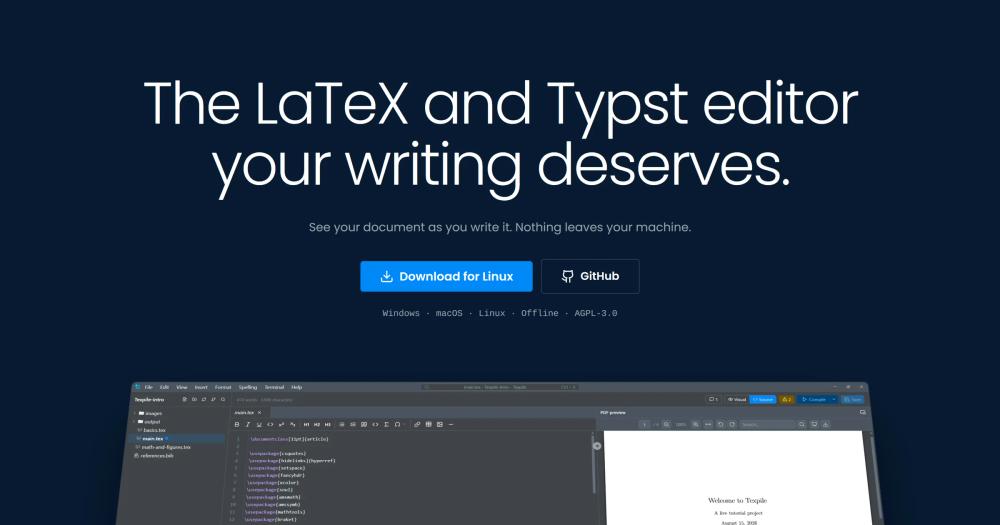
Texpile's visual editor handles LaTeX, Typst, and Markdown as plain .tex, .typ, and .md files. It covers complex elements such as citations, cell-merging tables, and multirow equations. The source editor adds autocomplete for commands, environments, \ref, and \cite, with hover documentation provided by tinymist for Typst.
Live preview with your own compiler
Live preview compiles documents using your own LuaLaTeX or Typst installation, with many text changes rendering instantly without a manual compile step. Math, TikZ, and pgfplots figures update in real time. No cloud compilation: output stays on your machine.
Real-time collaboration, no account needed
Share a folder to start a live editing session; others join with a code from the home screen, no sign-up required. Collaboration works in both the visual and source editors. Sessions are end-to-end encrypted, so the relay server cannot read your documents.
Built-in terminal and version history
The built-in version history lets you stage, commit, and diff side-by-side against the last commit. A real terminal is available for latexmk or any custom compile command. Multi-file projects parse fragments with the main file's macro definitions.
MCP and AI assistant integration
Texpile connects Claude and other AI assistants to the editor via the Model Context Protocol. The command palette (Ctrl+K) opens files, compiles, or runs any editor action. Vim and Emacs modal keybindings are available in the source editor.
Strengths and trade-offs#
Strengths
- 100% offline, nothing leaves your machineDocuments compile on your own LaTeX or Typst installation and stay on your disk. The only background network request is an optional update check, which you can disable in Preferences. This makes Texpile usable in air-gapped environments and removes cloud compliance concerns.
- End-to-end encrypted collaborationShared editing sessions are end-to-end encrypted. The relay server forwards packets it cannot decrypt, so Texpile never has access to your document content during collaboration. Unlike Overleaf's server-side model, the document never leaves your control.
- No account, no subscriptionDownload and run on Windows, macOS, or Linux with no registration and no recurring fee. Editing works out of the box; a local compiler (TeX Live, MacTeX, MiKTeX, or tinymist) is only needed to produce a PDF. Markdown needs no compiler at all.
- AGPL-3.0 licenseTexpile is AGPL-3.0 licensed, meaning the source code is available, forkable, and free to inspect. AGPL requires sharing source changes if you run a modified version as a network service, which keeps the tool free for its user community.
Trade-offs
- -Requires a local compiler for PDF outputEditing works without a compiler, but producing a PDF requires a locally installed TeX distribution (TeX Live, MacTeX, or MiKTeX for LaTeX) or tinymist for Typst. Setup takes a few minutes on a clean machine but is a non-trivial dependency for users unfamiliar with TeX distributions.
- -Early-stage project with limited communityTexpile was created in July 2026 and has 132 GitHub stars and 3 forks. The project is new enough that edge cases in compilation or collaboration may surface. There is no managed cloud option if the desktop install path is too complex for a collaborator.
- -AGPL license restricts proprietary forksAGPL-3.0 requires any modified version deployed as a network service to publish its source changes. For teams building proprietary tooling on top of Texpile, this is a meaningful constraint. MIT-licensed alternatives in the LaTeX editor space do not carry this requirement.
texpile vs alternatives#
Texpile vs Overleaf
Overleaf is the dominant browser-based LaTeX editor for academic writing. Texpile is a local desktop alternative for teams who want offline access, document privacy, and no per-user subscription.
| Feature | Texpile | Overleaf |
|---|---|---|
| License | AGPL-3.0 | Proprietary |
| Document storage | On your machine | Overleaf's servers |
| Compilation | Your local TeX installation | Overleaf's cloud servers |
| Collaboration | Yes, end-to-end encrypted | Yes, browser-based |
| Offline access | Yes, fully offline | No (requires internet) |
| Account required | No | Yes |
| Cost | Free | Free tier limited; paid plans available |
Texpile wins when your priority is data ownership, offline access, or budget. If you are working with sensitive research data, Texpile's local-only model removes the compliance concern that comes with storing documents on a third-party server. It also works in environments with restricted internet access.
Overleaf remains the better choice when you need a zero-install setup that multiple collaborators can join from any browser, or when your institution provides an Overleaf site license. Overleaf's collaboration features are mature; Texpile was created in July 2026 and is still early in its development.
Texpile vs CoCalc
CoCalc is a browser-based platform for collaborative scientific computing and LaTeX editing, with paid plans for faster compute and private projects. Texpile focuses on the LaTeX and Typst document editing use case.
| Feature | Texpile | CoCalc |
|---|---|---|
| License | AGPL-3.0 | Proprietary |
| Document storage | On your machine | CoCalc's servers |
| LaTeX editing | Yes | Yes |
| Markdown | Yes | Yes |
| Jupyter notebooks | No | Yes |
| Collaboration | Yes | Yes |
| Offline access | Yes | No |
CoCalc serves teams that need to combine LaTeX editing with Python notebooks, Sage math, and compute environments in one browser interface. Texpile does not include computational kernels or Jupyter notebook integration. If your workflow involves both document writing and interactive computation, CoCalc covers more ground.
For writing-focused teams who want a desktop editor with offline access, privacy, and no subscription, Texpile is the lighter and more direct option.
What it's built on#
- Languages
- JavaScriptLuaTypeScript
- Frameworks
- Svelte
- Tooling
- esbuild
FAQ#
Is Texpile free to use?
Yes. Texpile is AGPL-3.0 licensed and free to download and use. There is no subscription, no account required, and no paid tier. A local TeX distribution is needed to produce PDFs, but that is also free (TeX Live, MacTeX, MiKTeX, or tinymist).
Does Texpile support real-time collaboration?
Yes. Start a shared session from File > Shared Session, share the code with collaborators, and they join from the home screen with no sign-up. Sessions are end-to-end encrypted and work in both the visual and source editors.
What is the difference between Texpile and Overleaf?
Overleaf is browser-based and stores documents on its servers, with free-tier limits and per-user pricing on paid plans. Texpile runs entirely on your local machine, requires no account, and compiles documents with your own LaTeX installation. Overleaf is simpler to start with if collaborators need browser access; Texpile gives you full document ownership and offline access.
What operating systems does Texpile support?
Texpile runs on Windows, macOS, and Linux. Download the installer for your platform from texpile.com/download. No additional runtime or container is required; install your preferred TeX distribution separately if you need PDF output.
Does Texpile work offline?
Yes. Texpile is fully offline. Documents compile on your local machine using your own TeX installation. The only optional network request is the update check, which can be disabled in Preferences. Shared sessions use end-to-end encryption but do require an internet connection to route collaboration traffic.
Similar open-source tools#

hindsight
Self-hosted memory that makes AI agents smarter over time

cli
Official Lark/Feishu CLI with 200+ commands and AI Agent Skills

modly
Generate 3D models from images or prompts, entirely offline

LibreChat
One self-hosted interface for every AI model you use

Fluent-Qt
Fluent UI component library for Qt Widgets in C++17 and Python

Neon-Vision-Editor
Native Apple text and Markdown editor with safe file sync