Open Source Alternatives
  • Alternatives
  • Categories
    Categories by size1,235 projects
    • Developer Tools635
    • AI & Machine Learning530
    • Business & Productivity298
    • Web Development217
    • Security & Monitoring191
    • Communication & Collaboration167
    • IT Management158
    • LLMOps & AI Tooling135
    • DevOps & CI/CD132
    • Cloud & Hosting131
    Browse all 21 categoriesDesign & Creative, Product & Project Management and 9 more
  • Blog
  • Advertise
SearchNotion, Slack, password manager.../
Submit
Open Source Alternatives
  • Alternatives
    • Developer Tools635
    • AI & Machine Learning530
    • Business & Productivity298
    • Web Development217
    • Security & Monitoring191
    • Communication & Collaboration167
    • Browse all 21 categories
  • Blog
  • Advertise
Submit your project

New open source projects by email

The projects we add and every new guide. Free, unsubscribe any time.

Open Source Alternatives LogoOpen Source Alternatives

Handpicked Open Source Alternatives to Paid Softwares

Add Open Source Alternatives as a preferred source on Google

Product

  • Categories
  • Tag
  • Advertise

Resources

  • Blog
  • Collection
  • Submit

Company

  • Privacy Policy
  • Terms of Service
  • Refund Policy
  • Sitemap

Alternatives

  • Claude Code
  • Jira
  • Notion
  • Slack
  • Linear
  • Wispr Flow
  • All alternatives
© 2026 Open Source Alternatives. All rights reserved.
Open SourceAlternatives
Home/Categories/Design & Creative/Excaliself
icon of Excaliself

Excaliself

Open source alternative to Excalidraw+

  • 153 stars
  • MIT
  • Active this week
  • Last commit today

Last verified Nov 13, 2026

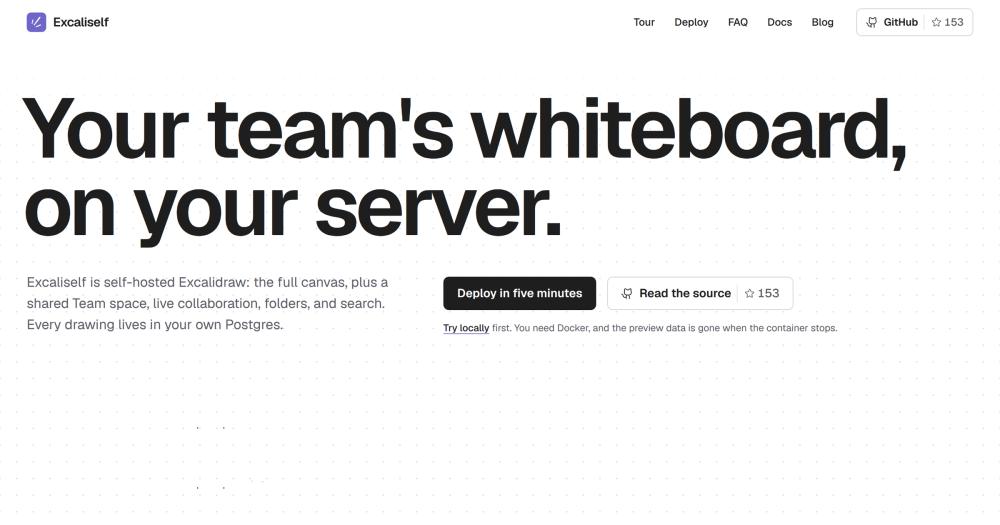
Host a self-hosted team whiteboard on the official Excalidraw canvas, with live collaboration, shared folders, and Postgres storage.

Visit websiteGitHub153 starsDeploy on Hostinger
image of Excaliself
TL;DR

Excaliself is a self-hosted team whiteboard that runs the official Excalidraw canvas with accounts, live collaboration, shared folders, and a Postgres drawing store. It replaces Excalidraw+, the paid cloud service, for teams that need their diagrams on their own server. Deployed with Docker Compose, MIT licensed. Best for small to mid-size teams with a data-residency requirement or a preference for self-managed infrastructure.

Read the full breakdownHide the full breakdownWho it is for, how it works, trade-offs, the quick start and the FAQ
who it's for

Who Excaliself is for#

Teams migrating away from Excalidraw+

Settings includes an Import feature (beta) that brings scenes, collections, and images over from Excalidraw+ using an API key. Teams can also drag `.excalidraw` files or `.png` / `.svg` exports with embedded scenes onto a folder in the sidebar. This is a direct migration path for teams that want their data off the managed service.

Skip if:

Skip if the team needs Excalidraw+'s built-in AI features, is comfortable with managed hosting, and has no data-residency requirement. The managed service requires less infrastructure management.

Development teams wanting AI diagram integration

Any member can connect an MCP-compatible AI client to the instance. The client can search, read, create, and modify drawings, propose changes that wait for human approval, and create folders. Useful for teams that want an AI client to generate architecture diagrams or flowcharts from code or plain language.

Skip if:

Skip if no team member uses an MCP-compatible AI client, as the MCP feature adds no value without one.

Organizations with data-residency or compliance requirements

Every drawing and pasted image lives in the Postgres database you deploy. No external account is required. SSO with your identity provider keeps access control inside your existing directory. The app communicates only with its database unless a member connects an optional integration.

Skip if:

Skip if the team has no data-residency constraint and prefers a fully managed service over running and backing up a Postgres database.

the problem

The problem it solves#

Excalidraw is excellent as a local drawing tool, but teams hit a wall when they need drawings to persist and be shared. The .excalidraw file format is a file on a laptop or a link in a chat, not a collaboration layer. Without a server, there is no folder structure, no search across drawings, no access control, and no guarantee the person you share a link with has the same version you do.

The hosted options solve the persistence problem but add a third party between the team and its diagrams. Excalidraw+ stores drawings on Excalidraw's servers. That works for many teams, but not for those with data-residency requirements, compliance needs, or a preference for not depending on a commercial service for internal documentation. The result is a gap: teams that want the canvas but need to own where the data lives.

how Excaliself solves it

How it solves it#

Official Excalidraw canvas, unchanged

Embeds the official `@excalidraw/excalidraw` package without modification. Every stroke auto-saves. Images pasted into a drawing are stored with it in Postgres. Editor updates arrive with each Excaliself release, so the canvas stays current with upstream.

Live collaboration with guest links

Open the same drawing and see everyone's cursors and edits in real time. Share a link to let someone outside the team draw with you without an account. Team drawings are always live; a badge shows who is in a drawing right now. Follow mode lets you track another member's cursor.

Team space with nested folders

A Private and Team switch in the sidebar keeps personal drawings separate from shared ones. Folders nest as deep as needed, and drawings drag between them. Starred drawings stay at the top of the sidebar. A 30-day trash holds deleted items before they are purged automatically.

MCP server for AI clients

Connects Claude.ai, Claude Code, Claude Desktop, and other MCP clients. Each client authenticates with OAuth or a personal access token; the server needs no AI API key. Clients can list, read, create, and export drawings, propose edits that wait for human approval, create folders, and move items to the trash. Nothing changes in a drawing until a member clicks Apply.

Invite-only accounts with optional SSO

The first visitor creates the admin account; everyone else joins by invite link. SSO is optional: configure Google Workspace, Microsoft Entra ID, or any OIDC provider. Members from allowed email domains join on first sign-in without an invite. Admins manage roles and password resets from Settings.

strengths · trade-offs

Strengths and trade-offs#

Strengths

  • MIT licensed with no paid planExcaliself is MIT licensed with no paid tier, no per-seat fee, and no telemetry. The only cost is the server it runs on. Sponsorships on GitHub fund development, but using it is free. MIT terms mean teams can fork, modify, or extend it without licensing restrictions.
  • Embeds the official editor, not a forkExcaliself uses the official `@excalidraw/excalidraw` NPM package unchanged rather than forking the editor. Canvas behavior is identical to Excalidraw's own releases, and editor updates arrive automatically as the package version advances. No behavioral drift from the upstream canvas.
  • No third-party account requiredEvery drawing and pasted image lives in the Postgres database you control. Back up the `pgdata` volume and you have everything. No external service needs an account. AI clients and SSO are optional and set up by the admin. Stopping the app container leaves the data in Postgres, intact.

Trade-offs

  • -Early-stage project: 153 stars, created January 2026Excaliself was created in January 2026 and has 153 GitHub stars and 10 forks. The issue tracker shows 2 open issues. For teams replacing a production tool, this means less community-sourced documentation, fewer third-party integrations, and a shorter track record than more established self-hosted tools.
  • -Requires Docker and a reverse proxy for public useThe standard deployment needs Docker, a Postgres-compatible database, and three environment variables. Any public deployment requires a reverse proxy with HTTPS in front of port 3000, as documented in the README. Teams without experience managing Docker Compose services will need to follow the deployment docs carefully.
versus alternatives

Excaliself vs alternatives#

Excaliself vs Excalidraw+

Excaliself and Excalidraw+ both build a team whiteboard on the Excalidraw canvas. The core decision is deployment model: Excalidraw+ is a managed cloud service with built-in AI features; Excaliself is self-hosted and MIT licensed.

FeatureExcaliselfExcalidraw+
LicenseMITProprietary
HostingSelf-hosted (Docker + Postgres)Managed cloud
Team spaceYesYes
Live collaborationYesYes
AI featuresVia MCP (client-side, any MCP client)Built-in AI tools
PricingFree (server costs only)Paid subscription
Data locationYour Postgres databaseExcalidraw's servers
Import from Excalidraw+Yes (beta)n/a

Excaliself is the better choice when the team needs drawings stored on their own infrastructure, wants no per-seat licensing cost, or needs to connect AI clients through MCP without sending data to a third party. MIT licensing means teams can fork, modify, or extend it. The beta import path from Excalidraw+ makes it a direct migration target for teams leaving the managed service.

Excalidraw+ is worth considering when the team wants AI features built directly into the canvas (Excaliself has no built-in AI, only MCP access from connected clients), when managed hosting is preferable over self-managed Postgres and Docker infrastructure, or when the team has no data-residency requirement and prioritizes minimal setup over data ownership.


install · quick start

Quick start#

bash
Self-hosting uses Docker Compose with a bundled Postgres container.

```bash
mkdir excaliself && cd excaliself
curl -fsSLO https://raw.githubusercontent.com/maciekzygmunt/excaliself/main/docker-compose.yaml
curl -fsSL -o .env https://raw.githubusercontent.com/maciekzygmunt/excaliself/main/.env.example
docker compose up -d
```
tech stack · detected from GitHub

What it's built on#

Languages
TypeScript
Frameworks
React
Databases
PostgreSQL
Infrastructure
Docker
frequently asked

FAQ#

Is Excaliself free to use?

Yes. Excaliself is MIT licensed with no paid plan or feature tier. The only cost is the server it runs on. If a team finds it valuable, the author accepts GitHub Sponsors, but sponsorship is optional.

Can I move my existing Excalidraw+ drawings to Excaliself?

Yes, in beta. Settings includes an Import option that brings scenes, collections, and images over using an Excalidraw+ API key. You can also drag .excalidraw files or .png and .svg exports with an embedded scene onto a folder in the sidebar.

Is Excaliself a fork of Excalidraw?

No. It embeds the official @excalidraw/excalidraw NPM package without modification and adds accounts, a Team space, folders, search, and Postgres storage around the canvas. Editor updates arrive with each Excaliself release as the package version advances.

How do I update Excaliself?

Pull the new image and restart: docker compose pull && docker compose up -d. Database migrations run when the app starts, so no manual migration step is needed. To pin a specific release, set EXCALISELF_VERSION in .env before restarting.

What infrastructure does Excaliself need?

A server with Docker. The Docker Compose file starts the app and a Postgres database together. The prebuilt image runs on amd64 and arm64. For a public deployment, put a reverse proxy with HTTPS in front of port 3000. No external service account is required. Coolify, Railway, and Hostinger each have one-click deploy paths documented in the README.

also worth a look

Similar open-source tools#

Capso

Alternative toCleanShot X

Free open-source screenshot and recorder for macOS

  • 1,496 GitHub stars
  • Apache-2.0Licence Apache-2.0

OBS Studio

Alternative tovMix

Record and stream with multi-source scenes and hardware encoding

  • 79,267 GitHub stars
  • GPL-2.0Licence GPL-2.0

Excalidraw

Alternative toMiro

Open source whiteboard for hand-drawn style diagrams

  • 135,635 GitHub stars
  • MITLicence MIT

Cap

Alternative toLoom

Self-hosted screen recorder with custom S3 bucket support

  • 24,802 GitHub stars
  • AGPL-3.0Licence AGPL-3.0

Kap

Alternative toCleanShot X

Open source screen recorder for macOS with web tech

  • 19,405 GitHub stars
  • MITLicence MIT

Kdenlive

Alternative toAdobe Premiere Pro

Free non-linear video editor for Linux, Mac, and Windows

  • 6,085 GitHub stars
  • GPL-3.0Licence GPL-3.0
by category

Open source tools in these categories#

131

Design & Creative

ComfyUI, Excalidraw, Godot Engine
167

Communication & Collaboration

freeCodeCamp, iptv, Excalidraw
298

Business & Productivity

OpenClaw, Excalidraw, RustDesk
Hostinger

Self-host Excaliself on a Hostinger VPS

Keep it running 24/7, even when your laptop is off. A Hostinger VPS gives it a server of its own.

  1. 01

    Choose a plan

    Starts from $6.49/mo

  2. 02

    Apply

    Extra 10% off yearly plans

  3. 03

    Install Excaliself

    On a server that stays on

  4. 04

    Start building

    Focus on the app, not the server

Deploy on Hostinger

Sponsors

Inbox Zero

Alternative toSuperhuman

AI email assistant that drafts replies and clears your inbox

  • 12,987 GitHub stars
  • AGPL-3.0Licence AGPL-3.0
  • #Email

rakazo

Alternative toGrok Bot

AI teammates you own: your keys, your model, your machine.

  • 7,869 GitHub stars
  • Apache-2.0Licence Apache-2.0
  • #AI Agents

SnitchFeed

Live monitoring on LinkedIn, X, Reddit & more. Agentic social listening for startups.

Marketing & Growth

Advertise your product

New open source projects by email

The projects we add and every new guide. Free, unsubscribe any time.

Find open source alternatives to paid software

/
  • Claude Code to OpenCode
  • Jira to Windshift
  • Notion to AppFlowy
  • Slack to Mattermost
  • Linear to GitLab
  • Wispr Flow to Handy
  • Arc to Zen Browser
  • CapCut to Concat
  • Grok Bot to rakazo
  • Superhuman to Inbox Zero
  • Discord to Stoat
  • Airtable to AITable
  • Datadog to SigNoz
  • Muse to OpenClaw
  • Railway to Coolify
  • GitHub Copilot to Cline
  • Confluence to Wiki.js
  • Microsoft Teams to Rocket.Chat
  • 1Password to KeePassXC
  • Firebase to Supabase
  • Pinecone to Qdrant
  • Zapier to n8n
  • Devin AI to OpenHands
  • Asana to Leantime
  • Claude Code to OpenCode
  • Jira to Windshift
  • Notion to AppFlowy
  • Slack to Mattermost
  • Linear to GitLab
  • Wispr Flow to Handy
  • Arc to Zen Browser
  • CapCut to Concat
  • Grok Bot to rakazo
  • Superhuman to Inbox Zero
  • Discord to Stoat
  • Airtable to AITable
  • Datadog to SigNoz
  • Muse to OpenClaw
  • Railway to Coolify
  • GitHub Copilot to Cline
  • Confluence to Wiki.js
  • Microsoft Teams to Rocket.Chat
  • 1Password to KeePassXC
  • Firebase to Supabase
  • Pinecone to Qdrant
  • Zapier to n8n
  • Devin AI to OpenHands
  • Asana to Leantime