
Open Source Alternatives
  • Alternatives
  • Categories
    Categories by size1,131 projects
    • Developer Tools575
    • AI & Machine Learning491
    • Business & Productivity275
    • Web Development209
    • Security & Monitoring173
    • Communication & Collaboration154
    • IT Management146
    • Cloud & Hosting128
    • LLMOps & AI Tooling127
    • Product & Project Management120
    Browse all 21 categoriesDevOps & CI/CD, Data & Analytics and 9 more
  • Blog
  • Advertise
SearchNotion, Slack, password manager.../
Submit
Open Source Alternatives
  • Alternatives
    • Developer Tools575
    • AI & Machine Learning491
    • Business & Productivity275
    • Web Development209
    • Security & Monitoring173
    • Communication & Collaboration154
    • Browse all 21 categories
  • Blog
  • Advertise
Submit your project

New open source projects by email

The projects we add and every new guide. Free, unsubscribe any time.

Open Source Alternatives LogoOpen Source Alternatives

Handpicked Open Source Alternatives to Paid Softwares

Product

  • Categories
  • Tag
  • Advertise

Resources

  • Blog
  • Collection
  • Submit

Company

  • Privacy Policy
  • Terms of Service
  • Refund Policy
  • Sitemap

Alternatives

  • Claude Code
  • Jira
  • Notion
  • Slack
  • Linear
  • Wispr Flow
  • All alternatives
© 2026 Open Source Alternatives. All rights reserved.
Open SourceAlternatives
Home/Categories/Developer Tools/Vicoa
icon of Vicoa

Vicoa

Open source alternative to Conductor

  • 531 stars
  • AGPL-3.0
  • Active this week
  • Last commit 2 days ago

Last verified Nov 5, 2026

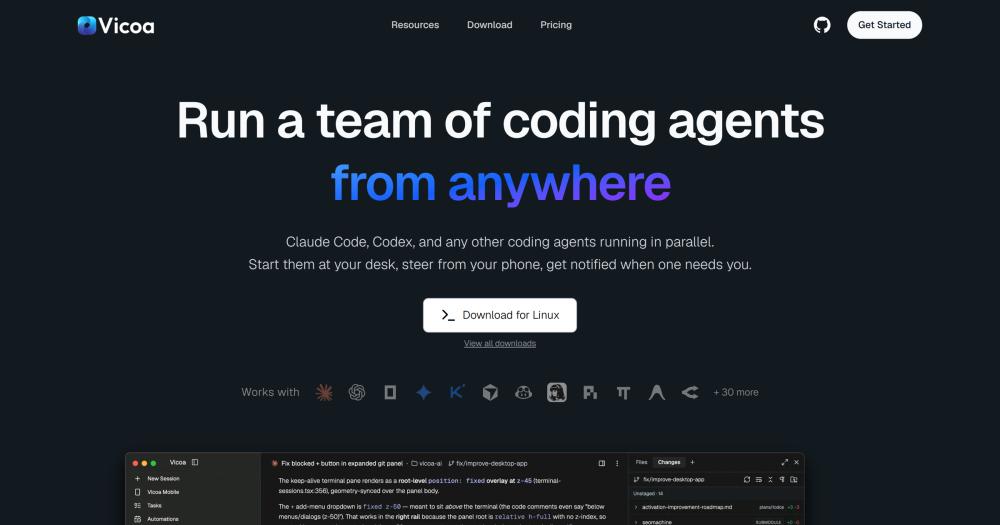
Run a team of AI coding agents in parallel from any device, with agents isolated on their own git worktrees and code staying on your machine.

Visit websiteGitHub531 starsDeploy on Hostinger
image of Vicoa
TL;DR

Vicoa is an open-source AI orchestrator for running a team of coding agents in parallel from any device. It addresses the problem that running multiple AI coding agent CLIs requires a separate terminal per agent with no unified view or mobile control. Licensed under AGPL-3.0, the full stack is self-hostable with Docker and Postgres. Best for solo developers and small teams who want to coordinate multiple AI agents without being tied to a single machine.

Read the full breakdownHide the full breakdownWho it is for, how it works, trade-offs, the quick start and the FAQ
who it's for

Who Vicoa is for#

Solo developers running parallel feature branches

Start one Claude Code session on the auth branch, another Codex session on the payment integration, a third on documentation. Each agent stays isolated on its own worktree. You steer from a phone notification when one needs a decision, then come back to the laptop to review the diffs.

Skip if:

If you only ever run one agent at a time and always have your laptop nearby, Vicoa's relay and mobile layer add setup overhead without a clear benefit. A single terminal with the agent's own UI is simpler.

Teams coordinating agent work across multiple machines

Connect several machines to one Vicoa workspace, assign tasks from the board, and let agents work across different repositories or the same repository on different branches. The team sees all sessions in one view rather than hunting terminal tabs across machines.

Skip if:

Teams that need fine-grained access controls, audit logs, or agents that review each other's output may find Vicoa's current feature set limited for enterprise use cases.

Developers who want to continue work from their phone

Start a session on the desktop or a VPS, then continue the conversation from an iPhone or Android. The mobile app shows the full thread, inline diffs, and the file browser. Push notifications pull you to whichever agent needs a decision. Voice dictation works from the mobile app.

Skip if:

If you need to write significant amounts of code yourself rather than steer agents, the mobile app is not a code editor. Vicoa is for directing agents, not for writing code from scratch on a touchscreen.

Developers exploring scheduled and automated agent workflows

Create tasks on the board, assign them to agents, and schedule recurring automations with cron. Nightly refactors, daily test runs, and weekly summaries can run on their own schedule and report back when done. The setup maps to a workflow where you define intent and agents handle implementation.

Skip if:

If you need deterministic control over each step the agent takes, or you rely on reading the full terminal output to debug issues, Vicoa's layer of abstraction may work against you.

the problem

The problem it solves#

Running multiple AI coding agents currently requires one terminal window per agent and constant manual monitoring. Claude Code in one tab, Codex in another, a third already blocked waiting for a decision you have not seen yet: there is no unified view of session status and no way to steer from your phone when you step away.

Agents working the same repository without branch isolation overwrite each other's changes. Teams end up running one agent at a time, forfeiting the parallelism the hardware supports, and always needing to be at the desk to keep things moving.

how Vicoa solves it

How it solves it#

Parallel agent sessions on isolated worktrees

Start Claude Code, Codex, Gemini, Cursor, and any of 40+ supported agents side by side, each on its own git worktree and branch. Agents cannot interfere with each other's code, so you can run multiple sessions against the same repository without merge conflicts.

Device-agnostic control from phone, desktop, or web

Connect macOS, Windows, Linux, or a remote VPS to Vicoa's relay, then steer any running session from an iOS or Android app, the web dashboard, or the CLI. Switching devices does not interrupt a session; messages sync instantly across all surfaces.

Push notifications and inline diffs on mobile

Vicoa sends a push notification when an agent is blocked or finishes. The mobile app shows the full inline diff with word-level highlights, the file tree, and the conversation. You can review changes, approve a decision, or redirect the agent without opening a laptop.

Linear-style task board with agent dispatch

Create tasks on a kanban board with priorities, labels, and sub-tasks, then right-click any task to start a session. The agent picks it up directly, removing the step of composing a prompt from scratch for each piece of work.

Cron automations for scheduled agent runs

Define recurring automations with cron expressions so agents handle routine work: nightly refactors, daily test runs, weekly summaries. Runs trigger on a schedule whether or not anyone is at a desk, and report back when they finish.

Bring-your-own keys across 300+ models

Vicoa uses your existing Claude, Codex, or other agent subscriptions and API keys. It routes to 300+ models from 60+ providers through OpenRouter. No usage markup, no token resale, no lock-in to Vicoa's billing.

strengths · trade-offs

Strengths and trade-offs#

Strengths

  • Code never leaves your machineVicoa's relay passes conversation messages between your phone or browser and the daemon running on your machine. Your source code and git history stay on your hardware; Vicoa does not receive or store it. This is different from cloud-based AI development tools that run agents on hosted environments where your code leaves your infrastructure.
  • AGPL-3.0 open source with a full self-hosted stackThe complete stack (backend, web app, desktop app, and mobile app) is in one open-source repo under AGPL-3.0. Self-hosting with Docker Compose requires Postgres but no external cloud services. Teams that need a private or air-gapped deployment can run the entire product on their own infrastructure.
  • Native mobile apps, not a browser-wrapped terminalThe iOS and Android apps are built in Flutter and show agent sessions, inline diffs, a file browser, the conversation thread, and push notifications in a real mobile interface. This is architecturally different from tools that wrap a web terminal or a simplified chat window in a mobile browser tab.
  • Agent Client Protocol supports 40+ coding agentsBuilt-in support for Claude Code, Codex, OpenCode, Gemini, Cursor, GitHub Copilot, Kimi, Hermes, Pi, Oh My Pi, and Antigravity, with 30+ more via ACP. Any agent that speaks ACP works with a custom launch command. Because Vicoa launches each provider's own CLI with your credentials, usage looks to the provider the same as running the agent yourself.

Trade-offs

  • -AGPL-3.0 restricts managed-service redistributionAGPL-3.0 requires distributing source changes if you run a modified version of Vicoa as a hosted service for others. Running it internally for yourself or your team on your own infrastructure is unrestricted. If you plan to offer Vicoa as a managed service to paying customers, you must open-source your modifications or negotiate a separate license.
  • -New project with limited public historyThe repo was first published on 2026-08-28 and has fewer than three months of public history. It has 3 open issues and is in active early development. Some features documented in the README (live preview, dictation) may be less polished than in established tools. Evaluate the current release against your specific requirements before committing to it in a production workflow.
versus alternatives

Vicoa vs alternatives#

Vicoa vs Conductor

Conductor and Vicoa both address the problem of orchestrating AI coding agents from a single interface. Conductor stops working on November 20, 2026. Teams relying on it need to migrate.

Vicoa is an open-source alternative under AGPL-3.0 that covers the same orchestration workflow: start multiple coding agents, monitor their status, and steer them from a single view. Beyond what Conductor offered, Vicoa adds native iOS and Android apps, a task management board, cron-based automations, and an open self-hosted stack.

FeatureVicoaConductor
LicenseAGPL-3.0 (open source)Proprietary
Self-hostingYes (Docker Compose)No
Mobile appsiOS and Android (Flutter)No
Supported agents40+ via native integrations and ACPLimited
Task managementBuilt-in kanban boardNo
AutomationsCron schedulingNo
PricingFree tier; bring-your-own keysProprietary pricing

Vicoa is the natural migration path for teams using Conductor. The open-source codebase, self-hosting option, and broader agent support address the most common reasons to look for an alternative. The AGPL-3.0 license means you can run it internally without restriction; offering Vicoa as a managed service to paying customers requires open-sourcing any modifications.

install · quick start

Quick start#

bash
Install the Vicoa CLI via npm, or deploy the full self-hosted stack with Docker Compose.
```bash
npm install -g @vicoa/cli

cp .env.example .env
./backend/scripts/generate-jwt-keys.sh selfhost/keys
docker compose -f docker-compose.selfhost.yml up -d
```
tech stack · detected from GitHub

What it's built on#

Languages
DartPythonTypeScript
Frameworks
ElectronFlutterNext.jsReact
frequently asked

FAQ#

Does my code leave my machine when I use Vicoa?

No. Vicoa runs the agent CLI on your own machine and your code stays there. Your phone, browser, and other devices connect through a secure relay that passes conversation messages; it does not receive or store your source files. The relay passes the conversation, not your repository.

What coding agents does Vicoa support?

Vicoa supports 40+ agents. Claude Code, Codex, OpenCode, Gemini, Cursor, GitHub Copilot, Kimi, Hermes, Pi, Oh My Pi, and Antigravity have native integrations. Another 30+ agents (Amp, Cline, Devin, Factory Droid, goose, Kiro, Qwen Code, TRAE, and others) connect via the Agent Client Protocol. Any ACP-compatible agent works with a custom launch command.

Is Vicoa free to use?

Vicoa has a free tier. You bring your own agent and model subscriptions or API keys; Vicoa does not add a usage markup. For advanced features and higher usage limits, paid plans are available on the pricing page. The self-hosted path under AGPL-3.0 runs at no cost on your own infrastructure.

How do I self-host Vicoa?

Clone the repo, copy .env.example to .env, generate JWT keys with the included script, and run docker compose -f docker-compose.selfhost.yml up -d. The full walkthrough is in SELF_HOSTING.md. The backend requires Postgres; Docker Compose handles the whole stack. The mobile and desktop apps can connect to your self-hosted backend.

Can I run Vicoa without git or git worktrees?

Yes. Vicoa works in any project folder. Git worktrees are optional; they are what let agents run in parallel on the same repository without stepping on each other's code. You can run a single agent in any directory where you normally work, with or without git.

Looking for more

Other ways to replace Conductor#

paperclip

Featuredfor Conductor

Self-hosted AI agent management with org charts and budgets

111,113 GitHub starsVisit

Orca

#1 in the Conductor guide

Drop-in Conductor replacement with 27 or more agents on macOS, Windows, and Linux under MIT

115,397 GitHub stars

T3 Code

#2 in the Conductor guide

MIT-licensed control plane for 6 or more agents with mobile and web clients and a large community

46,806 GitHub stars

Paseo

#3 in the Conductor guide

Daemon-based architecture for agents running on a VM or Docker host with full mobile parity

23,074 GitHub stars
All 44 Conductor alternatives12 open source Conductor alternatives, ranked
by category

Open source tools in these categories#

576

Developer Tools

REA (Reverse Engineer Anything), Skills for Real Engineers, superpowers
492

AI & Machine Learning

freeCodeCamp, REA (Reverse Engineer Anything), OpenClaw
120

Product & Project Management

agency-agents, freeCodeCamp, Gstack
Hostinger

Self-host Vicoa on a Hostinger VPS

Keep it running 24/7, even when your laptop is off. A Hostinger VPS gives it a server of its own.

  1. 01

    Choose a plan

    Starts from $6.49/mo

  2. 02

    Apply

    Extra 10% off yearly plans

  3. 03

    Install Vicoa

    On a server that stays on

  4. 04

    Start building

    Focus on the app, not the server

Deploy on Hostinger

Sponsors

Inbox Zero

Alternative toSuperhuman

AI email assistant that drafts replies and clears your inbox

  • 12,915 GitHub stars
  • AGPL-3.0Licence AGPL-3.0
  • #Email

rakazo

Alternative toGrok Bot

AI teammates you own: your keys, your model, your machine.

  • 7,028 GitHub stars
  • Apache-2.0Licence Apache-2.0
  • #AI Agents

SnitchFeed

Live monitoring on LinkedIn, X, Reddit & more. Agentic social listening for startups.

Marketing & Growth

Advertise your product

New open source projects by email

The projects we add and every new guide. Free, unsubscribe any time.

Find open source alternatives to paid software

/
  • Claude Code to OpenCode
  • Jira to Windshift
  • Notion to AppFlowy
  • Slack to Mattermost
  • Linear to GitLab
  • Wispr Flow to Handy
  • Arc to Zen Browser
  • CapCut to Concat
  • Grok Bot to rakazo
  • Superhuman to Inbox Zero
  • Airtable to AITable
  • Muse to OpenClaw
  • Railway to Coolify
  • GitHub Copilot to Cline
  • Datadog to Netdata
  • Confluence to Wiki.js
  • Microsoft Teams to Rocket.Chat
  • Firebase to Supabase
  • Pinecone to Qdrant
  • Zapier to n8n
  • 1Password to KeePassXC
  • Devin AI to OpenHands
  • Asana to Leantime
  • Contentful to Strapi
  • Claude Code to OpenCode
  • Jira to Windshift
  • Notion to AppFlowy
  • Slack to Mattermost
  • Linear to GitLab
  • Wispr Flow to Handy
  • Arc to Zen Browser
  • CapCut to Concat
  • Grok Bot to rakazo
  • Superhuman to Inbox Zero
  • Airtable to AITable
  • Muse to OpenClaw
  • Railway to Coolify
  • GitHub Copilot to Cline
  • Datadog to Netdata
  • Confluence to Wiki.js
  • Microsoft Teams to Rocket.Chat
  • Firebase to Supabase
  • Pinecone to Qdrant
  • Zapier to n8n
  • 1Password to KeePassXC
  • Devin AI to OpenHands
  • Asana to Leantime
  • Contentful to Strapi