
Open Source Alternatives
  • Alternatives
  • Categories
    Categories by size1,136 projects
    • Developer Tools580
    • AI & Machine Learning495
    • Business & Productivity275
    • Web Development209
    • Security & Monitoring173
    • Communication & Collaboration154
    • IT Management146
    • Cloud & Hosting128
    • LLMOps & AI Tooling128
    • Product & Project Management121
    Browse all 21 categoriesDevOps & CI/CD, Data & Analytics and 9 more
  • Blog
  • Advertise
SearchNotion, Slack, password manager.../
Submit
Open Source Alternatives
  • Alternatives
    • Developer Tools580
    • AI & Machine Learning495
    • Business & Productivity275
    • Web Development209
    • Security & Monitoring173
    • Communication & Collaboration154
    • Browse all 21 categories
  • Blog
  • Advertise
Submit your project

New open source projects by email

The projects we add and every new guide. Free, unsubscribe any time.

Open Source Alternatives LogoOpen Source Alternatives

Handpicked Open Source Alternatives to Paid Softwares

Product

  • Categories
  • Tag
  • Advertise

Resources

  • Blog
  • Collection
  • Submit

Company

  • Privacy Policy
  • Terms of Service
  • Refund Policy
  • Sitemap

Alternatives

  • Claude Code
  • Jira
  • Notion
  • Slack
  • Linear
  • Wispr Flow
  • All alternatives
© 2026 Open Source Alternatives. All rights reserved.
Open SourceAlternatives
Home/Categories/Developer Tools/wmux
icon of Wmux

wmux

Open source alternative to Conductor

  • 448 stars
  • MIT
  • Active this week
  • Last commit today

Last verified Nov 5, 2026

Run multiple AI coding agents in parallel on Windows and macOS, with isolated git worktrees, hunk-level diff review, and an iOS companion for remote approvals.

Visit websiteGitHub448 stars
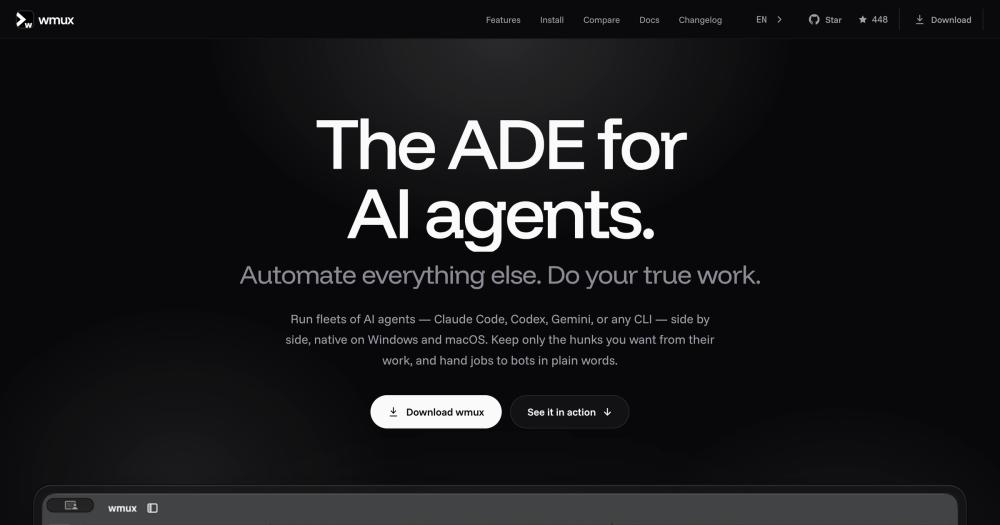
image of Wmux
TL;DR

wmux is a free, MIT-licensed desktop agent development environment (ADE) for Windows 10+ and Apple Silicon Macs. It runs Claude Code, Codex, Gemini, and other CLI agents side by side in isolated git worktrees, letting you compare approaches, fan out tasks up to 8 parallel lanes, and review changes hunk by hunk before anything touches your working tree. The daemon runs in the background so quitting the window does not end a session. Best for developers who want to run multiple AI coding agents in parallel on their own machine without a subscription or cloud account.

Read the full breakdownHide the full breakdownWho it is for, how it works, trade-offs, the quick start and the FAQ
who it's for

Who wmux is for#

Developers comparing parallel approaches to the same problem

Use Multi Task to split one prompt into up to 8 lanes, run an agent in each isolated worktree, and compare the resulting diffs side by side. Good for evaluating different refactor strategies, testing competing implementations, or reviewing how different agents handle the same spec.

Skip if:

You have only one approach in mind and no need to compare results. A single-task workflow in wmux works fine but brings more UI than a plain terminal session.

Developers who need mobile approval capability

When Claude Code or another agent reaches a question or permission gate, the iOS companion shows it in Fleet on your iPhone. Answer from your phone and the desktop pane continues. Useful for long-running background tasks where you do not want to stay at your machine.

Skip if:

You are always at your desk or do not have an iPhone. The iOS app is optional; every approval can be handled in the desktop Fleet view.

Teams running multiple AI agents for parallel feature work

Run Claude Code on a feature branch while Codex reviews a pull request in the next pane, and pass their outputs through channels without leaving wmux. Fleet surfaces any pane that needs attention, so nothing stalls waiting for input.

Skip if:

Your team uses a CI-based review workflow and agents only need to generate code, not coordinate with each other. A single terminal session is simpler for that case.

Developers orchestrating bots for autonomous background tasks

Name a bot, describe the job in plain words, and hand it a task while you work on something else. The bot starts a Claude Code worker on its own branch, runs the tests, and reports back. Any action requiring your approval, like merging a pull request, waits in Fleet.

Skip if:

You need deterministic, scripted automation rather than an AI agent making judgment calls. wmux bots delegate to Claude Code and reflect its behavior: good for open-ended coding tasks, not for rigid sequential scripts.

the problem

The problem it solves#

Managing multiple AI coding agents manually means juggling separate terminal windows, tracking which agent is on which branch, and reviewing incomplete diffs that may conflict with each other. When Claude Code and Codex are both changing the same codebase, nothing coordinates the merge, nothing warns before changes collide, and reviewing two separate sets of diffs by switching between windows is slow and error-prone.

Handling agent approvals adds another layer: an agent waiting for input blocks your flow until you notice it. If you are away from your desk, there is no way to answer from your phone. And once a task finishes, finding the result among a pile of terminal sessions takes time you do not have between parallel work.

how wmux solves it

How it solves it#

Parallel worktree fan-out

One prompt, up to 8 isolated git worktrees. wmux creates a fresh wtask/* branch per lane, runs an agent in each, and shows all diffs side by side. You harvest changes hunk by hunk after the tasks finish: each hunk applies completely or not at all, and you open a pull request from the Git tab.

Hunk-level diff review and adoption

Review diffs by file and hunk across every parallel task, tick the hunks you want, and apply the selection to your working tree as one atomic git apply. Nothing lands until you confirm it. Fewer file conflicts between tasks because each change applies completely or not at all.

Bots: natural-language job delegation

Name a bot, describe the job in plain words, and wmux starts a Claude Code worker on its own branch, runs the tests, and reports back. Any action that is public, like merging a pull request, waits for your approval before proceeding.

Fleet view for multi-agent attention

Fleet lists every agent across every workspace in one attention view: Needs you, Ready to review, Running, and Idle. A row that needs you shows the agent's question inline; answer it there or jump to the pane. Access it with Ctrl+Shift+A on Windows or Cmd+Shift+A on macOS.

Built-in browser with 81 MCP tools

Each agent gets its own browser pane, backed by either a built-in browser or a dedicated Chrome instance over the DevTools Protocol. The 81 MCP tools register themselves on first run and cover browser automation, pane control, A2A messaging, and git worktree fan-out, so agents can navigate, click, screenshot, and compose text in real browser tabs.

iOS companion for remote approvals

When an agent stops for input or hits an approval gate, the question appears in Fleet on your iPhone. Answer it from your phone and the desktop pane moves on. The iOS app pairs through Tailscale; push notifications pass through a relay as sealed envelopes the relay cannot read.

strengths · trade-offs

Strengths and trade-offs#

Strengths

  • MIT license, no telemetry, no accountThe full source is on GitHub under the MIT license. No account is required, the daemon binds to loopback by default, and the website states no telemetry leaves the machine. You own the tool and the data.
  • Native on Windows without WSLwmux talks to ConPTY directly on Windows 10 and 11, with no WSL, no Cygwin, and no Linux VM in the path. Claude Code, Codex, and other CLI agents run in real PTYs. This matters for Windows developers who avoid WSL for performance or policy reasons.
  • Daemon outlives the app windowA background daemon owns every terminal and git worktree. Quitting the desktop app leaves all sessions running; reopen it to pick up where you left off. After a crash, recovered panes offer a Resume option that types the agent command back and restores the conversation when the session ID is known.
  • Agent-to-agent messaging through channelsAgents in adjacent panes pass tasks to each other through wmux channels and A2A tools. Claude Code can send a diff to the Codex pane for review; Codex replies with a suggested test case; Claude adds it and reports the result. No copy-pasting between terminals or manual hand-off.

Trade-offs

  • -macOS requires Apple Siliconwmux ships only an arm64 DMG for macOS 13 Ventura or later. Intel Mac builds are not currently produced, and the README notes that macOS 12 stops receiving updates from version 4.14. Developers on Intel Macs need to build from source or wait for an Intel build to be added.
  • -Linux support is experimentalLinux builds (AppImage, .deb, .rpm) are on the releases page but marked experimental. Status detection for some agents is listed as not verified in the README. Developers on Linux who need reliable, tested builds should check the GitHub issues for the current state.
  • -Windows SmartScreen warning on direct installerSetup.exe is signed with a SignPath test certificate while the full OSS certificate is pending, so Windows SmartScreen shows an unknown publisher warning on the direct installer. Installing via winget or Chocolatey skips this prompt. The in-app updater handles subsequent updates automatically.
versus alternatives

wmux vs alternatives#

wmux vs Conductor

Both wmux and Conductor target developers who want to run multiple AI coding agents in parallel, with worktree isolation and a unified view of running tasks. Conductor shuts down on 2026-11-20.

FeaturewmuxConductor
LicenseMITProprietary
DeploymentLocal desktop appCloud-hosted
PlatformsWindows 10+, macOS Apple SiliconWeb
Agent supportClaude Code, Codex, Gemini, Aider, OpenCode, othersClaude Code (focus)
iOS companionYesNo
TelemetryNoneAccount required

wmux runs entirely on your own machine: the daemon is local, diffs stay on disk, and no data moves through a third-party server. For developers who want multi-agent orchestration with no subscription, no account, and no cloud dependency, wmux covers the core workflow: parallel worktrees, hunk-level diff review, Fleet for attention management, built-in browser automation through 81 MCP tools, and bot delegation through natural language. For teams that were on Conductor, wmux is the natural migration path given Conductor's end-of-life date.

install · quick start

Quick start#

bash
Install wmux on Windows using winget or Chocolatey.
```powershell
winget install openwong2kim.wmux
```
On macOS (Apple Silicon, macOS 13 Ventura or later), download the signed and notarized DMG: https://github.com/openwong2kim/wmux/releases/latest
tech stack · detected from GitHub

What it's built on#

Languages
C#JavaScriptTypeScript
Frameworks
ElectronReact
Tooling
esbuild
frequently asked

FAQ#

Does wmux require WSL on Windows?

No. wmux talks to ConPTY directly on Windows 10 and 11, so there is no Linux VM in the path. Claude Code, Codex, and other CLI agents run in real PTYs without Cygwin, WSL, or MSYS2. The minimum requirement is Windows 10 build 1903 or later (x64).

Which AI agents does wmux support?

Claude Code and Codex CLI get the full feature set: status display, chat view, approvals from the iOS app, and session resume. OpenCode and Kiro CLI report status through hooks after a one-time setup. Gemini CLI, Aider, and others start from the pickers but their status detection is listed as not verified in the README. Any CLI agent that runs in a terminal works in a pane.

Can I use wmux without the iOS app?

Yes. The iOS app is optional. Every agent question and approval gate shows in the Fleet view on your desktop. The iOS companion adds the ability to answer from your phone; without it, you handle everything from the wmux window. Remote pane access is also available through wmux web, which serves your sessions to any browser over loopback by default.

What is the difference between wmux and a terminal multiplexer like tmux?

wmux borrows tmux muscle memory (split panes and a prefix mode covering 13 actions) but the unit it multiplexes is the workspace, not the terminal. A wmux workspace holds agent panes, git worktrees, browser panes, and channels. The daemon manages isolated worktrees and routes agent-to-agent messages, which are not tmux concepts. wmux is not a tmux port: it uses ConPTY on Windows and forkpty on macOS and ships as a native Electron desktop app.

Is wmux free and open source?

Yes. wmux is MIT licensed with the full source on GitHub at openwong2kim/wmux. No account is required, no telemetry leaves the machine, and the license allows commercial use, forking, and modification without restriction.

Looking for more

Other ways to replace Conductor#

paperclip

Featuredfor Conductor

Self-hosted AI agent management with org charts and budgets

111,113 GitHub starsVisit

Orca

#1 in the Conductor guide

Drop-in Conductor replacement with 27 or more agents on macOS, Windows, and Linux under MIT

115,397 GitHub stars

T3 Code

#2 in the Conductor guide

MIT-licensed control plane for 6 or more agents with mobile and web clients and a large community

46,806 GitHub stars

Paseo

#3 in the Conductor guide

Daemon-based architecture for agents running on a VM or Docker host with full mobile parity

23,074 GitHub stars
All 49 Conductor alternatives12 open source Conductor alternatives, ranked
by category

Open source tools in these categories#

581

Developer Tools

REA (Reverse Engineer Anything), Skills for Real Engineers, superpowers
496

AI & Machine Learning

freeCodeCamp, REA (Reverse Engineer Anything), OpenClaw

Sponsors

Inbox Zero

Alternative toSuperhuman

AI email assistant that drafts replies and clears your inbox

  • 12,915 GitHub stars
  • AGPL-3.0Licence AGPL-3.0
  • #Email

rakazo

Alternative toGrok Bot

AI teammates you own: your keys, your model, your machine.

  • 7,028 GitHub stars
  • Apache-2.0Licence Apache-2.0
  • #AI Agents

SnitchFeed

Live monitoring on LinkedIn, X, Reddit & more. Agentic social listening for startups.

Marketing & Growth

Advertise your product

New open source projects by email

The projects we add and every new guide. Free, unsubscribe any time.

Find open source alternatives to paid software

/
  • Claude Code to OpenCode
  • Jira to Windshift
  • Notion to AppFlowy
  • Slack to Mattermost
  • Linear to GitLab
  • Wispr Flow to Handy
  • Arc to Zen Browser
  • CapCut to Concat
  • Grok Bot to rakazo
  • Superhuman to Inbox Zero
  • Airtable to AITable
  • Muse to OpenClaw
  • Railway to Coolify
  • GitHub Copilot to Cline
  • Datadog to Netdata
  • Confluence to Wiki.js
  • Microsoft Teams to Rocket.Chat
  • Firebase to Supabase
  • Pinecone to Qdrant
  • Zapier to n8n
  • 1Password to KeePassXC
  • Devin AI to OpenHands
  • Asana to Leantime
  • Contentful to Strapi
  • Claude Code to OpenCode
  • Jira to Windshift
  • Notion to AppFlowy
  • Slack to Mattermost
  • Linear to GitLab
  • Wispr Flow to Handy
  • Arc to Zen Browser
  • CapCut to Concat
  • Grok Bot to rakazo
  • Superhuman to Inbox Zero
  • Airtable to AITable
  • Muse to OpenClaw
  • Railway to Coolify
  • GitHub Copilot to Cline
  • Datadog to Netdata
  • Confluence to Wiki.js
  • Microsoft Teams to Rocket.Chat
  • Firebase to Supabase
  • Pinecone to Qdrant
  • Zapier to n8n
  • 1Password to KeePassXC
  • Devin AI to OpenHands
  • Asana to Leantime
  • Contentful to Strapi