Open Source Alternatives
  • Alternatives
  • Categories
    Categories by size1,127 projects
    • Developer Tools571
    • AI & Machine Learning487
    • Business & Productivity275
    • Web Development209
    • Security & Monitoring173
    • Communication & Collaboration154
    • IT Management146
    • Cloud & Hosting128
    • LLMOps & AI Tooling126
    • DevOps & CI/CD119
    Browse all 21 categoriesProduct & Project Management, Data & Analytics and 9 more
  • Blog
  • Advertise
SearchNotion, Slack, password manager.../
Submit
Open Source Alternatives
  • Alternatives
    • Developer Tools571
    • AI & Machine Learning487
    • Business & Productivity275
    • Web Development209
    • Security & Monitoring173
    • Communication & Collaboration154
    • Browse all 21 categories
  • Blog
  • Advertise
Submit your project

New open source projects by email

The projects we add and every new guide. Free, unsubscribe any time.

Open Source Alternatives LogoOpen Source Alternatives

Handpicked Open Source Alternatives to Paid Softwares

Product

  • Categories
  • Tag
  • Advertise

Resources

  • Blog
  • Collection
  • Submit

Company

  • Privacy Policy
  • Terms of Service
  • Refund Policy
  • Sitemap

Alternatives

  • Claude Code
  • Jira
  • Notion
  • Slack
  • Linear
  • Wispr Flow
  • All alternatives
© 2026 Open Source Alternatives. All rights reserved.
Open SourceAlternatives
Home/Categories/AI & Machine Learning/Xum
icon of Xum

Xum

Open source alternative to Conductor

  • 2.1K stars
  • AGPL-3.0
  • Active this week
  • Last commit today

Last verified Nov 5, 2026

Orchestrate multiple coding agents in parallel, each running in an isolated workspace on macOS, Linux, or a remote SSH server.

Visit websiteGitHub2.1K stars
image of Xum
TL;DR

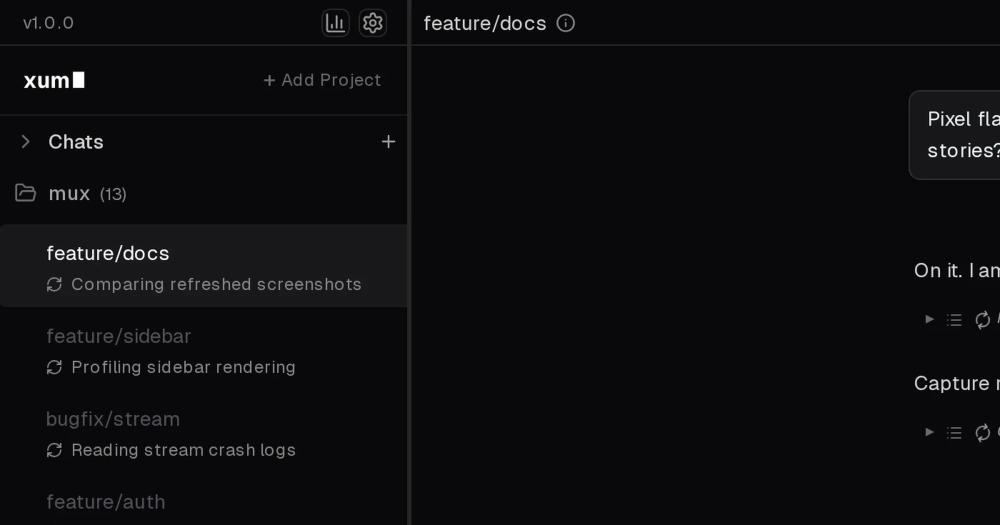
Xum is an open source coding agent multiplexer that runs multiple AI agents in parallel, each in its own isolated git workspace, with a central dashboard showing git divergence across all of them. AGPL-3.0 licensed and built by Coder Technologies, it ships as a pre-built binary for macOS and Linux with no subscription required. It supports any major LLM provider, including Claude, GPT, Grok, and local Ollama models, plus a server mode for mobile access. Best for developers running agents on separate feature branches who want LLM flexibility and full control over their toolchain.

Read the full breakdownHide the full breakdownWho it is for, how it works, trade-offs, the quick start and the FAQ
who it's for

Who Xum is for#

Solo developers parallelizing feature branches

Run one agent per branch simultaneously, then review each agent's changes in Xum's central git status view before deciding which approach to merge. The worktree runtime keeps branches independent so agents cannot overwrite each other.

Skip if:

You only run one agent at a time. Standard Claude Code or a single terminal session is simpler when there is no parallelism to manage.

Teams evaluating multiple LLM models on the same task

Point two or three workspaces at the same codebase with different models, run the same prompt, and compare their outputs using Xum's git divergence view. Useful for benchmarking model quality on your actual codebase before committing to a provider.

Skip if:

You have a fixed model contract and no interest in multi-model comparison. The overhead of managing multiple workspaces does not pay off for a single-model workflow.

Developers who want mobile access to running agents

Xum's server mode exposes a responsive web UI accessible from a phone or tablet. Start a fleet of agents on your workstation, then check their status and review output from a mobile browser without installing anything on the mobile device.

Skip if:

You only use Xum at your desktop. Server mode adds a hosting step that is not worth the setup for local-only workflows.

Remote-first teams running agents on shared servers

The SSH runtime runs each workspace on a remote server you control, keeping source code off local machines. This suits teams with centralized infrastructure policies who want agents executing on the server rather than individual laptops.

Skip if:

Your team already uses Coder's remote development tool for workspace management. The overlap may make native Coder integration a better fit than a separate Xum installation.

the problem

The problem it solves#

Running multiple coding agents on the same codebase exposes a gap in existing tools: agents share the filesystem, overwrite each other's edits, and their outputs are scattered across separate terminal windows with no unified way to track what each one actually changed. Reviewing three agents' work means switching between sessions, manually comparing branches, and discovering conflicts only after the fact.

The core problem is coordination overhead. Each agent may produce good code independently, but without isolated workspaces and a shared status view, the developer spends as much time managing the agents as evaluating their output. Scaling to five or more concurrent agents with standard CLI tools quickly reaches a point where coordination cost erases the productivity gain from parallelism.

how Xum solves it

How it solves it#

Isolated Workspaces with Three Runtime Options

Local, Worktree, and SSH runtimes give three levels of workspace isolation. Local runs the agent in your project directory. Worktree creates a git worktree per agent so each one works on a separate branch copy. SSH runs agents on a remote server you control, keeping source code off local machines.

Multi-Model Support with Local LLM Option

Connect Claude (sonnet-4-*, opus-4-*), GPT (gpt-5-*, gpt-6-*), Grok, any OpenRouter model, or a local Ollama instance. Model selection is per-workspace, so you can run a faster model on one branch and a more capable one on another at the same time.

Central Git Divergence View

The main dashboard shows every agent's git status and branch divergence at a glance. As agents commit changes, you see what each modified without switching windows or running manual git commands, which speeds up code review and merge planning.

Plan/Exec Mode and Keyboard Shortcuts

Xum's agent loop includes Plan/Exec mode, vim-style inputs, and a full keyboard shortcut reference. The interface is designed for keyboard-first workflows to manage a large fleet of agents without reaching for the mouse.

Rich Markdown Output with Mermaid and LaTeX

Agents' proposals and plans render as formatted markdown with Mermaid diagrams and LaTeX math. This makes it practical to review a complex refactoring plan or algorithm description directly in Xum's output panel without exporting to another tool.

Cost and Token Consumption Tracking

A costs tab shows each workspace's token consumption and estimated spend in real time. When running multiple models simultaneously, you see which workspaces are consuming the most context before budgets spike unexpectedly.

strengths · trade-offs

Strengths and trade-offs#

Strengths

  • LLM-Agnostic by DesignXum treats model selection as configuration, not a constraint. Claude, GPT, Grok, Ollama, and OpenRouter work out of the box, so you can switch providers or test models side-by-side without changing your workflow. No API key lock-in to a single vendor.
  • Self-Hosted with No SubscriptionThere is no managed service, no seat pricing, and no data leaving your machine when using local or git-worktree runtimes. The AGPL-3.0 license permits commercial internal use; the copyleft clause applies only if you offer Xum as a hosted service to others.
  • Git Worktrees Prevent Mid-Session ConflictsThe worktree runtime gives each agent a full copy of the branch tree, so agents never write to the same files at the same time. Conflict resolution happens at merge time with full git history, not mid-session when two agents clobber the same file.
  • Actively Maintained by Coder TechnologiesCoder Technologies, the company behind the open source Coder remote development tool, maintains Xum. The project reached over 2,000 stars in roughly 14 months and was last pushed on 2026-11-05, indicating active maintenance at the time of this writing.

Trade-offs

  • -AGPL-3.0 License Restricts Hosting as a ServiceThe AGPL-3.0 license requires distributing source code modifications to any user of a network service you build on Xum. For teams running it internally this has no practical effect. Anyone offering Xum as a managed or hosted product to others must comply with the network-service copyleft clause.
  • -macOS and Linux OnlyPre-built binaries are available for macOS and Linux. There is no documented Windows installer from the maker. Windows users need WSL2 or a remote Linux server to use Xum in its documented install path.
  • -247 Open Issues on an Early-Stage ProjectThe project has 247 open issues. Xum was created in September 2025 and is still early in its maintenance lifecycle. Expect some rough edges in edge-case workflows; check the issue tracker before adopting it for a critical production pipeline.
versus alternatives

Xum vs alternatives#

Xum vs Conductor

Xum and Conductor both offer parallel coding agent management with isolated workspaces, but they represent different deployment models. Conductor was a managed commercial service; Xum is self-hosted and open source.

Conductor shuts down on 2026-11-20. Teams that built workflows on Conductor should plan their migration before that date.

FeatureXumConductor
LicenseAGPL-3.0Proprietary
Self-hostingYesNo
LLM providersClaude, GPT, Grok, Ollama, OpenRouterProprietary selection
PricingFree (self-hosted)Subscription
PlatformsmacOS, Linux, SSH serverManaged service

Xum's parallel-agent model mirrors Conductor's core workflow: each agent runs in an isolated workspace, and you review changes across agents in a central view. The migration path is conceptually straightforward, with Xum adding LLM flexibility that Conductor did not offer. Conductor users who relied on GPT or Claude can keep those models; those who want to test local Ollama models for cost control can do that too.

The practical differences are infrastructure and ownership. With Xum, source code stays on your machine or server. There is no vendor to call when something breaks, which means your team owns both the upside (full configuration control) and the downside (you manage the binary and updates). Conductor's managed experience meant less operational overhead, but that trade-off disappears when the service ends.

For teams evaluating alternatives now, Xum is the strongest direct replacement in the parallel coding agent category: it matches the core workflow, runs where you need it, and carries no ongoing subscription cost.

install · quick start

Quick start#

bash
Download the pre-built binary for macOS or Linux from GitHub Releases: https://github.com/coder/xum/releases/latest
tech stack · detected from GitHub

What it's built on#

Languages
JavaScriptPythonTypeScript
Frameworks
ElectronExpressReact
Infrastructure
AWS
Tooling
esbuild
frequently asked

FAQ#

Is Xum free to use?

Yes. Xum is free to download and self-host. The binary is available from GitHub Releases for macOS and Linux with no license key or subscription. The AGPL-3.0 license permits commercial internal use without restriction. The only limitation applies if you offer Xum itself as a hosted service to others, in which case you must distribute your source modifications.

What LLM providers does Xum support?

Xum supports Claude (sonnet-4-* and opus-4-), GPT (gpt-5- and gpt-6-*), Grok, and any model via OpenRouter. Ollama is also supported for running LLMs locally without an API key. Model selection is per-workspace, so different agents can use different models in the same session.

Why was the project renamed from Mux to Xum?

The project was originally called Mux, a common technical abbreviation for multiplexer. Mux.com raised a trademark concern, and Coder Technologies chose to rename the project to Xum rather than pursue a dispute. The underlying code and GitHub organization are unchanged; only the name and repository path moved.

Does Xum work on Windows?

Xum ships pre-built binaries for macOS and Linux only. There is no documented Windows installer. Windows users can run Xum via WSL2 or point it at a remote Linux server over SSH.

What is the difference between Xum's local, worktree, and SSH runtimes?

Local runs the agent directly in your project directory, sharing the filesystem. Worktree creates a git worktree for each agent so each one works on a separate branch copy with no overlap. SSH runs agents on a remote server you connect to, keeping source code off your local machine. Most individual developers start with Worktree; teams with centralized servers use SSH.

Looking for more

Other ways to replace Conductor#

paperclip

Featuredfor Conductor

Self-hosted AI agent management with org charts and budgets

111,113 GitHub starsVisit

Orca

#1 in the Conductor guide

Drop-in Conductor replacement with 27 or more agents on macOS, Windows, and Linux under MIT

115,397 GitHub stars

T3 Code

#2 in the Conductor guide

MIT-licensed control plane for 6 or more agents with mobile and web clients and a large community

46,806 GitHub stars

Paseo

#3 in the Conductor guide

Daemon-based architecture for agents running on a VM or Docker host with full mobile parity

23,074 GitHub stars
All 39 Conductor alternatives12 open source Conductor alternatives, ranked
by category

Open source tools in these categories#

487

AI & Machine Learning

freeCodeCamp, REA (Reverse Engineer Anything), OpenClaw
571

Developer Tools

REA (Reverse Engineer Anything), Skills for Real Engineers, superpowers

Sponsors

Inbox Zero

Alternative toSuperhuman

AI email assistant that drafts replies and clears your inbox

  • 12,915 GitHub stars
  • AGPL-3.0Licence AGPL-3.0
  • #Email

rakazo

Alternative toGrok Bot

AI teammates you own: your keys, your model, your machine.

  • 7,028 GitHub stars
  • Apache-2.0Licence Apache-2.0
  • #AI Agents

SnitchFeed

Live monitoring on LinkedIn, X, Reddit & more. Agentic social listening for startups.

Marketing & Growth

Advertise your product

New open source projects by email

The projects we add and every new guide. Free, unsubscribe any time.

Find open source alternatives to paid software

/
  • Claude Code to OpenCode
  • Jira to Windshift
  • Notion to AppFlowy
  • Slack to Mattermost
  • Linear to GitLab
  • Wispr Flow to Handy
  • Arc to Zen Browser
  • CapCut to Concat
  • Grok Bot to rakazo
  • Superhuman to Inbox Zero
  • Airtable to AITable
  • Muse to OpenClaw
  • Railway to Coolify
  • GitHub Copilot to Cline
  • Datadog to Netdata
  • Confluence to Wiki.js
  • Microsoft Teams to Rocket.Chat
  • Firebase to Supabase
  • Pinecone to Qdrant
  • Zapier to n8n
  • 1Password to KeePassXC
  • Devin AI to OpenHands
  • Asana to Leantime
  • Contentful to Strapi
  • Claude Code to OpenCode
  • Jira to Windshift
  • Notion to AppFlowy
  • Slack to Mattermost
  • Linear to GitLab
  • Wispr Flow to Handy
  • Arc to Zen Browser
  • CapCut to Concat
  • Grok Bot to rakazo
  • Superhuman to Inbox Zero
  • Airtable to AITable
  • Muse to OpenClaw
  • Railway to Coolify
  • GitHub Copilot to Cline
  • Datadog to Netdata
  • Confluence to Wiki.js
  • Microsoft Teams to Rocket.Chat
  • Firebase to Supabase
  • Pinecone to Qdrant
  • Zapier to n8n
  • 1Password to KeePassXC
  • Devin AI to OpenHands
  • Asana to Leantime
  • Contentful to Strapi