
Open Source Alternatives
  • Alternatives
  • Categories
    Categories by size1,150 projects
    • Developer Tools590
    • AI & Machine Learning503
    • Business & Productivity278
    • Web Development209
    • Security & Monitoring173
    • Communication & Collaboration154
    • IT Management146
    • LLMOps & AI Tooling129
    • Cloud & Hosting128
    • Product & Project Management123
    Browse all 21 categoriesDevOps & CI/CD, Data & Analytics and 9 more
  • Blog
  • Advertise
SearchNotion, Slack, password manager.../
Submit
Open Source Alternatives
  • Alternatives
    • Developer Tools590
    • AI & Machine Learning503
    • Business & Productivity278
    • Web Development209
    • Security & Monitoring173
    • Communication & Collaboration154
    • Browse all 21 categories
  • Blog
  • Advertise
Submit your project

New open source projects by email

The projects we add and every new guide. Free, unsubscribe any time.

Open Source Alternatives LogoOpen Source Alternatives

Handpicked Open Source Alternatives to Paid Softwares

Add Open Source Alternatives as a preferred source on Google

Product

  • Categories
  • Tag
  • Advertise

Resources

  • Blog
  • Collection
  • Submit

Company

  • Privacy Policy
  • Terms of Service
  • Refund Policy
  • Sitemap

Alternatives

  • Claude Code
  • Jira
  • Notion
  • Slack
  • Linear
  • Wispr Flow
  • All alternatives
© 2026 Open Source Alternatives. All rights reserved.
Open SourceAlternatives
Home/Categories/Developer Tools/Yardlet
icon of Yardlet

Yardlet

Open source alternative to Conductor and Nimbalyst

  • 31 stars
  • MIT
  • Active this week
  • Last commit today

Last verified Nov 6, 2026

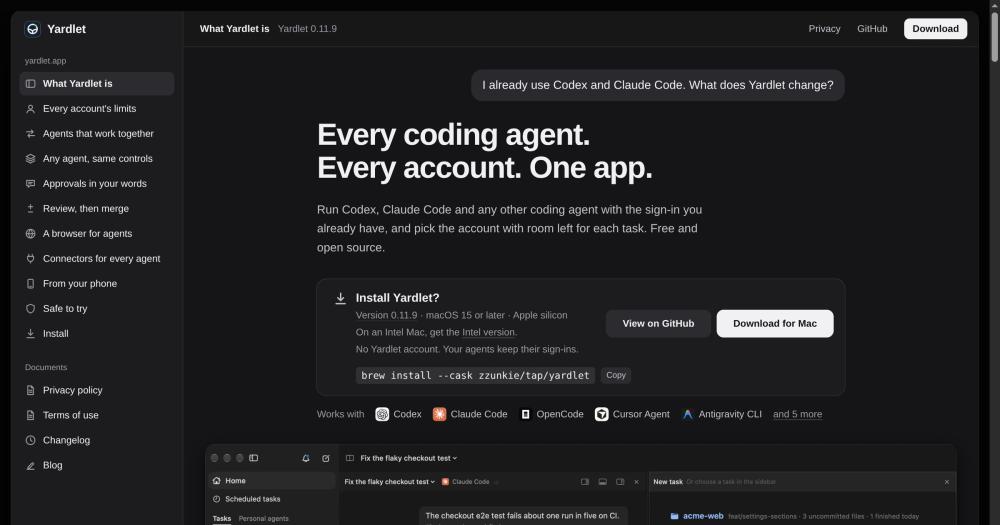
Run Codex, Claude Code and other coding agent CLIs side by side on macOS, each with its own sign-in, account limits and session history intact.

Visit websiteGitHub31 stars
image of Yardlet
TL;DR

Yardlet is a free, MIT-licensed macOS app that runs Codex, Claude Code, OpenCode, Cursor Agent and other coding agent CLIs in one window, each keeping its own sign-in and session history. It replaces the tab-switching and manual account juggling that come with using multiple agents, filling a space occupied by commercial tools like Nimbalyst. It runs locally with no Yardlet account, no cloud dependency, and stores all data on your Mac. Best for developers who use more than one coding agent or juggle multiple accounts with the same provider.

Read the full breakdownHide the full breakdownWho it is for, how it works, trade-offs, the quick start and the FAQ
who it's for

Who Yardlet is for#

Developers using multiple coding agents daily

Bring Codex, Claude Code and OpenCode into one window without losing each agent's session history or switching to separate terminals. Quota limits for all accounts stay visible at a glance, and new tasks start automatically on the account with the most headroom.

Skip if:

Skip if you use only one coding agent with one account and do not need cross-agent session sharing or account switching.

Engineers who review and merge code from agent tasks

Yardlet puts diffs of the last turn, file restore and fork, a PR tab with checks through your own gh, and a terminal beside each conversation. When checks fail, it shows the log and offers Fix CI. Merge from within the app when the PR is ready.

Skip if:

Skip if your review workflow happens exclusively in a separate IDE and you prefer not to merge from within an agent workbench.

Teams with multiple provider accounts and quota limits

Register several Codex or Claude accounts in Yardlet and distribute tasks automatically to the one with quota remaining. The token usage view, by day, model, project and task, gives a detailed read on where spend is going across accounts.

Skip if:

Skip if you have a single provider account with a plan that does not hit rate limits in normal use.

Developers building multi-agent workflows

Session tools let one task hand work to another across any agent or account: start a subagent, send a message to a running task, wait for a result, and schedule follow-up tasks. Approval forwarding is verified against the sender's actual messages, so agents receiving forwarded approvals can trust them.

Skip if:

Skip if your workflow is a single linear coding task with no need for agent-to-agent coordination.

the problem

The problem it solves#

Most developers who work with more than one coding agent end up running them in separate terminal windows or tabs, each with its own sign-in, quota, and approval flow. There is no central view of which agent is busy, which account has quota left, or what a finished task changed. Switching between Codex, Claude Code, and others means context lives in separate places, diffs are scattered across different views, and when one account's limits run out mid-task, finding the right account to continue on is a manual search.

For teams or developers who pay for multiple agent accounts, there is a secondary challenge: quota is spread across accounts with no visibility into which one has headroom. Starting a heavy task on an account that is about to hit its weekly limit means the task stalls partway through, with no easy way to continue on a fresh account without restarting.

how Yardlet solves it

How it solves it#

Unified window for every agent CLI

Codex, Claude Code, OpenCode, Cursor Agent, Antigravity CLI, Kimi Code, Grok Build and others share one sidebar, conversation view, composer and approval cards. Each agent runs through its own CLI with its own sign-in; Yardlet adds the shell, not a proxy or replacement.

Account quota tracking across providers

Register more than one account per provider and start a task on the one with quota left. Yardlet shows each account's session and weekly limits, and the tokens the agents' own transcripts record by day, model, project and task. When a task starts a subagent, it goes to the account with the most headroom.

Cross-agent session tools

Codex, Claude Code and agents using ACP get a set of session tools: read another task's turns, send a message to a running task, start a task under itself on any agent and account, run a one-off subagent on a different agent and get its answer, or wait for tasks to finish. Work started in one agent can hand off to another without manual copy-paste.

Built-in Chromium browser with credential vault

A Chromium panel sits beside the conversation for agents to drive through browser tools. The vault fills saved sign-ins, two-step codes and passkeys into pages without showing the values to the agent, and only on the site they belong to. Steps only you can take, like a CAPTCHA or a payment, come back as a handed-over tab.

Non-invasive design and clean exit

Yardlet writes nothing into the agents' own configuration. Each agent runs against its own session store: a session started in Yardlet resumes in the original CLI, and the other way round. Quit or delete Yardlet and each agent, its sign-in and its sessions are unchanged. Task data lives in ~/.yardlet and is removed with one Homebrew command.

Approval word verification for agent-to-agent handoffs

When one agent passes your approval to another, Yardlet verifies that the forwarded words appear in your own messages in the originating task before sending. If the words are not there, the message is not sent. The receiving agent sees both the words and the timestamp of the original message, so it can tell the difference from words another agent claims you said.

strengths · trade-offs

Strengths and trade-offs#

Strengths

  • MIT license with no Yardlet account requiredYardlet is free to use and MIT licensed. There is no subscription, no paid tier, and no Yardlet account. Its only network calls are a daily update check and, optionally, an end-to-end encrypted relay if you pair a phone. You pay only for the agents' own plans, as you do today.
  • Non-invasive: each agent stays independentBecause Yardlet starts each agent's own CLI and hands it its tools only at session start, removing Yardlet leaves every agent, sign-in and session exactly as they were. No lock-in, no config drift, and no need to migrate data out. Sessions started in Yardlet resume in the original app or CLI.
  • Broad agent support across multiple providersYardlet runs ten or more CLIs: Codex, Claude Code, OpenCode, Cursor Agent, Antigravity CLI, Kimi Code, Grok Build, Hermes Agent, Muse Code and Pi. The same sidebar, composer and approval cards work across all of them, reducing the learning surface when you add a new agent.
  • Privacy-first local architectureNo analytics, no server that receives your work. Task metadata and drafts live in ~/.yardlet, agent sessions stay in each agent's own store, and connector sign-ins are kept in the macOS Keychain. Data goes to your AI providers under your own accounts, with training following those accounts' settings.

Trade-offs

  • -macOS 15 or later only; no Windows or LinuxYardlet runs only on macOS 15 or later, on Apple silicon or Intel. Windows and Linux are not yet supported. The Intel version is new and has been tested on a limited number of machines; other Intel graphics configurations and macOS 26 on Intel have not been fully validated. The built-in browser does not play H.264 video or AAC audio on Intel Macs.
  • -Scheduled tasks require Yardlet to stay openScheduled tasks run only while Yardlet is open. A run missed while it was closed fires once when it next opens, within 7 days; runs scheduled daily or more frequently may miss windows if the app is not running. Teams who need headless background scheduling should keep the app open or look at CLI-based alternatives.
  • -No connectors or session tools for some agentsCursor Agent, Pi, Muse Code and earlier Antigravity CLI versions cannot add an MCP server to a single session, so tasks started with those agents run without connectors, browser tools or cross-agent session tools. The limitation is in those agents' CLIs, not in Yardlet.
  • -Maintained by one personYardlet is maintained by one person, and only the latest release receives fixes. There are 9 open issues. Teams with strict support or SLA requirements should factor that in when evaluating it for production use.
versus alternatives

Yardlet vs alternatives#

Yardlet vs Nimbalyst

Both Yardlet and Nimbalyst are macOS apps for running multiple Codex and Claude Code sessions in parallel. The key differences are breadth of agent support, cross-agent session tools, and pricing.

FeatureYardletNimbalyst
LicenseMITProprietary
PriceFreePaid
Agents supported10+ (Codex, Claude Code, OpenCode, Cursor Agent, Antigravity CLI, Kimi Code, Grok Build, Hermes, Pi, Muse Code)Codex and Claude Code
Cross-agent session toolsYes (Codex, Claude Code, ACP agents)No
Built-in browser with vaultYesNot documented
Local only, no cloudYesYes

Yardlet is the better choice when you use more than two agents or need agents to pass work between each other. The session tools, approval verification, and built-in browser with credential vault go beyond what Nimbalyst offers. Nimbalyst may suit users who are already in its ecosystem and do not need multi-agent coordination or the broader set of supported CLIs.

Yardlet vs Conductor

Conductor stops working on 2026-11-20. It is not a live alternative to Yardlet. If you currently use Conductor, Yardlet covers the same macOS multi-agent use case with a broader set of supported CLIs, cross-agent session tools, and no cloud dependency for core features.

install · quick start

Quick start#

bash
Install Yardlet on macOS using Homebrew or download the signed disk image from GitHub Releases: https://github.com/zzunkie/yardlet/releases/latest

```bash
brew install --cask zzunkie/tap/yardlet
```
tech stack · detected from GitHub

What it's built on#

Languages
CPythonSwift
frequently asked

FAQ#

Does Yardlet work with Claude Code and Codex at the same time?

Yes. Yardlet runs Codex and Claude Code in parallel, each in its own conversation tab with its own sign-in. Session tools let a Codex task read the output of a Claude Code task and vice versa, so work can flow between agents in the same session.

Does Yardlet replace or proxy my Codex or Claude Code accounts?

No. Yardlet starts the CLI you already have installed with the sign-in that CLI already has. It does not copy credentials, proxy accounts, or stand between the agent and its provider. Each agent talks to its provider directly under your account, using the interface that agent's CLI exposes for apps.

Is Yardlet free? Are there any paid tiers?

Yardlet is free and MIT licensed. There is no subscription, no paid tier, and no Yardlet account. You pay only for the agents' own plans, as you do today, using your existing provider accounts. The source is available on GitHub.

What happens to my sessions if I quit or delete Yardlet?

Yardlet writes nothing into the agents' own configuration, so quitting or removing it leaves each agent, its sign-in and its sessions unchanged. Sessions started in Yardlet resume in the original app or CLI. To remove Yardlet's own data, delete ~/.yardlet and ~/Library/Application Support/Yardlet, or run brew uninstall --zap --cask zzunkie/tap/yardlet to remove both folders along with caches and preferences.

Does Yardlet support Windows or Linux?

Not yet. Yardlet runs on macOS 15 or later, on Apple silicon or Intel. Windows and Linux support is not yet available. The Intel version is new and has limited testing across Intel graphics configurations.

Looking for more

Other ways to replace Conductor and Nimbalyst#

Orca

#1 in the Conductor guide

Drop-in Conductor replacement with 27 or more agents on macOS, Windows, and Linux under MIT

115,397 GitHub stars

T3 Code

#2 in the Conductor guide

MIT-licensed control plane for 6 or more agents with mobile and web clients and a large community

46,806 GitHub stars

Paseo

#3 in the Conductor guide

Daemon-based architecture for agents running on a VM or Docker host with full mobile parity

23,074 GitHub stars

Paradev

#4 in the Conductor guide

macOS parallel-agent desktop app with SOC 2 Type II certification and optional paid remote access

15,923 GitHub stars
All 52 Conductor alternatives12 open source Conductor alternatives, ranked
by category

Open source tools in these categories#

590

Developer Tools

REA (Reverse Engineer Anything), Skills for Real Engineers, superpowers
503

AI & Machine Learning

freeCodeCamp, REA (Reverse Engineer Anything), OpenClaw

Sponsors

Inbox Zero

Alternative toSuperhuman

AI email assistant that drafts replies and clears your inbox

  • 12,915 GitHub stars
  • AGPL-3.0Licence AGPL-3.0
  • #Email

rakazo

Alternative toGrok Bot

AI teammates you own: your keys, your model, your machine.

  • 7,028 GitHub stars
  • Apache-2.0Licence Apache-2.0
  • #AI Agents

SnitchFeed

Live monitoring on LinkedIn, X, Reddit & more. Agentic social listening for startups.

Marketing & Growth

Advertise your product

New open source projects by email

The projects we add and every new guide. Free, unsubscribe any time.

Find open source alternatives to paid software

/
  • Claude Code to OpenCode
  • Jira to Windshift
  • Notion to AppFlowy
  • Slack to Mattermost
  • Linear to GitLab
  • Wispr Flow to Handy
  • Arc to Zen Browser
  • CapCut to Concat
  • Grok Bot to rakazo
  • Superhuman to Inbox Zero
  • Airtable to AITable
  • Muse to OpenClaw
  • Railway to Coolify
  • GitHub Copilot to Cline
  • Datadog to Netdata
  • Confluence to Wiki.js
  • Microsoft Teams to Rocket.Chat
  • Firebase to Supabase
  • Pinecone to Qdrant
  • Zapier to n8n
  • 1Password to KeePassXC
  • Devin AI to OpenHands
  • Asana to Leantime
  • Contentful to Strapi
  • Claude Code to OpenCode
  • Jira to Windshift
  • Notion to AppFlowy
  • Slack to Mattermost
  • Linear to GitLab
  • Wispr Flow to Handy
  • Arc to Zen Browser
  • CapCut to Concat
  • Grok Bot to rakazo
  • Superhuman to Inbox Zero
  • Airtable to AITable
  • Muse to OpenClaw
  • Railway to Coolify
  • GitHub Copilot to Cline
  • Datadog to Netdata
  • Confluence to Wiki.js
  • Microsoft Teams to Rocket.Chat
  • Firebase to Supabase
  • Pinecone to Qdrant
  • Zapier to n8n
  • 1Password to KeePassXC
  • Devin AI to OpenHands
  • Asana to Leantime
  • Contentful to Strapi