Open Source Alternatives
  • Alternatives
  • Categories
    Categories by size1,130 projects
    • Developer Tools574
    • AI & Machine Learning490
    • Business & Productivity275
    • Web Development209
    • Security & Monitoring173
    • Communication & Collaboration154
    • IT Management146
    • Cloud & Hosting128
    • LLMOps & AI Tooling127
    • DevOps & CI/CD119
    Browse all 21 categoriesProduct & Project Management, Data & Analytics and 9 more
  • Blog
  • Advertise
SearchNotion, Slack, password manager.../
Submit
Open Source Alternatives
  • Alternatives
    • Developer Tools574
    • AI & Machine Learning490
    • Business & Productivity275
    • Web Development209
    • Security & Monitoring173
    • Communication & Collaboration154
    • Browse all 21 categories
  • Blog
  • Advertise
Submit your project

New open source projects by email

The projects we add and every new guide. Free, unsubscribe any time.

Open Source Alternatives LogoOpen Source Alternatives

Handpicked Open Source Alternatives to Paid Softwares

Product

  • Categories
  • Tag
  • Advertise

Resources

  • Blog
  • Collection
  • Submit

Company

  • Privacy Policy
  • Terms of Service
  • Refund Policy
  • Sitemap

Alternatives

  • Claude Code
  • Jira
  • Notion
  • Slack
  • Linear
  • Wispr Flow
  • All alternatives
© 2026 Open Source Alternatives. All rights reserved.
Open SourceAlternatives
Home/Categories/Developer Tools/Zeron
icon of Zeron

Zeron

Open source alternative to Conductor

  • 3.5K stars
  • MIT
  • Active this week
  • Last commit today

Last verified Nov 5, 2026

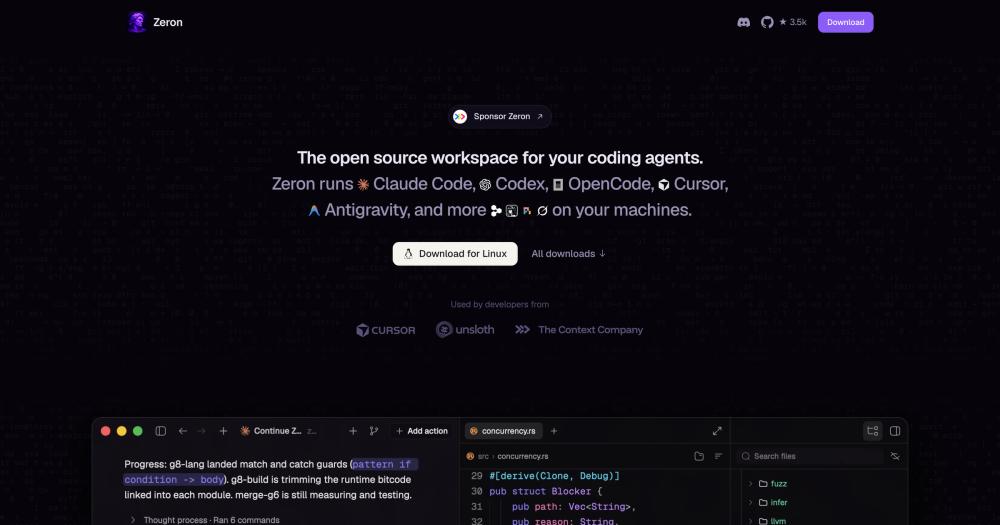
Orchestrate Claude Code, Codex, Cursor and other coding agents from a native window, with local-first sessions and optional free multi-device sync.

Visit websiteGitHub3.5K stars
image of Zeron
TL;DR

Zeron is a native desktop app and CLI that runs Claude Code, Codex, Cursor, Devin, and other coding agents on your own machines and lets you control them from any device. It replaces Conductor, which stops working on 2026-11-20, and similar paid orchestration tools, with an MIT-licensed, local-first alternative. Sessions stay on your hardware by default; optional multi-device sync links your devices through a free account without uploading existing sessions. Best for developers who work across multiple machines and want one unified view of all their active agent sessions.

Read the full breakdownHide the full breakdownWho it is for, how it works, trade-offs, the quick start and the FAQ
who it's for

Who Zeron is for#

Full-stack developers working across a desktop and a laptop

If you regularly switch between a home workstation and a work laptop, Zeron lets you start a Claude Code session on one machine and resume or monitor it on the other without manually transferring context. The session list shows all active agents across both devices in one view.

Skip if:

If you work on a single machine and never move between devices, the multi-device sync adds no value. Local Zeron still gives you a unified UI for multiple agents, but the core multi-device use case does not apply.

Developers running coding agents on a remote server or VPS

Teams that keep coding agents running continuously on a remote machine benefit from the headless engine, which runs as a background service on Linux. The agent stays active after you close your laptop, and the desktop app reconnects to it from any device on the same account.

Skip if:

If your server is not Linux-based, the headless path is not available. macOS and Windows server setups cannot use the CLI install and would need an open desktop window to maintain agent sessions.

Developers managing multiple coding agents in parallel

If you regularly run Claude Code on one task and Codex or Cursor on another simultaneously, Zeron aggregates all active sessions into one window with branch diffs and commit history for each workspace. You can switch between sessions without opening multiple terminals.

Skip if:

If you run only a single agent at a time and rarely need to compare their outputs or switch between them, a standard terminal interface for each agent is likely sufficient without an orchestration layer.

the problem

The problem it solves#

Running AI coding agents is inherently machine-local. Claude Code, Codex, and Cursor sessions live in the terminal or editor on a single device; closing the lid ends the session or breaks your view. Developers who work across a desktop, a laptop, and a phone have no built-in way to start an agent on one machine and pick it up from another.

The pain sharpens on remote setups. A coding agent running on a VPS or cloud machine needs a persistent SSH connection to stay visible. If you close your terminal, you lose sight of what the agent is doing. There is no native mechanism to approve a diff, review a branch change, or redirect an agent from your phone while it runs on a remote server.

how Zeron solves it

How it solves it#

Drives existing coding agents without replacing them

Zeron connects to Claude Code, Codex, Cursor, Devin, Grok, Hermes, Pi, and Antigravity by driving their existing sessions directly. No new runtime is introduced: your agents keep their existing tools, context windows, and configuration. You get a control layer on top of what you already use.

Every machine's sessions in one list

The app shows all running and recent agent sessions across every device you have connected, in a single list. You can see which machines have active agents, which are idle, and what each session's current status is, without opening multiple terminals or SSH connections.

Live branch diffs while agents work

While an agent is editing code, Zeron shows branch diffs updating in real time. You can see what files the agent has changed, review the diff before it commits, and approve or redirect work without interrupting the session. Commit history for every workspace is accessible from the same window.

Multi-device session handoff

Start a Claude Code session at your desk, then follow it from your phone or tablet. When multi-device sync is enabled, any signed-in device can read and write each other's workspace files. Existing local sessions are never uploaded; only devices you sign in can access the workspace.

Headless engine for servers and VPS machines

On Linux servers without a display, the headless engine installs as a background service with one curl command and starts at boot. This keeps coding agents running after you close your laptop and lets the desktop app reconnect to them from any device on the same account.

Native Rust interface built on GPUI

The app uses GPUI, the same native Rust UI framework used by the Zed editor. This gives Zeron consistently fast rendering on macOS, Windows, and Linux without the overhead of an Electron shell. Users in public feedback specifically note the frame rate and typing responsiveness.

strengths · trade-offs

Strengths and trade-offs#

Strengths

  • MIT licensed with no self-hosting restrictionsThe entire codebase is MIT licensed, confirmed from the GitHub repository. You can run Zeron on your own infrastructure, fork it, modify it, and use it commercially without restriction. There is no open-core tier with paid features withheld, and no license change risk.
  • Local-first with no forced cloud dependencySessions live on your machines by default. No account is required to run Zeron locally, and no data leaves your device unless you opt into multi-device sync. This matters for teams with air-gapped environments or compliance requirements around code not leaving the developer's machine.
  • Available on every major developer platformDesktop builds ship for macOS (Apple Silicon), Windows (x64), and Linux (x64 and arm64). An Android app is available; iOS is listed as coming. The headless engine runs on Linux servers. This covers the full surface of where a developer's coding agents might need to run.
  • Wraps any agent without changing its configurationZeron adds a control layer on top of Claude Code, Codex, Cursor, and others without replacing them. Teams already invested in a particular agent's tooling or configuration can add Zeron without touching those existing setups or migrating between agent providers.

Trade-offs

  • -163 open issues on a recently launched projectZeron launched in July 2026 and has 163 open issues as of November 2026. At this stage some edge cases in agent session management, multi-device sync, and platform-specific behavior are still being worked through. Teams that need a stable, thoroughly tested control plane may want to watch the issue tracker before adopting it in critical workflows.
  • -Headless mode is Linux onlyThe CLI and headless engine are documented for Linux only. macOS and Windows server use cases that want agent sessions to stay alive without a GUI are not covered by the headless path. Desktop-only macOS and Windows support means those platforms require an open app window to maintain sessions.
  • -iOS support is not yet availableThe website lists iOS as coming soon and directs users to the App Store listing without a confirmed release date. Developers who want to monitor or approve agent runs from an iPhone cannot do so at launch; Android is available, but Apple's mobile platform is currently absent.
versus alternatives

Zeron vs alternatives#

Zeron vs Conductor

Zeron and Conductor both sit in the same category: a control plane that lets you manage coding agents across sessions and devices. Conductor is a proprietary commercial product; Zeron is MIT licensed and runs entirely on your own machines.

Conductor stops working on 2026-11-20 and will not be available after that date.

FeatureZeronConductor
LicenseMITProprietary
Self-hostingYes, fully localNo
PricingFreePaid
Agents supportedClaude Code, Codex, Cursor, Devin, Grok, Hermes, Pi, AntigravityConductor-specific
Headless/CLIYes (Linux)Not documented
Multi-device syncOptional, free accountProprietary sync

For teams currently using Conductor and looking for a migration path before its November 2026 shutdown, Zeron covers the core orchestration use case: a unified view of running agent sessions, multi-device control, and live diffs while agents work. The MIT license means no licensing continuity risk, and the local-first model means your sessions do not depend on a third-party service staying operational.

For new adopters choosing an agent orchestration layer from scratch, Zeron is the actively maintained MIT-licensed option in this category. It wraps the agents you already use rather than requiring a new runtime, which keeps the adoption surface small.

install · quick start

Quick start#

bash
Download the latest installer for your platform from GitHub Releases: https://github.com/zeronsh/zeron/releases/latest
tech stack · detected from GitHub

What it's built on#

Languages
CJavaScriptKotlinPythonRustSwiftTypeScript
frequently asked

FAQ#

Is Zeron free to use?

Yes. Zeron is MIT licensed and free to download and run on your own machines. The desktop app and headless engine have no paid tiers or usage limits. Multi-device sync, which lets you control sessions across devices, requires a free Zeron account; no pricing page exists and no price is listed on the site.

Does Zeron replace Claude Code, Codex, or Cursor?

No. Zeron drives those agents without replacing them. It connects to Claude Code, Codex, Cursor, and others by wrapping their existing sessions in a control layer. Your agent keeps its tools, configuration, and context. Zeron adds the ability to view and direct sessions from any device.

How does multi-device sync work without uploading my code?

When you sign in to Zeron on two devices with the same account, those devices can read and write each other's workspace files directly. Existing local sessions are never uploaded to a server. Only devices you explicitly sign in can access the workspace, so access stays within the set of machines you control.

What operating systems does Zeron support?

Desktop builds are available for macOS (Apple Silicon), Windows (x64 installer and portable zip), and Linux (x64 and arm64 tar.gz). An Android app is available. iOS is listed as coming soon. The headless engine for servers is Linux only, installed as a background service via a one-line curl command.

How do I run Zeron on a Linux server without a display?

Use the headless installer: run curl -fsSL https://zeron.sh/install.sh | sh on your Linux server. The installer starts the Zeron engine as a background service that starts at boot. Use zeron status to check the engine and sync mode, and zeron daemon start|stop|restart to manage the service.

Looking for more

Other ways to replace Conductor#

paperclip

Featuredfor Conductor

Self-hosted AI agent management with org charts and budgets

111,113 GitHub starsVisit

Orca

#1 in the Conductor guide

Drop-in Conductor replacement with 27 or more agents on macOS, Windows, and Linux under MIT

115,397 GitHub stars

T3 Code

#2 in the Conductor guide

MIT-licensed control plane for 6 or more agents with mobile and web clients and a large community

46,806 GitHub stars

Paseo

#3 in the Conductor guide

Daemon-based architecture for agents running on a VM or Docker host with full mobile parity

23,074 GitHub stars
All 43 Conductor alternatives12 open source Conductor alternatives, ranked
by category

Open source tools in these categories#

575

Developer Tools

REA (Reverse Engineer Anything), Skills for Real Engineers, superpowers
491

AI & Machine Learning

freeCodeCamp, REA (Reverse Engineer Anything), OpenClaw

Sponsors

Inbox Zero

Alternative toSuperhuman

AI email assistant that drafts replies and clears your inbox

  • 12,915 GitHub stars
  • AGPL-3.0Licence AGPL-3.0
  • #Email

rakazo

Alternative toGrok Bot

AI teammates you own: your keys, your model, your machine.

  • 7,028 GitHub stars
  • Apache-2.0Licence Apache-2.0
  • #AI Agents

SnitchFeed

Live monitoring on LinkedIn, X, Reddit & more. Agentic social listening for startups.

Marketing & Growth

Advertise your product

New open source projects by email

The projects we add and every new guide. Free, unsubscribe any time.

Find open source alternatives to paid software

/
  • Claude Code to OpenCode
  • Jira to Windshift
  • Notion to AppFlowy
  • Slack to Mattermost
  • Linear to GitLab
  • Wispr Flow to Handy
  • Arc to Zen Browser
  • CapCut to Concat
  • Grok Bot to rakazo
  • Superhuman to Inbox Zero
  • Airtable to AITable
  • Muse to OpenClaw
  • Railway to Coolify
  • GitHub Copilot to Cline
  • Datadog to Netdata
  • Confluence to Wiki.js
  • Microsoft Teams to Rocket.Chat
  • Firebase to Supabase
  • Pinecone to Qdrant
  • Zapier to n8n
  • 1Password to KeePassXC
  • Devin AI to OpenHands
  • Asana to Leantime
  • Contentful to Strapi
  • Claude Code to OpenCode
  • Jira to Windshift
  • Notion to AppFlowy
  • Slack to Mattermost
  • Linear to GitLab
  • Wispr Flow to Handy
  • Arc to Zen Browser
  • CapCut to Concat
  • Grok Bot to rakazo
  • Superhuman to Inbox Zero
  • Airtable to AITable
  • Muse to OpenClaw
  • Railway to Coolify
  • GitHub Copilot to Cline
  • Datadog to Netdata
  • Confluence to Wiki.js
  • Microsoft Teams to Rocket.Chat
  • Firebase to Supabase
  • Pinecone to Qdrant
  • Zapier to n8n
  • 1Password to KeePassXC
  • Devin AI to OpenHands
  • Asana to Leantime
  • Contentful to Strapi