Open Source Alternatives
  • Alternatives
  • Categories
    Categories by size1,326 projects
    • Developer Tools682
    • AI & Machine Learning550
    • Business & Productivity325
    • Web Development219
    • Security & Monitoring201
    • Communication & Collaboration171
    • IT Management166
    • Design & Creative149
    • DevOps & CI/CD144
    • LLMOps & AI Tooling142
    Browse all 21 categoriesCloud & Hosting, Product & Project Management and 9 more
  • Blog
  • Advertise
SearchNotion, Slack, password manager.../
Submit
Open Source Alternatives
  • Alternatives
    • Developer Tools682
    • AI & Machine Learning550
    • Business & Productivity325
    • Web Development219
    • Security & Monitoring201
    • Communication & Collaboration171
    • Browse all 21 categories
  • Blog
  • Advertise
Submit your project

New open source projects by email

The projects we add and every new guide. Free, unsubscribe any time.

Open Source Alternatives LogoOpen Source Alternatives

Handpicked Open Source Alternatives to Paid Softwares

Add Open Source Alternatives as a preferred source on Google

Product

  • Categories
  • Tag
  • Advertise

Resources

  • Blog
  • Collection
  • Submit

Company

  • Privacy Policy
  • Terms of Service
  • Refund Policy
  • Sitemap

Alternatives

  • Claude Code
  • Jira
  • Notion
  • Slack
  • Linear
  • Wispr Flow
  • All alternatives
© 2026 Open Source Alternatives. All rights reserved.
Open SourceAlternatives
Home/Categories/Developer Tools/Zorven
icon of Zorven

Zorven

Open source alternative to ngrok and Cloudflare Tunnel

  • 9 stars
  • AGPL-3.0
  • Active this week
  • Last commit 5 days ago

Last verified Nov 24, 2026

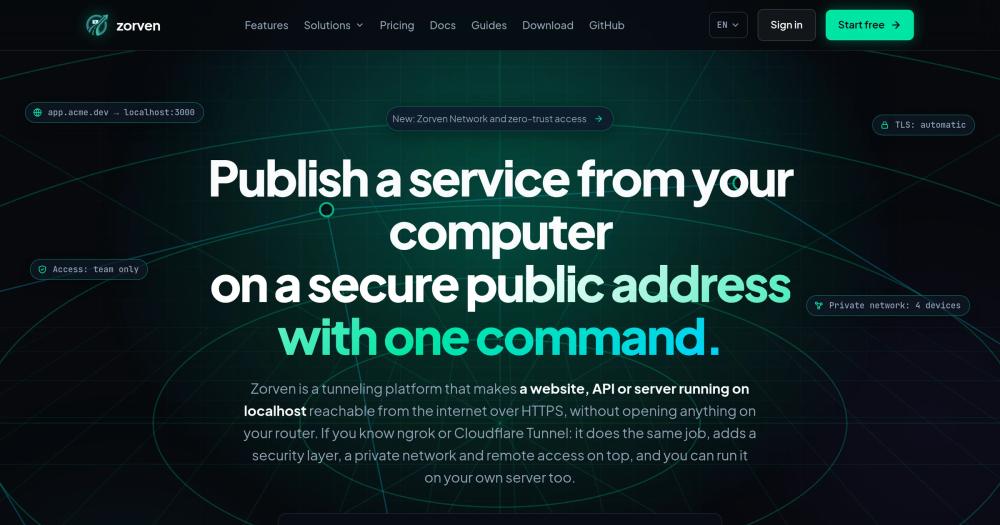
Run a self-hostable tunnel server that exposes local services at a secure HTTPS address with one command, adding WAF, private networking, and remote access.

Visit websiteGitHub9 starsDeploy on Hostinger
image of Zorven
TL;DR

Zorven is a self-hosted, open-source tunneling server that exposes any local service at a public HTTPS address without port forwarding. It replaces paid services like ngrok and Cloudflare Tunnel with infrastructure you fully control, adding a built-in policy engine, WAF, bot protection, WireGuard private networking, and remote browser terminals in the same deployment. Licensed under AGPL-3.0, the complete server and client source is available with no feature gates for self-hosters. Best for developers, home-lab operators, and small teams who want ngrok-style tunneling without sending traffic through a third-party edge network.

Read the full breakdownHide the full breakdownWho it is for, how it works, trade-offs, the quick start and the FAQ
who it's for

Who Zorven is for#

Developers testing webhooks from local services

Zorven exposes a local HTTP server at a public HTTPS URL in one command. The dashboard request inspector shows every incoming webhook with headers and body, and a one-click replay sends it again. Webhook providers like Stripe, GitHub, and Slack can hit the tunnel URL while the developer inspects and debugs without deploying to a staging server.

Skip if:

If you only need a public URL for a few minutes and do not need persistent request logs or replay, a simpler free option may be sufficient.

Home-lab operators running services behind CGNAT

CGNAT and most home ISPs block inbound connections, making it impossible to forward ports to a NAS, Home Assistant, game server, or personal site. Zorven's client opens an outbound connection to the server, bypassing CGNAT without router changes. Custom domains, automatic HTTPS, and optional WAF rules are included.

Skip if:

If your ISP provides a static IP and you can open ports, a reverse proxy like Nginx or Caddy running directly on the host is simpler and has no dependency on an external server.

Small teams sharing internal services without a VPN

The `zorven share` command shares a port with a named colleague over a WireGuard-encrypted channel. The recipient runs `zorven access` to reach it. Database ports, staging servers, and development APIs can be shared without exposing them publicly or setting up a team VPN product.

Skip if:

Teams already running WireGuard, Tailscale, or a site-to-site VPN will not gain much from Zorven's private networking, since those products cover the same use case with a larger ecosystem.

AI coding workflows needing controlled tunnel access

Running `zorven mcp` over stdio gives Claude Code, Claude Desktop, or Cursor direct access to manage tunnels, inspect request logs, and publish an MCP server endpoint. Scoped API tokens control which operations each agent can perform, and sensitive actions require confirmation before proceeding.

Skip if:

If you are not using AI assistants that support MCP (Model Context Protocol), this use case does not apply. Standard tunnel and networking features work without MCP.

the problem

The problem it solves#

Exposing a local service to the internet without opening ports is harder than it should be. CGNAT and dynamic IP addresses block straightforward port forwarding; corporate and home firewalls close inbound paths by default; and setting up a static IP costs money or requires a VPS anyway. The usual workaround is a managed tunnel service, but that moves every byte of traffic through a third party's edge network, raising data-residency concerns and introducing per-seat or per-bandwidth pricing that scales uncomfortably as usage grows.

Developers in this situation typically choose ngrok for quick demos and webhook testing, then hit its free-tier limits or its per-agent pricing on the team plan. Home-lab operators running Home Assistant or a NAS from behind CGNAT have no self-hosted alternative that also covers private networking and remote access in one tool. The result is running multiple products: a tunnel for public access, a VPN for private connections, and something else for remote terminals.

how Zorven solves it

How it solves it#

HTTPS tunneling without port forwarding

The client dials the Zorven server over a single outbound WebSocket connection, so tunnels work from behind CGNAT, home routers, and corporate firewalls without changing any router or firewall settings. HTTP, WebSocket, SSE, raw TCP, and UDP are supported. Path-based routing and load balancing with health checks are available for more complex deployments.

Built-in WAF and bot protection

A policy engine applies OWASP-lite WAF rules, Geo-based country blocks, per-tunnel rate limiting, and a bot challenge page at the ingress layer before requests reach your service. Visitor login (password, Google, or GitHub OAuth) gates access to any tunnel. Zorven CAPTCHA is an embeddable proof-of-work widget usable on your forms without cookies or tracking.

WireGuard private networking

The `zorven share` command shares a port with a named user, group, or device over a WireGuard-encrypted channel. Peer-to-peer paths are established where STUN hole-punching succeeds; relay fallback covers the rest. Full network layer mode (`zorven net up`) exposes devices by hostname on a `.zorven.internal` TUN interface, covering SSH, RDP, and browser access without a separate VPN product.

Remote browser terminal and screen sharing

Any device running the client can offer a browser-accessible PTY terminal (bash, zsh, PowerShell, cmd, or WSL), screen sharing with multi-viewer H.264 video, and file transfer. All features are off by default and must be enabled per client with `--enable-terminal` or `--enable-screen`, keeping the device owner in control.

Request inspector with one-click replay

Every incoming HTTP request is logged in the dashboard with headers, body, status code, and duration. Any logged request can be replayed with one click, and replays can be diffed against the original response. This makes webhook testing (Stripe, GitHub, Slack) faster without external replay tools.

MCP server for AI agent integration

Running `zorven mcp` over stdio or as a remote endpoint lets AI assistants (Claude Code, Claude Desktop, Cursor) manage tunnels, devices, and domains directly. Each MCP token can be scoped to specific actions; delete operations require a separate permission; sensitive targets prompt for confirmation before proceeding.

strengths · trade-offs

Strengths and trade-offs#

Strengths

  • Full self-hosting on AGPL-3.0 sourceThe complete tunneling product, including the server, CLI client, dashboard, SDKs, webmail, and remote access, is released under AGPL-3.0 with no feature gates or quotas for self-hosters. ngrok and Cloudflare Tunnel offer no self-hosted server option; your data always routes through their networks. Zorven's server runs on any VPS you own.
  • Traffic stays on your infrastructureBecause you run the server, every packet passes through hardware you control. For teams with data-residency requirements (GDPR or similar regulations), this removes the third-party routing that managed tunnel services require. ngrok's edge and Cloudflare's network both see your traffic; Zorven's self-hosted path does not.
  • Per-plan pricing, not per-userZorven's paid hosted plans (Hobby at $5, Pro at $12, Team at $29 per month) are priced per plan rather than per user or per agent. Tailscale prices per user; ngrok's PAYG tier adds per-usage costs above its base. For small teams with multiple tunnels, Zorven's flat-plan pricing is typically cheaper. Self-hosting has no per-tunnel or per-user cost beyond the VPS.
  • Tunnel and private network in one deploymentngrok focuses on public tunnels; Tailscale focuses on device-to-device networking. Zorven handles both in a single deployment. Developers can expose a service publicly and share a database port privately with a colleague from the same server and client, without running two separate products.

Trade-offs

  • -Self-hosting requires a VPS, domain, and Docker ComposeUnlike ngrok or Cloudflare Tunnel, which work with no infrastructure of your own, Zorven's self-hosted path needs a VPS with a public IP, a registered domain, and Docker Compose. Setting up DNS (two A records, plus optional MX and SPF/DKIM/DMARC for webmail), generating a bootstrap TLS certificate, and configuring `.env` takes roughly 15-30 minutes for someone comfortable with a Linux VPS. First-time server operators will need longer.
  • -New project with early community adoptionZorven's GitHub repository was created in September 2026 and had 9 stars and 1 fork at the time of this writing. It has not yet seen wide community adoption, which means fewer third-party guides, fewer community answers for edge cases, and a smaller contributor pool than mature alternatives like ngrok.
  • -AGPL-3.0 source-sharing obligation for SaaS useIf you run a modified version of Zorven's server as a managed service for external users, AGPL-3.0 requires you to make the corresponding source available to those users. Teams that want to build a proprietary SaaS product on top of Zorven need a commercial license from the authors. Running Zorven unmodified or with modifications for internal teams does not trigger this requirement.
versus alternatives

Zorven vs alternatives#

Zorven vs ngrok

Both services expose local services over a secure public URL. The key distinction is infrastructure ownership. ngrok routes all traffic through its own edge network with no self-hosted server option; Zorven's self-hosted path runs the entire tunnel server on hardware you control.

FeatureZorvenngrok
Self-hosted serverYes (AGPL-3.0)No
Free tier2 tunnels, 5 GB/month1 agent, 1 GB/month
Cheapest paid plan$5/month (Hobby, per plan)$10/month (Hobbyist)
Custom domainsHobby plan and abovePAYG plan and above
Raw TCP / UDPYes / YesYes / not documented
Request inspectorYesYes (Full Capture add-on)
WAF / bot protectionBuilt inVia ngrok Traffic Policy
Private networkingWireGuard-basedNot documented
Remote terminalYesNo
Pricing modelPer planPer agent / PAYG

Zorven is the better choice when data residency matters, when you want to avoid per-agent pricing as your team grows, or when you need private networking and remote terminal access alongside public tunneling. ngrok is the stronger choice for teams that need a mature, globally distributed edge network with long production history, enterprise support contracts, and wide third-party integrations.

Zorven vs Cloudflare Tunnel

Cloudflare Tunnel routes traffic through Cloudflare's global edge and is tightly integrated with Cloudflare's firewall, DNS, and Zero Trust platform. The tunnel server is not open source and cannot be self-hosted; only the cloudflared client is open source under Apache 2.0. Zorven self-hosts the entire tunnel infrastructure and provides its own WAF and policy engine.

FeatureZorvenCloudflare Tunnel
Self-hosted serverYes (AGPL-3.0)No
Free tier2 tunnels, 5 GB/monthZero Trust up to 50 users
Custom domainsHobby plan and aboveSupported via Cloudflare DNS
WAFBuilt-in policy engineCloudflare's global WAF
Private networkingWireGuard-basedWARP connector
Remote terminalYesNo
Traffic routeYour server or zorven.appCloudflare edge

Zorven is the better choice when you need a self-hosted server, when you want to avoid Cloudflare ecosystem dependency, or when remote browser terminals and private networking matter alongside tunneling. Cloudflare Tunnel is worth choosing when you are already on Cloudflare for DNS and want your tunnel traffic through the same global edge network as your CDN, or when you need Cloudflare's mature DDoS protection and Zero Trust integrations.

install · quick start

Quick start#

bash
Install the client on Linux, macOS, or Windows to connect to zorven.app or your own self-hosted server.

```bash
# Linux / macOS
curl -fsSL https://zorven.app/install.sh | sudo bash

# Windows (PowerShell)
irm https://zorven.app/install.ps1 | iex
```
tech stack · detected from GitHub

What it's built on#

Languages
GoTypeScript
Frameworks
NuxtVue
Databases
PostgreSQL
Messaging
WebSocket
frequently asked

FAQ#

Does Zorven work without a public IP or static IP on my machine?

Yes. Only the Zorven server needs a public IP; that is the VPS you provision separately. Your local machine runs only the Zorven client, which dials the server outbound. CGNAT, home routers, and corporate firewalls do not block outbound connections, so the tunnel works from any device with internet access.

What is the difference between the self-hosted server and the zorven.app hosted service?

Zorven offers a hosted service at zorven.app where traffic routes through servers in Istanbul. The self-hosted path means you run the Zorven server on your own VPS; all traffic routes only through your hardware. The self-hosted server uses the same codebase, released under AGPL-3.0, with no feature gates. The hosted service has usage-based pricing tiers (Free to Enterprise); the self-hosted path has no per-tunnel costs beyond the VPS.

Is Zorven fully open source, or is some of it proprietary?

Zorven is open core. The complete tunneling product, including the server, CLI client, dashboard (Nuxt), SDKs, webmail, and remote access, is released under AGPL-3.0 with no quotas or feature gates for self-hosters. Some enterprise-only extras are distributed separately under a commercial license: billing enforcement, multi-node clustering, OIDC SSO, audit log, log export, zero-trust access conditions, and service accounts.

Can I use Zorven for HTTP and non-HTTP traffic?

Yes. Zorven supports HTTP, HTTPS, WebSocket, and SSE tunnels, plus raw TCP and UDP tunnels and SNI-based TLS passthrough on port 443. Raw TCP is useful for database connections, SSH, and game servers; UDP covers protocols that need it. Define TCP or UDP tunnel configurations in the dashboard, then connect with the CLI.

How does Zorven compare to running Cloudflare Tunnel for free?

Cloudflare Tunnel's free Zero Trust tier covers up to 50 users and routes all traffic through Cloudflare's global network. Zorven's self-hosted path has no user limit and routes traffic through your own VPS. The key difference is data residency and infrastructure control: Cloudflare sees all traffic through its network; with Zorven self-hosted, only your server does. Cloudflare Tunnel also does not support self-hosting the tunnel server itself.

also worth a look

Similar open-source tools#

iroh

Alternative toTailscale

Connect devices seamlessly without relying on the cloud.

  • 13,078 GitHub stars
  • Apache-2.0Licence Apache-2.0

Tunnelmole

Alternative tongrok

Get a public HTTPS URL for your local development server

  • 1,899 GitHub stars
  • MITLicence MIT

Pangolin

Alternative toCloudflare Zero Trust

Zero-trust network access, reverse proxy, and AI gateway, self-hosted.

  • 23,954 GitHub stars

Code Server

Alternative toGitHub Codespaces

VS Code in the browser, self-hosted, with no per-seat pricing.

  • 79,930 GitHub stars
  • MITLicence MIT

Minimal

Alternative toChainguard Images

150 hardened container images, MIT-licensed, signed and rebuilt daily

  • 559 GitHub stars
  • MITLicence MIT

Keda

Alternative toKedify

Event-driven Kubernetes autoscaling with 70+ scalers and scale to zero

  • 10,738 GitHub stars
  • Apache-2.0Licence Apache-2.0
by category

Open source tools in these categories#

682

Developer Tools

REA (Reverse Engineer Anything), Skills for Real Engineers, superpowers
136

Cloud & Hosting

dify, RuView, OmniRoute
201

Security & Monitoring

RustDesk, REA (Reverse Engineer Anything), Sherlock
144

DevOps & CI/CD

Nvm, Uptime Kuma, Netdata
Hostinger

Self-host Zorven on a Hostinger VPS

Keep it running 24/7, even when your laptop is off. A Hostinger VPS gives it a server of its own.

  1. 01

    Choose a plan

    Starts from $6.49/mo

  2. 02

    Apply

    Extra 10% off yearly plans

  3. 03

    Install Zorven

    On a server that stays on

  4. 04

    Start building

    Focus on the app, not the server

Deploy on Hostinger

Sponsors

SnitchFeed

Live monitoring on LinkedIn, X, Reddit & more. Agentic social listening for startups.

Marketing & Growth

Windshift

Alternative toJira

Self-hosted work management for teams leaving Jira

  • 468 GitHub stars
  • AGPL-3.0Licence AGPL-3.0

Nuphos

Alternative toConductor

Agent workspace for teams running Claude Code or Codex

  • 759 GitHub stars
  • Apache-2.0Licence Apache-2.0
  • #AI Agents
Advertise your product

New open source projects by email

The projects we add and every new guide. Free, unsubscribe any time.

Find open source alternatives to paid software

/
  • Claude Code to OpenCode
  • Jira to Windshift
  • Notion to AppFlowy
  • Slack to Mattermost
  • Linear to GitLab
  • Wispr Flow to Handy
  • Microsoft To Do to Super Productivity
  • Arc to Zen Browser
  • CapCut to Concat
  • Grok Bot to rakazo
  • Superhuman to Inbox Zero
  • Discord to Stoat
  • Airtable to AITable
  • Datadog to SigNoz
  • Muse to OpenClaw
  • Railway to Coolify
  • GitHub Copilot to Cline
  • Confluence to Wiki.js
  • Microsoft Teams to Rocket.Chat
  • Zapier to n8n
  • 1Password to KeePassXC
  • Pinecone to Qdrant
  • Contentful to Strapi
  • Devin AI to OpenHands