Open Source Alternatives
  • Alternatives
  • Categories
    Categories by size1,263 projects
    • Developer Tools650
    • AI & Machine Learning535
    • Business & Productivity305
    • Web Development217
    • Security & Monitoring196
    • Communication & Collaboration168
    • IT Management160
    • Design & Creative138
    • DevOps & CI/CD135
    • LLMOps & AI Tooling135
    Browse all 21 categoriesCloud & Hosting, Product & Project Management and 9 more
  • Blog
  • Advertise
SearchNotion, Slack, password manager.../
Submit
Open Source Alternatives
  • Alternatives
    • Developer Tools650
    • AI & Machine Learning535
    • Business & Productivity305
    • Web Development217
    • Security & Monitoring196
    • Communication & Collaboration168
    • Browse all 21 categories
  • Blog
  • Advertise
Submit your project

New open source projects by email

The projects we add and every new guide. Free, unsubscribe any time.

Open Source Alternatives LogoOpen Source Alternatives

Handpicked Open Source Alternatives to Paid Softwares

Add Open Source Alternatives as a preferred source on Google

Product

  • Categories
  • Tag
  • Advertise

Resources

  • Blog
  • Collection
  • Submit

Company

  • Privacy Policy
  • Terms of Service
  • Refund Policy
  • Sitemap

Alternatives

  • Claude Code
  • Jira
  • Notion
  • Slack
  • Linear
  • Wispr Flow
  • All alternatives
© 2026 Open Source Alternatives. All rights reserved.
Open SourceAlternatives
Home/Categories/Business & Productivity/Kaset
icon of Kaset

Kaset

Open source alternative to Apple Music

  • 2.6K stars
  • MIT
  • Active this week
  • Last commit today

Last verified Nov 15, 2026

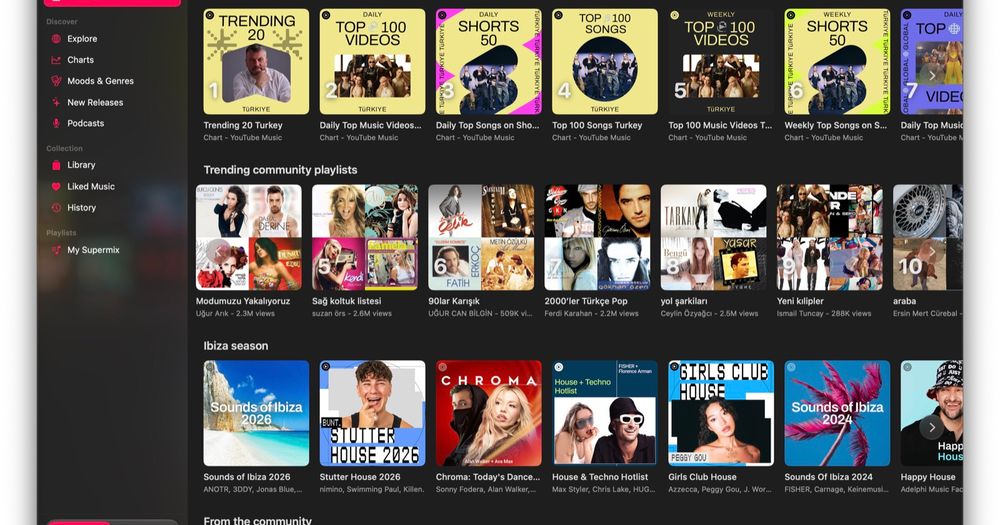
Run YouTube Music and YouTube in a single native macOS app, with a 6-band EQ, synced lyrics, smart shuffle, and AppleScript automation.

Visit websiteGitHub2.6K stars
image of Kaset
TL;DR

Kaset is a free, MIT-licensed native macOS app that puts YouTube Music on Side A and YouTube on Side B in a single window. It replaces the browser-tab experience of YouTube Music with real media key support, Control Center Now Playing, a 6-band parametric equalizer, and synced lyrics. For YouTube Premium subscribers on macOS who want a native client, Kaset is the most fully-featured option available.

Read the full breakdownHide the full breakdownWho it is for, how it works, trade-offs, the quick start and the FAQ
who it's for

Who Kaset is for#

YouTube Premium subscribers wanting a native Mac music client

Kaset delivers the full YouTube Music experience in a proper Mac window: your library, playlists, podcasts, smart shuffle, and EQ. For users whose music lives on YouTube Music rather than Apple Music or Spotify, Kaset is the only native macOS client available.

Skip if:

Skip if your music library is on Apple Music, Spotify, or another streaming service. Kaset plays YouTube Music and YouTube only; it cannot access other streaming catalogs.

macOS power users who rely on automation

Kaset's AppleScript support and URL scheme let you control playback from Raycast, Alfred, or macOS Shortcuts. You can trigger playback, switch playlists, or open a specific YouTube video from any automation context. Apple Intelligence integration on macOS 26 enables natural language playback commands.

Skip if:

Skip if you need broad cross-platform support. Kaset is macOS-only and requires macOS 15.4 or later; there is no Windows or Linux version.

YouTube viewers who want native controls and no browser clutter

Side B gives YouTube subscriptions, Shorts, Watch Later, and history in a clean native window. The Liquid Glass player bar handles captions, quality, picture-in-picture, and AirPlay. SponsorBlock can be loaded as a WebKit extension to skip sponsorship segments.

Skip if:

Skip if you need Chromecast or non-AirPlay casting. Kaset supports AirPlay but not other casting protocols.

the problem

The problem it solves#

Using YouTube Music on macOS means living in a browser tab: media keys work inconsistently, there is no Control Center Now Playing widget, no picture-in-picture, and no way to apply an equalizer to the audio output. YouTube's official apps are iOS-first, and no first-party macOS client exists for YouTube Music or YouTube.

The gap deepens for users who also watch YouTube: switching between a music tab and a video tab is clunky, and browser UI adds clutter around content. Users who want native controls, subscription and history navigation, or AirPlay from a YouTube video have no official path on macOS.

how Kaset solves it

How it solves it#

Side A and Side B in one app

Kaset puts YouTube Music (Side A) and YouTube (Side B) in a single window with a sidebar toggle. Side A gives your full YouTube Music library, playlists, podcasts, and smart shuffle. Side B shows your subscriptions, Shorts, Watch Later, and history. One click flips between them.

6-band parametric equalizer

A system-wide 6-band parametric EQ is applied directly to WebKit playback output, so it affects what you hear from Kaset without touching other audio on your Mac. Spotify-style presets are built in, and you can adjust individual bands at 60, 150, and 400 Hz, 1 kHz, 2.4 kHz, and 15 kHz.

Synced lyrics with Apple Intelligence explanations

Lyrics display with line-by-line highlighting as a song plays, using timing data when available. On macOS 26 with Apple Intelligence, Kaset can explain lyrics and analyze their mood on device, without sending data to a third-party service.

WebKit extensions on both sides

Load standard WebKit extensions such as uBlock Origin Lite and SponsorBlock. Extensions work on both YouTube Music and YouTube. Nothing is bundled; you install only what you choose.

AppleScript and Shortcuts automation

Kaset is scriptable via AppleScript, making it compatible with Raycast, Alfred, and macOS Shortcuts. You can control playback, play specific playlists, and run actions from other apps or scripts. A URL scheme (kaset://play?v=VIDEO_ID) lets any app open a specific video directly.

Full macOS system integration

Now Playing appears in Control Center and responds to media keys. A Dock menu gives quick playback controls. Music continues playing when the window is closed. The app supports 18 languages and haptic feedback on Force Touch trackpads.

strengths · trade-offs

Strengths and trade-offs#

Strengths

  • MIT license, free to downloadKaset is MIT-licensed and costs nothing to download and use. Unlike subscription music apps, there is no per-user fee and no account required beyond your existing Google account. The source code is public on GitHub and can be audited or forked.
  • Native Swift app, not a browser wrapperKaset is written in Swift and SwiftUI with Apple's Liquid Glass APIs. It behaves like a Mac app: media keys, Control Center Now Playing, picture-in-picture, and AirPlay all work natively. This distinguishes it from browser-based or Electron-wrapped alternatives that lack proper system integration.
  • Smart shuffle and queue managementBeyond a plain shuffle toggle, Kaset blends suggested tracks into the queue based on what is currently playing, with configurable cadence. You can reorder, clear, and inspect the queue at any time. This level of queue control is not available in YouTube Music's web player.

Trade-offs

  • -Not signed with an Apple Developer IDKaset is not signed or notarized by Apple, so macOS shows a warning on first launch. The Homebrew install handles this automatically. If you download the .dmg directly, you must approve it manually in System Settings > Privacy and Security. This is a one-time step, but it adds friction for less technical users.
  • -102 open issues as of November 2026Kaset had 102 open issues on GitHub at the time this pack was generated (from the GitHub issues API, pull requests excluded). First released in December 2025, it is a relatively new project. The maintainer is active and the issue tracker is open, but some edge cases and feature requests remain unresolved.
  • -Full playback requires YouTube Music PremiumKaset plays DRM-protected YouTube Music content via your existing Premium subscription. Without a Premium subscription, YouTube Music playback is limited to free-tier content. Users on the free tier will find Side A less functional than Side B, which works with a standard Google account.
versus alternatives

Kaset vs alternatives#

Kaset vs Apple Music

Kaset and Apple Music solve different problems for different user bases. Apple Music is Apple's own streaming service with 100 million+ songs, lossless audio, and deep macOS integration. Kaset is an unofficial native client for YouTube Music and YouTube, for users whose library and habits are on Google's platform rather than Apple's.

FeatureKasetApple Music
CatalogYouTube Music and YouTube video100M+ songs, iTunes Match
LicenseMIT, free to downloadProprietary, subscription required
SubscriptionYouTube Music Premium for full featuresYes ($10.99/mo individual)
Native macOS appYes (Swift and SwiftUI)Yes (first-party)
Equalizer6-band parametric EQNo built-in EQ
Video playbackYes (Side B: YouTube)No
ExtensionsuBlock Origin Lite, SponsorBlockNo

Apple Music is the right choice if your library lives in iTunes or iCloud Music Library, or if you want lossless audio, Dolby Atmos, or Apple's curated editorial. iTunes Match for personal libraries and lossless playback have no equivalent in YouTube Music.

Kaset fits better when your listening centers on YouTube Music's catalog, you want YouTube video playback in the same app, or you need a real equalizer, AppleScript automation, or SponsorBlock for ad skipping. It is free to download and costs nothing beyond your existing YouTube Music Premium subscription.

install · quick start

Quick start#

bash
Install Kaset on macOS 15.4 or later via Homebrew, which handles the quarantine flag automatically.
```bash
brew install sozercan/repo/kaset
```

Or download the .dmg installer directly from GitHub Releases: https://github.com/sozercan/kaset/releases/latest
tech stack · detected from GitHub

What it's built on#

Languages
PythonSwift
frequently asked

FAQ#

Is Kaset free to use?

Yes. Kaset is free to download and MIT-licensed. There is no subscription fee for the app itself. To use YouTube Music's full library and Premium playback, you need an existing YouTube Music Premium subscription from Google. The YouTube side (Side B) works with a free Google account.

Does Kaset work without a YouTube Music Premium subscription?

Side B (YouTube) works with a free Google account. Side A (YouTube Music) can browse and play free-tier content, but Premium features like offline playback and ad-free listening require a YouTube Music Premium subscription. Kaset does not add or remove any subscription tier from what Google offers.

Is Kaset affiliated with YouTube or Google?

No. Kaset is an unofficial, community-built app and is not affiliated with YouTube or Google Inc. 'YouTube', 'YouTube Music', and the YouTube logo are registered trademarks of Google Inc. The app uses publicly available web interfaces.

What macOS version does Kaset require?

Kaset requires macOS 15.4 (Sequoia) or later. Apple Intelligence features, including on-device lyrics explanations and natural language playback commands, require macOS 26 or later. Kaset will not run on macOS 14 or earlier.

How do I install Kaset without the macOS security warning?

Install Kaset via Homebrew by running brew install sozercan/repo/kaset in Terminal. Homebrew clears the quarantine flag automatically, so no security warning appears. If you download the .dmg directly, go to System Settings > Privacy and Security and click 'Open Anyway' after the first failed launch attempt.

also worth a look

Similar open-source tools#

ytm-rs

Alternative toSpotify

YouTube Music client in Rust, with karaoke lyrics and 30 themes.

  • 193 GitHub stars
  • GPL-3.0Licence GPL-3.0

Navidrome

Alternative toSpotify

Self-hosted music server with Subsonic API and mobile app support

  • 24,711 GitHub stars
  • GPL-3.0Licence GPL-3.0

Koel

Alternative toSpotify

Self-hosted music streaming with smart playlists and mobile apps

  • 17,349 GitHub stars
  • MITLicence MIT

CleanYourTV

Featured

Alternative toATV Launcher Pro

Debloat any Android or Google TV over Wi-Fi and get an Apple TV-style home.

  • 57,122 GitHub stars
  • MIT LicenseLicence MIT License

OpenClaw

Featured

Alternative toMuse

Self-hosted AI assistant for WhatsApp, Telegram, and more

  • 394,399 GitHub stars
  • MITLicence MIT

Inbox Zero

Featured

Alternative toSuperhuman

AI email assistant that drafts replies and clears your inbox

  • 13,025 GitHub stars
  • AGPL-3.0Licence AGPL-3.0
by category

Open source tools in these categories#

306

Business & Productivity

OpenClaw, Excalidraw, RustDesk

Sponsors

Inbox Zero

Alternative toSuperhuman

AI email assistant that drafts replies and clears your inbox

  • 13,025 GitHub stars
  • AGPL-3.0Licence AGPL-3.0
  • #Email

rakazo

Alternative toGrok Bot

AI teammates you own: your keys, your model, your machine.

  • 8,291 GitHub stars
  • Apache-2.0Licence Apache-2.0
  • #AI Agents

SnitchFeed

Live monitoring on LinkedIn, X, Reddit & more. Agentic social listening for startups.

Marketing & Growth

Advertise your product

New open source projects by email

The projects we add and every new guide. Free, unsubscribe any time.

Find open source alternatives to paid software

/
  • Claude Code to OpenCode
  • Jira to Windshift
  • Notion to AppFlowy
  • Slack to Mattermost
  • Linear to GitLab
  • Wispr Flow to Handy
  • Arc to Zen Browser
  • CapCut to Concat
  • Grok Bot to rakazo
  • Superhuman to Inbox Zero
  • Discord to Stoat
  • Airtable to AITable
  • Datadog to SigNoz
  • Muse to OpenClaw
  • Railway to Coolify
  • GitHub Copilot to Cline
  • Confluence to Wiki.js
  • Microsoft Teams to Rocket.Chat
  • 1Password to KeePassXC
  • Firebase to Supabase
  • Pinecone to Qdrant
  • Zapier to n8n
  • Devin AI to OpenHands
  • Asana to Leantime
  • Claude Code to OpenCode
  • Jira to Windshift
  • Notion to AppFlowy
  • Slack to Mattermost
  • Linear to GitLab
  • Wispr Flow to Handy
  • Arc to Zen Browser
  • CapCut to Concat
  • Grok Bot to rakazo
  • Superhuman to Inbox Zero
  • Discord to Stoat
  • Airtable to AITable
  • Datadog to SigNoz
  • Muse to OpenClaw
  • Railway to Coolify
  • GitHub Copilot to Cline
  • Confluence to Wiki.js
  • Microsoft Teams to Rocket.Chat
  • 1Password to KeePassXC
  • Firebase to Supabase
  • Pinecone to Qdrant
  • Zapier to n8n
  • Devin AI to OpenHands
  • Asana to Leantime