Open Source Alternatives
  • Alternatives
  • Categories
    Categories by size1,235 projects
    • Developer Tools635
    • AI & Machine Learning530
    • Business & Productivity298
    • Web Development217
    • Security & Monitoring191
    • Communication & Collaboration167
    • IT Management158
    • LLMOps & AI Tooling135
    • DevOps & CI/CD132
    • Cloud & Hosting131
    Browse all 21 categoriesDesign & Creative, Product & Project Management and 9 more
  • Blog
  • Advertise
SearchNotion, Slack, password manager.../
Submit
Open Source Alternatives
  • Alternatives
    • Developer Tools635
    • AI & Machine Learning530
    • Business & Productivity298
    • Web Development217
    • Security & Monitoring191
    • Communication & Collaboration167
    • Browse all 21 categories
  • Blog
  • Advertise
Submit your project

New open source projects by email

The projects we add and every new guide. Free, unsubscribe any time.

Open Source Alternatives LogoOpen Source Alternatives

Handpicked Open Source Alternatives to Paid Softwares

Add Open Source Alternatives as a preferred source on Google

Product

  • Categories
  • Tag
  • Advertise

Resources

  • Blog
  • Collection
  • Submit

Company

  • Privacy Policy
  • Terms of Service
  • Refund Policy
  • Sitemap

Alternatives

  • Claude Code
  • Jira
  • Notion
  • Slack
  • Linear
  • Wispr Flow
  • All alternatives
© 2026 Open Source Alternatives. All rights reserved.
Open SourceAlternatives
Home/Categories/Design & Creative/ytm-rs
icon of Ytm Rs

ytm-rs

Open source alternative to Spotify and Apple Music

  • 193 stars
  • GPL-3.0
  • Active this week
  • Last commit today

Last verified Nov 13, 2026

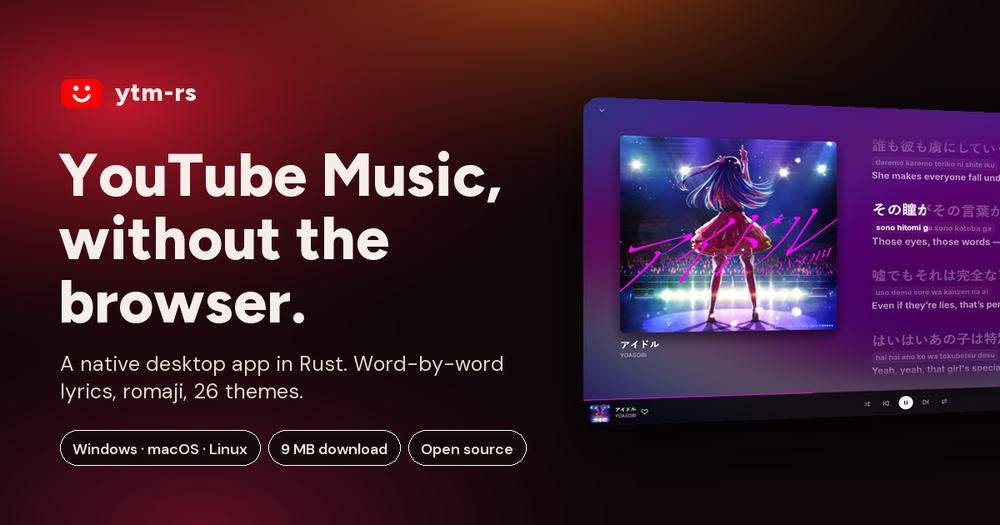
Run YouTube Music as a native desktop app on Windows, macOS and Linux, built in Rust with no Electron and word-by-word karaoke lyrics.

Visit websiteGitHub193 stars
image of Ytm Rs
TL;DR

ytm-rs is a native YouTube Music desktop client for Windows, macOS and Linux, written in Rust using egui for the interface and rodio for audio, with no Electron and no browser in the player. It is an unofficial app, not a Google product, that plays YouTube Music's catalogue with word-by-word karaoke lyrics, 30 themes, offline downloads, Last.fm scrobbling, and Discord Rich Presence. Best for people who already use YouTube Music and want a native desktop experience with more features than the browser provides, under the GPL-3.0 license.

Read the full breakdownHide the full breakdownWho it is for, how it works, trade-offs, the quick start and the FAQ
who it's for

Who ytm-rs is for#

YouTube Music users who want a native desktop app

ytm-rs replaces the YouTube Music browser tab with a window that starts faster, sits in the tray, responds to media keys with a seekable timeline, and updates itself in the background. Your home feed, liked songs, saved albums, playlists, and history are all there after signing in with your Google account.

Skip if:

Your music library is on Spotify or Apple Music. ytm-rs plays YouTube Music's catalogue only and cannot stream from other services.

Music fans who want karaoke lyrics and themes

The karaoke lyrics renderer ports Better Lyrics' word-by-word display natively, with romanization for Japanese, Korean, and Chinese text. Twenty-seven community themes are rebuilt as native Rust code, each restyling the full app. Click any lyric line to jump there, or tune the timing offset per song.

Skip if:

You rarely look at lyrics or never use themes. These are the app's most distinctive features; if neither matters to you, any YouTube Music client covers the basics.

Linux desktop users seeking a streaming music client

A one-line curl command installs ytm-rs to the home directory on Linux without root access, with MPRIS support for system media controls and Wayland close-to-tray. YouTube Music has no official desktop app on any platform; ytm-rs fills that gap for YouTube Music users on Linux.

Skip if:

You need Spotify's catalogue or Apple Music's lossless audio. ytm-rs plays YouTube Music only, and audio quality peaks at Opus ~256 kbps with YouTube Premium.

Groups who want synchronized listening sessions

Start a jam and share the code or link. Up to 16 people hear the same song at the same second, each streaming from YouTube directly. The host controls whether guests can add songs, control playback, both, or neither. The relay, built on Cloudflare Durable Objects, keeps everyone within a tenth of a second.

Skip if:

Not everyone in your group uses ytm-rs. The session requires all participants to have the app installed.

the problem

The problem it solves#

The official YouTube Music experience has no native desktop app. Users either keep a browser tab open or use an Electron wrapper that bundles a full web browser, consuming several hundred megabytes of RAM just to play a song. Neither option provides karaoke lyrics, true close-to-tray behavior, or any way to reduce the memory footprint on machines where RAM is limited.

A browser-based player imposes the browser's constraints on what a music app can do. There is no mini player, no native Discord Rich Presence, and no synchronized listening feature that works independently of the browser's sharing model. Users who want YouTube Music to behave like a first-class desktop application have had no first-party path to get there.

how ytm-rs solves it

How it solves it#

Word-by-word karaoke lyrics

Synced lyrics fill in word by word as they are sung, drawing the same way the Better Lyrics browser extension does. Sources include Better Lyrics, Unison, Musixmatch, LRCLib, and others; if one has nothing for a track, the next takes over. Japanese, Korean, and Chinese lines get romanization and translation in their own rows. Click any line to jump to that point in the song, or dial in a timing offset per track.

Native Rust renderer, no browser in the player

The interface is egui on OpenGL, the audio stack is rodio and Symphonia, and the whole app compiles to a single executable. ytm-rs downloads at 11 MB on Windows and uses around 130 MB of memory while a song plays, compared to 496 MB for YouTube Music in Chrome and 638 MB for Pear Desktop on the same hardware. When the window is idle, it draws zero frames.

30 themes, natively rendered

Twenty-seven of the 30 themes are native Rust ports of community CSS themes from the Better Lyrics project, including Apple Music, Material 3, Spicy, Spinning Record, and reCover. Each theme restyles the whole app, in light or dark mode, with real frosted glass where the theme calls for it. Three themes are native to ytm-rs: ytm-rs, Classic, and Fluent in the style of Windows 11.

Listen Together for up to 16 people

Start a listening session and share a code or link. Up to 16 people hear the same song at the same moment, each streaming from YouTube directly. The relay keeps everyone within a tenth of a second of the host. The host decides whether guests can add songs, control playback, both, or neither. Guest picks play next, marked with who added them.

Spotify library transfer

Bring playlists and Liked Songs from Spotify to YouTube Music in the background. ytm-rs asks for confirmation when it is not sure about a match, then creates a private playlist. Liked Songs transfer in the same order as on Spotify, and the process resumes from where it left off if interrupted. No Spotify Premium account is required: paste any public playlist link to transfer it without signing in.

Offline downloads and local file uploads

Save any song as a tagged .m4a file with its cover art, at the best quality your account provides, and play it offline from Library, then Downloads. Upload your own MP3, M4A, FLAC, OGG, or WMA files by dropping them on the window; tags and cover art are read from the file and uploaded to your YouTube Music library.

strengths · trade-offs

Strengths and trade-offs#

Strengths

  • Minimal footprint, native renderer11 MB download on Windows, around 130 MB of RAM with a song playing, and zero frames rendered when the window sits idle. egui on OpenGL redraws only when something changes, so the app is not pulling CPU in the background.
  • GPL-3.0, free to useNo ads, no accounts of its own, no paid tiers. The source is on GitHub and the GPL-3.0 license allows anyone to read, modify, and redistribute it, including using it internally at a business.
  • Full system integration on Windows, macOS, and LinuxSystem media controls with a seekable timeline on Windows (SMTC), macOS, and Linux (MPRIS); close to tray including Wayland; taskbar thumbnail buttons; mini player; and system-wide keyboard shortcuts configurable in Settings. Discord Rich Presence, Last.fm scrobbling, and ListenBrainz support are built in.
  • Automatic background updatesThe installed app checks GitHub for new releases, downloads them in the background, and installs when you close the app. The nightly channel offers builds of the newest changes. Portable versions on all three platforms also auto-update. Turn updates off, or stay on a specific version, in Settings.

Trade-offs

  • -Unofficial client, subject to YouTube API changesytm-rs is not a Google product and uses an internal YouTube Music API that is not documented publicly or guaranteed to remain stable. Changes YouTube makes can break playback, sign-in, or lyrics without warning. The 7 open GitHub issues at time of writing reflect active maintenance, but upstream API changes can outpace fixes.
  • -macOS app not notarizedThe macOS release is not notarized by Apple. The first time you open it, macOS Gatekeeper will block it. You must right-click the app and choose Open, or run xattr -dr com.apple.quarantine on it from the terminal. This is a one-time step, but it asks more of users than a notarized app would.
  • -Audio quality depends on your YouTube account tierFree listening works without signing in, but audio runs at Opus ~130 kbps. Signing in without YouTube Premium gives you your library but the same quality ceiling. YouTube Premium raises that to Opus ~256 kbps and unlocks Premium-only tracks. Users who want the highest audio fidelity from a streaming service should compare this against Apple Music's lossless tier.
versus alternatives

ytm-rs vs alternatives#

ytm-rs vs Spotify

ytm-rs and Spotify both offer a large catalogue of music in a desktop app, but they depend on separate services. Spotify is a commercial subscription platform with 100 million tracks, its own proprietary streaming infrastructure, and official apps for every platform including mobile and smart speakers. ytm-rs is an unofficial client for YouTube Music's catalogue.

Featureytm-rsSpotify
LicenseGPL-3.0Proprietary
CatalogueYouTube MusicSpotify
Offline playbackYes, tagged .m4aYes (Premium)
PlatformsWindows, macOS, LinuxWindows, macOS, Linux, mobile

ytm-rs is the better choice if you already pay for YouTube Premium or your music discovery happens on YouTube. Spotify remains the better fit if you rely on its editorial playlists, podcast catalogue, Spotify Connect for speakers, or mobile and voice assistant integrations that ytm-rs cannot replicate.

ytm-rs vs Apple Music

Apple Music is Apple's commercial streaming service with 100 million songs, lossless ALAC streaming, and iTunes Match for uploading your own library. ytm-rs runs on Windows, macOS, and Linux; Apple Music has official apps for Apple devices, Windows and Android, but none for Linux.

Featureytm-rsApple Music
PlatformsWindows, macOS, LinuxApple devices, Windows, Android (no Linux)
Audio qualityOpus ~256 kbps (YouTube Premium)Lossless / Hi-Res Lossless
Linux supportYesNo
Official statusUnofficial clientOfficial Apple app

ytm-rs is the better choice for Linux users who want a native streaming music client, or for anyone already invested in YouTube Music's catalogue. Apple Music is the better fit for users on Apple hardware who prioritize lossless audio quality and integration across Apple devices.

install · quick start

Quick start#

bash
Download from GitHub Releases at https://github.com/grapedjuice/ytm-rs/releases/latest on Windows and macOS, or install on Linux with:

```bash
curl -fsSL https://raw.githubusercontent.com/grapedjuice/ytm-rs/main/linux/install.sh | sh
```
tech stack · detected from GitHub

What it's built on#

Languages
Rust
frequently asked

FAQ#

Is ytm-rs an official YouTube Music or Google app?

No. ytm-rs is an unofficial client built by an independent developer and is not affiliated with Google or YouTube. It talks to the same internal API that music.youtube.com uses, so changes YouTube makes can occasionally affect playback, sign-in, or lyrics.

Is ytm-rs free to use?

Yes. ytm-rs is free and open source under the GPL-3.0 license. It has no ads, no accounts of its own, and no paid tiers. If your Google account has YouTube Premium, songs play at Opus ~256 kbps and Premium-only tracks are available; without Premium, audio plays at ~130 kbps.

Do I need a YouTube Premium subscription?

No. You can browse, search, and play without signing in at all. Signing in with a Google account adds your home feed, library, liked songs, and history. YouTube Premium raises audio quality to Opus ~256 kbps and unlocks Premium-only tracks.

Where do the synced lyrics come from?

Synced lyrics come from every source the Better Lyrics browser extension uses: Better Lyrics, Unison, Musixmatch, LRCLib, and others. If one source has nothing for a track, the next takes over. Machine translations and romanization for Japanese, Korean, and Chinese text can have rough spots.

How do I install ytm-rs and keep it updated?

Windows: download and run the installer from GitHub Releases. macOS: download the disk image, drag ytm-rs to Applications, then right-click it and choose Open the first time (the app is not notarized yet). Linux: run the one-line curl installer. Once installed, ytm-rs downloads new versions in the background and installs on close.

also worth a look

Similar open-source tools#

Navidrome

Alternative toSpotify

Self-hosted music server with Subsonic API and mobile app support

  • 24,635 GitHub stars
  • GPL-3.0Licence GPL-3.0

Koel

Alternative toSpotify

Self-hosted music streaming with smart playlists and mobile apps

  • 17,342 GitHub stars
  • MITLicence MIT

God's Eye View

Featured

Alternative toFFlightradar24

Real-time global intelligence on a 3D globe

  • 64,214 GitHub stars
  • CustomLicence MIT with third-party data restrictions

Excaliself

Alternative toExcalidraw+

Self-hosted Excalidraw with team space, folders, and live collab.

  • 153 GitHub stars
  • MITLicence MIT

Renderdoc

Alternative toNVIDIA Nsight Graphics

Frame-capture graphics debugger for Vulkan, D3D, and OpenGL

  • 11,304 GitHub stars
  • MITLicence MIT

Slint

Alternative toQt

Cross-platform native UI toolkit for Rust, C++, JS, and Python.

  • 24,574 GitHub stars
  • CustomLicence Triple-licensed: Royalty-free 2.0 / GPL-3.0-only / Commercial (Slint)
by category

Open source tools in these categories#

131

Design & Creative

ComfyUI, Excalidraw, Godot Engine

Sponsors

Inbox Zero

Alternative toSuperhuman

AI email assistant that drafts replies and clears your inbox

  • 12,987 GitHub stars
  • AGPL-3.0Licence AGPL-3.0
  • #Email

rakazo

Alternative toGrok Bot

AI teammates you own: your keys, your model, your machine.

  • 7,869 GitHub stars
  • Apache-2.0Licence Apache-2.0
  • #AI Agents

SnitchFeed

Live monitoring on LinkedIn, X, Reddit & more. Agentic social listening for startups.

Marketing & Growth

Advertise your product

New open source projects by email

The projects we add and every new guide. Free, unsubscribe any time.

Find open source alternatives to paid software

/
  • Claude Code to OpenCode
  • Jira to Windshift
  • Notion to AppFlowy
  • Slack to Mattermost
  • Linear to GitLab
  • Wispr Flow to Handy
  • Arc to Zen Browser
  • CapCut to Concat
  • Grok Bot to rakazo
  • Superhuman to Inbox Zero
  • Discord to Stoat
  • Airtable to AITable
  • Datadog to SigNoz
  • Muse to OpenClaw
  • Railway to Coolify
  • GitHub Copilot to Cline
  • Confluence to Wiki.js
  • Microsoft Teams to Rocket.Chat
  • 1Password to KeePassXC
  • Firebase to Supabase
  • Pinecone to Qdrant
  • Zapier to n8n
  • Devin AI to OpenHands
  • Asana to Leantime
  • Claude Code to OpenCode
  • Jira to Windshift
  • Notion to AppFlowy
  • Slack to Mattermost
  • Linear to GitLab
  • Wispr Flow to Handy
  • Arc to Zen Browser
  • CapCut to Concat
  • Grok Bot to rakazo
  • Superhuman to Inbox Zero
  • Discord to Stoat
  • Airtable to AITable
  • Datadog to SigNoz
  • Muse to OpenClaw
  • Railway to Coolify
  • GitHub Copilot to Cline
  • Confluence to Wiki.js
  • Microsoft Teams to Rocket.Chat
  • 1Password to KeePassXC
  • Firebase to Supabase
  • Pinecone to Qdrant
  • Zapier to n8n
  • Devin AI to OpenHands
  • Asana to Leantime