Open Source Alternatives
  • Alternatives
  • Categories
    Categories by size1,183 projects
    • Developer Tools610
    • AI & Machine Learning515
    • Business & Productivity283
    • Web Development214
    • Security & Monitoring178
    • Communication & Collaboration158
    • IT Management149
    • LLMOps & AI Tooling130
    • Cloud & Hosting129
    • Product & Project Management126
    Browse all 21 categoriesDesign & Creative, DevOps & CI/CD and 9 more
  • Blog
  • Advertise
SearchNotion, Slack, password manager.../
Submit
Open Source Alternatives
  • Alternatives
    • Developer Tools610
    • AI & Machine Learning515
    • Business & Productivity283
    • Web Development214
    • Security & Monitoring178
    • Communication & Collaboration158
    • Browse all 21 categories
  • Blog
  • Advertise
Submit your project

New open source projects by email

The projects we add and every new guide. Free, unsubscribe any time.

Open Source Alternatives LogoOpen Source Alternatives

Handpicked Open Source Alternatives to Paid Softwares

Add Open Source Alternatives as a preferred source on Google

Product

  • Categories
  • Tag
  • Advertise

Resources

  • Blog
  • Collection
  • Submit

Company

  • Privacy Policy
  • Terms of Service
  • Refund Policy
  • Sitemap

Alternatives

  • Claude Code
  • Jira
  • Notion
  • Slack
  • Linear
  • Wispr Flow
  • All alternatives
© 2026 Open Source Alternatives. All rights reserved.
Open SourceAlternatives
Home/Categories/Design & Creative/Pubwork
icon of Pubwork

Pubwork

Open source alternative to Microsoft Publisher

  • 1 stars
  • MPL-2.0
  • Active this week
  • Last commit today

Last verified Nov 9, 2026

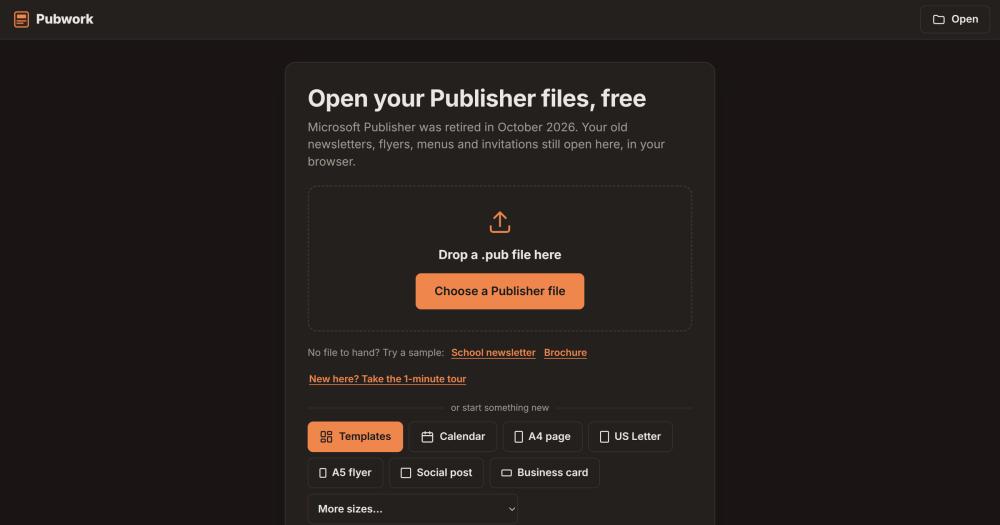
Convert Microsoft Publisher .pub files to PDF, Word, or images in any browser, with no upload and no account required.

Visit websiteGitHub1 stars
image of Pubwork
TL;DR

Pubwork opens, edits, and converts Microsoft Publisher .pub files in any web browser, without uploading them to a server. It was built after Microsoft retired Publisher in October 2026, leaving schools, churches, and small businesses with no way to access their existing .pub archives. Pubwork is a free alternative to the now-unavailable Microsoft Publisher, licensed under MPL-2.0, and runs on Windows, Mac, Linux, Chromebook, iPhone, iPad, and Android. Best for anyone who needs to open, modify, print, or convert .pub files without a Microsoft 365 Business subscription.

Read the full breakdownHide the full breakdownWho it is for, how it works, trade-offs, the quick start and the FAQ
who it's for

Who Pubwork is for#

Schools and nonprofits with Publisher archives

Organizations that created newsletters, flyers, permission slips, and event programmes in Publisher over many years need to open, update, and reprint those files after the retirement. Pubwork handles the entire in-browser workflow: open the .pub file, edit the text, and save as PDF for printing or Word for future editing.

Skip if:

A Microsoft 365 Business subscription with legacy access to Publisher is still active and the organization has no cross-platform or cross-device sharing requirement.

Designers receiving .pub files from clients

Design professionals who receive .pub files and need to extract or repurpose the content can export from Pubwork to Adobe InDesign (.idml) or Scribus (.sla), with text still editable and the matching free fonts bundled. This avoids manual recreation of layouts from scratch.

Skip if:

The client can deliver files in a format the designer's existing tools already read (AI, PDF/X, Word, or similar). Pubwork's value is specifically in bridging the .pub format gap.

IT teams doing a Publisher migration

Teams tasked with converting a directory of .pub files to PDF or other formats for archival can use Pubwork's batch conversion: choose a folder of files, and download the results as a ZIP. This is a browser-based workflow appropriate for moderate archive sizes.

Skip if:

The archive volume is large enough to need a scripted server-side pipeline. Pubwork runs in the browser and processes files in a single session.

the problem

The problem it solves#

Microsoft Publisher was removed from Microsoft 365 on 1 October 2026, and support for standalone purchased versions ended on 13 October 2026. No other Microsoft Office program opens .pub files, and Microsoft has not released a migration tool or replacement for the format. Schools, churches, clubs, and small businesses that built their document workflows around Publisher now have no path to open, modify, or convert those archived files.

The challenge has two layers: opening the .pub file at all, and doing something useful with it. Without Publisher running, there is no built-in way to read the format, let alone convert it to PDF, extract images, or update text. Organizations with hundreds of archived documents face the choice of paying for a continuing Microsoft 365 Business subscription purely to maintain access to their Publisher installation, or accepting that those documents are no longer editable.

how Pubwork solves it

How it solves it#

Publisher 97 to 365 compatibility

Opens .pub files from Publisher 97 and 98 through Publisher 2021 and Microsoft 365. Handles text, pictures, shapes, tables, WordArt, and linked text boxes. Files from Publisher 95 and older cannot be read.

In-browser text and layout editing

Double-click any text to type, drag pictures and shapes to move them, adjust fonts, colours, line spacing, and rotation. Supports bulleted and numbered lists, table row and column management, merged cells, master pages, guides, spell checking, and undo.

Professional export formats

Saves as PDF (with searchable text, embedded fonts, and optional CMYK with bleed and crop marks for print shops), Word (.docx), PowerPoint (.pptx), LibreOffice Draw (.odg), PNG, JPG, SVG, Scribus (.sla), and Adobe InDesign (.idml). The InDesign and Scribus exports keep text editable and include the free fonts the page uses.

Local-only file processing

Files are read inside the browser using a WebAssembly build of libmspub, LibreOffice's Publisher import library. Nothing is uploaded; there is no server-side processing, no account, and no cookies tracking file names or contents. The MPL-2.0 source code is available for independent audit.

Offline use after first visit

A service worker caches the application after the first visit, so Pubwork continues to work in that browser without an internet connection. Because files are read locally on the device, no network access was ever required for the core reading and editing functionality.

strengths · trade-offs

Strengths and trade-offs#

Strengths

  • Files never reach a serverUnlike cloud-based .pub converters that upload and process files on remote infrastructure, Pubwork's conversion runs entirely in the browser via WebAssembly. The MPL-2.0 source code is publicly available on GitHub so any organization can verify that no network request carries file data. This makes it appropriate for documents marked confidential or sensitive.
  • Runs on any device without installationWorks in Chrome, Edge, Firefox, and Safari on Windows, Mac, Linux, Chromebook, iPhone, iPad, and Android. No plugin, extension, or desktop software to install. After the first visit, the service worker keeps it working offline.
  • Self-hostable on a static hostBuild with `npm run build` using Node.js 18 or newer and deploy the `dist/` folder to any web server, CDN, or file host. The WebAssembly reader is pre-compiled in `public/pubreader/`, so a standard deployment does not require Emscripten or a build chain beyond Node.js.

Trade-offs

  • -Very new project with minimal communityThe repository was created in October 2026 and has 1 GitHub star and 0 forks. Bug reports and contributed fixes will move more slowly than established open source tools. Organizations running their own self-hosted copies should expect to handle edge cases in .pub file parsing themselves.
  • -Publisher 95 and older files cannot be readFiles from Publisher 95 and earlier are not supported. The WebAssembly reader is built from libmspub, which covers Publisher 97 onward. Very old archives may require a different migration path.
versus alternatives

Pubwork vs alternatives#

Pubwork vs Microsoft Publisher

Both tools open and edit Microsoft Publisher .pub files. The key context: Microsoft removed Publisher from Microsoft 365 on 1 October 2026 and ended support for standalone purchased versions on 13 October 2026. Pubwork exists specifically to serve the users that retirement left without a tool.

FeaturePubworkMicrosoft Publisher
LicenseMPL-2.0 (open source)Proprietary
AccessAny browser, freeNo longer available to purchase
File processingLocal, never uploadedOn-device
ExportPDF, Word, PowerPoint, InDesign, Scribus, SVG, PNG, JPGPDF, Word, XPS, HTML
PlatformsWindows, Mac, Linux, Chromebook, Android, iOSWindows only
Self-hostingYes, any static hostNo
OfflineYes (service worker)Requires installed copy

For anyone who needs to open, edit, or convert .pub files today, Pubwork is the practical path. Publisher itself cannot be downloaded or activated for new users. Organizations that built workflows around Publisher need a migration path; Pubwork reads files from Publisher 97 through Publisher 2021 and Microsoft 365, adds export formats Publisher never offered (InDesign, Scribus, SVG), and runs on devices Publisher never supported (Mac, Linux, Chromebook, Android, iOS).

The case where Microsoft Publisher remains the better choice is narrow: an organization that already has it running under a legacy Microsoft 365 subscription, has no need to edit files on non-Windows devices, and has no near-term migration requirement. For every other scenario, including opening existing archives, converting to PDF or Word, or working across devices, Pubwork covers the gap without cost or installation.

install · quick start

Quick start#

bash
Self-host Pubwork by installing dependencies and building the deployable site with Node.js 18 or newer.

```bash
npm install
npm run build
```
tech stack · detected from GitHub

What it's built on#

Languages
JavaScript
frequently asked

FAQ#

Why can I no longer open .pub files in Microsoft Publisher?

Microsoft removed Publisher from Microsoft 365 on 1 October 2026, and support for standalone purchased versions ended on 13 October 2026. No other Microsoft Office application opens .pub files. Pubwork runs in any modern browser and reads Publisher files from version 97 through Publisher 2021 and Microsoft 365.

Does Pubwork upload my files to a server?

No. The entire program runs in the browser using a WebAssembly build of libmspub, LibreOffice's Publisher import library. Your file never leaves your device; there is no server-side processing, no account required, and no limit on the number of files you can open. The MPL-2.0 source code is on GitHub if you want to verify this independently.

Can I run my own copy of Pubwork on my own server?

Yes. The repository requires Node.js 18 or newer. Run npm install and npm run build; the finished site goes into dist/ and deploys to any static host, CDN, or internal web server. The WebAssembly reader is pre-built in public/pubreader/, so you do not need Emscripten for a standard deployment.

Which formats can Pubwork export to?

PDF (with searchable text, embedded fonts, and optional CMYK with bleed and crop marks for print shops), Word (.docx), PowerPoint (.pptx), LibreOffice Draw (.odg), PNG, JPG, SVG, Scribus (.sla), and Adobe InDesign (.idml). The InDesign and Scribus exports keep text editable and bundle the free substitute fonts the page uses.

Does Pubwork work offline?

Yes. After your first visit, a service worker caches the application so Pubwork continues to work in that browser without an internet connection. Because files are processed locally on your device, they never needed network access in the first place.

also worth a look

Similar open-source tools#

ApolloShell

InDesign & Creative

macOS 26 desktop shell with sidebar, dock, launcher and dashboard

  • 130 GitHub stars
  • AGPL-3.0Licence AGPL-3.0

ScreenToGif

Alternative toSnagit

Screen, webcam, and sketchboard recorder with frame-level GIF editor

  • 27,890 GitHub stars
  • MS-PLLicence MS-PL

Stayput

InBusiness & Productivity

136 file tools for images, PDFs and video, no uploads or accounts.

  • MITLicence MIT

Lap

Alternative toMylio Photos

Local-first photo manager with on-device AI and face clustering

  • 4,264 GitHub stars
  • GPL-3.0Licence GPL-3.0

Reactive Resume

Alternative toResume.io

Resume builder with 18 templates, ATS checker, and job tracker.

  • 45,423 GitHub stars
  • MITLicence MIT

Screenshots

Alternative toCleanShot X

macOS screenshot and recorder, no cloud, no account, MIT licensed

  • 5 GitHub stars
  • MITLicence MIT
by category

Open source tools in these categories#

124

Design & Creative

ComfyUI, Excalidraw, Godot Engine
284

Business & Productivity

OpenClaw, Excalidraw, RustDesk

Sponsors

Inbox Zero

Alternative toSuperhuman

AI email assistant that drafts replies and clears your inbox

  • 12,942 GitHub stars
  • AGPL-3.0Licence AGPL-3.0
  • #Email

rakazo

Alternative toGrok Bot

AI teammates you own: your keys, your model, your machine.

  • 7,478 GitHub stars
  • Apache-2.0Licence Apache-2.0
  • #AI Agents

SnitchFeed

Live monitoring on LinkedIn, X, Reddit & more. Agentic social listening for startups.

Marketing & Growth

Advertise your product

New open source projects by email

The projects we add and every new guide. Free, unsubscribe any time.

Find open source alternatives to paid software

/
  • Claude Code to OpenCode
  • Jira to Windshift
  • Notion to AppFlowy
  • Slack to Mattermost
  • Linear to GitLab
  • Wispr Flow to Handy
  • Arc to Zen Browser
  • CapCut to Concat
  • Grok Bot to rakazo
  • Superhuman to Inbox Zero
  • Airtable to AITable
  • Muse to OpenClaw
  • Railway to Coolify
  • GitHub Copilot to Cline
  • Datadog to Netdata
  • Confluence to Wiki.js
  • Microsoft Teams to Rocket.Chat
  • 1Password to KeePassXC
  • Firebase to Supabase
  • Pinecone to Qdrant
  • Zapier to n8n
  • Devin AI to OpenHands
  • Asana to Leantime
  • Contentful to Strapi
  • Claude Code to OpenCode
  • Jira to Windshift
  • Notion to AppFlowy
  • Slack to Mattermost
  • Linear to GitLab
  • Wispr Flow to Handy
  • Arc to Zen Browser
  • CapCut to Concat
  • Grok Bot to rakazo
  • Superhuman to Inbox Zero
  • Airtable to AITable
  • Muse to OpenClaw
  • Railway to Coolify
  • GitHub Copilot to Cline
  • Datadog to Netdata
  • Confluence to Wiki.js
  • Microsoft Teams to Rocket.Chat
  • 1Password to KeePassXC
  • Firebase to Supabase
  • Pinecone to Qdrant
  • Zapier to n8n
  • Devin AI to OpenHands
  • Asana to Leantime
  • Contentful to Strapi