Open Source Alternatives
  • Alternatives
  • Categories
    Categories by size1,245 projects
    • Developer Tools641
    • AI & Machine Learning533
    • Business & Productivity299
    • Web Development217
    • Security & Monitoring196
    • Communication & Collaboration167
    • IT Management159
    • LLMOps & AI Tooling135
    • Design & Creative133
    • DevOps & CI/CD133
    Browse all 21 categoriesCloud & Hosting, Product & Project Management and 9 more
  • Blog
  • Advertise
SearchNotion, Slack, password manager.../
Submit
Open Source Alternatives
  • Alternatives
    • Developer Tools641
    • AI & Machine Learning533
    • Business & Productivity299
    • Web Development217
    • Security & Monitoring196
    • Communication & Collaboration167
    • Browse all 21 categories
  • Blog
  • Advertise
Submit your project

New open source projects by email

The projects we add and every new guide. Free, unsubscribe any time.

Open Source Alternatives LogoOpen Source Alternatives

Handpicked Open Source Alternatives to Paid Softwares

Add Open Source Alternatives as a preferred source on Google

Product

  • Categories
  • Tag
  • Advertise

Resources

  • Blog
  • Collection
  • Submit

Company

  • Privacy Policy
  • Terms of Service
  • Refund Policy
  • Sitemap

Alternatives

  • Claude Code
  • Jira
  • Notion
  • Slack
  • Linear
  • Wispr Flow
  • All alternatives
© 2026 Open Source Alternatives. All rights reserved.
Open SourceAlternatives
Home/Categories/Developer Tools/PyMemoryEditor
icon of PyMemoryEditor

PyMemoryEditor

  • 227 stars
  • MIT
  • Active this week
  • Last commit 1 day ago

Last verified Nov 14, 2026

Edit and analyze process memory in Windows applications with a Python library that provides read, write, and search operations across multiple backends.

Visit websiteGitHub227 stars
Image for PyMemoryEditor
TL;DR

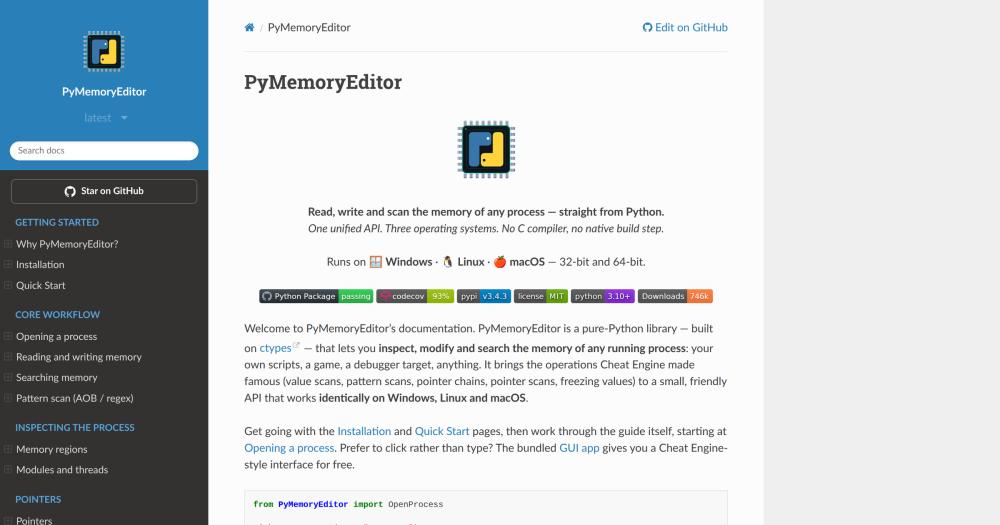
PyMemoryEditor is a pure-Python library for reading, writing, and scanning the memory of any running process, using the same value-scan and pointer-chain workflow made familiar by Cheat Engine. It runs on Windows, Linux, and macOS through Python's ctypes module, with no C compiler or native build step needed. It is MIT licensed, installable from PyPI, and pairs with an optional NumPy acceleration extra for 10-30x faster scans. Best for Python developers who need cross-platform process memory access for game modding, security research, or observability tooling.

Read the full breakdownHide the full breakdownWho it is for, how it works, trade-offs, the quick start and the FAQ
who it's for

Who PyMemoryEditor is for#

Game modders automating value edits and pointer chains

PyMemoryEditor handles the full Cheat Engine loop in Python: scan for the current health value, take damage to reduce it, refine the candidate addresses, then read and write the final address. The reverse pointer scan finds the static pointer chain so the same script works across game restarts without re-scanning.

Skip if:

Skip if the game has anti-cheat software running. PyMemoryEditor uses the same OS-level APIs as Cheat Engine, and anti-cheat systems that detect memory reads will flag both the same way.

Security researchers inspecting live process state

Attach to a running process, enumerate memory regions, scan for known patterns, and inspect data structures live without stopping the process or attaching a full debugger. The AOB and regex pattern scans are well-suited for finding specific code sequences or data signatures.

Skip if:

Only use on processes you own or have explicit authorization to inspect. PyMemoryEditor uses standard OS APIs; the same legal and ethical limits that apply to debuggers apply here.

Developers building process observability tooling

Sample variables from a running process without instrumenting its source code. Use it to watch a counter increment in a black-box binary, log a buffer's contents periodically, or verify that a live value matches an expected state. The Python API integrates directly with logging and monitoring scripts.

Skip if:

Skip if the process is instrumented with OpenTelemetry or an APM agent. Live memory reads are slower and less reliable than instrumented metrics for production observability.

AI-assisted memory scanning over MCP

With the MCP extra installed, an AI assistant in Claude Desktop or any MCP-compatible client can run the scan-refine-read workflow autonomously. The user describes the value to find; the assistant scans, asks for a game state change to narrow results, and returns the address. Scan handles keep large result sets server-side.

Skip if:

Skip if the target process is not reachable from the same machine where the MCP server runs. Remote process inspection is not supported.

the problem

The problem it solves#

Working with process memory from Python has long meant choosing between Windows-only libraries, fragile ctypes wrappers that break across platforms, or investing in heavyweight commercial debuggers built for a different purpose. The result is that cross-platform memory inspection, common in game modding, security research, and runtime debugging, either requires C extension builds or is locked to a single operating system.

The core operations (reading a value from a known address, running a first scan to find candidate addresses, narrowing them across iterations, following pointer chains) each require platform-specific API calls that differ between Windows, Linux, and macOS. Without a unified abstraction, developers end up writing and maintaining three separate code paths or accepting Windows-only tooling.

how PyMemoryEditor solves it

How it solves it#

Value and pattern memory scanning

Scans a running process for all addresses holding a specific value, with eight comparison modes (exact, greater than, less than, changed, unchanged, and others). An AOB (Array of Bytes) scan and regex scan find code or data by byte signature. The classic Cheat Engine first-scan-then-refine loop runs in Python in a few lines.

Cross-platform API: Windows, Linux, macOS

One Python API works on Windows, Linux, and macOS, both 32-bit and 64-bit. The underlying ctypes calls differ per OS, but the application code stays identical. Write a memory scanner once and run it on any platform without conditionals.

Optional NumPy acceleration

Adding the speed extra installs NumPy and vectorizes the numeric scan comparison loop. Selective scans run 10-30x faster than the pure-Python path with identical results. The fast path is opt-in; install PyMemoryEditor without extras and performance is still usable for typical workloads.

Reverse pointer scan for ASLR-resistant offsets

A reverse pointer scan finds the static module name and offset chain that reliably points to a target address across process restarts. The chain beats Address Space Layout Randomization (ASLR); save the module-plus-offset path once and reuse it on every launch without re-scanning.

MCP server for AI-assisted workflows

An installable MCP server exposes 14 tools covering open, scan, refine, read, write, and pointer operations. An AI assistant can run the full scan loop independently, scanning, asking the user to trigger a game event, refining candidates, and returning the address. Scan results are kept server-side so a 40,000-hit first scan costs a few tokens, not the entire context window.

Bundled Cheat Engine-style GUI app

A visual scanner ships as an optional app extra. Install it with pip install "PyMemoryEditor[app]" and run pymemoryeditor to open the GUI, attach to a process, scan for values, and freeze them without writing a script. Useful for exploring memory interactively before scripting the repeatable parts.

strengths · trade-offs

Strengths and trade-offs#

Strengths

  • No native build stepPure Python built on ctypes means pip install is the entire setup. No C compiler, no native extension wheel, no platform-specific build toolchain. This matters most on Linux and macOS, where most Windows-centric memory tools require Wine or simply do not run.
  • MIT license: no usage restrictionsMIT licensed for personal and commercial use. There are no restrictions on incorporating PyMemoryEditor into commercial tools, internal tooling, or redistributed scripts. Unlike some specialized debugger SDKs, there is no enterprise licensing tier or per-seat fee.
  • Active development with low open issue countLast pushed on 2026-11-13, with 2 open issues, covering Windows, Linux, and macOS simultaneously. The GitHub Actions CI runs the test suite across all three platforms on every push, so platform regressions surface before release.
  • Three deployment modes in one packageThe same codebase serves three separate workflows: programmatic scripting via the Python API, visual interaction via the GUI app, and AI-driven automation via the MCP server. Switching between them is a matter of which pip extras are installed.

Trade-offs

  • -OS permissions required to read other processesOn Linux, reading another process's memory requires ptrace permissions or running as root. On macOS, the target process must be signed to allow inspection, or the script must run as root. On Windows, the script needs sufficient privileges for the process handle. These are OS-enforced limits, not library limits, but they add friction for some deployment scenarios.
  • -Pure-Python path is slow on large address spacesThe pure-Python scan path is correct but slow on processes with large address spaces. For game titles or processes that hold gigabytes of heap, the pure-Python path can take several seconds per scan pass. The speed extra (NumPy) brings it to usable performance, but adds a dependency that may not fit minimal environments.
versus alternatives

PyMemoryEditor vs alternatives#

PyMemoryEditor vs Cheat Engine

Both tools implement the same core memory scanning workflow: attach to a process, scan for values, refine the results, and read or write target addresses. Cheat Engine is the standard tool for this use case and is free for personal use on Windows. The key difference is that PyMemoryEditor is a Python library, not a GUI tool, and runs on Windows, Linux, and macOS.

FeaturePyMemoryEditorCheat Engine
PlatformWindows, Linux, macOSWindows only
InterfacePython API + optional GUIGUI (scripting via Lua)
Installationpip installInstaller download
LicenseMITFreeware (closed source)
AutomationPython scripts, MCP serverLua scripts
NumPy accelerationYes (optional)N/A

PyMemoryEditor is the better choice when the workflow needs to run on Linux or macOS, when the scan loop should integrate with Python code, or when an AI assistant should drive the process over MCP. Cheat Engine is still the more capable GUI tool on Windows, with a larger feature set for advanced table-based modding and community script libraries.

PyMemoryEditor vs Commercial Debuggers

Commercial tools in the security research space, such as IDA Pro, are built for static binary analysis and disassembly rather than live memory reading and editing. IDA Pro's debugger module does support live process attachment, but it carries significant per-seat licensing costs and targets reverse engineers analyzing binary code, not developers scripting live memory reads. PyMemoryEditor is the practical choice when the goal is reading and modifying values in a running process from Python, not analyzing binary structure.

FeaturePyMemoryEditorIDA Pro
Primary useLive process memory editingStatic binary analysis
LicenseMITProprietary
CostFreeCommercial license
Python APIYes (native)Yes (IDAPython plugin)
Cross-platformWindows, Linux, macOSWindows, Linux, macOS

For Python developers who need runtime memory inspection without a full reverse engineering toolkit, PyMemoryEditor covers the use case at no cost.

install · quick start

Quick start#

bash
Install PyMemoryEditor from PyPI with optional extras for the GUI app, faster scans, or the MCP server.
```bash
pip install PyMemoryEditor
pip install "PyMemoryEditor[app]"
pip install "PyMemoryEditor[speed]"
pip install "PyMemoryEditor[mcp]"
```
tech stack · detected from GitHub

What it's built on#

Languages
Python
frequently asked

FAQ#

Does PyMemoryEditor work on Linux and macOS, or only Windows?

PyMemoryEditor supports Windows, Linux, and macOS, both 32-bit and 64-bit. The API is identical across all three. On Linux, the script needs ptrace permissions (run as root or adjust ptrace_scope); on macOS, the target process must allow inspection or the script must run as root.

How do I install PyMemoryEditor and its optional extras?

Install the base library with pip install PyMemoryEditor. For the bundled GUI app, use the app extra: pip install "PyMemoryEditor[app]". For faster scans with NumPy, add the speed extra: pip install "PyMemoryEditor[speed]". For the MCP server for AI assistants, add the mcp extra: pip install "PyMemoryEditor[mcp]". Extras can be combined: pip install "PyMemoryEditor[app,speed,mcp]".

What is the difference between a value scan and an AOB scan?

A value scan searches all process memory for addresses holding a specific typed value, such as an integer equal to 100. An AOB (Array of Bytes) scan searches for a specific byte sequence, often a code signature or a known data structure marker. Value scans are the starting point for game modding; AOB scans are more common in security research and reverse engineering.

Can an AI assistant use PyMemoryEditor directly?

Yes. Installing the mcp extra adds a Model Context Protocol server that exposes 14 tools for opening a process, scanning, refining, reading, writing, and following pointer chains. The server keeps scan results server-side behind handles, so large result sets do not overflow the AI's context window. Claude Desktop and any MCP-compatible client can connect to it.

Is it legal to use PyMemoryEditor on other processes?

PyMemoryEditor uses standard OS-level APIs to interact with processes, the same APIs that debuggers, profilers, and Cheat Engine use. Using it on processes you own or have explicit authorization to inspect is legal. Using it on processes you do not own, or without authorization, raises the same legal and ethical concerns as any unauthorized memory inspection. The README explicitly states this under its responsible-use note.

also worth a look

Similar open-source tools#

REA (Reverse Engineer Anything)

Featured

Alternative toRevEng.AI

AI-powered reverse engineering for binaries, apps, and assemblies.

  • 458,164 GitHub stars
  • MITLicence MIT

Osv Scanner

Alternative toSnyk

Open source dependency vulnerability scanner backed by OSV.dev

  • 11,510 GitHub stars
  • Apache-2.0Licence Apache-2.0

mRemoteNG

Alternative toDevolutions Remote Desktop Manager

Tabbed multi-protocol remote connections manager for Windows

  • 11,219 GitHub stars
  • GPL-2.0Licence GPL-2.0

Apache SkyWalking

Alternative toDatadog

APM platform covering traces, metrics, logs, and AI agent monitoring.

  • 25,004 GitHub stars
  • Apache-2.0Licence Apache-2.0

Uptrace

Alternative toDatadog

Self-hosted APM for distributed traces, metrics, and logs.

  • 4,311 GitHub stars
  • AGPL-3.0Licence AGPL-3.0

ClickStack

Alternative toDatadog

Self-hosted observability stack on ClickHouse with session replay

  • 10,031 GitHub stars
  • MITLicence MIT
by category

Open source tools in these categories#

641

Developer Tools

REA (Reverse Engineer Anything), Skills for Real Engineers, superpowers
196

Security & Monitoring

RustDesk, REA (Reverse Engineer Anything), Sherlock

Sponsors

Inbox Zero

Alternative toSuperhuman

AI email assistant that drafts replies and clears your inbox

  • 13,025 GitHub stars
  • AGPL-3.0Licence AGPL-3.0
  • #Email

rakazo

Alternative toGrok Bot

AI teammates you own: your keys, your model, your machine.

  • 8,291 GitHub stars
  • Apache-2.0Licence Apache-2.0
  • #AI Agents

SnitchFeed

Live monitoring on LinkedIn, X, Reddit & more. Agentic social listening for startups.

Marketing & Growth

Advertise your product

New open source projects by email

The projects we add and every new guide. Free, unsubscribe any time.

Find open source alternatives to paid software

/
  • Claude Code to OpenCode
  • Jira to Windshift
  • Notion to AppFlowy
  • Slack to Mattermost
  • Linear to GitLab
  • Wispr Flow to Handy
  • Arc to Zen Browser
  • CapCut to Concat
  • Grok Bot to rakazo
  • Superhuman to Inbox Zero
  • Discord to Stoat
  • Airtable to AITable
  • Datadog to SigNoz
  • Muse to OpenClaw
  • Railway to Coolify
  • GitHub Copilot to Cline
  • Confluence to Wiki.js
  • Microsoft Teams to Rocket.Chat
  • 1Password to KeePassXC
  • Firebase to Supabase
  • Pinecone to Qdrant
  • Zapier to n8n
  • Devin AI to OpenHands
  • Asana to Leantime
  • Claude Code to OpenCode
  • Jira to Windshift
  • Notion to AppFlowy
  • Slack to Mattermost
  • Linear to GitLab
  • Wispr Flow to Handy
  • Arc to Zen Browser
  • CapCut to Concat
  • Grok Bot to rakazo
  • Superhuman to Inbox Zero
  • Discord to Stoat
  • Airtable to AITable
  • Datadog to SigNoz
  • Muse to OpenClaw
  • Railway to Coolify
  • GitHub Copilot to Cline
  • Confluence to Wiki.js
  • Microsoft Teams to Rocket.Chat
  • 1Password to KeePassXC
  • Firebase to Supabase
  • Pinecone to Qdrant
  • Zapier to n8n
  • Devin AI to OpenHands
  • Asana to Leantime