Open Source Alternatives
  • Alternatives
  • Categories
    Categories by size1,182 projects
    • Developer Tools610
    • AI & Machine Learning515
    • Business & Productivity282
    • Web Development214
    • Security & Monitoring178
    • Communication & Collaboration158
    • IT Management149
    • LLMOps & AI Tooling130
    • Cloud & Hosting129
    • Product & Project Management126
    Browse all 21 categoriesDesign & Creative, DevOps & CI/CD and 9 more
  • Blog
  • Advertise
SearchNotion, Slack, password manager.../
Submit
Open Source Alternatives
  • Alternatives
    • Developer Tools610
    • AI & Machine Learning515
    • Business & Productivity282
    • Web Development214
    • Security & Monitoring178
    • Communication & Collaboration158
    • Browse all 21 categories
  • Blog
  • Advertise
Submit your project

New open source projects by email

The projects we add and every new guide. Free, unsubscribe any time.

Open Source Alternatives LogoOpen Source Alternatives

Handpicked Open Source Alternatives to Paid Softwares

Add Open Source Alternatives as a preferred source on Google

Product

  • Categories
  • Tag
  • Advertise

Resources

  • Blog
  • Collection
  • Submit

Company

  • Privacy Policy
  • Terms of Service
  • Refund Policy
  • Sitemap

Alternatives

  • Claude Code
  • Jira
  • Notion
  • Slack
  • Linear
  • Wispr Flow
  • All alternatives
© 2026 Open Source Alternatives. All rights reserved.
Open SourceAlternatives
Home/Categories/Developer Tools/Qualitylayer
icon of Qualitylayer

Qualitylayer

  • 2.1K stars
  • Proprietary (subscription required, source-available)
  • Active this week
  • Last commit today

Last verified Nov 9, 2026

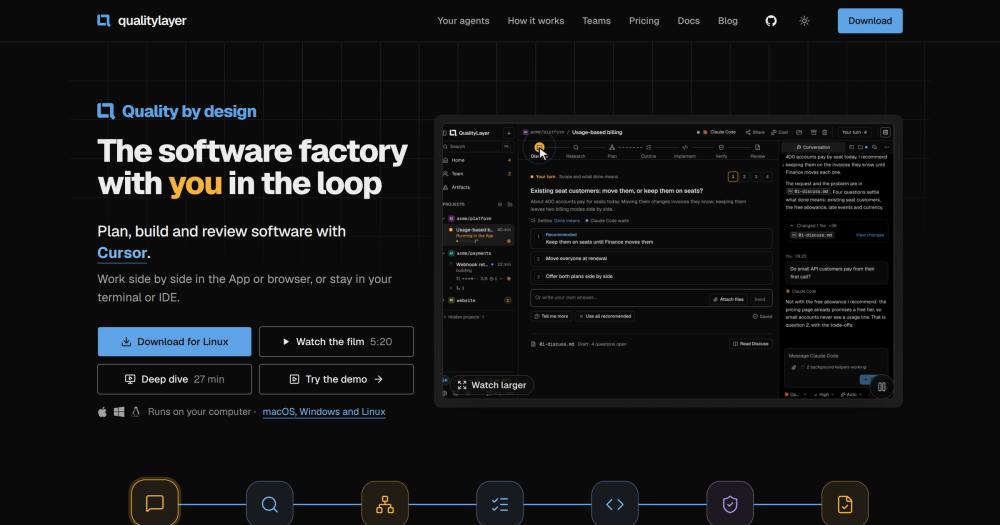
Orchestrate software changes from prompt to pull request with coding agents, keeping humans in the approval loop at planning and review.

Visit websiteGitHub2.1K stars
image of Qualitylayer
TL;DR

Qualitylayer is a workflow layer that structures every software change into eight steps: Discuss, Research, Plan, Outline, Implement, Verify, Review, and Pull Request. It works with Claude Code, Codex, Cursor, and other coding agents using your existing subscriptions or API keys. You approve the plan before any code is written and approve the finished change before it merges, with a separate review agent checking the work against your original request in between. QualityLayer is source-available with a subscription requirement and runs on your own computer. Best for engineers and small teams that use coding agents and want reproducible workflows with clear human approval gates.

Read the full breakdownHide the full breakdownWho it is for, how it works, trade-offs, the quick start and the FAQ
who it's for

Who Qualitylayer is for#

Engineers using Claude Code or Codex on complex features

QualityLayer gives your coding agent a fixed workflow: a plan you approve before code is written, test-first implementation, an independent check, and a final review before merge. The plan and all decisions land in your repository as Markdown, so the history of a feature is readable without opening a separate tool.

Skip if:

Skip if you are prototyping throwaway code or running quick experiments where approval steps add more time than the task saves. Chat mode is the lighter path for ad-hoc questions and one-off changes.

Small teams where code review still matters

The independent Verify step adds a separate agent that reads your original request and checks the diff against it, running your project's tests, linters, and security scan before the change reaches you. Teams that care about catching regressions and reviewing with context, not just diff lines, benefit from this step.

Skip if:

Skip if your team already has a thorough human review process and the independent agent review would duplicate effort. The verify step can be configured to run project checks only.

Teams coordinating multiple coding agents

The ql-peer skill lets connected agents hand work to each other. An engineer can instruct Claude Code to ask Codex for a review, and Codex's reply arrives in the same session without manual copying. This is useful when different agents have different strengths or when you want a second perspective on a specific change.

Skip if:

Skip if you work with a single coding agent. The ql-peer skill adds value only when multiple agents are connected and their different strengths are relevant to the task.

Product managers reviewing plans before engineering starts

Product mode starts with a product brief rather than a technical plan. A product manager can describe the change in plain words, review clickable artifact screens, and approve the plan before an engineer writes any code. The PM's approval is recorded in the plan file in the repository.

Skip if:

Skip if the product manager is not involved in the approval step. Product mode adds value only when the PM or design lead wants to review the plan and the finished change.

the problem

The problem it solves#

Coding agents that work without a structured workflow tend to implement the wrong thing, skip tests, or produce large diffs that are hard to review. The speed benefit of AI-assisted coding disappears when the engineer's job shifts from writing code to untangling what the agent changed.

The deeper problem is the absence of a shared contract. Without a plan the engineer has approved, the agent researches the codebase differently each session, makes its own architectural decisions, and leaves no record of what it tried or why. The result is changed code with no audit trail and no easy way to ask for targeted corrections once a large diff already exists.

how Qualitylayer solves it

How it solves it#

Eight-step structured workflow

Every change moves through Discuss, Research, Plan, Outline, Implement, Verify, Review, and Pull Request. Each step saves readable Markdown files in your repository, so you can read, diff, and commit the history of decisions, questions, and test runs alongside the code.

Visual plan with diagrams and clickable mockups

Before any code changes, your agent produces a visual plan with diagrams and clickable artifact screens for you to review and comment on. You approve the plan before the agent starts building. The approval and any comments you leave are written to the plan file in your repository.

Independent verification by a separate agent

After implementation, a separate agent that did not write the code reviews the change against your original request. It runs your project's checks (tests, types, linters, code health, security scan) and reports findings to your agent to fix before the change reaches you in Review.

Works with existing coding agents and subscriptions

QualityLayer connects to Claude Code, Codex, Cursor, Grok, Antigravity, Pi, OpenCode, and GitHub Copilot. You sign in with the subscription or API key you already have. The ql-peer skill lets Claude Code ask Codex to review a change and receive its reply in the same session.

Local execution with files stored in your repository

The App, your agent, and your repository all run on your computer. Task files stay on disk as Markdown files in your repository. Shared tasks are encrypted before leaving your machine. The CLI installs on macOS, Linux, WSL, and Windows with a single command.

strengths · trade-offs

Strengths and trade-offs#

Strengths

  • Works with the agents you already pay forQualityLayer is a workflow layer, not a replacement agent. It connects to Claude Code, Codex, Cursor, and six other coding agents using your existing subscriptions. You are not switching tools or paying for a new model tier: the agents you already use get a structured workflow.
  • Full audit trail in your repositoryEvery step writes Markdown files: the plan, decisions, questions, test run results, and review comments all land in your repository alongside the code. You can read what the agent tried and why it made its choices without opening a separate dashboard.
  • Agent-to-agent collaboration via ql-peerThe ql-peer skill lets connected agents hand work to each other. Claude Code can ask Codex for an independent review and receive its reply in the same session, without you orchestrating the exchange manually. This extends to all eight supported agents.
  • Two workflow levels for engineers and product managersEngineering mode starts with a technical plan. Product mode starts with a product brief, so a product manager can describe the change in plain words and review clickable artifact screens before engineering starts. You choose the level in Settings.

Trade-offs

  • -Source-available license requires an active subscriptionQualityLayer is not open source. The source code is available to inspect and modify for internal use, but redistribution, sharing with third parties, and offering it as a hosted or managed service are not permitted. An active paid subscription is required; use after expiry requires renewal.
  • -Workflow overhead on simple or quick changesThe eight-step workflow adds Discuss, Plan, and Review steps before and after implementation. For a quick one-line bug fix, the overhead is unnecessary. The README documents Chat mode to bypass workflow steps for one-off questions, and the ability to start existing plans directly at Plan.
  • -Requires a supported coding agent to functionQualityLayer does not include a built-in coding agent. It orchestrates Claude Code, Codex, Cursor, and others. If your team does not already use a supported agent, you will need to set one up and obtain a subscription or API key before QualityLayer can run a task.
versus alternatives

Qualitylayer vs alternatives#

QualityLayer vs Devin

Devin and QualityLayer both use AI agents to handle software engineering tasks, but they represent different models. Devin is a fully autonomous AI software engineer that accepts a task prompt and returns a finished pull request with minimal human involvement. QualityLayer is a workflow layer that keeps the engineer in the loop at every approval step.

FeatureQualityLayerDevin
Human approval gatesPlan and ReviewOptional check-ins
Agent infrastructureRuns on your computerDevin's cloud
Works with existing agentsYesNo (Devin is the agent)
LicenseSource-available, subscriptionProprietary, usage-based
Repository audit trailMarkdown per stepDevin's dashboard

QualityLayer is the stronger choice when you need an auditable record of agent decisions, want to approve the plan before any code is written, or need your code to stay on your machine. Devin fits teams that want a hands-off agent and are comfortable with cloud-side code execution. For high task volume, Devin's per-task pricing grows with usage; QualityLayer's subscription is a fixed cost.

QualityLayer vs GitHub Copilot Workspace

GitHub Copilot Workspace is GitHub's built-in environment for structured, agent-assisted changes inside a GitHub repository. Both tools add a planning step before implementation; they differ in workflow depth and agent flexibility.

FeatureQualityLayerGitHub Copilot Workspace
Independent review agentYesNo
Works outside GitHubYes (any git repo)Requires GitHub
Agents supportedClaude Code, Codex, Cursor, 5 othersGitHub Copilot
Repository audit trailMarkdown per stepGitHub UI
LicenseSource-available, subscriptionProprietary, Copilot plan

QualityLayer suits engineers who want a deeper workflow with independent verification and the flexibility to use Claude Code, Codex, or other agents. GitHub Copilot Workspace is a good choice for teams already on a GitHub Copilot plan who want a lightweight planning step inside their existing GitHub workflow and do not need multi-agent support or a local audit trail.


install · quick start

Quick start#

bash
Install the CLI on macOS, Linux or WSL; use the PowerShell installer on Windows.
```bash
curl -fsSL https://qualitylayer.dev/install.sh | bash
```
tech stack · detected from GitHub

What it's built on#

Frameworks
Next.jsReact
frequently asked

FAQ#

Does my code leave my computer when I use QualityLayer?

No. The App, your coding agent, and your repository all run on your computer. Task files stay on disk as Markdown files in your repository. When you share a task with a team member, the task data is encrypted before it leaves your machine. Your coding agent sends requests to its own provider, which is subject to that provider's terms.

Can I use the coding agent subscriptions I already have?

Yes. QualityLayer connects to Claude Code, Codex, Cursor, Grok, Antigravity, Pi, OpenCode, and GitHub Copilot using your existing subscription or API key. You choose which model handles building and which handles independent review separately in Settings. QualityLayer does not include a built-in model.

How is QualityLayer different from using an agent in plan mode?

Plan mode in Claude Code or Cursor is a single pre-implementation review before the agent runs. QualityLayer adds a full eight-step workflow: separate Discuss, Research, Plan (with visual diagrams and clickable mockups), Outline, Implement, Verify (independent agent review), Review (you approve the diff), and Pull Request steps. Each step writes Markdown to your repository. The key addition is the independent Verify step, where a separate agent checks the finished change against your original request before you see it.

Is QualityLayer open source?

No. QualityLayer is source-available with a subscription requirement. The source code is on GitHub and you may read and modify it for internal use, but redistribution, sharing with third parties, and offering it as a managed service are not permitted. An active paid subscription is required for continued use. The licence terms are in the LICENSE file in the repository.

What happens to my plans and task history if I cancel my subscription?

Your plans and task history are Markdown files stored in your repository, so the files themselves stay after the subscription lapses. You would not be able to continue running new tasks without renewing, but all prior decisions, diagrams, and test run records remain in your repository indefinitely.

also worth a look

Similar open-source tools#

rakazo

Featured

Alternative toGrok Bot

AI teammates you own: your keys, your model, your machine.

  • 7,478 GitHub stars
  • Apache-2.0Licence Apache-2.0

Commonly

InCommunication & Collaboration

Bring your AI agents into one shared team workspace, self-hosted.

  • 1,391 GitHub stars
  • Apache-2.0Licence Apache-2.0

Dev 3.0

Alternative toConductor

Kanban board where every card is a live AI agent in its own worktree.

  • 329 GitHub stars
  • Apache-2.0Licence Apache-2.0

Agent Teams AI

Alternative toConductor

AI agent teams with a Kanban board, code review, and 300+ models.

  • 2,446 GitHub stars
  • AGPL-3.0Licence AGPL-3.0

Agentbox

Alternative toConductor

Desktop inbox for parallel Claude Code and Codex agents

  • 376 GitHub stars
  • GPL-3.0Licence GPL-3.0

Vicoa

Alternative toConductor

Agent-native IDE for running 40+ coding agents from any device

  • 531 GitHub stars
  • AGPL-3.0Licence AGPL-3.0
by category

Open source tools in these categories#

610

Developer Tools

REA (Reverse Engineer Anything), Skills for Real Engineers, superpowers
515

AI & Machine Learning

freeCodeCamp, REA (Reverse Engineer Anything), OpenClaw
126

Product & Project Management

agency-agents, freeCodeCamp, Gstack

Sponsors

Inbox Zero

Alternative toSuperhuman

AI email assistant that drafts replies and clears your inbox

  • 12,942 GitHub stars
  • AGPL-3.0Licence AGPL-3.0
  • #Email

rakazo

Alternative toGrok Bot

AI teammates you own: your keys, your model, your machine.

  • 7,478 GitHub stars
  • Apache-2.0Licence Apache-2.0
  • #AI Agents

SnitchFeed

Live monitoring on LinkedIn, X, Reddit & more. Agentic social listening for startups.

Marketing & Growth

Advertise your product

New open source projects by email

The projects we add and every new guide. Free, unsubscribe any time.

Find open source alternatives to paid software

/
  • Claude Code to OpenCode
  • Jira to Windshift
  • Notion to AppFlowy
  • Slack to Mattermost
  • Linear to GitLab
  • Wispr Flow to Handy
  • Arc to Zen Browser
  • CapCut to Concat
  • Grok Bot to rakazo
  • Superhuman to Inbox Zero
  • Airtable to AITable
  • Muse to OpenClaw
  • Railway to Coolify
  • GitHub Copilot to Cline
  • Datadog to Netdata
  • Confluence to Wiki.js
  • Microsoft Teams to Rocket.Chat
  • 1Password to KeePassXC
  • Firebase to Supabase
  • Pinecone to Qdrant
  • Zapier to n8n
  • Devin AI to OpenHands
  • Asana to Leantime
  • Contentful to Strapi
  • Claude Code to OpenCode
  • Jira to Windshift
  • Notion to AppFlowy
  • Slack to Mattermost
  • Linear to GitLab
  • Wispr Flow to Handy
  • Arc to Zen Browser
  • CapCut to Concat
  • Grok Bot to rakazo
  • Superhuman to Inbox Zero
  • Airtable to AITable
  • Muse to OpenClaw
  • Railway to Coolify
  • GitHub Copilot to Cline
  • Datadog to Netdata
  • Confluence to Wiki.js
  • Microsoft Teams to Rocket.Chat
  • 1Password to KeePassXC
  • Firebase to Supabase
  • Pinecone to Qdrant
  • Zapier to n8n
  • Devin AI to OpenHands
  • Asana to Leantime
  • Contentful to Strapi