Open Source Alternatives
  • Alternatives
  • Categories
    Categories by size1,173 projects
    • Developer Tools603
    • AI & Machine Learning510
    • Business & Productivity281
    • Web Development213
    • Security & Monitoring175
    • Communication & Collaboration158
    • IT Management149
    • LLMOps & AI Tooling130
    • Cloud & Hosting129
    • Product & Project Management125
    Browse all 21 categoriesDesign & Creative, DevOps & CI/CD and 9 more
  • Blog
  • Advertise
SearchNotion, Slack, password manager.../
Submit
Open Source Alternatives
  • Alternatives
    • Developer Tools603
    • AI & Machine Learning510
    • Business & Productivity281
    • Web Development213
    • Security & Monitoring175
    • Communication & Collaboration158
    • Browse all 21 categories
  • Blog
  • Advertise
Submit your project

New open source projects by email

The projects we add and every new guide. Free, unsubscribe any time.

Open Source Alternatives LogoOpen Source Alternatives

Handpicked Open Source Alternatives to Paid Softwares

Add Open Source Alternatives as a preferred source on Google

Product

  • Categories
  • Tag
  • Advertise

Resources

  • Blog
  • Collection
  • Submit

Company

  • Privacy Policy
  • Terms of Service
  • Refund Policy
  • Sitemap

Alternatives

  • Claude Code
  • Jira
  • Notion
  • Slack
  • Linear
  • Wispr Flow
  • All alternatives
© 2026 Open Source Alternatives. All rights reserved.
Open SourceAlternatives
Home/Categories/Security & Monitoring/Sherlock
icon of Sherlock

Sherlock

Open source alternative to OSINT Industries

  • 100.5K stars
  • MIT
  • Active this week
  • Last commit 1 day ago

Last verified Nov 8, 2026

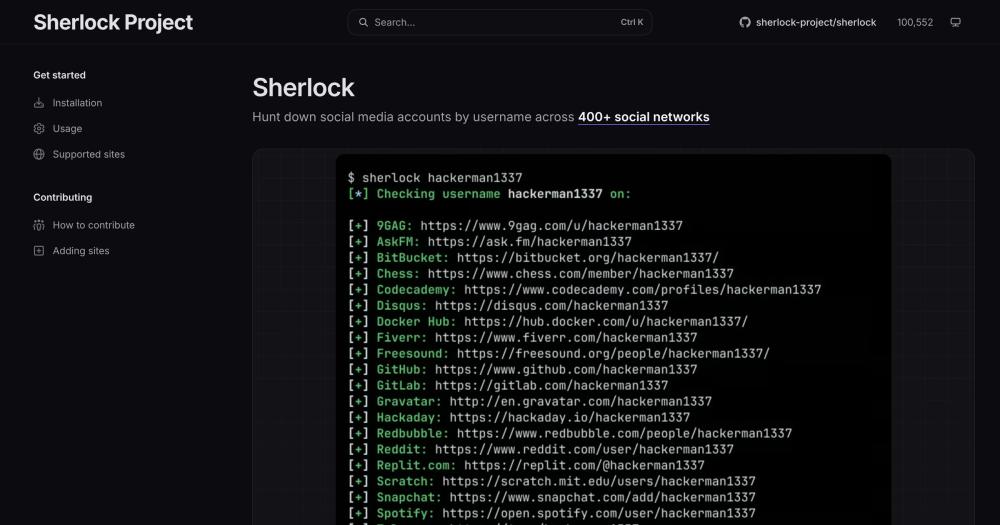
Search social media accounts by username across 400+ networks with this self-hosted CLI tool built for OSINT investigations.

Visit websiteGitHub100.5K stars
image of Sherlock
TL;DR

Sherlock is a command-line OSINT tool that hunts for user accounts across 400+ social networks by username. It replaces paid commercial platforms like OSINT Industries by running entirely on your own infrastructure with no per-query charges. MIT licensed and Python-based, it installs via pipx or Docker and exports results to text, CSV, or XLSX files. Best for security researchers, penetration testers, and journalists who need automated, repeatable username reconnaissance without subscription costs.

Read the full breakdownHide the full breakdownWho it is for, how it works, trade-offs, the quick start and the FAQ
who it's for

Who Sherlock is for#

Security researchers conducting OSINT reconnaissance

Sherlock handles the username enumeration phase of an investigation in seconds, returning matched profile URLs across 400+ platforms. The JSON output flag and folder-per-subject organization support structured case files and reproducible query runs.

Skip if:

If your investigation requires email or phone number pivots beyond username lookup, Sherlock covers only usernames; a commercial OSINT service with multi-identifier search may be more practical.

Penetration testers mapping a target's attack surface

Running Sherlock against an engagement target's known usernames identifies accounts the subject uses, which often reveal personal details or phishing vectors. The --browse flag opens all found profiles in the default browser for quick visual review.

Skip if:

If the engagement scope does not include OSINT or social profiling, or if the target's social presence is out of scope, skip this tool for that engagement.

Journalists and investigators verifying public figures

A single Sherlock run can confirm whether a public figure uses the same handle across platforms, surfacing accounts they may not have disclosed publicly. CSV and XLSX export formats make it straightforward to reference findings in a written report.

Skip if:

If your subject uses different usernames across platforms, Sherlock will miss those accounts. It searches by exact username match only, with no fuzzy or variation search.

CTF participants in OSINT challenge categories

Sherlock is a standard tool in Capture the Flag OSINT categories. It is fast, free, and ships results in a text file format that maps directly to flag submission workflows. The community actively tracks it in CTF write-ups and tool lists.

Skip if:

If the challenge requires more than username lookup (email or phone pivots, geolocation, image analysis), you will need additional tools alongside Sherlock.

the problem

The problem it solves#

When an investigation requires locating a person's online presence, manually checking each social network is too slow to scale. A subject active across 10 to 20 platforms can take hours to map by hand, and the platforms change their URL structures often enough that cached bookmarks break without warning.

Paid OSINT platforms charge monthly fees that make them impractical for occasional investigators or small teams with no dedicated budget. And even with a subscription, they tend to surface only the accounts they were paid to index, not the full open web. For teams that need an auditable, scriptable workflow, a closed commercial tool also means no visibility into how results are gathered or what gets missed.

how Sherlock solves it

How it solves it#

Username search across 400+ social networks

Queries every configured network in parallel using a single username argument. The network list is a plain JSON file (data.json), so teams can add or remove sites without touching Python. Version 0.16.0 ships coverage for over 400 services.

Bulk username search with per-subject output files

Pass multiple usernames as positional arguments (sherlock user1 user2 user3) and Sherlock writes results to separate text files per username, optionally under a named output folder with --folderoutput. Useful for batch investigations across a list of handles.

Export to CSV, XLSX, and text files

Results can be written to plain text (--txt), comma-separated CSV (--csv), or a modern Excel spreadsheet (--xlsx) in addition to the default terminal output. The --json flag writes a named JSON file, useful when results feed a broader investigation workflow.

Proxy support for anonymous queries

Routes all HTTP requests through a proxy with the --proxy flag (e.g. socks5://127.0.0.1:1080). This covers standard anonymous proxies and Tor exit nodes without requiring a separate wrapper around the tool.

NSFW site list inclusion

By default Sherlock skips a curated list of adult-content sites. The --nsfw flag enables those checks when an investigation requires full coverage. The NSFW list is maintained separately in the data.json network definitions and kept distinct from the default network set.

strengths · trade-offs

Strengths and trade-offs#

Strengths

  • MIT license with zero recurring costRunning Sherlock on your own server carries no licensing fees and no per-query charges. The MIT license permits commercial use, modification, and redistribution without restriction, unlike subscription OSINT services that charge monthly or per-seat fees.
  • 100k+ stars and actively maintainedOver 100,000 GitHub stars and 11,876 forks, with the last commit pushed on 2026-11-07. The contributor base spans infosec practitioners and CTF players who add new network definitions and fix broken site checks when platforms change their URL structures.
  • Single-command install via pipx or Dockerpipx install sherlock-project pulls the latest release and isolates its dependencies from the system Python. The official Docker image (sherlock/sherlock) works as a drop-in for teams without Python set up. DNF packages are available on supported distributions.

Trade-offs

  • -Terminal-only interface with no GUISherlock is a CLI tool with no web interface or graphical frontend. Teams that need a point-and-click investigation workflow will need to wrap it in a script or pair it with an external case management tool. This is a deliberate design decision, not a gap in progress.
  • -Third-party distro packages broken on some systemsThe README explicitly warns that packages for ParrotOS and Ubuntu 24.04, maintained by a third party, are broken. Users on those systems should use pipx, uv, pip, or Docker instead of their distro's package manager to avoid a non-working install.
  • -112 open issuesThe project carries 112 open issues. Many are site-specific, covering a network's check returning false positives or missing positives as platforms change their URL patterns. This is an inherent maintenance challenge for a tool covering 400+ networks.
versus alternatives

Sherlock vs alternatives#

Sherlock vs OSINT Industries

OSINT Industries is a managed OSINT service that searches usernames, email addresses, and phone numbers across social networks and websites. Sherlock covers the username search dimension only, but does so entirely from your own infrastructure at no recurring cost.

FeatureSherlockOSINT Industries
LicenseMITProprietary
Self-hostingYesNo
PricingFreePaid subscription
Username search400+ networksYes
Email/phone lookupNoYes
InterfaceCLI onlyWeb interface
Export formatsTXT, CSV, XLSX, JSONWeb UI export

Sherlock is the right choice when you need automated, scriptable username reconnaissance that you can run on your own hardware, audit, and integrate into an existing investigation pipeline. Because the network list is a plain JSON file, teams can add private or niche platforms that OSINT Industries does not cover.

OSINT Industries is worth considering when your investigation requires email and phone number pivot points beyond username lookup, or when you need a managed web interface with no installation overhead. Its strength is data breadth across multiple identifier types; Sherlock is narrower but free, auditable, and self-hosted.

install · quick start

Quick start#

bash
Install using pipx or run the official Docker image.

```bash
pipx install sherlock-project
docker run -it --rm sherlock/sherlock
```
tech stack · detected from GitHub

What it's built on#

Languages
Python
frequently asked

FAQ#

Is Sherlock free to use?

Yes. Sherlock is MIT licensed and free to run on your own hardware with no usage caps or subscription fees. The source code is openly available at github.com/sherlock-project/sherlock and can be modified or redistributed without restriction.

What social networks does Sherlock check?

Version 0.16.0 covers more than 400 social networks. The full site list is maintained in data.json in the repository and viewable at sherlockproject.xyz/sites. Teams can add custom or private platforms by editing the JSON file directly.

How do I install Sherlock?

The recommended install is pipx install sherlock-project, which isolates dependencies from your system Python. Docker users can run docker run -it --rm sherlock/sherlock. DNF packages are available on supported distributions; ParrotOS and Ubuntu 24.04 packages from third parties are currently broken and should be avoided.

Can Sherlock search with a proxy for anonymity?

Yes. The --proxy flag routes all requests through any proxy that accepts standard URL syntax, including SOCKS5 proxies and Tor exit nodes (e.g. socks5://127.0.0.1:1080). No additional wrapper or configuration is needed.

What output formats does Sherlock support?

Results print to the terminal by default. The --txt flag writes a text file, --csv writes a CSV file, --xlsx writes an Excel spreadsheet, and --json outputs a named JSON file. When searching multiple usernames, --folderoutput saves each result to a named folder.

also worth a look

Similar open-source tools#

REA (Reverse Engineer Anything)

Featured

Alternative toRevEng.AI

AI-powered reverse engineering for binaries, apps, and assemblies.

  • 431,018 GitHub stars
  • MITLicence MIT

Stats

Alternative toiStat Menus

Free macOS menu bar system monitor, MIT-licensed.

  • 43,201 GitHub stars
  • MITLicence MIT

Stalwart

Alternative toMicrosoft 365

Mail and collaboration server in Rust, one binary for everything.

  • 15,731 GitHub stars
  • AGPL-3.0Licence AGPL-3.0

Duplicati

Alternative toArq Backup

Free encrypted backup client for 20+ cloud services, self-hosted

  • 15,183 GitHub stars
  • MITLicence MIT

OpenNavo

Alternative toCork

Homebrew GUI for Mac with ClamAV scanning and system monitoring.

  • 89 GitHub stars
  • GPL-3.0Licence GPL-3.0

Bugsink

Alternative toSentry

Self-hosted error tracking, drop-in compatible with all Sentry SDKs.

  • 2,166 GitHub stars
  • CustomLicence PolyForm Shield License 1.0.0
by category

Open source tools in these categories#

175

Security & Monitoring

REA (Reverse Engineer Anything), RustDesk, Sherlock

Sponsors

Inbox Zero

Alternative toSuperhuman

AI email assistant that drafts replies and clears your inbox

  • 12,915 GitHub stars
  • AGPL-3.0Licence AGPL-3.0
  • #Email

rakazo

Alternative toGrok Bot

AI teammates you own: your keys, your model, your machine.

  • 7,028 GitHub stars
  • Apache-2.0Licence Apache-2.0
  • #AI Agents

SnitchFeed

Live monitoring on LinkedIn, X, Reddit & more. Agentic social listening for startups.

Marketing & Growth

Advertise your product

New open source projects by email

The projects we add and every new guide. Free, unsubscribe any time.

Find open source alternatives to paid software

/
  • Claude Code to OpenCode
  • Jira to Windshift
  • Notion to AppFlowy
  • Slack to Mattermost
  • Linear to GitLab
  • Wispr Flow to Handy
  • Arc to Zen Browser
  • CapCut to Concat
  • Grok Bot to rakazo
  • Superhuman to Inbox Zero
  • Airtable to AITable
  • Muse to OpenClaw
  • Railway to Coolify
  • GitHub Copilot to Cline
  • Datadog to Netdata
  • Confluence to Wiki.js
  • Microsoft Teams to Rocket.Chat
  • Firebase to Supabase
  • Pinecone to Qdrant
  • Zapier to n8n
  • 1Password to KeePassXC
  • Devin AI to OpenHands
  • Asana to Leantime
  • Contentful to Strapi
  • Claude Code to OpenCode
  • Jira to Windshift
  • Notion to AppFlowy
  • Slack to Mattermost
  • Linear to GitLab
  • Wispr Flow to Handy
  • Arc to Zen Browser
  • CapCut to Concat
  • Grok Bot to rakazo
  • Superhuman to Inbox Zero
  • Airtable to AITable
  • Muse to OpenClaw
  • Railway to Coolify
  • GitHub Copilot to Cline
  • Datadog to Netdata
  • Confluence to Wiki.js
  • Microsoft Teams to Rocket.Chat
  • Firebase to Supabase
  • Pinecone to Qdrant
  • Zapier to n8n
  • 1Password to KeePassXC
  • Devin AI to OpenHands
  • Asana to Leantime
  • Contentful to Strapi