Open Source Alternatives
  • Alternatives
  • Categories
    Categories by size1,324 projects
    • Developer Tools681
    • AI & Machine Learning552
    • Business & Productivity324
    • Web Development219
    • Security & Monitoring200
    • Communication & Collaboration171
    • IT Management166
    • Design & Creative148
    • DevOps & CI/CD143
    • LLMOps & AI Tooling142
    Browse all 21 categoriesCloud & Hosting, Product & Project Management and 9 more
  • Blog
  • Advertise
SearchNotion, Slack, password manager.../
Submit
Open Source Alternatives
  • Alternatives
    • Developer Tools681
    • AI & Machine Learning552
    • Business & Productivity324
    • Web Development219
    • Security & Monitoring200
    • Communication & Collaboration171
    • Browse all 21 categories
  • Blog
  • Advertise
Submit your project

New open source projects by email

The projects we add and every new guide. Free, unsubscribe any time.

Open Source Alternatives LogoOpen Source Alternatives

Handpicked Open Source Alternatives to Paid Softwares

Add Open Source Alternatives as a preferred source on Google

Product

  • Categories
  • Tag
  • Advertise

Resources

  • Blog
  • Collection
  • Submit

Company

  • Privacy Policy
  • Terms of Service
  • Refund Policy
  • Sitemap

Alternatives

  • Claude Code
  • Jira
  • Notion
  • Slack
  • Linear
  • Wispr Flow
  • All alternatives
© 2026 Open Source Alternatives. All rights reserved.
Open SourceAlternatives
Home/Categories/Business & Productivity/Errands
icon of Errands

Errands

Open source alternative to Microsoft To-Do and 2Do

  • 532 stars
  • Zlib
  • Active this week
  • Last commit today

Last verified Nov 21, 2026

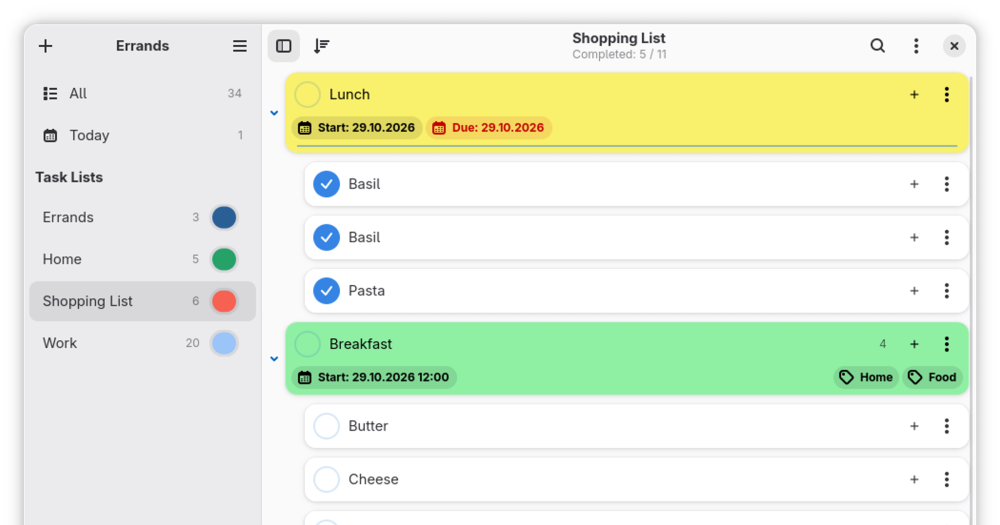
Manage tasks and sub-tasks on your GNOME desktop, with CalDAV sync, recurrent tasks, and .ics import/export.

Visit websiteGitHub532 stars
image of Errands
TL;DR

Errands is a GNOME-native task manager for Linux that handles personal to-do lists and project tasks without a cloud account. It replaces Microsoft To-Do for Linux users who want a local, CalDAV-compatible alternative with no Microsoft account required. Zlib licensed, it runs as a desktop app and optionally syncs with self-hosted CalDAV servers such as Nextcloud, Radicale, or Baikal. Best for GNOME desktop users managing individual task lists who prefer offline-first tools.

Read the full breakdownHide the full breakdownWho it is for, how it works, trade-offs, the quick start and the FAQ
who it's for

Who Errands is for#

GNOME Linux users replacing Microsoft To-Do

Errands covers the same core workflow: task lists, tasks, sub-tasks, and due times. For users moving away from Microsoft's ecosystem on Linux, it handles the daily to-do list without requiring a Microsoft account.

Skip if:

You share task lists with people on Windows or mobile apps and need live sync. Errands has no official mobile client, and CalDAV sync requires a server you manage.

Home users self-hosting Nextcloud

If Nextcloud is already running at home, Errands integrates directly through CalDAV sync. Tasks created on the GNOME desktop appear in Nextcloud Tasks, and any other CalDAV-compatible app on the same server can read them.

Skip if:

You need tasks on a smartphone without a separate CalDAV client app. Errands is a desktop app; accessing tasks on mobile requires a CalDAV app connected to the same server.

Linux users who want offline-first task management

Errands stores tasks locally by default and requires no account, sign-in, or network connection. For users who want a task manager that works without internet and stores nothing outside their own machine, it fits that model.

Skip if:

Your work requires real-time task collaboration with teammates. Errands is a single-user desktop app with no shared list feature.

the problem

The problem it solves#

Task management on Linux means either settling for a web app that requires an account, or accepting a tool designed for Windows or macOS that never quite fits the desktop. Microsoft To-Do and similar commercial products require signing in, give the vendor access to your task data, and do not integrate with the GNOME environment.

For Linux users who want their task manager to feel native, sync with infrastructure they already run like a Nextcloud instance, and store nothing outside their own machines by default, the mainstream options are a poor fit. Importing tasks from a standard .ics file or subscribing to a CalDAV calendar requires leaving data in someone else's hands or building workarounds.

how Errands solves it

How it solves it#

CalDAV sync with Nextcloud, Radicale, and Baikal

Connects to any CalDAV server to sync tasks across devices. The repository topics list Nextcloud, Radicale, and Baikal as tested providers. Without a CalDAV server configured, tasks store locally on the machine.

Task and sub-task hierarchy

Create named task lists, then add tasks with sub-tasks inside each. Each list stays separate, so projects and personal to-dos do not mix unless you choose to combine them.

Recurrent tasks

Set a task to repeat on a schedule. Once completed, the next occurrence appears automatically, so recurring errands and check-ins stay on the list without manual re-entry.

.ics import and export

Read tasks from and write them to .ics files, the standard iCalendar format. Import a task list exported from another app or export tasks to archive or share them with any calendar-compatible tool.

Per-task details: accent color, time, tags, notes, attachments

Each task accepts a color accent for visual grouping, a time (due or start), one or more tags, free-text notes, and file attachments. All details stay local unless CalDAV sync is configured.

strengths · trade-offs

Strengths and trade-offs#

Strengths

  • Zlib license: free for any useZlib is a permissive license with no copyleft conditions. You can run Errands commercially, modify it, and redistribute it without publishing source changes. No subscription, no usage limits, no vendor terms to track.
  • Native GNOME integrationBuilt with GTK4 and libadwaita, Errands follows GNOME's design conventions including adaptive layouts, dark mode, and accent color support. No Electron, no web tech: it runs at native speed and respects the system theme.
  • GNOME Circle membershipErrands is listed in GNOME Circle, a curated group of third-party apps that meet GNOME's quality, design, and maintenance standards. Membership indicates the project follows GNOME guidelines and is actively maintained.

Trade-offs

  • -Linux and GNOME desktop onlyErrands runs on Linux with GTK4 and libadwaita. It does not run on macOS or Windows, and there is no mobile app or web interface. Users on other platforms, or who share tasks with people on other platforms, need a different tool.
  • -Multi-device sync requires a CalDAV serverWithout a CalDAV server, tasks are local to one machine. Setting up Nextcloud or Radicale for the first time requires some server administration knowledge. If you do not already run one, this is an extra setup step before sync works.
versus alternatives

Errands vs alternatives#

Errands vs Microsoft To-Do

Microsoft To-Do is a task management app tied to a Microsoft account and Microsoft 365 integrations; Errands is a Linux-native desktop app that stores tasks locally and optionally syncs with a CalDAV server you control. Both tools handle personal task lists, sub-tasks, and reminders.

FeatureErrandsMicrosoft To-Do
PlatformLinux (GNOME)Windows, iOS, Android, web
Account requiredNoMicrosoft account
Self-hosted syncYes (CalDAV: Nextcloud, Radicale, Baikal)No
.ics import/exportYesNo
LicenseZlib (open source)Proprietary
PricingFreeFree (Microsoft account)

Microsoft To-Do retires on June 30, 2027. For GNOME Linux users already considering a switch, Errands covers the core daily task list workflow without requiring a Microsoft account or sending task data to Microsoft's servers.

Errands is the better choice for GNOME Linux users who want an offline-first, account-free task manager with optional CalDAV sync to self-hosted infrastructure. If you need tasks on iOS or Android alongside your Linux desktop, or you rely on Microsoft 365 integrations like flagged email appearing as tasks, Errands does not cover those workflows; a cross-platform CalDAV client or web-based task app would fit better there.

install · quick start

Quick start#

bash
Download the latest Linux release from GitHub Releases: https://github.com/mrvladus/Errands/releases
tech stack · detected from GitHub

What it's built on#

Languages
C
frequently asked

FAQ#

Does Errands work on macOS or Windows?

No. Errands is a native GNOME application built with GTK4 and libadwaita, which are Linux-only libraries. It runs on Linux distributions with a GNOME desktop environment. The official distribution is a Flatpak available from Flathub, and source releases are available on GitHub.

How do I sync tasks across devices with Errands?

Errands syncs through CalDAV, the standard calendar and task protocol. You need a CalDAV server: Nextcloud, Radicale, and Baikal are all tested options named in the project repository. Configure the CalDAV account in Errands settings with your server address and credentials. Without a CalDAV server, tasks stay local to your machine.

What license is Errands released under?

Zlib, a permissive license. It permits personal and commercial use, modification, and redistribution without requiring you to publish source changes. There is no copyleft condition and no usage fee.

Can I import tasks from other apps into Errands?

Yes. Errands supports .ics file import and export, the standard iCalendar format used by most task and calendar apps. If your current task manager can export to .ics, you can import those tasks into Errands.

Is Errands part of an official GNOME project?

Errands is a GNOME Circle app, meaning it meets GNOME's design and quality standards and is officially listed as a compatible ecosystem app. It is not developed by the GNOME Foundation itself; it is maintained by the original author with contributions from the community.

also worth a look

Similar open-source tools#

Taskwarrior

Alternative toMicrosoft To-Do

Command-line task manager with GTD workflows and local storage.

  • 6,176 GitHub stars
  • MITLicence MIT

Tududi

Alternative toMicrosoft To-Do

Self-hosted life manager with AI day planning and MCP server.

  • 3,572 GitHub stars
  • MITLicence MIT

Donetick

Alternative toMicrosoft To-Do

Shared chore and task manager with rotation and NFC triggers

  • 2,766 GitHub stars
  • AGPL-3.0Licence AGPL-3.0

Tasks.org

Alternative toMicrosoft To-Do

GPL-licensed Android to-do app with CalDAV and self-hosted sync

  • 5,784 GitHub stars
  • GPL-3.0Licence GPL-3.0

Super Productivity

Alternative toMicrosoft To-Do

Offline-first task manager with time tracking and dev integrations

  • 23,913 GitHub stars
  • MITLicence MIT

Vikunja

Alternative toMicrosoft To-Do

Self-hosted task manager with list, Kanban, Gantt, and table views

  • 6,120 GitHub stars
  • AGPL-3.0Licence AGPL-3.0
by category

Open source tools in these categories#

324

Business & Productivity

OpenClaw, Excalidraw, RustDesk
133

Product & Project Management

freeCodeCamp, agency-agents, Gstack

Sponsors

SnitchFeed

Live monitoring on LinkedIn, X, Reddit & more. Agentic social listening for startups.

Marketing & Growth

Windshift

Alternative toJira

Self-hosted work management for teams leaving Jira

  • 460 GitHub stars
  • AGPL-3.0Licence AGPL-3.0

Nuphos

Alternative toConductor

Agent workspace for teams running Claude Code or Codex

  • 707 GitHub stars
  • Apache-2.0Licence Apache-2.0
  • #AI Agents
Advertise your product

New open source projects by email

The projects we add and every new guide. Free, unsubscribe any time.

Find open source alternatives to paid software

/
  • Claude Code to OpenCode
  • Jira to Windshift
  • Notion to AppFlowy
  • Slack to Mattermost
  • Linear to GitLab
  • Wispr Flow to Handy
  • Arc to Zen Browser
  • CapCut to Concat
  • Grok Bot to rakazo
  • Superhuman to Inbox Zero
  • Discord to Stoat
  • Airtable to AITable
  • Datadog to SigNoz
  • Muse to OpenClaw
  • Railway to Coolify
  • GitHub Copilot to Cline
  • Confluence to Wiki.js
  • Microsoft Teams to Rocket.Chat
  • 1Password to KeePassXC
  • Firebase to Supabase
  • Pinecone to Qdrant
  • Zapier to n8n
  • Devin AI to OpenHands
  • Adobe Premiere Pro to Shotcut
  • Claude Code to OpenCode
  • Jira to Windshift
  • Notion to AppFlowy
  • Slack to Mattermost
  • Linear to GitLab
  • Wispr Flow to Handy
  • Arc to Zen Browser
  • CapCut to Concat
  • Grok Bot to rakazo
  • Superhuman to Inbox Zero
  • Discord to Stoat
  • Airtable to AITable
  • Datadog to SigNoz
  • Muse to OpenClaw
  • Railway to Coolify
  • GitHub Copilot to Cline
  • Confluence to Wiki.js
  • Microsoft Teams to Rocket.Chat
  • 1Password to KeePassXC
  • Firebase to Supabase
  • Pinecone to Qdrant
  • Zapier to n8n
  • Devin AI to OpenHands
  • Adobe Premiere Pro to Shotcut