Open Source Alternatives
  • Alternatives
  • Categories
    Categories by size1,324 projects
    • Developer Tools681
    • AI & Machine Learning552
    • Business & Productivity324
    • Web Development219
    • Security & Monitoring200
    • Communication & Collaboration171
    • IT Management166
    • Design & Creative148
    • DevOps & CI/CD143
    • LLMOps & AI Tooling142
    Browse all 21 categoriesCloud & Hosting, Product & Project Management and 9 more
  • Blog
  • Advertise
SearchNotion, Slack, password manager.../
Submit
Open Source Alternatives
  • Alternatives
    • Developer Tools681
    • AI & Machine Learning552
    • Business & Productivity324
    • Web Development219
    • Security & Monitoring200
    • Communication & Collaboration171
    • Browse all 21 categories
  • Blog
  • Advertise
Submit your project

New open source projects by email

The projects we add and every new guide. Free, unsubscribe any time.

Open Source Alternatives LogoOpen Source Alternatives

Handpicked Open Source Alternatives to Paid Softwares

Add Open Source Alternatives as a preferred source on Google

Product

  • Categories
  • Tag
  • Advertise

Resources

  • Blog
  • Collection
  • Submit

Company

  • Privacy Policy
  • Terms of Service
  • Refund Policy
  • Sitemap

Alternatives

  • Claude Code
  • Jira
  • Notion
  • Slack
  • Linear
  • Wispr Flow
  • All alternatives
© 2026 Open Source Alternatives. All rights reserved.
Open SourceAlternatives
Home/Categories/Business & Productivity/Tududi
icon of Tududi

Tududi

Open source alternative to Microsoft To-Do and TickTick

  • 3.6K stars
  • MIT
  • Active this week
  • Last commit 2 days ago

Last verified Nov 21, 2026

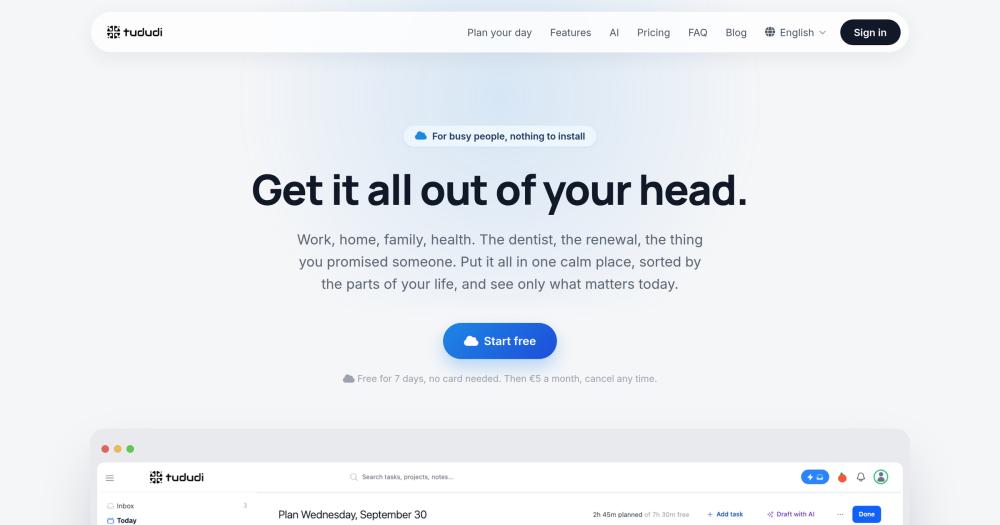
Manage tasks, projects, habits, and goals in a self-hosted life management system with AI day planning and an MCP server for AI agents.

Visit websiteGitHub3.6K starsDeploy on Hostinger
image of Tududi
TL;DR

Tududi is a self-hosted life management system for tasks, projects, habits, goals, and calendar integration, structured around the GTD hierarchy of areas, projects, and tasks. It replaces proprietary task managers like TickTick, with an MCP server that connects your AI agents directly to your own instance rather than through a third-party relay. MIT licensed, it runs on Docker with a PostgreSQL database. Best for individuals and small teams who want full data ownership and AI agent access to their task list.

Read the full breakdownHide the full breakdownWho it is for, how it works, trade-offs, the quick start and the FAQ
who it's for

Who Tududi is for#

Individuals managing work and personal life in one system

Tududi's area and project hierarchy lets you keep work projects and household tasks in the same system without mixing them. The Today view shows only the tasks you committed to for the day, alongside calendar meetings. The AI day planner fills the gaps between meetings with tasks from any area, so a dentist appointment and a sprint deadline share the same planning surface.

Skip if:

If you only need work task tracking and already have a team project management tool, Tududi's breadth is more than the use case requires. A simpler task app covers a personal to-do list at lower setup cost.

AI power users who want agent access to their tasks

The MCP server exposes 59 tools to any MCP-compatible AI agent. You can ask Claude, Cursor, or Windsurf to list overdue tasks, create new ones, check a project's health, or suggest what to focus on today, all from the AI's chat interface. The connection goes to your own Tududi instance rather than through a third-party relay.

Skip if:

If your AI agent workflow does not need read-write access to a personal task system, the MCP server is overhead. A simpler task manager integrated into your AI tool's native context window may be sufficient.

Privacy-conscious users replacing a commercial task manager

Self-hosting keeps all tasks, notes, habits, and calendar data on your own server. Encrypted backups, full data export at any time, and account self-deletion are built into the product. For users leaving TickTick for data ownership reasons, Tududi covers every feature category TickTick offers, with the addition of a self-hosted MCP server.

Skip if:

If you have no data ownership requirements and prefer zero infrastructure management, Tududi Cloud at €5 per month gives the same feature set without a self-hosted setup.

Families and small teams sharing projects

Tududi supports project sharing with read-only or read-write access controls, groups for assigning tasks to multiple people at once, and an Everyone board showing who is working on what across the team. Members without an email address can get a sign-in link without registering, covering household members or children.

Skip if:

For teams larger than 10 to 15 people with dedicated project management needs, purpose-built tools with Gantt charts, time tracking, and reporting are likely a better fit.

the problem

The problem it solves#

Most task managers fragment your work across separate apps: a to-do list, a habit tracker, a calendar, a goal-tracking notebook. Switching between them adds cognitive load instead of reducing it. Proprietary tools like TickTick charge per person for features you use partially, store your data on their infrastructure, and give you limited control over export or migration.

The deeper problem is that most of these tools treat AI as a disconnected add-on. When AI assistants can read your calendar but not your task list, or access your tasks but not your goals, they give generic advice instead of situated help. A system where every part of your life's organization is in one place, one you control, is what makes AI day planning and AI agent access useful.

how Tududi solves it

How it solves it#

AI Day Planning

The day planner shows tasks from your areas and projects alongside your calendar events. Each task accepts a time estimate; the planner ranks them by overdue status, today's due date, and progress, then lets you fill the free time between meetings by hand or ask AI to draft the whole day. An end-of-day wrap-up carries unfinished work to tomorrow.

MCP Server for AI Agents

Tududi ships a Model Context Protocol server exposing 59 tools covering tasks, projects, areas, goals, habits, notes, search, and metrics. The connection goes to your own self-hosted instance, not through a Tududi relay: an AI agent reading your task list talks directly to your server. Compatible with Claude Desktop, Cursor, Windsurf, Cline, and any MCP client.

CalDAV Bidirectional Sync

Tasks sync bidirectionally with any CalDAV-compatible client using the standard RRULE format for recurring tasks. Supported clients include Apple Reminders, tasks.org for Android and iOS, Thunderbird, and Evolution. External CalDAV servers such as Nextcloud and Baikal also connect for server-to-server sync.

GTD Hierarchy: Areas, Projects, Tasks

The structure follows Getting Things Done: Areas group ongoing life domains (Work, Personal, Health), Projects sit inside Areas and hold Tasks, and Tasks can have Subtasks. Goals sit at the top level alongside Areas. This hierarchy keeps long-range outcomes connected to the daily task list without flattening everything into one list.

OIDC/SSO with Multi-Provider Support

Single Sign-On works with any OIDC-compatible provider. Configured by environment variable, it supports Google, Okta, Keycloak, Authentik, PocketID, Azure AD, and multiple providers simultaneously. First login auto-provisions users; admin role assignment by email domain is built in. Existing email/password accounts link to SSO without losing history.

Habit Tracking with Streaks

Recurring habits appear in the same interface as tasks and projects, with daily completion tracking and streak counts. Habits can be linked to Areas or Projects, keeping health, learning, and work routines visible alongside actionable tasks rather than in a separate app.

strengths · trade-offs

Strengths and trade-offs#

Strengths

  • MIT License with Full Self-HostingThe MIT license lets you run Tududi on your own infrastructure, fork it, modify it, and use it commercially with no restrictions. Unlike TickTick, there are no per-seat fees for running your own server, and your data stays on the hardware you control. Encrypted backups and full data export are built in.
  • MCP Server Routes Directly to Your InstanceThe MCP server connects to your self-hosted Tududi account, not to a central relay. AI agent reads and writes for tasks, projects, goals, and habits stay within your own network. The 59 exposed tools cover search, metrics, inbox, and views, giving agents full context over the task system rather than a narrow subset.
  • Active Development with Recent PushThe main branch received a commit on November 19, 2026, three years into the project. At 3,572 stars and 295 forks, the repo shows consistent growth since the November 2023 launch. The 2.0 release migrated the database from SQLite to PostgreSQL, with an included migration guide for existing installs.
  • GTD-Native Data ModelTududi ships Areas, Projects, Tasks, Subtasks, Goals, Habits, and Notes as first-class entities with enforced relationships in the database schema. Getting Things Done practitioners get a working hierarchy on first login, without custom fields or view configuration. The structure prevents scattered lists by design: tasks belong to projects, projects belong to areas, and goals tie to both.

Trade-offs

  • -PostgreSQL Required Since Version 2.0Since version 2.0, Tududi runs on PostgreSQL only: the SQLite option from 1.x was removed. A self-hosted setup needs either Docker Compose (which starts Postgres automatically) or an existing PostgreSQL 14+ server. Users upgrading from 1.x on SQLite must export and re-import their data before moving to 2.0.
  • -Small Maintainer TeamThe project is maintained primarily by its author, Chris Veleris. The GitHub tracker shows 12 open issues. Feature velocity reflects a small team: major additions land in point releases, but turnaround on specific bug requests varies. Self-hosters should subscribe to releases and take database backups before upgrading, since migrations run on start.
  • -Initial Configuration Requires Several Environment VariablesGetting started requires setting at least four environment variables before the app will start: the database password, admin email, admin password, and session secret. Users adding CalDAV sync, OIDC SSO, or a reverse proxy introduce additional variables. The `.env.example` file documents all of them, but first-time self-hosters should read it before running `docker compose up -d`.
versus alternatives

Tududi vs alternatives#

Tududi vs Microsoft To-Do

Microsoft To-Do retires on June 30, 2027. Users still on To-Do need to plan a migration before that date, and Tududi covers every feature To-Do offers plus habit tracking, goals, CalDAV sync, and an MCP server.

FeatureTududiMicrosoft To-Do
LicenseMITProprietary
Self-hostingYesNo
Data locationYour serverMicrosoft infrastructure
Habit trackingYesNo
MCP serverYes (59 tools)No
CalDAV syncYesNo
PricingFree (self-hosted) / €5/mo cloudIncluded with Microsoft 365

The difference in infrastructure is clear: Tududi runs on your own server; To-Do is a Microsoft-managed service with no self-hosting option. For anyone who needs data ownership or wants to avoid the June 30, 2027 retirement, Tududi is a direct migration path.

Tududi vs TickTick

Both tools cover tasks, habits, calendar integration, and recurring task management. The key decision factors are self-hosting, MCP access, and pricing model.

FeatureTududiTickTick Premium
LicenseMITProprietary
Self-hostingYesNo
Habit trackingYesYes
CalDAV syncYesNo
MCP serverYes (59 tools)No
Pomodoro timerNoYes
PricingFree (self-hosted) / €5/mo cloud$49.99/yr

Tududi is the stronger choice when data ownership, self-hosting, or AI agent access matter. Its MCP server connects directly to your instance with no routing through a Tududi relay, which TickTick does not offer. The CalDAV sync covers more clients with full bidirectional recurring task support.

TickTick is the better fit for users who want a Pomodoro timer built in, a polished mobile-first experience with no server to manage, and do not need self-hosting or MCP agent access. At $49.99 per year for a solo user, TickTick Premium costs slightly less than Tududi Cloud at €50 per year billed annually.

install · quick start

Quick start#

bash
Self-hosting uses Docker Compose with a bundled PostgreSQL database, configured from a `.env` file.

```bash
cp .env.example .env
docker compose up -d
```
tech stack · detected from GitHub

What it's built on#

Languages
JavaScriptTypeScript
Frameworks
ExpressReact
Databases
PostgreSQL
Runtimes
Node.js
Tooling
Webpack
frequently asked

FAQ#

Can I self-host Tududi for free?

Yes. The self-hosted version is MIT licensed and free to run on your own infrastructure with no seat limits or feature paywalls. You need Docker and a PostgreSQL database (or Docker Compose, which bundles both). The only costs are your hosting infrastructure. A cloud-managed version is available at €5 per month if you prefer not to maintain a server.

What database does Tududi require?

PostgreSQL 14 or newer. Since version 2.0, SQLite support was removed. The recommended setup uses Docker Compose, which starts a Postgres 16 Alpine container alongside Tududi automatically. If you already have a PostgreSQL server, point the DATABASE_URL environment variable at it and start the Tududi container. Users upgrading from 1.x on SQLite must migrate data first following the docs at docs.tududi.com.

How does the MCP server connect to AI agents?

Tududi's MCP server runs alongside your self-hosted instance and exposes 59 tools over the Model Context Protocol. Configure your AI client (Claude Desktop, Cursor, Windsurf, or any MCP-compatible client) to point at your server's MCP endpoint. The connection goes directly to your instance with no Tududi relay in between. Full setup instructions are in the MCP docs on the Tududi website.

Does Tududi sync with Apple Reminders, tasks.org, or other task apps?

Yes, via CalDAV. Tududi implements the CalDAV standard with full bidirectional sync, including recurring tasks using RRULE. Supported clients include Apple Reminders, tasks.org for Android and iOS, Thunderbird, and Evolution. It also connects to external CalDAV servers such as Nextcloud and Baikal for server-to-server sync.

Can team members or family sign in without an email address?

Yes. Admins can add members without an email address, who receive a sign-in link instead of an account verification email. This covers household members or children who need access to shared projects and task assignments. Each person keeps their own private tasks and notes; shared projects appear in both their views with the access level the owner set.

also worth a look

Similar open-source tools#

Tasks.org

Alternative toMicrosoft To-Do

GPL-licensed Android to-do app with CalDAV and self-hosted sync

  • 5,784 GitHub stars
  • GPL-3.0Licence GPL-3.0

Super Productivity

Alternative toMicrosoft To-Do

Offline-first task manager with time tracking and dev integrations

  • 23,913 GitHub stars
  • MITLicence MIT

Vikunja

Alternative toMicrosoft To-Do

Self-hosted task manager with list, Kanban, Gantt, and table views

  • 6,120 GitHub stars
  • AGPL-3.0Licence AGPL-3.0

OpenTodo

Alternative toMicrosoft To-Do

Self-hosted to-do app with offline sync, shared lists, and optional AI

  • 577 GitHub stars
  • AGPL-3.0Licence AGPL-3.0

Errands

Alternative toMicrosoft To-Do

GNOME task manager with CalDAV sync and recurrent tasks.

  • 532 GitHub stars
  • ZlibLicence Zlib

Taskwarrior

Alternative toMicrosoft To-Do

Command-line task manager with GTD workflows and local storage.

  • 6,176 GitHub stars
  • MITLicence MIT
by category

Open source tools in these categories#

324

Business & Productivity

OpenClaw, Excalidraw, RustDesk
133

Product & Project Management

freeCodeCamp, agency-agents, Gstack
Hostinger

Self-host Tududi on a Hostinger VPS

Keep it running 24/7, even when your laptop is off. A Hostinger VPS gives it a server of its own.

  1. 01

    Choose a plan

    Starts from $6.49/mo

  2. 02

    Apply

    Extra 10% off yearly plans

  3. 03

    Install Tududi

    On a server that stays on

  4. 04

    Start building

    Focus on the app, not the server

Deploy on Hostinger

Sponsors

SnitchFeed

Live monitoring on LinkedIn, X, Reddit & more. Agentic social listening for startups.

Marketing & Growth

Windshift

Alternative toJira

Self-hosted work management for teams leaving Jira

  • 460 GitHub stars
  • AGPL-3.0Licence AGPL-3.0

Nuphos

Alternative toConductor

Agent workspace for teams running Claude Code or Codex

  • 707 GitHub stars
  • Apache-2.0Licence Apache-2.0
  • #AI Agents
Advertise your product

New open source projects by email

The projects we add and every new guide. Free, unsubscribe any time.

Find open source alternatives to paid software

/
  • Claude Code to OpenCode
  • Jira to Windshift
  • Notion to AppFlowy
  • Slack to Mattermost
  • Linear to GitLab
  • Wispr Flow to Handy
  • Arc to Zen Browser
  • CapCut to Concat
  • Grok Bot to rakazo
  • Superhuman to Inbox Zero
  • Discord to Stoat
  • Airtable to AITable
  • Datadog to SigNoz
  • Muse to OpenClaw
  • Railway to Coolify
  • GitHub Copilot to Cline
  • Confluence to Wiki.js
  • Microsoft Teams to Rocket.Chat
  • 1Password to KeePassXC
  • Firebase to Supabase
  • Pinecone to Qdrant
  • Zapier to n8n
  • Devin AI to OpenHands
  • Adobe Premiere Pro to Shotcut
  • Claude Code to OpenCode
  • Jira to Windshift
  • Notion to AppFlowy
  • Slack to Mattermost
  • Linear to GitLab
  • Wispr Flow to Handy
  • Arc to Zen Browser
  • CapCut to Concat
  • Grok Bot to rakazo
  • Superhuman to Inbox Zero
  • Discord to Stoat
  • Airtable to AITable
  • Datadog to SigNoz
  • Muse to OpenClaw
  • Railway to Coolify
  • GitHub Copilot to Cline
  • Confluence to Wiki.js
  • Microsoft Teams to Rocket.Chat
  • 1Password to KeePassXC
  • Firebase to Supabase
  • Pinecone to Qdrant
  • Zapier to n8n
  • Devin AI to OpenHands
  • Adobe Premiere Pro to Shotcut